IK Multimedia TONEX Board Review: Is It Worth $999.99?
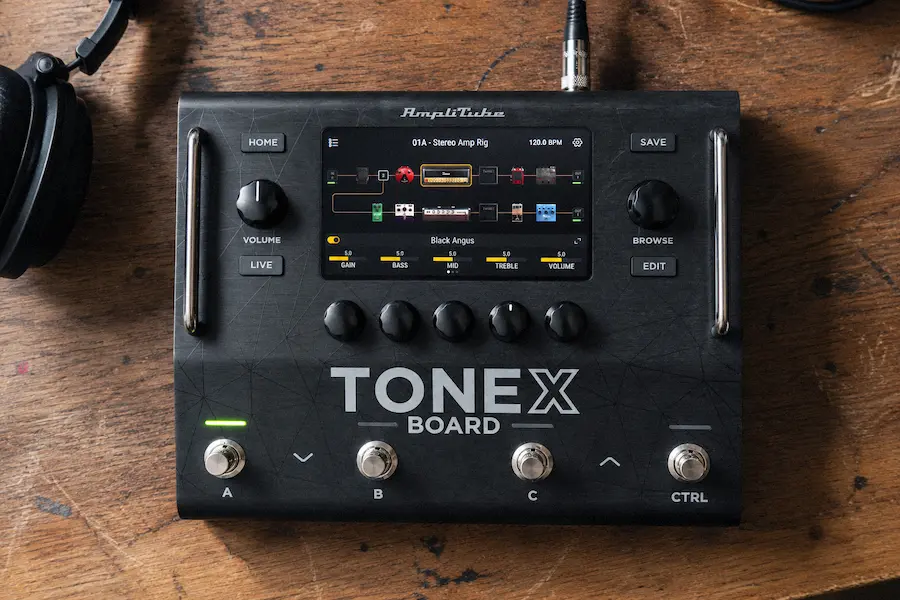
IK Multimedia TONEX Board is a floor-based guitar and bass processor built around the company’s TONEX AI Machine Modeling technology. Unlike the smaller TONEX hardware, the Board is designed as a complete hardware rig with two independent signal paths, up to four simultaneous Tone Models, up to 12 effect slots, flexible effects-loop routing, MIDI, multiple outputs, IR loading, and touchscreen control.
The important question is not whether TONEX captures can sound convincing. The more relevant question at this price is whether the Board’s hardware architecture provides enough practical advantages over conventional multi-effects processors to justify the premium. Its value depends less on the number of effects than on the combination of TONEX captures, dual-path routing, external hardware integration and preset recall.
Our verdict: TONEX Board is a serious professional guitar processor, but it is not automatically the best choice at this price. Its strongest advantage is the combination of TONEX captures, dual-path processing, external hardware integration and recallable studio/live routing. If you only need one amp sound and a few effects, cheaper hardware makes more sense.
TONEX Board at a glance
- Price: $999.99
- Signal paths: 2 independent paths
- Tone Models: Up to 4 per preset
- Processing slots: Up to 12 effect slots with flexible dual-path routing
- Effects: 76
- Outputs: Balanced XLR and 1/4-inch TRS output pairs
- Effects loop: Stereo or dual mono, movable within the signal path
- USB audio: 4-in/2-out USB audio with configurable routing and direct monitoring, scheduled for October 1, 2026 via free firmware update
- Best for: Guitarists, producers, recording engineers, reamping and complex live rigs
In this review
TONEX Board Architecture: Two Signal Paths and Four Tone Models
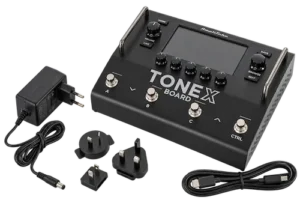 The defining feature of TONEX Board is its dual-path architecture. Each of the two signal paths can run one Amp Tone Model and one Stomp Tone Model, allowing up to four Tone Models simultaneously.
The four-model configuration is organized across two independent signal paths, with one Amp Tone Model and one Stomp Tone Model available per path. In other words, the headline “four Tone Models” does not represent four unrestricted amp chains. That distinction matters when comparing TONEX Board with more open-ended processors such as the Quad Cortex.
The two-path design nevertheless covers several practical configurations: dual amps, stereo rigs, wet/dry setups, parallel processing and blended amp tones. Effects can be positioned within the available processing architecture, making the Board considerably more flexible than smaller TONEX hardware.
For recording and reamping, this is the feature that changes the product’s role. Instead of using TONEX simply as an amp replacement, the Board can function as the central processor for a complete guitar or bass signal chain.
The key advantage is therefore not simply “four Tone Models.” It is the ability to build a repeatable signal architecture around those models.
TONEX Board Effects: 76 Effects and Up to 12 Processing Slots
TONEX Board includes 76 effects, combining processors derived from AmpliTube and TONEX with new effects developed for the Board. More important than the headline number is how those processors fit into the two-path architecture.
The Board provides up to 12 effect slots, while up to four Tone Models can run simultaneously. This makes the Board closer to a complete multi-effects processor than the smaller TONEX hardware.
For guitar production, the practical advantage is that the effects chain can remain part of the stored hardware preset. A producer can therefore recall not only an amp capture but the surrounding processing required to reproduce the tone.
The 76-effect specification should not, however, be interpreted as evidence that TONEX Board offers more sophisticated effects than every competing platform. Line 6, Neural DSP and other established processors also provide extensive effects libraries. The Board’s differentiation is the way those effects are combined with the TONEX capture ecosystem.
TONEX Board Routing and I/O: Built for Complex Guitar Rigs
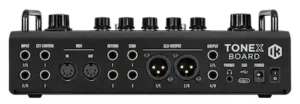
Routing is one of the strongest reasons to choose TONEX Board over the smaller TONEX hardware. The processor provides two independent signal paths, flexible effects-loop placement, two stereo output pairs, MIDI, external control and four-cable-method support.
The balanced XLR outputs and balanced 1/4-inch TRS outputs allow different destinations to be handled independently, including front-of-house, FRFR monitoring, amplifiers and studio equipment. Global EQ for the output pairs is useful when the same preset needs to feed different monitoring systems.
The effects loop can operate as a stereo send/return or as two independent mono loops, and its position can be moved within the signal path. This makes it possible to place external pedals or processors before or after modeled stages.
Four-cable-method support is another practical advantage for players who want to combine TONEX processing with a conventional guitar amplifier. This lets the Board sit inside an existing amp-and-pedal rig rather than forcing the entire setup into the digital domain.
For a studio, the same architecture is useful for reamping and external processing. A DI guitar can be sent through different Tone Models, split into parallel paths, or routed through external hardware without changing the original performance.
From Flexible Guitar Routing to a Mix-Ready Source
TONEX Board is designed to give engineers repeatable control over complex guitar and bass signal paths, but the final production still depends on how well those sounds integrate with the mix. If you want to hear how your track translates through a dedicated mastering chain, you can upload up to 35 seconds of your mix for a free mastering demo. Get your free mastering demo →
TONEX Board Audio Quality: Modeling, Conversion and Real-World Use
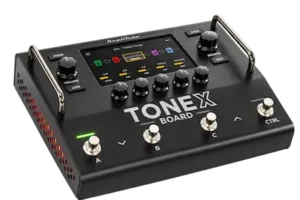 TONEX Board’s sound quality comes from two different parts of the system: the TONEX capture engine and the hardware signal path surrounding it.
The TONEX ecosystem uses IK Multimedia’s AI Machine Modeling technology to capture the sonic behavior of real amps, cabinets and pedals. The resulting Tone Models are designed to reproduce the response and playing feel of the captured equipment, making dynamics, guitar volume and picking intensity important parts of the experience.
The Board uses 24-bit/192 kHz converters, with a specified frequency response of 5 Hz–24 kHz and up to 123 dB of dynamic range. These specifications describe the hardware’s conversion capability, but they do not by themselves establish superior audible performance. In practice, the selected Tone Model, cab or IR, gain staging, guitar and monitoring chain will have a much larger effect on the final result.
For professional recording, the more important benefit is repeatability. Once the Tone Model and signal chain are saved, the setup can be recalled without rebuilding the same physical amplifier, microphone placement and pedalboard.
That makes TONEX Board particularly useful for tracking and reamping, where the final guitar tone may need to change after the performance has already been recorded.
TONEX Board USB Audio: Can It Replace an Audio Interface?
TONEX Board should not currently be treated as a complete replacement for a studio audio interface. At launch on September 3, 2026, TONEX Board’s USB-C connection is used for preset and Tone Model transfer and firmware updates. The announced 4-in/2-out USB audio interface with configurable routing and direct monitoring is scheduled to become available on October 1, 2026 via a free firmware update.
Until that update is available, the practical studio configuration is to connect the Board’s analog outputs to a separate audio interface. Once the October 1 firmware update is available, USB audio should make the Board more practical as a direct DAW recording interface. For now, however, it should be treated as a future workflow improvement rather than part of the core launch specification.
How We Evaluate TONEX Board
This review analyzes TONEX Board from a recording and production perspective, focusing on how its published hardware architecture translates into practical guitar and bass workflows.
- Tone Models: considered in terms of the TONEX capture workflow and their role in recording and live production.
- Signal routing: analyzed for dual-amp, stereo, parallel and wet/dry configurations.
- Studio integration: examined for tracking, reamping and external hardware workflows.
- Recall: considered as part of repeatable production and live-rig workflows.
- I/O: analyzed in relation to interfaces, amplifiers, FRFR systems and external processors.
- Value: judged against the published capabilities and current US pricing of competing hardware processors.
Where independent laboratory measurements or hands-on measurements are unavailable, this review does not treat published specifications as evidence of superior audible performance.
TONEX Board Limitations: What the Specifications Do Not Tell You
TONEX Board has an unusually broad specification sheet, but several headline features need context before they can be used to justify the $999.99 price.
- Four Tone Models: these are distributed across two signal paths rather than four unrestricted amp chains.
- 76 effects: the number is broad, but effect count alone does not establish DSP quality or depth.
- USB audio: the announced 4-in/2-out USB functionality depends on a future firmware update.
- Software workflow: some announced software features are still rolling out. ToneNET sharing of Board presets is scheduled for October 1, while full real-time editing in TONEX Board Editor is planned for Q4 2026.
- Footswitch control: four footswitches support Preset, Scene and Stomp modes, but players accustomed to larger floor processors may want more dedicated switches for direct access to individual functions.
- Price: at $999.99, the Board competes with significantly cheaper processors and therefore needs to deliver value through its specific routing and TONEX ecosystem.
These limitations do not make TONEX Board a weak product. They define its target user. The Board makes the most sense when its routing, external hardware integration and recall capabilities are actually required.
TONEX Board vs. HX Stomp, Ampero, Kemper, and Neural DSP
| Processor | US Price / Position | Core Technology | Main Advantage |
|---|---|---|---|
| IK Multimedia TONEX Board | $999.99 | TONEX captures | Dual-path capture-based rig |
| Line 6 HX Stomp | $599.99 US street | Helix modeling | Mature modeling and effects ecosystem |
| Neural DSP Nano Cortex | $549 | Capture + modeling | Compact capture-based rig |
| Hotone Ampero II Stage | $699.99 | Modeling | Extensive routing and effects |
| Neural DSP Quad Cortex | Premium flagship | Capture + modeling | Premium routing and hardware |
| Kemper | Varies by model | Profiling | Established profiling ecosystem |
TONEX Board vs HX Stomp
HX Stomp is one of the strongest alternatives because it delivers a mature modeling and effects platform at a substantially lower price. TONEX Board is the better fit when captured amps and pedals, the TONEX library and its dual-path architecture are more important than the broader Helix ecosystem.
TONEX Board vs Neural DSP Nano Cortex
Nano Cortex is the more compact and less expensive option for players who mainly want capture-based amp processing. TONEX Board differentiates itself through more extensive routing, effects, I/O and external hardware integration.
TONEX Board vs Quad Cortex
Quad Cortex remains the more ambitious high-end platform, particularly for users who prioritize extensive routing and a premium hardware interface. TONEX Board’s argument is that it brings a substantial dual-path capture-based system into a lower-priced category than flagship processors such as the Quad Cortex.
Where TONEX Board Earns Its Place in a Professional Workflow
 TONEX Board makes the most sense in productions where guitar or bass tones have to be built quickly, recalled accurately, and changed after the performance has already been recorded. In that environment, it can occupy several roles: tracking front end, reamping processor, external hardware insert, rehearsal rig, or live performance system.
The studio advantage is repeatability. Instead of recalling an amp, microphone position, pedalboard, cabinet, and outboard chain separately, the engineer can store the core guitar signal path as a hardware preset. That does not make every decision recallable in isolation—microphone placement and the behavior of a physical amplifier still have advantages in some recording situations—but it makes a modeled rig substantially easier to reproduce across sessions.
Reamping is an even stronger use case. A DI performance can remain untouched while the Board supplies different amp captures, parallel configurations, effects chains, or external hardware routing. This is useful when the production reaches the mix stage and the original guitar tone no longer fits the arrangement. The engineer can change the source without asking the player to recreate the performance.
For touring, the argument is consolidation. The Board can accommodate dual-amp stereo rigs, wet/dry routing, external effects, MIDI devices, expression control and separate output paths in a single hardware platform, potentially reducing the need for multiple processors in complex setups. At 1.6 kg and 235 × 184 × 72 mm, it is also substantially easier to transport than a conventional multi-amp setup, although the total weight and size of a complete touring system will still depend on the external pedals, power supplies, and monitoring hardware involved.
Mixing engineers can use the Board in a similar way as an external guitar-processing path. It is particularly useful when a track contains a clean or lightly processed DI and the final amp sound has not yet been committed. The Board can provide another hardware signal path without forcing the engineer to alter the existing plugin chain or reserve substantial CPU resources for additional nonlinear processing.
Is TONEX Board Worth $999.99?
TONEX Board is worth $999.99 if you need its routing architecture. It is not worth $999.99 if you only need amp modeling.
The price makes sense for guitarists, producers and engineers who need several of the following at the same time:
- Multiple Tone Models in one preset
- Dual-amp or parallel processing
- Wet/dry routing
- External pedals and processors
- Four-cable-method integration
- Multiple balanced outputs
- MIDI control
- Recallable studio and live rigs
- Hardware-based reamping
If you need only one convincing amp sound, a few effects and a compact recording rig, the cheaper TONEX hardware, HX Stomp, Nano Cortex or similar processors can provide a better cost-to-capability ratio.
Who Should Buy TONEX Board?
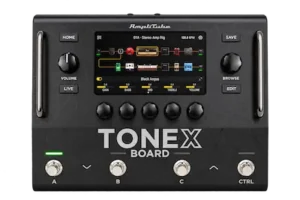
Buy TONEX Board if:
- You already use TONEX and want a more complete hardware rig.
- You regularly record or reamp guitar and bass.
- You need two amp paths, stereo or parallel processing.
- You use external pedals or studio hardware.
- You need separate outputs for FOH, monitors, amplifiers or studio equipment.
- You need MIDI and recallable presets for a complex live rig.
- You want one processor that can move between studio and stage.
Do not buy TONEX Board if:
- You only need one amp model at a time.
- You rarely use guitar or bass in your productions.
- You do not need external hardware routing.
- You primarily want the smallest possible capture-based processor.
- You are buying it mainly because of the 24-bit/192 kHz specification.
TONEX Board Pros and Cons
Pros
- Convincing TONEX amp and pedal capture ecosystem.
- Two independent signal paths.
- Up to four Tone Models in a preset.
- Flexible stereo, parallel, dual-amp and wet/dry routing.
- 12 processing slots.
- 76 available effects.
- Movable stereo or dual-mono effects loop.
- Four-cable-method support.
- Balanced XLR and TRS output pairs.
- MIDI and external-control integration.
- Touchscreen and hardware controls.
- Strong fit for studio, reamping and live workflows.
Cons
- $999.99 is expensive for users who only need amp modeling.
- Four physical footswitches provide less dedicated live access than larger floor processors with more switches.
- The four-Tone-Model specification does not mean four unrestricted amp chains.
- USB audio depends on the announced firmware implementation.
- Some future software features should not be treated as launch-day capabilities.
Overall Rating
| Category | Rating |
|---|---|
| Tone Modeling / Sound Potential | 9/10 |
| Routing & Signal Architecture | 9.5/10 |
| Studio Workflow | 9/10 |
| Recall & Integration | 9/10 |
| Live Control | 8/10 |
| I/O & Connectivity | 9/10 |
| Value for Money | 7.5/10 |
| Overall | 8.5/10 |
The 8.5/10 score reflects the strength of the complete system and its published architecture, while the 7.5/10 value score reflects the fact that many users will not need its full routing and integration capabilities.
The TONEX Board is therefore a strong professional processor whose biggest weakness is not sound quality but cost relative to how much of its architecture the user will actually exploit. Its routing and integration capabilities are genuinely useful in complex guitar and bass workflows, while the value proposition becomes much weaker for simple rigs. For a recording or mixing engineer, the Board earns its 8.5/10 primarily through workflow consolidation, repeatability, and signal-path flexibility rather than through specifications alone.
TONEX Board Review Verdict
TONEX Board is worth $999.99 when its routing architecture is part of the requirement—not when it is being used as a simple amp modeler.
TONEX Board’s strongest argument is the combination of four simultaneous Tone Models, two independent signal paths, 12 effect slots, flexible external routing, multiple outputs, MIDI and recallable presets. That makes it substantially more relevant to complex studio and live rigs than to players who simply need one convincing amp sound.
The price is harder to justify for simpler setups. At $999.99, TONEX Board costs $400 more than the $599.99 HX Stomp and $450.99 more than the $549 Nano Cortex. That price premium needs to be justified by its routing, I/O, external hardware integration and TONEX ecosystem rather than by amp modeling alone.
A Complex Guitar Rig Still Has to Translate in the Mix
TONEX Board can give you extensive control over amp captures, parallel paths, effects, external hardware and recallable guitar processing. But a technically flexible signal chain does not automatically produce a guitar tone that sits correctly in the finished production. Once the routing and processing decisions are made, the important question is how the complete mix translates as a finished master.
Instead of adding another processor and guessing whether the result is actually improving the track, upload up to 35 seconds of your mix and hear what a dedicated mastering chain can do to the finished production. Your free mastering demo is prepared by a real mastering engineer, giving you a direct before/after comparison on your own audio. Upload your mix and get your free mastering demo →
FAQ: TONEX Board for Recording, Mixing, and Live Production
Can you record guitar directly into a DAW with TONEX Board?
Not through USB at launch. IK has announced 4-in/2-out USB audio with direct monitoring as a future firmware feature. Until that update is available, recording requires routing the Board’s analog outputs into a separate audio interface.
Does TONEX Board add latency when used for recording?
Like any digital amp-modeling processor, TONEX Board introduces processing latency, but the manufacturer does not publish a complete independent round-trip latency measurement for a full recording setup. Actual monitoring latency will depend on the Board, audio interface, DAW buffer size and monitoring path. IK describes TONEX Board as an ultra-low-latency processor, but that claim should not be confused with a measured end-to-end studio latency figure.
Can TONEX Board be used for reamping a DI guitar track?
Yes. A recorded DI can be sent through the Board and processed with different Tone Models, effects, and routing configurations without recording the performance again. This makes it useful when the guitar tone was not fully committed during tracking.
Can TONEX Board run two different amps at the same time?
Yes. Its two signal paths can be configured with separate Amp Tone Models and combined using stereo, parallel, split, or other supported routing configurations. The four-Tone-Model limit should not be interpreted as four completely independent amp chains.
Can TONEX Board be used with a tube amp and external pedals?
Yes. The effects loop can operate in stereo or as two mono loops, and the Board supports the four-cable method. This allows it to sit between parts of a conventional amplifier rig rather than forcing every stage of the setup into the digital domain.
Does TONEX Board replace an audio interface?
Not at launch. TONEX Board’s announced 4-in/2-out USB audio interface with configurable routing and direct monitoring is scheduled for October 1, 2026 via a free firmware update. Even after that update, it should be viewed as a specialized guitar and bass recording interface rather than a general-purpose studio interface with multiple microphone inputs and broader recording I/O.
Is TONEX Board useful if I already own TONEX plugins?
It can be, but the value comes from hardware workflow rather than simply getting the same models in another format. The Board becomes more compelling when you need to take Tone Models outside the DAW, integrate external hardware, build complex routing, or maintain the same rig across studio and live environments.
Does TONEX Board use DAW CPU when processing guitar?
The Board performs its Tone Model and effect processing internally when used as hardware, so those operations do not consume DAW CPU in the same way as native TONEX or other amp-modeling plugins. Computer resources still matter when using the accompanying software for model management, capture, and editing.
Is TONEX Board a good choice for a home recording studio?
It is a strong fit when guitar or bass is a major part of the studio’s work and the user will exploit its routing and recall capabilities. For occasional guitar recording, a smaller TONEX device or software-based rig will usually provide a better cost-to-function ratio.
Should I buy TONEX Board instead of HX Stomp?
Choose TONEX Board when captured amps and pedals, dual-path routing, and the TONEX ecosystem are central to the workflow. HX Stomp is the more economical choice for users who prioritize the broader Helix processing environment and do not specifically need TONEX’s capture ecosystem.
Is TONEX Board a worthwhile upgrade from an existing TONEX Pedal?
Only if the limitations of the smaller hardware are affecting the workflow. The upgrade is primarily about routing, I/O, simultaneous Tone Models, external hardware integration, control, and preset architecture—not a fundamentally new generation of TONEX amp modeling.

Yurii Ariefiev evaluates guitar and bass production tools from a recording-engineering perspective, with particular attention to amp modeling, captured amplifier tones, signal routing, reamping and gain staging. His reviews focus on how hardware and software perform as part of an actual production chain rather than judging modeling technology by specifications alone.
At AREFYEV STUDIO, guitar-processing systems are assessed by their effect on source quality, mix integration, recallability and final mix translation. For processors such as TONEX Board, the practical question is whether the available routing and Tone Models help engineers build repeatable guitar rigs, make better reamping decisions and deliver a cleaner source to the mixing and mastering stages.
☕ Buy me a coffee