Supported Versions
Compatible with Samplitude Pro X7, Pro X8 and Pro X9, as well as Boris FX Sequoia 2026.
Working hours: 9:00–20:00 (Sunday: Closed) | sales@arefyevstudio.com

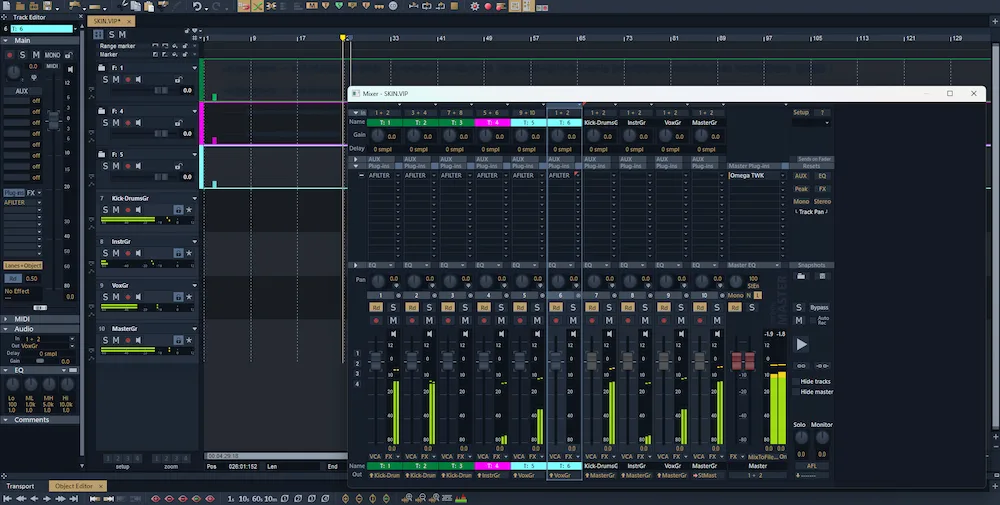
A free dark interface theme for Samplitude Pro X7, X8 and X9, as well as Boris FX Sequoia 2026. The graphite-and-champagne color scheme gives your audio workstation a clean, understated look.
The Graphite Champagne theme is free to download and use. Patreon supporters can also request custom color versions for supported music production applications.
ABOUT THE THEME
Graphite Champagne is a custom interface theme created for users of Samplitude and Sequoia. The theme combines dark graphite surfaces with subtle champagne accents, creating a distinctive interface that keeps the focus on your work without unnecessary visual distractions.
Compatible with Samplitude Pro X7, Pro X8 and Pro X9, as well as Boris FX Sequoia 2026.
The dark graphite background and champagne-colored accents give the interface a distinctive look while keeping its controls and visual elements clearly defined.
Whether you're recording, editing, mixing or mastering, the theme brings a consistent visual style to your everyday work in the DAW.
INSTALLATION GUIDE
Follow these steps to install Graphite Champagne in your supported version of Samplitude or Sequoia.
Bitmaps folder in your DAW's installation directory: ...\[DAW installation folder]\Bitmaps.Bitmaps, alongside the original skin folders such as Carbon and Canis. Avoid creating an additional nested folder.Our Patreon supporters can request custom color versions of the theme, tailored to their preferred color schemes and visual styles.
Interested in a custom theme for another music production application? Let us know which software you use and share your preferred colors or visual references. We'll consider your request for future development.
Graphite Champagne is available as a free download for the supported versions of Samplitude and Sequoia listed on this page.
Samplitude and Sequoia are trademarks of their respective owners. AREFYEV STUDIO is an independent project and is not affiliated with, endorsed by or sponsored by the software developers.