
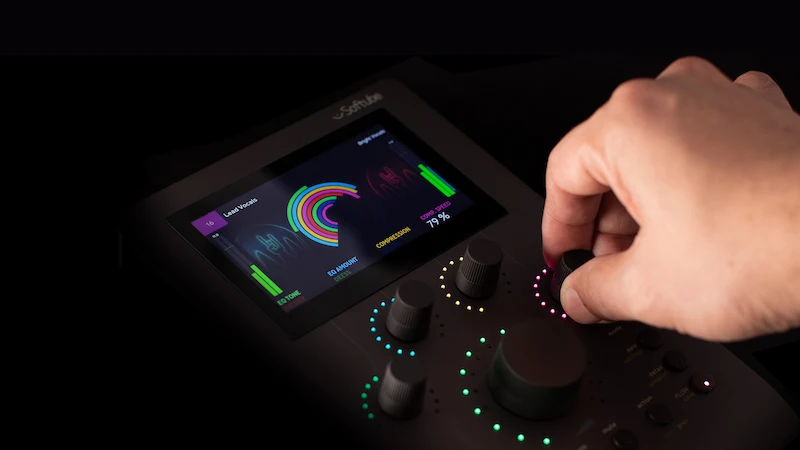
Softube Flow Studio Targets Fast Mixing Workflows — Hardware Control Built Around Macro Chains
Softube Flow Studio is now official. The company’s latest hardware release is a compact desktop controller designed to reshape how engineers interact with plugins inside a DAW — not by adding more precision, but by reducing friction.
This isn’t another generic MIDI surface. Flow Studio is built around Softube’s own ecosystem, combining physical control, macro-based processing, and real-time visual feedback into a single workflow layer. The angle is clear: faster decisions, less screen time, more tactile mixing.
Why Softube Flow Studio Matters Right Now
The release lands at a moment when audio production is overloaded with options. Engineers are stacking plugins, scrolling presets, and spending more time navigating interfaces than making decisions. Controllers have existed for years, but most of them mirror the DAW rather than simplify it.
Softube Flow Studio takes a different approach. Instead of exposing every parameter, it abstracts processing into signal chains — effectively packaging multiple plugins into controllable macro behaviors.
This positions the unit somewhere between a controller and a decision engine. It’s less about “tweaking” and more about “shaping quickly.”
Core Features and Workflow Design
At the hardware level, Flow Studio is straightforward:
— five rotary encoders
— function buttons
— 4.3-inch full-color display
— real-time metering and visual feedback
The real story is in how it interacts with software.
The system ships with 100+ signal chains derived from the Flow Mixing Suite, alongside 25 included Softube processors. These chains combine EQ, compression, saturation, and spatial effects into cohesive processing blocks.
Instead of dialing in each plugin, users manipulate entire chains via macro controls.
Three operational modes define the workflow:
DAW Mode
Immediate control over levels, pan, and sends — no mapping required.
Flow Mode
The core concept. One encoder can reshape tone, dynamics, and space simultaneously.
Detail Mode
Access to individual plugin parameters when precision is required.
Softube also emphasizes low-latency performance, positioning the unit as viable for real-time applications, including vocal tracking and live processing.
What Actually Changes in a Mixing Session
In practice, Softube Flow Studio shifts the early stages of mixing.
Rough balance becomes faster
Engineers can establish tone and movement without opening multiple plugin windows.
Creative decisions happen earlier
Instead of building chains from scratch, you start from a shaped sound and refine it.
Less visual dependency
The hardware encourages listening over looking — a subtle but important shift.
However, this workflow comes with trade-offs. Macro-based processing accelerates decisions, but it also compresses visibility. You’re often adjusting outcomes rather than understanding causes.
That distinction matters, especially when transitioning into critical stages like mastering, where precision and transparency become non-negotiable. At that point, workflows typically move beyond macro control toward detailed evaluation — the kind of refinement covered in professional processes like high-end track mastering.
No Subscription — But Not Fully Independent
Softube makes a point of stating that Flow Studio does not require a subscription. The included plugin set is permanent, and the unit functions out of the box.
But in reality, the system is still tightly bound to Softube’s ecosystem. Expanding its capabilities depends on additional plugins or access to the Flow Mixing Suite.
This isn’t unusual — it’s a controlled environment. The difference is that here, the hardware’s value is directly tied to how deep you go into that ecosystem.
Where the Marketing Overreaches
The promise of “transforming sound instantly” deserves scrutiny.
Macro control is not intelligence
Signal chains are pre-designed. They don’t adapt to arrangement, phase relationships, or context.
Speed can mask poor decisions
Fast workflows reduce hesitation — but they also reduce evaluation time.
Limited transparency
When multiple processes are tied to one control, it becomes harder to diagnose problems.
This doesn’t make the tool ineffective. It just defines its boundaries.
Positioning Against Competitors
Softube Console 1
More surgical, channel-focused, slower but more precise.
SSL UF8
Traditional DAW control surface — excellent for automation, not for sound shaping.
Ableton Push
Performance and production-oriented, broader scope but less mixing focus.
Softube Flow Studio sits in a narrower lane:
fast tonal shaping rather than detailed control.
Who This Is Actually For
Flow Studio makes sense for:
— producers building ideas quickly
— engineers who value speed over surgical precision
— users already invested in Softube plugins
It’s less relevant for:
— mastering engineers
— detail-oriented mixers
— workflows built around third-party ecosystems
Price and Availability
Softube Flow Studio is available now at £349 (incl. VAT).
Given the included plugin bundle, the price is positioned mid-tier — not entry-level, but not premium hardware either.
Verdict
Softube Flow Studio is not about improving sound quality. It’s about changing how quickly you get there.
It compresses workflow, reduces friction, and encourages momentum. But it also abstracts control, which can be a liability in critical stages.
Bottom line:
A useful tool for speeding up decisions — not a replacement for engineering judgment.

