
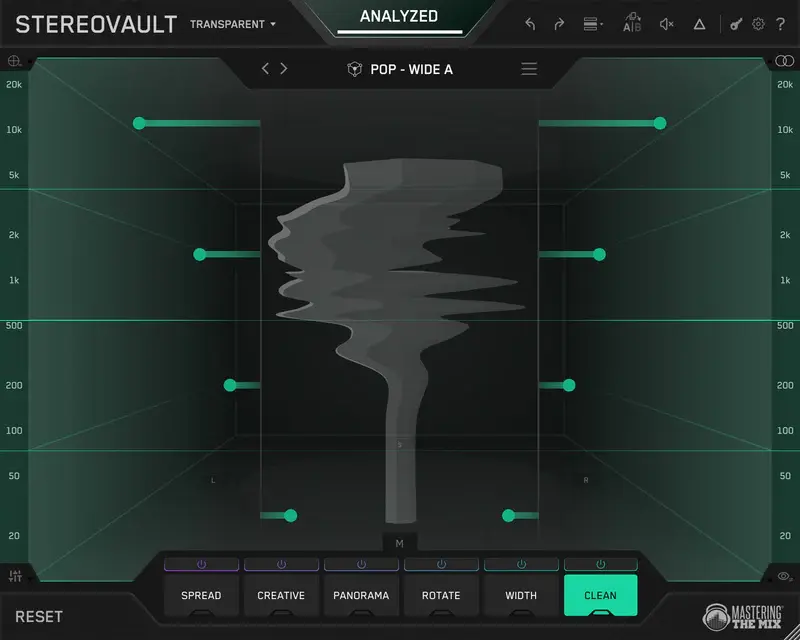
STEREOVAULT plugin — how to fix stereo width, phase issues, and improve mix translation in mastering
STEREOVAULT plugin targets a core failure in modern mixing and mastering: uncontrolled stereo width. This problem is often misunderstood even at a basic level of audio mastering, where stereo is treated as a final-stage adjustment instead of a structured parameter. These issues become critical in modern audio production, where mixes are expected to translate across streaming platforms, mobile devices, and mono playback systems.
STEREOVAULT plugin shifts the approach from widening to control. Instead of pushing the signal outward, it redistributes stereo energy across the spectrum, allowing engineers to manage width per frequency range while preserving center integrity.
Why stereo widening breaks mixes
Stereo widening is typically applied as a single global process, often at the end of the chain. This ignores how stereo information behaves across the frequency spectrum and leads to consistent technical failures:
- low-end loses impact as side energy interferes with mono stability
- center elements (kick, snare, vocal) lose definition and forward position
- phase correlation drops, causing artifacts in mono playback
- mix translation degrades under streaming codecs and consumer playback systems
The issue is not widening itself, but the lack of control. These problems are often misdiagnosed as general mastering failures, while in reality they fall under common mastering problems related to stereo imbalance and phase instability.
How STEREOVAULT plugin fixes stereo width
STEREOVAULT plugin treats stereo width as a controllable parameter, not a global effect. It analyzes the input signal to map Mid/Side energy distribution across the spectrum before any processing is applied.
This enables targeted corrections instead of blind widening, which is critical in a real professional mastering workflow where stereo decisions must translate across systems.
- low frequencies remain centered to preserve punch and mono compatibility
- high-frequency content can be widened without destabilizing the mix
- Mid and Side energy can be rebalanced without altering tonal EQ
- stereo distribution can be aligned to a reference track, not guessed
The outcome is not simply a wider mix, but a controlled stereo field that holds up across different playback systems and encoding formats.
Multi-band stereo processing explained
STEREOVAULT plugin uses multi-band stereo processing to avoid the limitations of global widening. The signal is split into up to six frequency bands, each with independent Mid/Side control.
This allows stereo width to be managed where it matters, not applied uniformly:
- sub frequencies stay mono to maintain low-end stability and impact
- midrange remains controlled to preserve clarity and center definition
- high frequencies can be widened to increase perceived space without phase collapse
This type of frequency-dependent stereo control is standard in high-end mastering workflows, but rarely available in a single dedicated stereo plugin.
How to avoid phase issues in stereo processing
Phase problems emerge when left and right channels lose correlation beyond a usable threshold. This typically happens with Haas delays, modulation-based wideners, or any process that exaggerates Side content without control.
Once correlation drops too far, the mix becomes unstable: mono playback collapses, transient definition softens, and imaging shifts unpredictably across systems.
STEREOVAULT plugin addresses this at the signal level rather than after the fact:
- real-time phase correlation feedback highlights frequency-specific instability
- Side energy can be constrained per band instead of globally boosted
- Mid/Side balance is adjustable without introducing time-based artifacts
This allows width to be increased while maintaining phase integrity and consistent mono compatibility.
How to use STEREOVAULT plugin in mastering
In mastering, stereo width adjustments should follow gain staging and tonal balance. Start by analyzing the signal, then:
- keep sub frequencies in Mid to preserve low-end stability
- apply width gradually to upper bands
- monitor phase correlation continuously
- compare against reference tracks
Over-processing stereo at this stage often leads to translation issues rather than improvements.
Real-world use cases in mixing and mastering
 STEREOVAULT plugin is most effective when stereo problems are tied to frequency distribution rather than simple width.
- Mastering: stabilizing low-end by collapsing sub frequencies to mono while opening the top-end for perceived width and better translation
- Mixing: resolving masking and separation issues without relying on hard panning or additional EQ moves
- Vocals: widening upper harmonics and spatial components while keeping the fundamental locked in the center
- Electronic production: expanding high-frequency content (synths, FX, hats) without degrading punch or phase coherence
The advantage is not increased width, but controlled placement — managing where stereo energy exists instead of applying it globally.
STEREOVAULT vs traditional stereo wideners
Most stereo widening plugins rely on a single mechanism: increase Side level relative to Mid. This delivers immediate width, but without control over where that width is applied in the spectrum.
The result is fast but unstable — low-end smear, loss of center definition, and unpredictable phase behavior.
STEREOVAULT plugin takes a different approach:
- analysis-driven starting point instead of manual guesswork
- multi-band stereo control rather than global widening
- reference-based stereo profiling instead of subjective adjustment
- loudness compensation to remove bias during evaluation
In practice, this shifts the plugin away from “creative widening” and closer to a corrective mastering tool focused on stereo balance and translation.
Limitations and what it doesn’t fix
STEREOVAULT plugin addresses stereo distribution, not mix quality. If the balance, arrangement, or dynamics are flawed, stereo processing will only expose those issues more clearly.
- it does not correct poor tonal balance or masking — these issues must be addressed before processing, typically at the stage of mix preparation for mastering
- it cannot restore punch lost to over-compression or weak transients
- it depends on correct Mid/Side interpretation — misuse leads to center collapse or exaggerated sides
Excessive processing remains a risk. Over-expanding or over-correcting stereo bands can create an unstable image that sounds wide in isolation but fails in real playback conditions.
Who should use STEREOVAULT plugin
STEREOVAULT plugin is built for situations where stereo decisions affect translation, not just aesthetics.
- mix engineers dealing with dense arrangements where stereo overlap reduces clarity
- mastering engineers correcting inconsistent width and maintaining center stability across tracks
- producers targeting streaming platforms where uncontrolled width collapses under encoding
It is not designed for fast, one-knob widening or beginner workflows. Without an understanding of Mid/Side behavior, it adds complexity rather than solving problems.
Conclusion
STEREOVAULT plugin shifts stereo processing from a subjective effect to a controlled parameter. The goal is not maximum width, but predictable behavior across systems.
For engineers dealing with phase instability, weak center image, or inconsistent stereo balance, it provides a structured workflow based on analysis and frequency-dependent control rather than guesswork. However, in real projects these decisions are part of a larger mastering chain, where stereo processing interacts with EQ, dynamics, and limiting.
STEREOVAULT plugin is most effective when used as a corrective and refinement tool, not as a primary source of width. As a stereo width plugin, STEREOVAULT plugin is most effective when used to correct stereo imbalance and improve mix translation, not to artificially increase width.
FAQ — STEREOVAULT plugin
Can STEREOVAULT plugin replace stereo imaging tools like Ozone Imager?
No. It operates at a different level. Basic imagers are fast tools for adding width, while STEREOVAULT plugin is designed for controlled stereo correction and analysis. It complements, not replaces, traditional wideners.
Does STEREOVAULT plugin improve mix translation on streaming platforms?
It can, if used correctly. By controlling low-end mono compatibility and preventing excessive side energy, it reduces issues caused by AAC/OGG encoding and playback on small devices.
Is multi-band stereo processing necessary for mastering?
In modern mastering, yes. Global widening is rarely reliable. Frequency-dependent stereo control is often required to keep low-end stable while maintaining perceived width in higher ranges.
Can STEREOVAULT plugin fix a narrow or mono-sounding mix?
Only partially. It can redistribute stereo energy and enhance spatial perception, but it cannot recreate missing stereo information from poorly recorded or collapsed sources.
How does it differ from Mid/Side EQ?
Mid/Side EQ adjusts tonal balance between center and sides. STEREOVAULT plugin focuses on spatial distribution, allowing width control without directly altering frequency content.
Does it introduce latency or phase shift?
Like any multi-band processor, it introduces processing latency. However, phase integrity is managed internally, and the design prioritizes mono compatibility over aggressive widening.
Is STEREOVAULT plugin useful for beginners?
Not really. Without understanding stereo imaging and Mid/Side behavior, it’s easy to over-process and degrade the mix. The plugin is more effective in experienced workflows.
When should you NOT use STEREOVAULT plugin?
Avoid it when the mix already translates well. Additional stereo processing at that stage often introduces unnecessary complexity and potential phase instability.