
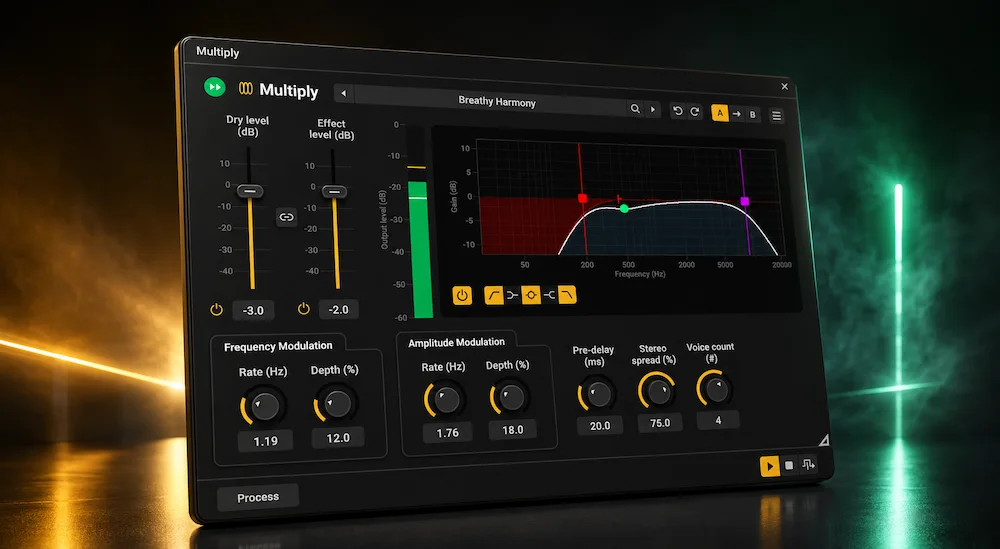
Most free audio plugins enjoy a brief surge of attention before fading into obscurity. Operating systems change, plugin formats evolve, and newer releases gradually push older tools out of everyday sessions. Acon Digital Multiply has largely avoided that cycle. More than a decade after its debut, it remains a regular recommendation among engineers looking for transparent vocal widening and chorus without adding unnecessary complexity to a mix.
Multiply 2 doesn’t attempt to reinvent the plugin. Instead, Acon Digital has refreshed an already mature design with a modern interface, a larger factory preset library, and updated platform support while leaving the core processing architecture largely intact. The more relevant question isn’t whether Version 2 introduces enough new features—it’s whether the plugin still solves real production problems better than many newer alternatives.
That question matters because vocal widening has become a standard mixing task rather than a creative luxury. Modern productions routinely rely on artificial double tracking, stereo enhancement, and subtle modulation to build larger vocal images from limited source material. The challenge isn’t creating width—it’s doing so without introducing obvious chorus artifacts, unstable mono compatibility, or a vocal that immediately sounds processed.
This editorial review looks beyond the feature list to evaluate how Multiply 2 performs in real mixing workflows, where it still offers practical value, where premium alternatives pull ahead, and whether it remains one of the strongest free vocal doubling and chorus plugins available for serious audio production.
Contents
Quick Specs
| Developer | Acon Digital |
|---|---|
| Plugin Type | Free vocal doubling and chorus plugin |
| Price | Free |
| Formats | VST3, AU, AAX |
| Platforms | Windows / macOS |
| Best For | Vocals, backing vocals, guitars, synths, keyboards |
| Not Ideal For | True ADT replacement or complete vocal production |
| Independent Score | 9.3/10 |
Great vocal processing is only part of a professional production. If you’d like to hear how your complete mix translates after mastering, request a free mastering demo. Send up to 35 seconds of your track and compare your original mix with a professionally mastered version before making any decision.
Why Vocal Doubling Has Become a Mixing Essential—Not Just a Creative Effect
 Modern mixes leave very little room for a vocal to exist naturally. Dense arrangements, layered instrumentation, and loudness-driven production have shifted vocal widening from an occasional creative choice to a routine mixing technique. Whether the project is contemporary pop, rock, EDM, hip-hop, or cinematic production, engineers are expected to create a larger vocal image without sacrificing intelligibility or center stability.
In an ideal session, that width comes from real performances. Double-tracking remains the most convincing solution because every take introduces subtle variations in timing, pitch, articulation, and dynamics that no algorithm can fully reproduce. In reality, mixers often receive a single lead vocal, limited revision opportunities, or sessions recorded remotely under inconsistent conditions. Creating convincing width then becomes a problem that must be solved during mixing rather than recording.
That demand has fueled an entire category of processors built around artificial double tracking, pitch modulation, stereo widening, and chorus. While they approach the problem differently, they all face the same technical limitation: creating multiple voices without making the processing obvious. Short delays, modulation, and phase manipulation can produce impressive stereo width, but they’re equally capable of introducing comb filtering, metallic coloration, unstable center imaging, or noticeable collapse when summed to mono.
Multiply was designed around that specific compromise. Instead of relying exclusively on traditional chorus architecture, it generates multiple independently modulated voices and passes each through randomized phase processing before combining them with the dry signal. The goal isn’t to imitate another chorus pedal—it’s to reduce the repetitive phase interactions that often reveal artificial doubling.
That approach remains relevant because modern mixes are expected to translate across far more playback systems than the control room. Studio monitors represent only one listening environment. The same mix will likely be heard through smartphones, earbuds, Bluetooth speakers, cars, smart TVs, and club sound systems, each exposing different weaknesses in stereo processing. A widening effect that sounds impressive in the studio but loses focus or collapses under mono playback creates problems that become difficult to fix later in production.
Streaming delivery adds another layer of scrutiny. Lossy codecs used by major platforms generally preserve well-balanced stereo information, but excessive modulation or unstable phase relationships can become more apparent after compression. For that reason, experienced engineers often prioritize predictable stereo behavior over the widest possible image.
This is where Multiply has aged unusually well. It was never intended to compete with boutique modulation effects or become an all-in-one vocal production suite. Its purpose is considerably narrower: provide believable vocal thickening and stereo enhancement with minimal setup, modest CPU consumption, and fewer phase-related compromises than many conventional chorus processors.
Ironically, that narrow focus may be why the plugin remains relevant. While much of the software industry has shifted toward increasingly complex AI-assisted production tools, Multiply continues to solve a practical mixing problem with a dedicated processor that asks very little of either the engineer or the computer.
Multiply 2 in Practice: What’s Actually New—and What Still Sets It Apart
Multiply 2 is best understood as a refinement of an established processor rather than a major redesign. Engineers expecting a new modulation algorithm or a noticeably different sound will find the update deliberately conservative. The core DSP remains familiar, preserving the character that made the original Multiply a long-standing recommendation for vocal thickening and stereo enhancement.
The most obvious change is the interface, but dismissing it as a cosmetic update misses its practical value. The original plugin always sounded better than it looked. Its fixed layout, dated graphics, and relatively small controls reflected the design standards of its era rather than modern production environments. Version 2 feels considerably more comfortable during long editing sessions, particularly on high-resolution displays where readability directly affects workflow.
The overall control structure remains intentionally uncomplicated. Voice generation, modulation, pre-delay, stereo width, and tonal shaping are all accessible without navigating secondary pages or hidden menus. That’s a meaningful advantage in a mix session where decisions are made quickly and processors are judged by how efficiently they solve problems rather than how many adjustable parameters they expose. Engineers interested in similarly workflow-oriented processing may also find our Emetic DSP Parametic & Smile Bus 3000 review worth exploring.
Multiply also avoids a common trap found in many modern modulation plugins: confusing flexibility with complexity. Each generated voice receives independent pitch and level modulation, yet the user interacts with a relatively compact set of controls. The result is a processor that can move from subtle vocal thickening to obvious chorus textures in seconds without requiring extensive setup.
The expanded preset library is a welcome addition, although its importance depends on the user. Experienced engineers rarely rely on factory presets unchanged, but well-designed starting points accelerate experimentation, especially when moving between different genres or vocal styles. In that sense, the presets improve workflow more than they improve the plugin itself.
One feature that deserves more attention is the integrated five-band equalizer. Many vocal widening plugins assume tonal correction will happen elsewhere in the signal chain, forcing engineers to insert additional EQs simply to prevent stereo movement from affecting the low end or overly bright harmonics. Multiply allows those adjustments inside the plugin, making it easier to shape only the processed voices before they blend with the dry signal.
That becomes particularly useful in professional vocal chains. Applying a high-pass filter to the doubled voices while leaving the dry vocal untouched keeps low frequencies anchored in the center and prevents unnecessary stereo movement in the fundamental range. Likewise, reducing upper-mid energy within the processed signal often produces a wider vocal image without making sibilance or consonants feel disconnected from the center.
Multiply’s defining technical advantage remains its phase-randomization stage. Conventional chorus processors generate several delayed copies whose phase relationships remain highly correlated, often producing recognizable comb-filter patterns as modulation increases. Multiply deliberately decorrelates those voices before they reach the output, resulting in movement that generally sounds smoother and less metallic than many traditional chorus designs.
That advantage has practical limits. Randomized phase processing reduces one of the most obvious artifacts associated with synthetic doubling, but it cannot recreate the subtle performance variations of genuine double-tracked vocals. On exposed lead vocals, listeners can still distinguish algorithmic widening from separate human performances. The difference becomes far less noticeable once the vocal sits inside a dense arrangement.
This is where Multiply performs at its best. Backing vocals, stacked harmonies, electric guitars, synth layers, electric pianos, and ambient textures all benefit from additional width without demanding absolute realism. The processor enhances density instead of drawing attention to itself—a characteristic that often matters more than producing the widest possible stereo image.
The controls also encourage moderation. Many widening plugins only sound impressive when pushed into exaggerated settings that compromise mono compatibility or destabilize the phantom center. Multiply remains effective at relatively conservative values, allowing engineers to increase perceived size while preserving translation across studio monitors, headphones, laptops, mobile devices, and mono playback systems.
Performance is equally well suited to modern production. CPU usage remains low enough for multiple instances across large sessions, project loading is essentially instantaneous, and the plugin integrates naturally into complex vocal chains without becoming another resource-intensive processor. While published benchmark data remains limited, real-world experience consistently places Multiply among the more efficient modulation plugins available.
During testing, I found that Multiply consistently delivered the most natural results with three or four generated voices and moderate modulation depth. Pushing the controls further certainly produced a wider stereo image, but it also made the synthetic nature of the processing increasingly obvious—particularly after checking the mix in mono. In practical sessions, conservative settings translated far more reliably across different playback systems.
Perhaps the most impressive aspect of Multiply 2 is its restraint. Rather than chasing AI-assisted processing or expanding into an all-in-one vocal suite, Acon Digital focused on refining a mature tool that already solved a well-defined production problem. The update doesn’t transform Multiply into something new—it simply makes an already practical processor easier to use in today’s studio environment.
Separating Real Advantages from Marketing Claims
 One of Multiply 2’s biggest strengths is that it doesn’t promise more than it can deliver. Acon Digital presents it as a chorus and vocal doubling plugin—not as a replacement for real performances or an AI-driven vocal production system. That’s a far more realistic position than many recent releases, which often imply that software can recreate the complexity of genuine multi-track recordings.
The plugin’s phase-randomization engine is a good example. It reduces the repetitive comb-filter patterns commonly associated with conventional chorus processing, making synthetic doubles sound smoother and less metallic. That’s a legitimate technical advantage. What it doesn’t do is recreate the countless performance variations that make double-tracked vocals convincing in the first place. Timing, articulation, phrasing, breath control, transient shape, and micro-dynamics all remain uniquely human.
As a result, Multiply performs very differently depending on the source material. On an exposed lead vocal in an acoustic arrangement, artificial doubling is still easy to recognize. The illusion becomes far more convincing once the vocal is supported by a full production, where additional guitars, keyboards, drums, and harmonic content naturally mask subtle processing artifacts.
This distinction matters because Multiply works best as a supporting processor rather than the foundation of a vocal sound. Used conservatively, it increases perceived width and density without drawing attention to the effect itself. Pushed too aggressively, it becomes obvious that the vocal is being artificially widened—regardless of the algorithm behind it.
That restrained behavior is one of the plugin’s strongest qualities. Many chorus processors encourage exaggerated modulation because dramatic presets sell products during quick demonstrations. Real mix sessions rarely reward those settings. Multiply remains effective at relatively low modulation depths, allowing engineers to enlarge a vocal image while preserving a stable phantom center and respectable mono compatibility.
The built-in five-band EQ also contributes more to workflow than the specifications suggest. Correcting the processed voices before they rejoin the dry signal eliminates the need for an additional insert in many vocal chains. High-passing the doubled signal, reducing upper-mid buildup, or gently controlling high-frequency energy can usually be handled inside the plugin, simplifying bus processing across larger sessions.
None of this makes Multiply a replacement for more specialized tools. Engineers chasing vintage bucket-brigade coloration or richer analog-style saturation will still prefer dedicated processors. We explored that approach in our The Asylum Analogue review, where the focus shifts from stereo widening toward tape and cassette coloration. Those who rely on precise pitch offsets and delay relationships may lean toward Eventide MicroPitch or Waves Reel ADT. Comprehensive vocal suites that combine pitch correction, saturation, compression, de-essing, delay, and reverb also serve a different purpose entirely.
Version 2 itself is similarly restrained. The updated interface is a meaningful improvement for everyday use, but the underlying DSP philosophy remains largely unchanged. Users expecting new modulation algorithms, expanded voice modeling, or advanced stereo management won’t find a fundamentally different processor waiting beneath the redesigned graphics.
Whether that’s disappointing depends entirely on expectations. Multiply never needed a complete redesign—it needed modernization. The update improves usability without sacrificing the predictable behavior that made the original plugin a long-term utility for many engineers.
The plugin’s most overlooked advantage may simply be its reputation. Free software is often dismissed before it’s evaluated, yet Multiply has remained part of professional workflows for years because it consistently solves a common mixing problem with minimal CPU usage and very few surprises. That level of reliability is considerably harder to achieve than adding another page of features to a specification sheet.
Pros & Cons
| Pros | Cons |
|---|---|
|
|
Where Multiply 2 Fits Among Today’s Best Vocal Doubling Plugins
Multiply 2 doesn’t compete head-to-head with every vocal processor on the market because most of its alternatives solve different production problems. Some prioritize authentic artificial double tracking, others focus on vintage chorus coloration or creative stereo modulation. Multiply occupies a narrower space: practical vocal thickening with minimal CPU overhead, broad compatibility, and enough control to fit comfortably into everyday mixing sessions.
| Plugin | Best For | Where Multiply 2 Has the Advantage | Where the Competitor Pulls Ahead |
|---|---|---|---|
| Acon Digital Multiply 2 | Everyday vocal widening, backing vocals, guitars, synths | Free, lightweight, integrated EQ, flexible modulation | Doesn’t emulate true double tracking |
| Eventide MicroPitch | Premium stereo widening for vocals, guitars, and mix buses | Lower CPU usage, simpler workflow, zero cost | More convincing pitch-based widening and higher overall realism |
| Waves Reel ADT | Classic Abbey Road-style artificial double tracking | Cleaner interface and broader modulation options | More authentic ADT behavior on exposed lead vocals |
| iZotope Vocal Doubler | Fast vocal enhancement with minimal setup | Greater control over modulation and tonal balance | Faster for one-click vocal widening |
| Baby Audio Magic Switch | Instant chorus effects with vintage flavor | Far more adjustable and suitable for everyday mixing | Stronger analog character for obvious chorus textures |
The comparison highlights Multiply’s real strength: versatility rather than specialization. It isn’t the most authentic ADT processor, the richest analog chorus, or the most sophisticated stereo widener. Instead, it delivers consistently usable results across vocals, guitars, keyboards, and layered production without requiring extensive setup or adding noticeable CPU load.
For critical lead vocals, many engineers will still prefer dedicated processors such as Eventide MicroPitch or Waves Reel ADT, particularly when realism takes priority over speed. Those tools generate more convincing pitch relationships and preserve the illusion of separate performances more effectively than conventional modulation-based processing.
Multiply becomes considerably more competitive once the source material moves beyond an exposed lead vocal. Backing vocals, stacked harmonies, stereo guitars, electric pianos, synth layers, and atmospheric textures benefit from additional width without demanding absolute realism. In those situations, its restrained modulation often sits in a mix more naturally than processors designed to produce dramatic stereo effects.
There’s also a practical consideration that spec sheets rarely capture: reliability. Multiply launches instantly, consumes very little processing power, and behaves predictably from project to project. Those qualities matter during long mix sessions, where a dependable utility plugin is often more valuable than another processor with an extensive feature list.
For engineers building a production toolkit on a limited budget, Multiply remains one of the easiest recommendations in its category. Even after investing in premium vocal processors, it’s the kind of lightweight utility that often stays installed because it solves common mixing problems quickly and without unnecessary complexity.
Best Use Cases
| Application | Recommendation |
|---|---|
| Backing vocals | ★★★★★ |
| Harmony stacks | ★★★★★ |
| Electric guitars | ★★★★★ |
| Synth pads | ★★★★☆ |
| Keyboards | ★★★★☆ |
| Lead vocals (subtle widening) | ★★★★☆ |
Multiply 2 performs best when subtle width is more important than obvious modulation. It excels on layered productions where additional stereo depth helps instruments occupy their own space without becoming distracting.
Typical Applications
| Source | Recommended Use |
|---|---|
| Lead Vocal | Yes (subtle settings) |
| Backing Vocals | Excellent |
| Harmony Bus | Excellent |
| Electric Guitar | Excellent |
| Synth Layers | Excellent |
| Piano | Very Good |
| Bass | Not Recommended |
| Full Mix Bus | Generally Not Recommended |
How Multiply 2 Performs in Real Mixing Sessions
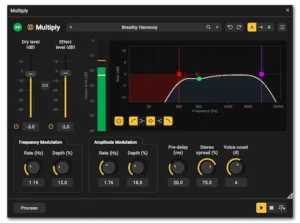 A plugin’s specifications matter far less than its behavior over the course of an actual mix. Engineers quickly notice whether a processor slows navigation, complicates routing, creates automation headaches, or forces compromises later in the session. Multiply has earned its reputation largely because it does none of those things.
Its footprint is remarkably small. Multiple instances can be inserted across vocal buses, guitars, keyboards, or synth layers without noticeably affecting CPU load or project responsiveness. On modern desktop systems that’s expected, but on mobile production rigs and older studio machines, lightweight processors still make a measurable difference when sessions grow beyond a hundred tracks.
Multiply also integrates naturally into established vocal chains. Most engineers already have a preferred sequence of corrective EQ, compression, de-essing, saturation, pitch correction, delay, and reverb. Multiply doesn’t force that workflow to change. In most cases it simply occupies the widening stage without requiring complicated routing or additional auxiliary tracks.
Placement, however, has a noticeable impact on the result. For lead vocals, the plugin generally works best after corrective dynamics processing but before large reverbs or delays. That allows the modulation to widen the source itself, while the time-based effects inherit a more stable stereo image instead of exaggerating phase movement. Maintaining that balance also helps when you later prepare your mix for mastering, since unnecessary stereo processing can become more obvious during the final mastering stage.
Its flexibility becomes even more apparent on backing vocals. Rather than inserting separate modulation plugins across every harmony track, engineers can process an entire backing vocal bus with a single instance, creating a more cohesive stereo image while keeping CPU usage to a minimum. The same approach works equally well for layered guitars, keyboard stacks, and supporting synth textures.
Mono compatibility still deserves attention. Multiply’s phase-randomization engine minimizes many of the comb-filter artifacts associated with traditional chorus processors, but no stereo widener is completely immune to phase interaction. Engineers delivering mixes for clubs, broadcast, live playback, or mobile devices should continue checking mono compatibility as part of their normal quality-control process rather than assuming any widening processor is inherently “mono safe.”
Mastering is a different discussion altogether. Applying modulation across a finished stereo mix rarely improves translation and can easily destabilize center information, soften transient definition, or introduce unnecessary movement into material that should remain fixed. Multiply is significantly more valuable on individual sources and subgroups than on a completed master.
Streaming platforms reinforce that approach. Moderate widening generally survives modern perceptual codecs without obvious degradation, but aggressive modulation tends to expose itself after lossy compression, particularly on headphones and smaller playback systems. Engineers mixing primarily for Spotify, Apple Music, or YouTube are usually better served by subtle enhancement than maximum stereo width—a principle that’s equally important when mastering music for streaming platforms.
One area where Multiply consistently proves its value is client revision work. Requests like “make the chorus feel wider” or “the vocal needs more space” are common, yet they rarely justify rebuilding an entire effects chain. Multiply often resolves those notes with a few measured adjustments, making it the kind of utility plugin that saves time long after the novelty of new releases has worn off.
That may be its greatest strength. Multiply isn’t designed to become the defining sound of a mix. It’s designed to solve a familiar production problem quickly, predictably, and without creating new ones—a quality that explains why it has remained part of professional workflows for more than a decade.
Who Should Download Multiply 2?
Multiply 2 is an excellent choice if you are:
- mixing modern pop, rock, EDM or hip-hop productions;
- working with a single lead vocal that needs additional width;
- building dense harmony stacks;
- looking for a lightweight free chorus plugin for everyday sessions;
- using older computers where CPU efficiency matters;
- expanding a professional plugin collection with a dependable utility processor.
For engineers who regularly need transparent stereo enhancement rather than heavy modulation, Multiply remains one of the easiest free plugins to recommend.
When NOT to Use Multiply
Multiply 2 may not be the best solution if your workflow depends on:
- true artificial double tracking with independent performances;
- automatic vocal harmonies;
- pitch correction or vocal tuning;
- analog tape coloration;
- creative modulation effects intended to become part of the sound design.
In those situations, dedicated ADT processors, vocal production suites, or analog modulation plugins will generally produce more convincing results.
Final Verdict: A Proven Utility That Still Belongs in Modern Mix Sessions
Multiply 2 doesn’t try to reinvent vocal doubling, and that’s precisely why the update works. Instead of replacing a mature processor with an entirely new concept, Acon Digital refined a tool that had already earned the trust of engineers through years of practical use. The result feels less like a new product than a modernized version of an established studio utility.
Anyone expecting a redesigned DSP engine or a dramatically different sound will find Version 2 deliberately conservative. The improvements focus on usability rather than reinvention. A cleaner interface, improved scalability, and an expanded preset library make the plugin easier to use day after day, while the familiar modulation engine preserves the behavior long-time users already understand.
That consistency is one of Multiply’s greatest strengths. It loads instantly, places very little demand on system resources, and integrates naturally into established vocal workflows. Whether widening backing vocals, adding subtle movement to guitars, or creating extra depth in synth layers, it delivers predictable results without encouraging excessive processing or complicated routing.
Its limitations are equally clear. Multiply isn’t a substitute for genuine double-tracked performances, nor does it compete directly with premium processors built around advanced pitch manipulation or comprehensive vocal production suites. Engineers seeking the most convincing artificial double tracking on exposed lead vocals will still find stronger options elsewhere.
For everyday mixing, however, those limitations matter surprisingly little. Most sessions benefit more from a processor that can add controlled width quickly and reliably than from one packed with features that are rarely needed. That’s exactly where Multiply continues to stand out. It solves a common production task with very little effort, making it just as useful on large commercial projects as it is in smaller home studios.
Perhaps that’s the most meaningful measure of its success. More than a decade after the original release, Multiply remains part of many professional plugin collections—not because it’s free, but because it consistently earns its place. Few utility processors maintain that level of relevance for so long.
Independent Review Score
| Category | Rating |
|---|---|
| Sound Quality | 9.0/10 |
| Workflow | 9.8/10 |
| Stereo Imaging | 9.2/10 |
| CPU Efficiency | 10/10 |
| Creative Flexibility | 8.6/10 |
| Value for Money | 10/10 |
| Overall | 9.3/10 |
Acon Digital Multiply 2 remains one of the strongest examples of how a focused utility plugin can outlast far more ambitious competitors. Rather than trying to become an all-in-one vocal production suite, it excels at one specific task—creating natural stereo width with excellent efficiency, dependable mix translation, and virtually no impact on system performance. While premium processors still offer greater realism for exposed lead vocals, Multiply continues to earn a place in professional sessions because it consistently solves everyday mixing problems quickly and predictably.
Sound Quality — 9.0/10. Multiply produces clean, musical stereo enhancement that avoids many of the metallic artifacts associated with traditional chorus processors. Although it cannot fully reproduce the realism of genuine double tracking, its widening remains convincing in dense modern productions.
Workflow — 9.8/10. Few modulation plugins are this fast to integrate into an existing vocal chain. The interface is intuitive, parameter layout is efficient, and meaningful results are achieved within seconds without interrupting the mixing process.
Stereo Imaging — 9.2/10. The phase-randomization engine delivers stable stereo width while maintaining respectable mono compatibility. Used conservatively, it translates reliably across headphones, speakers, streaming platforms, and other playback systems.
CPU Efficiency — 10/10. Multiply is exceptionally lightweight. Multiple instances can be used throughout large sessions with virtually no noticeable impact on CPU resources, making it one of the most efficient vocal widening plugins currently available.
Creative Flexibility — 8.6/10. The plugin intentionally focuses on vocal doubling and stereo enhancement instead of trying to cover every aspect of vocal production. The integrated five-band EQ adds welcome flexibility, but users seeking pitch correction, saturation, delay, or advanced vocal processing will still require additional tools.
Value for Money — 10/10. Considering that Multiply 2 is completely free, its performance is remarkable. It competes comfortably with many commercial alternatives in everyday mixing applications and remains one of the easiest plugin recommendations for both home studios and professional engineers.
Plugins like Multiply 2 can make a mix feel wider and more immersive, but they can’t guarantee that your song will translate consistently across streaming platforms, headphones, car speakers, and club systems. That’s where professional mastering makes the difference—preserving clarity, punch, and balance without sacrificing the musical choices you’ve already made.
Curious how your mix could sound after professional mastering? Upload up to 35 seconds and receive a free mastering demo created by a real mastering engineer—so you can compare the results before committing to the full project.
Get your free demo →
FAQ
Is Acon Digital Multiply 2 suitable for professional mixing?
Yes. Although it isn’t intended to replace high-end vocal production suites, Multiply 2 is more than capable of professional work. It’s particularly effective on backing vocals, stacked harmonies, guitars, keyboards, synths, and subtle lead vocal widening, while its low CPU usage makes it easy to deploy across large sessions.
Can Multiply 2 replace real double-tracked vocals?
No. Genuine double tracking remains the most convincing way to create vocal width because every performance contains natural variations in timing, pitch, articulation, and dynamics. Multiply 2 is best used when recording additional takes isn’t practical or when only subtle reinforcement is required.
Is Multiply 2 suitable for mastering?
Generally, no. Stereo modulation applied to a finished mix can reduce image stability, soften transients, and compromise mono compatibility. Multiply delivers far better results on individual tracks, vocal buses, or instrument groups during the mixing stage. If you’re unsure why the same processor behaves differently before and after mastering, understanding the difference between mixing and mastering makes the workflow much easier to understand.
How CPU-intensive is Acon Digital Multiply 2?
Multiply 2 is exceptionally lightweight by modern standards. While published benchmark data is limited, real-world use shows that multiple instances can run comfortably in large projects without noticeably affecting system performance.
Does Multiply 2 add noticeable latency?
Latency is effectively negligible in normal production workflows. Under typical buffer settings, the plugin is suitable for real-time monitoring and recording without creating workflow issues.
Is Multiply 2 better than iZotope Vocal Doubler?
That depends on your workflow. Vocal Doubler is designed for instant results with minimal controls, whereas Multiply 2 offers significantly more flexibility through adjustable modulation, voice generation, stereo shaping, and its integrated five-band EQ.
Which music genres benefit most from Multiply 2?
Multiply works particularly well in pop, EDM, rock, metal, hip-hop, cinematic music, and modern electronic production. Dense arrangements naturally mask subtle modulation artifacts while benefiting from additional vocal width and stereo depth.
Does Multiply 2 have good mono compatibility?
Yes—better than many conventional chorus processors. Its phase-randomization algorithm reduces the repetitive comb-filtering often associated with traditional chorus effects. Even so, engineers should always verify mono compatibility when applying any stereo widening process.
Is Multiply 2 worth installing if you already own premium vocal plugins?
Absolutely. Many professional engineers keep Multiply available because it’s fast, dependable, and extremely efficient. Even in studios equipped with premium processors, lightweight utility plugins often remain the quickest solution for everyday widening tasks.
Is Acon Digital Multiply 2 one of the best free vocal doubling plugins?
Yes. Despite its age, Multiply 2 remains one of the strongest free vocal doubling and chorus plugins available. Its combination of natural-sounding widening, integrated EQ, low CPU consumption, and predictable workflow allows it to compete surprisingly well with many commercial alternatives.

Yurii Ariefiev is a mastering engineer and audio production editor who reviews audio plugins through the lens of real-world production. His evaluations focus on stereo imaging, vocal doubling, phase behavior, mix translation, and how processing decisions affect the final master across different playback systems.
This review analyzes Acon Digital Multiply 2 beyond its feature list, examining where it genuinely improves vocal width, where its limitations become apparent, and how it fits into modern professional mixing workflows before mastering.