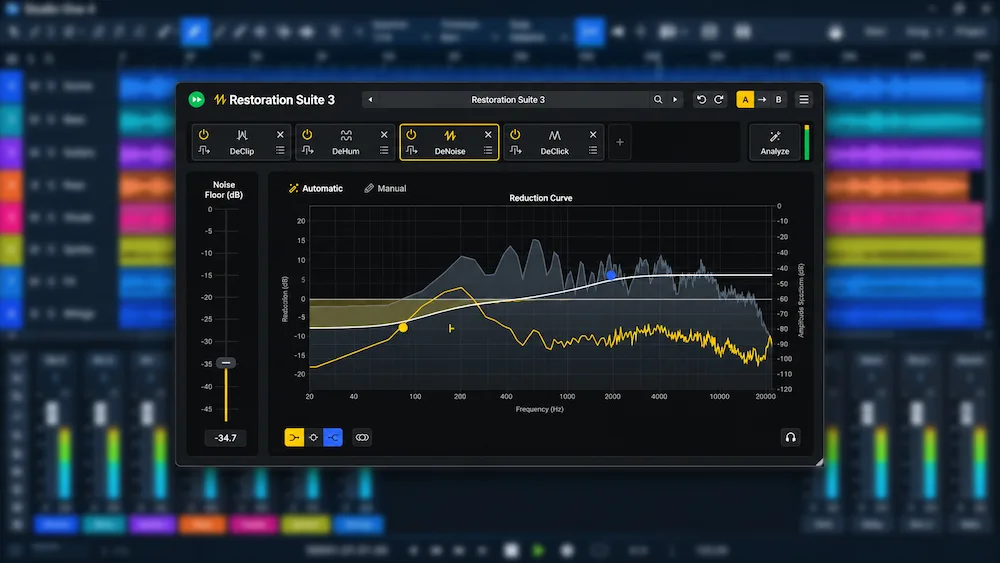
Acon Digital Restoration Suite 3 introduces a redesigned restoration workflow centered on a new all-in-one plug-in. Its Analyze function examines audio and configures a processing chain using DeNoise 3, DeHum 3, DeClick 3, and DeClip 3, targeting common recording problems such as broadband noise, electrical interference, clicks, and clipping. The update also brings machine learning-powered Automatic modes to DeNoise 3 and DeHum 3, along with refreshed interfaces for DeClick 3 and DeClip 3.
The most significant change is how the restoration process begins. Rather than selecting and configuring individual processors from scratch, engineers can analyze a recording and use the resulting chain as a starting point for repair. This shifts some of the initial diagnostic work to the software, potentially reducing setup time on routine restoration tasks. It does not, however, eliminate the need to evaluate each processor’s effect, adjust its settings, and check for unwanted artifacts.
The New Analyze Workflow in Restoration Suite 3
 Restoration Suite 3 introduces a combined plug-in that brings DeNoise 3, DeHum 3, DeClick 3, and DeClip 3 into a single interface. After inserting it on a track, the engineer can click Analyze and play a representative section of the recording. The plug-in analyzes the audio, identifies potential restoration needs, and builds a processing chain from the modules it considers relevant, applying initial settings for the detected issues.
This approach targets one of the more time-consuming stages of audio restoration: identifying the defects in a recording before choosing the appropriate processing tools. A source may contain broadband hiss, electrical hum, intermittent clicks, or peaks damaged by clipping. Each issue requires a different type of processing, while unnecessary restoration can introduce artifacts, alter transients, or remove wanted audio information.
By generating a proposed repair chain, Restoration Suite 3 aims to reduce the initial setup and trial-and-error involved in diagnosing common recording problems. However, Analyze should be treated as a starting point rather than a finished restoration. Engineers still need to listen critically, evaluate how each processor affects the source, and adjust the settings where necessary.
The workflow may be particularly useful for engineers handling dialogue, location recordings, archival transfers, or music tracks with multiple types of damage. It can provide a consistent starting point when several files require similar diagnostic attention. The results will still depend on the material being analyzed: if the selected section does not contain a particular defect, the plug-in may not identify it or configure the corresponding processor appropriately.
For more reliable analysis, select a section that actually contains the recording problem rather than an unrelated or mostly clean passage. After Analyze builds the processing chain, bypass each module individually and compare the result with the original. Where available, auditioning the removed signal can also help identify whether the processor is taking away useful audio, such as vocal consonants, transients, or reverb tails.
DeNoise 3 and DeHum 3 Introduce Automatic Modes
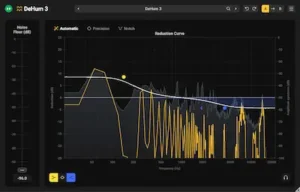 DeNoise 3 and DeHum 3 both gain machine learning-powered Automatic modes designed to simplify noise reduction. These modes can provide an initial processing setup without requiring the engineer to capture a separate noise profile before starting.
DeNoise 3 is designed to reduce hiss, broadband noise, wind, buzz, and camera noise. Its Automatic mode offers a more direct starting point when unwanted noise cannot be easily isolated or when a dedicated noise profile is impractical. A Manual mode remains available for material that requires more precise control or when the automatic settings do not deliver the desired result.
This distinction is important in music production because noise reduction is not simply about maximizing attenuation. Aggressive processing can compromise high-frequency detail, transient information, ambience, and the natural decay of instruments. Automatic settings can speed up the initial setup, but the engineer still needs to evaluate the balance between noise reduction and preservation of the wanted signal.
DeHum 3 targets electrical hum and buzz, including interference associated with grounding problems and electric motors. Its Automatic mode is designed to detect and reduce this type of interference. The processor also retains two alternative approaches:
- Precision mode: Designed to track hum that changes or drifts in pitch.
- Notch mode: Provides a low-CPU, zero-latency option for targeted hum reduction.
These modes give engineers different ways to address electrical interference instead of relying on a single automatic process. The choice depends on the characteristics of the noise: whether its pitch remains stable, drifts over time, or requires targeted attenuation. As with broadband noise reduction, the goal is to remove the interference without unnecessarily affecting the wanted audio.
DeClick 3 and DeClip 3: Click Repair and Clipping Restoration
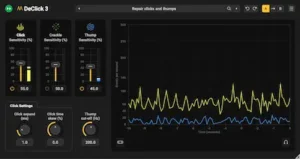 The remaining two processors in Restoration Suite 3 also receive refreshed interfaces, with updates focused on their respective restoration workflows.
DeClick 3 is designed to remove clicks, pops, surface crackle, digital drop-outs, and plosive thumps. Its restoration process uses surrounding clean audio to reconstruct damaged sections. This makes it relevant to vinyl and tape transfers, recordings affected by intermittent digital errors, and dialogue containing unwanted transient noises. For close-miked vocal and dialogue recordings that require broader editing, NoiseWorks VoiceAssist’s AI-assisted vocal editing workflow also addresses breaths, sibilance, and mouth noise.
DeClip 3 focuses on reconstructing waveform peaks flattened by analog or digital clipping. Its updated workflow includes one-click clipping-level detection and a level histogram that helps visualize which parts of the signal are being targeted for restoration.
Understanding the difference between repairing clipped audio and deliberately using clipping to shape perceived loudness is also important; the latter is a separate mastering consideration covered in our guide to loudness and clipping in mastering.
Although both processors address damaged audio, they are designed for different problems and are not interchangeable. DeClick 3 targets short unwanted events and interruptions, while DeClip 3 focuses on waveform distortion caused by signal overload. Selecting the appropriate processor is essential: using the wrong restoration method may deliver little improvement and can introduce additional artifacts.
What Restoration Suite 3 Changes in a Production Workflow
The practical value of Restoration Suite 3 lies in combining automated analysis with specialized restoration processors. Rather than opening several plug-ins and deciding independently which tools to use, engineers can start in the combined interface, analyze the source material, and review the processing chain suggested by the software.
This is primarily a workflow improvement, not evidence of a fundamental change in restoration quality. Acon Digital presents Analyze as a way to identify recording problems and configure relevant processing modules. However, the available product information does not establish that its automated decisions will consistently outperform a manually configured restoration chain across different sources and recording conditions.
For mixing and mastering engineers, the suite is most relevant when noise or recording damage is already present in the source material. Typical examples include vocal recordings with background hiss, instrument tracks affected by electrical interference, vinyl samples with surface crackle, and clipped recordings that require peak reconstruction before further processing.
For music projects intended for release, source restoration is only one part of the process; the mix must also be stable and properly prepared before mastering, as explained in our guide to preparing a mix for mastering.
Restoration should still be approached conservatively. Noise reduction can alter the texture of a recording, while peak reconstruction cannot guarantee the recovery of all information lost through clipping. A technically cleaner signal is not necessarily a better-sounding one. The result must be evaluated in the context of the arrangement and the intended production.
A sensible approach is to use Analyze as an initial diagnostic step, then compare the processed signal with the original. When a recording requires more careful treatment, the individual processors’ controls remain important for refining the result and avoiding unnecessary processing.
From Cleaned Recordings to a Balanced, Release-Ready Mix
Removing noise and repairing damaged audio can make individual tracks easier to work with, but it does not guarantee that the full mix will translate well. Once unwanted noise and recording defects are under control, the next challenge is preserving clarity, depth, transient impact, and tonal balance across the entire production. Our mastering process focuses on how these elements work together, rather than simply making the mix louder. You can upload up to 40 seconds of your mix for a free mastering demo and hear how professional mastering may affect its overall presentation.
Submit your mix for a free mastering demo →
Restoration Suite 3 Pricing and Acoustica 8 Availability
Acon Digital lists Restoration Suite 3 at a regular price of $99. A 30% introductory discount brings the new-license price down to $69 through November 17, 2026. Owners of Restoration Suite 2 can upgrade for $49 through their Acon Digital accounts.
Eligible customers who registered a Restoration Suite 2 license on or after August 1, 2026, qualify for a free upgrade to version 3. According to Acon Digital, these upgrades have already been added to eligible accounts.
The Restoration Suite 3 plug-in is also included in the Premium and Ultimate editions of Acoustica 8. This gives users of Acon Digital’s audio editing software access to the restoration tools as part of those editions, rather than requiring a separate Restoration Suite 3 purchase.
Restoration Suite 3 supports Windows 10 and 11, as well as macOS 10.13 or later. The macOS version runs natively on both Intel and Apple Silicon systems. Supported plug-in formats include VST, VST3, and AAX on Windows, with AU also available on macOS. The suite supports sample rates up to 192 kHz and surround or immersive audio configurations of up to 7.1.6 channels.
Is the New Automatic Workflow a Reason to Upgrade?
Restoration Suite 3 is a meaningful workflow update for engineers who regularly work with damaged or noisy recordings. Its most distinctive addition is the combined Analyze plug-in, which examines audio and configures a starting restoration chain using the relevant processors. This reduces the need to select and configure each module manually before beginning the repair process.
The Automatic modes in DeNoise 3 and DeHum 3 further simplify the initial setup for common noise problems. Meanwhile, the refreshed DeClick 3 and DeClip 3 interfaces bring updates to the other two processors in the suite.
For existing Restoration Suite 2 owners, the decision to upgrade depends on how frequently they perform restoration and whether the new workflow addresses a recurring bottleneck. Engineers who already work efficiently with individual processors may find the combined interface convenient, but not essential. Those who regularly handle dialogue, archival material, noisy recordings, or damaged source audio have a stronger reason to consider the update.
Restoration Suite 3 is best understood as a more streamlined approach to audio repair, not a replacement for critical listening or detailed manual restoration. Automated analysis can reduce the time spent selecting and configuring tools, but decisions about processing intensity, artifact control, and the final sound remain the engineer’s responsibility.
If you are considering an upgrade, start with the free demo. Testing the software on recordings that represent your actual restoration challenges will provide a more useful assessment of its practical value than relying on feature descriptions alone.
Feature and Workflow Assessment
The scores below are editorial assessments of Restoration Suite 3’s documented feature set and workflow design. They are not based on independent audio measurements or a hands-on comparison of processed recordings. The overall score is the arithmetic average of the five category ratings.
| Category | Rating |
|---|---|
| Automated Restoration Analysis | 8.6/10 |
| Broadband Noise Reduction Control | 8.3/10 |
| Hum Reduction Flexibility | 8.4/10 |
| Click and Transient Repair | 8.5/10 |
| Clipping Restoration Workflow | 8.1/10 |
| Overall | 8.4/10 |
The combined Analyze function earns a strong rating for its ability to identify potential recording defects and configure a starting processing chain, although its decisions still require critical evaluation.
DeNoise 3 provides useful flexibility through Automatic and Manual modes, but the available information does not establish how effectively it preserves high-frequency detail and ambience under demanding noise-reduction settings.
Automatic, Precision, and Notch modes address different electrical interference scenarios, including hum that drifts in pitch and situations requiring targeted reduction.
DeClick 3 covers a broad range of transient defects, from clicks and pops to digital drop-outs and plosive thumps, with reconstruction based on surrounding clean audio.
Automatic clipping-level detection and the level histogram make DeClip 3’s restoration process more accessible, although the documented workflow does not establish how accurately it reconstructs severely damaged peaks.
Restoration Suite 3 combines four specialized processors with automated analysis in a single workflow, making it a capable option for engineers handling noisy, damaged, or archival recordings. Its main advantage is the breadth of restoration tasks covered and the faster initial setup. However, the quality of the actual repair still depends on the source material and manual adjustment. These ratings assess documented functionality and workflow design, not independently measured audio performance.
Frequently Asked Questions
What is the main new feature in Acon Digital Restoration Suite 3?
The main addition is an all-in-one plug-in with an Analyze function. It examines a recording and builds a suggested processing chain using DeNoise 3, DeHum 3, DeClick 3, and DeClip 3, based on the issues it detects.
Does Restoration Suite 3 require a noise profile for DeNoise processing?
No. DeNoise 3 includes a machine learning-powered Automatic mode designed to reduce noise without requiring a separately captured noise profile. A Manual mode is also available for more specific control.
What is the difference between DeNoise 3 and DeHum 3?
DeNoise 3 targets broadband noise and unwanted sounds such as hiss and wind. DeHum 3 focuses on electrical hum and buzz, offering Automatic, Precision, and Notch modes for different types of interference.
Can Restoration Suite 3 repair clipped audio?
Yes. DeClip 3 is designed to reconstruct waveform peaks damaged by analog or digital clipping. Its updated workflow includes automatic clipping-level detection and a histogram that visualizes the signal levels targeted for restoration.
Is Restoration Suite 3 included in Acoustica 8?
Yes. The Restoration Suite 3 plug-in is included in the Premium and Ultimate editions of Acoustica 8.
How much does Acon Digital Restoration Suite 3 cost?
The regular price is $99. A 30% introductory discount brings the price down to $69 through November 17, 2026. Owners of Restoration Suite 2 can upgrade for $49 through their Acon Digital accounts. Promotional upgrade discounts may also be available during the introductory offer.
Does Restoration Suite 3 support Apple Silicon?
Yes. The macOS version runs natively on both Intel-based Macs and Apple Silicon systems.
Should Restoration Suite 2 owners upgrade?
The upgrade is most relevant to engineers who regularly restore recordings and would benefit from the Analyze workflow and updated processors. Those who are already satisfied with their existing restoration setup may find the new version a useful convenience rather than an essential upgrade.

When evaluating audio restoration tools, the key considerations are how accurately they distinguish unwanted noise from useful signal content and how well they preserve transients, ambience, and natural decay. Effective restoration requires balancing noise attenuation against artifact control, particularly when repairing recordings that will undergo further processing.
Enjoyed this review?
If you found it useful, you can support independent audio research with a coffee. ☕
Buy me a coffee