Accentize dxSplit Review: Rebuilding Dialogue Instead of Just Cleaning It
There’s a hard truth in audio post: once dialogue is compromised, most tools can only make it “less bad.” They reduce noise, soften problems, and hope artifacts stay hidden. That’s been the standard for years.
Accentize dxSplit flips that model. Instead of suppressing unwanted elements, it breaks the signal apart — literally. Voice, room, and noise are separated into independent layers, giving engineers the ability to rebuild dialogue from its components rather than patch over issues.
This isn’t just another cleanup plugin. It’s a shift in how dialogue processing is approached.
From Noise Reduction to Signal Reconstruction
Traditional tools — whether spectral denoisers or adaptive filters — operate by identifying unwanted content and attenuating it. The problem is obvious: the algorithm doesn’t truly understand the signal, so it removes parts of everything.
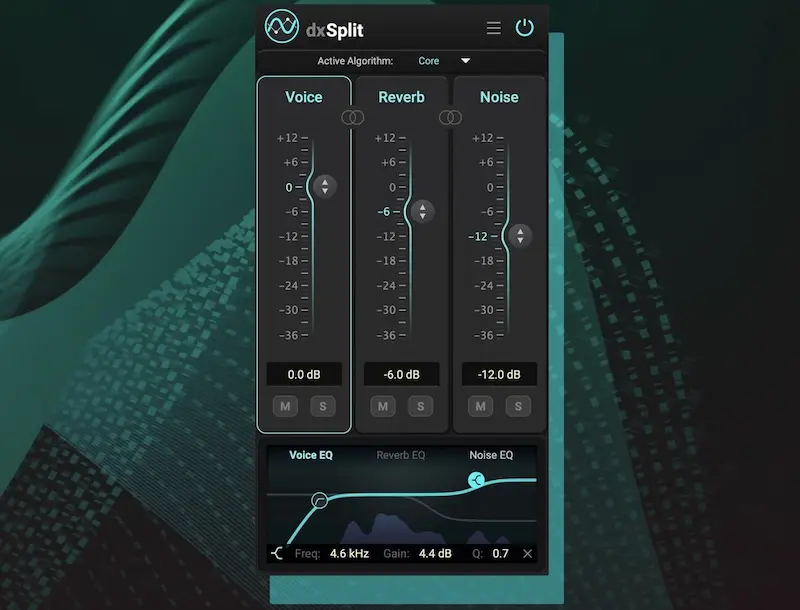
dxSplit takes a different route. Using trained neural networks, it analyzes the incoming audio and splits it into three discrete layers:
- Direct speech (voice)
- Environmental reflections (reverb)
- Unwanted background content (noise)
This isn’t filtering — it’s decomposition. Once separated, each layer becomes independently controllable, with its own level and EQ shaping.
Instead of fighting a compromised signal, you’re working with extracted components.
Why This Matters in Real Sessions
In real-world production — especially in the US content ecosystem — dialogue rarely comes from perfect recording conditions. Remote podcasts, YouTube content, documentary interviews, and location shoots all introduce variables:
- uncontrolled room acoustics
- background noise from HVAC, traffic, or equipment
- inconsistent mic positioning
- reflections that smear intelligibility
With standard tools, fixing one issue often worsens another. Clean the noise, lose clarity. Reduce reverb, kill the body of the voice.
dxSplit removes that trade-off. You’re no longer choosing what to sacrifice — you’re deciding what to keep.
Working Like You Actually Have Stems
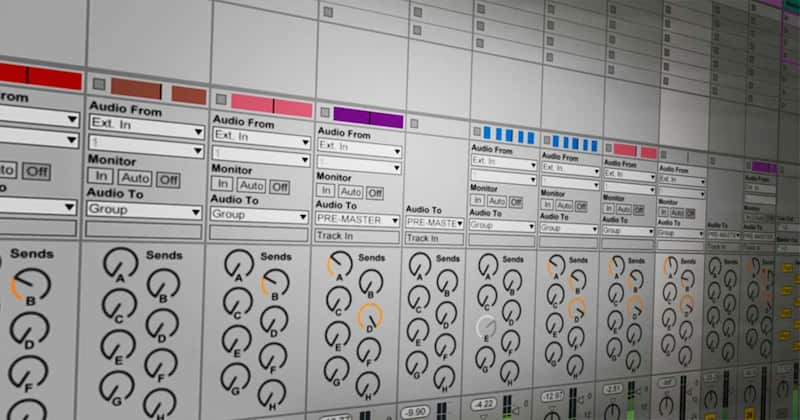
One of the most practical advantages is multi-output routing. Each component can be sent to its own track inside your DAW, effectively turning a single problematic recording into a multi-layer session.
This unlocks workflows that were previously impossible:
- compressing only the voice without lifting background noise
- reducing reverb dynamically instead of statically
- treating noise as a separate texture instead of a side effect
- automating clarity without touching ambience
It’s closer to mixing stems than fixing damage.
dxSplit vs Traditional Restoration Chains
In a typical post-production chain, you might stack multiple tools: noise reduction, de-reverb, EQ correction, maybe harmonic restoration. Each stage introduces its own compromises.
dxSplit consolidates that logic into a single structural step — separation first, processing second.
This drastically reduces cumulative artifacts and speeds up decision-making. Instead of tweaking thresholds across multiple plugins, you’re shaping clearly defined elements.
The dxRevive Factor: Fixing What Gets Lost
Heavy cleanup often strips away more than just noise — it removes harmonic content, presence, and intelligibility cues. That’s where dxRevive becomes critical.
Inserted directly into the voice layer, it rebuilds missing spectral information and smooths out processing artifacts. The result is not just cleaner dialogue, but more believable dialogue.
This combination — separation plus restoration — is what makes the workflow viable for professional delivery standards.
Where dxSplit Actually Delivers
This isn’t a universal “fix everything” tool. It shines in very specific scenarios:
- dialogue recorded in untreated spaces
- remote interviews and podcast recordings
- on-location voice capture
- archival material with embedded noise and room coloration
In controlled studio recordings, the benefit is smaller. But in imperfect conditions — which is most real-world content — the difference is significant.
System Support and Workflow Compatibility
dxSplit is available for current production systems and integrates into standard workflows without friction:
- Windows 10+
- macOS 13.1+
- VST3, AU, AAX formats
This makes it usable across all major DAWs in professional environments.
Pricing Context
The plugin is positioned in the mid-to-high tier of dialogue tools, with an introductory price below its standard cost. Given its capabilities, the pricing aligns more with advanced restoration software than basic utilities.
A trial version is available, which is essential — this is not a tool you evaluate by specs, but by results on your own material.
Studio Take: Tool vs Outcome
dxSplit changes how dialogue can be handled, but it doesn’t replace engineering decisions. Separation gives control — it doesn’t guarantee results.
In professional production, what matters is not how clean the signal is in isolation, but how it translates across platforms, devices, and listening environments.
If you need consistent, release-ready audio that holds up outside your studio, professional mixing and mastering still define the final outcome.
We use advanced AI tools where they make sense — but the final result always comes from critical listening and precise decisions.