KNOCK 2, developed by Knock Audio and created by producer DECAP, is a drum-processing plugin that combines six effects in a single configurable chain. It covers transient shaping, compression, saturation, sub-frequency generation, high-frequency enhancement, and clipping. Rather than assembling these processors individually, producers can use KNOCK 2 to shape individual drum sounds or process an entire drum bus within one interface.
What KNOCK 2 Offers
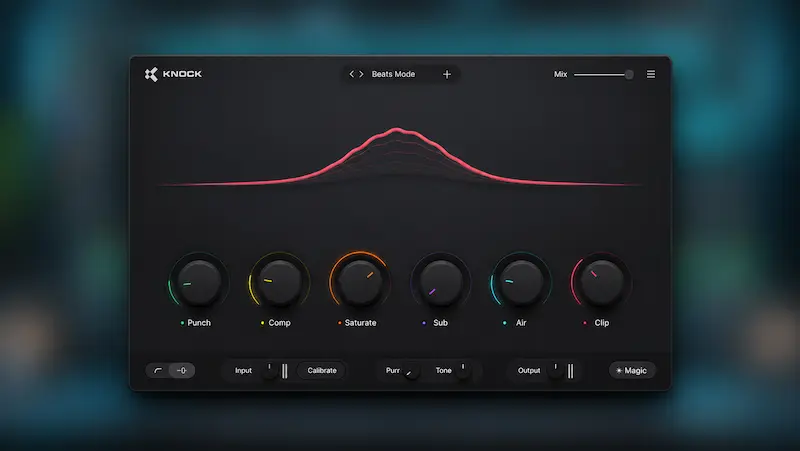
KNOCK 2 contains six processing modules: PUNCH, COMP, SATURATE, SUB, AIR, and CLIP. Users can rearrange them to change the order in which the signal is processed.
PUNCH shapes transients through attack and sustain controls, with additional parameters for adjusting the low- and mid-frequency impact. COMP provides compression with several selectable modes, while SATURATE adds harmonic distortion. SUB generates a tunable low-frequency layer using kick detection, allowing users to reinforce the kick without adding a separate sample or synthesizer.
AIR enhances the high frequencies and includes a stereo-widening control. CLIP provides peak shaping and clipping. Together, the six modules cover several stages of drum processing, from transient control and tonal enhancement to peak management.
Each module has its own input and mix controls. These let users manage the level feeding each processor and blend its effect with the unprocessed signal. This matters in a chain where the output level of one module affects how the next processor responds.
Processing Architecture and Workflow
KNOCK 2 offers three phase modes, each with different processing and latency characteristics. Mixed Phase is the default multiband mode. Zero Latency switches to single-band processing without adding latency, while Linear Phase uses more CPU resources and introduces greater latency.
The choice affects more than latency. Zero Latency disables several controls, including PUNCH’s CRACK and BOOM parameters and SATURATE’s BUMP control. Users who rely on these functions will need to choose a different phase mode.
Other workflow features include reorderable modules, 1x, 2x, and 4x oversampling for SATURATE and CLIP, and the CALIBRATE function. CALIBRATE analyzes five seconds of incoming audio, adjusts the input level, and gain-matches the output. This provides a consistent starting point for setting up the processing chain.
Practical Value and Limitations
KNOCK 2 is designed for producers and mix engineers working with kick drums, snares, percussion, and drum buses. Its main workflow advantage is the ability to combine transient shaping, compression, saturation, sub-frequency reinforcement, and clipping in one configurable plugin chain instead of loading several separate effects.
Reorderable modules and individual mix controls provide flexibility over the processing chain. The phase modes also offer different options for balancing processing requirements against latency. However, the available documentation does not establish how KNOCK 2’s algorithms compare sonically with dedicated alternatives. Independent CPU benchmarks and measurement results are also unavailable, so performance claims cannot be verified.
Some operational details deserve attention. Zero Latency mode disables selected processing controls, while Linear Phase introduces higher latency and CPU demands. The CLIP module also continues processing when its main amount control is set to zero. To bypass it completely, users must switch the module off. Understanding these behaviors is important when configuring the signal chain.
KNOCK 2 does not replace every specialized processor. Engineers who need transparent clipping, detailed corrective compression, or dedicated transient shaping may still prefer tools built specifically for those tasks.
Pricing, Compatibility, and Verdict
At the time of writing, KNOCK 2 is listed for $119, reduced from a stated regular price of $149. The purchase includes a lifetime license, and a seven-day full trial is available. On macOS, the plugin supports AU, VST2, VST3, and AAX. The Windows version supports VST3 and AAX. Both versions require a 64-bit system and a compatible host application.
KNOCK 2 is worth considering for producers who regularly process drums and want several tools in one configurable environment. Its six modules, reorderable signal chain, and selectable phase modes provide flexibility for shaping individual drum sounds and processing drum buses.
However, the feature list alone does not establish that KNOCK 2 sounds better than dedicated alternatives or offers enough new functionality to justify an upgrade for existing KNOCK users. Without independent listening tests and performance comparisons, its clearest documented advantage is workflow flexibility. Producers looking for an integrated drum-processing toolkit may find it useful, while those who need only one specific type of processing may be better served by a dedicated plugin.