In Chicago, a huge number of tracks are recorded in fast-moving environments. Some come from live club performances and rehearsal rooms, others from day-rate studios where every hour matters, and many are built at home between sessions and gigs. It’s a city where creativity moves quickly — but file preparation often doesn’t keep up.
One of the biggest reasons mixing projects in Chicago slow down is not sound quality, but technical cleanup. Engineers end up fixing alignment issues, clipped recordings, missing fades, and messy sessions before the actual mix even begins. That leads to more revisions, higher total cost, and longer turnaround times.
This guide shows exactly how to deliver stems for online mixing so your Chicago project starts clean and moves straight into professional sound shaping. Prepare your Chicago session files right the first time — and speed up your online mix.
Why proper stem delivery matters for Chicago sessions
 Chicago’s recording culture blends live energy with fast studio workflows. In day-rate studios, time lost to technical fixes directly increases the bill. In live multitrack recordings from venues or rehearsal rooms, phase issues, bleed, and room mic chaos are common. In home sessions, clipping, noise, and timing inconsistencies happen constantly.
When stems arrive organized and clean, engineers can immediately focus on balance, tone, and impact instead of troubleshooting. That almost always results in faster first mixes, fewer revision rounds, and more predictable project timelines.
Stems vs multitracks — what online engineers actually need
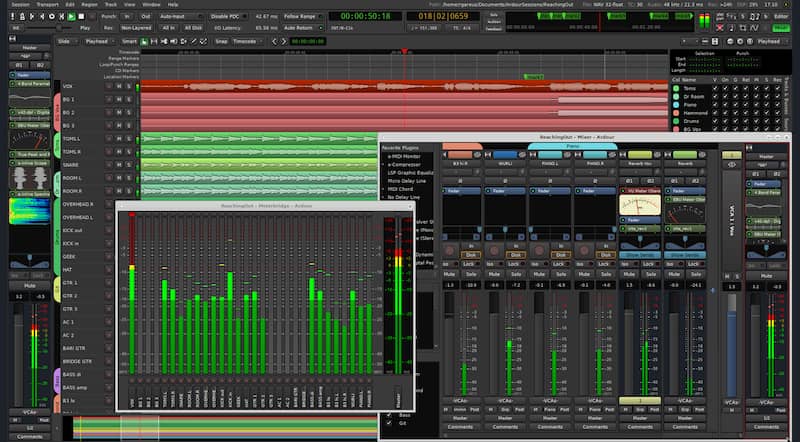
For remote mixing, most engineers prefer consolidated multitracks where each individual sound is exported from the very beginning of the session. This gives full control over balance, dynamics, and spatial placement.
Grouped stems can work for simpler productions or massive projects where session size needs to be reduced, but they limit flexibility. For a vocal over a beat, individual vocal tracks alongside the instrumental usually work best. For live bands, full multitracks are almost always required. For layered productions with lots of synths and effects, consolidated tracks keep everything aligned and clean.
When in doubt, clean multitracks are the safest choice for professional online mixing.
Chicago club and live session export — the critical step most people skip
 Live multitrack sessions are common across Chicago’s rehearsal spaces and performance venues, and they need special attention before sending files out for mixing.
Bleed between microphones is normal and not always a problem, but phase alignment is critical. Drum overheads should line up properly with close mics, bass DI should be checked against amp tracks, and room microphones should be clearly labeled so the engineer understands their role.
Every track must be consolidated from the same start point so the session lines up perfectly when imported. Without this step, engineers waste time rebuilding timing manually — one of the biggest causes of remote project delays.
Live sessions benefit hugely from clean preparation because it preserves energy while allowing professional control.
Studio and home recording stem prep for fast online mixing
For studio and home sessions alike, every track should be consolidated into one continuous file that starts at the session beginning. Silence can be removed between phrases, but natural reverb tails and instrument decays should remain intact.
Tracks should be exported mostly dry unless a creative effect is essential to the sound. Master bus processing must be removed entirely. Online engineers build the final tone and loudness later — printed limiting or compression usually harms flexibility.
This workflow mirrors how professional studios prep sessions for mixing engineers and keeps remote projects moving efficiently.
— See also: The Sound Engineer Profession — What It Means Today and Where It’s Heading by 2026 —
File naming that engineers love — and Chicago budgets appreciate
Clear names instantly speed up any mixing session. Kick_In, Snare_Top, Bass_DI, Guitar_Rhythm, Lead_Vox_Main communicate everything without confusion. Random names like “Audio_17_final” force engineers to listen and sort manually.
In day-rate environments common around Chicago studios, messy naming literally costs time and money. Clean labeling makes the mix start faster and reduces revision errors later.
Headroom, levels, and formats that prevent technical problems
Stems should peak well below clipping, leaving healthy headroom for processing. Consistent sample rates across all files are critical. Twenty-four-bit WAV or AIFF formats are standard for professional mixing.
Normalization, limiting, or loudness processing should never be applied to stems. Clean dynamic range gives engineers room to shape the sound properly.
— See also: Who Are the Mixing Engineer and the Mastering Engineer? —
Packaging and delivery for fast remote sessions
All stems should be organized in clearly labeled folders and compressed into a single archive before uploading. Cloud services like Google Drive and WeTransfer work well when files are verified after upload. Simple organization avoids missing tracks and download issues that often slow projects at the very start.
The engineer’s two-minute quality check before sending
Before uploading, play the session from start to finish. Confirm every track starts at the same point, nothing is missing, no clipping appears, and there are no pops or glitches. A quick mono check can reveal phase issues early.
This short review prevents most delays that happen later in the mix process.
Common stem mistakes Chicago artists make
 Many projects arrive unconsolidated, forcing engineers to rebuild timing. Live recordings often contain clipped peaks that can’t be repaired. Mixed sample rates break sessions. Master bus processing is baked into files. These problems are responsible for most revision delays in remote mixing.
Avoiding them dramatically speeds up professional results.
How proper stems speed up your online mixing project
When stems are clean and organized, the first mix arrives faster, feedback is clearer, revisions are smaller, and the final sound reaches release quality sooner. Preparation directly affects turnaround time, budget efficiency, and overall sound quality.
How AREFYEV Studio works with Chicago stems
AREFYEV Studio reviews session files before mixing begins, flags potential issues early, and ensures projects start clean. This workflow keeps Chicago artists on schedule while delivering professional clarity and impact. Send your Chicago session files for a quick review and clean quote.
Conclusion
 Chicago’s mix of live recording culture, fast studio sessions, and home production makes stem preparation more important than ever. Clean delivery allows engineers to focus on sound instead of technical fixes, leading to better results in less time.
When you prepare stems correctly for online mixing in Chicago, you save money, reduce revisions, and reach release-ready sound faster. Order professional online mixing and mastering for your Chicago release at AREFYEV Studio.
Mini-FAQ
What are stems for online mixing?
– They are consolidated audio files of each track exported from the same session start for clean alignment.
Should I export dry or processed tracks?
– Mostly dry, keeping only essential creative effects.
How much headroom should stems have?
– Enough to avoid clipping, typically several decibels below zero.
Can I send live multitrack sessions?
– Yes, as long as tracks are consolidated and phase-aligned.
What format is best for mixing engineers?
– Twenty-four-bit WAV or AIFF files at the original sample rate.