
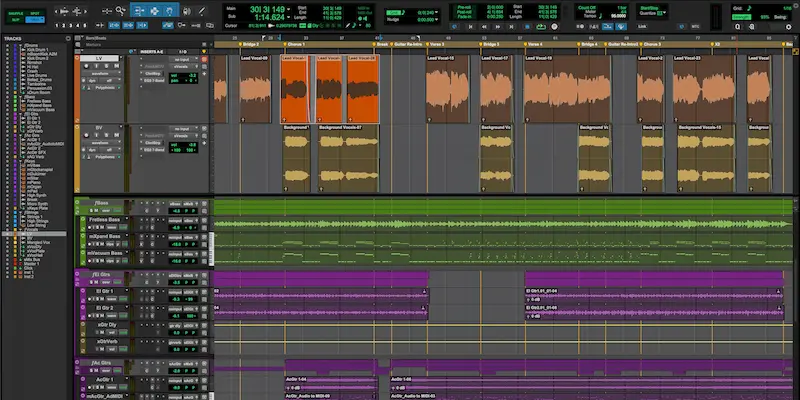
Pro Tools 2026.4 Update Fixes Session Navigation and Expands MPEG-H Support
Pro Tools 2026.4 update addresses two persistent workflow bottlenecks: managing large sessions and handling immersive formats inside a single project.
The release introduces Track Pin for fixed track visibility, adds native MPEG-H support, and integrates headphone-based spatial monitoring.
Why This Update Matters Now
Session scale has changed. It’s common to see 100+ tracks in post-production and hybrid music workflows, where navigation speed directly affects decision-making. Pro Tools has been slower than competing DAWs in this area—particularly in track visibility and multi-format handling.
Pro Tools 2026.4 update targets those bottlenecks. Instead of adding new instruments or features, it addresses session management and format integration—areas where inefficiencies accumulate over long edits and complex mixes.
What Actually Changed
Track Pin anchors selected tracks in the Edit window. Dialogue, lead vocals, and master buses remain visible regardless of vertical scrolling. In dense sessions, this removes constant repositioning and reduces context switching during edits.
MPEG-H support introduces native object-based audio handling via a built-in renderer developed by Fraunhofer IIS. Mixes can now be created and monitored inside a single session without external routing or duplicate project versions. This is relevant for broadcast workflows where Dolby Atmos is not the only delivery format.
Dolby Headphone Personalization adds HRTF-based monitoring using profiles generated through Sonarworks SoundID Tools. The goal is improved spatial accuracy in headphones and more consistent translation between headphone and speaker-based playback.
Massive X Player and bundled expansions integrate Native Instruments’ synthesis engine directly into Pro Tools. Additional plugins such as Ampknob BDH III and Bad Math expand the toolset, but function as secondary additions rather than workflow changes.
What This Means in Real Mixing and Mastering Workflows
 Pro Tools 2026.4 update delivers its impact in high-track-count sessions. Track Pin removes constant vertical navigation by keeping critical elements—vocal buses, master chains, key returns—fixed in view. This reduces context switching and shortens repetitive edit cycles.
In post-production, MPEG-H integration changes session structure. Multiple delivery formats can be handled inside a single timeline instead of maintaining parallel session versions. This directly reduces versioning errors and simplifies final deliverables.
For immersive mixing, Dolby Headphone Personalization improves spatial perception in headphones, but remains a secondary reference.
Misjudging translation at this stage often leads to typical mastering issues — mastering problems such as imbalance, distortion, or loss of depth.
From a mastering standpoint, processing remains unchanged. What improves is session control—fewer navigation errors and more consistent structure. This directly affects how final decisions are made, especially when preparing mixes for mastering — prepare mix for mastering becomes more predictable when session layout is stable.
The gain is operational: fewer navigation errors, fewer format inconsistencies, and more stable session handling. Under deadline pressure, that translates into faster decisions and fewer revisions.
Where It Falls Short
Track Pin addresses a basic workflow issue that competing DAWs solved years ago. It improves navigation, but does not increase editing speed or reduce processing time.
MPEG-H support expands format capability, but remains limited in the U.S. market. Dolby Atmos continues to dominate, and adoption of alternative broadcast standards is inconsistent.
Dolby Headphone Personalization improves spatial perception, but does not replace calibrated monitoring. HRTF modeling cannot account for room acoustics or guarantee reliable translation across playback systems.
Massive X Player adds sound generation inside Pro Tools, but does not change its core positioning. Composition, arrangement, and sound design workflows remain slower compared to Logic Pro and Ableton Live.
Positioning Against Competitors
Logic Pro is optimized for composition and in-the-box production. Faster MIDI editing, integrated instruments, and streamlined arrangement workflows make it more efficient for music creation, but less structured for large-scale post sessions.
Ableton Live prioritizes real-time manipulation and loop-based production. It excels in sound design and performance workflows, but lacks the session control and routing depth required for complex mixing and post-production.
Nuendo targets the same post-production segment as Pro Tools, with broader feature depth and more flexible routing. However, it requires a more complex setup and steeper operational learning curve.
Pro Tools 2026.4 remains focused on controlled session management, standardized workflows, and predictable behavior under load. It does not compete on speed of creation—it competes on stability, consistency, and scalability in mixing and post environments.
Verdict
Pro Tools 2026.4 update is a workflow correction, not a feature expansion. It addresses navigation, format handling, and session stability—areas that directly impact efficiency in large-scale projects.
Use it if:
- you work in post-production or broadcast environments
- your sessions regularly exceed 80–100 tracks
- you rely on immersive audio formats
Skip it if:
- your focus is music production and arrangement
- you expect faster creative workflows
- you need new processing or sound design tools
Pro Tools 2026.4 update does not change the sound. It changes how efficiently complex sessions are managed and delivered.
FAQ — Pro Tools 2026.4 Update
Does Track Pin affect session performance or CPU usage?
No. Track Pin is a UI-level function. It does not change DSP load, buffer behavior, or processing latency. The impact is purely operational—reduced navigation overhead.
Can MPEG-H sessions be exported for standard stereo mastering?
Yes. MPEG-H projects can be rendered down to stereo or other delivery formats. However, object-based balance decisions may not translate directly without additional adjustments.
Is Dolby Headphone Personalization accurate enough for final decisions?
No. It improves spatial perception, but should be treated as a secondary reference. Final balance and translation still require calibrated speaker monitoring.
Does this update improve automation or editing speed?
Not directly. Editing tools and automation behavior remain unchanged. The gain comes from reduced navigation friction, not faster processing.
Is Pro Tools 2026.4 update relevant for mastering engineers?
Indirectly. It does not introduce new mastering tools, but improves session handling. In complex projects, fewer navigation errors and cleaner structure reduce revision cycles. For a deeper breakdown of how mastering actually works, see how professional mastering works.
Can Massive X Player replace external instruments?
No. It provides quick access to sounds inside the DAW, but lacks the depth and flexibility of a full production environment.
Does MPEG-H replace Dolby Atmos in current workflows?
No. Dolby Atmos remains the dominant format in most U.S. production pipelines. MPEG-H expands compatibility but does not replace existing standards.
Who benefits most from Pro Tools 2026.4 update?
Engineers working in post-production, broadcast, and large-scale mixing sessions. The update is less relevant for producers focused on composition and sound design.