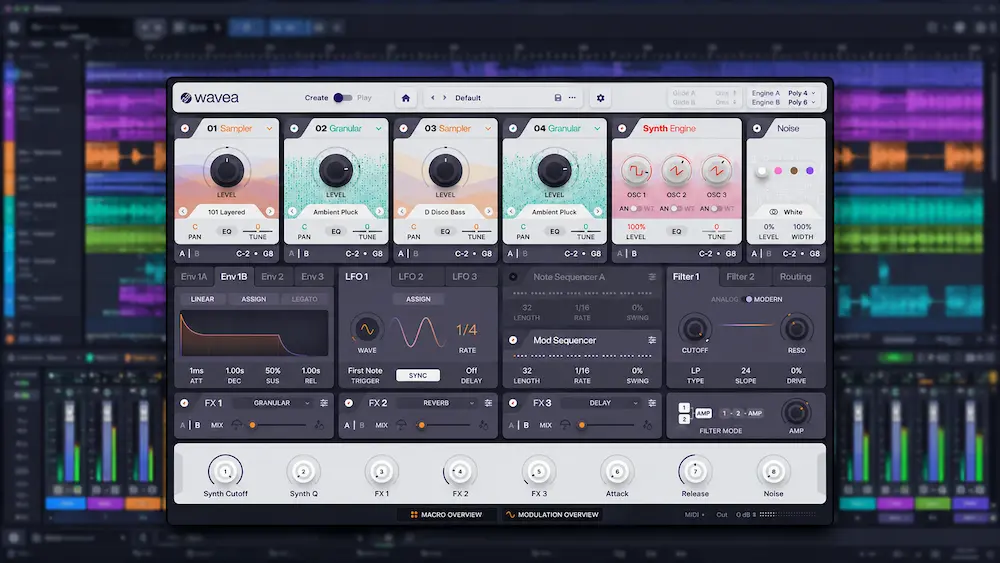
Wavea Flite 2 is a hybrid software instrument that combines sampling, FM synthesis, wavetable processing, granular manipulation, sequencing, MIDI control and built-in effects inside a single production environment. The current Flite 2.1 release extends that architecture with AI-assisted sample generation through external services, while keeping the core instrument focused on shaping, layering and sequencing sound rather than replacing conventional synthesis and sampling workflows.
The appeal of Flite is not that any individual technology is new. FM, granular processing, wavetable synthesis and multisampling are established production techniques. What makes Flite interesting is the way these components are combined into a single instrument, allowing sampled material, synthesized layers, modulation and sequencing to be developed without constantly moving between separate instruments.
There are limits. Flite V2 does not replace the depth of Kontakt or Falcon, the synthesis focus of Pigments, or the broader workstation ecosystem of Omnisphere. It also has no AAX version, which makes it unsuitable for native Pro Tools instrument workflows. Flite V2 offers enough sampling, synthesis and sequencing depth to function as a serious production instrument rather than simply another preset-driven synth, with its overall value depending on the features available in the edition you choose.
Wavea Flite 2 at a Glance
Type: Hybrid synthesizer, sampler and production instrument
Current version: Flite 2.1
Free edition: Flite Play
Full version: Flite Create
Paid edition: Flite Create; check Wavea for current pricing
Formats: VST3 on Windows and macOS; AU on macOS
AAX: Not supported
Flite 2’s Hybrid Architecture and Voice Engines
 Flite V2 combines two voice engines with four multisamplers, synthesis sources, filters, modulation and effects. This architecture lets a patch combine sampled material with generated harmonics and evolving textures without requiring a separate plugin for every layer. The practical question is how much of that internal routing a particular sound actually needs, rather than how many sound-generation methods the instrument supports.
Keeping these components inside one instrument can reduce the number of plugin instances and automation lanes in a session. The trade-off is that complex patches can become harder to navigate and balance internally, particularly when several layers occupy similar frequency ranges. Flite’s independent voice-engine outputs help preserve separation when those layers need different processing in the mix.
Flite V2 Is More Than a Synth Update
Flite started as a hybrid instrument, and successive updates have expanded the architecture well beyond a conventional sample-based synth. V2 adds a dedicated FM engine, additional oscillators and filters, new effects, drawable LFOs, deeper sequencing, MIDI output and MPE support. The result is a broader sound-generation and modulation environment rather than a simple feature update to the original instrument.
The sampling workflow is one of the more significant changes. Flite V2 can import SoundFont/SF2, SFZ and Decent Sampler content, with automatic mapping and looping handling much of the preparation required to turn a multisample into a playable instrument. For producers working with personal sample libraries, that can have more practical value than another collection of factory presets because the instrument becomes a way to process and reshape existing material.
The factory library extends that approach with sampled hardware and instruments associated with classic synthesis workflows, including the Yamaha CS-80, Roland Juno-106, Oberheim OB-8 and Sequential Pro-One, along with drum machines and other synthesizers. These sources give the instrument a substantial pool of raw material for layering, resampling and further synthesis.
That does not make Flite an analog-modeling synthesizer. The hardware sources are sampled rather than recreated through circuit-level modeling. The distinction matters when choosing the instrument: Flite reshapes recorded hardware sounds through sampling, synthesis and modulation rather than attempting to reproduce the original circuitry. Its appeal lies in combining those sampled sources with independently generated and processed layers inside one patch.
Where the New FM and Granular Engines Actually Matter
The advanced FM engine is one of the more substantial additions in V2, with more than 60 FM-related parameters. FM synthesis itself is hardly new. The practical difference is that Flite treats FM as one sound source within a larger hybrid architecture rather than as a self-contained synthesis method.
That makes FM useful for tasks that would otherwise require layering another instrument. An FM layer can sharpen the attack of a sampled piano, introduce metallic harmonics into a pad, add upper-frequency definition to a bass or give a lead controlled digital edge. Because it can coexist with sampled and granular sources, the FM layer does not need to define the entire patch.
Granular synthesis follows the same principle. Flite can use imported or factory samples as the source for evolving textures, unstable pads, rhythmic fragments and atmospheric layers. The approach is particularly effective when a sample already has a useful harmonic or tonal identity but remains too static to function as a finished production element.
The real advantage comes from combining these processes. A sample can provide the tonal body, FM can reinforce its attack or harmonic structure, granular processing can introduce temporal movement, and modulation can control how those elements evolve over time. Instead of treating each technique as a separate sound-design stage, Flite lets them operate as parts of the same instrument.
Hear How Your Mix Translates Beyond the Studio
Hybrid sounds can add harmonic detail, width and movement, but their impact depends on how well they sit within the full arrangement. A professional mastering review can help assess tonal balance, stereo compatibility, dynamics and how clearly the mix holds together across playback systems. Submit up to 40 seconds of your track for a free mastering demo and hear how your mix translates under a focused mastering assessment. Request Your Free Mastering Demo →
Sequencing Is One of the Most Important V2 Improvements
Flite V2’s four sequencers — two note sequencers and two modulation sequencers — have more production value than the feature list initially suggests. Parameters can be assigned to step-based patterns, with Euclidean sequencing, pattern modifiers and multiple note-pattern modes providing control over both rhythmic and tonal movement.
The important change is that sequencing becomes part of the instrument rather than something that has to be built entirely in the DAW. Filter cutoff, wavetable position, effects parameters and other controls can follow repeatable internal patterns without requiring separate automation lanes for every movement.
MIDI output extends that workflow beyond Flite’s own sound engine. Its sequencers can send MIDI to external hardware or software instruments, allowing Flite to function as a dedicated pattern generator while another synthesizer handles the actual sound generation.
That makes the sequencing section useful even when Flite is not being used as the final instrument. A rhythmic or melodic pattern can be designed inside Flite, routed to another synth and kept independent from the DAW’s main automation system. For complex sessions, that separation can make evolving parts easier to edit, reproduce and reuse.
Sample Import and Mapping Solve a Less Glamorous Problem
Sample preparation is rarely the part of sound design that gets much attention, yet it can consume a disproportionate amount of time when building playable instruments from raw recordings.
Loading individual samples, assigning key ranges, creating velocity zones and establishing loop points becomes tedious when the objective is to audition an idea quickly. Flite V2’s sample-import and automatic mapping functions reduce much of that initial setup, allowing a collection of samples to be turned into a playable instrument with less manual preparation.
The workflow is particularly useful for producers working with their own multisamples or libraries of hardware recordings. Instead of rebuilding the same mapping structure manually for every source, a prepared sample set can become the starting point for further synthesis, modulation and layering.
Automatic mapping and looping do not remove the need for critical listening. Sustained material still needs to be checked for clicks, phase discontinuities, abrupt loop transitions and unnatural modulation caused by the loop position. The advantage is narrower and more useful: Flite automates repetitive preparation work while leaving the sonic decisions to the engineer or producer.
What Flite V2 Changes in a Mixing Workflow
 Flite is a production instrument rather than a mixing processor, but its architecture affects how the resulting sound fits into the mix. A complex patch should be judged in the context of the full arrangement rather than by its soloed sound alone.
The main issue is density. A patch combining multiple samples, synthesis sources, granular processing, modulation and stereo effects can occupy substantially more spectral and spatial space than its soloed sound suggests. A patch that sounds impressive on its own can become difficult to place once drums, vocals, bass and other harmonic material are present.
This is not a limitation of Flite itself. It is a consequence of concentrating several sound-generation and processing stages inside one patch. The useful approach is to evaluate the result in context rather than mixing around the soloed instrument.
For bass parts, that can mean separating the fundamental from upper harmonics introduced by FM or granular processing. Pads may require tighter control of low-frequency stereo information and overall width. Leads can accumulate substantial high-frequency energy through modulation and layered sources, which may become more problematic once bus compression or limiting is applied.
Flite’s independent voice-engine outputs are particularly useful at this stage. They allow major components of a patch to be routed separately rather than committing the entire instrument to a single stereo channel. That provides considerably more control over balance, EQ, dynamics and spatial processing than treating the patch as one finished sound.
From a mastering perspective, Flite has no direct processing role. Its influence is upstream: wide granular layers, dense multisampling and sustained high-frequency modulation can increase peak activity, limiter gain reduction and inter-channel differences before the signal reaches the final chain. Those characteristics are not inherently problematic, but they can make a mix less predictable across different playback systems.
Flite expands the amount of sound-design information that can exist inside a single instrument. The mixing stage still has to decide which of that information is musically necessary.
CPU Efficiency: Useful Improvement, Limited Independent Evidence
Wavea states that Flite V2 can reduce CPU usage by up to 40 percent compared with earlier versions. If achieved under comparable workloads, that would be a meaningful improvement for an instrument combining multiple sample engines, synthesis sources, modulation and effects.
There is not enough independent benchmark data to treat the figure as a verified performance result. A meaningful comparison would require identical patches, DAW settings, buffer size, sample rate, oversampling conditions and hardware, none of which are consistently documented in independent testing.
The appropriate conclusion is therefore limited: Wavea has made CPU optimization part of the V2 development, and the claimed reduction may be useful in larger sessions, but the “up to 40 percent” figure should be treated as a manufacturer claim rather than an independently measured benchmark.
The workflow benefit is easier to assess. Consolidating sampling, synthesis, modulation, sequencing and effects inside one instrument can reduce plugin instances, routing and automation overhead regardless of the exact CPU savings achieved by an individual patch.
Where Flite V2 Falls Short
The most significant limitation for professional studios is the lack of AAX support. Flite cannot be used as a native instrument inside a Pro Tools session, which immediately excludes it from some commercial studio workflows.
For producers working in Ableton Live, Logic Pro, Cubase, Studio One, Bitwig or Reaper, the limitation is considerably less important. In a Pro Tools-based facility, however, plugin format compatibility is not a minor inconvenience; it determines whether the instrument can be part of the native session at all.
The second limitation is ecosystem depth. Kontakt and Falcon have accumulated extensive third-party libraries, established sound-design workflows and long-standing user communities. Flite does not yet have comparable library infrastructure, so its value depends more heavily on the factory content and the user’s willingness to build or import their own material.
The interface also becomes considerably more demanding once the deeper Create functionality is involved. The free Play environment is relatively easy to approach, but constructing sophisticated multisampled instruments with multiple synthesis sources, modulation and sequencing requires more time and a better understanding of the internal architecture.
There is a separate distinction to make around the newer AI workflow. Flite can use external services such as ElevenLabs and Stable Audio to generate source material that is subsequently brought into the instrument. That can shorten the path from an idea to usable sample content, but it is dependent on external services, accounts and available credits. It is more accurate to describe this as an integrated AI-assisted production workflow than as proprietary AI synthesis built into Flite’s sound engine.
Flite V2 vs Kontakt, Falcon, Pigments and Omnisphere
| Instrument | Primary Strength | Sampling | Synthesis | Sound Design | Best Fit |
|---|---|---|---|---|---|
| Wavea Flite V2 | Hybrid sound creation and integrated workflow | Strong | Strong | Strong | Electronic production, hybrid instruments, fast sound design |
| Native Instruments Kontakt | Sampling ecosystem and playable instruments | Excellent | Good | Excellent | Orchestral production, sampled instruments, commercial libraries |
| UVI Falcon | Deep synthesis and sampling architecture | Excellent | Excellent | Excellent | Advanced sound design and custom instruments |
| Arturia Pigments | Modern synthesis and modulation | Good | Excellent | Excellent | Synthesis-focused production and electronic sound design |
| Omnisphere | Large sound library and broad synthesis architecture | Excellent | Excellent | Excellent | Broad professional production and sound design |
| UVI Synth Anthology 5 | Vintage hardware sampling library | Excellent | Good | Good | Sample-based vintage synth production |
Flite V2 is not a category leader across all of these areas. Falcon offers substantially deeper synthesis and sampling architecture, Kontakt has a far larger third-party sampling ecosystem, Pigments is more focused on modern synthesis and modulation, and Omnisphere combines an extensive library with a broad production-oriented architecture.
Flite makes a different trade-off. Its strength is the combination of sampling, synthesis, granular processing, modulation and sequencing inside a comparatively compact instrument. That makes it easier to justify when the goal is to build hybrid sounds quickly rather than invest in a large specialist ecosystem.
Flite Play is free, while Flite Create unlocks full parameter editing, preset saving and sample import. Wavea’s displayed pricing has varied across its official pages, so check the current offer before purchasing. The practical value of Create depends on whether you need to build custom instruments and import your own samples rather than work exclusively with factory presets.
Where Flite Makes the Most Sense in Real Production
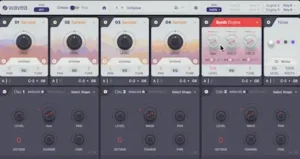 Electronic production: This is the most obvious fit for Flite V2. FM, wavetable, granular processing, sequencing and modulation can be combined within the same instrument to build basses, leads, evolving pads and rhythmic textures without separating each function into another plugin.
Hip-hop and beat production: Flite is particularly useful when a conventional sample needs to become something less recognizable. A melodic recording can be reshaped into a playable texture, layered with synthesis and modulated into a bass, pad or secondary melodic element without maintaining several separate instruments.
Pop production: Flite is better suited to supporting a conventional arrangement than replacing its primary instruments. Pads, transitional effects, synthetic layers and short ear-candy elements are areas where its hybrid architecture can add movement without requiring a complex external signal chain.
Film and game scoring: Granular processing and sample transformation are useful for evolving textures, pulses, transitions and atmospheric material. Flite can contribute to these layers efficiently, but it does not replace the depth of a dedicated orchestral or cinematic sampling platform when realistic acoustic instrumentation is the priority.
Mix preparation: Flite can be valuable before the mixing stage, particularly when its independent voice-engine outputs are used to keep layered components under separate control. That makes it easier to manage the relationship between the tonal body, synthesized layers, modulation and spatial effects once the sound enters the full arrangement.
Overall Rating
Editorial rating based on the documented feature set, sound-design architecture, workflow, format compatibility and stated limitations. It is not a controlled audio-quality or CPU benchmark.
| Category | Rating |
|---|---|
| Hybrid Architecture | 9.0/10 |
| Sampling Integration | 8.7/10 |
| Synthesis Depth | 8.5/10 |
| Modulation & Sequencing | 8.8/10 |
| Production Practicality | 8.6/10 |
| Platform & Ecosystem Compatibility | 6.8/10 |
| Overall | 8.4/10 |
The hybrid architecture earns 9.0/10 because sampling, FM, wavetable and granular synthesis operate within the same instrument rather than requiring separate sound-generation stages.
Sampling integration rates 8.7/10 because support for multisample formats, automatic mapping and looping makes imported material a practical starting point for further processing rather than merely an additional library source.
Synthesis depth receives 8.5/10: the dedicated FM engine, multiple oscillators, filters and granular processing provide substantial range, although the instrument does not reach the architectural depth of specialist platforms such as Falcon.
Modulation and sequencing score 8.8/10 because internal note and parameter sequencing, drawable LFOs and MIDI output extend movement beyond basic patch programming and can reduce dependence on external automation.
Production practicality earns 8.6/10 because independent voice-engine outputs, sample import and the consolidated signal-generation environment make complex hybrid parts easier to construct without immediately expanding the session.
Platform and ecosystem compatibility is the clearest limitation at 6.8/10. The absence of AAX restricts native Pro Tools use, while the available library ecosystem remains considerably smaller than established platforms such as Kontakt and Falcon.
Find Out What Your Mix Is Actually Delivering
Layered synthesis, granular textures and wide stereo effects can make a sound feel detailed and expansive in isolation, yet the full mix may tell a different story. More processing is not always the answer: the critical question is how the entire arrangement holds together in terms of tonal balance, transient impact, stereo compatibility and dynamics. Upload up to 40 seconds of your mix for a free mastering demo prepared by a real mastering engineer. Compare the original with the mastered version to evaluate the changes in context and decide whether further work would benefit your track. Upload Your Mix for a Free Mastering Demo →
Is Flite V2 Worth Buying?
Flite V2 makes the strongest case for producers who regularly move between sampling, synthesis and sound design rather than working exclusively within one of those disciplines.
It does not compete directly with the largest commercial sampling ecosystems. Kontakt remains the stronger choice for extensive third-party libraries and dedicated sampled instruments. Falcon offers deeper synthesis and custom-instrument architecture, while Pigments is more focused as a modern synthesis platform.
Flite occupies the space between those approaches. A sound can start as a sample and develop into a synthesized instrument, or begin with synthesis and move into granular processing, sequencing and modulation without rebuilding the signal path across several plugins. That reduction in setup is the instrument’s most convincing practical advantage.
The free Play edition provides the preset-focused entry point, while Create unlocks full parameter editing, preset saving and sample import. That distinction is important when evaluating the instrument commercially: Play is enough to assess the library and performance interface, while Create is the version intended for building and saving custom instruments.
For electronic production and hybrid sound design, Flite V2 is best viewed as a complementary instrument rather than a replacement for Kontakt, Falcon, Pigments or Omnisphere. Its value comes from combining several sound-generation and sequencing approaches in one environment and keeping the path from raw source material to finished production part relatively short.
FAQ
Does Wavea Flite V2 work in Pro Tools?
No. Flite V2 does not support AAX, so it cannot run as a native instrument inside Pro Tools. It supports VST3, with AU available on macOS.
What is the difference between Flite Play and Flite Create?
Flite Play is the free preset-focused version, while Flite Create unlocks full parameter editing, preset saving and sample import. Both use the same core instrument, but Create is required for building and saving custom instruments.
Is Flite V2 a sampler or a synthesizer?
Both. Flite combines multiple samplers with FM, wavetable, granular and other synthesis capabilities. Its main distinction is the ability to combine these sources within the same instrument.
Can Flite V2 import my own samples?
Yes. Flite supports common audio formats as well as SoundFont/SF2, SFZ and Decent Sampler content. Automatic mapping and looping can reduce the manual preparation required for multisampled instruments.
Is Flite V2 good for mixing?
Flite is a production and sound-design instrument, not a mixing processor. Its independent voice-engine outputs can nevertheless make complex layered sounds easier to separate and integrate during mixing.
Can Flite V2 be used for mastering?
Not directly. Flite generates and processes sound rather than performing mastering functions. Its relevance to mastering is upstream, since dense stereo layers, low-frequency buildup and complex modulation can affect the mix delivered to the mastering stage.
Is Flite V2 CPU efficient?
Wavea claims up to 40% lower CPU usage than earlier versions. That figure should be treated as a manufacturer claim because there is limited independent benchmark data under controlled conditions. Actual CPU load varies with the active engines, samples, effects and sequencing.
Is Flite V2 better than Kontakt?
Not overall. Kontakt has a much larger professional sampling ecosystem and extensive third-party library support. Flite is better suited to producers who prioritize hybrid synthesis, granular processing and integrated sequencing over access to a large external sample-library ecosystem.
Is Flite V2 a good alternative to UVI Falcon?
It can be for producers who do not need Falcon’s deeper synthesis and custom-instrument architecture. Falcon remains the more comprehensive choice for advanced sound design, while Flite emphasizes a faster hybrid workflow and lower entry cost.
Does Flite 2.1 have AI sound generation?
Yes. Flite 2.1 can generate sample material through external services such as ElevenLabs and Stable Audio. The generated audio can then be used as source material inside Flite’s sampling and granular workflow. This is an additional sound-generation workflow rather than an AI-based replacement for Flite’s core synthesis architecture.
Is Flite V2 worth buying if I already own another major synth?
It can be, particularly if your workflow involves sample manipulation, granular textures, hybrid patches or internal sequencing. Flite is most useful as a complementary instrument rather than a replacement for every synthesizer in a studio.
Is Wavea Flite V2 worth upgrading to?
For existing Flite users, V2 represents a substantial expansion of the instrument’s synthesis, sampling, modulation and sequencing capabilities rather than a minor interface or preset update.

Yurii Ariefiev is a mastering engineer and audio production editor at AREFYEV STUDIO. His editorial focus is on how instrument architecture affects sound design, arrangement and mix integration, including the practical trade-offs between synthesis depth, sample handling, modulation and DAW compatibility.
Enjoyed this review?
If you found it useful, you can support independent audio research with a coffee.
☕ Buy me a coffee