Rockheyday Smooth 7 is a seven-band dynamic equalizer designed to control problematic frequencies without relying solely on static EQ cuts. It combines adjustable filter bands, independent dynamic processing, and an integrated tape- and transformer-style saturation stage in a single plugin. Its minimum-phase processing is described by the developer as zero-latency, while the spectral metering provides a visual overview of frequency content. Smooth 7 is aimed at producers and engineers who need more flexible frequency control during mixing and mastering.
Dynamic EQ with Seven Independent Bands
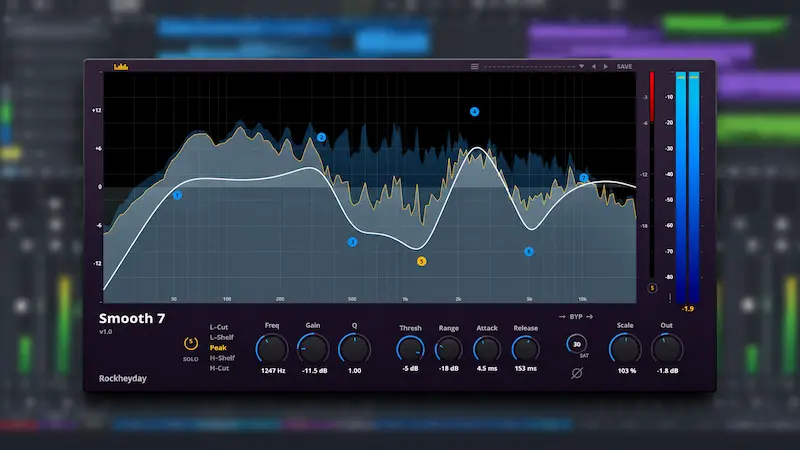
Smooth 7 provides seven draggable EQ nodes, each supporting Low Cut, Low Shelf, Peak, High Shelf, and High Cut filter types. Frequency and bandwidth can be adjusted directly in the interface, with mouse-wheel control for Q.
Each band also has its own dynamic processing section, with threshold, range, attack, and release controls. The threshold can be set as low as -60 dB, while the gain reduction range extends to -24 dB. A fixed 6 dB quadratic soft knee controls the transition into compression.
This setup allows individual frequency regions to respond dynamically to changes in the incoming signal. For example, a vocal resonance that becomes prominent only on louder notes can be reduced dynamically rather than cut permanently with static EQ. The same approach can help control occasional low-mid buildup, harsh cymbal energy, or inconsistent bass frequencies.
The seven-band layout offers flexibility across multiple frequency regions, but the results will depend on the filter settings, threshold, and source material.
Minimum-Phase Processing and Integrated Saturation
According to the developer, Smooth 7 uses a minimum-phase IIR processing architecture designed to operate with zero latency. This approach makes the plugin suitable for real-time tracking and monitoring, as well as conventional mixing and mastering workflows.
Minimum-phase processing is different from linear-phase equalization. Smooth 7 does not list a linear-phase mode, so engineers who specifically require linear-phase processing will need a separate tool.
Smooth 7 also includes a tape- and transformer-style saturation stage with automatic makeup gain. This adds a coloration option alongside its dynamic EQ functions and may appeal to engineers who prefer to handle frequency control and harmonic processing within a single interface.
However, the available documentation does not establish the saturation algorithm’s harmonic characteristics or demonstrate how closely it resembles specific analog equipment. Its sonic character should be assessed through hands-on listening rather than inferred from the developer’s description.
Spectrum Analysis and Version 1.1 Improvements
Smooth 7 features an adaptive 4096/8192-point FFT spectrum analyzer with separate input and output spectrum displays. Dedicated left/right peak meters and gain-reduction monitoring provide additional insight into signal levels and dynamic processing activity.
Version 1.1 introduces a dynamic response curve and calibrated gain-reduction metering. These additions make it easier to visualize how each band’s dynamic processing affects the response curve while adjusting its settings.
Other features include global scaling from 0% to 200%, output gain control, polarity inversion, and XML preset saving and loading. Smooth 7 supports sample rates from 44.1 kHz to 192 kHz and above, automatically matching the host DAW’s sample rate.
How Does Smooth 7 Compare with Other Dynamic EQs?
Smooth 7 competes in an established category with several well-known alternatives. Tokyo Dawn Labs TDR Nova is a relevant comparison, offering dynamic equalization in a free plugin. Waves F6 provides a floating-band dynamic EQ workflow, while FabFilter Pro-Q 4 offers a more comprehensive equalization environment with extensive dynamic processing capabilities.
Smooth 7’s main appeal is its combination of seven dynamic bands, integrated saturation, and visual feedback. However, its specifications alone do not establish a processing advantage over these alternatives. Its practical value will depend on how well its workflow and sound meet an engineer’s needs.
Price, Compatibility, and Limitations
Rockheyday Smooth 7 is available for Windows and macOS as a VST3 and AU plugin. The advertised introductory price is $24.99, down from the regular $34.99, with the launch offer scheduled to end on December 3, 2026.
A free demo is available with some restrictions. It does not support saving or recalling projects, and each session is limited to 20 minutes before the plugin must be reloaded. This is an important consideration when evaluating Smooth 7 in an existing DAW workflow.
Some technical details remain unclear. Independent CPU benchmarks and latency measurements are not available, and the developer has not provided sufficient detail about the saturation algorithm. Engineers who require AAX support should also note that this format is not listed among the supported plugin formats.
Final Verdict
Rockheyday Smooth 7 combines seven-band dynamic equalization, minimum-phase processing, integrated saturation, and detailed spectral monitoring. Its feature set is relevant to practical mixing and mastering tasks, particularly when frequency problems occur intermittently rather than remaining constant throughout a performance or mix.
Smooth 7 may appeal to producers and engineers looking for a focused dynamic EQ workflow rather than a more comprehensive equalization platform. TDR Nova remains a notable free alternative, while Waves F6 and FabFilter Pro-Q 4 offer established options for different workflow requirements.
Smooth 7 is worth considering based on its documented features and introductory price. However, its sonic performance, CPU efficiency, and saturation characteristics still need independent evaluation. The free demo provides an opportunity to assess its workflow before making a purchase.