iZotope RX 12 — what actually changed and should you upgrade?
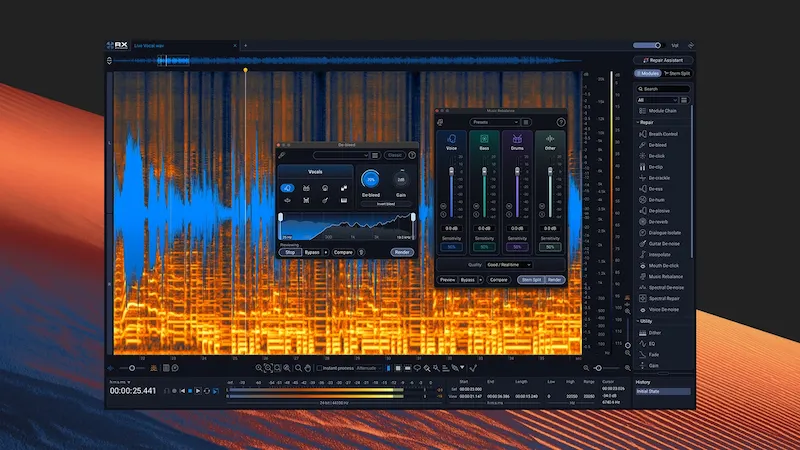
iZotope RX 12 introduces Scene Rebalance, Stems View, and expanded real-time processing — but the real shift is strategic. RX is moving beyond pure restoration into AI-assisted separation, without fully solving its core limitation: artifacts.
Bottom line: RX 12 improves workflow and speed. It does not meaningfully improve separation quality or overall audio results.
This evaluation is based on real-world use in post-production and music workflows, not feature descriptions.
What is iZotope RX 12 and what it’s actually used for
iZotope RX 12 is a dedicated audio repair platform — not a mixing or mastering plugin. It’s designed for situations where the source is compromised and re-recording isn’t an option.
In practice, RX is used for corrective work that standard plugins can’t handle:
- noise and interference removal (hum, broadband noise, environmental recordings)
- dialogue cleanup for film, podcast, and broadcast
- spectral editing to remove specific events inside a waveform
- bleed reduction in multi-mic recordings
Key point: RX operates on damaged material. It restores usability — it does not enhance mix quality or replace proper production workflows.
This distinction becomes critical when comparing restoration to actual finishing stages like mixing vs mastering, where the goal is to shape sound rather than repair it.
What’s new in iZotope RX 12
iZotope RX 12 introduces new modules and updates existing ones, but the changes are uneven — some affect workflow, others are incremental at best.
- Scene Rebalance — separates dialogue, music, and effects from a mixed source. Useful for post fixes, but not accurate enough for reconstruction or creative remixing.
- Stems View — exposes separated components as editable layers. This enables targeted processing, but still depends on the quality of the initial separation.
- Rebuilt De-bleed — removes the need for a reference track and works in real time. This is a genuine workflow improvement, though accuracy varies with source complexity.
- Realtime processing — expands to key modules. Faster iteration, but increased CPU load and no replacement for offline precision.
- Updated neural networks — slightly cleaner isolation, but artifacts remain when pushed beyond moderate correction.
What actually changed: RX 12 is less about new sound quality and more about reducing friction in repair workflows.
Real-world performance
In practical use, iZotope RX 12 behaves predictably: it performs well within its limits and degrades quickly when pushed beyond corrective use.
Dialogue cleanup: consistent results with moderate settings. Noise reduction and Dialogue Isolate improve intelligibility without heavy artifacts, as long as processing remains conservative.
Music Rebalance: effective for quick fixes, such as lifting vocals or reducing background elements. However, separation introduces phase issues and residual bleed, making it unsuitable for release-quality work.
De-bleed: faster to deploy and more accessible without a reference track. In dense arrangements, accuracy drops and the algorithm begins to remove useful signal along with bleed.
Conclusion: RX 12 is reliable as a corrective tool. When used aggressively, it introduces artifacts faster than it improves the source.
In cases where the source isn’t damaged but simply unbalanced, proper preparation matters more than repair — see how to prepare a mix for mastering before relying on corrective tools.
iZotope RX 12 vs RX 11 — what actually changed
The difference between iZotope RX 12 and RX 11 is incremental. Most updates affect workflow speed and usability rather than processing quality.
| Feature | RX 11 | RX 12 | Practical impact |
|---|---|---|---|
| De-bleed | requires reference track | no reference needed | faster setup, but accuracy still depends on source complexity |
| Realtime processing | limited | expanded across modules | quicker decision-making, but not a replacement for offline rendering |
| Music Rebalance | basic separation | refined neural models | slightly cleaner results, still not usable for final production |
| Dialogue Isolate | offline-focused | improved + realtime | better workflow for dialogue editing, minimal change in sound quality |
| Scene-level control | not available | Scene Rebalance added | useful in post workflows, limited value in music production |
Verdict: RX 12 improves speed, accessibility, and workflow. It does not introduce a meaningful jump in audio quality or separation accuracy.
Where to download iZotope RX 12 and pricing
iZotope RX 12 is available through the official iZotope website. A trial version is offered, but with export and time limitations.
- RX 12 Elements — $99
Entry-level cleanup tools. Suitable for basic noise reduction, but limited for professional work. - RX 12 Standard — $399
Core restoration toolkit. Covers most use cases for producers and editors. - RX 12 Advanced — $1399
Full post-production suite with extended modules and deeper control. Designed for professional environments.
Upgrade pricing from RX 11 starts at $129, but the value depends on how often RX is used in your workflow.
Key consideration: RX 12 is a specialized tool. For occasional use, Standard is sufficient — Advanced only makes sense for consistent post-production work.
Should you buy iZotope RX 12
iZotope RX 12 is a task-specific tool. Whether it’s worth buying depends entirely on how often you deal with compromised audio.
Buy if:
- you work in post-production — dialogue cleanup, broadcast, and film workflows benefit directly from the new tools
- you regularly repair recordings — noise, bleed, and artifacts that can’t be fixed in a mix
- you need faster turnaround — real-time processing and improved workflow reduce editing time
Skip if:
- you expect clean stem extraction — separation remains approximate and artifact-prone
- you’re looking for mix improvement — RX does not enhance balance, depth, or tone
- you already use RX 11 effectively — the upgrade adds speed, not a major quality jump
Bottom line: RX 12 is worth it for consistent repair work. For occasional use or music-focused workflows, the upgrade is harder to justify.
Many issues users try to fix with RX are actually mix or mastering problems — see common cases in why your track sounds worse after mastering.
RX 12 vs competitors
 The audio repair and separation space has split into two directions: traditional restoration and AI-driven extraction. iZotope RX 12 sits in between, but doesn’t lead in both.
SpectraLayers — offers deeper layer-based editing and more precise spectral control. Better suited for detailed manipulation, but comes with a steeper learning curve.
RipX / Lalal — focus on AI separation. They deliver cleaner stem extraction, especially for music, but lack RX’s surgical repair tools.
Where RX 12 stands: it remains the most complete restoration environment, combining noise reduction, spectral repair, and analysis in a single workflow.
Limitation: its separation tools are still corrective, not creative — useful for fixing issues, not rebuilding mixes.
FAQ
Is iZotope RX 12 good for mastering?
No. iZotope RX 12 is designed for audio repair, not mastering. It can clean problematic material before mastering, but it does not improve balance, loudness, or tonal quality.
Is RX 12 better than RX 11?
Yes in terms of workflow. RX 12 adds real-time processing, improved De-bleed, and new tools like Scene Rebalance. However, the improvement in audio quality is incremental rather than significant.
Can RX 12 create clean stems?
No. Separation tools in RX 12 are designed for corrective work. They introduce artifacts when pushed and are not suitable for rebuilding mixes or professional stem extraction.
Is there a free version of iZotope RX 12?
There is no full free version. A trial is available, but it includes limitations on export and usage.
Which version of RX 12 should you choose?
Standard is sufficient for most producers and editors. Advanced is only justified for consistent post-production work and complex restoration tasks.
Is RX 12 worth upgrading from RX 11?
If you rely on RX daily, the workflow improvements can justify the upgrade. For occasional use, the difference is not critical.
Final verdict
iZotope RX 12 is a refinement, not a reinvention. The update focuses on workflow speed, accessibility, and incremental improvements rather than a fundamental leap in audio quality.
What it does well: fast, reliable repair of dialogue, noise, and problematic recordings — especially in post-production environments.
Where it falls short: AI-based separation remains limited, with artifacts appearing under heavier processing. It does not replace dedicated stem extraction tools or traditional mixing workflows.
Verdict: RX 12 is a practical upgrade for engineers who rely on restoration daily. For music-focused users or occasional use, the benefits are incremental rather than essential.