
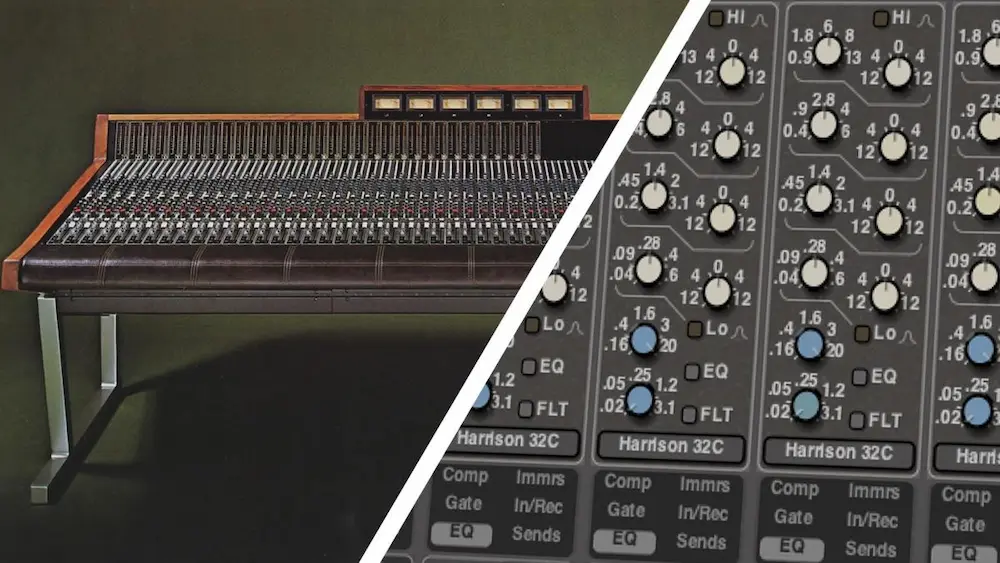
Harrison Mixbus 12 is built around a question most DAWs leave to the user: how much of the mixing system should already exist before the session opens? Instead of starting with a largely neutral mixer and relying on plugin chains to define its character, Mixbus puts channel processing, bus routing, saturation, and master-section controls into the core signal path.
Version 12 extends that approach rather than redesigning the DAW around a new feature list. DeEssing and DeNoising are now available directly on every channel, cue and MIDI tools have been expanded, and Mixbus 12 Pro adds switchable SSL 9000J EQ and dynamics alongside Dolby Atmos mixing. The practical question is whether those additions make Mixbus faster and more coherent for real mixing work—or simply add more controls to an already specialized workflow.
Our verdict: Mixbus 12 is one of the strongest DAWs for engineers who want a dedicated console-style mixing environment, especially for prepared multitracks and committed productions. Its integrated processing can make mixing faster and more coherent, but producers who depend on advanced sequencing, modular workflows, or extensive DAW customization may be better served elsewhere. The standard version offers the better value for most stereo engineers; Mixbus 12 Pro makes sense primarily for users who need its SSL 9000J processing or Dolby Atmos workflow.
What’s New in Harrison Mixbus 12?
Mixbus 12 expands the DAW in three areas: integrated channel processing, production workflow, and the feature gap between the standard and Pro editions. The most important additions are per-channel DeEssing and DeNoising, expanded cue and MIDI tools, workflow refinements across the main production environment, and—on Mixbus 12 Pro—switchable SSL 9000J EQ and dynamics alongside Dolby Atmos mixing.
| New in Mixbus 12 | Why It Matters |
|---|---|
| Per-channel DeEsser | Handles routine sibilance and frequency-dependent aggression without opening another plugin. |
| Per-channel DeNoiser | Reduces low-level noise before compression, saturation, and bus processing make it more obvious. |
| Expanded cue and MIDI tools | Makes Mixbus more practical outside a strictly mix-only workflow. |
| SSL 9000J processing in Pro | Adds an alternative EQ and dynamics architecture directly inside the mixer. |
| Dolby Atmos in Pro | Creates a clear upgrade path for engineers delivering immersive mixes. |
The update does not fundamentally change what Mixbus is. Version 12 strengthens the existing console-centered workflow by moving more routine processing into the mixer and giving Pro users a broader choice of channel architecture and delivery formats.
Harrison Mixbus 12 Pros and Cons
| Pros | Cons |
|---|---|
| Fast console-style mixing workflow | Less flexible for production-heavy sessions |
| Integrated EQ, dynamics, saturation, DeEssing, and DeNoising | Dense mixer can become harder to navigate in large projects |
| Strong fit for prepared multitracks and stem mixing | Opinionated architecture will not suit highly customized workflows |
| Can reduce dependence on repetitive third-party plugin chains | Integrated processing makes cumulative overprocessing easier |
| Excellent value for a dedicated mixing DAW | Pro is harder to justify without SSL 9000J or Dolby Atmos requirements |
Why Mixbus 12 Takes the Opposite Approach to Modern DAW Design
 Most modern DAWs are designed as flexible frameworks. The user chooses the channel strip, builds the bus structure, decides where saturation belongs, configures monitoring, and saves the result as a template. With enough work, almost any major DAW can be turned into an efficient mixing system.
The cost is that the system has to be built and maintained. Routine moves often involve opening separate plugin windows, comparing processors, managing large templates, and revisiting choices that should take seconds. None of this prevents a good mix, but it adds context switching before the mix has established a clear balance or direction.
Mixbus 12 starts further down the road. Its channel processing, bus structure, saturation, and master controls are part of the mixer rather than a layer assembled around it. The practical advantage is not fewer options. It is faster access to the controls used repeatedly across a session.
That approach reflects Harrison’s background in large-format console design, but the hardware lineage matters only if it improves the software workflow. Mixbus does not reproduce every electrical interaction of a physical desk, nor does it need to. Its more useful achievement is preserving the operating logic of a console: make broad decisions across the mix, keep core processing visible, and reserve third-party plugins for problems that require more specialized tools.
Mixbus 12 extends that logic with DeEssing and DeNoising on every channel. These are not headline features because the industry lacked de-essers or noise-reduction plugins. Their value is that routine cleanup can now happen inside the same channel workflow as EQ and dynamics, without turning every corrective move into another insert, window, or plugin decision.
Harrison Mixbus 12 Review: Where the Console Workflow Actually Pays Off
The real test of Mixbus 12 is not whether its mixer looks more like a console than competing DAWs. It is whether that layout changes the speed and quality of decisions across a full session.
The advantage becomes clear once the rough balance is in place. Core channel controls remain part of the mixer, so an engineer can move through drums, bass, vocals, guitars, and buses without treating each track as an isolated processing task. The mix stays visible as a set of relationships rather than a sequence of plugin windows.
That changes how problems are identified. A vocal that feels buried may not need more compression; the guitars may need less upper midrange. A kick that lacks impact may be competing with the bass rather than lacking processing. When several channels can be evaluated in context, it is easier to solve the interaction instead of overprocessing the track that first draws attention.
This is where Mixbus is strongest: the broad shaping stage between a static balance and detailed corrective work. Level, tone, dynamics, and bus relationships can be adjusted quickly while the hierarchy of the mix remains intact. For sessions built from recorded multitracks or committed stems, a large part of the mix can be established before specialized plugins become necessary.
The benefit becomes smaller once the work turns surgical. Resonance control, detailed dynamic EQ, restoration, advanced vocal processing, and highly specific sound design still pull the session toward dedicated plugins. Mixbus does not eliminate that layer. It delays the point at which the mixer has to become a collection of separate processing environments.
Per-Channel DeEssing Solves More Than Vocal Sibilance
A DeEsser on every channel may look like a vocal-production convenience, but its practical range is wider. Sibilance is only the obvious use case. Backing vocals, bright overheads, hi-hats, distorted guitars, aggressive synths, and sampled loops can all produce frequency-dependent peaks that become distracting once the arrangement fills out.
These problems do not always justify a dedicated dynamic EQ or multiband processor. If the issue is simple and repeatable, the built-in DeEsser can reduce the offending energy directly from the mixer and keep the session moving. That is particularly useful across layered material, where opening separate processors on several related tracks can turn a small corrective task into unnecessary session management.
The limitation is precision. A conventional DeEsser is not a substitute for dynamic EQ when the problem shifts in frequency, requires narrow-band control, or changes significantly between sections. It is also the wrong tool for every harsh source simply because high-frequency energy is involved.
Used within those limits, the per-channel implementation makes sense. It handles routine sibilance and broad frequency-dependent aggression before a more specialized processor is necessary. The value is not that Mixbus 12 eliminates third-party tools; it keeps minor problems from automatically becoming plugin chains.
Per-Channel DeNoising Targets the Noise Problems That Build Up Across a Mix
Noise reduction is an unusual choice for universal channel processing. It is normally treated as a repair stage handled before mixing, often with dedicated restoration software. In practice, many sessions contain noise that is too minor for forensic cleanup but too persistent to ignore.
Guitar amp hiss, room tone, analog-chain noise, headphone bleed, and noisy location recordings may be barely noticeable in isolation. Stack enough of those tracks, then add compression and bus processing, and the combined noise floor can become obvious in intros, breakdowns, vocal gaps, and fade-outs.
A per-channel DeNoiser is useful at that level. Reducing low-level noise at the source can prevent it from accumulating downstream, without turning routine cleanup into a separate restoration pass. This is especially relevant in large recorded sessions, where ten individually acceptable tracks can create a noticeably noisy mix when they are summed.
The built-in processor should not be treated as a replacement for spectral restoration. Variable environmental noise, mains hum, clicks, broadband contamination, and damaged recordings still require more specialized control. Its role is narrower: clean up predictable low-level noise before compression, saturation, and bus processing make it harder to ignore.
Mixbus 12 vs Mixbus 12 Pro: Who Actually Needs the Upgrade?
The difference between Mixbus 12 and Mixbus 12 Pro is more substantial than a typical feature-tier split. Both versions retain the core Harrison mixing environment, but Pro adds switchable SSL 9000J EQ and dynamics on every channel, along with Dolby Atmos mixing tools.
The additional channel processing is the more relevant upgrade for most stereo engineers. Standard Mixbus is built around Harrison’s own console logic; Pro adds another EQ and dynamics architecture that can be selected according to the source or the way an engineer prefers to work. That matters most for users who want to stay inside the mixer rather than recreate alternative channel-strip workflows with third-party plugins.
It does not make the Pro edition automatically better for mixing. If the Harrison channel architecture is the reason for choosing Mixbus in the first place, or if a session already relies on preferred third-party EQ and dynamics plugins, the standard version covers the essential workflow. Paying for another built-in console option only makes sense if it will replace processors or decisions already present in the session.
Dolby Atmos creates a clearer dividing line. Engineers delivering immersive mixes have a practical reason to choose Pro. Stereo-only producers do not. Atmos support adds capability, but it adds no value to a workflow that never requires immersive delivery.
For most buyers, the decision is straightforward: choose Mixbus 12 for the Harrison mixing environment; choose Mixbus 12 Pro if the SSL 9000J processing will become part of the daily channel workflow or if Dolby Atmos is an actual delivery requirement.
Does Harrison Mixbus 12 Really Have an Analog Sound?
 The question of whether Harrison Mixbus has an “analog sound” has followed the DAW for years, but the useful answer requires separating two different issues: neutral playback and the processing built into the Mixbus signal path.
A DAW should not produce a dramatic sonic advantage simply by playing the same files at matched levels through equivalent routing and processing. The more relevant difference is that Mixbus places console-style processing and saturation inside the normal channel, bus, and mix workflow. Those stages can affect the result, but only when they are actually used and driven.
This makes gain structure important. Pushing channels and buses can add harmonic density and soften transient edges, but cumulative saturation is easy to overestimate while working. A source may sound fuller in isolation while the complete mix gradually becomes flatter, less open, and congested through the low mids.
The effect is most useful when it replaces deliberate parts of an existing plugin chain. Drums can gain density at the bus stage, guitars can be grouped with a more consistent texture, and the mix can develop harmonic continuity without loading a different analog-modeling plugin across every section. The same systems-based logic appears in integrated hardware such as the Heritage Audio TUBESTRIP, where the value comes from how multiple stages interact inside one signal path rather than from treating each processor as an isolated effect. The advantage is consistency, not automatic improvement.
That is the practical meaning of the Mixbus “sound.” The software makes saturation and console-style tone shaping available as part of routine mixing rather than as a separate layer added later. The result still depends on source material, level structure, routing, and how aggressively the processing is used.
Engineers with established bus chains and carefully chosen saturation tools may not hear anything they cannot already build elsewhere. The difference is more significant for users who want those decisions integrated into the mixer instead of assembled from multiple plugins. Mixbus 12 does not make neutral digital audio inherently more analog; it makes analog-style processing harder to separate from the way the mix is constructed.
Where Mixbus 12 Works Best — and Where Its Console Workflow Becomes a Limitation
Mixbus 12 makes the strongest case for itself when the session is ready to be mixed. Edited multitracks, consolidated stems, live recordings, and productions with committed sound design all fit the software better than projects still moving between arrangement, programming, and mix decisions.
The Strength: Getting From Raw Tracks to a Working Mix Quickly
With prepared audio, the advantage is speed. Routing, channel shaping, dynamics, bus processing, and saturation can be established inside one mixer without first building the processing framework around the session. Specialized plugins remain available, but they enter the workflow because a specific problem requires them—not because every channel starts empty.
The difference is most noticeable early in a mix. A workable balance can develop while routing and tonal structure are still being established, rather than after a template has been populated and multiple plugin chains have been configured. On large multitrack sessions, removing even a small amount of setup from each channel can materially shorten the path to the first useful mix pass.
Mixbus also encourages earlier commitment. Instead of auditioning several EQs, compressors, or saturation plugins for routine moves, the engineer can use the mixer to establish direction and reserve detailed comparisons for sources that actually need them. That is not inherently better than a modular workflow, but it is often faster when the job is to finish a mix rather than keep redesigning its processing architecture.
The Weakness: Production-Heavy Workflows Fit Less Naturally
The same structure that makes Mixbus efficient for mixing can become restrictive when the session is still being composed. Producers who depend on complex MIDI systems, generative tools, clip-based arrangement, modular routing, or DAW-specific instruments may gain little from moving the entire production process into a console-centered environment.
The distinction is less about genre than session behavior. An electronic production built from committed audio can fit Mixbus extremely well. A rock session with extensive programming, sound replacement, editing, and arrangement changes may not. Mixbus is at its best when the mixer is the main workspace rather than one component inside a larger composition system.
Mixbus 12 expands its cue and MIDI capabilities, which makes the DAW more complete, but those improvements do not erase its specialization. Users choosing a platform primarily for advanced sequencing, flexible routing, or a lightweight production environment may prefer a more modular DAW; our Waveform 14 review examines the opposite design philosophy, where user-defined routing and production flexibility matter more than a fixed console architecture.
Built-In Processing Makes Overprocessing Easier
Integrated controls remove setup friction, but they also remove the small pause that often forces an engineer to decide whether processing is necessary. When compression, saturation, DeEssing, and other corrective tools are already available across the mixer, it becomes easy to use them by default rather than in response to a specific problem.
The cumulative effect matters more than any single setting. Light compression across many channels, saturation at several bus stages, and repeated high-frequency control can gradually reduce transient contrast and tonal openness even when no individual processor sounds excessive in isolation.
This is not a flaw unique to Mixbus, but an integrated console makes the pattern easier to build. The fastest workflow is only an advantage when bypassing a processor remains as deliberate as engaging it.
Large Sessions Can Expose the Cost of a Dense Mixer
A console-style interface keeps many controls available at once, but that density becomes harder to manage as track counts rise. Screen size, channel navigation, bus visibility, and session organization matter more when the mixer is carrying a larger share of the workflow.
Engineers coming from highly configurable DAWs may also miss the ability to reshape the workspace around a specific task. Mixbus asks the user to adapt to a more defined operating model, and the learning curve is not only about finding commands; it is about deciding whether that model remains efficient across different types of sessions.
For that reason, Mixbus 12 may be easier to adopt first as a dedicated mixing environment than as an immediate replacement for an established production DAW.
Harrison Mixbus 12 vs LUNA, Reaper, Pro Tools, and Studio One
Mixbus 12 is not differentiated by a feature that competing DAWs cannot reproduce. Its advantage is that the mixer arrives with a defined signal path and working method already in place. The relevant comparison, then, is not which DAW has the longest feature list, but how much setup each platform requires before an engineer can work the way they want.
| DAW | Core Strength | Mixing Workflow | Best Fit | Main Trade-Off |
|---|---|---|---|---|
| Harrison Mixbus 12 | Integrated console architecture | Channel- and bus-centered with built-in processing and saturation | Mix engineers, stem mixing, recorded multitracks | Less flexible for production workflows built around sequencing and sound design |
| LUNA | Recording and mixing inside an analog-inspired ecosystem | Console-style workflow with integrated extensions and tape-oriented processing | Engineers who want recording and mixing in one tightly connected environment | Less compelling if the surrounding ecosystem is not part of the workflow |
| Reaper | Routing flexibility, customization, and efficiency | Almost entirely user-defined | Engineers who want to build and maintain their own system | More configuration is required to create a consistent console-style workflow |
| Pro Tools | Editing, session exchange, and studio standardization | Traditional studio workflow built around tracks, inserts, sends, and automation | Commercial studios, complex editing, collaboration, and session interchange | Requires external processing or templates to create a comparable integrated channel workflow |
| Studio One | End-to-end production and mastering workflow | Flexible environment spanning composition, mixing, and final delivery | Producers who want one DAW from writing through release preparation | Broader scope means less emphasis on a fixed console-style mixing architecture |
Mixbus 12 vs LUNA: Two Different Versions of the Analog-Style DAW
LUNA is the closest conceptual alternative to Mixbus 12, but the two platforms approach analog-style audio production from different directions. Mixbus begins with the mixer. LUNA places recording, production, and analog-inspired processing inside a broader connected environment.
For engineers working primarily with imported multitracks or stems, Mixbus is the more direct proposition. Its channel and bus architecture is immediately central to the session, and the software makes sense even without a larger hardware or plugin ecosystem around it. LUNA becomes more attractive when recording and mixing are part of the same integrated workflow and its surrounding tools already play a significant role in the studio.
The practical choice is less about which DAW sounds more analog. It is about where the session begins. If the job starts with prepared audio and the mixer is the main workspace, Mixbus has the clearer focus. If tracking, production, and mixing need to remain closely connected, LUNA may fit more naturally.
Mixbus 12 vs Reaper: Defined Workflow or Maximum Control?
Reaper and Mixbus solve almost opposite workflow problems. Reaper provides a highly flexible technical framework; Mixbus provides a mixer with much of its operating logic already decided.
A skilled Reaper user can build an advanced console-style environment with custom routing, channel strips, bus processing, metering, macros, scripts, and screen layouts. That system can be tailored far beyond what Mixbus allows. The cost is ownership: the user has to design it, test it, maintain it, and update it as the workflow changes.
Mixbus removes much of that configuration. For engineers who regularly import prepared tracks and want to begin balancing immediately, the fixed architecture can be an advantage. For users whose efficiency comes from custom actions, unusual routing, or heavily personalized session design, Reaper remains the stronger platform.
The deciding factor is not technical capability. It is whether customization is part of the solution or part of the overhead.
Mixbus 12 vs Pro Tools: Mixing Focus vs Studio Interoperability
Pro Tools remains difficult to separate from professional recording, editing, session exchange, and commercial studio collaboration. Mixbus does not need to replace that role to be useful.
For an independent mix engineer, a practical setup can involve editing, comping, tuning, and session preparation in Pro Tools, followed by consolidated multitrack export into Mixbus. This preserves Pro Tools where interoperability and detailed editing matter while using Mixbus as the dedicated mixing environment.
The cost is revision management. Every transfer creates another boundary in the project. Arrangement changes, replacement vocals, tempo-dependent effects, and late production revisions can require new exports and careful version control. The two-DAW approach works best when production is genuinely finished before mixing begins.
Engineers who exchange active sessions with clients and studios may be better served by staying in Pro Tools throughout the project. Engineers who receive committed audio and deliver finished stereo or immersive mixes have more freedom to choose a separate platform for the mix itself.
Why Mixbus 12 May Work Better as a Dedicated Mixing DAW
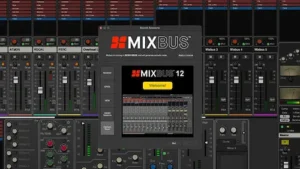 For many producers and engineers, the strongest reason to use Harrison Mixbus 12 is not to replace the main production DAW. It is to create a clean boundary between production and mixing.
Arrangement, editing, comping, tuning, MIDI programming, and sound design can remain in the environment already optimized for those tasks. Once the production is approved, consolidated multitracks can move into Mixbus for balance, tone shaping, dynamics, automation, bus processing, and the final mix print.
That separation changes the session immediately. Virtual instruments, alternate takes, inactive playlists, production experiments, and temporary routing no longer compete for attention. The Mixbus project contains the audio that is actually being mixed, which makes routing easier to audit and reduces the temptation to keep rewriting the production while trying to finish it.
For full mix control, consolidated multitracks are usually preferable to broad stems. Stems can be efficient when the production is already highly committed, but they also lock internal balances and processing relationships that may need to change once the complete mix is evaluated. A drum stem, for example, is faster to transfer than twelve individual drum tracks but offers far less control over transient balance, ambience, and low-frequency interaction.
The two-DAW workflow also tests Mixbus on the task it is best equipped to perform. There is no need to recreate the sequencing, instrument, or editing capabilities of the original production environment. The only relevant question is whether Mixbus improves the speed, organization, and quality of the mix process.
The cost is revision management. Once production and mixing live in separate applications, every late arrangement change, replacement vocal, edited performance, or revised programmed part creates another transfer. Consolidated files need identical start points, clear naming, reliable version control, and consistent sample-rate handling. Tempo-synchronized effects and automation require additional attention if they are expected to remain editable after export.
This workflow is natural for mix engineers who already receive prepared client multitracks. It is less suitable for self-producing artists who continue changing the arrangement, sound design, and performances deep into the mix. Mixbus works best as a separate mixing stage when the production is actually ready to leave production—and the same principle applies when preparing a mix for mastering: unresolved production decisions should not be pushed downstream and treated as mastering problems.
How Mixbus 12 Holds Up Beyond the Studio Monitors
Mixbus 12 can change how quickly a mix develops, but it does not change the conditions under which that mix will succeed. Translation still depends on monitoring, balance, spectral control, dynamics, and the amount of processing accumulated before the final master. The console architecture can help those decisions—or make problems harder to notice if every stage is treated as an opportunity to add more density.
Cumulative Saturation Can Hide Translation Problems
One of the attractions of Mixbus is the ease with which harmonic density can be built across channels and buses. The same feature can make a mix feel more cohesive on full-range monitors while gradually reducing separation elsewhere.
The low mids deserve particular attention. Small amounts of saturation across several stages may add weight to individual sources, but the combined result can become congested once the mix reaches laptop speakers, phones, cars, or compact Bluetooth systems. The problem is rarely one obviously overdriven channel. It is the accumulation of individually reasonable decisions.
Controlled bypass comparisons are therefore more useful than judging each saturation stage in isolation. Low-level listening can reveal whether the vocal and rhythmic hierarchy still holds together, while mono checks expose masking that stereo width may conceal. Alternate speakers remain essential because a mix that feels rich on the main monitors can become small once excess density starts competing for limited playback bandwidth.
Mixbus Processing Can Reduce Mastering Headroom Before the Mastering Stage
Mixbus can produce a dense, controlled mix before a limiter is inserted, but that should not be confused with a master that will tolerate additional level. Integrated compression and saturation can reduce crest factor and soften transients gradually enough that the loss of headroom is not immediately obvious.
This becomes a problem when the mix reaches mastering already close to its practical density limit. A track may sound polished at moderate playback level yet respond poorly to further limiting because the drums have lost transient margin, the low end is already compressed, or the buses have accumulated too much nonlinear processing.
For engineers printing a premaster from Mixbus, the useful question is not how much numerical headroom remains below 0 dBFS. It is how much dynamic and tonal flexibility remains in the signal. Lowering the output fader cannot restore transients or undo saturation that has already been printed upstream, which is why the relationship between loudness, clipping, and usable mastering headroom matters more than simply leaving a few decibels below digital full scale.
Self-mastering users should treat mix density and final loudness as separate decisions. If the mix needs aggressive bus drive to feel finished before mastering begins, the final loudness stage may have very little room left to work.
The CPU Question Depends on How Much Third-Party Processing Mixbus Replaces
A meaningful CPU comparison cannot be made between Mixbus 12 and an empty session in another DAW. The relevant comparison is between complete working sessions capable of producing the same mix.
If the built-in channel and bus tools replace separate EQ, dynamics, saturation, DeEssing, and noise-control plugins across a large session, Mixbus may reduce plugin count and simplify session management. If those integrated tools remain active while full third-party channel chains are added on top, the efficiency argument disappears.
Performance also depends on what remains in the session. Oversampling, look-ahead processing, linear-phase tools, virtual instruments, low buffer settings, automation density, and external hardware routing can outweigh any savings created by integrated channel processing.
For large projects, the useful measure is not whether Mixbus is inherently “light” or “heavy.” It is whether its built-in architecture replaces enough external processing to make the complete session easier to run and manage.
Who Is Harrison Mixbus 12 Actually For?
Mixbus 12 is best suited to engineers whose sessions become more efficient once the production is committed and the mixer becomes the main workspace. The clearest fit is someone who regularly receives recorded multitracks, consolidated audio, or finished productions that are ready for balance, tone shaping, dynamics, automation, and bus processing.
The strongest candidates are mix engineers, recording engineers who finish their own projects, and producers who prefer broad contextual decisions before detailed plugin work. Users who treat buses as major tonal stages and want core processing available across the mixer are more likely to benefit from Mixbus than those who build every session around a different processing architecture.
It can also make sense as a second DAW. A producer may prefer another platform for composition, MIDI programming, editing, or sound design but still want a more focused environment once the project reaches the mix stage. In that role, Mixbus does not have to replace an established production system to justify its place in the studio.
The weaker fit is a workflow built around advanced sequencing, clip-based performance, generative tools, modular sound design, or extensive DAW customization. Users who already have a fast, reliable mixing template in another platform should also be cautious. Rebuilding a mature workflow only makes sense if Mixbus solves a specific problem—such as excessive setup, fragmented channel processing, or an inefficient transition from production to mixing.
The decision should therefore be based on workflow friction, not the promise of an inherently better-sounding DAW. If the current system already gets from prepared tracks to finished mixes quickly and consistently, Mixbus 12 may offer a different way of working without offering a meaningful improvement.
Verdict: Is Harrison Mixbus 12 Worth It?
Yes—if mixing is the part of the workflow you want to improve. Harrison Mixbus 12 is much harder to justify as a replacement for a production DAW that already handles composition, editing, and sound design efficiently.
Its value comes from having the core mixing system already in place. Channel processing, buses, saturation, cleanup tools, and master controls are part of the working environment rather than a framework assembled from templates and plugin chains. The new per-channel DeEsser and DeNoiser strengthen that approach because they keep more routine corrective work inside the mixer instead of adding another layer of session management.
Mixbus 12 Pro is a more specific purchase. The additional SSL 9000J EQ and dynamics matter if they will become part of the daily channel workflow, while Dolby Atmos support matters only when immersive delivery is an actual requirement. Neither feature is a reason to pay for Pro simply because it expands the specification sheet.
The case against switching is just as practical. Engineers with mature templates, fast custom workflows, or production-heavy sessions may gain little from rebuilding their system around a more fixed console architecture. Mixbus can replace tools without removing any real friction, and a different mixer is not automatically a better one.
The strongest use case remains straightforward: prepared multitracks come in, the session needs to become a mix, and the engineer wants to spend less time constructing the processing environment around it. In that role, Mixbus 12 is one of the more focused DAWs available. For sequencing, modular production, or constant arrangement changes, its advantages become much less important.
Mixbus 12 does not justify itself by making digital audio inherently better. It justifies itself by shortening the distance between prepared tracks and deliberate mix decisions. If that is the bottleneck in your current workflow, it is worth using. If it is not, there is little reason to switch.
Harrison Mixbus 12: Overall Rating
| Category | Rating |
|---|---|
| Mixing Workflow | 9.5/10 |
| Console Integration | 9.5/10 |
| Sound and Processing | 9/10 |
| Production Flexibility | 7.5/10 |
| Session Management | 8.5/10 |
| CPU and System Efficiency | 8.5/10 |
| Value for Money | 9.5/10 |
| Overall | 8.9/10 |
Mixing Workflow — 9.5/10: This is the strongest reason to use Mixbus 12. Channel processing, buses, saturation, routing, and master controls operate as one mixing system rather than a framework that has to be assembled from plugins and templates. The score stops short of 10 because engineers with mature custom workflows may gain less from the fixed architecture.
Console Integration — 9.5/10: Mixbus does more than place analog-style graphics over a conventional DAW mixer. Core processing is integrated closely enough to change how quickly an engineer moves across channels, buses, and the complete mix. The limitation is the other side of the same design: users who prefer highly configurable mixers may find the console logic restrictive.
Sound and Processing — 9/10: The integrated saturation, channel tools, dynamics, and bus architecture can produce cohesive, dense mixes without requiring a large stack of third-party processors. From a mastering perspective, the processing deserves respect rather than automatic praise: excessive drive across several stages can reduce transient margin and leave less flexibility in the premaster.
Production Flexibility — 7.5/10: Mixbus 12 is a capable DAW, but its competitive advantage becomes weaker when sequencing, generative systems, clip-based production, deep MIDI work, or modular sound design dominate the session. Producers with specialized writing environments may get better results by keeping those tools and using Mixbus as a separate mixing platform.
Session Management — 8.5/10: Prepared multitracks and committed stems fit the workflow extremely well, and the defined mixer can reduce the technical clutter that builds up in production-heavy projects. Very large sessions expose the cost of a dense console interface, however, while two-DAW workflows require disciplined file naming, version control, and revision management.
CPU and System Efficiency — 8.5/10: Mixbus can reduce session complexity when its integrated EQ, dynamics, DeEssing, DeNoising, and saturation replace external plugin chains. The advantage disappears when users keep the entire built-in architecture active and stack equally heavy third-party processing on top. Efficiency depends on what Mixbus actually replaces.
Value for Money — 9.5/10: The standard edition offers unusual value for engineers who specifically want a dedicated console-style mixing environment. Mixbus 12 Pro is less universally compelling, but the additional SSL 9000J processing and Dolby Atmos tools can justify the higher cost when they solve an actual workflow or delivery requirement.
Overall — 8.9/10: Harrison Mixbus 12 is one of the strongest DAWs for engineers who want to move from prepared tracks to deliberate mix decisions without first constructing the mixer around the session. It loses points because the same opinionated architecture is less convincing for composition-heavy production and highly customized workflows. As a dedicated mixing environment, however, its focus is a genuine advantage rather than a limitation disguised as simplicity.
Harrison Mixbus 12 FAQ
Can Harrison Mixbus 12 use third-party plugins?
Yes. Mixbus supports third-party plugin workflows alongside its built-in channel and bus processing. External plugins remain useful for specialized dynamic EQ, restoration, limiting, metering, pitch correction, and sound design that goes beyond the integrated console tools.
Is Harrison Mixbus 12 good for mastering?
Yes, but its strongest advantage remains mixing. Mixbus can handle stereo mastering with appropriate third-party metering, limiting, and quality-control tools, while dedicated mastering software may be more efficient for album sequencing, metadata, version management, and complex delivery packages.
Can I record directly into Harrison Mixbus 12?
Yes. Mixbus is a full DAW rather than a mix-only application, so recording can remain in the same project as editing and mixing. Its strongest differentiation, however, is still the console-centered mixing environment rather than the fact that it can record audio.
Can I produce in another DAW and mix in Mixbus 12?
Yes. Export consolidated multitracks with identical start points, maintain the original sample rate, and import them into Mixbus. This works best after production is approved, because late arrangement or performance changes require another round of file transfers.
Does Harrison Mixbus 12 sound different from other DAWs?
It can when its integrated processing and saturation stages are used. That does not mean unprocessed playback is automatically superior. The audible result depends on gain structure, routing, bus processing, and how strongly the console-style stages are driven.
Is Mixbus 12 Pro worth the extra cost?
Choose Pro if the additional SSL 9000J EQ and dynamics will become part of your regular channel workflow or if you need Dolby Atmos mixing. For stereo engineers who mainly want the core Harrison console architecture, the standard version may be sufficient.
Is Harrison Mixbus 12 good for electronic music?
Yes, particularly when the production has been committed to audio and is ready for mixing. Producers who depend heavily on advanced sequencing, clip-based performance, generative systems, or modular sound design may prefer to create in another DAW and move the finished multitracks into Mixbus.
Does Mixbus 12 use less CPU than other DAWs?
Not inherently. Performance depends on the complete session, including track count, buffer size, virtual instruments, oversampling, look-ahead processing, and third-party plugins. The built-in architecture can reduce plugin count when it genuinely replaces external processors.
Is Harrison Mixbus 12 better than Reaper for mixing?
Mixbus is faster to configure for a console-style workflow because much of the mixer architecture is already defined. Reaper offers substantially more customization. Mixbus suits engineers who want a ready-made mixing system; Reaper suits users who want to build their own.
Should I switch completely to Harrison Mixbus 12?
Only if it solves a specific problem in the current workflow. Producers with efficient composition and editing systems may be better off keeping their existing DAW and using Mixbus only for mixing. A full switch makes more sense when the current mixer itself is the source of friction.

Yurii Ariefiev is a mastering engineer and audio production editor focused on mix translation, signal flow, saturation, dynamics and the technical decisions that determine how finished records hold up outside the studio.
His analysis of Harrison Mixbus 12 examines the DAW from an engineering perspective: how its console-style architecture affects mixing speed, cumulative processing, premaster headroom and the transition from prepared multitracks to a finished mix.