
Fix Distorted Master — Why It Happens and Where It Actually Breaks
Your master sounded clean in your DAW — now it’s distorted?
Quick answer:
Distortion in a master usually comes from limiter behavior, intersample peaks, encoding, or mix issues.
Fixing it starts with identifying where it breaks — not lowering the level.
This means the problem comes from a specific stage — limiter, export, encoding, or the mix itself.
Lowering the limiter sometimes helps. But in most cases, it doesn’t fix the real problem — it just hides it.
To fix it, you need to identify the exact stage where it breaks.
If the cause isn’t obvious yet, a deeper diagnostic breakdown here: a more detailed look at how mastering issues actually appear.
What Actually Makes a Master Sound Bad — It’s Not One Thing
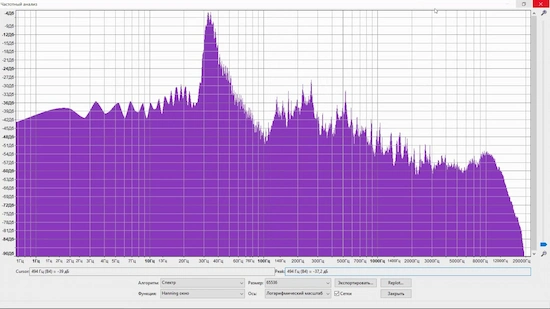 “Distorted” doesn’t always sound like obvious clipping. In many cases, it’s subtle — and that’s why it slips through.
Different symptoms point to different stages — that’s what you need to identify.
Where Distortion Actually Comes From — Five Stages Where Masters Break
If you don’t identify that stage, you’re just guessing — and guessing is why most “fixes” fail.
Limiter distortion.
This is the most common one — and the most misunderstood. It’s not just about pushing too hard. It’s about how the limiter reacts. Fast releases can create a gritty, unstable texture. Slow releases can smear transients until they lose definition. You might still hit your LUFS target, but the signal underneath starts breaking apart.
This is where loudness processing starts affecting the signal itself — not just the level.
We regularly receive tracks hitting -8 to -7 LUFS that still distort on snare hits. Not because of loudness — but because the limiter is reacting too aggressively to fast transients.
Intersample peaks (true peak issue).
Your meter says you’re safe. No red lights. Everything looks clean. But between the samples, the signal actually exceeds 0 dB — and that’s where distortion creeps in. It often shows up after conversion, not during playback in your DAW. This is why true peak control matters. If that concept isn’t fully clear, the LUFS and true peak relationship becomes critical here.
Codec distortion (AAC / streaming).
A track can sound solid before upload and fall apart after encoding. Why? Because lossy codecs don’t preserve peaks the same way. They reshape transients, especially in dense or aggressive masters. The more pushed the signal is, the more artifacts appear.
That moment when your track sounds worse on Spotify — this is usually the reason.
We’ve seen tracks that sounded clean offline but started distorting immediately after platform encoding — especially when pushed close to -8 LUFS.
Clipping during export.
This one is easy to miss. Your session is clean, but the render isn’t. Wrong bit depth, no proper headroom, or a last-stage plugin behaving differently offline — and suddenly the exported file has distortion baked in. You won’t fix that by adjusting the limiter later. The damage is already printed.
We’ve seen exports where the session was clean, but the final file clipped due to offline rendering differences. Same chain, same settings — different result after bounce.
Mix issues exposed in mastering.
In many cases, the master doesn’t create the problem — it exposes what was already there.
Harsh vocals, unstable low end, resonances that were barely noticeable in the mix — once you push the track to competitive loudness, they become obvious.
The limiter doesn’t create the distortion here. It amplifies what was already there.
Each of these cases points to a different stage — and that’s what defines the fix — limiter, peaks, export, encoding, or mix.
Quick Diagnostic — Match the Distortion to the Stage
You don’t fix distortion by guessing. You trace it. The moment you notice when it happens, you’re already halfway to the cause.
If it only shows up after upload — not in your DAW — you’re not dealing with your session anymore. You’re dealing with encoding and playback changes.
If it hits on strong transients — kicks, snares, drops — that points to limiter behavior. Not necessarily too loud, but reacting incorrectly.
If the top end feels brittle or smeared, especially on vocals or hi-hats, that’s usually high-frequency stress. Could be limiter artifacts. Could be something in the mix that got pushed too far.
If everything was clean, then suddenly distorted after export — stop. That’s not a mastering decision. That’s a render problem.
Here’s a fast way to map what you’re hearing:
| What you hear | Where it comes from |
|---|---|
| Sounds clean in DAW, distorted on Spotify | Codec / streaming compression |
| Crunch on kicks and snares | Limiter reaction / transient distortion |
| Harsh, brittle highs | HF overload or limiter artifacts |
| Distortion appears after export | Clipping or rendering issue |
| Low end feels unstable or breaks | Mix imbalance revealed under limiting |
At this point, you should clearly recognize your situation in one of these patterns. If you don’t — you’re dealing with multiple issues at once, which is more common than it seems.
If none of these line up cleanly, the issue might not be isolated. Some masters break in more than one place — especially when both the mix and limiter are pushing in the wrong direction. In that case, a broader breakdown of a deeper look at how mastering issues actually appear helps identify overlapping causes.
Quick check you can do right now:
Lower limiter input by 2–3 dB → export again → compare.
If distortion stays — it’s not the limiter.
If it disappears — limiter behavior caused it.
Why Lowering the Limiter Doesn’t Fix It — The Problem Isn’t Just Level
“Just pull the limiter down.” That’s the default advice. And sometimes — sure — it reduces the damage. But if distortion is already there, lowering the level usually doesn’t remove it. It just makes it quieter.
We see this all the time. A track comes in distorted, the limiter gain gets reduced by a couple dB, and the assumption is: problem solved. Then you listen closer. The crunch is still there. The highs still feel strained. The punch is gone.
Why? Because the issue isn’t just how loud the signal is — it’s how it got there.
If the limiter was reacting aggressively, reshaping transients or flattening movement, that behavior is already baked into the sound. Lowering the output doesn’t undo that. Same with intersample peaks or codec stress — once the signal is pushed into a problematic zone, turning it down after the fact doesn’t reverse the process.
It’s like compressing an image too hard and then reducing brightness. The artifacts don’t disappear. They’re part of the file now.
Quick fixes fail for a simple reason — they don’t target the cause. They target the level, not the mechanism. And until you deal with what actually caused the distortion, you’re not fixing anything — you’re just masking it.
What You Can Fix Yourself — And Where It Stops Being Fixable
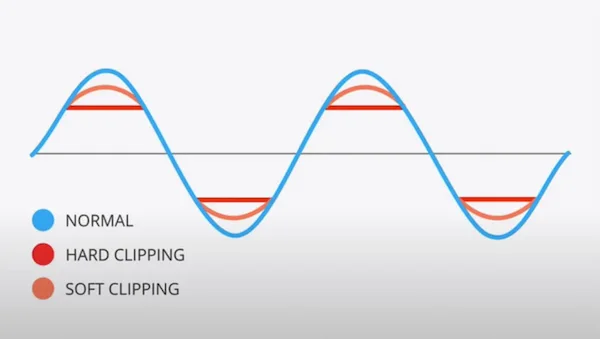 Not every distorted master needs a full redo. But not every problem is fixable either. The key is knowing the difference before you waste time chasing something that won’t improve.
What you can usually fix:
If the distortion is mild — small peaks clipping, slight limiter overshoot — you have room to correct it. Backing off gain before the limiter, adjusting how it reacts, or re-exporting with proper headroom can clean things up. Same goes for export issues. If the distortion only appeared after bounce, and your session was clean, that’s a technical mistake — not a sonic one. Fix the render settings, and the problem disappears.
Where it stops working:
If the distortion comes from the mix itself, mastering won’t save it. Harsh vocals, unstable bass, resonances that collapse under pressure — once those are pushed into a limiter, they don’t smooth out. They get worse.
The same applies to dynamics. If the track has already been flattened too hard, there’s no “restore” button. Once movement is gone, it doesn’t come back. Lowering levels won’t rebuild it.
Codec artifacts are another dead end. If a master falls apart after encoding, the issue isn’t the platform — it’s how the master reacts to compression. You don’t fix that after the fact. You fix the master itself.
We often get masters where everything looks fine on meters, but distortion appears only after upload. In most cases, the track was pushed too close to the edge before encoding.
At this point, the distortion is already part of the signal. Minor adjustments won’t change the outcome — the issue remains in the signal. And that’s usually the moment to step back and look at the source — not the output.
If there’s any doubt whether the issue comes from the mix, this guide on how to prepare a mix for mastering shows what might already be causing the issue before the master even starts.
Not sure what’s actually causing the distortion?
If you’re guessing — you’re probably fixing the wrong thing. We can quickly check your track, identify where it breaks (limiter, codec, mix, or export), and show you what’s really happening — before you waste time trying random fixes.
No guesswork. Real feedback from a mastering engineer.
Why It Sounds Fine in Your DAW — But Falls Apart After Upload
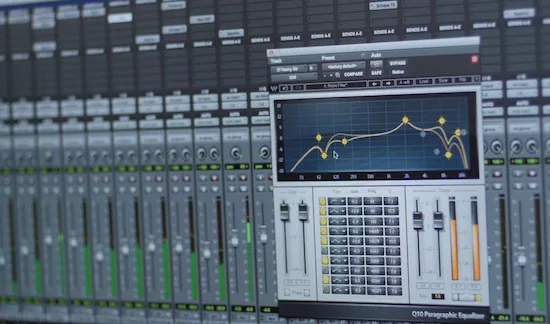 This is where the result stops matching what you heard in the DAW.
You export the track, play it back — sounds solid. Then you upload it. Same file. Different result.
Suddenly the highs feel sharper, the punch gets unstable, and there’s a subtle distortion that wasn’t there before.
This is where the result stops matching what you heard in the DAW.
You export the track, play it back — sounds solid. Then you upload it. Same file. Different result.
Suddenly the highs feel sharper, the punch gets unstable, and there’s a subtle distortion that wasn’t there before.
Nothing unusual happened — the file just went through processes your DAW doesn’t simulate in real playback.
AAC compression.
Streaming platforms don’t play your WAV. They convert it. AAC encoding reshapes transients and removes information it considers unnecessary. If your master is already dense or pushed close to the edge, that conversion introduces artifacts — especially in the top end. What felt clean before now sounds smeared or slightly broken.
We’ve tested identical masters before and after AAC encoding — and distortion can appear even when the original file stays below -1 dBTP.
Loudness normalization.
Your track gets turned up or down to match platform targets. That shift changes how the limiter behaves relative to playback. A master that was “just under control” can become unstable once it’s normalized. The distortion wasn’t added — it was revealed under different playback conditions.
Intersample peaks.
This is the hidden one. Your DAW might show safe peak levels, but during conversion, the signal can exceed 0 dB between samples. Those peaks don’t always show up until the file is encoded or played back through certain systems. That’s why a clean-looking master can still distort after upload.
Put all three together — encoding, normalization, and intersample behavior — and you get a version of your track that reacts differently than what you heard while mastering.
If your master only breaks after upload, the problem isn’t the platform. It’s how the master translates through it. This is exactly what breaks during streaming conversion — mastering for streaming platforms.
When a Distorted Master Can’t Be Saved — And Why Fixing It Won’t Work
Not every distorted master is fixable. That’s the part most people don’t want to hear — but it matters.
If clipping is already baked into the mix, mastering can’t remove it. It can be softened or slightly masked, but the distortion is part of the audio now. It’s not sitting on top — it’s inside the signal.
Same with dynamics. If the track has been pushed too far — flattened to the point where everything sits at the same intensity — there’s nothing left to recover. Lowering the level won’t restore what’s already lost. Once movement is gone, it doesn’t come back.
We’ve seen cases where producers try multiple “fixes” on the same master — different limiters, different settings — and the result keeps getting worse. Not because the tools are wrong, but because the source is already compromised.
Here’s what actually matters. Some problems don’t live in the mastering stage at all. They show up there, but they don’t start there.
When that happens, the only real solution is to step back — either to the mix or to a clean mastering pass from the original source. Not patching the result. Fixing the source.
If distortion comes from the mix — fix the mix.
If it comes from limiter behavior — rebuild the mastering stage.
If it appears after upload — adjust for encoding and true peak.
If you're unsure — start with the mix, then move forward step by step.
Fixing the wrong stage won’t change the result.
If your master is breaking — fix the cause, not the symptom
Distortion doesn’t come from nowhere. It always points to a specific stage — limiter behavior, peaks, encoding, or the mix itself. We analyze where your track actually breaks and rebuild the master from the source, not from guesses.
Clear diagnosis. Real correction. No trial-and-error.
Common Questions — Distorted Masters Explained
Why does my master distort but the mix doesn’t?
Because mastering pushes the signal further. What felt controlled in the mix can break once it’s limited, normalized, or encoded. The master exposes weaknesses that weren’t obvious before.
Can distortion be fixed after mastering?
Sometimes — if it’s caused by minor peaks, limiter behavior, or export issues. But if the distortion is baked into the mix or the dynamics are already destroyed, there’s nothing to “fix” without going back to the source.
Why does distortion appear on Spotify but not in my DAW?
Streaming platforms convert your audio and apply normalization. That process can introduce artifacts or reveal intersample peaks that don’t show up during playback in your session.
Is clipping always the cause of distortion?
No. Clipping is just one reason. Limiter artifacts, codec compression, and mix imbalances can all create distortion — even when peak levels look safe.
Should I remaster or fix the mix?
If the issue comes from balance, tone, or dynamics, it’s a mix problem. If the mix is solid and distortion appears during processing or export, then it’s a mastering issue. The key is identifying where it starts.