Brainworx bx_tonebox plugin review: fast multi-effects workflow vs real mix control
Brainworx bx_tonebox plugin review — Brainworx has released a modular multi-effects plugin built to collapse complex processing chains into a single, reorderable rack. The pitch is speed: get to a colored, moving sound in seconds instead of stacking five plugins and routing them manually.
This is not positioned as a precision tool. bx_tonebox is designed for audible change — saturation, instability, texture — and that framing matters when you drop it into a real mixing or mastering context.
Context: why a “fast rack” plugin matters in 2026
Modern audio production has split into two camps. One leans into deep control — multiband processing, modulation routing, surgical EQ. The other prioritizes workflow speed and idea capture. bx_tonebox sits squarely in the latter.
For producers working in EDM, hip-hop, and content-driven sessions, the bottleneck isn’t tools — it’s time. Building chains slows decisions. bx_tonebox removes that step and replaces it with a fixed architecture you can rearrange instantly.
The trade-off is obvious: less flexibility, faster results.
What the bx_tonebox plugin actually is (and isn’t)
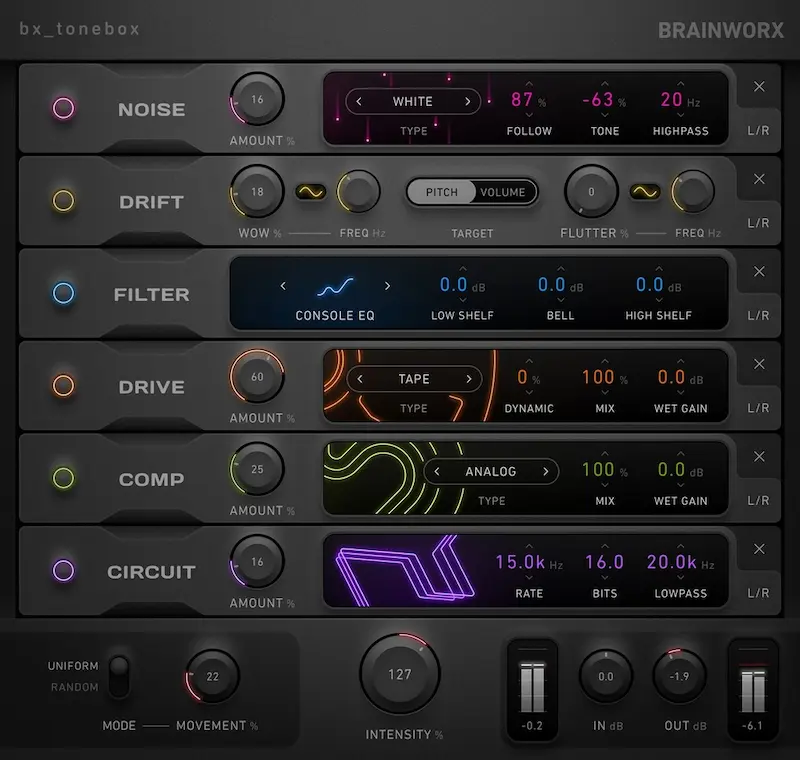
The plugin consists of six modules that can be reordered freely:
- Drive — harmonic saturation and distortion
- Circuit — tonal coloration (non-linear response)
- Drift — instability (pitch/phase variance)
- Comp — basic dynamics control
- Noise — broadband texture layer
- Filter — frequency shaping
Each module can run in Mid/Side independently. That’s the most technically meaningful feature here. You can, for example, saturate only the side signal while keeping the mid intact — something usually reserved for more advanced chains.
Two global macros define the behavior:
- Scale — overall processing intensity
- Movement — parameter drift across modules (non-periodic)
Movement is not LFO modulation. It’s stochastic variation. That distinction matters — it introduces motion, but not predictability.
How to use bx_tonebox fast (real workflow, not marketing)
If you’re wondering how to use bx_tonebox in an actual session, the workflow is simple — and that’s the point:
- Insert on a bus (drums or synth group works best)
- Start with Drive → Circuit → Comp as a baseline chain
- Adjust Scale to control global intensity
- Introduce Movement carefully (5–15% range)
- Switch individual modules to Mid/Side only when needed
This is a setup-in-30-seconds tool. If you’re spending minutes fine-tuning it, you’re using it wrong.
Practical use: where it works in mixing and production
bx_tonebox plugin review from a production standpoint comes down to context. It performs well when used as a creative layer, not as a core processor.
Drum buses
Drive + Circuit quickly add density. Push them too far and transient definition collapses — kick attack softens, snare snap blurs.
Synth groups
Drift introduces motion that static patches lack. But stereo image becomes unstable under Movement, especially in wide arrangements.
Bass
Adds harmonics, but compromises sub stability. Not suitable for controlled low-end work.
Vocals
Useful only for effect layers. Noise and filtering degrade intelligibility fast.
bx_tonebox vs ShaperBox vs Saturn — use-case comparison
| Task | bx_tonebox | ShaperBox | Saturn 2 |
|---|---|---|---|
| Fast sound design | Strong | Moderate | Moderate |
| Precise control | Weak | Strong | Strong |
| Low-end integrity | Weak | Moderate | Strong |
| Modulation depth | None | High | Moderate |
Positioning is clear:
- bx_tonebox — speed
- ShaperBox — control and modulation
- Saturn 2 — precision saturation
Where the plugin falls short
- No advanced modulation — no LFOs, no envelopes
- Basic compressor — not mix-grade
- No time-based FX — no delay or reverb
- Movement can destabilize phase
This is a creative shortcut, not a full processing environment.
“It accelerates the first 70% of the sound — but the last 30% still requires proper tools.”
Pricing and availability
The plugin is currently available at $39.99 (intro, regular $69). Formats include VST, VST3, AU, and AAX for Windows 10+ and macOS 13+.
Verdict
Brainworx bx_tonebox plugin review comes down to intent. If you need speed, it delivers. If you need control, it doesn’t.
Use it for: fast idea generation, aggressive tone shaping, creative layering.
Avoid it for: final mix decisions, mastering, or any scenario where precision matters.
Bottom line: bx_tonebox is a workflow accelerator — not a replacement for a serious mixing chain.