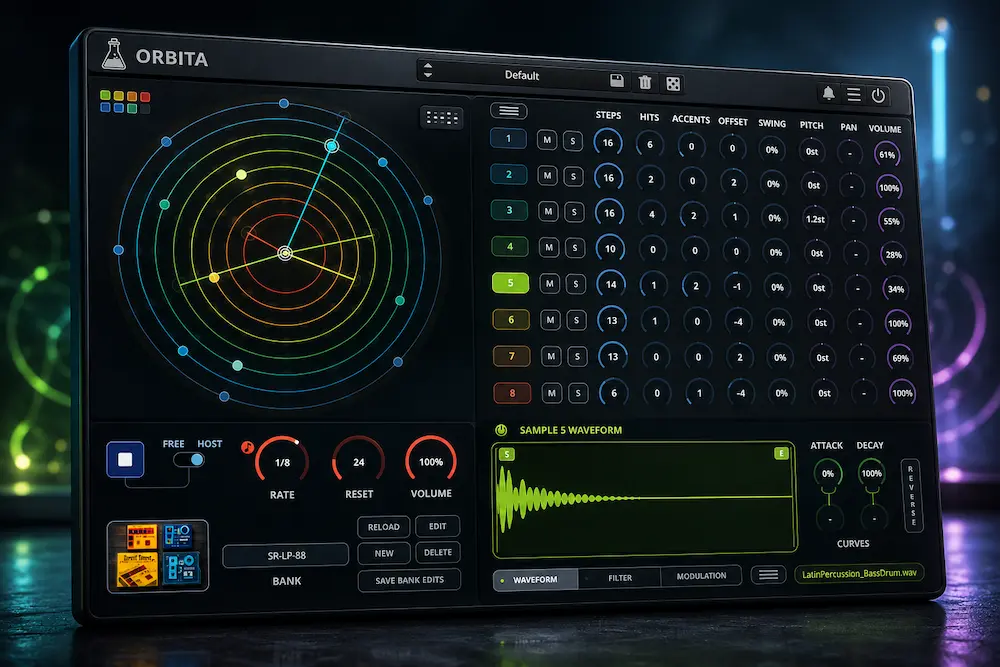
AudioThing Orbita takes a different approach to drum programming: instead of drawing every hit on a step grid, you decide how long each track should run and how many hits it should contain. The sequencer handles the distribution, while each of the eight tracks can move through its own rhythmic cycle. In practice, that makes Orbita much more interesting for evolving percussion than for ordinary 4/4 beat construction.
The important distinction is not that Orbita can create rhythms that are impossible elsewhere. Euclidean sequencing has been around for years. The attraction is that the rhythmic structure, sample playback and basic sound shaping are already combined in one instrument, so changing the relationship between percussion parts takes seconds rather than another round of MIDI editing.
Orbita is sample-based rather than a synthesizer drum machine. Its eight tracks can use factory sounds from 36 banks or your own samples, with per-sample filtering, envelopes, reverse and LFO modulation for basic sound shaping. The main reason to use it is therefore not advanced drum synthesis but the speed at which it can generate controlled, evolving and interlocking rhythms inside a DAW.
Complex rhythms are not the difficult part. The useful comparison is whether Orbita reaches those rhythms faster than a DAW sequencer, Euclidean MIDI tool and sampler used separately. Its real advantage is workflow: the rhythmic structure, sample playback and basic sound shaping stay in one focused instrument, so fewer steps are needed between the initial idea and a usable pattern.
AudioThing Orbita: Quick Verdict
Orbita is most convincing when it is used to generate the second layer of a groove rather than the entire groove. A stable kick and snare can stay anchored while hats, shakers or percussion run through different cycle lengths. That is where the plugin stops feeling like a mathematical rhythm toy and starts becoming a useful production tool.
For ordinary four-on-the-floor programming, I would not choose Orbita over a mature drum sampler or the DAW’s own sequencer. The advantage appears when changing a few rhythmic parameters produces a useful variation faster than manually moving, deleting and duplicating individual MIDI events.
The case is weaker for conventional 4/4 drum programming, deep sample editing or producers who already have an efficient Euclidean sequencer and sampler. From a production-engineering perspective, Orbita’s real value is workflow speed rather than revolutionary drum synthesis: it turns rhythmic structure into a controllable source of variations that can then be refined in the DAW.
Our independent rating: 8.8/10. Orbita is a focused specialist drum instrument with a clear production use case, not a universal replacement for a mature drum sampler.
AudioThing Orbita Hands-On: What Stands Out in Actual Use
After working with Orbita rather than judging it from the feature list, the biggest difference from a conventional drum sequencer is how quickly the pattern changes when you adjust the relationship between tracks. The useful control is not simply the number of hits; it is what happens when one percussion layer is shortened, shifted or given a different density while the main pulse stays fixed.
One thing that became obvious during use was that changing Hits is often more useful than changing the whole track length. Keeping the cycle fixed makes the effect easier to judge: increasing or reducing the hit count changes the density of the part without completely changing its relationship with the rest of the pattern.
The limitation becomes obvious when too many tracks are allowed to move at once. Once the kick, snare and several percussion parts all have unrelated cycles, the pattern can become interesting in isolation but less useful inside a full arrangement. In practice, Orbita works better when one or two secondary elements provide the movement and the primary pulse remains comparatively stable.
The point where I would stop adding cycles is when the changing percussion starts masking the reason for the main pulse. At that point, muting one moving layer usually tells you more than adding another one: if the groove immediately becomes clearer, the extra cycle was adding complexity rather than useful movement.
One workflow detail I found more useful than the feature list suggests is the difference between changing Steps and changing Hits. Steps sets the length of the cycle, while Hits changes the number of triggers distributed across it. Keeping those two decisions separate makes it much easier to find a variation without accidentally rebuilding the entire rhythmic relationship.
The eight-track limit is less restrictive in this workflow because the plugin does not need to carry the entire drum arrangement. Orbita is not trying to replace a full drum-production environment. Its strongest role is as a compact rhythm generator that gets a useful idea onto the timeline quickly, after which the DAW can take over for detailed editing and arrangement.
My practical takeaway: Orbita is faster for exploring rhythmic relationships than for finishing drum parts. I would use it to find the rhythmic idea, keep the strongest variation, and then move into the DAW for the edits that require exact control.
AudioThing Orbita Review — Contents
- Euclidean Sequencing & Real-World Workflow
- Production Workflow & Rhythm Programming
- Specifications & Features
- Workflow Speed & Production Time
- Mixing & Mastering Implications
- DAW Compatibility & Session Workflow
- Alternatives & Comparisons
- Who Should Use Orbita?
- Price & Value
- Professional Production Workflow
- Final Verdict
- FAQ
Why Orbita’s Euclidean Sequencing Matters in a Real Production Workflow
 Orbita becomes useful when the interaction between rhythmic layers is more important than the exact placement of every hit. A conventional step sequencer gives you precise control over individual events; Orbita gives you control over the structure that generates those events.
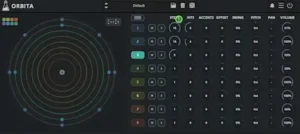
Set one track to 16 steps with four hits, another to 13 steps with seven, and a third to its own cycle. Their relative positions keep shifting as the sequence runs, creating a pattern that takes longer to repeat than a conventional loop. Offset changes the phase relationship without changing the underlying pattern, while Reset determines how the cycles return to their starting point.
The practical advantage is simpler: you change the relationship between the parts instead of rebuilding the parts themselves. Instead of moving individual percussion hits until a loop develops enough variation, you can change the length or density of a rhythmic cycle and hear a completely different interaction immediately. The useful part is not the mathematics itself; it is the reduction in manual editing required to explore those relationships.
A practical starting point is a 16-step kick with 4 hits, a 16-step snare with 2 hits, and a hi-hat or shaker track set to 15 steps. The kick and snare establish the main pulse while the 15-step percussion cycle gradually shifts against it. Offset can then move the percussion relationship without changing its density, while Swing can be used to make the result feel less mechanically even. This demonstrates Orbita’s real advantage more clearly than simply increasing the number of hits: the variation comes from changing relationships between rhythmic cycles.
For a first test, I would keep the kick at 16 steps and use the shorter cycle on a secondary percussion sound rather than the main low-frequency element. This makes the changing relationship audible without allowing the entire groove to lose its anchor. From there, changing Hits is usually more useful than immediately adding more tracks because it changes rhythmic density while keeping the overall architecture easy to understand.
There is also a compositional advantage. Because each track remains governed by a small set of predictable parameters, the resulting variation is easier to control than fully random pattern generation. A kick can provide a stable foundation while secondary percussion shifts around it, giving the arrangement movement without forcing every element into the same repeating bar structure.
That makes Orbita particularly relevant to techno, IDM, experimental electronic music, hip-hop, and rhythmic sound design. It is less compelling for conventional drum programming, where drawing a few events on a DAW grid is often faster than setting up a Euclidean cycle.
Hear How Your Mix Holds Up in the Final Master
Dense or evolving percussion can change the balance, punch, dynamics and stereo image of a mix in ways that are not always obvious while producing. If you want to hear how your own track translates through professional mastering, you can upload up to 35 seconds for a free mastering demo. Get a free mastering demo →
How Orbita Fits Into a Real Drum Programming Workflow
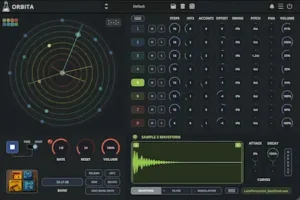
Orbita combines an eight-track sample engine with an independent Euclidean sequencer on each track. Every track can use its own sample, cycle length, hit count, accents, offset and swing, while per-sample filters and LFO modulation provide basic sound shaping. The factory library contains 36 banks covering drum-machine sounds, acoustic percussion, found sounds and more experimental material, and the Bank Editor lets you build banks from your own samples.
What makes the combination useful is how those elements interact. Start with a stable kick pattern, add a percussion track running at a different cycle length, then introduce another layer with a different hit density or offset. The rhythmic structure changes without requiring you to redraw the MIDI pattern. That makes Orbita less about building a finished beat from presets and more about quickly testing rhythmic relationships.
Orbita is deterministic enough to repeat and refine; it is not a conventional randomizer. Orbita does not simply scatter events across a grid and hope something works. You control the number of steps and hits, while the Euclidean distribution determines their placement. The result remains constrained enough to repeat and refine: change the parameters, audition the new interaction, and keep the version that works.
The Reset control is particularly useful once several tracks have different cycle lengths. Without a defined point of realignment, an evolving pattern can keep moving away from the structure of the arrangement. Reset gives you a way to decide when that relationship should become predictable again instead of leaving the rhythmic interaction entirely open-ended.
Why Eight Tracks Are Enough — and When They Aren’t
Eight tracks would be a serious limitation in a full drum workstation. In Orbita, it is a reasonable boundary because the instrument is designed around rhythmic sketches rather than complete drum production.
A typical setup might use the available tracks for kick, snare or clap, hat, shaker, two percussion layers and a couple of texture elements. That is enough to establish the rhythmic identity of a section without turning the plugin into another large-scale sampler and sequencing environment.
Once the pattern works, the more practical move is to transfer or record the useful material into the DAW and handle detailed arrangement, layering, processing and automation there. Orbita does not need to replace that workflow; it needs to get you to the useful rhythmic idea faster.
Sound Shaping: Enough to Develop a Pattern, Not a New Synthesis Engine
Orbita’s sound engine provides a multimode filter with low-pass, high-pass, band-pass and notch modes in two- and four-pole configurations. Each sample also has an LFO that can target pitch, pan, volume, cutoff or resonance, along with attack, decay and reverse controls.
These are established sampler and synthesis techniques rather than proprietary DSP innovations. Their value is practical: the rhythmic and tonal behavior of a sound can be developed inside the same instrument instead of requiring another plugin for every variation.
A shaker can move subtly across the stereo field. A percussion sample can receive pitch modulation. A found sound can be filtered into a narrower tonal range while its rhythm continues to evolve. Those changes are particularly useful for secondary layers, where small variations in timbre can prevent a repeated pattern from becoming static.
Orbita does not replace a dedicated sampler or sound-design environment. The built-in processing is there to keep the rhythmic engine useful, not to turn the plugin into a deep sampler.
AudioThing Orbita Specifications
| Specification | AudioThing Orbita |
|---|---|
| Instrument Type | Euclidean sample-based drum machine |
| Tracks | 8 independent sample tracks |
| Sequencing | Steps, Hits, Accents, Offset, Swing and Reset |
| Sound Source | Factory samples or user-loaded samples |
| Factory Banks | 36 |
| Filter | Low-pass, high-pass, band-pass and notch; 2-pole and 4-pole |
| Modulation | Per-sample LFO for Pitch, Pan, Volume, Cutoff or Resonance |
| Performance | 8-pad mode with custom MIDI note assignment |
| Plugin Formats | VST2, VST3, AU, AAX and CLAP |
| Mobile | AUv3 and standalone for iPhone and iPad |
| Operating Systems | Windows, macOS and Linux |
| Desktop Price | US$39 introductory price / US$69 regular price |
Where Orbita Actually Saves Production Time
Orbita’s biggest workflow advantage appears when a rhythmic part needs variation but the producer does not want to build that variation note by note.
Take a percussion loop that feels too predictable. With a conventional step sequencer, the usual solution is manual editing: move hits, add syncopation, change the loop length, introduce ghost notes, or build several variations and audition them against the arrangement. That gives you precise control, but it also makes experimentation increasingly time-consuming as the pattern becomes more complex.
Orbita shifts that work from individual events to rhythmic parameters. Changing Steps or Hits can alter the entire distribution at once. Offset changes the phase relationship between tracks without changing their density, while Swing changes the feel without requiring the pattern to be rebuilt. Accents add another level of control by establishing emphasis within an otherwise evenly distributed sequence.
For a conventional 16-step kick-and-snare pattern, the advantage largely disappears. A standard DAW grid is faster, more familiar and more precise. Orbita earns its place when the production calls for irregular cycles, evolving percussion or polyrhythmic interaction.
In other words, Orbita saves time during exploration, not necessarily during final editing. Once a specific hit needs to move to an exact position, the DAW becomes the faster tool again.
Where Euclidean Rhythms Start Working Against the Groove
More rhythmic complexity does not automatically produce a better groove. Orbita makes it easy to create patterns that are mathematically interesting but musically unconvincing.
Put a 16-step kick against an 11-step percussion cycle and the relationship will continually shift. That can create useful movement, but it can also undermine the pulse if too many important elements are allowed to drift at once. The risk is greatest when the low-frequency foundation is involved: if the kick keeps changing its relationship to a fixed bassline or 808, the variation can affect the perceived weight of the entire groove rather than simply adding movement.
A more reliable approach is to keep the primary pulse relatively stable and use Orbita’s independent cycles for secondary percussion. Hats, shakers, clicks and textural hits can move around the foundation without forcing the entire groove to become unpredictable. One or two contrasting cycles are often enough; adding more simply because the plugin makes it easy can turn rhythmic detail into clutter.
The problem becomes more obvious on the mix bus. Additional percussion increases transient density and often adds energy in the upper midrange and high frequencies. Dense, constantly shifting patterns can compete with vocals, cymbals and synth transients, while repeated low-frequency events can change how bus compression and limiting respond from moment to moment.
Orbita can generate the raw material for a more dynamic groove, but it cannot decide whether that complexity belongs in the arrangement. That remains a production decision.
How Orbita’s Rhythmic Density Affects Mixing and Mastering
Orbita does not process a mix, but the rhythmic material it generates can materially change how that mix behaves. The issue is not simply how busy a pattern sounds in isolation. It is how many transients and how much spectral information it adds once the rest of the arrangement is playing.
A high-frequency percussion pattern can sound like useful movement when auditioned on its own, then become unnecessary density against vocals, cymbals, synth attacks or other percussion. The same problem can occur in the low end when multiple rhythmic elements reinforce or obscure the main pulse. Polyrhythmic programming increases the number of events competing for attention, even when the individual samples are relatively quiet.
The solution is usually arrangement and spectral control rather than deleting the idea. Secondary percussion can be high-passed, narrowed, automated or shaped dynamically so that it contributes movement without competing with the primary groove. Orbita’s per-track filters can handle some of this work at the source, but detailed balance, routing and dynamics still belong in the DAW.
The mastering implications are indirect but real. More transient events can change crest factor and alter how a mix bus compressor or limiter responds over time. Dense upper-frequency percussion can also consume headroom and make a loud master feel harsher without necessarily sounding louder in a useful way. When those problems survive into the final mix, they become part of the broader set of mastering problems that cannot always be fixed at the mastering stage.
Judge the pattern against the full arrangement, not in isolation. If the rhythm still adds movement at the level of the full arrangement, it has earned its place. If it only sounds impressive when isolated, the mix probably does not need it.
Orbita in the DAW: Compatibility, MIDI Control and Session Workflow
 Orbita is available for Windows, macOS and Linux in VST2, VST3, AU, AAX and CLAP formats, with native Apple Silicon support on macOS. There is also a separate AUv3 and standalone version for iPhone and iPad. AudioThing supports Windows 7–11, macOS 10.13–26 and Ubuntu 20.04 or newer.
For a production instrument, that breadth is more useful than it looks on a specification sheet. CLAP support covers newer DAW workflows, AAX keeps Orbita viable in Pro Tools sessions, and native Apple Silicon support avoids relying on translation layers on current Macs. The broad OS coverage also makes the instrument practical for producers working across different studio systems.
Licensing is similarly straightforward: a single license can be activated on up to three computers, with both online and offline authorization and no iLok requirement. That is not a reason to buy the plugin, but it removes several common sources of friction when an instrument moves between a main workstation, laptop and secondary production system.
The eight-pad mode gives Orbita another useful role. Samples can be triggered directly from MIDI, with custom note assignments, while the Euclidean sequencer continues generating patterns. That makes it possible to build a programmed rhythmic layer, then play additional hits over it rather than treating the generated sequence as fixed material.
In practice, that makes Orbita easier to treat as part of a normal DAW session rather than as a closed generative instrument. Once a useful Euclidean pattern has been created, Orbita’s MIDI output can be used to continue the part in the DAW, where individual events can be edited and arranged in more detail. The eight-pad mode also allows manually triggered hits to sit alongside the generated sequence, so the final part does not have to remain completely automated.
The practical handoff is straightforward: generate the rhythmic material inside Orbita, keep the useful variations, then move into the DAW when individual events need precise editing, routing, processing, mixing or automation.
AudioThing Orbita System Requirements, CPU and Stability
AudioThing lists a 2 GHz CPU and 4 GB of RAM for the desktop version. That is useful as a compatibility baseline, but it is not a CPU benchmark.
At launch, there is not enough independent testing to give Orbita a meaningful CPU-per-instance, latency or multi-instance rating. KVR also currently has no written user reviews, so there is no established body of user reports covering long-term stability or DAW-specific problems.
Until independent testing accumulates, CPU efficiency and long-session stability remain unverified.
Orbita vs. Other Ways to Build Euclidean Drum Patterns
Orbita’s competitive position becomes clearer when the comparison is made against the workflows producers can already use: a conventional drum machine, a dedicated Euclidean MIDI sequencer feeding a sampler, or a free Euclidean sequencing tool combined with existing instruments.
| Workflow | Orbita | CHOPGRID | Euclidean Sequencer + Sampler |
|---|---|---|---|
| Primary concept | Euclidean rhythm generation | Chance-based sample generation | Depends on the sequencer |
| Independent rhythmic cycles | Yes | No | Depends on the sequencer |
| Sample-based | Yes | Yes | Yes |
| Built-in sound shaping | Filter + LFO + envelope | Extensive | Depends on sampler |
| Own samples | Yes | Yes | Yes |
| Rhythmic predictability | High | Low to variable | Depends on setup |
| Best use | Polyrhythmic / evolving grooves | Fast experimental sample creation | Maximum flexibility |
| Single-plugin workflow | Yes | Yes | No |
AudioThing Orbita vs CHOPGRID
Orbita and CHOPGRID overlap as creative drum-production tools, but they approach rhythm from opposite directions. Orbita starts with a defined rhythmic structure and distributes hits across independent cycles. CHOPGRID is more focused on chance-based sample generation and manipulation. If you already know the rhythmic relationship you want to explore, Orbita is the more controlled tool; if the goal is to discover unexpected material from a sample pool, CHOPGRID is the more exploratory option.
AudioThing Orbita vs a Euclidean MIDI Sequencer
A dedicated Euclidean MIDI sequencer remains the more modular solution because it can drive whatever drum sampler is already in the session. Orbita’s advantage is convenience: the sequencer, samples, filters, modulation and pad triggering are already in one instrument. The trade-off is that Orbita gives you less of the deep editing and routing flexibility available in a full sampler-based setup.
Orbita is not unique because it uses Euclidean sequencing. Free tools such as HY-ESG demonstrate the same underlying rhythmic principle, although a Euclidean gate is not equivalent to an eight-track sample drum machine. The closer alternative for full production is therefore a dedicated Euclidean MIDI sequencer combined with a sampler.
The trade-off is workflow friction. A modular setup gives you more freedom over routing, sample playback and MIDI processing, but it also creates more points between the initial rhythm idea and the finished part. Orbita compresses that process into one instrument, which is its strongest argument for existing producers who already know how to build the same result manually.
For conventional drum programming, the comparison goes the other way. A mature drum machine or sampler will generally provide deeper editing, more detailed routing and faster access to standard patterns. Orbita is strongest when the sequencing method itself is part of the creative decision.
Who Is AudioThing Orbita Actually For?
Orbita is best suited to producers who use evolving percussion, polyrhythms or non-standard loop lengths as part of their normal workflow. Techno, IDM, experimental electronic music, breakbeat and other rhythm-driven styles are obvious fits because independent cycle lengths can create movement without requiring a new MIDI pattern for every section. It is less suitable for producers who need analog drum synthesis, deep sample mapping, round-robin programming, extensive drum routing or a conventional 16-step workflow where manual editing is already faster.
Beatmakers can use it in a similar way, particularly as a source of secondary percussion and unexpected rhythmic ideas. The eight-pad mode also allows manually triggered hits to sit alongside the generated sequences, so an Orbita pattern does not have to remain a completely automated performance. Once a useful groove is found, the material can be edited and arranged in the DAW like any other production element.
Sound designers and composers have a different reason to use it. Long, non-repeating rhythmic structures can work well for transitions, tension beds, game audio and atmospheric cues, where a short repeating loop can sound too obvious. In those situations, Orbita’s value is less about making a conventional drum beat and more about generating controlled rhythmic movement.
For mixing and mastering engineers, Orbita is relevant mainly when production or arrangement is also part of the job. It does not solve a mixing or mastering problem; its value is upstream, where it can provide percussion material before the final mix is assembled.
Is AudioThing Orbita Worth It?
Orbita is worth buying if you regularly create electronic music where evolving percussion, polyrhythms or non-standard loop lengths are part of the production process. The plugin earns its price through workflow: it makes a specific type of rhythmic experimentation faster.
It is harder to justify if you mainly program conventional 4/4 drums, need deep sampler editing, or already have a Euclidean MIDI sequencer connected to a sampler you know well. In those cases, Orbita adds convenience rather than a capability you cannot get elsewhere.
My recommendation is therefore simple: buy Orbita for its workflow, not for its feature count. The more often you find yourself manually editing percussion to create shifting rhythmic relationships, the stronger the case becomes.
AudioThing Orbita Price and Value: Is It Worth the Cost?
AudioThing Orbita is priced at $69 for the desktop version, with a $39 introductory price available through September 30, 2026. The iOS/iPadOS version is sold separately.
At $39, Orbita is easy to justify for producers who actively want a dedicated Euclidean drum workflow. The price is low enough that the plugin can function as a specialist tool rather than a major studio investment, particularly for electronic producers who expect to use it regularly.
The $69 regular price is a more useful measure of its long-term value. Orbita does not offer a new sequencing technology that cannot be recreated elsewhere. A producer who already owns a capable Euclidean MIDI sequencer and sampler can achieve much of the same underlying result with an existing setup. In that case, Orbita is primarily buying back setup time and reducing workflow friction.
That makes the return on investment highly usage-dependent. If you regularly spend time building evolving percussion patterns, testing different cycle lengths and manually creating rhythmic variations, Orbita can pay for itself through faster experimentation. If your drum programming is mostly conventional, the same $69 is better spent on a tool that addresses a problem you actually encounter.
The introductory price lowers the barrier to entry, but it should not be the main reason to buy Orbita. At the regular price, the same question remains: how often will this particular sequencing workflow save you work that would otherwise be done manually in the DAW?
AudioThing Orbita User Feedback and Early Reception
Orbita is too new for a meaningful long-term consensus, but the first user signals are already useful. KVR currently shows no written reviews, while the iOS version has begun receiving ratings and early user feedback.
The limited early feedback so far points toward the product’s main appeal: users are interested in the combination of Euclidean sequencing, custom sample banks and a workflow that turns imported sounds into rhythmic parts without requiring the sequencing structure to be built manually.
That is still early evidence, not a reliability verdict. The product is new enough that long-term stability, host-specific issues and broader user satisfaction cannot be judged with confidence yet.
Where Orbita Earns a Place in a Professional Production Setup
In a professional session, Orbita makes more sense before detailed drum editing than after it. I would use it while the rhythmic identity of the section is still being decided, then commit the useful material to the DAW once the arrangement requires exact event placement, routing or automation.
A pattern that sounds impressive on its own does not automatically survive the full arrangement. Once bass, vocals, synth transients and the main drum pulse are playing, some of Orbita’s denser variations become unnecessary. The producer still has to decide which rhythmic movement actually supports the section.
The eight-track limit is therefore less restrictive than it looks. For a focused percussion layer, eight tracks are enough. If the production requires a large multi-mic acoustic kit, detailed articulation, extensive routing or deep sample editing, Orbita is simply the wrong tool for the job.
Overall Rating
| Category | Rating |
|---|---|
| Euclidean Sequencing | 9.5/10 |
| Workflow Efficiency | 9.5/10 |
| Rhythmic Control | 9/10 |
| Sound Shaping | 7.5/10 |
| Production Integration | 9/10 |
| Creative Workflow | 9/10 |
| Value for Money | 8.5/10 |
| Overall | 8.8/10 |
Euclidean Sequencing — 9.5/10: Orbita’s strongest feature is its implementation of independent Euclidean cycles. Steps, Hits, Offset, Swing and Accents provide enough control to create complex rhythmic relationships without turning the process into manual MIDI editing.
Workflow Efficiency — 9.5/10: Orbita can save substantial production time when the goal is to explore evolving or polyrhythmic percussion. Changing a small number of rhythmic parameters can produce variations that would otherwise require repeated editing and auditioning in the DAW.
Rhythmic Control — 9/10: The system remains more predictable than random pattern generation, but its flexibility needs restraint. Too many independent cycles can weaken the pulse instead of improving the groove, particularly when important low-frequency elements are allowed to drift.
Sound Shaping — 7.5/10: The multimode filter, LFO modulation, envelopes and reverse functions provide useful control over samples, but they are supporting features rather than a deep synthesis or sampler environment.
Production Integration — 9/10: Custom sample banks, MIDI triggering, eight independent tracks and broad plugin-format support make Orbita easy to integrate into a conventional DAW workflow. Detailed arrangement, routing and editing still belong in the DAW.
Creative Workflow — 9/10: Orbita is particularly effective when the goal is to explore changing rhythmic relationships quickly. Its advantage is not deeper drum editing but the speed at which a useful variation can be generated and auditioned.
Value for Money — 8.5/10: At the regular $69 price, Orbita offers good value when evolving or polyrhythmic percussion is a recurring part of the workflow. Its value drops if conventional drum programming dominates the production or a capable Euclidean sequencer and sampler are already available.
From an engineering perspective, Orbita is strongest as a focused rhythmic-generation instrument rather than a complete drum workstation. Its high score comes from how efficiently it turns independent rhythmic parameters into usable production ideas; the lower scores reflect the intentionally limited sound-shaping depth and the fact that complex generated patterns still require musical judgment once they enter the mix.
Verdict: A Focused Euclidean Drum Tool With a Clear Use Case
AudioThing Orbita is not a major advance in drum-machine technology. Euclidean sequencing is established, and its filtering, modulation and sample-playback features are conventional. The product’s strength is execution: it puts independent rhythmic cycles, sample playback and enough sound shaping into a single instrument that can be used quickly inside a DAW.
That makes Orbita genuinely useful for producers who regularly build evolving or polyrhythmic percussion. Its advantage is not that it can create rhythms other tools cannot; it is that changing the structure of those rhythms requires less manual sequencing. For techno, IDM, experimental electronic music, beatmaking and rhythmic sound design, that can be enough to justify keeping it in the toolkit.
The limitation is deliberate: Orbita solves a narrow production problem very efficiently, but it does not attempt to become a full drum workstation. That makes the purchase easy to justify for the right workflow and unnecessary for the wrong one.
Orbita is a specialist production instrument, not a must-have drum machine. Buy it if Euclidean sequencing is a recurring part of your workflow and you want that process consolidated into a fast, focused instrument. If your drum programming is mostly conventional, the DAW or a full drum sampler remains the more efficient choice.
Before Adding More Processing, Hear What the Mix Already Does
Evolving percussion can add movement without improving the mix if its transient density, frequency competition or stereo information starts competing with the main groove. The important test is not whether the pattern sounds impressive on its own, but whether it still improves the track when the full arrangement is playing.
Instead of solving every balance or dynamics issue with another processing stage, compare your actual mix with a professionally mastered version and judge what changes at the final stage. Upload up to 35 seconds of your mix and get a free mastering demo prepared by a real mastering engineer. Upload your mix and get the free mastering demo →
FAQ: AudioThing Orbita
Can AudioThing Orbita be used as a conventional drum machine?
Yes. Orbita can be triggered from its eight pads and used without relying exclusively on the Euclidean sequencer. However, producers who primarily program standard 4/4 drum patterns will generally find a conventional drum sampler or step sequencer more efficient.
How many independent rhythms can Orbita run at once?
Orbita provides eight sample tracks, with each track running its own rhythmic cycle. This allows multiple cycle lengths and hit densities to interact within the same pattern rather than forcing every percussion part to share one grid.
Can Orbita use samples from my own library?
Yes. The Bank Editor allows custom sample banks, so Orbita does not require you to work exclusively with its factory content. This is important if you want to use the Euclidean engine with an established personal drum and percussion library.
Can I play Orbita from a MIDI controller?
Yes. The eight-pad mode supports direct MIDI triggering with custom note assignments. This allows manually played hits to be combined with patterns generated by the Euclidean sequencer.
Which DAWs and plugin formats support Orbita?
The desktop version is available in VST2, VST3, AU, AAX and CLAP formats for Windows, macOS and Linux. AudioThing also offers a separate AUv3 and standalone version for iOS and iPadOS. Current OS and host compatibility should be checked against AudioThing’s specifications before installation.
Does Orbita use a lot of CPU?
There is not yet enough independent benchmark data to establish a reliable CPU figure or multi-instance performance profile. AudioThing lists a 2 GHz CPU and 4 GB of RAM as minimum desktop requirements, but those specifications should not be interpreted as a measured CPU benchmark.
Is AudioThing Orbita a synthesizer or a sampler?
Orbita is a sample-based drum machine rather than an oscillator-based synthesizer. Each of its eight tracks plays a sample, while the Euclidean sequencer controls when that sample is triggered. Filters, envelopes, reverse and LFO modulation provide sound shaping, but Orbita does not generate drum sounds through a dedicated synthesis engine.
Is Orbita useful for mixing engineers?
Only when the engineer also works on production or arrangement. Orbita can generate percussion and rhythmic material for a mix, but it does not replace dedicated mixing processors or solve conventional balance, dynamics or routing problems.
Does Orbita have any real value for mastering engineers?
Not for a mastering-only workflow. It can influence a mix before mastering by generating additional rhythmic material, but it provides no mastering-specific processing or analysis functions.
What is the main alternative to AudioThing Orbita?
The closest alternative is a dedicated Euclidean or generative MIDI sequencer combined with a sampler. That setup can reproduce much of Orbita’s core concept, while Orbita’s advantage is having sequencing, sample playback, filtering and modulation in one instrument.
Is AudioThing Orbita good for techno?
Yes, particularly for secondary percussion, hats, shakers and other rhythmic layers that benefit from changing cycle lengths. It is less useful when the entire groove needs to remain locked to a conventional 4/4 step pattern.
Is AudioThing Orbita good for IDM and experimental electronic music?
Yes. Independent rhythmic cycles make Orbita particularly suitable for evolving patterns, polyrhythms and percussion that does not need to repeat on every bar. The eight-track structure also makes it easy to keep the main pulse stable while secondary elements move around it.
Does AudioThing Orbita replace a drum sampler?
No. Orbita is better understood as a focused Euclidean drum machine with sample playback and basic sound shaping. A full drum sampler remains the better choice for detailed editing, complex routing, large libraries and conventional drum production.
Is AudioThing Orbita worth $69?
At $69, Orbita is worth considering if evolving or polyrhythmic percussion is a recurring part of your workflow. The regular price is harder to justify if you already have a Euclidean sequencer and sampler that cover the same job. For conventional drum programming, the workflow advantage is much smaller.

Yurii Ariefiev evaluates audio production tools from an engineering perspective, with particular attention to rhythmic structure, arrangement density, transient behavior, and how production decisions carry into the final mix.
At AREFYEV STUDIO, the focus is not simply whether a plugin can generate an interesting sound, but whether that sound remains useful once the full arrangement, mixing process, dynamics processing, and final mastering are taken into account.