
Updated September 18, 2026 • Independent product review
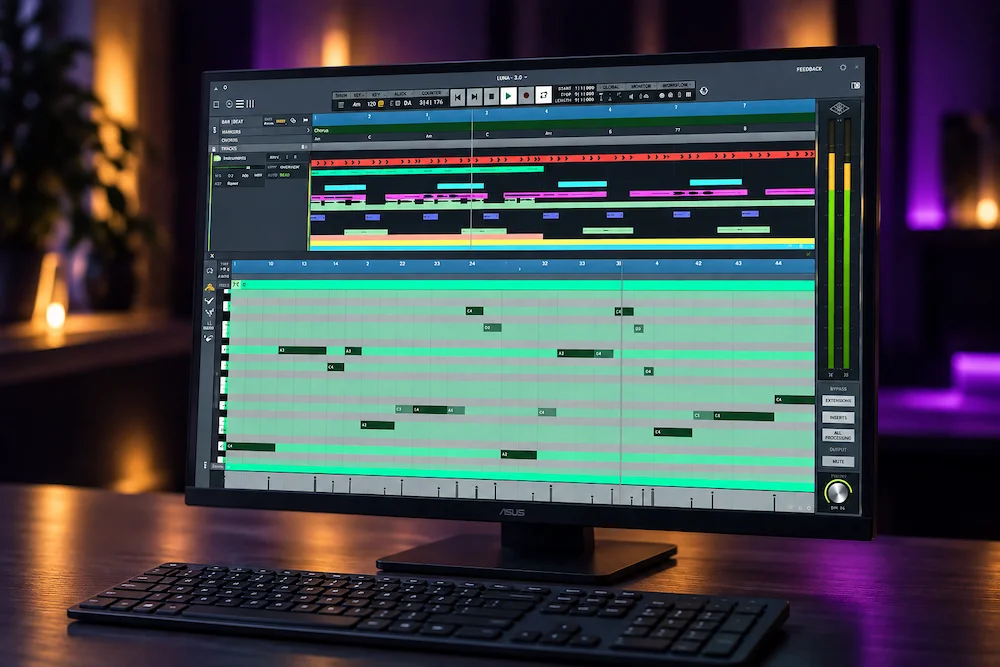
Universal Audio LUNA 3.0 is less interesting as a collection of new AI-assisted features than as a change in how much production work can stay inside one DAW session.
Stem separation, Audio-to-MIDI, chord extraction and lyric transcription are useful individually, but the larger change is the workflow around them. LUNA can now move a project from recording and editing into source separation, musical analysis and arrangement without requiring a separate application for every task. The important question is therefore not how many features LUNA 3.0 adds, but where that integration genuinely removes production friction—and where established DAWs still have the advantage.
For producers working heavily with Universal Audio hardware and software, LUNA’s integrated approach is increasingly difficult to ignore. For everyone else, the case is narrower: LUNA 3.0 is not a wholesale replacement for every established DAW, but it has become a substantially more capable option for audio production, mixing and modern editing workflows—particularly when stem extraction, MIDI conversion and fast session preparation are part of the job.
LUNA 3.0 Review at a Glance
| Product | Universal Audio LUNA 3.0 |
| Type | Digital audio workstation for recording, production, editing and mixing |
| LUNA Free | Free DAW with LUNA Play, four-track stem separation and major editing/session upgrades |
| LUNA Studio | $199 perpetual version with six-track stem separation, Audio-to-MIDI and additional production tools |
| Key 3.0 additions | LUNA Play, Stem Separation, Audio-to-MIDI, Chord Extraction, Lyric Transcription, Piano Roll and workflow improvements |
| Overall rating | 8.5/10 |
From Apollo Companion to a Full Production DAW
 When LUNA launched in 2020, its strongest selling point was its relationship with Universal Audio hardware. Apollo integration, low-latency tracking, UAD processing and an analog-console-oriented workflow gave it a clear identity in a market already dominated by established DAWs.
That position has changed. LUNA became free on macOS, expanded to Windows, and now offers production tools that have little to do with owning an Apollo interface. LUNA 3.0 pushes that development further with integrated stem separation, Audio-to-MIDI, chord extraction, lyric transcription, improved MIDI editing and more capable session organization. LUNA Studio adds the deeper production and UAD package, while UAD Spark Studio bundles the DAW with a broader native plug-in and instrument library.
What’s New in LUNA 3.0
LUNA 3.0 is more than a new collection of AI-assisted tools. The update also expands the core DAW workflow, with several features now available in LUNA Free and additional production capabilities reserved for LUNA Studio.
- LUNA Free: LUNA Play, four-track stem separation, Folder Tracks, improved Piano Roll, Adaptive Grid, Clip Gain Automation, Record FX, Strip Silence, Click Track Automation, mono inputs on stereo tracks, and Chord, Key and Time Signature Rulers.
- LUNA Studio: six-track stem separation, Audio-to-MIDI, Lyric Transcription, Chord Extraction, additional LUNA Extensions, UAD instruments and further production tools.
- Workflow direction: LUNA 3.0 moves further from being primarily a Universal Audio recording environment toward a broader production DAW in which recording, editing, analysis and creative transformation can happen inside the same session.
The practical consequence is more important than the product-tier changes. LUNA can now handle a larger portion of the path from recorded audio to a finished production without relying on separate applications for every specialized task.
That matters because production time is often lost in the handoffs between tools rather than in the processing itself. Separating stems, converting a performance to MIDI, extracting musical information or cleaning a recording can mean rendering files, opening another application, importing the results and rebuilding the session. LUNA 3.0 brings several of those operations into the same project. The algorithms do not need to be categorically better than dedicated alternatives for that to be useful; removing unnecessary transfers can be enough to make the workflow faster and easier to manage.
Where LUNA 3.0 Actually Saves Time in Production
LUNA 3.0’s most useful change is not any single new processing algorithm. It is the reduction in the number of times a production has to leave the DAW to get a job done.
Take a stereo reference mix that needs to be broken down for further production. A producer may want to isolate the vocal, inspect the harmonic structure, turn a melodic performance into MIDI and then build new parts around the result. In a conventional workflow, those jobs can mean moving between a stem-separation tool, an audio-to-MIDI processor and the DAW, with rendered files and additional session management at each step.
LUNA puts several of those operations on the same timeline. Stem separation can generate editable material from the stereo source, chord extraction can provide harmonic information for the session, and Audio-to-MIDI can turn a suitable recorded part into a MIDI starting point. ARA-compatible processing can then work more closely with the audio already inside the project rather than forcing another round of export and import.
The time savings are easy to underestimate because none of these operations is particularly dramatic on its own. The advantage appears when they are chained together. Fewer renders mean fewer duplicate files, fewer routing decisions and less session cleanup. For a producer working through multiple arrangement ideas—or an engineer preparing material from incomplete source files—that reduction in friction can matter more than a new processor or another collection of presets.
There is also a practical limit. Integration does not make the underlying analysis more accurate by itself. A poor stem separation still needs repair, and imperfect Audio-to-MIDI conversion still needs editing. LUNA’s advantage is that the cleanup happens in the same production environment instead of adding another application to the chain.
Hear What Your Mix Still Has Room For
LUNA 3.0 can streamline editing, source separation and production inside one session, but the final master still depends on how clearly the mix translates in terms of balance, dynamics, depth and detail. Our free mastering demo lets you hear how a short section of your own mix responds to professional mastering decisions. Upload up to 40 seconds of your mix and get a practical reference before committing to the full master.
Upload Your Mix for a Free Mastering Demo →
LUNA Play Reduces the Gap Between an Idea and a Recording
LUNA Play addresses a production problem that has little to do with audio quality: the time and setup required between having an idea and capturing it.
The concept is closer to an intelligent recording workflow than a conventional DAW template. LUNA can identify the recording source, help establish an appropriate input level and suggest starting-point processing. The goal is straightforward: get a microphone or instrument connected, start recording and refine the sound afterward instead of spending the first few minutes configuring the session.
For a professional tracking engineer working from a carefully built template, the benefit is limited. Input routing, gain structure, monitoring, plug-in chains and recording settings are usually already defined. In that environment, LUNA Play is solving a problem that the engineer has already solved manually.
Its value is more apparent in songwriting, home production and spontaneous overdubs. When a guitar part, vocal idea or instrumental phrase appears during a writing session, removing several setup steps can make it easier to capture the performance before the idea changes. For vocal tracking, that recording stage can also lead directly into tools such as real-time pitch correction when the production calls for it. That is a workflow improvement rather than an audio-processing breakthrough, but it is a useful distinction in real production.
There is an important boundary, however. LUNA Play can accelerate the initial setup; it cannot make engineering decisions on the user’s behalf. Automatic input-level suggestions and processing presets are starting points. Microphone selection, placement, gain staging, monitoring, performance direction and the decision to leave a signal clean or process it on the way in still require judgment.
LUNA 3.0 Stem Separation: Useful for Production, Limited for Precision Repair
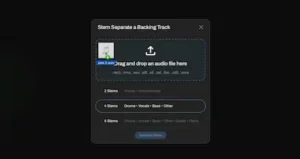
Stem separation is one of the most practical additions in LUNA 3.0. LUNA Free provides four-track separation, while LUNA Studio expands the process to six tracks, allowing a finished stereo mix to be broken into more manageable components without leaving the DAW.
For music production, the applications are straightforward: remix preparation, vocal isolation, sample extraction, reference analysis, rehearsal versions and creative resampling. A producer can start with a stereo mix, extract the elements needed for a new idea and continue working with them on the same timeline rather than exporting the source to a separate stem-separation application.
The important distinction is that separated does not mean original.
AI source separation has to reconstruct individual elements from a combined stereo signal. Depending on the arrangement and processing, the result can contain bleed, transient smearing, reverb and delay remnants, phase irregularities or other artifacts. Dense mixes, distorted guitars, cymbals, layered vocals and heavily processed sources tend to expose these limitations more readily.
That makes LUNA’s stem separation considerably more useful for creative production and session preparation than for surgical restoration. If a mastering client sends a finished stereo mix and asks for the vocal level to be changed, an extracted vocal is not equivalent to receiving the original vocal stem from the mix session. The separation may provide a workable approximation, but it cannot recreate information that was already combined during the mix.
From a mastering perspective, stem separation is therefore best treated as an intervention and analysis tool, not as a substitute for proper premaster stems. It can help isolate the source of a problem, test a corrective move, prepare an alternate version or recover material when the original session is unavailable. When the original multitrack or stem files exist, however, they remain the technically preferable source for precise mix revisions and mastering decisions. This distinction becomes especially important when deciding whether a dense mix actually benefits from stem mastering rather than conventional stereo mastering.
LUNA 3.0 Audio-to-MIDI: Fast Transcription With a Manual Cleanup Stage
Audio-to-MIDI is one of LUNA 3.0’s more useful production tools because it turns a recorded performance into editable MIDI material without requiring the part to be played again from scratch.
A bass guitar performance can be converted into MIDI and used to trigger a synthesizer or sampled instrument. A guitar phrase can become a starting point for a different arrangement. A melodic vocal can provide note information for harmony experiments, sound replacement or MIDI-based production. The practical advantage is speed: the original performance becomes a source for further editing rather than something that has to be manually transcribed note by note.
Conversion quality, however, depends heavily on the source material. Clean, clearly defined monophonic performances are generally easier for an audio-to-MIDI system to interpret than dense polyphonic recordings. Note boundaries, overlapping notes, vibrato, slides, distortion, background bleed and ambiguous transients can all introduce incorrect notes or timing that require manual correction.
For that reason, Audio-to-MIDI is better understood as a transcription starting point than as a finished MIDI performance. The useful workflow is to generate the note data quickly, audition it against the original recording and then correct timing, note lengths, velocities and unwanted notes where necessary.
That distinction does not reduce its practical value. If a generated MIDI part requires thirty seconds of editing instead of several minutes of listening and manually recreating the performance, the tool has already saved meaningful production time. The more important question is therefore not whether LUNA can produce flawless MIDI from every source, but how much of the repetitive transcription work it can remove from the session.
Chord Extraction and Lyric Transcription: Turning Audio Into Usable Session Data
 LUNA Studio adds chord extraction and lyric transcription powered by Moises. Both features work on the information contained in an existing recording rather than changing the audio itself.
Chord extraction becomes more useful when it feeds directly into LUNA’s chord-aware production workflow. Instead of listening through a reference track and entering the harmonic progression manually, a producer can use the detected chord information as a starting point for arrangement and session-player work. The result still needs to be checked against the recording, particularly with ambiguous voicings, passing chords and arrangements that do not follow a simple harmonic progression.
Lyric transcription solves a different problem: finding and working with vocal content. In a session containing multiple takes, doubles, harmonies and long vocal recordings, searchable lyric information can make it easier to locate a particular phrase without relying entirely on waveform navigation, markers or memory. That becomes especially useful during editing, comping and session review.
Neither feature is an audio-processing replacement for traditional engineering tools. Their value is organizational and informational: they extract musical or textual information from recorded audio and make that information available inside the production workflow.
That distinction is important to understanding LUNA 3.0 as a whole. Its newer analysis features are less about changing the sound directly and more about reducing the manual work required to interpret, organize and repurpose audio inside a session.
The broader LUNA Studio ecosystem also matters for songwriting. Audio-to-MIDI can provide source material for virtual instruments, while tools such as Celemony Tonalic Elements, Dreamtonics Synthesizer V 2 Core and Topline Vocal Tune extend the workflow from audio analysis into arrangement, virtual performance and vocal production. This makes the Studio tier more than a collection of additional analysis functions; it is also a more complete songwriting and production environment.
Editing and Session Management: The LUNA 3.0 Features Engineers Use Every Day
Folder Tracks, the improved Piano Roll, Adaptive Grid, Strip Silence and Clip Gain Automation are less visually impressive than stem separation or Audio-to-MIDI, but they can have a more direct effect on day-to-day engineering work. These are the tools that determine how quickly a session can be edited, organized and prepared for mixing.
Clip Gain Automation is particularly relevant to mixing because it allows level shaping to happen before insert processing. Bringing uneven phrases, drum hits or vocal sections closer to the desired operating range before they reach a compressor can reduce unnecessary gain reduction and make downstream processing easier to control. It does not replace compression or automation; it gives the engineer another stage at which to manage dynamics.
Strip Silence targets a different source of wasted time: removing unwanted gaps and inactive regions from recorded tracks. This becomes increasingly useful with multi-microphone drum sessions, vocal takes, live recordings and other projects where large amounts of unused audio have to be cleaned before detailed editing.
Folder Tracks address session organization rather than audio processing, but that distinction matters in large projects. Grouping related tracks makes complex arrangements easier to navigate and can reduce the visual and organizational overhead of a session. Improvements to the Piano Roll are similarly important for producers working with MIDI instruments, where editing speed is determined by how efficiently notes, timing and musical structure can be manipulated.
None of these features changes what a DAW can fundamentally do. Their significance is cumulative: fewer editing steps, cleaner session organization and more control over signal preparation make LUNA a more complete production environment for engineers who spend most of their time inside the DAW.
LUNA 3.0 for Mixing and Mastering: Where the Workflow Actually Fits
LUNA makes its strongest professional case when recording, editing and mixing are part of the same production workflow.
Its established appeal comes from the Universal Audio ecosystem: Apollo integration, UAD processing and a workflow built around console-style tracking, tape and summing extensions. LUNA Studio extends that environment with ARA-based editing and analysis tools, additional instruments and processors, and deeper integration between production tasks that would otherwise require separate applications.
For a mixing engineer, the advantage is not that LUNA automatically produces a better mix. The advantage is workflow continuity. Recording, editing, gain preparation, vocal processing, MIDI conversion and other production tasks can remain inside the same session instead of being divided between multiple applications and exported files.
A vocal production session illustrates the point. An engineer can record multiple takes, remove unwanted regions with Strip Silence, shape levels with clip gain before compression, use an ARA-compatible editor where appropriate, and extract musical information when needed before continuing into the mix. None of those operations guarantees a better result, but keeping them within the same project can reduce the number of technical handoffs between production stages.
For mastering, the case is narrower. LUNA Studio includes tools that can be useful for individual-track mastering and audio restoration, but LUNA remains primarily a music-production DAW rather than a dedicated mastering workstation. A mastering engineer can build and monitor a stereo processing chain in LUNA, and the logic behind that chain is the same regardless of the DAW hosting it; for a deeper look at how processing stages interact, see our mastering chain explained. Album sequencing, PQ and delivery preparation, batch-oriented workflows and other specialized mastering tasks may still be better served by dedicated mastering software.
The same principle applies to translation and monitoring. Moving a mastering chain into LUNA does not inherently improve how a master translates to headphones, cars, consumer systems or streaming codecs. Loudness, dynamics, tonal balance, monitoring accuracy and codec behavior are engineering variables, not properties of the DAW brand. For a broader look at what happens to finished masters after delivery, see our guide to mastering for streaming platforms.
What LUNA 3.0 Still Does Not Solve
LUNA 3.0 expands the DAW considerably, but it does not remove the reasons engineers choose other established platforms. The differences become most apparent in specialized workflows rather than basic recording and mixing.
Pro Tools remains deeply embedded in commercial recording, post-production and professional studio workflows. Logic Pro continues to combine a mature MIDI environment with extensive instruments and composition tools inside Apple’s ecosystem. Ableton Live remains built around clip-based production, electronic music and performance-oriented workflows that are fundamentally different from a traditional linear DAW. Cubase and Nuendo retain strong positions in advanced MIDI, orchestration, scoring and large-scale production.
LUNA’s MIDI workflow has also been an area of criticism among some users, particularly those coming from Ableton Live or Logic Pro. Version 3.0 addresses part of that gap with a substantially improved Piano Roll and broader MIDI functionality, but adding missing capabilities is different from matching years of refinement in a competing workflow. For producers whose sessions are heavily dependent on advanced MIDI editing, this distinction can still influence the choice of DAW.
Cross-platform session management is another consideration, but LUNA 3.0 is better positioned here than earlier versions. LUNA supports VST3 on both macOS and Windows, making VST3 the practical common plug-in format for sessions that need to move between the two platforms. Audio Units remain a macOS-specific format, so a session built around AU plug-ins still requires a platform-compatible alternative before it can move cleanly to Windows.
These limitations do not make LUNA unsuitable for professional work. They define where its workflow is strongest and where another DAW may still provide a more established toolset for a particular production environment.
LUNA 3.0 vs Pro Tools, Logic Pro, Ableton Live and REAPER
| DAW | Core Workflow | Where LUNA 3.0 Differs | Why Engineers Still Choose It |
|---|---|---|---|
| LUNA 3.0 | Recording, linear production and mixing | Deep Universal Audio integration with built-in stem separation and Audio-to-MIDI | Apollo/UAD workflow and an increasingly complete production environment |
| Pro Tools | Recording, editing, mixing and post-production | LUNA offers a more tightly integrated UA hardware/software workflow | Established studio compatibility, mature editing and widespread professional adoption |
| Logic Pro | Composition, MIDI and music production | LUNA places greater emphasis on recording and UAD-centered production | Deep MIDI functionality, instruments and integration across Apple’s ecosystem |
| Ableton Live | Clip-based production, electronic music and performance | LUNA follows a more conventional linear recording and mixing model | Session View, performance tools and a workflow designed around clips and real-time production |
| REAPER | Routing, customization and efficient session management | LUNA provides a more integrated Universal Audio production environment | Highly configurable workflows, extensive routing options and flexible licensing |
The comparison is therefore less about replacing one DAW with another and more about workflow architecture. LUNA 3.0 makes particular sense when recording, editing and mixing need to coexist with the Universal Audio ecosystem, while the alternatives retain established strengths in post-production, MIDI-heavy composition, clip-based performance or highly customized routing.
For an engineer choosing a primary DAW, the practical questions are more useful than a feature-count comparison: Which editing model matches the way you work? How much of the session depends on MIDI or clip-based production? Do projects need to move between macOS and Windows? How important is Apollo/UAD integration? And does the workflow extend into post-production, scoring or dedicated mastering tasks?
LUNA Free vs LUNA Studio vs UAD Spark Studio
LUNA 3.0 is easier to evaluate when the three available paths are separated clearly. LUNA Free provides the core DAW and a substantial set of the new workflow features, while LUNA Studio adds the deeper production and analysis tools. UAD Spark Studio combines LUNA Studio with Universal Audio’s native plug-in and instrument library through a subscription.
| Feature | LUNA Free | LUNA Studio | UAD Spark Studio |
|---|---|---|---|
| Pricing model | Free | $199 perpetual | $19.99/month or $149.99/year |
| LUNA Play | Yes | Yes | Yes |
| Stem separation | 4 tracks | 6 tracks | 6 tracks |
| Audio-to-MIDI | No | Yes | Yes |
| Chord Extraction | No | Yes | Yes |
| Lyric Transcription | No | Yes | Yes |
| LUNA Extensions | No | Yes | Yes |
| Native UAD plug-ins & instruments | Core/free content | Additional included software | 70+ native UAD plug-ins and instruments included with subscription |
LUNA Free is the lowest-friction way to evaluate the DAW itself and already includes several of the major LUNA 3.0 workflow improvements. LUNA Studio becomes relevant when Audio-to-MIDI, six-track stem separation, musical analysis and the additional production ecosystem are part of the workflow. UAD Spark Studio changes the calculation again because its value depends on how much of the included native UAD library the user would otherwise purchase separately.
For an existing LUNA or UAD user, the important number is therefore not the headline bundle size but the amount of genuinely new functionality added to the workflow. For a new user, the comparison is broader because the purchase also establishes the surrounding production ecosystem.
LUNA 3.0 Performance: What Can Be Measured and What Remains Unclear
 Performance is one area where LUNA 3.0 should be evaluated cautiously. The DAW is capable of monitoring CPU, memory, render and DSP usage within the application, but those indicators do not by themselves provide a meaningful benchmark against other DAWs.
Universal Audio currently recommends a modern quad-core Intel Core i7-class processor or Apple Silicon, with 16 GB of RAM recommended and an SSD preferred. Actual performance will still depend heavily on the session: track count, sample rate, virtual instruments, plug-in chains, oversampling, ARA processing and hardware integration can all change the workload substantially.
There is not yet enough independent testing to establish reliable, apples-to-apples benchmarks for LUNA 3.0 across CPU consumption, stem-separation render times, Audio-to-MIDI processing, large-session performance or equivalent Pro Tools, Logic Pro and Ableton Live projects. Without identical sessions, plug-in versions, buffer settings and hardware, numerical comparisons would be difficult to interpret anyway.
Earlier LUNA versions provide some useful real-world context, particularly around low-latency recording and Apollo integration, but user reports also vary considerably with system configuration and project complexity. Those reports can identify potential workflow issues worth testing, but they should not be treated as controlled measurements of LUNA 3.0 performance.
For a professional facility, the practical test is therefore more valuable than a synthetic benchmark. Load the actual production template, use the same interface and plug-in chains, reproduce typical track counts and monitor CPU behavior during recording, editing, mixing and rendering. That will show whether LUNA fits the workload that matters rather than simply producing a number that may not translate to a real session.
LUNA 3.0 Assessment
| Category | Rating |
|---|---|
| Production Integration | 9.0/10 |
| Stem Separation | 8.2/10 |
| Audio Analysis & Conversion | 8.4/10 |
| Editing & Session Management | 8.8/10 |
| Recording & Hardware Integration | 9.0/10 |
| Platform & Session Compatibility | 7.8/10 |
| Overall | 8.5/10 |
LUNA’s strongest attribute is the way recording, editing, audio analysis and subsequent production tasks remain within a single session, reducing the need for repeated exports and application changes.
The stem-separation score reflects its usefulness for extraction and creative work while accounting for reconstruction artifacts and the fact that separated material cannot replace original multitracks.
Audio analysis and conversion earn a strong score because chord extraction, lyric transcription and Audio-to-MIDI extend what can be done with existing recordings, although the results still require verification and manual correction.
The editing score reflects the practical importance of Folder Tracks, Strip Silence, Clip Gain Automation, Adaptive Grid and the improved Piano Roll for preparing and navigating larger sessions.
Recording and hardware integration remains a major strength because Apollo connectivity, low-latency tracking and the established Universal Audio environment give LUNA a clearly defined recording-oriented foundation.
Platform compatibility receives the lowest score because Windows and macOS support does not eliminate plug-in-format differences, particularly when sessions depend on Audio Units that cannot be carried directly to Windows.
Its main compromise is that some specialized areas—especially dedicated mastering, advanced MIDI workflows and cross-platform plug-in interchange—still require careful evaluation against an established setup.
The Bottom Line: LUNA 3.0 as a Professional Production DAW
LUNA 3.0 is no longer primarily an Apollo-centered recording environment. The new version makes it a credible general-purpose production DAW, particularly for projects that combine recorded audio, editing, source separation, MIDI conversion and UAD processing.
Its limitations are more about workflow specialization than missing basic DAW functionality. Advanced MIDI production, clip-based performance, post-production, dedicated mastering and cross-platform plug-in interchange can still make another DAW a better fit for a particular setup.
The deciding factor with LUNA 3.0 is therefore workflow fit: if its integrated tools remove enough application switching from your production process, the free version makes that proposition easy to evaluate before committing to LUNA Studio.
Before You Add Another Tool, Check the Mix
LUNA 3.0 shows how much production work can now be handled inside a single session, but better workflow does not automatically mean a better final master. Stem separation, editing and processing can change the balance, dynamics, depth and stereo image of a mix without making it easier to translate. Instead of judging the result by meters or processing alone, compare your own mix with a master prepared by a real mastering engineer. Upload up to 40 seconds of your mix and receive a free mastering demo you can use as a direct before-and-after reference.
Upload Your Mix and Get the Free Mastering Demo →
FAQ: Universal Audio LUNA 3.0
What is the difference between LUNA Free and LUNA Studio?
LUNA Free includes the core DAW plus LUNA Play, four-track stem separation and major editing and session-management improvements. LUNA Studio adds six-track stem separation, Audio-to-MIDI, Chord Extraction, Lyric Transcription, additional LUNA Extensions and further UAD production software. The main difference is therefore not basic recording capability but the depth of the integrated production and analysis toolkit.
How much does LUNA Studio cost?
LUNA Studio is available as a $199 perpetual product. UAD Spark Studio also includes LUNA Studio as part of a subscription priced at $19.99 per month or $149.99 per year. The more relevant option depends on whether the user needs LUNA Studio alone or also expects to use the larger native UAD plug-in and instrument library.
Can LUNA 3.0 replace Pro Tools for mixing?
LUNA can handle professional mixing workflows, particularly audio-based sessions built around recording and UAD processing. Whether it can replace Pro Tools depends on the surrounding workflow. Commercial studio compatibility, post-production requirements, collaboration, editing conventions and existing session archives can all make Pro Tools the more practical choice for a particular facility.
Does LUNA 3.0 work on Windows?
Yes. LUNA runs on both Windows and macOS. Cross-platform sessions require attention to plug-in compatibility, however, because Audio Units used on macOS are not available as a Windows plug-in format. Using plug-ins available in a compatible format on both systems can make project interchange more predictable.
Does LUNA 3.0 use a lot of CPU?
There is no single CPU figure that represents LUNA 3.0 because workload varies with track count, sample rate, plug-ins, virtual instruments, buffer settings and hardware integration. Independent benchmark data is still limited, so numerical comparisons with other DAWs should be treated cautiously. LUNA’s built-in resource monitoring is more useful when evaluating a real production template.
Is LUNA 3.0 good for mastering?
LUNA can be used for individual-track mastering and production-oriented mastering work. LUNA Studio also includes tools relevant to audio restoration and mastering. Engineers working on full albums should separately evaluate sequencing, delivery preparation and other specialized mastering requirements, where dedicated mastering environments may offer a more focused workflow.
Is LUNA 3.0 good for electronic music?
LUNA can support electronic production, particularly when the workflow combines recorded audio with MIDI instruments. Producers should evaluate its MIDI and arrangement workflow against their specific needs, especially if clip-based composition, performance features or advanced MIDI editing are central to the production process.
Does LUNA’s stem separation replace original multitracks?
No. Stem separation reconstructs individual components from a combined recording and can introduce bleed, transient smearing, reverb contamination and other artifacts. Separated material can be useful for remixing, creative production, analysis and limited repair, but it is not equivalent to receiving the original multitrack or premaster stems.
Is LUNA 3.0 suitable for a professional studio?
It can support professional recording, production and mixing workflows. Studios considering a migration should test real sessions rather than relying on feature lists: check third-party plug-in compatibility, CPU behavior, hardware integration, session interchange, collaboration requirements and existing project archives before moving an established workflow.
What is the main reason to use LUNA 3.0?
The main differentiator is workflow integration. LUNA combines recording, editing, stem separation, Audio-to-MIDI, musical analysis and mixing in one environment, reducing the need to move audio between separate applications for common production tasks.

Yurii Ariefiev approaches DAW evaluation from an engineering perspective, focusing on how audio tools behave within real recording and editing environments rather than judging software by feature count alone. For LUNA 3.0, particular attention belongs to stem separation, Audio-to-MIDI, session organization and the practical boundaries between automated analysis and decisions that still require experienced audio judgment.
Enjoyed this review?
If you found it useful, you can support independent audio research with a coffee.
☕ Buy me a coffee