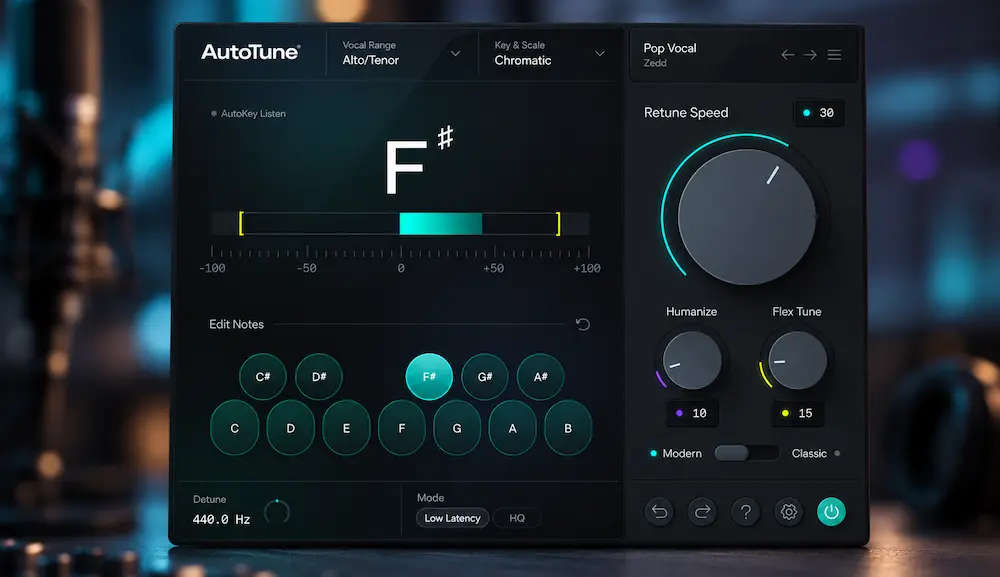
AutoTune Go puts Antares pitch correction directly into FL Studio at no additional cost through FL Cloud Free. The plugin is built around the essentials: real-time pitch correction, key and scale selection, vocal-range detection, pitch visualization, and four Retune Speed settings. It is intentionally much simpler than Antares’ full-featured Auto-Tune products.
That makes the real question less about whether AutoTune Go can tune a vocal—it can—and more about where it fits in a serious production workflow. For tracking, quick correction, background vocals, and hard-tuned effects, the streamlined design can be an advantage. For detailed lead-vocal editing, the reduced control set becomes the limiting factor.
In practice, AutoTune Go is best viewed as a fast real-time tuning tool rather than a replacement for a dedicated vocal-editing system. For an FL Studio producer, the more useful question is therefore not whether it can replace every professional pitch editor, but whether its streamlined controls are enough for the vocal work being done in the session. If the answer is yes, the free access and quick setup are significant advantages. If individual notes and phrases require selective treatment, its simplified design becomes the limiting factor.
AutoTune Go at a Glance
| Best for | Real-time vocal correction, tracking, doubles, backing vocals and hard-tuned effects |
| Works in | FL Studio through FL Cloud |
| Cost | Available at no additional cost through FL Cloud Free |
| Main controls | Key & Scale, Vocal Range, Auto Detect and four Retune Speed settings |
| Main limitation | No graphical note-level editing and fewer correction controls than higher-end Auto-Tune products |
| Best reason to use it | Fast access to Antares-style real-time pitch correction without buying a separate Auto-Tune plugin |
| Bottom line | A focused FL Studio vocal tuner rather than a replacement for detailed pitch editing |
Why Free Auto-Tune Matters in an FL Studio Vocal Workflow
 AutoTune Go is not a new approach to pitch correction. The technology behind real-time vocal tuning is well established. The meaningful change is that Antares’ Auto-Tune workflow is now available to FL Studio users without the cost or setup associated with a separate paid pitch-correction plugin.
AutoTune Go is the first plugin developed specifically for FL Cloud, and it is available to FL Studio users through the free FL Cloud tier. It can be installed directly from Tools > Manage Cloud Plugins inside the DAW.
That matters most in fast production sessions. A producer can correct a vocal while tracking, tighten a stack of backing vocals, or build a hard-tuned vocal sound without interrupting the session to add another paid tool. The time savings are small on a single track, but they become meaningful when pitch correction is part of the routine workflow.
FL Studio already has native options such as Pitcher for real-time correction and NewTone for more detailed offline editing. AutoTune Go does not replace those tools. Its practical distinction is simpler: it gives producers another real-time correction option, built around the familiar Auto-Tune workflow, with no additional purchase.
The important limitation is the same feature set that makes Go fast to use. It is designed around a small number of controls rather than detailed pitch editing. For straightforward correction, that keeps the process efficient. When a lead vocal needs note-by-note decisions or selective control over pitch movement, the workflow quickly moves beyond what Go is designed to handle.
AutoTune Go Controls: What They Mean for Vocal Tuning
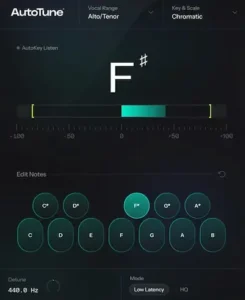
AutoTune Go keeps the correction stage deliberately compact. The core workflow comes down to choosing the correct key and scale, defining the singer’s vocal range, and setting how aggressively the pitch tracker should pull notes toward their target. A real-time pitch display provides visual feedback while the vocal is being processed.
- Key and Scale: Major, Minor, or Chromatic note targets.
- Vocal Range: A manually selected range or automatic range detection.
- Retune Speed: Four settings that determine how quickly detected notes are corrected.
- Pitch Display: Real-time visual feedback showing the pitch being detected and corrected.
The key and scale settings are more important than they may appear. AutoTune Go is not simply asking which pitch is closest to the incoming vocal; it is working within the note targets defined by the selected scale. If the song key is wrong, a singer who is only slightly out of tune can be pulled toward the wrong notes. Major and Minor modes therefore make the most sense when the song’s tonal center is known, while Chromatic is useful when the material does not fit cleanly into a conventional scale.
This is also one of the easiest ways to mistake a setup problem for a tracking problem. If AutoTune Go repeatedly moves otherwise convincing notes somewhere that sounds musically wrong, check the Key, Scale, and Vocal Range before changing the Retune Speed. Faster correction can make an incorrect target more obvious, but it cannot fix an incorrect target.
Vocal-range selection serves a different purpose. Pitch-correction algorithms need to distinguish the intended fundamental range of the source from pitches that may fall outside it. AutoTune Go can detect the range automatically, which removes one setup decision, although manual selection remains useful when the singer’s register changes or the detection is not reliable.
Retune Speed is the control that has the most obvious audible consequence. Slower correction allows more of the original pitch movement to remain, while faster settings produce a tighter and more immediate correction response. The four-position design makes the plugin quick to operate, but it also gives the engineer less room for fine adjustment than the more comprehensive Auto-Tune versions.
That trade-off defines AutoTune Go. It is built to get a vocal into a usable pitch-correction workflow quickly, not to expose every parameter an experienced vocal editor might want. For tracking, melodic rap, pop production, backing vocals, and deliberate hard-tuning effects, that economy can be useful. For detailed lead-vocal work, it becomes the first significant limitation.
Take the Vocal Beyond Pitch Correction
Once pitch is under control, the finished mix still has to translate with the right balance, depth, dynamics, and detail across different playback systems. If you want to hear how your mix holds up at the mastering stage, send us up to 40 seconds for a free mastering demo. Upload Your Mix for a Free Mastering Demo →
How to Use AutoTune Go in FL Studio
AutoTune Go is deliberately simple to set up, but the order of the first decisions still matters. A basic FL Studio vocal workflow looks like this:
- Insert AutoTune Go on the vocal track. Install it through Tools > Manage Cloud Plugins, then load it on the mixer channel carrying the vocal.
- Set the Key and Scale. Match the plugin to the song rather than leaving the vocal correction to an incorrect note set. Major, Minor, and Chromatic modes cover the basic targeting options.
- Choose the Vocal Range. Auto Detect can handle the initial setup, while manual selection gives you more control when the singer moves between registers or the automatic detection is not reliable.
- Choose the Retune Speed. Start with a less aggressive setting when the goal is transparent correction and move toward faster settings when the correction itself is intended to become audible.
- Listen for incorrect note targeting. If a vocal suddenly jumps toward an unexpected pitch, check the song key, scale, and vocal range before assuming the pitch-correction algorithm is the problem.
The important point is that AutoTune Go does not require a long setup procedure. Most of the decision-making happens in those few controls. The trade-off is equally straightforward: the faster setup is possible because the plugin gives you fewer ways to intervene once the automatic correction is running.
For a lead vocal, it is worth checking sustained notes, scoops, slides, and expressive phrases after the initial pass. If most of the performance responds correctly, Go can handle the routine correction efficiently. If individual notes repeatedly require different treatment, that is the point where a more detailed pitch-editing workflow becomes useful.
Where AutoTune Go Fits in a Real Vocal Production Workflow
AutoTune Go is most useful near the front of the vocal chain, where pitch correction can deal with the fundamental pitch problem before the mix starts shaping the vocal’s tone and dynamics.
A practical starting point is:
recording → pitch correction → editing → EQ → compression → effects
This is not a rule that every session has to follow. Pitch correction can be moved later when the production calls for it, and some engineers deliberately monitor through a separate processing chain while recording. But for straightforward corrective work, tuning the relatively clean vocal signal gives the pitch tracker a better source to work from and makes it easier to judge any artifacts before compression, saturation, and ambience magnify them. Antares’ current workflow guidance likewise places pitch correction early in the processing chain. The later processing stage can then shape the vocal’s harmonic coloration and dynamics without confusing those decisions with the initial pitch correction.
That makes AutoTune Go particularly practical during tracking. A producer can establish the key, choose the vocal range, set the correction speed, and hear the tuned performance while the session is still being built. For melodic rap, pop, R&B, and electronic vocals, that can be enough to make the monitoring sound intentional rather than forcing the singer to record against an obviously unstable pitch reference.
The same approach works after recording. AutoTune Go can serve as a fast first pass across a lead, doubles, or backing-vocal stack before more selective editing is applied. If the automatic correction gets the majority of the performance into shape, the engineer spends time fixing the few phrases that actually need attention rather than manually inspecting every note.
Natural Vocal Correction
Subtle tuning is where AutoTune Go’s limited control set becomes more noticeable. A convincing natural correction is not simply a matter of making the Retune Speed slower; the processor also needs to leave enough of the singer’s pitch movement intact to preserve phrasing, vibrato, slides, and note transitions.
Higher-end Auto-Tune products provide additional controls such as Flex-Tune and Humanize for this reason. AutoTune Go does not. The engineer therefore has less control over the boundary between correction and expression.
On a singer who is already reasonably close to pitch, that limitation may be insignificant. On a highly expressive performance, it can be the difference between a vocal that feels edited and one that still sounds like the original performance. If individual phrases need different treatment, AutoTune Go is more likely to become a first-pass processor than the final editing tool.
Hard-Tuned Vocals
AutoTune Go makes more sense when the audible correction is part of the production rather than something the engineer is trying to hide.
Fast pitch correction is a familiar sound in rap, trap, pop, R&B, EDM, and other contemporary styles. In these contexts, a tight correction response can become part of the vocal’s identity. The producer is not necessarily trying to preserve every pitch transition; the movement of the correction itself may be part of the effect.
Go’s simplified interface is an advantage here. There are fewer parameters between the vocal and the intended result, so a producer can move quickly from basic correction toward a more pronounced Auto-Tune effect.
There is still a ceiling. Antares’ current guidance for the classic hard-tuned effect uses a 0 ms Retune Speed setting, while AutoTune Go provides four broader Retune Speed choices instead of exposing the same continuous control.
Background Vocals, Doubles, and Vocal Stacks
Large vocal stacks are one of the more practical places to use a simplified automatic tuner. The goal of a background vocal is often consistency with the lead and with the other layers, not preservation of every small pitch deviation in each take.
That makes automatic correction a useful time-saving stage. A stack of doubles and harmonies can be brought into a tighter pitch range before the engineer moves on to timing, balance, EQ, and spatial processing. When only a handful of phrases remain problematic, those can be handled manually rather than turning every backing track into a detailed pitch-editing project.
That is where AutoTune Go earns its place in a professional session: not by replacing detailed vocal editing, but by taking care of enough routine correction that the engineer can spend more time on the decisions that actually affect the finished mix.
Where AutoTune Go Stops Short of Professional Vocal Editing
 AutoTune Go’s simplicity is useful until the vocal needs selective treatment. Automatic pitch correction works well when most of a performance needs roughly the same amount of correction. Professional vocal editing becomes more demanding when individual notes, phrases, or transitions need different decisions.
That is where the reduced control set starts to matter. AutoTune Go does not provide the Flex-Tune and Humanize controls found in higher-end Auto-Tune workflows, and it does not offer graphical note-level editing. Its scale options and Retune Speed controls are also considerably more limited.
Consider a lead vocal with a sustained note that is slightly flat but contains a deliberate vibrato. A blanket correction setting may pull the pitch toward the target while also changing the character of that movement. The same problem can appear on scoops, slides, and transitions where the pitch movement is part of the performance rather than an error to be removed.
There is also the question of selectivity. One word may need heavy correction while the following phrase is already convincing. A professional editor may want to treat those sections differently, move a single note to a specific pitch, or leave an expressive deviation untouched. AutoTune Go is not designed to provide that level of intervention. When the problem shifts from pitch correction to broader audio repair or spectral cleanup, a dedicated editor such as Acoustica 8 addresses a different part of the corrective process.
That makes the plugin much more effective as an automatic first pass than as a complete lead-vocal editing environment. If most of the performance is close to pitch, Go can eliminate a large amount of routine work. When the remaining problems require note-by-note judgment, a more advanced pitch editor becomes the appropriate tool.
The distinction is important: AutoTune Go is limited by design, not because automatic pitch correction is inherently limited. Its streamlined workflow is the reason it is fast, but that same design puts a ceiling on how precisely an engineer can shape a complex vocal performance.
AutoTune Go vs Pitcher, Auto-Tune and Melodyne
The most important comparison for an FL Studio user is not actually AutoTune Go versus Melodyne. It is AutoTune Go versus Pitcher, because both are designed around real-time pitch correction inside an FL Studio production workflow. The difference is in the control set, interface, and the particular correction workflow each tool provides.
| Tool | Primary Role | Control Depth | Best Fit |
|---|---|---|---|
| AutoTune Go | Real-time pitch correction | Focused | Fast FL Studio vocal tuning, tracking, doubles and effects |
| FL Studio Pitcher | Real-time pitch correction | FL Studio-native workflow | Producers who already rely on FL Studio’s built-in pitch tools |
| Auto-Tune 2026 | Professional real-time pitch correction | Advanced | Users who need more control over natural and hard-tuned correction |
| Auto-Tune Pro | Real-time correction plus detailed editing | Very advanced | Professional vocal production requiring deeper correction control |
| Melodyne | Detailed post-recording editing | Very advanced | Note-level pitch and timing correction after recording |
AutoTune Go vs Pitcher
For an FL Studio producer, this is the closest practical comparison. Both tools can handle real-time vocal pitch correction, so the question is not whether either one can perform the basic job. The more useful distinction is the workflow around that correction.
AutoTune Go brings the Antares approach into FL Studio through FL Cloud and concentrates the interface around Key & Scale, Vocal Range, Auto Detect, Retune Speed, and visual pitch feedback. Pitcher is already part of the FL Studio ecosystem, so it remains the obvious alternative for producers who are comfortable with Image-Line’s native workflow.
The advantage of AutoTune Go is therefore not simply that it can tune a vocal. Its appeal is that an FL Studio user can access the Antares workflow without purchasing a separate Auto-Tune product. The trade-off is its reduced control set: users who need detailed intervention, more advanced tuning behavior, or a broader professional feature set will still have reasons to use a different tool.
AutoTune Go vs Auto-Tune 2026
AutoTune Go and Auto-Tune 2026 occupy different points on the control spectrum. Auto-Tune 2026 adds controls such as Humanize and Flex-Tune, along with more advanced tuning options. AutoTune Go deliberately removes much of that complexity in exchange for a smaller, faster workflow.
That difference matters most when the vocal contains expressive slides, sustained notes, or phrases that need different correction behavior. Go can handle straightforward automatic correction, while the more advanced version provides additional ways to decide how tightly the processor follows the performance.
AutoTune Go vs Melodyne
Melodyne addresses a different stage of the process. It is designed around detailed post-recording editing of individual notes and phrases, while AutoTune Go is primarily a real-time automatic processor. If a vocal needs surgical note-by-note correction, timing changes, or selective treatment of individual phrases, the graphical editing approach remains the more relevant workflow.
In practical terms, AutoTune Go belongs at the fast end of the pitch-correction spectrum: configure the target, choose the correction behavior, and let the processor handle routine tuning. Melodyne belongs at the detailed editing end, where the engineer decides what happens to individual notes.
The Professional Vocal Chain: Where AutoTune Go Fits
AutoTune Go is one stage in a vocal-production chain, not a complete vocal-editing solution. A practical starting point is:
cleanup → AutoTune Go → clip gain and editing → corrective EQ → compression → tonal processing → ambience → automation
The order is not fixed for every session. Some engineers edit gain or timing before pitch correction, while tracking sessions may use a separate monitoring chain. The useful principle is to give the pitch-correction processor a reasonably clean and controlled vocal, then make the broader tonal and dynamic decisions around the corrected performance.
Pitch correction also solves only one part of the vocal problem. It does not fix timing, inconsistent dynamics, excessive sibilance, room noise, clipping, headphone bleed, microphone-position changes, or an unsuitable recording. Those problems still have to be addressed during editing and mixing.
For that reason, AutoTune Go is most useful when it removes routine pitch-correction work without becoming the center of the entire vocal workflow. Once the remaining problems require selective note treatment, the session has moved beyond the plugin’s intended level of control. Before the finished mix reaches mastering, broader mix issues should be resolved separately; see our guide to preparing a mix for mastering for the relevant checks.
What AutoTune Go Does Not Fix in a Mix
AutoTune Go changes the pitch behavior of the vocal, but it does not determine how that vocal sits in the finished mix.
EQ, compression, automation, effects, balance, arrangement, timing, and vocal editing still determine whether the corrected vocal works in context. A perfectly tuned vocal can remain too harsh, too quiet, too forward, or masked by the instrumental.
The useful distinction is simple: AutoTune Go solves a pitch problem. It does not solve the broader production problems that remain after pitch correction.
CPU, Latency and Large Sessions
Performance is one area where AutoTune Go should be evaluated conservatively. The plugin is new, and there is not yet enough independent testing to establish reliable figures for CPU usage, instance counts, offline rendering performance, or latency under controlled conditions.
Antares publishes latency specifications for its current Auto-Tune 2026 products, including measurements at 48 kHz, but those figures should not be treated as measurements for AutoTune Go. Different versions can use different processing architectures, optimization, and signal paths, so performance data from one product cannot establish the performance of another.
For a normal mixing session, the practical test is therefore the session itself. Add AutoTune Go to the vocal tracks that require it, monitor CPU load and system responsiveness, and determine whether the project remains stable at the buffer size you normally use. The result will depend on the DAW, audio interface, sample rate, buffer size, operating system, and the number of active plugins in the session.
Latency becomes more important during tracking. A vocalist monitoring through real-time pitch correction needs the processed signal to feel immediate enough that the correction does not interfere with performance. AutoTune Go is designed for real-time operation, but without controlled independent measurements, it would be premature to assign it a specific latency figure or make broad claims about demanding live-performance setups.
For producers working on large sessions, the same principle applies: measure the plugin in the actual project rather than extrapolating performance from another Auto-Tune product. Until independent benchmarks are available, that is the most defensible way to assess AutoTune Go’s CPU and latency behavior.
Is AutoTune Go Actually Free?
 Yes, but the way it is offered matters.
AutoTune Go is available at no additional cost through FL Cloud Free for FL Studio users. Image-Line states that AutoTune Go is available to FL Cloud users and can be installed through FL Studio’s cloud plugin management system.
In practical terms, this gives an FL Studio producer access to an Antares real-time pitch-correction plugin without purchasing a separate paid Auto-Tune license. For someone who does not already have a dedicated pitch-correction tool, that removes one of the usual barriers to getting real-time vocal tuning into a session.
Free access should not be confused with the feature set of Antares’ paid products. AutoTune Go is intentionally built around a smaller set of controls and a faster workflow, while the company’s higher-end Auto-Tune products provide substantially more options for detailed correction and vocal editing.
The important distinction is therefore cost versus control. AutoTune Go removes the additional purchase for eligible FL Cloud users, but it does not remove the technical reasons an engineer might eventually need a more comprehensive pitch-correction or note-editing tool.
Who Should Use AutoTune Go?
FL Studio producers: AutoTune Go makes sense when you need straightforward real-time pitch correction without adding another paid Auto-Tune plugin to the session.
Vocal producers and beatmakers: The real-time workflow fits tracking, rap, pop, R&B, electronic vocals, doubles, backing vocals, and deliberate hard-tuned effects.
Mixing engineers: Go can handle routine correction and first-pass tuning, but complex lead vocals may still require a more controllable pitch-editing tool.
Detailed vocal editors: If individual notes, transitions, vibrato, or phrases need different treatment, the simplified control set becomes the main limitation.
Overall, AutoTune Go makes the most sense when speed and straightforward real-time correction matter more than detailed pitch editing.
What Early Users Are Actually Saying
It is still too early to draw conclusions about long-term reliability, compatibility, or support. AutoTune Go was released on September 14, 2026, so the available user feedback represents an early snapshot rather than an established track record.
Early discussion among FL Studio users has largely focused on the plugin’s scope rather than any dramatic change to pitch correction itself. In Reddit discussions, users have pointed to the reduced control set compared with higher-end Auto-Tune products, including the absence of features such as Flex-Tune, Humanize, and graphical editing. Others have viewed the plugin as a practical option for producers who want straightforward real-time tuning without adding another paid plugin to their setup.
That interpretation is consistent with the way AutoTune Go is positioned. The available discussion does not yet provide enough evidence to assess long-term reliability or establish a broad professional consensus. What it does show is a clear point of interest: FL Studio users can now access a simplified Antares pitch-correction workflow without purchasing a separate paid Auto-Tune product.
That distinction matters when reading early reviews and forum comments. The relevant question is not whether AutoTune Go replaces every professional pitch-editing tool. It is whether its limited control set is sufficient for the particular vocal workflow in which it is being used.
Why AutoTune Go Fits the FL Studio Workflow
AutoTune Go’s practical distinction is integration rather than a new approach to pitch correction. It puts Antares’ real-time tuning workflow inside FL Studio through FL Cloud, so the producer can add pitch correction without installing or purchasing a separate Auto-Tune product.
That is most relevant for tracking, quick vocal passes, doubles, and backing-vocal stacks where the correction does not need to become a separate editing task.
The compromise is the same one seen throughout the plugin: fewer controls make the initial setup faster, but leave less room for selective correction when individual phrases need different treatment.
Where AutoTune Go Falls Short
AutoTune Go’s limitations become clear when the vocal requires more control than automatic real-time correction can provide:
- It does not provide graphical note-level editing.
- It does not include advanced controls such as Humanize and Flex-Tune.
- Its Retune Speed control is simplified to four settings rather than the more granular control found in higher-end Auto-Tune workflows.
- It does not expose the 0 ms Retune Speed setting used by higher-end Auto-Tune workflows for the most immediate hard-tuned response.
- Its scale and correction controls are intentionally narrower than those available in the full Auto-Tune products.
- Its workflow is specifically tied to FL Studio and FL Cloud rather than being positioned as a general-purpose pitch-editing environment.
- Independent testing of CPU usage, latency, and audio performance is still limited because the plugin is new.
None of these limitations are unexpected given the plugin’s design. AutoTune Go is built to make basic real-time pitch correction quick to access and easy to configure, not to provide every control required for detailed vocal editing.
The practical boundary appears when a vocal needs selective correction rather than a consistent correction strategy across the entire performance. At that point, the additional control offered by a professional real-time tuner or graphical pitch editor becomes more relevant.
AutoTune Go works best when the task is straightforward: detect the vocal, establish the key and range, choose the desired Retune Speed, and let the processor handle the routine correction. The more individual notes and phrases need to be treated differently, the faster the workflow moves beyond what Go is designed to do.
Review basis: This review evaluates AutoTune Go from its documented controls, FL Studio workflow, published limitations, and the practical production implications of those design choices. It does not claim independent listening, CPU, latency, or tracking measurements; those require direct hands-on testing and controlled comparison.
Overall Rating
| Category | Rating |
|---|---|
| Workflow Accessibility | 9/10 |
| Correction Control | 7/10 |
| Real-Time Workflow Fit | 8/10 |
| Hard-Tuning Flexibility | 7/10 |
| Detailed Vocal Editing | 5/10 |
| Overall Editorial Score | 7.5/10 |
Editorial assessment: AutoTune Go scores well for fast FL Studio-based real-time correction because its core controls are easy to configure and directly suited to tracking, doubles, backing vocals, and audible hard tuning. The score drops where the workflow requires selective note treatment, finer control over expressive pitch movement, or graphical editing.
AutoTune Go Final Assessment: A Useful Free Tool, Not a Professional Vocal Editor
AutoTune Go fills a specific gap in the FL Studio workflow: straightforward real-time vocal pitch correction with a low-friction setup and no additional cost through FL Cloud Free. Its value comes from making a familiar production task immediately accessible, rather than from replacing the more comprehensive tools already used for detailed vocal editing.
The plugin is particularly well suited to tracking, rap and melodic vocals, pop and electronic production, backing vocals, doubles, demos, and deliberate hard-tuned effects. In these situations, a simple correction workflow can handle a substantial amount of routine work without requiring detailed note-by-note editing.
The boundary becomes clearer as the vocal requires selective treatment. Engineers working extensively with detailed pitch editing may still need tools such as Auto-Tune Pro, Melodyne, NewTone, or other advanced editors when individual notes, transitions, vibrato, or phrases require different treatment.
AutoTune Go is best understood as a fast real-time pitch-correction tool rather than a replacement for a professional vocal-editing environment. That distinction is important: its limited feature set is also what keeps the workflow simple and fast.
For an FL Studio producer, the practical question is therefore straightforward: does the streamlined control set cover the correction work required in the session? If it does, AutoTune Go provides a capable way to handle that stage of the vocal chain without adding another paid pitch-correction product.
Hear What Your Mix Needs Beyond Vocal Tuning
AutoTune Go can bring the vocal’s pitch into place, but a finished mix still has to work as a complete stereo picture. If you have finished the vocal processing and want to judge the actual balance, dynamics, depth, punch, stereo image, and detail of the mix rather than adding another processor by default, compare it against a real mastering pass. Upload up to 40 seconds of your mix and receive a free mastering demo prepared by a real mastering engineer. Upload Your Mix for a Free Mastering Demo →
AutoTune Go FAQ
Is AutoTune Go free?
Yes. AutoTune Go is available at no additional cost through FL Cloud Free for FL Studio users. Image-Line provides installation through Tools > Manage Cloud Plugins in FL Studio.
Is AutoTune Go the same as Auto-Tune 2026?
No. AutoTune Go is a simplified, FL Studio-focused pitch-correction plugin. Auto-Tune 2026 provides a broader set of professional controls, including features such as Flex-Tune and Humanize.
Can AutoTune Go create a hard-tuned Auto-Tune effect?
Yes, it can produce an audible hard-tuned effect with its faster Retune Speed settings. However, AutoTune Go does not expose the 0 ms Retune Speed setting available in higher-end Auto-Tune workflows, so the most extreme instant-response effect has less control available than in the full versions.
How does AutoTune Go compare with FL Studio Pitcher?
Both can be used for real-time pitch correction inside an FL Studio workflow. Pitcher is already part of the FL Studio environment, while AutoTune Go provides the Antares Auto-Tune workflow through FL Cloud Free. The practical difference is therefore mainly in the interface, available controls, and correction workflow.
Why use AutoTune Go instead of Pitcher?
Both tools address real-time pitch correction inside an FL Studio workflow. AutoTune Go’s main distinction is that it brings the Antares Auto-Tune workflow into FL Studio through FL Cloud, while keeping the interface focused on a small set of controls. Pitcher remains a relevant native FL Studio option, so the choice depends on which correction workflow and control set better fit the session.
Why does AutoTune Go sometimes move a vocal toward the wrong note?
The first things to check are the selected Key, Scale, and Vocal Range. AutoTune Go corrects toward the note targets defined by those settings, so an incorrect key or unsuitable range can produce correction that sounds musically wrong even when pitch detection itself is working. If the settings are correct and only certain expressive phrases cause problems, the limitation may be the plugin’s simplified control set rather than the basic setup.
Can AutoTune Go replace Melodyne?
No. Melodyne is designed for detailed post-recording editing of individual notes and phrases, including pitch and timing. AutoTune Go is primarily a real-time automatic correction tool. They address different stages of vocal editing.
Can AutoTune Go be used while recording vocals?
Yes. Real-time vocal correction is one of its intended uses. The practical tracking experience depends on the complete monitoring chain, including the audio interface, buffer size, DAW configuration, computer system, and processing latency.
Does AutoTune Go work on instruments?
AutoTune Go is focused on vocal pitch correction rather than general-purpose instrument tuning. Pitch-correction processors can work with suitable monophonic sources, but the plugin should not be treated as a polyphonic pitch editor or a replacement for dedicated instrument-tuning software.
Is AutoTune Go suitable for professional mixing?
It can be used as a basic pitch-correction stage within a professional mixing workflow, particularly for tracking, doubles, backing vocals, and straightforward correction. Complex lead vocals may still require a more controllable pitch-editing tool.
Does AutoTune Go have a role in mastering?
No direct role. Pitch correction is normally handled during vocal production and mixing, before the final stereo mix reaches mastering. AutoTune Go can affect the source material that eventually reaches mastering, but it is not a mastering processor.
Should you replace an existing Auto-Tune or Melodyne workflow with AutoTune Go?
Not if that workflow depends on features Go does not provide. AutoTune Go is better treated as an additional fast real-time option for FL Studio sessions; detailed note editing and advanced correction control still require a different tool.

As an audio production editor, I evaluate pitch-correction tools by how predictably they handle real vocal performances rather than by feature count alone. With a real-time tuner such as AutoTune Go, the important considerations are pitch tracking, correction behavior, and how cleanly the processor follows vibrato, slides, and other natural pitch movement without turning every deviation into an error.
Enjoyed this review?
If you found it useful, you can support independent audio research with a coffee.
☕ Buy me a coffee