Stereo imaging describes how sound is distributed across the left and right channels of a stereo mix. It determines the perceived position and width of individual sources, as well as the spatial relationship between instruments. Effective stereo imaging helps establish separation, preserve a stable center, and create depth without relying solely on level or EQ differences. A wider stereo image, however, is not necessarily a better one.
The objective is to create a coherent soundstage in which width, placement, and phase relationships work together. Excessive stereo enhancement can weaken center definition, introduce unwanted phase interactions, and compromise mono compatibility. Understanding how Left/Right signals, panning, and Mid/Side processing affect the stereo field makes it easier to control these trade-offs during mixing and mastering.
This guide examines how stereo images are formed, the techniques engineers use to shape stereo width and instrument placement, and the monitoring methods that help identify phase-related problems before they affect playback translation.
What Is Stereo Imaging in Audio?
 Stereo imaging describes the perceived spatial distribution of sound between the left and right channels. It determines where sources appear within the stereo field, how wide they sound, and how distinctly they occupy their positions relative to other elements in the mix.
In a conventional stereo playback system, a centered vocal is typically reproduced at equal levels through both speakers, creating a phantom center. Instruments panned toward either side are perceived at different positions between the speakers, while stereo recordings and effects can extend beyond a single pan position by introducing differences in level, timing, and phase between channels.
The resulting spatial presentation is known as the stereo image. Its characteristics depend on several interacting factors:
- Interchannel level differences: Differences in amplitude between the left and right channels influence the perceived position of a sound. This is the basis of conventional amplitude panning.
- Interchannel time differences: Small timing differences can affect localization and perceived spaciousness, depending on the source material and playback conditions.
- Phase relationships: Relative phase differences between channels influence stereo correlation, width, and how the signal behaves when summed to mono.
- Channel decorrelation: Differences in the waveform content of the left and right channels create spatial separation and contribute to the perception of width.
- Frequency-dependent differences: Variations in level, timing, and phase across the frequency spectrum can cause different frequency ranges to occupy different perceived positions within the stereo field.
These factors do not operate independently. Their interaction determines whether a stereo image sounds focused, spacious, diffuse, or unstable. Consequently, effective stereo imaging requires more than increasing a plugin’s width control; it requires managing the relationships between the two channels without compromising the mix’s tonal balance or mono compatibility.
Stereo Width vs. Stereo Placement: What’s the Difference?
Stereo width and stereo placement describe two distinct properties of a stereo image. Width concerns the spatial spread of a sound, while placement describes its perceived position within the left-to-right soundstage. Treating them as separate parameters helps engineers make more deliberate decisions about separation, balance, and spatial depth.
Stereo Width
Stereo width describes the perceived extent of a sound across the stereo field. A narrow image concentrates most of its energy around the center, while a wide image contains greater spatial separation between its left and right components.
For a closer look at how listeners perceive stereo width and why center stability matters, read our guide to the perception of stereo width in mixing.
A mono signal reproduced equally through both channels occupies the phantom center and has no inherent stereo width. A stereo recording, by contrast, can contain differences in level, timing, and phase between its channels that produce a broader spatial presentation.
In music production, stereo width can result from several techniques and source characteristics:
- Double-tracking: Independently recorded performances panned to opposite sides create natural differences in timing, pitch, and articulation.
- Stereo instruments: Synthesizers, keyboards, and sampled sources may contain distinct left and right channel information.
- Stereo reverb and delay: Spatial reflections and channel-dependent delay patterns extend the perceived sound beyond the position of the dry source.
- Modulation effects: Chorus and related processing introduce time- and pitch-dependent differences between channels.
- Mid/Side processing: Adjusting the Side component relative to the Mid component changes the balance between central and lateral information.
- Interchannel differences: Variations in amplitude, timing, and phase contribute to the perceived width of stereo material.
Increasing Side information or introducing additional channel differences can make a mix sound wider, but the result is not automatically an improvement. Excessive widening may reduce center definition, produce unstable spatial perception, or cause partial cancellation when the signal is summed to mono. The impact depends on the processing method and the source material.
Stereo Placement
Stereo placement describes the perceived location of a sound within the left-to-right soundstage. In conventional mixing, this is primarily controlled through panning, which changes the relative signal levels sent to the left and right channels.
For example, a lead vocal may remain centered, while rhythm guitars are positioned toward opposite sides and supporting keyboards occupy intermediate positions. These decisions establish spatial relationships between sources and help prevent important elements from competing for the same position.
Unlike stereo width, which concerns the spatial spread of a source, placement concerns its localization. A mono guitar can be panned to the left without becoming a stereo source, while a stereo synthesizer can occupy a wide area of the soundstage rather than a single perceived position.
The practical distinction: placement determines where a source is perceived, while width describes how broadly its sound extends across the stereo field. A mix can have widely distributed instruments but poor separation, or a relatively narrow image with precise localization and excellent clarity. Width and placement should therefore be evaluated together, but controlled independently whenever the processing allows it.
Does Your Mix Have the Right Stereo Balance?
A wide stereo image is only effective when it preserves a focused center, clear instrument separation, and reliable mono compatibility. Professional mastering helps refine the overall balance, dynamics, and spatial presentation while maintaining the character of your mix. Submit your track for a free mastering demo and hear how your mix translates through a dedicated mastering process. You can upload up to 40 seconds of your mix for evaluation.
How Does a Stereo Image Work? Understanding Left and Right Channels
A conventional stereo signal consists of two channels: Left (L) and Right (R). Their relationship determines how sounds are localized and how spatial information is reproduced. Depending on the recording and processing techniques used, the channels may contain identical, partially correlated, or substantially different audio information.
When the same signal reaches both channels at equal levels and with matching timing and polarity, the listener perceives it at the center of the stereo field. This is known as the phantom center. Unlike a physical center speaker in a multichannel system, this apparent central position is created through the combined output of the left and right speakers.
Conventional amplitude panning works by changing the relative levels of a signal sent to the two channels. Increasing the left-channel level relative to the right shifts the perceived position toward the left, while the opposite adjustment moves it toward the right. Pan laws determine how the signal level is distributed between channels as it moves across the stereo field.
In simplified terms:
- Equal levels: The signal is perceived at the phantom center when timing and polarity are also matched.
- Higher left-channel level: The perceived position shifts toward the left.
- Higher right-channel level: The perceived position shifts toward the right.
- Different channel content: Differences in musical information between the channels can create a broader or more complex stereo presentation.
Amplitude differences primarily determine localization in conventional panning, but stereo width also depends on interchannel timing, phase relationships, and the degree of correlation between the channels. These factors become particularly important when working with stereo recordings, modulation effects, and Mid/Side processing.
Why Phase Differences Matter
Differences in phase and timing between the left and right channels influence how a stereo signal is perceived. Depending on their frequency content and correlation, these differences can contribute to a wider or more diffuse stereo image. Chorus, short delays, and other decorrelation techniques use this principle to create spatial separation between channels.
However, the same differences can cause problems when a stereo signal is summed to mono. Components that reinforce each other in stereo may partially cancel when the channels are combined, particularly when their phase relationships differ across specific frequency ranges.
The audible consequences can include reduced instrument levels, weakened low-frequency content, changes in tonal balance, and comb filtering. In more severe cases, important elements may become significantly quieter or lose definition.
It is important to distinguish between ordinary phase differences and polarity inversion. A polarity-inverted component can cancel its corresponding in-phase counterpart under the appropriate summing conditions, while frequency-dependent phase differences may produce partial cancellation that varies across the spectrum.
For this reason, stereo width should be evaluated alongside phase correlation and mono compatibility. A mix that sounds wide in stereo must also retain its essential tonal balance and musical information when reproduced through a mono signal path.
Mid/Side Processing: The Key to Controlling Stereo Width
Mid/Side (M/S) processing provides a way to manipulate the shared and differential information in a stereo signal independently. Rather than processing the Left and Right channels directly, the signal is encoded into two components: Mid, which represents the sum of the channels, and Side, which represents their difference. This separation allows engineers to adjust stereo width and center balance without treating the original channels as independent signals.
What Are Mid and Side Signals?
The Mid signal is derived from the sum of the left and right channels. It contains the information common to both channels, including centrally panned material and other correlated content. It should not be interpreted as an isolated center channel: sounds positioned away from the center can also contribute to the Mid component.
The Side signal is derived from the difference between the left and right channels. It contains information that differs between the channels and contributes to the perceived stereo width. This includes differences in level, timing, phase, and musical content.
Using a normalized encoding convention, the M/S signals are calculated as follows:
Mid = (Left + Right) / 2
Side = (Left – Right) / 2
The original stereo channels can be reconstructed through the corresponding decoding equations:
Left = Mid + Side
Right = Mid – Side
These equations use a normalization factor of 1/2 during encoding. Other implementations may use different scaling conventions, but the underlying sum-and-difference operation is identical. The encoding and decoding stages must use matching conventions to preserve the original signal level.
Once the signal is separated into Mid and Side components, their relative levels can be adjusted before decoding. This changes the balance between correlated and differential information, providing a direct way to control the perceived width of stereo material.
How Mid/Side Processing Changes Stereo Width
The most direct way to modify stereo width with M/S processing is to adjust the Side level relative to the Mid level. Because the Side component represents the differences between the channels, changing its gain alters the contribution of lateral information when the signal is decoded back into Left and Right.
- Increasing Side gain: Increases the contribution of differential information, generally producing a wider stereo image. It can also make existing phase differences more prominent.
- Reducing Side gain: Decreases the contribution of the Side component, narrowing the stereo image and bringing the decoded channels closer together.
- Increasing Mid gain: Raises the level of shared information, strengthening the central component of the stereo presentation relative to the sides.
- Reducing Mid gain: Lowers the shared component relative to the Side information, potentially making the stereo image less centered and more diffuse.
These adjustments have practical applications in both mixing and mastering. For example, increasing the Side level of a stereo keyboard recording can make its lateral information more prominent around a centered vocal. Conversely, reducing Side gain on a stereo bass or synthesizer recording can narrow its spatial presentation and help establish a more focused low-frequency foundation.
There is an important distinction between changing the relative Mid/Side balance and correcting an underlying phase problem. Increasing Side gain does not necessarily improve stereo separation, and reducing it does not automatically resolve every mono compatibility issue. The result depends on the source material and its frequency-dependent relationships between channels.
M/S processing also cannot generate additional stereo information from a perfectly mono signal. When the left and right channels are identical, the Side component is zero. Creating stereo differences from a mono source requires additional processing, such as modulation, delay, or other forms of signal decorrelation.
Using ADUAL for Mid/Side Stereo Control
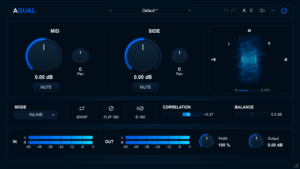 AREFYEV ADUAL is a free Mid/Side stereo processor that provides independent control over the Mid and Side components. Its controls allow engineers to adjust their levels and pan positions, offering more flexibility than a conventional stereo width control.
This distinction matters when the goal is not simply to make a signal wider, but to change the balance and positioning of its shared and differential components. Independent gain and pan controls make it possible to explore these relationships without relying exclusively on a single width parameter.
Practical applications include:
- Adjusting stereo width: Change Side gain to control the contribution of lateral information to the decoded stereo signal.
- Balancing the center: Adjust Mid gain to change the level of shared information relative to the Side component.
- Modifying spatial balance: Use independent Mid and Side panning to alter how the two components are distributed across the stereo field.
- Checking polarity: Use the polarity controls to investigate signal relationships and identify potential cancellation issues.
- Monitoring stereo behavior: Use the phase correlation meter and vectorscope to observe changes in channel relationships and stereo distribution.
ADUAL also includes INLINE, ENCODE, and DECODE operating modes, providing different ways to integrate Mid/Side processing into a signal chain. Mid and Side panning is available in INLINE and DECODE modes, but remains inactive in ENCODE mode because the signal stays in the Mid/Side domain. The choice of mode determines how the processor handles the incoming and outgoing signal, making correct routing important when incorporating it into an existing mixing or mastering workflow.
As with any M/S processor, the most useful results come from making controlled adjustments and evaluating both the decoded stereo signal and its mono compatibility. Visual meters can help identify changes in stereo behavior, but listening remains essential for determining whether those changes improve the mix. Learn more about AREFYEV ADUAL — Free Mid/Side Stereo Processor
5 Stereo Imaging Techniques for a Wider and More Balanced Mix
Creating a controlled stereo image involves more than adjusting a width parameter. Instrument placement, performance differences, spatial effects, and Mid/Side processing each affect how a mix occupies the stereo field. The following techniques address different aspects of stereo imaging and can be combined according to the arrangement and the characteristics of the source material.
1. Use Panning to Create Instrument Separation
Panning establishes the position of individual sources within the stereo field. It is often the most effective starting point for improving separation because it changes where instruments are perceived without requiring additional stereo processing.
A practical starting arrangement might keep the kick, bass, lead vocal, and primary snare elements near the center, while distributing guitars, keyboards, percussion, and backing vocals across the remaining stereo field. The exact positions should follow the arrangement rather than a fixed panning template.
When deciding where to place an instrument, consider its role, frequency range, relationship to other sources, and importance within the arrangement. Two instruments occupying similar frequency ranges and competing for attention may benefit from different pan positions. However, panning alone will not resolve masking caused by overlapping frequency content or excessive dynamics; addressing the frequency balance between instruments may also be necessary.
The objective is to establish a clear spatial hierarchy while maintaining a stable center for the elements that carry the main musical focus. Good panning can improve separation before any dedicated stereo imaging processing is introduced.
2. Use Double Tracking to Create Natural Stereo Width
Double tracking is an effective way to create stereo width from performances that contain genuine variations in timing, pitch, articulation, and dynamics. It is particularly useful for rhythm guitars and backing vocals.
Rather than duplicating an existing recording, capture a second independent performance of the same part. When the two takes are panned to opposite sides, their small differences create a broader and more complex stereo image than a single centered performance.
This technique is especially common in:
- Rhythm guitar arrangements in rock and metal.
- Layered backing vocals and vocal harmonies.
- Pop productions with stacked vocal parts.
- Double-tracked acoustic guitars.
- Layered instrumental performances.
Duplicating an identical recording and panning the copies left and right does not produce the same result. Because the waveforms remain highly correlated, the copies retain essentially the same spatial information. Slight timing offsets or pitch changes can introduce width, but they also create comb filtering and other phase-dependent effects when the signals are combined. A separately performed take generally provides a more musically natural result.
3. Use Stereo Reverb and Delay to Add Depth
Reverb and delay can expand the perceived space around a source while preserving the position of its direct signal. This is particularly useful when an instrument needs to remain clearly localized but should not sound acoustically isolated.
Sending a mono source to a stereo reverb creates an opportunity to distribute its reflections and reverberant energy across both channels. Similarly, stereo delay configurations can introduce different timing patterns between the left and right outputs, creating movement and spatial separation.
For example, a lead vocal can remain centered while its reverb extends across the stereo field. A guitar panned slightly left can be complemented by a stereo delay that adds rhythmic movement without requiring the dry signal to become wider.
Several approaches are worth considering:
- Stereo reverb: Use early reflections and the reverberant tail to establish a sense of acoustic space around the source.
- Ping-pong delay: Alternate repeats between the left and right channels to create rhythmic movement across the stereo field.
- Dry/wet separation: Keep the direct signal focused while allowing the processed signal to occupy a broader spatial area.
- Automation: Change reverb and delay levels between sections to create contrast without permanently altering the source’s placement.
Excessive stereo ambience can obscure transients, reduce definition, and push important elements farther back in the perceived soundstage. Reverb and delay should therefore be evaluated not only for width, but also for their effect on clarity, density, and depth.
4. Apply Mid/Side Processing to Control Width
Mid/Side processing provides a different form of stereo control from conventional panning. Instead of changing the position of an individual source, it allows engineers to manipulate the shared and differential components of an existing stereo signal.
For example, increasing Side gain on a stereo synthesizer can emphasize its lateral information, making the sound appear wider. Reducing Side gain can narrow a stereo recording and increase the relative prominence of its shared content. These adjustments are useful when the original stereo balance needs refinement without changing the entire signal through conventional Left/Right processing.
Mid/Side equalization offers another level of control. Because the two components can be processed independently, engineers can shape their frequency content according to the role each plays in the mix.
- Mid-focused EQ: Shape the tonal balance of the shared information, which often includes important central elements.
- Side-focused EQ: Control the frequency content of the differences between the left and right channels.
- Low-frequency Side management: Reduce excessive lateral energy when it contributes to an unstable or unfocused low end.
- High-frequency Side management: Avoid unnecessary boosts that can exaggerate cymbals, reverberation, and other lateral content.
These techniques can be useful on stereo instrument buses and the master bus. However, M/S adjustments should be judged in context: reducing Side information may improve focus, but excessive processing can also remove useful spatial detail. Always check the decoded signal in stereo and mono.
For independent Mid and Side gain and pan adjustments, AREFYEV ADUAL provides dedicated controls for shaping the relationship between shared and differential stereo information.
5. Use Stereo Width Automation for Dynamic Arrangements
Stereo width does not need to remain constant throughout a song. Changes in spatial presentation can reinforce the arrangement, distinguish sections, and create a stronger sense of progression.
For example, a verse may benefit from a relatively restrained stereo image, while the chorus introduces wider guitars, backing vocals, and supporting synthesizers. This contrast can make the transition feel more expansive without requiring the entire mix to operate at maximum width.
Useful automation approaches include:
- Narrowing selected stereo elements in verses to create contrast with wider choruses.
- Increasing the level or width of backing vocals during key sections.
- Raising stereo delay or reverb levels toward the end of phrases.
- Expanding synthesizer layers during transitions, breakdowns, and instrumental passages.
- Keeping the main vocal and low-frequency foundation relatively stable while allowing supporting elements to change position or width.
Width automation should follow the musical arrangement rather than operate as an independent effect. The most effective changes are often subtle: a small increase in lateral information or ambience at the right moment can create a stronger sense of contrast than applying aggressive widening throughout the entire production.
How to Check Stereo Width and Phase Correlation
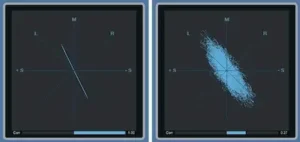 One of the most common mistakes in stereo imaging is judging width exclusively through headphones or stereo speakers. A mix may sound impressively wide in one listening environment while exhibiting phase relationships that compromise its compatibility with mono playback.
This matters because music is reproduced through a variety of systems, including smartphones, laptops, televisions, club sound systems, and other playback setups with different speaker configurations. Checking stereo width, phase correlation, and mono compatibility helps reveal problems that may not be obvious during normal stereo listening.
Several monitoring tools and techniques can help you evaluate a stereo image more reliably.
Check Your Mix in Mono
Mono monitoring is one of the simplest ways to identify potential stereo compatibility problems.
When a stereo signal is summed to mono, the left and right channels are combined. In a conventional Mid/Side representation, the Side component cancels out, leaving the Mid component. This makes mono monitoring particularly useful for identifying elements that rely heavily on differences between the two channels.
Listen for:
- Instruments that become significantly quieter or disappear.
- Low frequencies that lose weight or definition.
- Vocals or guitars that suddenly sound thinner.
- Stereo effects that become weaker or change character.
- Important elements that become difficult to distinguish.
Some changes in width and tonal balance are normal when switching from stereo to mono. However, substantial losses of essential musical information may indicate phase cancellation or excessive reliance on Side content. Check whether the problem affects a particular instrument, frequency range, or effect before making corrective adjustments.
Understand the Phase Correlation Meter
A phase correlation meter indicates how closely the left and right channels correlate over time. It provides a useful reference for assessing the relationship between the two channels, but it does not measure stereo quality or mono compatibility on its own.
Although display conventions vary between meters, a typical correlation scale can be interpreted as follows:
- +1: The channels are perfectly positively correlated, as with identical signals in both channels.
- 0: The channels have no linear correlation. This can occur with highly decorrelated stereo material, although it does not necessarily indicate a problem.
- -1: The channels are perfectly negatively correlated, as with identical signals of opposite polarity. They cancel completely when summed to mono.
A reading close to zero is not automatically a warning, and a positive reading does not guarantee a well-balanced stereo image. Correlation changes with the musical material and over time, so interpret the meter alongside critical listening and mono checks.
Sustained negative readings, particularly on prominent instruments or essential parts of the mix, deserve investigation. Brief negative excursions may occur in some stereo effects and do not necessarily indicate a serious compatibility problem.
Use a Stereo Vectorscope
A stereo vectorscope displays the relationship between the left and right channels as a graphical pattern. It can help reveal channel similarity, stereo spread, and unusual signal relationships that may warrant further investigation.
In a conventional vectorscope display:
- A narrow, vertically oriented pattern generally indicates strong similarity between the channels and a relatively narrow stereo image.
- A wider pattern suggests greater differences between the left and right signals.
- A strongly horizontal pattern can indicate substantial out-of-phase content and potential mono compatibility issues.
Display orientation and interpretation can vary between vectorscopes, so learn how your particular meter represents the stereo field before drawing conclusions from its shape.
A vectorscope is not a substitute for listening or mono monitoring. It is most useful as a complementary tool alongside a phase correlation meter, helping you investigate stereo behavior rather than treating a particular display shape as a measure of mix quality.
Common Stereo Imaging Mistakes to Avoid
Even experienced producers and mixing engineers can make stereo imaging decisions that reduce clarity, weaken the center image, or compromise translation across different playback systems.
Here are five common mistakes to avoid when shaping the stereo image of a mix.
Making Everything Wide
If every instrument occupies the edges of the stereo field, the mix loses the contrast between wide and focused elements. Without that contrast, the stereo image can become diffuse, and important parts may lose their sense of position.
A strong mix needs a clear spatial hierarchy. Keep essential elements appropriately focused, and use wider positions for supporting instruments, effects, and arrangement layers that benefit from additional space. Width is most effective when it creates contrast rather than being applied uniformly.
Overusing Stereo Widening Plugins
Increasing stereo width can sound impressive at first, but excessive widening may weaken the center image, exaggerate phase differences, and reduce mono compatibility.
Apply widening selectively and evaluate the result in the context of the full mix. If a track already has a convincing stereo image, additional processing may offer little benefit. Avoid judging a widening effect solely by how dramatic it sounds in isolation.
Ignoring Mono Compatibility
Some stereo widening techniques introduce timing, phase, or decorrelation differences between the left and right channels. These can create a wider presentation in stereo but may cause comb filtering, level changes, or cancellation when the channels are summed to mono.
Check important stereo elements in mono, paying particular attention to vocals, bass, kick, and other foundational parts of the arrangement. The goal is not to eliminate all stereo differences, but to make sure essential musical information remains clear when reproduced through a mono signal path.
Confusing Loudness With Width
A louder signal can sometimes seem more impressive, even when its stereo image has not actually improved. This can lead to misleading comparisons between different processing settings.
When comparing stereo processing options, match their output levels as closely as possible. This makes it easier to judge whether a change genuinely improves spatial presentation, separation, or depth rather than simply increasing perceived loudness.
Relying Only on Visual Meters
Phase correlation meters and vectorscopes provide useful information about stereo behavior, but they cannot determine whether an image sounds natural, balanced, or musically appropriate.
Use visual analysis to identify potential issues and understand the relationship between the channels. Make the final decision through critical listening, mono monitoring, and comparisons across suitable playback systems.
A Practical Stereo Imaging Workflow for Mixing and Mastering
A consistent workflow helps you create a wide, controlled stereo image without sacrificing clarity, balance, or mono compatibility. Rather than applying widening as a final corrective step, build the spatial presentation progressively throughout the mix.
Use this sequence as a practical starting point:
- Establish the foundation: Balance the main elements and identify which sources need a stable, focused position in the stereo field.
- Set stereo placement: Use conventional panning to separate instruments and establish a clear spatial arrangement.
- Build natural width: Use independent performances, stereo instruments, reverb, and delay where they support the arrangement.
- Evaluate the stereo image: Identify elements that sound too narrow, excessively wide, or poorly balanced in the context of the full mix.
- Apply Mid/Side processing: Adjust Mid and Side levels to refine the relationship between shared and differential stereo information.
- Monitor phase behavior: Use a correlation meter and vectorscope to investigate potentially problematic relationships between the channels.
- Check mono compatibility: Confirm that essential elements remain audible and balanced when the mix is summed to mono.
- Compare at matched levels: Evaluate processed and unprocessed versions at similar loudness to avoid confusing increased level with improved stereo imaging.
During the Mid/Side stage, AREFYEV ADUAL provides controls for adjusting Mid and Side gain and panning, managing polarity, and monitoring stereo behavior with its phase correlation meter and vectorscope.
Stereo imaging should support the arrangement, not compensate for problems elsewhere in the mix. If instruments are masking each other, addressing frequency balance, dynamics, or arrangement may be more effective than simply making them wider. A controlled stereo image comes from deliberate placement and processing, not maximum width.
Before approving the finished mix, use our mixing checklist to review stereo consistency, mono compatibility, and overall translation across the entire arrangement.
Final Thoughts: A Wide Mix Should Also Be a Balanced Mix
Creating a wide stereo image is not about pushing every instrument toward the edges of the stereo field or maximizing the settings of a widening plugin. It is about shaping the spatial relationships between instruments to create a coherent soundstage that supports the music.
Effective stereo imaging combines thoughtful panning, natural stereo recording techniques, carefully applied spatial effects, and precise Mid/Side processing. It also requires monitoring phase relationships and checking how the mix translates to mono playback.
Start with a balanced mix, use stereo width selectively, and make adjustments while listening critically. The goal is a stereo image that feels spacious without sacrificing clarity, focus, or consistency across different playback systems.
If you need a dedicated tool for controlling Mid/Side balance, stereo width, and panning, explore AREFYEV ADUAL. This free stereo processing plugin provides independent Mid and Side controls, along with phase correlation and vectorscope monitoring, to help you refine the stereo image of your mix.
Hear How Your Mix Translates After Professional Mastering
A stereo mix can sound wide and impressive while still losing focus in the center, clarity between instruments, or essential detail when summed to mono. After refining your panning, stereo width, and Mid/Side balance, the next step is to hear how the mix performs through a professional mastering process. Upload up to 40 seconds of your mix and receive a free mastering demo prepared by a real mastering engineer. Compare the original with the mastered version to hear the actual differences in stereo balance, tonal clarity, dynamics, and overall translation.
Frequently Asked Questions About Stereo Imaging
What Is Stereo Imaging in Music Production?
Stereo imaging is the process of shaping how sounds are positioned and perceived across the left and right channels of a stereo mix. It encompasses stereo width, panning, spatial depth, and the phase relationships between channels.
How Do I Make My Mix Sound Wider?
You can create a wider mix through double tracking, panning, stereo reverb, delay, modulation effects, and Mid/Side processing. Start with effective instrument placement and use widening techniques selectively. Always check the result in mono to identify potential phase cancellation and loss of essential elements.
What Is the Difference Between Stereo Width and Panning?
Panning determines the perceived position of a sound between the left and right channels. Stereo width describes how broadly a sound is distributed across the stereo field. Panning primarily controls placement, while stereo imaging techniques can shape the width and spatial characteristics of a signal.
What Is Mid/Side Processing Used For?
Mid/Side processing separates a stereo signal into Mid (sum) and Side (difference) components. This allows engineers to process the shared and differential information independently. It is useful for adjusting stereo width, shaping tonal balance, and refining spatial characteristics during mixing and mastering.
Does Increasing Stereo Width Cause Phase Problems?
It depends on the widening technique and source material. Increasing Side gain in conventional Mid/Side processing does not automatically introduce additional phase shifts, but it can make existing differences between the channels more prominent. Time-based widening and decorrelation techniques can introduce additional phase interactions and mono compatibility issues. Always evaluate the result in mono.
How Do I Check If a Mix Is Too Wide?
Listen to the mix in mono, monitor the phase correlation meter, and examine the stereo image with a vectorscope. If essential instruments become significantly quieter or disappear in mono, investigate their phase relationships and reduce excessive widening where necessary.
What Is a Good Phase Correlation Reading for a Stereo Mix?
There is no single ideal correlation value for every mix. Positive readings indicate some degree of similarity between the channels, while readings closer to zero indicate less linear correlation. Sustained negative readings can signal potential mono compatibility problems. Interpret the meter alongside critical listening rather than treating any particular value as a universal target.
Can I Create a Stereo Image From a Mono Recording?
Yes. Chorus, short delays, modulation, reverb, and other stereo decorrelation techniques can create a wider perceived image from a mono source. However, simply increasing Side gain in an M/S processor will not create width from a perfectly mono signal because identical left and right channels contain no Side information.
What Is a Good Free Stereo Imaging Plugin?
AREFYEV ADUAL is a free Mid/Side stereo processing plugin with independent Mid and Side gain and panning, polarity controls, a phase correlation meter, and a vectorscope. It can help you adjust stereo width and monitor the spatial characteristics of a mix.

Yurii Ariefiev approaches stereo imaging from an engineering perspective, where spatial width must remain compatible with tonal balance and reliable playback translation. Evaluating a stereo image involves more than its apparent spread: interchannel correlation, phase relationships, phantom center stability, and mono compatibility all influence the result. These considerations are particularly important when applying Mid/Side processing to a finished mix.
Enjoyed this review? If you found it useful, you can support independent audio research with a coffee. ☕
Buy me a coffee