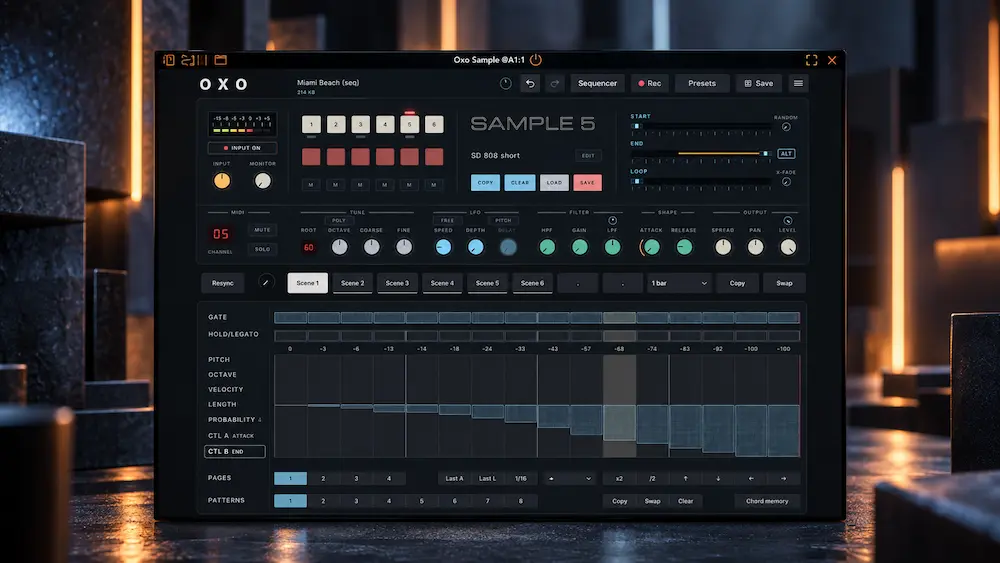
Oxo Sample is a specialist 12-bit sampler and sequencer built around the limitations of early digital sampling rather than a conventional high-fidelity sampling workflow. It captures and resamples audio at 12-bit/32 kHz mono, while direct START, END, and LOOP controls make the sample buffer itself part of the performance. The result is a production instrument focused on creating, reshaping, and sequencing deliberately degraded source material.
Its main strength is the combination of low-resolution sampling with live buffer manipulation, parameter sequencing, and repeated resampling. Its main compromises are equally clear: six sample slots, mono capture, limited sample-editing depth, and no attempt to reproduce a complete vintage sampler architecture. The relevant question is therefore not whether Oxo Sample can replace a general-purpose sampler, but whether its deliberately constrained workflow makes creative sampling faster and more playable.
Oxo Sample at a Glance
| Specification | Oxo Sample |
|---|---|
| Type | 12-bit lo-fi sampler and sequencer |
| Capture / resampling | 12-bit / 32 kHz mono |
| Additional sample rates | 20, 16, 10 and 8 kHz |
| Sample slots | 6 slots |
| Playback control | START, END, LOOP, reverse, random start and loop crossfade |
| Sequencer | 8 patterns per slot, up to 64 steps |
| Formats | VST3, AU and AUv3 |
| Desktop price | €39 |
Review status: this assessment reflects the current Oxo Sample feature set and early post-release information available in September 2026.
Why 12-Bit Sampling Still Has a Place in Modern Production
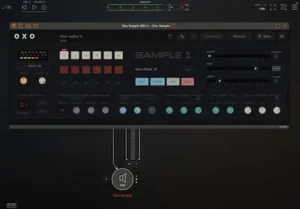 There is no shortage of plugins that simulate the technical limitations of early digital samplers. The problem is that many of them reduce the idea of “vintage” to a processing chain: lower the bit depth, reduce the sample rate, roll off the top end, add some distortion, and stop there. Oxo Sample approaches the problem differently by making those limitations part of the sampling process itself.
Oxo captures audio at 12-bit/32 kHz mono, with additional sampling-rate options down to 8 kHz. It can also resample its own output, so the signal can pass through the sampling stage more than once. That matters because successive generations of sampling do not behave like a single bitcrusher placed on an otherwise clean signal. Each pass changes the available bandwidth and reconstructs the audio from an already degraded source.
In practice, the audible result is not defined by 12-bit quantization alone. Sample rate, bandwidth, transient reproduction, filtering, pitch manipulation, looping, and repeated resampling all contribute to the final texture. This is where Oxo Sample becomes more useful than a conventional lo-fi effect: the degradation happens inside a playable sampler, where the resulting limitations directly affect how the sound is selected, shaped, and performed.
Its historical reference is the mid-1980s digital sampler, particularly the Akai S612, whose workflow and technical constraints provide much of the conceptual foundation. Oxo Sample should not, however, be evaluated as a strict S612 emulation. The goal is to use that era’s sampling limitations as a modern instrument design principle, and the resulting sound can be considerably more aggressive than the original hardware.
Oxo Sample’s Core Advantage: Live Sample-Buffer Manipulation
The most important part of Oxo Sample is not its 12-bit specification. It is the way the instrument exposes the sample buffer for real-time manipulation.
START, END, and LOOP can be moved while the sample is playing, so the playback window itself becomes a performance control. Move START beyond END and the sample reverses. Change the loop region and the playback immediately follows it. Add random start positions, crossfaded looping, pitch or filter modulation, and parameter sequencing, and a single recording can produce a wide range of variations without leaving the instrument.
That is a fundamentally different workflow from putting a bitcrusher after a conventional sampler. The sampler is not simply generating a clean playback stream and then adding lo-fi processing downstream; the act of selecting and reshaping the sampled material is part of the sound-generation process.
In a typical DAW, the same result can require several separate operations: edit the source, isolate a section, reverse it, define a loop, automate playback position, process it with a lo-fi effect, and resample the result. Oxo Sample puts many of those decisions behind a small set of immediately accessible controls. The result is closer to playing the sample than editing it.
That distinction becomes useful when working with material that benefits from variation rather than precision—vocal fragments, drum hits, synth stabs, percussion, or field recordings. Instead of repeatedly stopping playback to redraw regions and create new files, you can move the playback boundaries while listening and keep the useful results inside the same instrument.
For sound design, that immediacy is ultimately more valuable than a claim of vintage accuracy. The interesting part is not simply that Oxo Sample can make audio sound degraded; it gives those limitations enough physical control to become part of the performance.
Does Your Mix Hold Up Beyond the Sound-Design Stage?
Deliberately degraded sources can change the balance, transient behavior, and spectral space of a production long before mastering. A professional mastering pass can help assess how the finished mix translates in terms of clarity, punch, depth, dynamics, stereo image, and detail without removing the character you built into the production.
Submit up to 40 seconds for a free mastering demo →
The Sequencer Turns Oxo Sample Into a Sound-Design Instrument
Oxo Sample is more than a lo-fi sampler because its sequencing system can manipulate the sample itself, not just trigger notes. Each of its six sample slots supports up to six voices and can operate monophonically or polyphonically. Each slot also provides eight patterns of up to 64 steps, with lanes for Gate, Hold/Legato, Pitch, Octave, Velocity, Length, Probability, Control A, and Control B.
The Control A and B lanes are where the system becomes substantially more interesting. They can sequence sampler parameters such as filter cutoff and the START, END, and LOOP positions. Instead of programming only when a sound plays, you can program which part of the recorded material is heard on each step.
A drum hit can therefore change playback position and probability from step to step. A vocal fragment can scan different sections of its buffer as the pattern runs. A sustained sound can turn into a rhythmic texture by moving its loop boundaries rather than repeatedly triggering an identical waveform.
The result is controlled variation rather than random degradation. The source material remains recognizable, but its playback behavior can change continuously within the pattern. For production, that can replace a surprising amount of manual DAW automation while keeping the process playable and easy to audition.
Where Oxo Sample Fits in a Production and Mixing Workflow
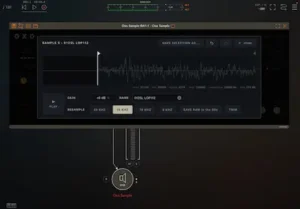 I would treat Oxo Sample as a sound-generation stage before the mix, rather than as a conventional mixing processor. Its strongest use is to create or reshape individual production elements before they enter the main balance, where the resulting audio can then be mixed like any other source.
For drums and percussion, individual hits or loops can be sampled, resampled, pitched, and rearranged with the internal sequencer. The reduced bandwidth can give otherwise clean percussion a narrower, less clinical character, while the playback controls provide another way to generate variations from the same source.
With vocals, short phrases can be reduced to fragments, reversed, looped, or played from different sections of the sample buffer. For intentionally processed vocal material, the mono architecture is rarely a problem because the sampled fragment is normally going to be placed and processed as an individual element in the mix anyway.
Synths are another natural fit. Resampling a synth line and then changing its playback boundaries can turn a static phrase into a more unstable texture without building the same result from multiple clips and automation lanes in the DAW. This is particularly useful when the original source already has a strong oscillator character, such as the vintage-style synthesis found in Martinic Prodigy, because resampling can preserve the character of the source while pushing it into a different sonic role.
Field recordings can be particularly productive because the source already contains irregularities that respond well to aggressive resampling and playback manipulation. A short section of environmental audio can become a source for transitions, percussion, drones, or atmospheric layers without requiring extensive editing.
Once the sound has been generated, there is no reason to treat it differently from any other production element. EQ, compression, saturation, reverb, delay, and spatial processing can all follow normally. The important distinction is that Oxo is creating the source material; the subsequent mix processing is still handled by the conventional signal chain. The same principle applies at the final stage: mastering is not an extension of Oxo’s sound-design process, but a separate set of decisions applied to the completed mix, as explained in this breakdown of the mastering chain.
For mastering, the role is fundamentally different. Oxo Sample deliberately reduces bandwidth and resolution, so putting it across a finished stereo master would normally be a creative-effect decision rather than a mastering process. In a mastering workflow, I would be far more likely to use Oxo on a stem, texture, or sampled element upstream of the final mix than on the completed program. Once those elements are part of the finished mix, their balance, dynamics, and frequency relationships become part of what needs to be stable before the track reaches mastering, which is why preparing a mix for mastering still matters even when the source material has been deliberately degraded.
What Oxo Sample’s 12-Bit / 32 kHz Architecture Actually Does
Oxo Sample’s 12-bit resolution and selectable sampling rates define the character before conventional mix processing is applied. The most useful distinction is between the reduction in resolution and the reduction in available bandwidth: they affect different aspects of the source material.
| Sampling Rate | Theoretical Nyquist Limit | Practical Result |
|---|---|---|
| 32 kHz | 16 kHz | Moderate bandwidth reduction with a clearly low-resolution character |
| 20 kHz | 10 kHz | Noticeably narrower and darker source material |
| 16 kHz | 8 kHz | Clearly degraded upper spectrum |
| 10 kHz | 5 kHz | Strong bandwidth restriction with major tonal consequences |
| 8 kHz | 4 kHz | Extreme bandwidth limitation for deliberately degraded material |
The 12-bit resolution affects the signal differently. Compared with 16- or 24-bit audio, fewer quantization levels introduce greater quantization error and change the fine structure of the waveform. At the same time, lowering the sampling rate progressively removes high-frequency information. Oxo Sample therefore combines two separate forms of digital limitation rather than simply applying a generic “lo-fi” filter.
The production consequence depends heavily on the source. A snare may benefit from losing some high-frequency detail, while a vocal phrase can lose articulation quickly as the sampling rate falls. A bass source may retain its fundamental while losing the harmonics and attack that define its perceived character. The lower the sampling rate, the more the result needs to be judged as a new sound rather than as a degraded copy of the original.
Oxo can also resample its own output, allowing successive generations of sampling to build on an already degraded source. That makes the architecture more than a fixed tonal coloration: the sampling process itself becomes part of the sound-generation chain.
Oxo Sample’s Limitations: Where It Stops Being the Right Tool
Oxo Sample is not designed to be a modern general-purpose sampler, and evaluating it against that category misses the point. Its architecture favors immediate manipulation over sample-library management, detailed instrument construction, or transparent playback.
There is no substitute here for the feature depth of a conventional sampler when the job requires multisampling, complex key mapping, large sample libraries, high-fidelity playback, or detailed sample editing. Six sample slots are also a meaningful constraint if you want to build a large playable instrument rather than a compact sound-design setup. The mono capture path imposes another clear boundary: sources whose stereo image is essential will need to be handled elsewhere or converted to mono intentionally.
Oxo Sample is also not a replacement for a dedicated waveform editor. START, END, and LOOP controls are designed for playing and reshaping the buffer, not for surgical editing, detailed cleanup, fades, or file preparation.
These limitations are important because they define the product’s actual use case. Oxo makes a strong case when you want a small, deliberately constrained sampling instrument that encourages manipulation while you play. It becomes a poor fit when the task is to organize, edit, and reproduce sampled material with maximum precision.
Oxo Sample vs. Akai S612: What Is Actually Similar?
Oxo Sample clearly draws from the approach of early digital samplers such as the Akai S612, but the comparison needs to be made at the level of sampling architecture and interaction rather than treated as a claim of complete hardware emulation.
| Aspect | Oxo Sample | Relationship to S612 |
|---|---|---|
| Resolution | 12-bit | Shares the early-digital 12-bit approach |
| Sampling rate | 32 kHz, with additional lower-rate modes | Conceptually related, but not a complete recreation of the original architecture |
| Playback manipulation | Live START, END and LOOP controls with reverse playback | One of the strongest workflow parallels |
| Sequencing | Integrated pattern and parameter sequencing | Modern extension of the concept rather than hardware emulation |
| Resampling | Can resample its own output | A modern production-oriented extension of the low-resolution concept |
The distinction is important because the sound of a vintage sampler was not determined by bit depth and sampling rate alone. Converter behavior, analog input and output stages, filtering, memory architecture, clocking, and gain structure also contributed to the final result. Oxo Sample therefore makes more sense as a modern instrument inspired by early digital sampling than as a strict S612 recreation.
That distinction also matters when evaluating its deliberately aggressive character. Early user discussion has already included the observation that a real S612 was not nearly as crunchy as Oxo Sample. In other words, the product’s value is better judged by how effectively it turns early-digital limitations into a playable production workflow than by whether it reproduces the exact sonic behavior of the original hardware.
For producers seeking an authentic S612 recreation, this is an important limitation. For producers who want the constraints of early digital sampling to become an active part of sound design, the difference is much less problematic.
What Oxo Sample Changes Downstream in the Mix
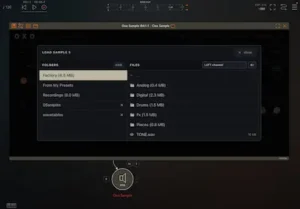 Oxo Sample does not have any special relationship with streaming loudness normalization or codec delivery. Once its output is recorded or rendered into a production, it is simply another audio source in the signal chain.
The important effects appear earlier, in the way that degraded source material interacts with the rest of the mix. Reducing sample rate removes high-frequency content and can alter transient shape, while 12-bit quantization changes the fine structure of the signal. Those changes can affect how compressors and limiters respond, how bright a sound feels at a given level, and how much space the source occupies relative to other elements.
This is particularly relevant when a degraded sample is used as a prominent transient source. A kick, snare, or percussion hit with substantially reduced bandwidth may require a different EQ or dynamics treatment than the original recording. Conversely, removing unnecessary high-frequency information can sometimes make a source easier to place without competing with cymbals, vocals, or other bright elements. The result needs to be judged in the context of the complete mix rather than against the unprocessed source in isolation.
Monitoring level matters here as well. At higher playback levels, added midrange density and distortion can make a degraded sound feel exciting and substantial. At quieter levels, the same element may reveal itself as dull, congested, or disproportionately forward in the midrange. Checking the mix at more than one monitoring level is therefore more useful than judging the Oxo output by itself. This is also why problems that seem minor during production can become much more obvious once the finished mix is pushed through mastering; the underlying causes are often already present in the mix rather than created by the mastering process. That distinction is covered in more detail in this guide to common mastering problems.
Codec compatibility should be evaluated from the finished mix, not from the sampler in isolation. Aggressive resampling at 8 or 10 kHz removes much of the upper spectrum before the encoder ever sees the signal, but that does not make the resulting material inherently “codec-safe.” It simply changes the spectral and transient information presented to the codec.
The practical approach is straightforward: use Oxo Sample to create the character, then make all subsequent EQ, dynamics, balance, monitoring, and mastering decisions from the finished production.
Oxo Sample Compatibility, Versions, and Studio Workflow
Oxo Sample is available as VST3 and AU on macOS 12 or later, VST3 on 64-bit Windows 10 or later, and AUv3 on iPadOS 17 or later. The desktop formats cover the usual modern DAW environments, while the iPad version introduces a separate routing consideration for external audio.
For external audio recording on iPad, OXO specifies the AUv3 Effect version with audio and MIDI routing. The AUv3 Instrument version cannot record incoming audio. Because AUv3 routing can vary between hosts, the free version is particularly useful as a compatibility check before committing to the full instrument.
There is currently not enough independent benchmark data to make a meaningful claim about CPU load, performance in large sessions, memory use, or offline rendering efficiency. I would rather leave those figures unqualified than label the instrument “lightweight” based on its feature set alone. Actual performance depends on the host, project, sample activity, and platform.
Oxo Sample is also still early in its development cycle. Initial KVR discussion shows that the developer has already addressed issues including DC clicks and UI contrast in early updates. That is a positive sign for active maintenance, but it is too soon to describe the instrument as a thoroughly battle-tested studio standard.
Who Is Oxo Sample Actually For?
Electronic producers and beatmakers are the most obvious audience. If the goal is to turn short recordings into rhythmic, pitched, reversed, or degraded material and then sequence those changes, Oxo Sample provides that workflow without requiring a large sampler or a chain of separate processors.
Mixing engineers may find it useful as a dedicated sound-generation tool rather than as a mixing processor. It makes the most sense when a production needs distinctive drum material, vocal fragments, transitions, or other deliberately degraded elements that can be generated before they enter the mix.
Mastering engineers have little reason to treat Oxo as a core tool. Its main function is to create and manipulate source material, while conventional mastering is concerned with controlling the finished program rather than intentionally reducing its bandwidth and resolution.
For home studios and producers working on a budget, the low entry price and functional free version make experimentation relatively low-risk. The free version is also useful for checking host compatibility before committing to the full instrument.
In a professional studio, I would classify Oxo Sample as a specialist tool rather than an essential dependency. It earns its place when its particular workflow comes up often enough to justify having a dedicated instrument instead of rebuilding the same process manually.
Composers and sound designers are another strong fit, particularly for retro game-inspired music, experimental scoring, glitches, transitions, and deliberately degraded textures. The value is less in reproducing a specific vintage machine than in using sampling limitations as part of the composition and sound-design process.
Oxo Sample Price and Long-Term Value
Oxo Sample’s desktop version is listed at €39, with a functional free version providing one sample slot. The iPad version uses a separate in-app purchase model, so mobile pricing should be checked independently rather than assumed to match the desktop license.
At this price, the decision is less about replacing a conventional sampler and more about whether Oxo’s particular workflow earns a permanent place in the production toolkit. The free version is useful because the product’s value depends heavily on whether live buffer manipulation, sequencing, and resampling actually improve the way a producer works.
For producers who regularly edit, reverse, loop, degrade, and resample short pieces of audio manually in a DAW, consolidating those operations into a playable instrument can justify the purchase. For users who primarily need multisampling, detailed editing, large libraries, or accurate vintage hardware emulation, another type of sampler remains the more appropriate choice.
The six-slot architecture is therefore easier to understand as a design constraint than as a missing feature. Oxo is intended for compact sound-generation setups and rapid manipulation, not for building large sample-based instruments.
Overall Rating
| Category | Rating |
|---|---|
| Sampling Character & Resolution Control | 8.8/10 |
| Live Buffer Manipulation | 9.2/10 |
| Sequencing & Parameter Control | 8.9/10 |
| Resampling & Sound Transformation | 8.6/10 |
| Production Workflow | 9.0/10 |
| Sampler Scope & Practical Versatility | 6.7/10 |
| Overall | 8.5/10 |
The combination of 12-bit capture, multiple lower sampling rates, and mono operation gives the instrument a clearly defined low-resolution sampling identity, although its character is intentionally more about controlled degradation than accurate recreation of a specific vintage sampler.
Direct access to START, END, and LOOP during playback is the strongest part of the design, particularly because reversing and reshaping the playback window can be performed as part of the performance rather than treated as separate editing tasks.
Eight patterns per slot, up to 64 steps, and dedicated lanes for probability, velocity, pitch, length, and sampler parameters provide substantial control for a deliberately compact instrument without turning it into a full-scale sequencing environment.
Repeated sampling, lower-rate conversion, playback-point changes, filtering, pitch manipulation, and resampling give the source material several distinct transformation stages, although the deliberately destructive architecture also limits its usefulness when transparency or high-fidelity reproduction is required.
The strongest production advantage is the short path from recording to playable variation: sampling, buffer manipulation, degradation, and sequencing are consolidated into one environment rather than requiring multiple DAW editing and processing stages.
The six-slot architecture, mono capture, lack of multisampling and complex mapping, and limited sample-editing functions make Oxo Sample substantially less suitable for detailed instrument construction, large libraries, or general-purpose sampling than a conventional sampler.
Oxo Sample is most valuable as a specialist production instrument built around low-resolution sampling and immediate buffer manipulation. Its focused architecture makes the creative process unusually direct, but the same constraints rule it out for detailed sample management, large instruments, or high-fidelity sampling duties. It is particularly well suited to producers, beatmakers, and sound designers who want sampling limitations to become part of the composition rather than merely an effect applied afterward.
Oxo Sample Verdict: A Focused 12-Bit Sampler for Creative Resampling
Oxo Sample earns its place by making low-resolution sampling itself part of the instrument’s workflow. The 12-bit/32 kHz architecture establishes the sonic limitation, but START, END, and LOOP manipulation, parameter sequencing, and repeated resampling turn that limitation into something playable and repeatable.
The compromises are substantial: six sample slots, mono capture, limited editing, and no attempt at full-scale multisampling or strict S612 emulation. Those are not minor omissions; they define the product’s intended role as a compact creative sampler rather than a general-purpose sampling platform.
For producers and sound designers working with chopped samples, degraded drums, vocal fragments, resampled synths, and experimental textures, that specialization is the main reason to choose Oxo Sample. For detailed sample management, large instruments, or authentic vintage hardware recreation, a different sampler is the better tool.
Before Adding Another Processor, Check What the Mix Actually Needs
Oxo Sample can deliberately reshape bandwidth, transients, and the density of individual production elements, but those changes become part of the finished mix once the sound-design stage is over. The useful next step is not necessarily another plugin, but a real before-and-after comparison that shows how the complete production translates in terms of balance, punch, dynamics, stereo image, clarity, and detail. Upload up to 40 seconds of your mix and receive a free mastering demo prepared by a real mastering engineer, so you can compare the result directly rather than judge the final processing in theory. Upload your mix and get the free mastering demo →
Oxo Sample FAQ
What is Oxo Sample best used for?
Oxo Sample is best suited to creating and reshaping short production elements through low-resolution sampling, live buffer manipulation, sequencing, and resampling. It is particularly relevant to degraded drums, vocal fragments, synth textures, transitions, experimental percussion, and other material where the sampling limitations are intended to become part of the sound.
Can Oxo Sample replace an SP-1200-style sampler?
Not if authentic SP-1200 behavior is the priority. Inphonik RX1200 is a more direct choice for that specific target. Oxo Sample is better understood as a modern creative sampler built around early-digital sampling constraints, with an emphasis on live buffer manipulation and sequencing.
Can Oxo Sample be used in a mixing workflow?
Yes, primarily as a sound-generation tool. It can be used to create degraded drums, vocal fragments, transitions, textures, and resampled elements before they are processed and balanced in the mix.
Is Oxo Sample useful for mastering?
Not as a conventional mastering processor. Its core function is intentional reduction of sampling resolution and bandwidth, which is fundamentally different from the controlled processing normally applied to a finished master. It can be used creatively on material upstream of mastering, or as a special effect, but that is a different use case.
Does Oxo Sample use a lot of CPU?
There is not yet enough independent benchmark data to make a reliable quantitative claim about CPU consumption or large-session performance. Actual performance should be evaluated in the target DAW and project rather than inferred from the instrument’s feature set.
Can Oxo Sample record external audio on iPad?
Yes, with an important routing limitation. For incoming audio, OXO specifies the AUv3 Effect version with audio and MIDI routing. The AUv3 Instrument version cannot record incoming audio. Testing the free version in the intended AUv3 host is advisable before relying on the setup.
Is Oxo Sample good for hip-hop production?
Yes, particularly for chopped samples, degraded drums, resampling, pitch manipulation, and rhythmic sample variation. If the goal is specifically to reproduce authentic SP-1200 behavior, a dedicated SP-1200-oriented instrument is a better comparison.
Is Oxo Sample better than a DAW sampler?
For general-purpose sampling, no. A conventional DAW sampler is more flexible for detailed editing, mapping, multisampling, sample management, and large instruments. Oxo Sample is more specialized: its advantage is immediate buffer manipulation, destructive resampling, and sequencing within a deliberately constrained environment.
Is Oxo Sample worth buying at €39?
For producers who regularly work with lo-fi sampling, resampling, or experimental sample manipulation, the price is easy to justify if the workflow becomes part of the production process. The free one-slot version also provides a practical way to test the instrument before buying. It is less compelling if you need a general-purpose sampler or have little interest in deliberately degraded sampling.
Is Oxo Sample an accurate Akai S612 emulation?
No. Oxo Sample is clearly inspired by the S612-era approach to low-resolution sampling and hands-on playback manipulation, but it is better understood as a modern creative sampler than as a strict hardware recreation. Its sequencing, repeated resampling, and deliberately constrained production workflow extend beyond reproducing the original machine.

Yurii Ariefiev approaches sampler evaluation from the perspective of an engineer concerned with how deliberately limited digital audio behaves once it becomes part of a real production. With instruments such as Oxo Sample, the important distinctions are not simply bit depth or vintage styling, but how sample-rate reduction, quantization, buffer manipulation, and repeated resampling affect the resulting source material.
Enjoyed this review?
If you found it useful, you can support independent audio research with a coffee.
☕ Buy me a coffee