
Layered vocals rarely fall apart because the performances are fundamentally wrong. More often, the problem is timing. A consonant lands slightly early on one double, a harmony trails the lead, or several backing parts hit the same phrase just far enough apart to make the stack sound soft and unfocused. Manual editing can correct those differences, but working through a dense vocal arrangement can quickly become hours of repetitive waveform editing.
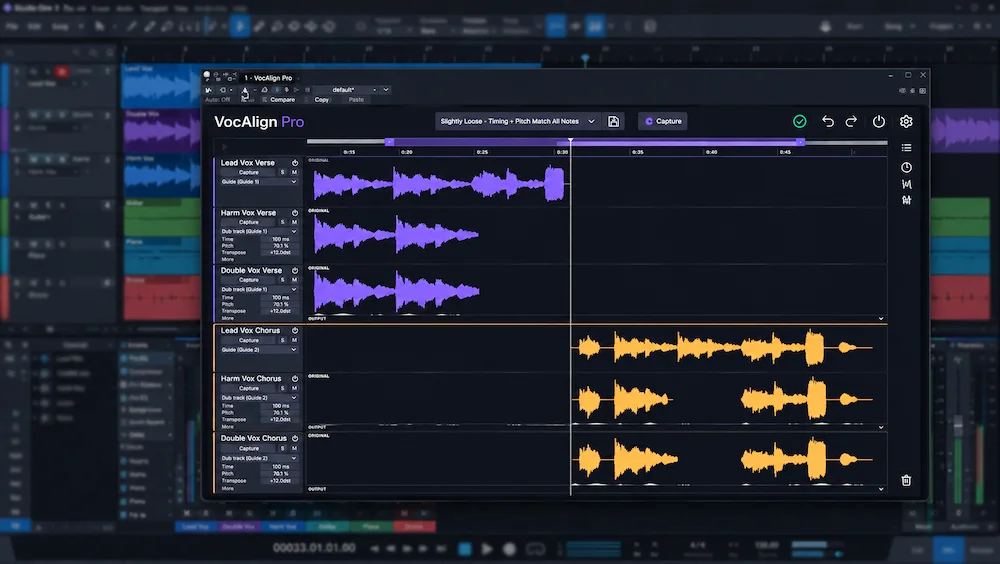
Synchro Arts VocAlign 7 is built around a straightforward principle: analyze a guide performance, then align other vocal takes against it. That part is not new. The major change in version 7 is the editing environment around the alignment process. Its multitrack workspace brings an entire vocal stack into a single view, making it possible to manage multiple tracks without treating every alignment as a separate operation.
For a mixing engineer, that workflow change is more significant than another incremental alignment algorithm. VocAlign has already established the basic technique; the real question with version 7 is whether managing an entire vocal stack in one workspace makes the editing process faster without stripping away the small timing differences that keep layered vocals sounding human.
That makes VocAlign 7 less interesting as a simple alignment upgrade than as a change in how complex vocal sessions are organized, corrected and refined.
Why Vocal Alignment Matters in Modern Vocal Stacks
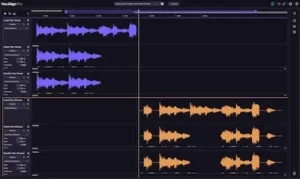 Modern vocal productions often contain far more layers than the finished record suggests. A lead may be reinforced by doubles, harmonies, octave parts, chorus stacks, ad-libs, whispers and effect vocals. Each take can work on its own, yet small timing differences become much more obvious once the performances are layered together.
The problem is usually concentrated around consonants and other short transients. When several performances hit the same word at slightly different moments, the attacks spread across time instead of forming a single coherent event. The stack can lose definition and feel soft, smeared or unfocused, even when the individual recordings are clean and well edited.
Manual editing remains the most controllable approach because an engineer can make decisions at the phrase and syllable level. A consonant may need to move closer to the lead, while a vowel can benefit from retaining some natural offset. A double may also need to sit slightly behind the main vocal rather than being locked to it. The difficulty is scale: applying those decisions across ten or fifteen vocal tracks can consume a substantial amount of editing time.
That is the specific workflow problem VocAlign is built to solve. Rather than treating each vocal as an isolated alignment task, VocAlign 7 puts the vocal stack itself at the center of the editing process, making multi-track timing correction easier to manage without requiring every performance to be edited identically.
VocAlign 7: What Changed in the Multitrack Workflow
VocAlign 6 vs. VocAlign 7: What Actually Changed?
| Workflow | VocAlign 6 | VocAlign 7 |
|---|---|---|
| Vocal session view | Primarily track-by-track | Multi-Track View |
| Guide relationships | More limited | Multiple Guides |
| Timing control | Alignment-focused | Session, track and clip-level control |
| Visual analysis | More limited workflow | Visual Energy Analysis across the session |
| Non-ARA workflow | More capture-oriented | Streamlined capture workflow |
The important point for existing users is that VocAlign 7 is primarily a workflow upgrade. The fundamental guide-and-dub alignment concept remains familiar; the substantial change is the ability to organize, align and refine a larger vocal stack inside one editing environment.
VocAlign 7 builds on Synchro Arts’ established vocal-alignment workflow rather than introducing a new type of processing. The central change is Multi-Track View, which brings multiple vocal tracks into a single workspace for viewing, management and alignment.
The difference becomes more meaningful as the vocal arrangement gets denser. Consider a chorus with a lead, two doubles and six harmony or backing-vocal tracks. In a track-by-track workflow, the engineer has to move repeatedly between performances: capture the relevant material, establish a guide, align the target, check the result in context, then repeat the process for the next track. The individual operations are simple, but the constant movement between tracks makes it harder to maintain a clear picture of the entire stack.
VocAlign 7 keeps those relationships visible within the same workspace. The engineer can see which performance is acting as the guide, how the other parts relate to it and which sections still require attention. The benefit is therefore less about reducing mouse clicks and more about reducing context switching during detailed vocal editing.
The workflow also provides session-, track- and clip-level control, allowing broad alignment decisions to be followed by more targeted corrections. An entire stack can be tightened first, then individual phrases or sections can be refined where the initial result is too loose or too rigid.
That distinction is important. The value of Multi-Track View is not simply that it puts more tracks on screen. It changes the unit of work from an individual vocal operation to the relationship between performances within the stack. For dense vocal sessions, that is a substantive workflow improvement rather than a cosmetic interface change.
Hear What Your Mix Can Do Before Final Mastering
Tight vocal editing can improve timing relationships, but the finished mix still has to translate with controlled dynamics, depth, detail and a coherent stereo image. If you want to evaluate how your mix responds to professional mastering decisions, you can send us a free mastering demo with up to 40 seconds of your track. Upload up to 40 seconds for a free mastering demo →
From Vocal Alignment to Vocal Stack Management
The real advantage of the multitrack workflow appears when a vocal arrangement contains several independent timing relationships. A dense stack is rarely one group of performances that should all be locked to the same reference.
Consider a typical pop chorus with a lead, two doubles, four harmony parts and several ad-libs. The lead can serve as the guide for the doubles, while the harmony groups use their own corresponding guides and the ad-libs remain independent. That structure matters because the timing relationship that works for a double is not necessarily appropriate for a harmony line with a different register, vowel pattern or rhythmic role.
VocAlign 7’s multi-guide workflow fits that structure more closely. The useful question is no longer simply how to make every vocal follow the lead, but which performances should move together and which should retain their own relationship to the arrangement.
That distinction is fundamental to good vocal editing. Alignment should not eliminate performance variation. It should control the timing differences that interfere with clarity, while preserving enough separation between performances to keep doubles, harmonies and backing vocals sounding like layered performances rather than copies of the same take.
The Real Benefit: Less Repetitive Editing, Not Better Vocals by Default
VocAlign 7 does not turn a weak performance into a convincing one, and alignment does not remove the need for editorial judgment. The value of the process begins when the underlying vocal takes are already usable and the remaining problem is the relationship between them.
That is where the time savings can become significant. Instead of manually locating individual consonants, cutting regions and nudging phrases across every track, the engineer can establish the intended timing relationship automatically and then concentrate on the sections that actually need attention.
SmartAlign and Tightness Control are important to that workflow. SmartAlign determines where the alignment should begin and end, while Tightness controls how closely the Dub follows the Guide. That distinction matters because a vocal stack can need different degrees of correction from one session to another: a tightly edited pop double may benefit from a much closer relationship than a backing vocal that is deliberately allowed to sit behind the lead.
The practical advantage is therefore not simply automatic alignment. It is the ability to establish a repeatable starting point and then decide how much of the original timing variation should remain.
The result is a different allocation of editing time. Automation handles the repetitive alignment work; manual editing becomes the finishing stage rather than the main operation.
A practical workflow is to establish the guide relationships first, apply the broad alignment pass, then inspect the complete stack for sections where tighter synchronization changes the intended feel. The final stage is selective refinement: relax individual passages or make manual edits where the musical result matters more than uniform timing.
The important point is that automation does not have to replace editorial decisions. Used properly, it removes the repetitive part of the job and leaves the engineer with more time to decide where precision helps the arrangement and where natural variation is part of the sound.
When Tight Alignment Starts Making Vocal Stacks Sound Smaller
 This is where vocal alignment requires more judgment than a simple “tighter is better” approach suggests. The goal is not to make every performance occupy exactly the same points in time.
A double that follows the lead too closely can lose some of the timing variation that makes it sound like a separate performance. When consonants, vowel transitions and other short transients are pushed into nearly identical positions, the layers can begin to behave more like a single reinforced vocal than multiple performances.
The effect becomes especially noticeable in wide vocal arrangements. Small differences in phrasing and timing help preserve separation between the layers, giving doubles and backing vocals their own identity within the stereo field. Remove too much of that variation and the stack can become unnaturally uniform, even if its timing is technically more precise.
That makes control over alignment strength more important than the ability to align automatically. The engineer needs to determine how much of the original timing relationship should be retained rather than simply applying the maximum available correction.
In practice, the useful target is usually controlled coherence rather than sample-accurate synchronization: enough alignment to sharpen consonants, rhythmic definition and intelligibility, while preserving enough timing variation for the individual performances to retain depth and character.
Visual Energy Analysis: A Faster Way to See Timing Relationships
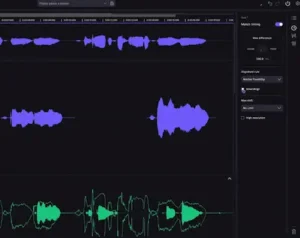
VocAlign 7 adds Visual Energy Analysis, giving the engineer another way to compare the timing and energy contours of multiple vocal performances.
That can be particularly useful in dense sessions, where waveform inspection alone does not always make timing differences obvious. Vocal energy is highly irregular, and the visual start of a phrase does not necessarily correspond to the perceptual start of a word. Comparing the energy patterns across tracks can make discrepancies easier to locate before making detailed timing decisions.
The feature is best understood as a diagnostic aid rather than a replacement for critical listening. The display can show where performances diverge, but the engineer still has to decide whether that difference is actually a problem. A backing vocal that appears slightly late visually may be exactly where it needs to sit musically.
From a technical perspective, this reinforces the broader direction of VocAlign 7. The release puts significant emphasis on making alignment decisions easier to see, manage and refine across a vocal stack. Its most consequential change is therefore the editing workflow surrounding the alignment process, rather than a claim of an entirely new audio-processing paradigm.
Creative Formant Control: Giving Doubles More Separation
VocAlign 7 Pro also adds Creative Formant Control, giving the engineer a way to alter the tonal identity of aligned vocal layers in addition to their timing.
This can be useful when building doubles and dense vocal stacks. Two performances may be tightly aligned yet remain too similar in their spectral character, making the result sound closer to a duplicated lead than two distinct performances. Subtle formant differences can create additional separation between the layers without depending entirely on EQ, panning or stereo processing. The same vocal source can also be pushed in a very different direction when used to create additional texture or layered material, as explored in our review of FRCTL GRN 4.
The technique is particularly relevant in pop, R&B and electronic vocal production, where multiple layers may need to occupy the same musical space while retaining some individual character. The amount of processing matters, however. Large formant shifts can quickly become an audible effect rather than a convincing variation between performances.
Formant manipulation itself is not a new vocal-processing concept; it has been available in pitch-editing and dedicated vocal-processing tools for years. The practical value here is its integration into the same workflow used to align the performances, allowing timing and vocal-layer differentiation to be handled within a single editing environment.
VocAlign 7 and RePitch 2: Connecting Pitch and Timing Correction
VocAlign 7 Pro also expands its integration with RePitch 2 through SynchroLink 2.0, connecting two editing tasks that often need to be revisited during the same vocal-production pass.
Pitch and timing correction are rarely completely independent. A vocal may be tuned first and aligned afterward, but changing the timing of a phrase can alter how the pitch correction is perceived, particularly around consonants, transitions and sustained notes. In a detailed vocal edit, that can lead to repeated adjustments if the two processes are handled as unrelated stages.
SynchroLink is intended to reduce that friction by keeping the two parts of the workflow more closely connected. For engineers already using RePitch, the integration can make it easier to move between pitch and timing decisions without rebuilding the same editing relationships from scratch.
The advantage is therefore largely ecosystem-specific. Engineers who already rely on another pitch-editing platform may have little reason to change their established workflow solely for SynchroLink 2.0. For users working extensively within the Synchro Arts environment, however, the tighter integration makes the overall vocal-editing chain more cohesive.
VocAlign 7 vs Melodyne vs Manual Editing
VocAlign and Melodyne overlap in some areas, but their workflows are built around different editing priorities. VocAlign is primarily concerned with establishing timing relationships between performances, while Melodyne provides deeper note-level control over pitch, timing and other aspects of individual vocal material. Manual DAW editing remains a separate approach, with maximum control but a higher amount of hands-on work.
| Workflow | VocAlign 7 | Melodyne | Manual DAW Editing |
|---|---|---|---|
| Aligning multiple vocal performances | Core workflow | Possible with detailed editing | Fully manual |
| Pitch matching between vocal performances | Pro feature | Available through detailed pitch editing | Depends on DAW tools |
| Managing large vocal stacks | Multi-track focused | Requires more individual editing | Time-intensive |
| Individual phrase and transition control | Available | Extensive | Extensive |
| Automating repetitive alignment | Core strength | Possible, but not the primary workflow | Limited |
| Formant processing | Creative Formant Control in Pro | Extensive pitch/formant editing | Depends on available DAW tools and plugins |
| Occasional vocal editing | May be more specialized than necessary | Broader editing scope | Often sufficient for isolated corrections |
If the main task is correcting individual notes, shaping pitch transitions or performing detailed note-level editing, Melodyne provides a broader set of controls for that type of work. If the recurring problem is making multiple performances follow a reference while preserving their individual character, VocAlign is built specifically around that relationship.
Manual editing remains valuable when a vocal requires highly selective treatment, unusual timing decisions or complete control over individual consonants, vowels and phrase transitions. It is also often the fastest option for a single problematic phrase when setting up an automated workflow would take longer than simply making the edit.
In a professional session, these approaches do not have to be mutually exclusive. An engineer may use pitch editing for individual performances, VocAlign for relationships between stacked vocals, and manual DAW edits for the exceptions that require a more deliberate musical decision.
VocAlign 7 vs Waves Sync Vx
Waves Sync Vx is a direct comparison point for engineers looking for dedicated automatic vocal alignment rather than a general-purpose pitch-editing environment. Both tools address the same basic production problem: bringing multiple vocal performances into a closer timing relationship.
The more useful distinction is what happens after the initial alignment. In a professional session, the workflow has to accommodate different guides, multiple vocal groups, selective correction and decisions about how much timing variation should remain between performances.
VocAlign 7’s approach places more emphasis on managing those relationships across a vocal stack, particularly through its multitrack workspace and multi-guide workflow. Sync Vx can fit naturally into sessions where the alignment task is more straightforward or where Waves plugins already form a significant part of the existing production setup.
| Workflow Consideration | VocAlign 7 | Sync Vx |
|---|---|---|
| Primary role | Dedicated vocal alignment workflow | Dedicated vocal alignment workflow |
| Large vocal-stack management | Multi-Track View and multiple guides | More dependent on the established Waves workflow |
| Pitch-related workflow | Pro adds Pitch Matching and SynchroLink integration | Different workflow and tool ecosystem |
For an engineer editing large vocal stacks regularly, the relevant question is therefore not simply whether both products can align vocals. It is how much control and visibility the workflow provides once several performances, guides and exceptions have to be managed at the same time.
Where VocAlign 7 Fits in a Production Workflow
VocAlign 7 is primarily a vocal-production and mixing tool. Its value appears while the individual performances are still available: aligning doubles, harmonies and backing vocals before compression, saturation, panning and spatial processing are finalized.
For mastering, the application is limited because the vocal performances are normally already consolidated into the stereo mix. VocAlign therefore belongs earlier in the production chain, where timing relationships can still be changed without affecting the rest of the arrangement.
CPU, Compatibility and Large-Session Considerations
 VocAlign 7 is available in VST3, AU and AAX formats for supported DAWs, with ARA integration where the host supports it. Version 7 also improves the workflow for non-ARA hosts, reducing the capture overhead that has historically made vocal-alignment workflows less convenient in environments such as Ableton Live and FL Studio.
This distinction matters because the same alignment engine can feel very different depending on how audio reaches the editor. In an ARA-compatible workflow, the DAW can provide the relevant audio directly; in a non-ARA workflow, the efficiency of capture becomes part of the practical user experience.
There is not enough independent testing to justify quoting a specific CPU percentage, latency figure or large-session benchmark for VocAlign 7 here. Manufacturer specifications can establish compatibility, but they do not provide a meaningful picture of how the plugin behaves across different DAWs, buffer settings, session sizes and numbers of active instances.
For professional sessions, the more relevant question is how the workflow scales. Aligning one lead and one double is a relatively small editing task. Managing a lead, multiple doubles, harmonies and backing-vocal groups across a large arrangement is where repetitive alignment work starts consuming significant engineering time.
That distinction also affects how performance should be evaluated. A benchmark based on a single plugin instance says little about the practical workload VocAlign is designed to address. The more meaningful test is how efficiently an engineer can manage a large number of related vocal performances while keeping enough control over the individual edits.
The Limits of Automatic Vocal Alignment
VocAlign 7’s main risk is not that automatic alignment fails to move a vocal; it is that the chosen timing relationship can be musically wrong. That matters more in a multi-guide workflow because different parts of the same stack may legitimately need different timing targets.
A lead and its doubles may benefit from close consonant alignment, while a harmony group can retain more offset to preserve separation. Ad-libs may need no alignment at all. The new session-level workflow makes those relationships easier to organize, but it does not remove the need to decide which tracks should actually move together.
In those situations, an algorithm can produce a technically consistent result that is less convincing musically. It may identify the wrong transient as the relevant alignment point, pull a consonant closer than intended or remove a timing offset that was part of the arrangement.
Sustained vowels present a similar issue. A backing vocal does not necessarily need to begin and end at exactly the same points as the lead, and forcing long phrases into the same timing envelope can reduce the separation between the layers. Some offset is often what makes a stack feel layered rather than mechanically doubled.
The safest workflow is therefore to make alignment decisions in context. Solo the vocal stack when necessary to locate obvious timing problems, but judge the final result with the surrounding instrumentation and complete mix playing.
This is where engineering judgment remains essential. VocAlign can reduce the amount of manual work required to execute a timing decision, but it cannot determine whether that decision serves the phrasing, arrangement or character of the record.
VocAlign 7 Standard vs Pro: Which Version Fits the Workflow?
The difference between VocAlign 7 Standard and Pro is more important than the price difference alone suggests. Standard is centered on multi-track time alignment, while Pro extends the workflow into pitch matching, formant processing and more detailed control over individual sections.
| Capability | Standard | Pro |
|---|---|---|
| Multi-Track View | Yes | Yes |
| Time Alignment | Yes | Yes |
| SmartAlign / Tightness Control | Yes | Yes |
| Visual Energy Analysis | Yes | Yes |
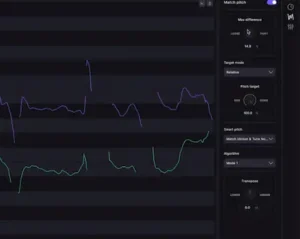
| Pitch Matching / SmartPitch | No | Yes |
| Creative Formant Control | No | Yes |
| Sync Points / Protected Areas | No | Yes |
| SynchroLink 2.0 | No | Yes |
Standard makes the most sense when the recurring problem is timing. If the main job is aligning doubles, harmonies and backing vocals, the core workflow is already there.
Pro becomes more relevant when pitch and timing are part of the same editing pass. Pitch Matching, Creative Formant Control, Sync Points, Protected Areas and SynchroLink 2.0 make the additional cost easier to justify for engineers who regularly perform more extensive vocal editing.
The important distinction is therefore not that Pro is simply the “better” edition. It is that the two versions target different levels of vocal-editing complexity.
VocAlign 7 Pricing and Workflow Value
VocAlign 7 is available in two editions:
| Edition | New License | Upgrade | Crossgrade |
|---|---|---|---|
| VocAlign 7 Standard | $149 | $69 | $99 |
| VocAlign 7 Pro | $199 | $99 | $133 |
The more useful way to evaluate the cost is against the amount of repetitive vocal editing an engineer actually performs. If vocal stacks are edited every week and alignment regularly consumes significant manual time, even a modest reduction in repetitive work can have practical value. For occasional vocal editing, the same purchase is harder to justify.
Subscription pricing is also available. At launch, Synchro Arts listed Artist at $14.99 per month or $119 per year, including VocAlign 7 Standard, and Pro at $24.99 per month or $199 per year, including VocAlign 7 Pro. Subscription pricing may change independently of perpetual-license pricing, so check Synchro Arts for the current plan price.
For existing VocAlign users, the upgrade question is similarly workflow-dependent. The value of version 7 is strongest when large vocal sessions, multiple guides and session-wide editing are recurring requirements rather than occasional exceptions.
Who Benefits Most From VocAlign 7?
Mixing engineers: The strongest use case is sessions with multiple vocal relationships to manage. Doubles, harmonies, backing vocals and layered hooks all create repetitive timing work that can benefit from a dedicated alignment workflow.
Pop and R&B producers: Particularly relevant to dense vocal arrangements where doubles and harmony stacks need controlled timing while retaining some separation between performances.
Hip-hop producers: Useful for hooks, doubles and stacked ad-libs when multiple performances need to sit tightly against the lead or the rhythmic structure of the production.
EDM producers: Relevant to layered hooks and heavily processed vocal arrangements where timing relationships can become more obvious after aggressive compression, effects and stereo processing.
Home-studio producers working on vocal-heavy projects: The workflow becomes more relevant as the number of vocal tracks and amount of repetitive editing increase. For occasional single-vocal corrections, a dedicated alignment tool may be unnecessary.
Mastering engineers: The direct application is limited because VocAlign addresses multitrack vocal editing, which normally takes place before the material reaches the mastering stage.
Podcast and general content production: Generally a niche use case unless the project involves multiple vocal performances that need to be synchronized.
What VocAlign 7 Does Not Replace
VocAlign 7 is not a replacement for the engineer or for the other tools involved in vocal production. Pitch correction, detailed vocal editing, the DAW itself and manual intervention on difficult passages all remain separate parts of the workflow. Nor does alignment remove the need to make decisions about phrasing, dynamics, balance or the final stereo mix. Keeping those stages separate is also important when distinguishing mixing from mastering: VocAlign belongs firmly on the production and mixing side, while mastering works from the completed mix.
Its role is considerably narrower: automate the repetitive part of establishing timing relationships between vocal performances while leaving the engineer in control of the musical exceptions. That distinction is important because the software is most effective when it handles the mechanical work and the engineer decides where precision should stop.
For that reason, VocAlign’s specialization is also its main strength. It does not try to become an all-purpose vocal editor; it focuses on one recurring production problem and provides a workflow built around solving it efficiently.
Editorial Assessment
| Category | Assessment |
|---|---|
| Multi-Track Workflow | Excellent |
| Vocal Stack Management | Excellent |
| Timing Control | Very Strong |
| Visual Diagnostics | Strong |
| Layer Differentiation | Very Strong |
| Workflow Efficiency | Excellent for dense vocal sessions |
This assessment reflects the documented feature set and workflow implications of VocAlign 7 rather than an independent laboratory or CPU benchmark. The strongest case for the plugin is its session-level approach to vocal alignment; the main limitation remains the need for musical judgment after automated processing.
VocAlign 7: A Workflow Upgrade Built Around Vocal Stacks
VocAlign 7 makes the most sense when evaluated in terms of engineering time and editing workflow. Its central improvement is not a new category of vocal processing, but a more comprehensive environment for managing the timing relationships between multiple performances.
The multitrack workspace addresses a practical problem in modern vocal production: a dense arrangement can contain numerous doubles, harmonies and backing parts that need to be edited in relation to one another. Multiple guides, track- and clip-level control, visual analysis and integration with RePitch make that process easier to organize than a workflow built entirely around separate track-by-track alignment operations.
The available information does not establish that VocAlign 7 delivers a dramatic improvement in raw alignment quality over previous generations. Without controlled independent testing, it would be premature to make a strong claim about the magnitude of any underlying processing improvement. The more clearly defined change is the way the engineer interacts with the alignment process.
That is not a minor distinction in a commercial mixing environment. When vocal editing involves dozens of related performances, reducing repetitive operations can have a greater practical impact than another incremental change to the processing algorithm.
VocAlign 7 is most relevant to engineers who regularly work with layered vocal arrangements and need to manage multiple timing relationships efficiently. The strongest case for version 7 is not that it makes every vocal sound better automatically, but that it gives the engineer a more scalable way to organize, align and refine complex stacks. Existing users should judge the upgrade primarily by how often they encounter sessions where track-by-track alignment becomes the bottleneck.
Alignment Is Only One Part of the Final Mix
A tighter vocal stack can improve timing relationships, but it does not determine how the finished mix will translate in terms of balance, dynamics, depth and stereo image. And not every remaining mix problem is solved by adding another processing stage. The most useful next step is to hear what professional mastering decisions actually do to your finished mix in a direct before-and-after comparison. Upload up to 40 seconds of your mix and receive a free mastering demo prepared by a real mastering engineer. Upload your mix and request the free 40-second mastering demo →
VocAlign 7 FAQ
What is the difference between VocAlign 7 Standard and Pro?
VocAlign 7 Standard focuses on multi-track vocal timing alignment, including Multi-Track View, SmartAlign, Tightness Control and Visual Energy Analysis. VocAlign 7 Pro adds pitch matching, Creative Formant Control, Sync Points, Protected Areas, Transpose and SynchroLink 2.0 for integration with RePitch 2.
Does VocAlign 7 work without ARA?
Yes. VocAlign 7 supports non-ARA workflows, and version 7 reduces the capture overhead compared with earlier workflows. This is particularly relevant for users of DAWs such as Ableton Live and FL Studio, where ARA support is not available in the same way as in compatible hosts.
Is VocAlign 7 better than Melodyne for vocal alignment?
The two tools approach vocal editing differently. VocAlign is specifically built around establishing timing relationships between performances, while Melodyne provides a broader set of controls for detailed pitch, timing and note-level editing. The relevant choice depends on whether the main task is aligning multiple performances or editing individual vocal material in greater detail.
Can VocAlign 7 align multiple vocal tracks at once?
Yes. Its Multi-Track View is designed to manage multiple vocal tracks within one workspace, including sessions where different groups of performances use different guide relationships.
Does VocAlign 7 work with Pro Tools?
Yes. VocAlign 7 is available in AAX as well as VST3 and AU formats. The exact workflow depends on the DAW configuration and the integration methods supported by the host.
Is VocAlign 7 useful with Logic Pro?
Yes. Logic Pro users can run the AU version. The practical value is highest when the session contains multiple vocal performances that need to maintain controlled timing relationships rather than being edited independently.
Does VocAlign 7 work with Ableton Live?
VocAlign 7 can be used in compatible plugin workflows with Ableton Live. The editing process differs from hosts that provide deeper ARA integration, so the exact workflow depends on how the plugin and DAW are configured.
Does VocAlign 7 use a lot of CPU?
There is not enough independent testing to give a reliable version-7 CPU figure. Actual load can vary with the DAW, buffer settings, number of instances and session size, so a single-instance benchmark would not provide a complete picture of performance in a large vocal session.
Can VocAlign replace manual vocal editing?
It can reduce much of the repetitive alignment work, but manual editing remains useful for difficult phrases, intentional timing offsets and performances where the desired result requires a more selective decision. The most effective workflow is usually automated alignment followed by manual refinement where necessary.
Is VocAlign 7 useful for mastering?
Its direct application to mastering is limited. VocAlign is designed for multitrack vocal editing, which normally takes place before the final mix is delivered for mastering. A mastering engineer would generally not have independent access to the vocal performances that need to be aligned.
Is VocAlign 7 worth upgrading from an older version?
The upgrade is most relevant when large vocal stacks are a recurring part of the workflow. Engineers who regularly manage multiple doubles, harmonies and backing-vocal groups are more likely to benefit from the new multitrack environment than users who only align an occasional double.
Is VocAlign 7 worth buying for a home studio?
It can make sense for home-studio producers who regularly work on vocal-heavy productions. The strongest justification is the amount of repetitive alignment work being done, rather than the size of the studio or the number of plugins already installed.

Yurii Ariefiev approaches audio-production software from an engineering perspective, with particular attention to mixing, mastering, vocal production and the practical workflow decisions that affect professional sessions. In evaluating VocAlign 7, the focus is on how timing relationships can be controlled across layered performances, how naturally variation is preserved, and where automated alignment still requires musical judgment.
Enjoyed this review?
If you found it useful, you can support independent audio research with a coffee.
☕ Buy me a coffee