AI-generated music can now arrive with convincing arrangements, vocals, dynamics, and full mixes, but the audio may still contain artifacts that become obvious under critical monitoring. Watery sustained sounds, metallic high-frequency textures, smeared transients, tonal ringing, and grainy upper-mid detail can survive into the final stereo file. Unlike a simple tonal imbalance, these artifacts often overlap the same frequency range as the musical material, making conventional EQ a blunt solution.
That is the specific problem Intrect addresses with de-artifact, a specialist plugin for AI music artifact removal. Its processing chain combines harmonic/percussive separation with a neural network designed to identify unwanted residue and applies adaptive spectral subtraction rather than simply attenuating a fixed frequency range.
For mixing and mastering, the important question is not whether AI-generated audio can be cleaned up in principle. It can. The harder question is whether a dedicated processor can remove enough of the unwanted residue without taking audible detail, transients, ambience, or musical tone with it—and whether it does so faster and more reliably than manual spectral work or broader restoration tools.
Intrect de-artifact: Specifications at a Glance
| Current release | 0.x release series; verify the current build before purchase |
| Formats | VST3, AU and CLAP on macOS; VST3 and CLAP on Windows |
| Operating systems | macOS 11+; Windows 10 version 2004+ |
| Minimum memory | 8 GB RAM |
| Windows CPU requirement | x86-64 CPU with AVX2 and FMA |
| Latency at 44.1 kHz | Approx. 305 ms macOS / 435 ms Windows |
| Factory presets | 8 |
| Trial | 14-day full-quality trial |
| License | One-time purchase; activation on three machines; free updates within v1.x |
| AAX / Pro Tools | Not supported |
| Price checked September 2026 | $149 release price through September 30, 2026; regular price $179 |
Specifications checked against the current product information available in September 2026.
Why AI Music Artifacts Are Hard to Remove
The obvious failures of early generative audio are becoming less common. What remains is often more difficult to diagnose: low-level artifacts that can pass casual listening but become exposed by close monitoring, mix processing, limiting, and lossy encoding.
A badly synthesized vocal is easy to recognize. A stronger generation may instead contain a watery tail on sustained notes, metallic high-frequency content around cymbals and consonants, smeared transients, narrow resonances, or unstable stereo textures. Some of these problems become significantly easier to hear once the mix is compressed or pushed toward a competitive loudness target.
The critical distinction is that the artifact is usually embedded in the rendered audio. It is not a discrete noise layer sitting underneath the music. The same spectral region may contain both the unwanted residue and legitimate harmonic, transient, or ambience information.
That makes conventional restoration a precision problem. Dynamic EQ can reduce a resonance, a denoiser can suppress broadband residue, and spectral editing can target individual events, but each approach requires the engineer to distinguish artifact from program material. Push the processing far enough and the cleanup itself can become audible: softened transients, hollowed harmonics, reduced ambience, or an unnatural high end.
The practical demand for this kind of cleanup already exists. Engineers working with Suno, Udio and other generative systems are using combinations of spectral repair, source separation, dynamic processing and restoration software because AI-generated material does not always arrive in a production-ready state. The dedicated AI music artifact removal category is still young, but the underlying restoration problem is already part of real-world audio workflows.
Inside de-artifact: A Restoration Processor Built for AI-Generated Audio
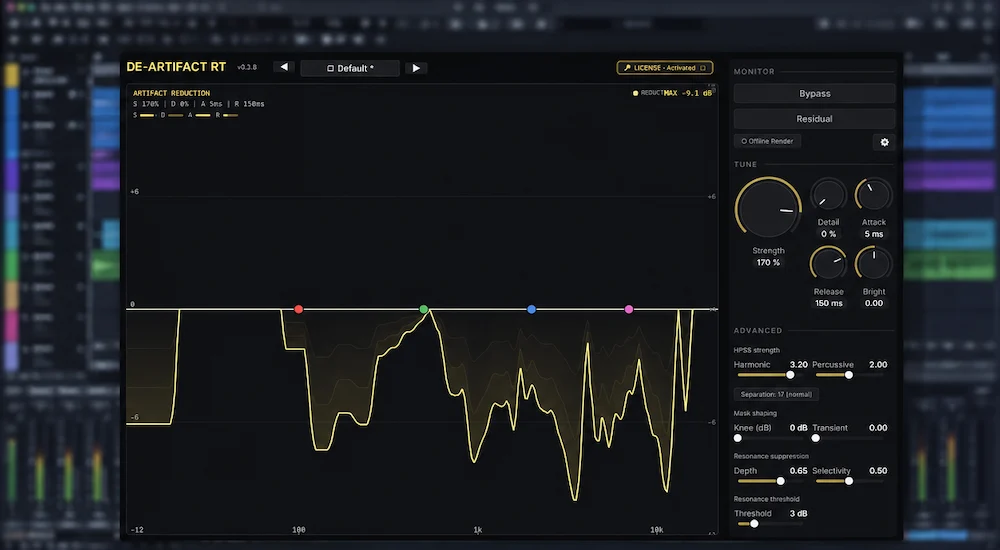
 de-artifact is not designed around the usual restoration model of finding a frequency and attenuating it. Its processing chain first separates harmonic and percussive information using HPSS, then feeds the resulting material into a neural model that estimates where unwanted artifact energy is present. Intrect identifies this model as ArtifactNet, a 3.6-million-parameter network designed for AI-generated audio residue.
The underlying idea is more selective than conventional filtering: estimate which spectral components are likely to be artifacts, create a reduction mask, and remove those components while leaving the surrounding musical information intact. The quality of that approach depends heavily on the model’s ability to distinguish artifact energy from legitimate content.
That distinction matters in a mastering context. A broad high-frequency cut may reduce a metallic texture, but it will also take cymbal detail, vocal air and upper harmonics with it. A narrow notch can deal with a fixed resonance, but it is poorly suited to an artifact that moves with the performance. Dynamic EQ adds temporal control, yet it still operates without knowing whether a particular spectral event is intentional musical content or residue from the generation process.
de-artifact puts that classification problem inside the processor itself. That is the central technical proposition of the plugin, and it is also where its results need to be judged most critically: not by how aggressively it can suppress unwanted material, but by how reliably it can separate artifact from information worth keeping.
The harmonic/percussive processing is particularly relevant to that goal. A full mix contains very different types of material, and AI artifacts do not present themselves in the same way across vocals, sustained synths, cymbals, drums, or transient-heavy material. Giving the model separate harmonic and percussive reduction paths provides a more appropriate starting point than treating the entire stereo mix as one undifferentiated spectral field.
de-artifact also includes a four-band emphasis control that serves a different purpose from a conventional EQ. The bands steer the model toward selected frequency regions, while inverse compensation is applied to prevent the emphasis itself from becoming a straightforward tonal boost or cut.
That makes the control more useful as a restoration parameter than as another piece of mix processing. The engineer can effectively prioritize a problem area and let the artifact model concentrate its analysis there without deliberately reshaping the tonal balance of the master.
Give Your AI-Generated Mix a Controlled Mastering Perspective
AI-generated mixes can carry subtle artifacts that become more apparent once compression, limiting and final delivery processing are applied. A mastering pass can evaluate the complete balance of clarity, dynamics, stereo image, depth and detail without treating artifact removal as an isolated processing problem. Upload up to 40 seconds of your mix for a free mastering demo and hear how the material translates through a dedicated mastering workflow. Request Your Free Mastering Demo →
Where de-artifact Fits in a Mixing and Mastering Workflow
de-artifact makes the most sense as a corrective stage before the final mastering decisions, not as another processor in the conventional loudness or tonal-control section of a mastering chain. The goal is to remove problematic source material before subsequent compression, limiting, EQ and saturation determine how prominently those artifacts are reproduced.
For a stereo AI-generated mix, a sensible starting point is:
AI-generated source → artifact inspection → de-artifact → corrective processing → tonal and dynamic processing → mastering → final QC
With a finished stereo file that needs little additional mix work, the chain can be considerably shorter:
stereo mix → artifact removal → mastering
The timing of the cleanup matters. A low-level metallic texture or unstable high-frequency component that seems tolerable at the source level can become much easier to hear after bus compression, saturation or limiting. Loudness processing does not create the underlying artifact, but it can increase its prominence relative to the musical detail around it. For that reason, I would make the artifact-removal decision before committing to the final loudness stage.
Stem-based production opens another useful position in the chain. An AI-generated vocal, separated instrumental, drum stem or other extracted source can be treated before it is combined with the rest of the arrangement. Cleaning the problem at the stem level can be preferable when the artifact is localized, because the processing does not have to make a distinction between unrelated elements already sharing the same stereo mix.
The residual monitor is particularly useful here. Manual spectral repair gives the engineer direct control over individual events, while an automated process needs to make its own decisions about what constitutes unwanted material. Being able to audition the residual provides a way to check those decisions rather than judging the processed signal alone.
That last step is essential. With artifact removal, a cleaner waveform is not automatically a better master. The useful result is the point at which the unwanted texture is reduced without stripping away the harmonics, transients, ambience and low-level detail that make the source sound like music rather than a repaired file.
Residual Monitoring: The Control That Keeps Artifact Removal Honest
In restoration work, being able to hear what a processor removes is a quality-control tool, not an interface extra. Artifact removal is inherently subtractive, so the engineer needs a way to determine whether the processor is isolating unwanted material or simply removing whatever happens to occupy the same spectral region.
de-artifact’s Residual mode makes that check possible by monitoring the material being removed. Instead of judging the process only by whether the full mix sounds cleaner, the engineer can listen directly to the residual and ask a more useful question: is the processor removing the problem, or is it removing the music around the problem?
If the residual is dominated by the metallic hash, watery sustain, ringing or other artifact that triggered the repair, the processing is behaving as intended. If recognizable vocal body, drum transients, bass fundamentals, cymbal detail or other musically important information starts appearing in the residual, the reduction has crossed into destructive territory.
That distinction matters particularly with AI-generated material. The artifact is often intertwined with legitimate harmonic and transient information rather than isolated in an independent noise layer. Residual monitoring therefore provides a second reference for making the processing decision, alongside the processed signal itself.
The sample-aligned bypass serves a different but equally practical purpose. Restoration decisions are vulnerable to small differences in level and timing, which can make a processed signal seem better simply because the comparison is not properly synchronized. A sample-aligned A/B lets the engineer switch between processed and bypassed audio without introducing an additional timing offset, making subtle changes easier to judge on their actual sonic merits.
In practice, the residual should be treated as a decision aid rather than a target in itself. If recognizable vocal body, cymbal decay, kick attack, bass fundamentals or stereo ambience become prominent in the removed signal, the processing is probably too aggressive even if the main output initially sounds cleaner. A useful restoration pass should reduce the identifiable artifact while leaving the residual dominated by material the engineer would not miss in the musical signal.
For this type of processing, those two controls are more consequential than another collection of factory presets. Artifact removal requires restraint, and the ability to inspect the removed material and make a properly synchronized comparison gives the engineer the information needed to apply that restraint.
What de-artifact Does Well — and Where It Stops
 The strongest case for de-artifact is not that it makes every mix better. Its value is narrower: it is designed to reduce a class of artifacts that can otherwise require disproportionate amounts of manual restoration work.
Consider a finished Suno or Udio stereo mix with a persistent metallic texture, unstable high-frequency residue or watery sustain. A conventional cleanup may involve spectral analysis, narrow dynamic EQ, resonance suppression, manual spectral repair and repeated A/B checks. Depending on the source, the engineer may need several of those techniques at once, and some artifacts will remain difficult to isolate without affecting adjacent musical content.
A dedicated processor changes the economics of that decision. If de-artifact can identify the unwanted material reliably and remove it without taking an audible amount of legitimate program information with it, the engineer gets a repeatable first-pass cleanup instead of building the repair manually from scratch.
That is the real professional value: not replacing engineering judgment, but reducing the amount of engineering time required to reach a controlled starting point.
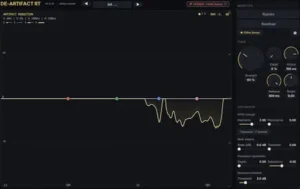
One useful indication of the intended behavior is how conservatively the processor treats clean material. Intrect states that artifact energy is concentrated mainly above roughly 3 kHz and that clean acoustic material can show very little reduction even at high Strength settings. In other words, a near-flat reduction curve on a clean source is not a processing failure; aggressive settings are more likely to create the problem the processor is supposed to prevent.
There are clear limits. de-artifact is not a general restoration suite and should not be evaluated as one.
The useful comparison is therefore not whether de-artifact can replace a broader restoration toolbox. It is whether a specialist processor can handle AI-generated residue efficiently enough that broader tools are needed less often, or only for the problems that actually require their additional control.
The Main Limitation: Latency Determines Where de-artifact Belongs
de-artifact is not a tracking processor. Its latency makes that distinction important.
At 44.1 kHz, reported plugin latency is approximately 305 ms on macOS and 435 ms on Windows. That is far beyond what would be comfortable for monitoring a vocalist or instrumentalist through the plugin while recording. For input monitoring, the issue is not CPU load but the delay introduced by the processing itself.
In a mix or mastering session, the situation is different. A DAW can compensate for plugin delay during playback, so the latency is largely a workflow issue rather than a reason the processor cannot be used. It does, however, make de-artifact much more naturally suited to mix-stage cleanup, stem processing and mastering preparation than to tracking or live performance.
CPU performance is more encouraging. Intrect’s published engineering tests indicate that its optimized inference pipeline can run faster than real time on modern desktop hardware. That supports its use in conventional mixing and mastering sessions, although a real-time factor should not be translated directly into a DAW’s CPU percentage. Host overhead, buffer size, sample rate, instance count and the rest of the session all affect actual CPU usage.
Apple Silicon is another relevant part of the implementation. Intrect has worked on Neural Engine acceleration for the plugin, which can be useful in Mac-based production environments running multiple neural processors. Actual performance will still vary with the DAW, project configuration, sample rate, buffer settings and number of active instances.
The practical conclusion is straightforward: de-artifact is a mix and restoration tool, not a low-latency input processor. That is a significant limitation for tracking workflows, but a much smaller concern when the plugin is used where it makes the most sense—after recording, during cleanup and before final mastering decisions.
The Pro Tools Limitation: No AAX Support
For professional users, the most consequential compatibility limitation is straightforward: de-artifact does not currently support AAX.
The plugin is available in VST3, AU and CLAP formats, covering most current DAW environments, including Logic Pro, Ableton Live, Cubase, Studio One, Reaper and Bitwig. Pro Tools users cannot load de-artifact as a native AAX plugin, which removes it from a significant part of the professional studio workflow.
That distinction matters less in a home-production setup where the DAW is flexible, but it can be a hard compatibility boundary in commercial mixing, mastering and post-production facilities built around Pro Tools. In those environments, routing audio through another application simply to access a restoration processor is rarely an efficient substitute for native plugin support.
The missing AAX format does not say anything about the quality of the underlying processing. It does, however, limit where that processing can be deployed. For a young specialist plugin aimed at professional restoration work, format coverage is part of the product’s practical value, not a secondary detail.
That is one reason de-artifact is better viewed as a specialized restoration tool with a defined workflow than as a universal professional standard. Its technical approach is interesting, but its current reach is constrained by both format compatibility and platform maturity.
de-artifact vs. RX, Spectral Editing, and Conventional Processing
| Tool / approach | Best suited to | Primary strength | Key limitation |
|---|---|---|---|
| Intrect de-artifact | AI-generated music and neural/codec-related residue | Specialized automated artifact analysis and reduction | Narrower scope, high latency, no AAX |
| iZotope RX | Broad audio restoration and repair | Large range of restoration and spectral tools | AI-specific artifacts may still require manual intervention |
| Spectral editing | Individual events and difficult localized repairs | Maximum control over exactly what is removed | Slow when many artifacts need attention |
| Dynamic EQ / resonance suppression | Frequency-specific tonal and resonance problems | Fast, familiar and highly controllable | Does not inherently classify AI residue separately from musical content |
| Shimmer / open-source AI cleanup | Free AI-music artifact cleanup and experimental workflows | Specialist AI cleanup without a paid plug-in license | Different workflow, controls, processing approach and integration from a dedicated commercial plug-in |
The distinction is less about which tool is universally better and more about the type of problem being solved. de-artifact is a commercial specialist processor built around AI-generated residue, while RX and spectral editors cover a much wider restoration territory. Open-source projects such as Shimmer approach the same emerging problem from a different direction, making them relevant alternatives for users who want to experiment before investing in a dedicated commercial workflow. Conventional dynamic processors remain useful when the problem can be described simply as a frequency, resonance or dynamics issue.
That makes frequency of use an important part of the buying decision. If AI-generated material appears only occasionally in a mastering queue, an existing restoration suite may already provide enough tools to handle the problem. If an engineer is cleaning AI-generated vocals, stems or finished mixes every week, a dedicated processor has a different economic proposition: repeated restoration work can be turned into a more consistent first-pass operation rather than rebuilt manually for every file.
There is also a workflow distinction. Spectral editing gives the engineer the highest degree of intervention, but that control comes with labor. de-artifact moves some of that decision-making into a specialized model, which makes the quality of its classification more important than the sheer number of controls on the interface. In practice, the useful question is whether the automated result leaves less corrective work for the engineer—not whether it eliminates the need for other restoration tools.
How Mastering and Streaming Can Change the Audibility of AI Artifacts
AI artifacts do not necessarily remain equally audible throughout the production chain. Their apparent severity can change as the signal passes through compression, saturation, limiting, sample-rate conversion and lossy encoding. The dynamic behavior of generated material is a related production issue, particularly when compression or limiting changes the balance between low-level residue and musical detail; see our guide to AI dynamics problems for that separate stage of diagnosis.
High-frequency residue is particularly vulnerable to this shift. Compression and limiting can alter the relationship between low-level artifact energy and the surrounding program material, making a texture that was barely noticeable in the source easier to identify in the finished master. Saturation can add further harmonic content around an already unstable region; the behavior of a nonlinear processor such as converter-modeled saturation illustrates why added harmonics need to be judged as part of the complete signal path rather than in isolation. On the other hand, aggressive filtering may make the artifact less obvious while removing legitimate air, transient detail or upper harmonics at the same time.
Streaming codecs introduce another layer of uncertainty. Lossy encoding does not simply make a track quieter or less detailed; it re-encodes the spectral information according to the codec’s own psychoacoustic model. If the source already contains unstable or highly synthetic high-frequency content, the encoded version can expose artifacts that were less obvious in the uncompressed master.
That does not mean every AI-generated track needs de-artifact processing before streaming. It means the encoded deliverable belongs in the quality-control process when artifact removal is part of the mastering decision. The relevant test is whether the cleanup remains beneficial after the rest of the mastering chain and final encoding have done their work.
A practical approach is to inspect the source before heavy bus processing, apply the smallest correction that addresses the identified artifact, compare it at matched level, complete the master, and then audition the encoded deliverable. The objective is not to produce the mathematically or spectrally cleanest file. It is to preserve the musical information that still matters after the entire production and delivery chain has been applied.
Where de-artifact Has the Most Practical Value
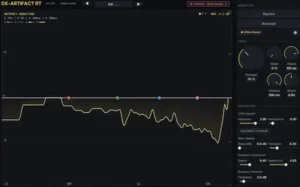 AI-generated vocals are one of the clearest use cases. Metallic sibilance, watery sustain and unstable upper-frequency texture can be difficult to reduce with conventional EQ because the same region often contains the vocal harmonics and articulation that give the performance its presence. For a deeper look at diagnosing and repairing these problems, see how to fix AI vocals. Overcorrecting the problem can leave the vocal cleaner but noticeably flatter.
Finished AI-generated stereo mixes present another strong case. Once the generator has rendered the arrangement, the engineer has limited control over the underlying synthesis. If an artifact is already embedded in the stereo file, there may be no individual source or production parameter available to correct it. A dedicated cleanup stage becomes more useful precisely because the problem has moved downstream into the final audio.
AI-separated stems are another relevant application. Source separation can introduce its own residual material, particularly around transients, sustained harmonics and complex high-frequency content. Before applying artifact removal, it is worth determining whether the extracted stem is actually independent enough to process on its own; our guide to AI stem separation problems covers that diagnostic step in more detail. Treating the separated stem before it is combined with the rest of the production can be preferable to trying to remove the same artifact after it has become part of a dense stereo mix.
Dense electronic and pop productions are also logical candidates because sustained synth content, layered vocals, cymbals and bright percussion leave relatively little room for unstable high-frequency material to hide. Compression and limiting can make those artifacts easier to notice once the arrangement is pushed toward its final level.
The opposite is equally important. A conventionally recorded rock, acoustic or vocal production with no identifiable AI-related residue does not become a better candidate simply because a specialist processor is available. Restoration should be driven by an audible problem, not by the presence of another plugin in the chain.
The $149 Question: When Does de-artifact Pay for Itself?
de-artifact is priced at $149 during the launch period, with a regular price of $179, and includes a 14-day trial. The relevant question for a professional user is not whether the price is low or high in isolation, but how often the processor solves a problem that would otherwise require manual restoration work.
Intrect also offers de-artifact Cloud, a separate pay-as-you-go version of the cleanup engine that runs without a DAW plug-in. It starts at $0.18 per processing minute, making it a different economic option for occasional cleanup, batch work or users who do not need a permanent restoration processor inside their DAW.
For an engineer who generates an occasional track with Suno or Udio, that calculation is difficult to make. A broader restoration suite can cover a wider range of problems and may therefore provide more utility across unrelated projects.
The equation changes when AI-generated material is a recurring part of the workload. If de-artifact consistently removes a class of residue that would otherwise require spectral inspection, dynamic processing and manual repair, even relatively small time savings can have production value. The return comes from repeated workflow efficiency rather than from a single dramatic restoration job.
That is also why the 14-day trial matters. The usefulness of a specialist artifact processor is highly source-dependent. Some files may respond to a light pass with little additional work; others may contain artifacts that still require manual spectral editing or a different restoration approach. The trial provides a practical way to evaluate that behavior against the actual material an engineer receives.
For professional use, the sensible test is therefore not whether de-artifact sounds impressive on one demonstration file. It is whether it produces repeatable, low-collateral cleanup across enough real-world sources to justify its place in the working template.
Where de-artifact Is Still an Early-Stage Product
The main weakness is not the underlying concept. It is the amount of independent evidence available to evaluate it.
There is currently no large body of third-party blind testing demonstrating that de-artifact consistently outperforms broader restoration tools, dynamic processing or manual spectral repair across a representative range of AI-generated material. Independent measurements of artifact-detection accuracy, transparency, phase behavior, distortion and frequency-response changes are also limited. That does not establish that the processor performs poorly; it means the available evidence is not yet strong enough to make broad performance claims.
The software remains a young 0.x product, although the current development history shows active maintenance rather than an abandoned or static release. Recent de-artifact builds have addressed Logic Pro playback and Windows installation requirements, while earlier releases addressed an Apple Silicon silence path and Windows AVX2 audio dropouts. Those changes are relevant when assessing a new restoration processor for mission-critical commercial work because product maturity includes host compatibility and release stability as well as the underlying audio algorithm.
The absence of AAX adds another practical limitation for professional facilities built around Pro Tools. Combined with the limited independent testing and early product maturity, it argues against treating de-artifact as an established studio standard at this stage.
The distinction is important: the technical approach is more developed than the independent evidence and ecosystem surrounding the product. That makes de-artifact an interesting specialist tool to evaluate on real material, but not yet a processor whose claims should be accepted without listening tests and workflow validation.
Intrect de-artifact Rating
| Category | Rating |
|---|---|
| Artifact-Removal Focus | 8.5/10 |
| Processing Control | 8.4/10 |
| Workflow & QC | 9.0/10 |
| Residual & A/B Quality Control | 9.0/10 |
| Production Deployment | 6.8/10 |
| Overall | 8.5/10 |
The specialist neural approach, combined with harmonic/percussive analysis and adaptive spectral subtraction, gives de-artifact a strong basis for separating generated residue from legitimate program material without relying on broad frequency cuts.
The Artifact-Removal Focus score reflects the plugin’s narrow specialization: it is built specifically around generated residue rather than general-purpose restoration. The score is tempered by the limited independent evidence available to establish how consistently the processing separates unwanted artifacts from useful musical information across different sources.
HPSS separation and model-based artifact masking give the processor a more targeted analysis path than conventional EQ or resonance suppression, although the available evidence does not justify assuming uniform results across every type of AI-generated material.
The four-band emphasis system provides useful control over where the analysis is concentrated, while adaptive spectral subtraction keeps the processing focused on reduction rather than conventional tonal shaping.
Residual monitoring and sample-aligned bypass are particularly valuable for this type of processor because they let the engineer inspect what is being removed and make synchronized A/B decisions rather than judging only the apparent cleanliness of the processed signal.
The main compromise is deployment: reported latency in the hundreds of milliseconds and the absence of AAX substantially narrow its suitability for tracking and Pro Tools-based environments, even though the optimized processing is designed for conventional DAW use.
Overall Comment: de-artifact has a clearly defined role as a specialist processor for AI-generated audio residue, with its strongest qualities centered on targeted analysis and quality control. Its narrower scope, high latency, missing AAX support and still-limited independent evidence keep it from being a universal restoration solution, but those constraints are easier to accept when AI-generated material is a recurring part of the production workload.
Verdict: A Specialist Tool for an Emerging Restoration Workflow
Intrect de-artifact has a specific job: reduce the metallic, watery, smeared and codec-like residue that can remain in AI-generated or AI-separated audio. Its strongest workflow features are the dedicated artifact model, separate harmonic/percussive processing, residual monitoring and latency-compensated A/B comparison.
The compromises are equally specific. It is not a general restoration suite, its reported latency rules out tracking use, Pro Tools users cannot load it natively because there is no AAX version, and independent comparative evidence is still limited. Those factors matter more than the novelty of the neural processing itself when deciding whether it belongs in a professional template.
For engineers who regularly receive Suno, Udio or AI-separated material, the 14-day trial is the most useful way to judge the product because artifact severity varies substantially between sources. For occasional AI cleanup, an existing restoration suite may already cover the required work. The case for de-artifact becomes stronger when the same class of residue appears repeatedly and a dedicated first-pass cleanup can reduce manual spectral repair.
Before Adding Another Processor, Hear What the Mix Actually Needs
Artifact removal is only one part of the final signal path. As this review shows, aggressive cleanup can reduce the unwanted texture while also affecting transients, harmonics, ambience or high-frequency detail, and mastering decisions can change how those problems translate at the final level. A real mastering comparison is the practical way to hear whether the processed mix still needs work in clarity, balance, dynamics, depth and stereo detail. Upload up to 40 seconds of your mix and receive a free mastering demo prepared by a real mastering engineer, so you can compare the source with a professionally mastered version on the same material. Upload Your Mix for a Free Mastering Demo →
FAQ: AI Music Artifact Removal and de-artifact
Can de-artifact remove artifacts from Suno and Udio tracks?
Yes. Suno and Udio material is among the plugin’s intended use cases. How much it can remove depends on the source, because different generations can produce different artifact patterns and levels of contamination.
Should de-artifact be used before or after mastering?
For a finished AI-generated mix, artifact removal generally belongs before the final mastering decisions. The exact position should still be determined by listening, since compression, saturation and limiting can change how prominent a particular artifact becomes.
Can de-artifact replace iZotope RX?
No. RX is a much broader restoration environment. de-artifact is a specialist processor aimed at AI-generated and related spectral residue, while RX remains relevant for clicks, hum, clipping, noise, spectral repair and other restoration tasks outside that scope.
Does de-artifact work in Pro Tools?
Not natively. The plugin is available in VST3, AU and CLAP formats, but it does not currently include AAX support. Pro Tools users therefore cannot load it as a standard native plugin.
Which DAWs support de-artifact?
de-artifact is available as VST3 and CLAP on Windows, and VST3, Audio Unit and CLAP on macOS. That covers common DAWs such as Logic Pro, Ableton Live, Cubase, Studio One, Reaper and Bitwig when using a supported plug-in format. Pro Tools is the major exception because de-artifact does not currently provide AAX support.
Is de-artifact suitable for recording vocals in real time?
No. Its reported latency is measured in hundreds of milliseconds, which makes it unsuitable for comfortable input monitoring during vocal or instrumental recording. Its practical role is in mixing, restoration and mastering preparation.
Is de-artifact CPU intensive?
The neural processing is computationally significant, although Intrect has optimized the inference pipeline for real-time operation. Actual DAW CPU usage depends on the processor, sample rate, buffer settings, project load and number of active instances. A published real-time-factor measurement should not be interpreted as a direct DAW CPU percentage.
Can de-artifact fix bad AI-generated vocals?
It can address certain artifacts in the rendered audio, but it cannot correct fundamental problems with writing, phrasing, pitch, arrangement or the underlying generated performance. Artifact removal is a restoration task, not a substitute for vocal production.
Is de-artifact useful for mastering engineers?
It can be, particularly when the engineer receives a finished AI-generated stereo mix without access to the original generation or individual sources. The strongest use case is material where recurring artifact cleanup would otherwise require significant spectral editing before mastering.
Is there a free alternative to de-artifact?
Yes. Free and open-source AI-audio cleanup projects exist, including tools designed around Suno and Udio material. Their processing quality, controls, documentation and DAW integration vary, so the relevant comparison is how they perform on the actual sources an engineer needs to clean.
Is de-artifact worth $149?
That depends on the workload. For occasional AI cleanup, a broader restoration suite may offer more overall utility. For an engineer processing AI-generated music regularly, the purchase becomes easier to justify if the plugin consistently reduces repetitive spectral cleanup and leaves less manual restoration work.

Yurii Ariefiev approaches AI audio restoration from an engineering perspective, with particular attention to how generated artifacts interact with legitimate harmonic and transient information. When evaluating a specialist processor such as de-artifact, the important considerations are artifact selectivity, spectral transparency, residual content and whether corrective processing remains controlled at the source level.
Enjoyed this review? If you found it useful, you can support independent audio research with a coffee.
☕ Buy me a coffee