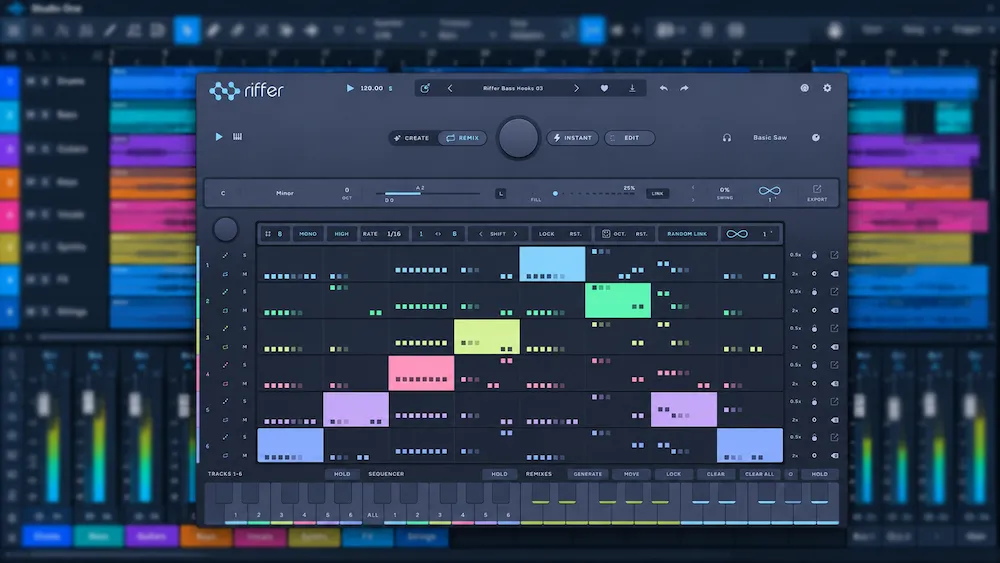
Audiomodern Riffer 4 is a generative MIDI sequencer built to create riffs, melodies, basslines, and arpeggios without requiring producers to enter every note manually. Its output is MIDI, not audio: the plugin generates note patterns that can drive virtual instruments in a DAW, leaving the sound, articulation, and final musical character to the instrument and the producer.
The real test is not how quickly Riffer 4 generates a sequence. It is how often that sequence provides a useful starting point for a track. A pattern can fit the selected scale and still clash with the groove, compete with the bass, or feel repetitive after a few bars. Riffer 4 is designed to shorten the distance between an empty piano roll and a workable musical idea, but the quality of the result depends on the available controls, the material being generated, and the editing that follows.
Audiomodern Riffer 4: Quick Assessment
Best for: Producers who regularly develop riffs, bass motifs, hooks, and arpeggios by exploring multiple MIDI variations.
Main advantage: Five generation engines give producers different starting points for musical ideas, with note editing and MIDI export available for further refinement.
Main limitation: Generated patterns still require musical judgment and may need substantial editing before they fit an arrangement.
Upgrade advice: Riffer 3 owners should verify that the new generation workflow improves their specific tasks before paying for the upgrade.
Bottom line: Riffer 4 is most compelling as a MIDI idea-generation tool, not as a replacement for composition, arrangement, or an instrument that produces sound.
Where Generative MIDI Fits in a Modern Production Workflow
 A modern DAW already provides the basic tools for writing MIDI: a piano roll, quantization, arpeggiators, MIDI effects, and pattern duplication. Riffer 4 has to offer more than automatic note entry to justify a place in that workflow. Its value lies in generating alternative rhythmic and melodic patterns that a producer might not have programmed deliberately.
Manual sequencing offers control, but it tends to follow the habits of the person at the keyboard. Familiar subdivisions, repeated intervals, and predictable phrase lengths can become defaults, even when the arrangement calls for something less obvious. A generative sequencer can introduce different combinations of notes and timing. Those variations are useful only when they provide a musical direction worth pursuing; novelty alone is not a production advantage.
Riffer has been available since 2015, so version 4 builds on an established approach rather than introducing generative MIDI sequencing as a new concept. Its five generation engines organize that approach around different types of musical material. The practical question is whether those engines produce distinct, usable starting points—and whether their controls make it faster to shape a pattern than to write one directly in the DAW.
That distinction matters in a working session. A generated phrase that needs a few edits may save time and open up a useful direction. One that requires extensive correction of its rhythm, phrasing, or note choices can take longer than manual programming. The number of variations a plugin can produce is therefore less important than how efficiently a producer can identify, refine, and fit a strong idea into the arrangement.
Riffer 4’s Five Generation Engines: What Each One Is Designed to Do
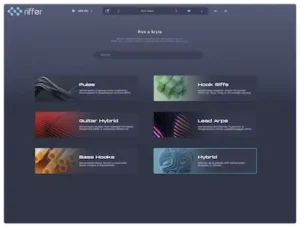
Riffer 4 groups its generative tools into five engines: Pulse, Hook Riffs, Guitar Hybrid, Lead Arps, and Bass Hooks. Each targets a different type of musical material, giving producers a more focused starting point than a single generator intended to cover every role. The distinction is about the kind of MIDI phrase being developed, not a guarantee that the output will fit a track without editing.
Pulse: Repeating Patterns and Rhythmic Motion
Pulse is designed for repetitive sequences and rhythmic patterns. It can provide material for a synth ostinato, a repeating accompaniment, or a secondary part that adds motion without introducing a new chord progression.
The main decision is how much rhythmic activity the arrangement can accommodate. A dense sequence may sound compelling in isolation but compete with percussion or crowd the midrange when other parts enter. Editing out notes, reducing activity, or leaving more space between events can make the pattern more effective than using the full generated sequence.
Hook Riffs: Shaping a Memorable Motif
Hook Riffs is aimed at short melodic phrases that can recur throughout a track. Staying in key is only the starting point: a memorable hook also depends on melodic contour, rhythmic placement, phrasing, and how the motif interacts with the harmony and vocals.
Riffer can generate phrases to evaluate, but it cannot determine whether one is distinctive in the context of a particular song. Auditioning the MIDI against the existing progression is essential. Removing a note, shifting an accent, or shortening the phrase may give a simple motif more identity than adding further variation.
Guitar Hybrid: Guitar-Oriented MIDI Ideas
Guitar Hybrid is designed to generate guitar-oriented patterns. That describes the intended musical direction, not the sound of a performed guitar. MIDI carries note and timing information; the receiving instrument determines how those events are articulated.
The result depends on the instrument’s capabilities, including picking behavior, articulation switching, string or fretboard mapping, and transitions between notes. A basic synth patch may reproduce the pitches while missing the phrasing that makes a guitar part convincing. Treat this engine as a source of guitar-inspired ideas, with realistic performance dependent on the instrument and any editing required afterward.
Lead Arps: Arpeggiated Motion and Synth Lines
Lead Arps targets arpeggiated and moving melodic sequences, making it relevant to electronic arrangements built around a repeating synth figure. Such a part can establish momentum, reinforce a harmonic pattern, or provide a recognizable lead element.
The MIDI cannot be judged independently of the sound assigned to it. A short-decay patch can emphasize each note as a distinct rhythmic event, while a sustained sound can merge the sequence into a more continuous texture. Register, note duration, and overlap with other melodic parts all affect whether the line supports the arrangement or competes with it.
Bass Hooks: Building a Bass Motif
Bass Hooks is intended for bass-oriented MIDI sequences that can drive a synthesizer, sampler, or other MIDI-compatible instrument. The goal is to develop a bass motif without entering every note manually.
A bassline has to work with the kick, harmonic rhythm, and overall low-frequency arrangement. Even notes that fit the scale can create unnecessary movement, weaken the groove, or make the downbeat less clear. Check the pattern’s register, note lengths, and rhythmic relationship to the kick before deciding whether it belongs in the track. The generated notes are a starting point; their role in the arrangement determines whether they are useful.
The five engines give Riffer 4 a clear workflow organized around musical roles. They do not, by themselves, establish how different the underlying generation methods are. Without technical documentation or controlled testing, it is more accurate to assess each engine by the MIDI it produces and how efficiently that material can be shaped into a usable part.
Give Your Track the Clarity and Balance It Needs
Generating a strong riff or bassline is only one part of building a finished track. Professional mastering helps assess how the complete mix translates as a cohesive whole, including tonal balance, low-end definition, transient impact, and stereo presentation. Submit up to 40 seconds of your mix for a free mastering demo to hear how your material can be evaluated in a dedicated mastering workflow, without assuming a particular result in advance. Request Your Free Mastering Demo →
Inside the Riffer 4 Workflow: Controlling, Editing, and Exporting MIDI
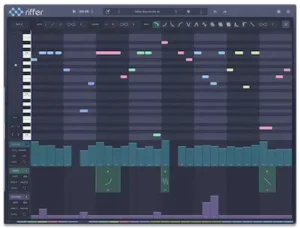 Riffer 4 combines generative controls with direct note editing and MIDI export. Key and scale settings constrain pitch choices; note-range and density controls shape the register and activity of a pattern, while timing and feel settings influence its rhythmic character. These controls matter because a generator becomes useful when its output can be steered toward a specific musical role rather than accepted as an unpredictable result.
Once exported, the MIDI can be further edited in the DAW, assigned to a different instrument, or developed into a longer arrangement. For a related but more integrated approach, Wavea Flite 2’s combination of sequencing and instrument sound generation offers another way to develop and route musical patterns within a production setup.
This approach is most useful for short motifs and repeating parts, where generating several alternatives can be more productive than entering every note from scratch. However, there is no independent, published time-on-task study establishing how much faster Riffer 4 is than manual sequencing. The actual benefit depends on the part being written, the quality of the generated variations, and how much editing each one requires.
Electronic Production: Finding a Pattern That Fits the Groove
Consider a house or techno track built around an established kick, percussion, and chord stab. The arrangement needs a moving synth part, but programming a convincing pattern manually has stalled.
The useful approach is to constrain the pitch material, generate several candidates, and audition them against the existing groove. Density, register, and timing can then be adjusted to keep the sequence from masking percussion or crowding the chord part. Individual notes can be edited before the MIDI is exported to the intended synthesizer.
The final decision should be made in context, not from the generator’s preview alone. A pattern that sounds energetic in isolation may disrupt the groove once the kick and percussion are playing. Automation, sound selection, and selective variation can help the part develop across the arrangement without repeating the same phrase unchanged for the entire track.
Hip-Hop Production: Developing Basslines and Melodic Hooks
In a hip-hop session, the drums and chord progression may already be established, leaving a bass motif or melodic hook to be developed. Riffer 4 can provide MIDI ideas to audition against the beat, with subsequent editing used to refine the register, timing, and note density.
Space is a critical consideration. A busy bass pattern can compete with the kick, while an overactive melodic phrase can leave less room for the vocal. A simpler sequence may serve the track better if its accents reinforce the groove and its phrasing leaves room for the other elements.
In both styles, the practical advantage is the ability to explore alternative patterns without manually rebuilding each one. That advantage disappears when the generated material requires extensive correction or consistently misses the musical direction of the track.
Riffer 4 vs. Riffer 3: What Changes and Is the Upgrade Worth It?
Riffer 4 changes the way producers approach MIDI generation by organizing the workflow around five engines: Pulse, Hook Riffs, Guitar Hybrid, Lead Arps, and Bass Hooks. Rather than starting with a general pattern and trying to steer it toward a particular musical role, users can choose an engine designed around the type of phrase they want to develop.
Riffer 3 already offered generative sequencing, MIDI connectivity, polyphonic operation, multi-riff functionality, and performance-oriented features. The move to version 4 should therefore be judged by more than the number of new generation options. The relevant question is whether the new workflow makes it easier to produce usable material for a recurring task.
| Decision factor | Riffer 3 | Riffer 4 |
|---|---|---|
| Generation approach | Established generative MIDI workflow with sequencing and performance features. | Five engines organized around different types of musical material. |
| Idea development | A relevant option for users whose existing sequencing workflow already meets their needs. | A more role-oriented starting point for exploring riffs, hooks, arpeggios, and bass motifs. |
| Legacy workflow requirements | Existing projects may depend on specific editing, sequencing, or controller behavior. | Verify the current implementation of any legacy functions that are essential to your projects. |
| Upgrade decision | Keep using it if it already produces the material you need efficiently. | Upgrade when the new engines offer a meaningful improvement to your actual writing process. |
Before upgrading, check three workflow details against the current build: whether you can set the piano-roll length as required, lock individual notes without locking an entire key, and create the custom scales your projects need. These points were raised in Audiomodern’s community forum, but forum requests alone do not establish their status in the current release. Verify each function in the trial if it matters to your existing workflow.
The most reliable upgrade test is to use the trial with a real project. Choose a recurring task, such as creating a bass motif or a lead arpeggio, and compare the amount of editing required to get a usable result in each version. If Riffer 4 consistently gets you closer to the intended part, the upgrade has a practical justification. If Riffer 3 already handles the same task efficiently, the new version may be optional.
Riffer 4 Limitations: Musical Control, Redundancy, and Compatibility
Riffer 4 can constrain pitch choices and shape the density and timing of a pattern, but those controls do not guarantee convincing phrasing, sophisticated voice leading, or a strong relationship with the existing harmony. A sequence can fit the selected scale and still sound predictable, disrupt the groove, or compete with the vocal and other parts. Musical judgment remains necessary to decide which notes serve the arrangement.
The plugin may also add little to a workflow that already relies on a piano roll, arpeggiators, and MIDI transformation tools. Its strongest case is for producers who need to explore possibilities and want a faster route to candidate patterns. If the musical idea is already clear, programming it directly may be more efficient than generating and evaluating alternatives.
The receiving instrument introduces another variable. MIDI describes note events and related performance data; it does not determine the final timbre, stereo image, or frequency response. The same pattern can work well with one patch and sound unconvincing with another. Articulation and note transitions are particularly important when using instruments intended to imitate acoustic performances.
Compatibility deserves a separate check. Audiomodern’s Riffer 4.0.1 release notes confirm a fix for a problem that prevented VST3 instruments from loading correctly for some users. Separate community discussions have raised questions about interface resizing and MIDI CC pass-through in Logic Pro; the available reports do not establish that these behaviors affect every setup or that all have been resolved. If your workflow depends on instrument hosting or controller pass-through, verify those functions in the current build before using Riffer 4 in a production template.
Before relying on Riffer 4 in a production template, test it in the intended DAW with the actual instrument, MIDI routing, and controller setup. That is particularly important in sessions where established templates or external control assignments are part of a repeatable workflow.
Riffer 4 vs. Other MIDI Plugins: Choosing the Right Tool
Riffer 4 competes with several MIDI composition tools, but they do not all solve the same problem. Some focus on generating riffs and melodic patterns; others are built around harmony, chord triggering, arpeggiation, or step sequencing. The useful comparison is how directly each tool supports the task at hand.
| Plugin | Primary focus | Best fit | Key trade-off |
|---|---|---|---|
| Audiomodern Riffer 4 | Generative MIDI patterns organized by musical role | Exploring riffs, bass motifs, arpeggios, and melodic sequences | Generated patterns still require selection, editing, and arrangement work |
| Scaler 3 | Harmony, chord progressions, and composition | Building ideas around chords and developing broader harmonic structures | Its main focus is broader than dedicated riff generation |
| Melody Sauce 3 | Generating melodic and related musical ideas | Exploring melody-led material and developing ideas into MIDI parts | Its generation approach and workflow differ from Riffer’s engine-based structure |
| Xfer Records Cthulhu | Chord triggering and arpeggiation | Playing chord voicings and turning held notes into rhythmic patterns | More suited to chord-based performance than broad riff exploration |
| HY-RPE2 | Step-based sequencing and MIDI pattern control | Shaping rhythmic sequences with deliberate control over individual steps | Its workflow favors hands-on sequencing over selecting generated riff ideas |
| BlueARP | Arpeggiation and pattern sequencing | Creating conventional arpeggiated parts and MIDI patterns | Its core sequencing approach differs from Riffer’s broader riff-generation workflow |
Riffer 4 makes the most sense when the goal is to explore alternative riffs, bass motifs, or lead patterns without programming every candidate from scratch. Scaler 3 is a stronger starting point when the problem is harmonic direction or chord progression. Cthulhu suits a different task: turning known chords into playable patterns or arpeggiated parts. HY-RPE2 and BlueARP are more relevant when direct control over sequencing behavior matters more than generating a range of riff ideas.
Melody Sauce 3 belongs in the comparison for producers who want to explore melodic material, although its workflow should be evaluated on its own terms rather than treated as interchangeable with Riffer’s five engines.
The deciding factor is not the number of features listed on a product page. It is how much useful MIDI material the tool produces for the task, how much editing that material needs, and how naturally it fits the producer’s existing DAW workflow. Comparing the same musical brief in each candidate is more informative than choosing by feature count alone.
Riffer 4 Pricing, License, and Value for Money
 Audiomodern Riffer 4 desktop is listed at an introductory price of €49, reduced from €69, with an upgrade price of €29 for owners of previous versions. US retail pricing is listed at $55 introductory and $79 regular. The announced desktop introductory offer runs through November 30, 2026, but prices and promotions may vary by seller and region.
Riffer 4 for iPad is available as a separate purchase through the App Store. The introductory price is $12.99 through December 7, 2026, before returning to $19.99. Do not assume that purchasing the desktop version includes the iPad edition; check the relevant license and platform requirements before buying.
The desktop version is offered with a perpetual license, and a trial is available before purchase. Check the current price, supported format, operating system, and activation terms for the edition you intend to use.
The value depends on how often the five generation engines help solve a real composition task. Producers who regularly develop riffs, bass motifs, hooks, and arpeggios may find the focused generation workflow worthwhile. The upgrade is less compelling for existing users whose current setup already covers those needs, or for producers who can program their intended MIDI parts faster by hand.
Free tools such as BlueARP and the MIDI sequencing features built into many DAWs can be sufficient for conventional arpeggiation and predictable patterns. Riffer 4 is easier to justify when the goal is to explore different riff ideas rather than simply trigger notes in a defined rhythm.
Overall Rating
Rating methodology: This assessment considers the documented feature set, published demonstrations, product information, and available user reports as of October 26, 2026. It is not a controlled benchmark of MIDI-generation quality, CPU performance, or compatibility across DAWs.
| Category | Rating |
|---|---|
| Generation Engine Specialization | 8.5/10 |
| Musical Direction and Pattern Control | 8.0/10 |
| Note Editing and MIDI Export | 8.2/10 |
| Practical Composition Utility | 7.8/10 |
| DAW and Instrument Integration Confidence | 6.8/10 |
| Upgrade and Purchase Value | 7.8/10 |
| Overall | 7.9/10 |
Generation Engine Specialization — 8.5/10. Five engines dedicated to pulse patterns, hooks, guitar-oriented ideas, lead arpeggios, and bass motifs give producers clear starting points for different musical roles without forcing every task through a single general-purpose generator.
Musical Direction and Pattern Control — 8.0/10. Key and scale constraints, note-range and density settings, and timing controls provide meaningful ways to guide generated phrases, although they cannot ensure memorable melodies, convincing phrasing, or a natural fit with an existing groove.
Note Editing and MIDI Export — 8.2/10. Direct note editing and export to a DAW make the generated material usable beyond the plugin, allowing producers to refine individual events and assign patterns to different instruments rather than accept the initial output unchanged.
Practical Composition Utility — 7.8/10. Riffer 4 is well suited to exploring alternative riffs, basslines, and arpeggios when the musical direction is not yet settled, but its advantage diminishes when generated phrases need extensive correction or the part is quicker to program manually.
DAW and Instrument Integration Confidence — 6.8/10. MIDI-based operation supports flexible instrument choices, but reported compatibility concerns and the need to verify routing, controller behavior, and host-specific operation make it difficult to assign a stronger rating without broader confirmation across setups.
Upgrade and Purchase Value — 7.8/10. The perpetual-license model and trial reduce the commitment for new buyers, while the five-engine approach may justify the cost for frequent MIDI idea generation; the case is less compelling for Riffer 3 owners whose existing workflow already meets their needs.
Overall Comment: Riffer 4’s main strength is its focused approach to generating different kinds of MIDI material, with enough editing and export support to move promising ideas into a production. Its limitation is that musical quality still depends on selection, arrangement, and instrument choice, while compatibility should be checked in the intended setup. It is best suited to producers who regularly develop riffs and motifs through experimentation.
Verdict: Is Audiomodern Riffer 4 Worth Buying?
Audiomodern Riffer 4 is best suited to producers who regularly develop riffs, bass motifs, arpeggios, and other MIDI patterns through experimentation. Its five generation engines provide distinct starting points, while note editing and MIDI export let producers refine the results in their existing DAW workflow.
The main selling point is workflow, not guaranteed musical quality. Riffer 4 can help generate alternatives when a part is difficult to write, but it cannot determine which phrase serves the song or how it should interact with the arrangement. Producers who already program MIDI efficiently may see little improvement; those who frequently explore different melodic and rhythmic directions have a stronger case for using it.
For Riffer 3 owners, an upgrade is justified when the new generation approaches solve a recurring problem in their workflow. New users should use the trial to test the plugin against real projects rather than judge it by the number of variations it can produce. Studios focused exclusively on mixing and mastering can place it lower on their purchasing list unless they also develop MIDI-based production material.
Your MIDI Ideas Are Only the Starting Point. Hear What Your Mix Can Deliver.
A compelling riff, bass hook, or arpeggio can give a track its identity, but even well-developed musical ideas can compete for space, create low-end conflicts, or lose impact when the full arrangement comes together. Adding another plugin is not always the answer. The next step is to evaluate the finished mix as a whole and hear how it compares with a professionally mastered version. Upload up to 40 seconds of your mix for a free mastering demo prepared by a real mastering engineer. Compare the before-and-after results, assess the differences in context, and decide whether professional mastering is the right next step for your track. Upload Your Mix and Get a Free Mastering Demo →
Frequently Asked Questions About Audiomodern Riffer 4
What does Audiomodern Riffer 4 generate?
Riffer 4 generates MIDI riffs, hooks, bass motifs, arpeggios, and related note patterns. It does not generate audio by itself; the MIDI can drive a compatible instrument or be exported to a DAW for further editing.
What is new in Riffer 4 compared with Riffer 3?
The main change is a workflow organized around five generation engines: Pulse, Hook Riffs, Guitar Hybrid, Lead Arps, and Bass Hooks. Existing users should verify any legacy editing or controller functions they rely on before upgrading.
Can I use Riffer 4 with other instruments and DAWs?
Riffer 4 supports MIDI export, allowing generated patterns to be edited in a DAW and assigned to compatible software or hardware instruments. The exact routing and controller behavior depends on the host and setup, so verify the workflow required for your project.
Is Riffer 4 worth upgrading to?
The upgrade is most compelling for producers who regularly generate riffs, bass motifs, hooks, and arpeggios and benefit from the five-engine workflow. If Riffer 3 already handles your recurring tasks efficiently, compare both versions before paying for the upgrade.
How much does Audiomodern Riffer 4 cost?
The announced desktop introductory price is €49, with a listed regular price of €69 and a €29 upgrade for owners of previous versions. US retail pricing is listed at $55 introductory and $79 regular. Check the current offer before purchasing.
Is there an iPad version of Riffer 4?
Yes. Riffer 4 for iPad is available as a separate purchase through the App Store. The introductory price is $12.99 through December 7, 2026, with a listed regular price of $19.99. The iPad edition is separate from the desktop license.

Yurii Ariefiev is an audio production editor and mastering engineer focused on the technical and musical decisions that shape recorded tracks. When evaluating generative MIDI tools such as Audiomodern Riffer 4, he considers whether generated note patterns offer useful melodic and rhythmic direction, how naturally they fit an existing musical idea, and how much refinement is needed before they become practical parts of a production.
Enjoyed this review?
If you found it useful, you can support independent audio research with a coffee.
☕ Buy me a coffee