
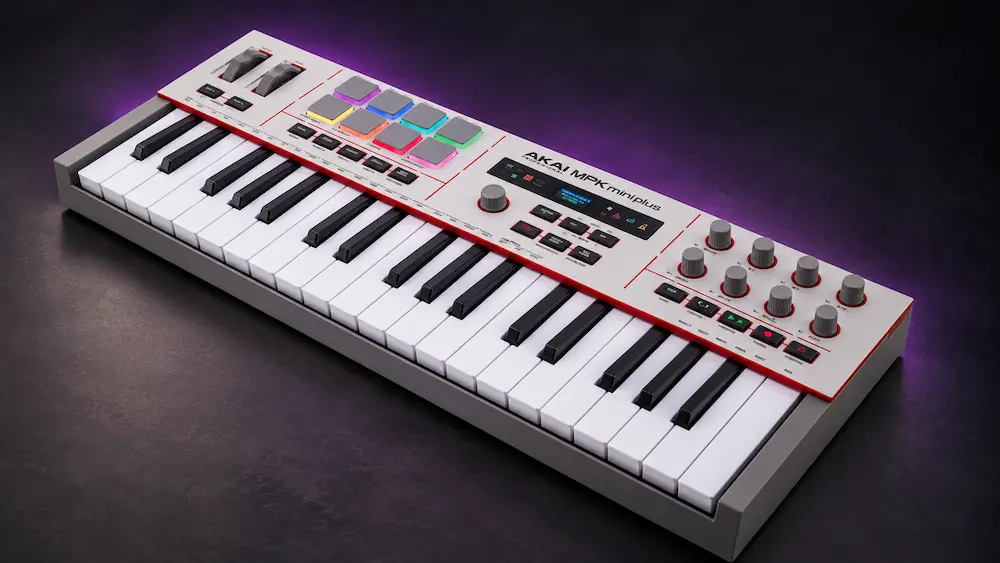
The Akai MPK Mini Plus II is a 37-key MIDI controller that combines RGB MPC pads, assignable encoders, a color display, creative MIDI-generation tools, and connections for compatible external hardware. Compared with the original MPK Mini Plus, the key buying questions are whether the revised interface and added performance functions justify an upgrade—and whether the updated connectivity still suits your setup.
This review examines the controller’s documented features, DAW integration, hardware compatibility, limitations, and alternatives. Published specifications can establish what the MPK Mini Plus II offers, but they cannot verify key response, pad sensitivity, MIDI timing, or whether its creative modes actually accelerate a production workflow.
Akai MPK Mini Plus II vs. MPK Mini Plus: What Changed?
The MPK Mini Plus II retains the compact 37-key format but changes the control interface and published connectivity options. For existing owners, the important question is whether the newer model improves the tasks they perform regularly—and whether any differences affect hardware connections or sequencing features they already rely on.
| Feature | MPK Mini Plus | MPK Mini Plus II |
|---|---|---|
| Keyboard | 37 mini keys | 37 mini keys; revised keybed |
| Display | Monochrome OLED | 160 × 80 color display |
| Computer connection and USB MIDI | USB Type-B; USB MIDI | USB-C for power and MIDI In/Out |
| Physical 5-pin MIDI DIN | MIDI In and Out | MIDI Out only |
| CV/Gate and clock connections | CV/Gate outputs and dedicated CV Clock In/Out | Three CV/Gate outputs; dedicated clock ports are not listed in the published specifications |
| Standalone sequencing | Built-in two-track sequencer | A built-in standalone sequencer is not listed in the published specifications |
| Creative functions | Arpeggiator, Chord and Scale modes, Note Repeat | Expanded creative modes, including Strum and additional pattern controls |
The MPK Mini Plus II is the more relevant choice when its revised interface and creative functions address a specific limitation in an existing setup. However, producers who depend on the original model’s physical MIDI In, dedicated clock connections, or built-in sequencer should verify the current MPK Mini Plus II manual before upgrading. Do not assume that a newer model retains every connection or standalone function.
Where the MPK Mini Plus II Fits in a Modern Production Setup
 A compact MIDI controller earns its place in a studio when it removes friction from playing, sequencing, and parameter control. The Akai MPK Mini Plus II combines those functions with MIDI and CV/Gate connectivity, targeting producers who work across a DAW, software instruments, and external hardware.
Its 37-key layout offers more room for chord voicings and melodic parts than a 25-key controller, while eight MPC-style pads provide a separate surface for drum programming and sample triggering. Assignable encoders bring selected instrument and effect parameters within reach; the color display provides feedback on supported controls. These features address different tasks, but their value depends on how well they work together in the user’s setup.
The hardware connections are a more meaningful differentiator for hybrid studios. A controller limited to USB-MIDI may require additional routing hardware to communicate with certain external instruments or modular systems. The MPK Mini Plus II includes a five-pin MIDI output and three CV/Gate outputs, reducing that equipment requirement for compatible setups. Producers working entirely with software may gain little from these connections.
The trade-off is familiar: a compact unit can consolidate several functions, but it cannot match the playing range of a full-size keyboard or the dedicated controls of a larger surface. The MPK Mini Plus II makes the strongest case for producers who need keys, pads, hands-on parameter control, and hardware connectivity in one portable device—not for users who will leave most of those features unused.
Akai MPK Mini Plus II: Keybed, Controls, and Creative Tools
37 Mini Keys: Playing Range and Velocity Response
The 37-key layout offers more playing range than a typical 25-key controller without the footprint of a full-size keyboard. The extra keys make it easier to record chord voicings, bass lines, and upper-register phrases in one pass, with fewer octave changes during performance.
Key count alone, however, says little about playability. Key travel, spring resistance, velocity response, and consistency across the keybed determine how reliably a player can translate touch into MIDI data. Akai describes the MPK Mini Plus II’s keybed as upgraded, but that description does not establish measurable improvements in velocity tracking or expressive response.
Without direct comparison against the original MPK Mini Plus, claims about improved feel or performance consistency remain unverified. The format should suit producers who primarily sketch melodies, enter chords, and record synth parts. Players who need wide two-handed voicings, piano-style dynamics, or a broader performance range will be better served by a larger keyboard. Producers deciding whether they need a controller or an instrument that generates its own sound can also consider the Arturia MiniFreak 49 hybrid synthesizer, which combines a full-size keyboard with its own synthesis engine.
Check Your Mix’s Balance, Punch, and Translation Before Mastering
A well-controlled production setup helps shape a track, but the final mix still needs to translate across playback systems without losing its tonal balance, low-end definition, or dynamic impact. Our free mastering demo lets you hear how your own material responds to professional mastering before committing to the full process. Upload up to 40 seconds of your mix for an initial assessment of its mastering potential.
Submit Your Mix for a Free Mastering Demo →
MPC Pads, Encoders, and Performance Controls
The eight assignable 360-degree knobs and separate push encoder provide hands-on access to mapped instrument and effect parameters, such as filter cutoff, resonance, envelope settings, modulation depth, and effect sends. With suitable DAW or instrument mappings, these controls can make sound design and parameter adjustment more immediate than mouse-based editing.
For pad performance, consistent velocity response matters more than RGB lighting. The pads need to translate repeated hits into predictable MIDI values across the intended dynamic range. Pressure data is useful only when the receiving instrument or MIDI mapping supports it. Pad count and advertised sensitivity describe the available controls, not how accurately they respond in practice.
Dedicated pitch-bend and modulation wheels support real-time performance gestures that can be awkward to draw manually after recording. Their behavior depends on the receiving instrument, MIDI assignments, and the range configured for each parameter. They are performance controls, not a substitute for detailed automation editing.
The Color Display: Parameter Feedback and Its Limits
The 160 × 80-pixel color display provides feedback on controller state and supported parameters. Its role is to make mapped controls easier to identify and use; it is not intended to replace the interface of a software instrument or DAW.
That distinction becomes important when a session involves multiple instruments, effects, and parameter groups. A hardware control is most useful when its assignment and current value are clear. The display can help communicate that information, but the benefit depends on what the integration exposes and how consistently it presents the data.
Producers who frequently switch between mapped instruments and parameter groups may benefit from having feedback on the controller itself. Those who already work efficiently with mouse control, keyboard shortcuts, and established templates may notice less improvement. The display is a workflow feature; it does not affect audio quality or add synthesis capability.
Arpeggiator, Chord Creator, Note Repeat, and Creative Functions
The MPK Mini Plus II expands its creative toolkit with chord functions, Strum Mode, Progression Mode, and an arpeggiator with programmable patterns. Strum Mode spreads chord notes over time, while Progression Mode lets players trigger assigned chord sequences from the pads and play melodies on the keyboard. Patterns Mode supports custom arpeggio patterns, giving producers another way to shape rhythmic phrases before editing MIDI in the DAW.
The additional Glitch, Mutate, Freeze, and Follow tools extend these options for experimenting with rhythmic and melodic material. They are intended to help producers introduce variations and explore different creative directions from the controller. Their exact operation should be assessed against the current product documentation rather than inferred from the feature names alone.
The arpeggiator’s pattern controls provide another composition tool for producers who build ideas through performance. Custom patterns can introduce accents, rests, sustained notes, and ratchets into a rhythmic phrase. The practical advantage is not the number of available modes, but whether they produce a useful MIDI idea with less editing than an equivalent DAW-based approach.
These features are performance and MIDI-generation tools, not new synthesis technology. Similar results may be possible with DAW MIDI effects, sequencers, scripts, or functions built into individual instruments. The distinction is workflow: the MPK Mini Plus II brings selected operations onto the controller, potentially reducing the need to navigate menus or configure separate software tools.
The useful measure is how quickly a function produces material worth keeping. A generator that creates elaborate variations but requires extensive editing may offer little practical advantage. A more limited tool that consistently produces a workable rhythm, chord pattern, or melodic variation can be more valuable during composition. Whether these functions save time depends on the producer’s workflow and the degree of control they provide.
MIDI, CV/Gate, and DAW Integration
 The MPK Mini Plus II’s strongest differentiator is its ability to connect a computer-based production workflow with compatible external hardware. USB-C handles the computer connection and power, while a full-size five-pin MIDI output sends MIDI data to external instruments. Three 3.5 mm CV/Gate outputs extend its control options to compatible modular and analog equipment. A quarter-inch sustain-pedal input supports hands-free sustain during performance.
For producers working entirely inside a DAW, the hardware outputs may add little value. In a hybrid studio, they can reduce the need for a separate MIDI interface or dedicated controller, depending on the equipment and routing requirements. That makes the MPK Mini Plus II more relevant to compact hardware setups than controllers designed primarily for USB-MIDI note entry.
CV/Gate connections require more than a matching socket. Compatibility depends on the receiving device’s voltage range, signal conventions, and input requirements. Producers should check the specifications of their synthesizers or modular modules before connecting them; the presence of CV/Gate outputs does not guarantee universal compatibility.
On the software side, Akai advertises integration with MPC Standalone and MPC Desktop, scripted support for DAWs including Ableton Live, Logic Pro, Cubase, and FL Studio, and compatibility with supported Native Instruments NKS workflows. The practical benefit depends on the functions available in each supported configuration.
DAW compatibility is not the same as full control-surface integration. A controller may transmit notes and MIDI CC data while offering limited support for transport commands, track selection, mixer parameters, preset browsing, or display feedback. Before buying, check the documented feature set for the specific DAW version, operating system, and instrument software in use. The relevant question is not simply whether the MPK Mini Plus II connects, but which operations it can control without additional setup.
Limitations: What the Specifications Don’t Reveal
Mini keys remain a performance compromise. The 37-key layout is useful for sketching chords, bass lines, and melodies, but it does not replace a full-size keyboard for extended piano parts or wide two-handed voicings.
Control depth varies by software. MIDI connectivity does not guarantee full transport control, track navigation, parameter feedback, or consistent mappings across DAWs and instruments. Check the integration available for the specific software versions you use.
Creative modes overlap with DAW functions. Arpeggiators, chord tools, and MIDI transformations are available in many software environments. Their advantage on the controller is faster physical access, not necessarily greater processing depth.
Several performance characteristics remain unverified. Published specifications do not establish key velocity consistency, pad sensitivity, MIDI timing, mechanical durability, or reliability over extended sessions. These characteristics require hands-on testing before they can be rated confidently.
MPK Mini Plus II vs. Alternative MIDI Controllers
The best alternative depends on what the controller needs to do. Key range, DAW integration, pad performance, and direct hardware connectivity matter more than the total number of advertised features.
| Controller | Best fit | Main advantage | Key trade-off |
|---|---|---|---|
| Akai MPK Mini Plus II | Beatmaking and hybrid setups | 37 mini keys, MPC-style pads, assignable encoders, MIDI out, and CV/Gate outputs | Compact keybed; advanced functions depend on software support |
| Akai MPK Mini Plus | Producers who need the original model’s hardware routing and sequencing | Physical MIDI In and Out, dedicated CV Clock In/Out, and a built-in two-track sequencer | Older monochrome display, USB Type-B, and no newer MPK Mini Plus II creative modes |
| Novation Launchkey 37 MK4 | DAW-centered composition and performance | Workflow-oriented controls for compatible music software | Different control priorities and connectivity; check requirements for external hardware |
| Arturia MiniLab 3 | Compact, software-focused production | Portable keyboard and hands-on controls for software instruments | Different control layout and fewer options for direct hardware integration |
| 49- or 61-key MIDI controller | Keyboard-led composition and performance | More playing range and room for wider voicings | Larger footprint and reduced portability |
Akai MPK Mini Plus: Existing owners should compare the documented changes in the MPK Mini Plus II against the controls and connections they already use. An upgrade makes sense when a specific refinement improves daily operation—not simply because the model is newer.
Novation Launchkey 37 MK4: Consider it when the priority is a controller organized around DAW-based composition and performance. Check the integration available for your chosen software, particularly if transport control, track navigation, or hands-on instrument control is central to your workflow.
Arturia MiniLab 3: It is a relevant alternative for producers who mainly control software instruments in a compact setup. If direct CV/Gate connectivity is a requirement, compare the physical outputs carefully rather than assuming the controllers offer equivalent hardware integration.
A larger keyboard: Producers who regularly perform piano parts, play wide chord voicings, or need more room for two-handed work should prioritize key range and playing comfort over compactness. A 49- or 61-key controller may be a better long-term fit even if it offers fewer built-in creative functions.
The MPK Mini Plus II makes the strongest case when its combination of pads, encoders, MIDI output, and CV/Gate connectivity consolidates functions that would otherwise require separate devices. For a software-only setup, a competing controller with a better-matched DAW workflow may be the more practical choice.
Price, Bundled Software, and Long-Term Value
At launch, the Akai MPK Mini Plus II was listed at around $169 in the US. Prices and availability can change, so confirm the current offer before buying. For existing MPK Mini Plus owners, the more important comparison is the upgrade cost against the specific new functions and connections they expect to use.
The software bundle includes the Studio Instrument Collection, featuring more than 1,000 sounds from AIR Music Tech, Moog Music, and Akai Professional, alongside Native Instruments Komplete Select (Akai Edition) and MPC Beats. Akai also lists Ableton Live Lite 12, a 30-day Melodics trial, and two months of Splice access. These inclusions are most valuable to buyers who do not already own equivalent instruments, DAW software, or sample-library access. Check the current licensing terms and eligibility before treating trial access or bundled software as part of the controller’s long-term value.
For a beginner, the combination of keyboard, pads, assignable controls, hardware connections, and bundled software can reduce the number of separate purchases needed to start producing. For an established producer, the decision is more specific: the controller needs to improve a workflow or add connectivity that the current setup lacks. If the original MPK Mini Plus already meets those needs, the newer display and creative functions may not justify an upgrade on their own.
Long-term value also depends on operating-system support, DAW compatibility, and the maintenance of application-specific scripts. Standard MIDI and CV/Gate connections may continue to serve a hardware setup even if particular software integrations change, but compatibility with future versions of a DAW or operating system cannot be assumed indefinitely.
The strongest purchase case is therefore functional rather than specification-driven. The MPK Mini Plus II is easier to justify when its additional controls and connections replace separate hardware or remove recurring workflow friction. If most of its features will go unused, a simpler controller—or keeping an existing one—may offer better value.
Review Summary
| Category | Assessment |
|---|---|
| Best fit | Beatmaking, electronic production, and compact hybrid hardware setups |
| Main strength | Combination of 37 mini keys, pads, assignable controls, creative MIDI tools, and CV/Gate outputs |
| Main compromise | Compact keybed and feature depth that depends on software integration |
| Upgrade decision | Worth considering when the revised controls or connectivity solve a specific limitation in the existing setup |
| Evidence limitation | Key response, pad sensitivity, MIDI timing, and long-term reliability require hands-on verification |
Verdict: A Workflow Upgrade, Not a Sound Upgrade
 The Akai MPK Mini Plus II is worth considering for producers who need a compact controller for playing parts, triggering samples, adjusting instrument parameters, and connecting compatible external hardware. Its strongest argument is the combination of these functions in one unit, particularly for beatmakers and electronic musicians working across a DAW and hardware synthesizers.
The revised keybed, color display, creative tools, and advertised software integrations could make common tasks more convenient. Their practical impact depends on control response, software implementation, and how well the features fit an established workflow. Without independent testing, improvements in timing consistency, input response, or long-session reliability should not be assumed.
For first-time buyers, the MPK Mini Plus II makes sense when its keys, pads, encoders, creative modes, and hardware connections will all see regular use. Existing MPK Mini Plus owners have a narrower reason to upgrade: a specific improvement must solve a limitation in their current setup. Producers who mainly work with software instruments should compare its control integration with alternatives, while hybrid-studio users should verify that the available physical connections meet their actual hardware requirements.
Bottom line: The MPK Mini Plus II is a versatile compact controller for producers whose workflows benefit from its combination of performance controls and hardware connectivity. Its value lies in how efficiently it supports music production—not in any direct improvement to frequency balance, dynamics, stereo imaging, or final audio quality.
Your Production Workflow Shapes the Track. Hear What Professional Mastering Can Do.
A controller can make it easier to build patterns, shape sounds, and refine a production, but a more efficient workflow does not automatically mean the finished mix will translate well across playback systems. Before adding more processing or making further adjustments, compare your own mix with a version mastered by a real mastering engineer. Upload up to 40 seconds and receive a free mastering demo prepared by a real mastering engineer. The before-and-after comparison gives you a practical reference for evaluating tonal balance, low-end definition, dynamics, and overall translation—without assuming in advance which changes your track needs.
Upload Your Mix for a Free 40-Second Mastering Demo →
Frequently Asked Questions
Can the MPK Mini Plus II control third-party VST plugins?
Yes, through MIDI mapping, MIDI Learn, or supported DAW integration. The available parameters depend on the plugin, host application, and controller mapping. Full display feedback is not guaranteed for every third-party instrument or effect.
Is the MPK Mini Plus II suitable for Ableton Live?
It is intended to support DAW-based production through its keyboard, pads, encoders, and supported control integration. Check the documented mapping and available display feedback for your version of Live before relying on specific functions in a performance setup.
Can it control analog and modular synthesizers?
It can control compatible equipment through its five-pin MIDI output and CV/Gate connections. Check the receiving device’s voltage range, signal conventions, and input requirements before connecting a modular system.
Can the MPK Mini Plus II work without a DAW?
It can send MIDI or CV/Gate signals to compatible external hardware without a DAW. It is a controller, not a standalone synthesizer, so an external instrument or system is required to generate sound. Some configuration tasks may still require a computer.
Is it worth upgrading from the original MPK Mini Plus?
Upgrade only if the revised interface, creative functions, or connectivity address a specific limitation in your current setup. If you rely on the original model’s physical MIDI In, clock connections, or standalone sequencing, verify the equivalent functionality in the newer model before buying.
What should I check before buying it for professional use?
Confirm DAW compatibility, the available control mappings, and the connections required by your external hardware. If key response, pad sensitivity, or live reliability is critical, seek a hands-on demonstration or test the unit in your own setup before depending on it for performance.

Yurii Ariefiev is a mastering engineer and audio-production editor at AREFYEV STUDIO. This review examines the MPK Mini Plus II from a production-workflow perspective, focusing on its MIDI and CV/Gate connectivity, control layout, DAW integration, and documented limitations. Performance characteristics that require direct testing are distinguished from manufacturer specifications.
Enjoyed this review?
If you found it useful, you can support independent audio research with a coffee.
☕ Buy me a coffee


