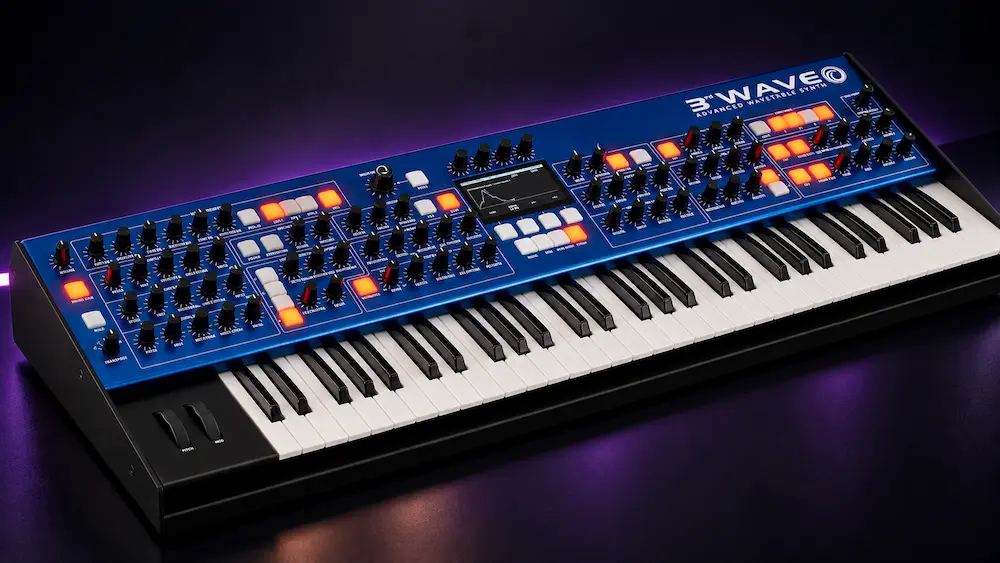
Groove Synthesis 3rd Wave Terminal Review: Wavetable Editing, Multisamples, and Patch Management
Groove Synthesis 3rd Wave Terminal moves patch editing, preset management, wavetable creation, and multisample preparation from the synthesizer’s hardware interface to a desktop application. For users building complex sounds or maintaining large program libraries, the main benefit is direct access to more parameters and a clearer way to manage sound assets without changing the 3rd Wave’s synthesis engine.
Terminal is an editing and library-management tool, not a standalone synthesizer or an audio-processing plugin. It does not add a new sound engine or improve the hardware’s signal path. Its value lies in making existing capabilities easier to access—particularly when a patch involves multiple modulation sources, custom wavetables, or layered sample material.
The practical difference depends on how the instrument is used. Producers who regularly design patches, composers managing project-specific banks, and sound designers building custom oscillator sources have the most to gain. Musicians who mainly use factory presets may find the expanded interface useful, but are less likely to see a substantial change in their workflow. Terminal is free to registered owners of compatible 3rd Wave instruments, making the time saved—not the software price—the relevant measure of its value.
Why Hardware Synthesizer Editing Can Slow Down Sound Design
 A deep hardware synthesizer can expose hundreds of parameters across oscillators, envelopes, LFOs, effects, and modulation routings. Even with a well-designed control panel, editing a complex patch often means moving between screens to inspect settings that need to be evaluated together. The bottleneck is not synthesis itself; it is the time spent navigating the instrument while trying to make informed sound-design decisions.
That friction compounds when a project relies on a large collection of custom programs. A composer may need variations of the same texture across several cues, while an electronic producer may maintain multiple versions of a bass or lead for different sections of an arrangement. Revisiting an older patch can be particularly inefficient if its modulation assignments and parameter relationships are difficult to inspect at a glance.
The main advantage of Terminal is not simply seeing more controls on a larger screen. It brings several distinct tasks into one desktop workflow: inspecting modulation relationships, preparing custom oscillator material, mapping multisamples, and organizing programs before transferring them to the instrument. The strongest case for using it is a workflow that regularly crosses those boundaries.
What 3rd Wave Terminal Adds to the Hardware Workflow
3rd Wave Terminal brings program and bank management, detailed patch editing, wavetable construction, and multisample preparation into a desktop interface. It also includes a piano-roll editor for working with the 3rd Wave’s internal pattern sequencer. These tools extend the instrument’s editing and organization capabilities without introducing a separate sound engine.
3rd Wave Terminal is a dedicated editor for the Groove Synthesis 3rd Wave family, not a universal hardware-synthesizer editor. It runs on macOS and Windows and requires a 3rd Wave 24K, 24M, or 8M running OS 2.0d or later and connected over USB. Owners must create a Groove Synthesis account and register their instrument to access the download through the Support page’s Software Tools section.
For existing owners, the benefit is a more visual environment for editing programs and preparing sound resources. For producers without a compatible instrument, Terminal is not a standalone software synthesizer and offers no independent way to generate the 3rd Wave’s sounds.
Hear How Your Synth-Driven Mix Translates Beyond the Studio
Detailed wavetable design, layered multisamples, and complex modulation can create distinctive sounds, but their role in a finished production depends on how clearly each element sits in the overall mix. A professional mastering perspective can help assess tonal balance, low-end definition, dynamics, and stereo translation without assuming that any single processing approach will suit every track. Submit up to 40 seconds of your mix for a free mastering demo and hear how your current mix translates through a mastering evaluation. Request Your Free Mastering Demo →
Patch Management: The Most Immediate Workflow Improvement
The librarian displays hardware programs alongside local sound banks, allowing users to organize collections, manage local copies of factory presets, and move programs between locations with drag and drop. Banks can also be prepared offline and transferred to the synthesizer later.
This becomes increasingly useful as a patch library grows. Factory sounds, personal variations, session-specific programs, and experimental patches can quickly become difficult to navigate. A desktop librarian makes it easier to review a collection and organize sounds around a project rather than the order in which they were created.
Program previewing adds another practical advantage: users can audition a candidate before committing it to a hardware location. Preparing banks offline also helps when patch selection happens during composition or when the synthesizer is shared across sessions.
These functions improve access and organization, not the sound of the presets themselves. They also cannot replace consistent naming, version control, or reliable backups. Those responsibilities remain part of an effective studio workflow.
For musicians with a small collection of frequently used programs, the improvement may be limited. For composers and sound designers managing hundreds of patches, a dedicated librarian can make everyday sound selection and library maintenance more efficient.
Expanded Patch Editing and Modulation Visibility
The program editor brings key synthesizer controls into an expandable desktop interface, covering oscillator settings, LFOs, envelopes, wave envelopes, and effects. Instead of navigating between hardware screens, users can inspect and adjust relevant parameters directly from the computer.
This is particularly useful when a patch depends on several interacting modulation sources. By making more settings visible at once, Terminal reduces the need to interrupt listening and sound design to locate individual controls. The benefit is a more direct editing process, especially when refining complex patches through repeated adjustments.
Terminal provides three ways to inspect and manage modulation: a table listing sources, destinations, and amounts; a matrix view; and a graphical patching interface with virtual cables. Each offers a different perspective on the same routing structure.
The table helps when checking specific assignments, while the matrix makes multiple source-to-destination relationships easier to scan. The cable-based view offers a more visual way to follow complex routing. Together, these representations can make a patch easier to inspect and revise, although their usefulness depends on the user’s preferred workflow.
These views do not add a new modulation engine or change the synthesizer’s underlying architecture. They provide alternative ways to access and manage its existing capabilities.
Expandable effect panels follow the same principle. They make parameters easier to reach and compare, including controls for effects such as Shimmer Reverb. For users who frequently revise detailed patches, reducing navigation between settings can make the editing process more efficient.
Wavetable Editing: From Audio Material to a Custom Oscillator Source
The wavetable editor connects external audio material with the 3rd Wave’s synthesis workflow. Users can import supported files, select source material, and build a wavetable using pitch detection or fixed-length slicing. Supported formats include WAV, AIFF, MP3, and MP4, along with other common audio types.
One practical advantage is being able to prepare a wavetable from common audio files on the computer rather than treating the hardware’s own import requirements as the starting point. The source still needs to suit the intended result: pitch detection and fixed-length slicing divide audio differently, so sustained harmonic material and transient-heavy recordings may produce very different frame sequences. Inspect and audition the resulting table before building a patch around it.
Editing tools include waveform drawing, interpolation, frame crossfading, smoothing, combining material with static waveforms, and normalization. These functions provide control over the wavetable’s structure and the transitions between its frames, rather than limiting the process to automatic conversion.
Frame-to-frame consistency is a key consideration in wavetable design. Abrupt changes or poorly matched frames can create unexpected timbral shifts or audible discontinuities as the table is scanned. Smoothing and crossfading can help in some cases, but neither guarantees a clean result. Finished tables should be auditioned across the intended pitch range and modulation depth.
Wavetables may also have uses beyond generating an oscillator’s audible timbre. Where supported by the instrument’s modulation architecture, a table can contribute evolving control movement to a patch. The practical possibilities depend on how the 3rd Wave allows wavetable data to be routed and used.
Terminal does not introduce a new synthesis method. Its contribution is a more accessible environment for creating, shaping, and refining wavetable material before using it in a patch.
Multisample Construction and Keyboard Mapping
The multisample editor combines sample-library management with a visual keyboard-mapping workspace. It supports audio formats including WAV, MP3, M4A, AAC, and MP4, as well as the instrument’s binary multisample files. Users can map up to eight samples across the keyboard and adjust start and end points, loop settings, crossfades, root notes, key ranges, volume, and trimming.
This workflow makes it possible to turn a set of recordings into a playable multisample source. For example, a sound designer could record several notes from a prepared piano or a metallic percussion instrument, assign root notes and keyboard zones, and use the resulting structure within a larger 3rd Wave patch.
The visual mapping interface helps users inspect how samples are distributed across the keyboard and organize source material before transferring the multisample to the synthesizer. This is particularly useful when building custom sounds from recordings rather than relying exclusively on factory content.
The eight-sample limit defines the feature’s scope. It is suited to relatively compact multisample designs, not as a substitute for a dedicated sampler or an extensive orchestral library with large numbers of velocity layers and sample zones. Results also depend on source quality, tuning, loop-point selection, and how smoothly adjacent keyboard regions transition.
Support for compressed formats such as MP3 is primarily a compatibility convenience, not a sound-quality benefit. Lossy encoding may introduce artifacts, so WAV or another suitable high-quality source is preferable when available. For professional sample construction, the recording and editing decisions matter more than the number of formats the application can import.
How Terminal Fits Into a DAW-Based Production Workflow
 3rd Wave Terminal is a desktop companion to a DAW, not an instrument or plugin that runs inside one. Its role is to prepare, edit, and organize sounds before they are recorded or incorporated into a production session.
For an electronic producer, that might mean creating a custom wavetable, refining modulation, and saving several variations of a bass patch before recording the hardware into a track. Terminal handles the preparation and editing stage; arrangement, audio recording, and mixing remain in the DAW.
A film composer may place more emphasis on patch organization and repeatability. Preparing multisamples, maintaining cue-specific sound banks, and retrieving established programs can help keep a large project organized as its musical requirements evolve.
In both cases, Terminal can reduce friction during sound design, but it does not replace the rest of the recording workflow. MIDI configuration, audio routing, gain staging, session organization, and reliable patch recall still need to be managed within the studio setup.
Terminal should not be evaluated as a DAW plugin or audio-processing tool. There is no established basis for claiming that it reduces plugin CPU usage, accelerates DAW rendering, or changes audio latency. Its contribution is to the editing and management of sounds for compatible 3rd Wave hardware.
Limitations, Compatibility, and Early Reliability
Terminal’s main limitation is its dependence on compatible hardware. It is designed for the Groove Synthesis 3rd Wave family, not as a universal editor for hardware synthesizers. Before installation, owners should check the manufacturer’s current compatibility and firmware requirements for their specific model.
Its reliability across different studio setups is also difficult to assess from limited early feedback. Some initial user reports described macOS interface or file-navigation problems, but this evidence is insufficient to establish either widespread instability or consistent performance across systems. It is therefore too early to treat the application as equally well tested in every professional environment.
Before using Terminal in a critical session, test its main functions on the intended computer and synthesizer. Back up valuable programs and user data before firmware updates or large-scale library transfers. After transferring edits, check the relevant programs on the hardware and confirm that the intended changes have been retained.
These precautions are standard practice when introducing a new tool into a production workflow. Terminal’s expanded editing interface should not, by itself, be taken as evidence of improved audio performance or faster processing.
3rd Wave Terminal vs. Editing on the Hardware
3rd Wave Terminal and the synthesizer’s built-in interface serve the same instrument but support different editing workflows. The hardware provides direct, hands-on control, while Terminal offers a desktop environment for inspecting parameters, organizing programs, and preparing custom sound resources. The main trade-off is between working directly at the instrument and using a larger interface for tasks that benefit from a broader view.
| Workflow | Primary advantage | Main limitation |
|---|---|---|
| Editing on the 3rd Wave hardware | Direct, hands-on control without a separate computer interface | Some editing and library tasks require navigating the instrument’s own interface |
| Editing with 3rd Wave Terminal | Expanded parameter views, patch-library management, and desktop-based wavetable, multisample, and sequencer editing | Requires compatible 3rd Wave hardware, supported firmware, a computer, and a USB connection |
Terminal is most useful when a task involves several related editing steps, such as refining modulation, preparing a wavetable, and organizing the resulting patch in a program bank. For immediate parameter changes while playing, the hardware interface remains a practical option. The two approaches are complementary rather than competing: Terminal expands access to the instrument’s editing and library functions without replacing hands-on control.
Is 3rd Wave Terminal Worth Installing?
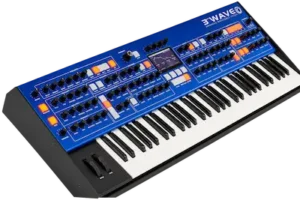 For 3rd Wave owners who regularly design complex patches, maintain large program libraries, or create custom wavetables and multisamples, Terminal is a practical addition to the workflow. Its value comes from making existing sound-design and library-management tasks easier to access and control.
The benefit is less significant for musicians who mainly load presets and make occasional adjustments. They may find the desktop interface convenient, but the time saved is likely to be smaller. Mixing and mastering engineers who do not use a compatible 3rd Wave have little direct reason to install it.
Terminal should be evaluated as a workflow tool, not as an upgrade to the synthesizer’s sound engine. It does not replace the hardware or independently improve audio fidelity. Its purpose is to make patch editing, sound-resource preparation, and program organization more direct.
For eligible registered owners, installing Terminal is worth considering if the 3rd Wave is an active part of their sound-design process. Check compatibility, test the application on the intended system, and back up important programs before making substantial library changes. The strongest case for Terminal is a more efficient editing workflow—not a measurable improvement in mixing or mastering performance.
Overall Rating
| Category | Assessment |
|---|---|
| Patch Editing & Modulation Views | Strong feature set |
| Wavetable Construction | Extensive editing options |
| Multisample Editing | Useful for compact designs; limited to eight samples |
| Program Library Management | Practical for larger libraries |
| Compatibility | Restricted to supported 3rd Wave hardware and firmware |
| Overall Assessment | Useful specialist companion app |
This assessment is based on the documented feature set and workflow implications, not on independent hands-on testing or measured performance.
Your Synth Sounds Are Only Part of the Final Mix
Precise wavetable design, carefully shaped modulation, and custom multisamples give you more control over the source, but they do not determine on their own how the finished track will translate. A sound that feels detailed and wide in isolation may interact differently with the bass, transients, and other elements of a full arrangement. Before adding more processing or making further mix changes, compare your current mix with a mastering demo prepared by a real mastering engineer. Upload up to 40 seconds and hear an actual before-and-after comparison to help you evaluate tonal balance, punch, dynamics, and stereo presentation in context. The result will depend on the source material; the purpose is to give you a concrete reference, not a guaranteed fix. Upload Your Mix for a Free Mastering Demo →
Frequently Asked Questions
Does Groove Synthesis 3rd Wave Terminal work without a 3rd Wave synthesizer?
No. Terminal is a companion application for compatible 3rd Wave hardware, not a standalone software synthesizer.
Which 3rd Wave models are compatible with Terminal?
Compatibility includes the 3rd Wave 24K, 24M, and 8M, subject to the manufacturer’s firmware requirements. Check the latest compatibility information before installing.
Can Terminal run as a VST or AU plugin in a DAW?
No. Terminal is a separate desktop application, not a VST or AU instrument. Its editing and library-management functions operate outside the DAW’s plugin environment.
Does Terminal improve the 3rd Wave’s audio quality?
Not directly. It provides tools for editing patches and preparing sound resources, but it does not independently change the synthesizer’s audio engine or signal path.
Can Terminal create wavetables from MP3 files?
Yes. MP3 is among the supported audio formats. For critical sound design, use the highest-quality source available and audition the resulting wavetable for unwanted transitions or artifacts.
Can Terminal replace a dedicated sampler?
Not for every task. Its multisample editor supports up to eight mapped samples for use with the 3rd Wave. Extensive sample libraries, complex velocity layers, and advanced sampler-instrument design may require dedicated software.
Is Groove Synthesis 3rd Wave Terminal free?
It is available at no additional charge to registered owners of compatible 3rd Wave hardware. Check the manufacturer’s current documentation for firmware and installation requirements.

Yurii Ariefiev writes about synthesizers and audio production from an engineering perspective, with attention to oscillator behavior, modulation architecture, and the practical decisions behind creating reliable, repeatable patches. His approach to evaluating tools such as Groove Synthesis 3rd Wave Terminal focuses on how clearly their editing environments expose synthesis parameters and help users manage complex programs without confusing interface convenience with changes to the instrument’s underlying sound engine.
Enjoyed this review?
If you found it useful, you can support independent audio research with a coffee.
☕ Buy me a coffee