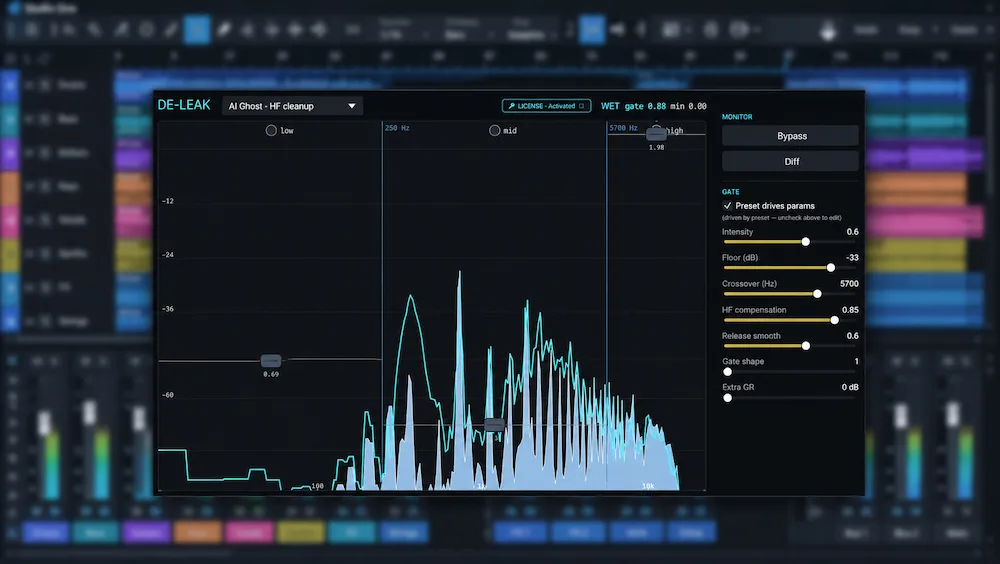
AI source separation can extract vocals, drums, bass, and other elements from a finished mix, but it rarely produces the equivalent of original multitrack recordings. Residual bleed can leave cymbal transients in a vocal stem, guitar harmonics in a drum stem, or fragments of one instrument embedded in another. Intrect de-leak-rt is designed to reduce this cross-source contamination after separation.
The plugin uses machine learning to suppress unwanted material in real time. Its focus is narrower than general-purpose audio restoration: it targets bleed in already-separated stems, particularly those generated by Demucs and similar workflows. For producers working with extracted material, the potential benefit is more controlled editing and processing when residual instruments interfere with the intended source. Conventional gates and expanders are less selective when wanted and unwanted sounds overlap.
The available evidence calls for a measured assessment. The manufacturer documents the processing approach and reports a classification score on the MUSDB18-HQ dataset, but the research reviewed for this article did not establish independent, controlled comparisons of audio quality across different musical material. The evaluation below therefore distinguishes documented features from manufacturer-reported results and considers the plugin’s practical role, limitations, and alternatives without implying firsthand testing.
What Intrect de-leak-rt Is Designed to Do
 Intrect de-leak-rt is designed to reduce residual bleed in audio stems produced by source-separation software. These algorithms estimate individual sources from a mixed recording, but the resulting stems rarely have the isolation of tracks captured separately during recording. Some energy from one instrument may remain in another stem, especially when sources overlap in frequency, timing, or sustained harmonic content.
A separated vocal, for instance, may retain hi-hat transients or guitar harmonics; a bass stem may contain kick-drum energy; and a guitar stem may carry traces of cymbals or vocals. Such remnants can become more conspicuous when a stem is soloed, processed on its own, or pushed forward in a remix.
De-leak-rt operates after source separation rather than extracting stems from the full mix. Its purpose is to suppress this residual cross-source contamination—not to repair every artifact introduced during separation or restore audio information that the separation process has lost.
How the Machine-Learning Processing Works
According to the manufacturer’s documentation, de-leak-rt uses a compact machine-learning model to identify and suppress unwanted content in separated stems. The model is described as a multilayer perceptron with approximately 95,000 parameters, and its ONNX file is approximately 370 KB. These figures indicate a small model footprint, but they do not, by themselves, establish processing transparency, CPU demand, or performance across different sessions and source material.
The manufacturer reports an F1 score of 0.993 on the MUSDB18-HQ dataset. F1 combines precision and recall into a single classification metric for the evaluated task. It is not a measure of perceived audio quality: the score does not mean a 99.3% improvement, guarantee artifact-free processing, or establish equivalent results on arbitrary commercial recordings.
The distinction is important because classification performance and sonic transparency are separate criteria. Even when a model performs well on its evaluation dataset, processing can still affect wanted transients, sustained notes, harmonics, or ambience in actual production material. The reported score provides technical context, but independent listening tests across different genres, stem types, and separation methods would be needed to establish how consistently those trade-offs are managed.
The documented controls include independent band adjustment, seven factory presets, and a Difference monitoring option. These provide ways to tailor the processing and examine the material being suppressed. Difference monitoring can help identify what changes between the input and processed signal, but it does not by itself prove that the removed content is unwanted. The result still needs to be judged against the original stem and the role that stem must play in the mix.
Choosing a Starting Preset
The seven factory presets provide different starting points for specific stem-cleanup tasks. According to the manufacturer’s documentation, Default (Universal) is a conservative first option when the source type is uncertain. Vocal is intended for raw vocal stems from Suno and Udio, while Instrument is designed for transient-heavy material such as drums, bass, guitar, and synths.
AI Ghost targets high-frequency ghosting in Suno Other and Percussion stems, whereas AI Heavy is intended for more severe codec-related residue in AI vocals. Master applies a more conservative approach to full mixes, and Aggressive is intended primarily for auditioning the removed material rather than routine processing. These are manufacturer-described use cases, not independent evidence that a preset will produce transparent results on every source.
Start with the preset closest to the material, then compare the processed stem with the original. Pay particular attention to consonants, cymbal detail, transient attacks, and reverb tails before increasing suppression.
Bring Greater Clarity and Balance to Your Final Mix
Cleaning AI-separated stems is only one part of preparing a track for release. The final mastering stage requires careful attention to tonal balance, transient definition, dynamics, stereo image, and translation across playback systems. If your mix is ready for an independent assessment, submit up to 40 seconds of audio for a free mastering demo and hear how your material translates through a dedicated mastering workflow.
Request Your Free Mastering Demo →
Where De-Leak Processing Can Help
De-leak processing is most useful when residual bleed limits what you can do with a separated stem. If the stem already works in the intended arrangement, additional suppression may offer little benefit and can introduce unwanted changes. The decision should be based on whether the bleed interferes with editing, processing, or the role of the stem in the mix.
- Vocal stems: Instrumental remnants can complicate vocal editing, level automation, and remixing. Suppression must preserve consonants, breaths, reverb tails, and other low-level details that contribute to the vocal’s natural character.
- Drum stems: Reducing traces of guitars, keyboards, or vocals may help when drums need to be processed independently. Cymbal transients and room ambience, however, can overlap with the material being removed, making aggressive cleanup risky.
- Bass stems: Residual kick drum or other low-frequency content can interfere with independent bass processing. Check that suppression does not weaken note attacks, sustain, or the low-frequency body of the part.
- Guitar, piano, and keyboard stems: Bleed can limit how aggressively these sources can be edited or processed in isolation. Dense harmonics and overlapping notes may also make it harder to suppress unwanted material without affecting the instrument itself.
- Remixing and archival work: Stem cleanup may make older stereo recordings or other material without original multitracks easier to adapt for alternate arrangements and mixes. The result still depends on the quality of the initial separation.
These are potential applications, not evidence that de-leak-rt consistently improves every type of stem. The outcome will depend on the separation method, source recording, character and level of the bleed, and processing settings. Evaluate the result in the context of the intended mix, where changes to transients, ambience, and tonal balance are easier to judge than in isolation alone.
A Practical Stem-Cleanup Checklist
- Choose a representative passage. Include a section where the unwanted instrument is clearly audible and a quieter passage where tails or low-level details are exposed.
- Preserve the original stem. Process a duplicate so the cleanup can be bypassed or revised without losing the source.
- Begin conservatively. Choose a suitable preset and adjust the relevant frequency bands only as needed.
- Audition the Difference signal. Check whether the removed material is mainly unwanted bleed or whether it also contains wanted consonants, attacks, sustain, or ambience.
- Compare at matched playback levels. Listen in solo and in the full arrangement, paying attention to phrase endings, transients, and tonal balance.
- Keep the cleanup only if it helps. If suppression removes important musical detail or changes the stem more than necessary, reduce the processing or return to the original.
What Intrect de-leak-rt Cannot Fix
 De-leak-rt is a stem-cleanup tool, not a general repair system for artifacts created by AI source separation. For a broader look at fixing AI-generated music, it is important to distinguish problems that can be corrected in post-production from damage that may require a new generation or separation. Suppressing unwanted bleed cannot restore audio that the separation model has removed, reconstruct missing detail, or reliably correct distortion already embedded in a stem.
Metallic artifacts, smeared transients, missing vocal consonants, and unstable reverb may require a different separation model, a new extraction with adjusted settings, targeted manual editing, or a dedicated artifact-removal approach such as the one examined in our Intrect de-artifact review. The same applies to softened drum attacks or guitar parts with damaged sustain. Bleed reduction addresses unwanted source content; it does not necessarily correct these separate defects.
Selective suppression also involves a trade-off: wanted and unwanted sources can overlap in both frequency and time. Removing a residual guitar harmonic, for example, may also weaken a vocal or instrument occupying the same spectral region. More aggressive settings may reduce the audible bleed but increase the risk of tonal thinning, transient loss, or other changes to the target stem.
Reverb tails and room reflections are particularly difficult to separate cleanly because they can contain energy from several sources. Suppressing those remnants may alter the perceived ambience or decay of the wanted instrument. Evaluate the result during quiet passages, sustained notes, fades, and transitions as well as in louder sections, where masking can conceal processing artifacts.
The practical approach is to treat de-leak-rt as an optional corrective stage, not an automatic improvement. Compare processed and unprocessed stems at matched playback levels, check whether the wanted source retains its natural character, and bypass the processing if the reduction in bleed comes at the expense of more important musical detail.
Compatibility, Latency, and Workflow
The documented version is 0.1.11. According to the manufacturer’s manual, de-leak-rt supports 64-bit VST3 and CLAP on Windows 10 or later and macOS 11 or later. The manual was last updated on October 10, 2026.
The manufacturer specifies approximately 93 ms of latency at a 44.1 kHz sample rate. That figure makes the plugin better suited to offline stem cleanup than latency-sensitive monitoring or live performance. In a mixing session, check how your DAW reports and compensates for the plugin’s latency, particularly when comparing processed stems with other tracks or routing parallel signals.
The available documentation does not list a native Audio Unit (AU) version. Users working in Logic Pro or GarageBand should therefore verify compatibility before purchasing rather than assume the plugin can load directly in those applications.
For a controlled workflow, preserve the original separated stem and process a duplicate. Compare both versions in the full arrangement, paying attention to transient definition, ambience, and tonal balance. Keeping the unprocessed file makes it easy to adjust or discard the cleanup if suppression removes wanted musical detail.
Alternatives to Intrect de-leak-rt
The right alternative depends on where the unwanted material comes from. Bleed left inside an AI-separated stem is different from microphone spill captured during a drum recording, and neither is the same as metallic or watery artifacts created by source separation. A tool designed for one problem should not automatically be treated as a substitute for a tool designed for another. Before choosing an alternative, identify the defect you need to reduce and verify that the product is intended for that type of material.
- Re-run source separation: When a stem contains substantial bleed or severe separation artifacts, try a different model or extraction approach before adding another processing stage. This addresses the source of the problem, although a new separation is not guaranteed to produce a better result.
- Manual editing: Clip edits, fades, spectral editing with a dedicated audio-repair application, and automation work well when unwanted material is limited to identifiable passages. This approach offers precise control but becomes time-consuming when bleed persists throughout the stem.
- Conventional gates and expanders: These processors can attenuate unwanted material during pauses or between hits. They are less effective when bleed overlaps with wanted content, and aggressive settings can truncate natural decays or alter the envelope of the target sound.
- iZotope RX De-bleed: RX offers de-bleed processing within a broader audio-restoration workflow. It may be worth considering for users who already work in RX or need additional restoration tools. The available evidence does not establish direct performance equivalence between RX De-bleed and de-leak-rt on AI-separated stems.
- Acon Digital DeBleed:Drums: This tool is specifically oriented toward drum-bleed cleanup. It may be relevant to drum-related tasks, but its narrower stated focus means it should not automatically be treated as a direct substitute for de-leak-rt across different types of AI-separated stems.
Choose the least complex method that solves the actual problem. Re-separation is worth trying when the extracted source is fundamentally compromised; manual editing is often more practical for isolated instances of bleed; and gates or expanders can work when unwanted content occurs between wanted events. A dedicated de-bleed processor is most useful when it reduces persistent contamination while preserving the transients, tone, and ambience needed from the target stem.
Pricing and Purchase Considerations
The manufacturer’s comparison article dated October 20, 2026, lists de-leak-rt at $99 as a one-time purchase and specifies a 14-day trial. An introductory price of $79 ended on September 30, 2026, so it should not be treated as the standard price. Confirm the current price and trial terms before purchasing.
At $99, the value proposition depends on how often residual bleed complicates stem-based work. Producers who regularly prepare AI-separated material for remixes, editing, or further processing may benefit if the plugin reduces the need for time-consuming manual cleanup. For occasional stem extraction, existing editing tools or an alternative separation method may be sufficient.
Use the trial to evaluate representative material rather than relying on the manufacturer’s classification score alone. Test different stem types and both dense and sparse passages. Listen for changes to transients, tonal balance, sustain, and ambience, and compare the processed and original stems at matched playback levels. The relevant question is whether the cleanup improves the stem’s usefulness in the intended mix—not simply whether it sounds cleaner in solo.
Overall Rating
| Category | Rating |
|---|---|
| Bleed Suppression Focus | 8.5/10 |
| Frequency-Band Control | 8.0/10 |
| Suppression Monitoring | 8.0/10 |
| Processing Transparency Evidence | 5.5/10 |
| DAW Compatibility | 6.5/10 |
| Latency Suitability | 5.5/10 |
| Overall | 7.0/10 |
The plugin’s narrow focus on residual bleed makes it relevant to cleaning AI-separated stems, where conventional gates may struggle with overlapping sources. Its independent band controls provide useful adjustment options, although their effectiveness on different material has not been independently established.
Difference monitoring offers a practical way to inspect changes caused by suppression, but it cannot establish whether the removed material is unwanted without careful listening. The documented controls support informed evaluation, while the absence of independent, controlled audio-quality comparisons limits confidence in the plugin’s real-world transparency.
Support for VST3 and CLAP covers established plugin formats, but the lack of a documented native Audio Unit version may complicate use in some DAWs. The specified latency of approximately 93 ms at 44.1 kHz also makes the plugin less suitable for latency-sensitive monitoring than for offline stem cleanup.
The compact model and reported F1 score provide technical context rather than proof of sonic quality. The rating therefore reflects the documented feature set and workflow suitability, not firsthand testing or verified listening results.
Intrect de-leak-rt is best considered by producers who regularly work with AI-separated stems and need a dedicated option for persistent cross-source contamination. Its practical value will depend on whether it reduces unwanted bleed while preserving transients, sustain, and ambience in the user’s own material.
Verdict: A Specialized Tool for AI Stem Cleanup
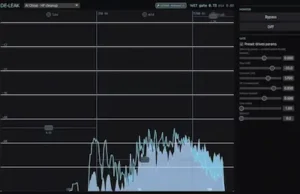 Intrect de-leak-rt targets a specific weakness of AI source separation: residual bleed between extracted stems. Its documented features—including real-time processing, independent band controls, factory presets, and Difference monitoring—are relevant to that task. The compact model and manufacturer-reported MUSDB18-HQ F1 score describe aspects of its implementation, but neither establishes how transparently it will process real-world material.
The key uncertainty is practical audio quality. An F1 score measures classification performance, not sonic transparency, and the available research did not establish controlled, independent comparisons across representative musical sources. A purchase decision should therefore rest on trial results with the user’s own material, not on the benchmark alone.
De-leak-rt is worth evaluating if AI-separated stems are a regular part of your workflow and persistent bleed creates additional editing work. It is harder to justify when stems already meet the project’s needs, when the main problem is damage caused by separation rather than residual bleed, or when the workflow requires a native Audio Unit plugin. In those cases, trying a different separation method, editing the affected passages manually, or using a broader restoration tool may be more appropriate.
Hear What Your Mix Needs Beyond Stem Cleanup
Reducing unwanted bleed does not automatically resolve tonal imbalance, compromised transients, or problems with dynamics and stereo translation. Before adding another processing stage, find out how your mix holds together as a complete track. Upload up to 40 seconds and receive a free mastering demo prepared by a real mastering engineer, with an actual before-and-after comparison to help you evaluate the changes and decide what your mix needs next.
Submit Your Mix for a Free Engineer-Prepared Mastering Demo →
Frequently Asked Questions
Does Intrect de-leak-rt separate vocals, drums, and bass from a full mix?
No. It is designed to reduce residual bleed in stems that have already been separated. You still need a source-separation tool to extract individual elements from a mixed recording.
Can de-leak-rt remove all unwanted sound from a separated stem?
No such result is guaranteed. Performance depends on the source material and how much the wanted and unwanted sounds overlap. The plugin also cannot be assumed to restore audio information lost or damaged during source separation.
What does the reported F1 score of 0.993 mean?
The manufacturer reports this score on the MUSDB18-HQ dataset. F1 combines precision and recall into a classification metric; it does not represent a 99.3% improvement in audio quality or guarantee transparent processing on commercial recordings.
Does de-leak-rt work in Logic Pro or GarageBand?
The available documentation lists VST3 and CLAP formats but does not list a native Audio Unit (AU) version. If you use Logic Pro or GarageBand, verify compatibility before purchasing rather than assuming direct plugin support.
Is de-leak-rt suitable for live performance?
The manufacturer specifies approximately 93 ms of latency at 44.1 kHz. That makes the plugin better suited to offline stem cleanup than latency-sensitive monitoring. Check the latency behavior in your DAW before using it in a real-time signal path.
How does de-leak-rt compare with iZotope RX De-bleed and Acon Digital DeBleed:Drums?
The available research does not establish a controlled, like-for-like performance winner. The tools serve different workflows, so evaluate them against the stem types and cleanup problems you actually encounter rather than assuming equivalent results.
How much does Intrect de-leak-rt cost?
The manufacturer’s comparison article dated October 20, 2026, lists a $99 one-time purchase price and a 14-day trial. The earlier $79 introductory offer ended on September 30, 2026. Verify the current price and trial terms before purchasing.
Should I apply de-bleed processing to every AI-separated stem?
No. If a stem already works in the mix, additional processing may do more harm than good. Use suppression when residual bleed interferes with the intended result, and compare the processed stem with the original at matched playback levels.
Where can I find the plugin’s current specifications and compatibility requirements?
Check the manufacturer’s product documentation and manual for the latest supported formats, operating systems, controls, and installation requirements.

Yurii Ariefiev approaches AI stem cleanup from an audio-engineering perspective, where reducing unwanted bleed matters only if the target source retains its musical integrity. Evaluating this type of processing requires attention to transient preservation, spectral overlap, phase relationships, and low-level ambience. Classification metrics can describe a model’s technical performance, but careful listening in the full arrangement remains essential when judging whether suppression improves a stem without compromising its intended role.
Enjoyed this review?
If you found it useful, you can support independent audio research with a coffee.
☕ Buy me a coffee