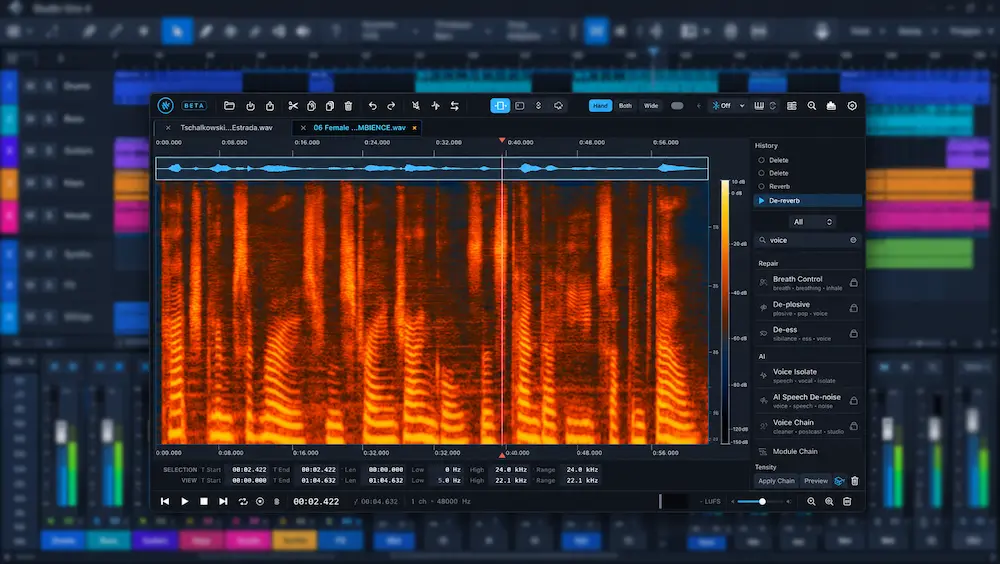
Audio restoration can determine how much of a recording remains usable in a finished production. Room noise behind a vocal, clipping on a transient, an unwanted sound embedded in an orchestral passage, or a vocal that needs to be extracted from a stereo mix can all require corrective work before mixing or mastering can proceed. FluffyAudio FFT brings spectral editing, audio restoration, source separation, and voice-processing tools into a single standalone application.
Its value depends less on the number of available tools than on the quality of the repairs they produce. Spectral processing can remove unwanted material, but it can also smear transients, leave tonal residue, or introduce artifacts that become more obvious after compression and limiting. For a working engineer, the real test is whether FFT can solve these problems cleanly and efficiently enough to justify adding another application to the production workflow.
FFT combines conventional audio-processing tools with machine-learning-assisted features for stem separation, speech enhancement, pitch and transcript editing, and harmony generation. Processing runs locally, and supported machine-learning models can work offline after installation. The result is a broad restoration and editing environment aimed at producers, mixing engineers, and mastering engineers who need more control over difficult source material.
Review scope: This assessment examines FFT’s documented capabilities, editing approach, compatibility, and practical fit alongside established restoration tools. Product descriptions and developer-supplied demonstrations are not treated as independent proof of sound quality. Claims about repair transparency, comparative performance, and processing reliability require direct evaluation on representative audio material.
How FluffyAudio FFT Handles Spectral Repair
 FFT’s spectral workflow combines a waveform and spectrogram with box, frequency-band, and lasso selections. A selected region can be attenuated, replaced using surrounding audio, or processed with a repair method intended to reconstruct the damaged passage. Preview, A/B comparison, and undo provide ways to evaluate an edit before accepting it.
These controls define the editing approach, not the quality of the result. A localized cough or click is a different repair problem from noise overlapping a sustained vocal or instrument. The key question is whether FFT can reduce the unwanted sound while preserving the wanted transient, harmonic detail, and ambience. That requires listening to the processed audio; the precision of a selection alone does not establish transparency.
FluffyAudio FFT: Core Tools for Audio Repair and Production
Spectral Repair for Localized Recording Problems
Spectral editing is most useful when a defect occupies a specific time-frequency region rather than affecting the entire recording. Clicks, isolated impacts, squeaks, and other unwanted sounds can often be targeted without applying corrective processing to the surrounding performance.
Consider a vocal take with a chair squeak between phrases. A gate may suppress noise during the pause, but it will not help if the squeak overlaps the vocal. EQ is similarly limited when the unwanted sound shares frequencies with the singer. Spectral editing lets the engineer isolate the event more precisely and reduce its contribution while preserving as much of the wanted signal as possible.
The same approach applies to acoustic instruments, orchestral recordings, dialogue, and archival audio. Its effectiveness depends on how clearly the defect can be separated from the source. When both occupy the same time-frequency region, removing one without damaging the other becomes substantially harder.
Spectral repair does not guarantee transparent reconstruction. Depending on the tool and the extent of the damage, the software may interpolate, suppress, or estimate information that cannot be cleanly separated from the unwanted sound. The result can lose transient definition or develop tonal residue, particularly around complex attacks, sustained harmonics, and dense reverberation. A clean-looking spectrogram is not proof of an inaudible repair.
Noise Reduction and Voice Restoration
FFT covers a broad range of corrective tasks, including de-noising, de-humming, de-clicking, de-crackling, de-clipping, de-reverberation, de-essing, and de-plosive processing. Its speech-oriented features extend that toolkit to voice enhancement and reconstruction.
In a vocal mix, restoration can address problems that would otherwise become more obvious after compression, saturation, and level automation. Dialogue editors face a different priority: reducing noise and reverberation without making speech sound processed or detached from its environment. In mastering, localized repair can be preferable to broad tonal or dynamic changes when the defect is confined to a small part of the program.
Every restoration process has trade-offs. Aggressive denoising can produce watery high frequencies or unstable ambience; de-reverberation can strip away the room cues that make a voice sound natural; and de-clipping can estimate missing waveform information without necessarily recovering the original transient. These are general limitations of the techniques, not confirmed defects specific to FFT.
Evaluate the processed audio for more than noise reduction. Listen for changes in consonants, breaths, sibilance, transient shape, room tone, and the transitions between phrases. A lower noise floor is useful only if the wanted signal remains convincing.
Stem Separation and Music Editing
FFT also includes source-separation tools for working with music when the original multitrack session is unavailable. Separating vocals, drums, or other musical elements can support remixing, reference analysis, alternate arrangements, and edits made from an existing stereo mix.
For a producer, an extracted vocal may provide a starting point for a remix. A mixing engineer can use separated elements to examine how a reference track balances its components. A composer may use them to adapt an arrangement or create a temporary stem for a different edit length. In each case, the separated audio is a working source, not a substitute for the original multitrack files.
Machine-learning separation can leave residual bleed, softened transients, phase inconsistencies, and watery or granular artifacts. Cymbals, distorted guitars, layered vocals, and reverberant material are particularly demanding because their energy overlaps across both time and frequency. When the problem is specifically residue in AI-generated audio or separated stems, a specialist tool such as Intrect de-artifact addresses a narrower restoration task than a general-purpose spectral editor.
Audition each stem on its own, then listen to the complete set together. Solo playback can reveal artifacts, but recombination is the more important test when the stems will be used in a mix. If the reconstructed balance sounds hollow, unstable, or noticeably different from the original, the separation may not be suitable for the intended job.
Pitch Editing, Transcription, and Creative Reconstruction
FFT extends beyond repair with tools for pitch and note editing, transcription-related tasks, harmony generation, and audio reconstruction. These functions are aimed at reshaping or interpreting existing material, making the application relevant to production and sound design as well as restoration.
Potential uses include preparing alternate musical parts, exploring harmony options, and extracting information from recordings that were not delivered as editable sessions. Their practical value depends on how much manual correction the output requires and whether it retains the timing, articulation, and character of the source.
Generated or reconstructed audio should not be treated as recovered original information. An algorithm can produce a plausible note, phrase, or harmony without reproducing what the performer actually played or sang. For creative work, that may be acceptable; for archival restoration, critical editing, or phase-sensitive production, the distinction is fundamental.
Preserve the Detail That Makes Your Mix Work
Spectral repair and audio restoration can address specific recording problems, but the final mix still needs to retain its musical balance, transient definition, stereo image, and dynamic detail. Professional mastering provides a broader perspective on how those elements work together in the finished track. Submit up to 40 seconds of your mix for a free mastering demo and hear how your material translates through a dedicated mastering process.
Request Your Free Mastering Demo →
FluffyAudio FFT Workflow: When a Standalone Editor Saves Time
 FFT’s main workflow advantage is the range of operations available in one standalone editor. Spectral repair, voice cleanup, source separation, and musical editing can be handled without opening a separate application for every task. For engineers who regularly move between these types of work, consolidation can simplify file management and reduce repetitive setup.
The benefit is most apparent in repeatable jobs. When processing a batch of dialogue recordings, for example, saved processing chains and batch operations can reduce manual setup across multiple files. They do not eliminate the need to inspect the results: background noise, room tone, clipping, and speech dynamics can vary enough that one processing chain will not suit every recording equally well.
The same calculation applies to recurring restoration work. Engineers who frequently remove clicks, reduce hum, or repair vocal recordings may gain efficiency by keeping those tools in one environment. If spectral repair is only an occasional requirement, the time saved may be too small to justify adding another application to the workflow.
A standalone editor also creates an extra handoff when the rest of the session lives in a DAW. The engineer must export or transfer the audio, process it, check the result, and return it to the session while preserving timing, channel configuration, and file organization. That is often a reasonable trade-off for detailed offline repair, but it can be less convenient than processing directly within the DAW. The actual advantage depends on the available integration options and the demands of the session.
FFT is best assessed as a dedicated editing environment rather than a replacement for every DAW effect. Its workflow advantage is strongest when a task benefits from detailed file-based editing or batch processing; for quick corrections during a mix, an insert plug-in may be the more direct choice.
Local AI Processing: Privacy, Performance, and Hardware Limits
For studios handling unreleased music, client vocals, or confidential dialogue, local processing can be a practical advantage. FluffyAudio FFT supports locally installed machine-learning models that can run offline after setup, allowing supported processing tasks to be performed without sending audio to a cloud service.
Platform compatibility is more specific than the general macOS and Windows labels suggest. FFT requires an Apple Silicon Mac (M1 or later) running macOS 14 or newer; Intel Macs are not supported. Windows support covers Windows 10 version 1903 or later and Windows 11 in 64-bit form. AI processing speed depends on the selected model, processing task, and available hardware, so demanding operations should be evaluated on the system you intend to use.
Offline processing does not necessarily mean the entire application is independent of an internet connection. Licensing, software updates, and model downloads may still require access. Nor does local execution guarantee better sound quality, lower latency, or faster results. Those depend on the algorithm, the model, the source material, and the computer running the process.
Hardware demands can vary substantially between operations. A simple corrective task and a computationally intensive machine-learning process may behave very differently on the same system. Without comprehensive independent benchmarks across representative hardware, it would be premature to make firm claims about FFT’s CPU load, memory consumption, GPU acceleration, or rendering speed.
The 15-day trial is therefore the most useful way to assess performance before committing. Test representative project files, including the longest recordings and most demanding operations in your workflow. Check processing time, memory use, interface responsiveness, and how well the application handles several consecutive jobs. A workflow that performs adequately on a short vocal sample may be less practical when applied to an entire dialogue session.
Integration is another consideration. FFT is a standalone application, not a conventional channel-strip plug-in. Its plug-in-hosting capabilities support Audio Units on macOS and VST3 on Windows, but this is distinct from loading FFT itself as a standard insert effect in a DAW. Engineers who rely on direct session integration should verify the available workflow on their own system before purchasing.
Using FluffyAudio FFT in Mixing and Mastering Workflows
Mixing: Repair the Source Before Shaping the Sound
For a mixing engineer, FFT is most useful when a recording defect interferes with decisions elsewhere in the mix. A noisy vocal, an isolated click, excessive room sound, or a poor edit can become more distracting once compression, saturation, and automation bring the source forward.
Repairing the source before applying creative processing can reduce the need to compensate for defects later. Compression, for example, may raise the audibility of background noise between vocal phrases. Removing a localized noise problem first can make heavy gating or corrective automation unnecessary. The goal is not to process less for its own sake, but to avoid using dynamics and tonal processors to solve problems they were not designed to fix.
Stem separation has a different role. It can help with reference analysis, arrangement experiments, and preliminary remix work when only a stereo file is available. It should not be treated as equivalent to receiving the original multitracks: separation artifacts may affect transients, ambience, and the interaction between sources. If a client needs a reliable commercial remix, requesting the original session or stems remains the better starting point.
Mastering: Keep Restoration Targeted and Transparent
In mastering, FFT is best considered a specialized repair and editing tool rather than a complete mastering environment. Its restoration capabilities may help remove isolated defects from a finished mix, but processing a stereo master leaves little room to correct collateral damage without affecting other musical elements.
A click repair that softens a transient, a noise reduction process that alters ambience, or a spectral edit that changes the local tonal balance can be more damaging than the original defect. Compare every repair with the unprocessed source at matched playback levels, checking both the edited region and the surrounding musical context. Pay particular attention to stereo stability, transient shape, and changes that become apparent only when the full mix is playing.
A broad set of processing tools does not, by itself, make FFT a substitute for a dedicated mastering workflow. Final delivery still requires independent checks of tonal balance, dynamics, peak levels, stereo compatibility, and translation across playback systems. Restoration should solve a defined problem without creating a larger one.
FluffyAudio FFT: What the Feature List Doesn’t Tell You
FFT’s distinguishing proposition is the combination of spectral repair, conventional restoration, source separation, and editing through notes and text in one standalone application. Notes mode supports pitch, timing, and expression editing, while Text mode can rebuild a transcribed sentence in the original speaker’s voice. The application also includes plug-in hosting, saved processing chains, and batch processing. These features extend FFT beyond a conventional spectral repair tool, but their value depends on which tasks an engineer actually needs.
The main uncertainty is output quality, not feature availability. The documented toolset does not establish that FFT matches iZotope RX or Steinberg SpectraLayers on difficult repairs. Before adopting it for paid work, evaluate at least three different tasks: localized spectral repair, noise or reverberation reduction, and source separation. Check the processed signal for transient damage, residual noise, altered ambience, and artifacts when separated sources are recombined. Until those comparisons are performed, FFT is best treated as a candidate for evaluation rather than a proven replacement for an established restoration system.
FluffyAudio FFT vs. iZotope RX, SpectraLayers, and Adobe Audition
FluffyAudio FFT, iZotope RX, Steinberg SpectraLayers, and Adobe Audition overlap in audio repair and editing, but their processing tools, editing approaches, and integration options serve different needs. The comparison below focuses on documented capabilities and practical workflow fit, not a measured ranking of sound quality. Determining which application produces the cleanest repair requires the same source material, comparable processing goals, and direct listening comparisons.
| Application | Primary strength | Best suited to | What to evaluate |
|---|---|---|---|
| FluffyAudio FFT | A broad combination of spectral editing, restoration, source separation, and creative tools | Engineers looking for a multifunctional standalone editor | Repair quality on real material, processing speed, workflow integration, and long-term reliability |
| iZotope RX | A dedicated restoration environment with specialized repair tools | Studios with established audio-repair workflows | Which edition includes the required tools, and whether its capabilities justify the cost |
| Steinberg SpectraLayers | Visual spectral editing and layer-based source manipulation | Engineers who need detailed spectral selections and source separation | Editing precision, separation quality, and the value of available DAW integration |
| Adobe Audition | General audio editing and post-production | Dialogue editors and media teams working across audio and video | Whether its restoration tools are sufficient for the specific repair workload |
RX is a logical benchmark for engineers whose work depends on specialized restoration tools and established repair procedures. SpectraLayers deserves consideration when visual spectral manipulation and layer-based editing are central to the job. Audition can be a practical choice for dialogue and media post-production, particularly when general editing is as important as restoration.
FFT is worth evaluating if you want several types of editing and restoration in one standalone environment, or if you need a supplementary tool for work your current setup handles inefficiently. If you already rely on RX or SpectraLayers, switching makes sense only when comparative tests reveal a meaningful advantage in repair quality, speed, cost, or workflow. A lower purchase price alone does not justify replacing a tool that already delivers dependable results.
FluffyAudio FFT Price and Value: What Should Engineers Consider?
FluffyAudio FFT is currently listed at an introductory price of $99, compared with a stated regular price of $199. The announced offer ends October 20, 2026, and a free 15-day trial is available without a credit card. The one-time purchase covers two computers. FFT imports WAV, AIFF, CAF, MP3, AAC, and FLAC files, exports lossless and compressed formats, and supports mono, stereo, and multichannel audio. Confirm the current price and license terms on the official product page before purchasing.
At $99, FFT is easier to justify as a way to add spectral editing, restoration, and source-separation tools to an existing setup. The strongest case is for engineers who encounter these tasks regularly and can benefit from keeping several types of processing in one standalone application. A broad feature set has limited financial value, however, if most of its tools duplicate capabilities already available in the studio.
At $199, the decision depends more heavily on repair quality, workflow efficiency, and the specific alternatives available to you. Engineers who already own iZotope RX or Steinberg SpectraLayers should identify a recurring task that FFT handles more effectively before adding another application to the toolkit.
Use the trial to test material representative of paid work: a noisy vocal, a reverberant recording, a dense stereo mix, and a localized defect that requires spectral repair. Compare FFT with your existing tools at matched playback levels, then assess the result in context. If it produces reliable repairs and measurably reduces the time spent on recurring tasks, the purchase may be justified. If every result needs extensive manual correction, a lower entry price will not translate into a more efficient workflow.
Production Checks: Auditioning Restored Audio Before Delivery
 A restoration edit should be judged by how it holds up through the rest of the production chain, not just by how clean it sounds in the editor. Compression can expose residual noise, saturation can exaggerate tonal residue, and limiting can make softened or distorted transients more apparent.
Compare the original and processed versions at matched playback levels. Listen first at the monitoring level normally used for the project, then turn down to assess changes in ambience, phrase continuity, and low-level detail. Level matching matters: even a small gain difference can make one version seem clearer or more impressive without reflecting an actual improvement.
For stereo material, check the center image and mono compatibility for unintended changes. With separated stems, audition each element individually, then recombine the stems and compare the result with the original mix. During mastering, pay particular attention to transient shape, high-frequency residue, low-frequency stability, stereo balance, and peak behavior after the full processing chain.
For streaming delivery, audition a lossy-encoded version when a repair is close to the threshold of audibility. Encoding can expose or alter artifacts around sharp transients, dense high-frequency material, and synthetic textures created by aggressive processing. This does not mean every repair needs an extensive codec test; it is most useful when the source or processing already presents a marginal case.
These checks apply to any restoration system, not just FFT. The objective is straightforward: remove the audible defect while preserving the musical detail, spatial cues, and dynamics that make the original recording work.
Verdict: Is FluffyAudio FFT a Worthwhile Alternative to RX?
FluffyAudio FFT is worth considering as a standalone editor for engineers who need spectral repair, restoration, source separation, and additional audio-editing tools in one application. Its broad feature set is a reason to evaluate it, not proof that its individual repair algorithms outperform established alternatives.
Recommendation: Use the 15-day trial on representative project material before buying. If you already rely on iZotope RX or Steinberg SpectraLayers, replace them only if direct comparisons show a meaningful advantage in repair quality, workflow, or cost for the tasks you perform most often.
Hear Your Mix Beyond the Repair Process
Spectral repair and stem separation can help address specific problems, but they cannot tell you on their own whether your finished mix has the tonal balance, transient definition, dynamics, and stereo stability it needs. Those qualities must be judged in the context of the complete track. Upload up to 40 seconds of your mix for a free mastering demo prepared by a real mastering engineer. Compare the original with the mastered version to hear what changes in practice, rather than relying on processing features or theoretical improvements. The comparison gives you a concrete basis for deciding whether professional mastering is the right next step for your music.
Upload Your Mix for a Free Mastering Demo →
FluffyAudio FFT FAQ: Compatibility, Performance, and Alternatives
Can FluffyAudio FFT run inside a DAW?
FFT is a standalone editor that can host supported plug-ins; it is not itself a conventional VST insert effect. If you need direct DAW integration, verify the available workflow and supported formats before purchasing.
Can FFT process audio offline?
Supported processing functions and installed machine-learning models can run locally without a continuous internet connection. Licensing, updates, and additional model downloads may still require internet access.
Can FFT repair clipped audio transparently?
De-clipping attempts to reconstruct damaged peaks, but the original waveform cannot always be recovered. Results depend on the severity of the clipping and the characteristics of the source.
Is FFT suitable for mastering a stereo file?
It can be used for targeted repairs and selected processing tasks. Check each edit for changes to transients, stereo image, tonal balance, and peak behavior. FFT’s range of features does not replace the monitoring and quality-control requirements of a mastering workflow.
Does FFT need a dedicated GPU?
Hardware demands depend on the operation, model, and system configuration. Use the trial to measure processing time and responsiveness on your own computer rather than assuming that a particular GPU is required.
Can FFT extract vocals and instruments from a finished mix?
Its source-separation tools are designed for separating musical elements. Extracted stems may contain residual bleed, softened transients, or other artifacts, so check them individually and when recombined.
Is FFT a practical alternative to iZotope RX for a small studio?
It may suit studios looking for a multifunctional restoration editor at a lower initial cost. If RX is already central to your workflow, compare both applications on the repairs you perform most often before switching.
How can you decide whether FFT is worth the price?
Use the trial to evaluate the operations you need most often, then compare the results with your existing tools on the same source material. Consider repair quality, time spent correcting artifacts, and how easily processed files fit into your current setup.

Yurii Ariefiev is a mastering engineer and audio production editor focused on the technical challenges of recording repair and spectral editing. When evaluating tools such as FluffyAudio FFT, he considers how accurately a repair isolates unwanted sound, whether transient detail and ambience remain intact, and how processing artifacts behave in the context of a complete mix. These factors matter more than a feature list when deciding whether restoration is suitable for professional work.
Enjoyed this review?
If you found it useful, you can support independent audio research with a coffee.
☕ Buy me a coffee