quietformat TOYKEY plugin: what it is, price, download, and real-world use
quietformat TOYKEY — quick answer
quietformat TOYKEY is a sample-based virtual instrument built from a vintage 1980s toy keyboard. It runs as a VST3/AU plugin on macOS and Windows and is designed for lo-fi textures, layering, and character—not realism.
- Type: virtual instrument (not an effect)
- Use case: lo-fi, layering, texture
- Price: $39 intro / $69 regular
- Trial: 14 days (full version)
- Platforms: macOS, Windows
If you’re searching for quietformat TOYKEY plugin, this is not a full production instrument—it’s a character layer.
quietformat TOYKEY release details (price, download, formats)
quietformat TOYKEY is available now via the developer’s official website.
- Formats: VST3, AU
- Compatibility: macOS / Windows
- Intro price: $39 (until April 30, 2026)
- Regular price: $69
- Trial: 14-day fully functional demo
There is no third-party distribution. Installation is standard plugin deployment into your DAW.
What the quietformat TOYKEY plugin actually is
The positioning is clear: quietformat TOYKEY plugin is not competing with full samplers or synths. It’s built around a constrained source—a toy keyboard—and expands it just enough to make it usable in modern audio production.
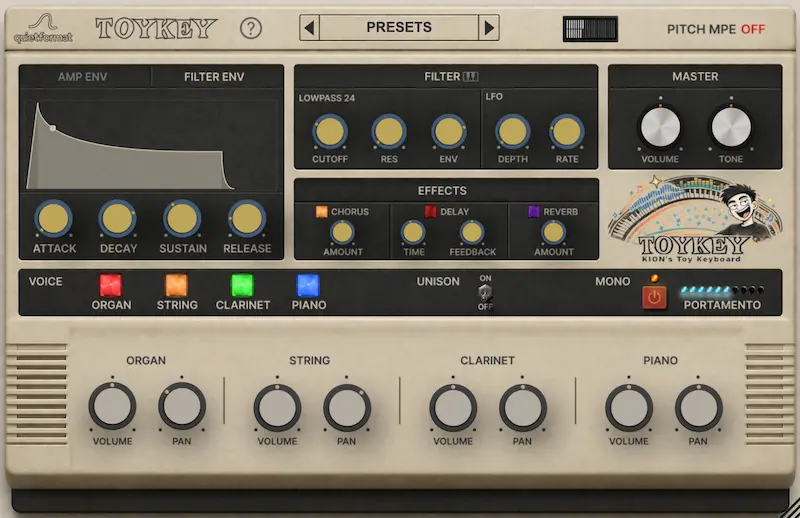
At its core, the plugin provides four sound layers:
- Organ
- String
- Clarinet
- Piano
Each layer can be independently balanced and panned, allowing quick tonal blending. On top of that:
- basic filter and envelope shaping
- built-in Chorus, Delay, Reverb
- Unison, Mono, Portamento
- MPE pitch control
The architecture is intentionally shallow. The value is not flexibility—it’s tone.
How quietformat TOYKEY fits into real mixing and production
In practice, quietformat TOYKEY is rarely used as a primary instrument. Its role is structural support inside a mix.
1. Layering under clean instruments
Placed beneath a piano or pad, it adds instability and density. You don’t hear it clearly—you feel it.
2. Lo-fi melodic lines
In minimal arrangements, it can function as a lead, but only when the track leaves enough space.
3. Background tonal movement
Used as a sustained layer, it introduces subtle motion behind static elements.
The downside is translation. These sounds are mid-heavy and unstable. Without control, they create masking and phase issues.
In professional workflows, this kind of material often requires precise balancing at the mastering stage to avoid collapsing on consumer systems. If you’re working with similar tonal layers, controlled final processing becomes critical (see: quality track mastering).

quietformat TOYKEY limitations (what it doesn’t do)
- Very limited sound palette — only four core layers
- No deep modulation system
- Repetitive tone over time
- Not scalable for complex arrangements
quietformat TOYKEY plugin is a fixed aesthetic. It does not evolve with the track.
Comparison: where quietformat TOYKEY stands
To understand its position, it helps to compare it directly:
- Spitfire LABS — broader library, less defined character
- Output Arcade — faster ideas, less control
- Native Instruments Kontakt — deep and flexible, but slower workflow
- AudioThing Toy Piano — similar concept, even narrower
quietformat TOYKEY sits between utility and novelty. It’s faster than most tools—but far more limited.
Is quietformat TOYKEY worth it?
Buy it if:
- you need instant lo-fi character
- you work with layering
- you want fast results without sound design
Skip it if:
- you need a primary instrument
- you rely on deep control
- you build complex arrangements
quietformat TOYKEY plugin is a tool for solving one problem: making clean digital tracks feel imperfect.
FAQ
What is quietformat TOYKEY?
A sample-based instrument built from a toy keyboard, designed for lo-fi production.
Is quietformat TOYKEY free?
No. It offers a 14-day trial, then costs $39–$69.
Does it work in all DAWs?
Yes, if your DAW supports VST3 or AU.
Is it good for mixing and mastering?
Indirectly. It generates sound; proper integration depends on mixing and mastering.
Final verdict
quietformat TOYKEY is not trying to replace anything. It fills a narrow gap: controlled imperfection.
Used as a layer, it works. Used as a foundation, it fails.
This is a fast tool with a short lifecycle—but within its lane, it’s effective.