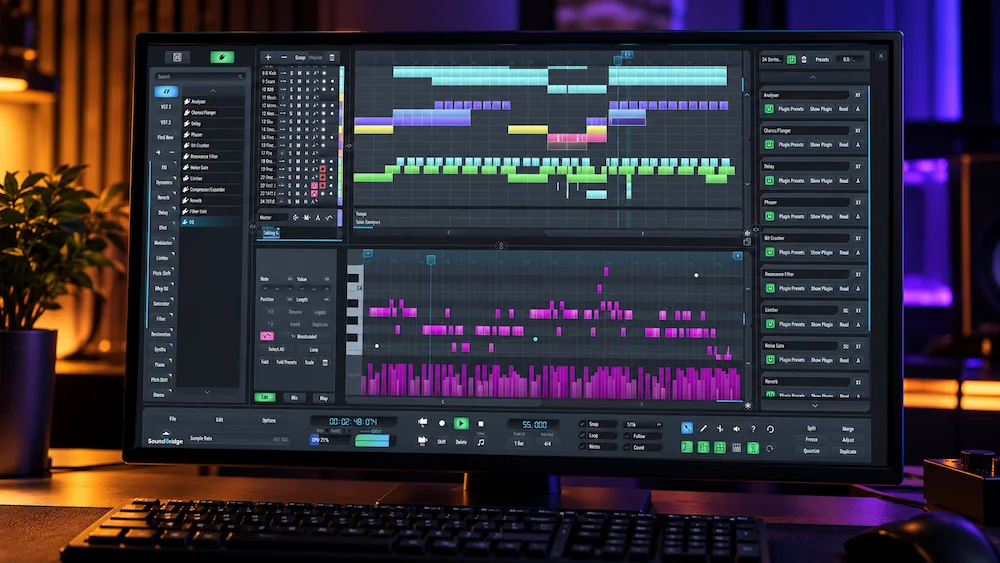
SoundBridge takes a deliberately focused approach to DAW design. It covers recording, editing, MIDI, arrangement, automation, mixing, third-party plug-ins, sampling, and video, but its strongest point is not feature count. The platform is built around a production workflow that treats remote recording and collaboration as part of the DAW rather than as a separate collection of external services.
SoundBridge 3.2.0 continues that direction with practical changes to track-level gain control, Sequencer layout, Virtual Collaboration, interface scaling, multilingual support, and plug-in scanning stability. These are workflow improvements rather than a new generation of audio processing, so the release should be judged primarily by how efficiently it handles real production sessions.
For producers and recording engineers who regularly work with musicians in other locations, that distinction is significant. SoundBridge’s strongest differentiator is not another mixing architecture; it is the ability to keep remote recording, synchronized session control, communication, and transfer inside the DAW. For an established DAW user with an efficient remote workflow already in place, that specific advantage has to justify the cost of changing the production environment.
| Product | SoundBridge 3.2.0 |
| Type | Digital Audio Workstation |
| Platforms | Windows and macOS |
| Free Version | 10-track limit |
| Primary Differentiator | Integrated Virtual Collaboration and remote recording |
| Main Limitation | Smaller ecosystem than the major established DAWs |
What Makes SoundBridge Different From Other DAWs?
 The cost of changing a DAW is rarely the license price. For an experienced producer or engineer, the larger investment is the accumulated workflow: templates, routing schemes, keyboard shortcuts, plug-in chains, session archives, controller mappings, and the muscle memory built around years of daily work. A new DAW therefore needs to offer more than another implementation of the same recording and mixing fundamentals.
SoundBridge takes a relatively disciplined approach. Its core environment covers the functions expected from a modern production DAW — audio and MIDI recording, editing, arrangement, automation, mixing, third-party plug-ins, sampling, and video — without trying to turn every part of the application into a separate feature ecosystem. That focus is useful when the session itself is the priority: tracks, routing, editing, plug-in processing, and automation remain relatively close to the center of the workflow.
The more significant distinction is Virtual Collaboration. Rather than treating remote recording as a separate video-call or file-exchange problem, SoundBridge builds synchronized sessions, remote DAW control, talkback, webcam communication, remote audio and MIDI recording, and project-based file transfer into the production environment. That changes the practical role of the DAW. The software is not simply being used to make a track locally; it can also function as the shared workspace between the engineer and a remote performer.
SoundBridge 3.2.0 does not reinvent that architecture. Its contribution is more pragmatic: the collaboration workflow continues to be refined while the main DAW interface receives changes aimed at everyday session control. For an engineer who never records remotely, those additions are secondary. For a producer working with musicians, vocalists, or collaborators in different locations, they are much closer to the reason SoundBridge deserves consideration in the first place.
SoundBridge 3.2.0: The Workflow Changes That Matter in Production
SoundBridge 3.2.0 is not a feature-heavy overhaul. Its meaningful changes are concentrated in session control, track layout, gain management, and Virtual Collaboration. Viewed from an actual production workflow rather than a release checklist, those are the areas where the update has practical value.
Gain Staging Gets Better Track-Level Access
Version 3.2.0 turns the existing Pre-Gain control into a dedicated knob beside Pan and adds a separate Gain fader to each track. Master, Return, and Group tracks also expose Pre-Gain, Pan, and Gain controls directly in the Sequencer.
The distinction between Pre-Gain and channel Gain is important in a mix. The two controls occupy different positions in the signal path, so using the channel fader to solve every level problem is not the same as managing the level feeding a processor. Putting both controls within direct reach makes that distinction easier to use during a session.
Dynamics processing is the clearest example. A compressor responds to the level arriving at its detector and input stage. If a recorded vocal enters the chain significantly hotter than intended, pulling down the channel fader changes its output level but does not necessarily change how the compressor is being driven. Pre-Gain lets the engineer correct the level earlier in the chain while leaving the channel fader available for mix balance.
This is not an audio-quality upgrade in itself. The processing algorithms have not suddenly become better. The improvement is that the engineer has more precise control over how existing processing is driven.
The Sequencer Becomes Easier to Configure Around a Real Session
SoundBridge 3.2.0 makes the Master, Return, Video, and Virtual Collaboration tracks resizable and allows special tracks to be unlocked and moved into the scrollable Sequencer area. Their controls also adapt as the available vertical space changes.
The benefit is primarily spatial rather than functional. A production session does not give every track type equal importance at every stage. A video track may be essential during picture work and irrelevant during an audio-only mix; Virtual Collaboration controls may be central during a remote recording session and unnecessary afterward. Making those tracks easier to position and resize reduces the amount of fixed interface competing with the arrangement.
That sounds minor until a session becomes dense. DAW efficiency is often determined by how much useful information can remain visible without constant scrolling, resizing, or switching between views. This update addresses that part of the workflow directly.
Virtual Collaboration Gains Practical Reliability Improvements
Version 3.2.0 adds webcam self-preview, updates the Webcam Settings interface, and improves the Create and Join Session workflow. Guests also receive a clear warning that the host project’s tempo, time signatures, and position markers will follow the host session.
A more consequential change is what happens after a remote recording is transferred. Audio blocks transferred to a Remote-linked track are automatically muted after the transfer, reducing the risk of monitoring the remote source and the newly transferred material at the same time.
The release also addresses several failure modes affecting Virtual Collaboration, including audio streaming artifacts, transferred takes, sample-rate changes, talkback behavior, webcam operation, and pops, crackles, or white noise during recording and session transitions.
For remote production, those fixes matter more than cosmetic interface additions. A collaboration system is only useful when the engineer can trust what is being recorded, transferred, monitored, and synchronized. Reliability is not a secondary feature of that workflow; it is part of the workflow itself.
Take Your Mix Beyond the DAW Workflow
A well-organized production session is only part of the equation. The finished mix still needs to translate with controlled dynamics, balanced frequency relationships, precise stereo image, and enough depth and detail to hold together across different playback systems. If you want an independent mastering perspective before committing to the final version, you can submit up to 40 seconds of your mix for a free mastering demo. Upload up to 40 seconds for a free mastering demo →
SoundBridge as a Production DAW: Recording, Editing, MIDI, and Mixing
SoundBridge covers the core production stages required to take a project from recorded material to a finished mix. Audio and MIDI recording, arrangement, editing, automation, third-party plug-ins, sampling, and video are integrated into the same session rather than separated into specialist applications.
For recording, the relevant question is not whether SoundBridge provides another way to capture audio, but whether the session can remain organized as the project becomes more complex. Multitrack recording, track-level gain control, routing, automation, and the ability to work with Group and Return tracks give the engineer the basic structure required for conventional production.
Editing is similarly conventional in its purpose. Comping, fades, gain processing, pitch and time manipulation, and MIDI editing cover the practical tasks involved in cleaning and arranging recorded material. The advantage is therefore less about introducing a radically different editing model and more about keeping recording, editing, processing, and arrangement inside one production environment.
Mixing follows the same principle. Third-party plug-ins, automation, routing, Pre-Gain, channel Gain, Groups, Returns, and conventional track-based control provide the signal-flow infrastructure required for a normal mix. Version 3.2.0 improves the accessibility of those controls rather than changing the underlying processing architecture.
The limitation becomes more apparent outside the core session. SoundBridge has a smaller surrounding ecosystem than the major established DAWs, with fewer accumulated templates, scripts, controller integrations, educational resources, and specialized third-party workflows. That does not limit the basic production functions, but it can increase friction when a project depends heavily on infrastructure built around another platform.
Virtual Collaboration Is the Feature That Gives SoundBridge a Distinct Workflow
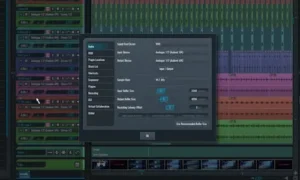 Virtual Collaboration is the part of SoundBridge that most clearly separates it from a conventional compact DAW. Recording a remote musician normally means stitching together several independent systems: the DAW, a video call, screen sharing, remote audio transport, file exchange, messaging, and whatever monitoring solution the engineer can make work. Each additional layer creates another potential failure point in routing, synchronization, monitoring, or communication.
SoundBridge moves a larger part of that workflow into the DAW itself. A collaboration session can combine remote audio and MIDI recording, synchronized project behavior, talkback, webcam communication, remote DAW control, and transfer of recorded material within the same production environment.
The important technical point is how the system approaches latency. Internet latency cannot be removed by software, and a remote performer cannot reliably monitor through an arbitrary real-time round trip as if the connection were a local audio interface. SoundBridge instead uses buffering and local recording to make the network connection manageable while preserving the session’s synchronization and recorded material.
That distinction matters in an engineering workflow. “Low latency” is not the same as zero latency, and a remote-recording system should be judged by how effectively it works around network delay rather than by whether it eliminates the physical constraints of the connection. The practical objective is to keep the performer comfortable, maintain reliable synchronization, and get usable audio or MIDI into the project without turning the session into a troubleshooting exercise.
How SoundBridge Remote Recording Fits Into a Production Session
The practical advantage of Virtual Collaboration is that the remote performer remains connected to the production session instead of becoming a separate file-delivery stage. SoundBridge can route remote audio or MIDI into the host project, keep the session synchronized, and transfer recorded material back to the appropriate timeline position.
The workflow becomes more useful when the remote performer is not simply sending a finished file. A producer can work with a remote audio or MIDI source, maintain a dedicated collaboration path, record the performance, and continue editing the resulting takes inside the same project. SoundBridge also supports block and file transfer, so material created on the remote system can be placed into the shared session without rebuilding its timeline position manually.
Remote control adds another layer to the workflow: the collaborator can grant access to the DAW environment itself, allowing the other participant to interact with supported session controls rather than relying only on screen sharing. That makes Virtual Collaboration materially different from a DAW paired with a video call and a separate file-transfer service.
The limitation remains network-dependent performance. Internet latency cannot be removed by software, so SoundBridge’s approach relies on buffering, synchronization, latency compensation, and local recording rather than pretending that a remote connection behaves like a local audio interface.
For a vocalist, guitarist, drummer, or instrumentalist recording into a producer’s session from another location, that architecture can remove several steps from the traditional remote-production setup. For a mastering engineer working primarily from delivered stereo mixes, it is considerably less relevant. The feature has value because of the workflow it enables, not because remote collaboration is inherently useful to every type of audio professional.
SoundBridge for Mixing and Audio Production
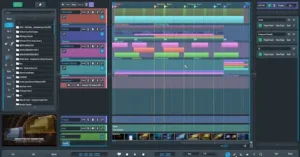 For mixing, SoundBridge provides the core signal-flow infrastructure required for a conventional production session: audio routing, automation, editing, third-party plug-ins, gain control, Groups, Returns, and track-based processing.
The meaningful 3.2.0 change for mixing is operational rather than sonic. Pre-Gain and channel Gain are now directly accessible on tracks, while the Sequencer layout gives the engineer more control over how session-level tracks are displayed. These changes affect gain management and session navigation rather than the underlying character of the processing.
Mastering is possible, but it is not where SoundBridge has its strongest product identity. A stereo mastering chain can be hosted using SoundBridge and third-party processors, but the platform’s more distinctive role is recording and production, particularly when remote performers are part of the session.
That distinction matters when evaluating the DAW as a professional tool. SoundBridge does not need specialized mastering features to be useful in production; its stronger proposition is combining conventional recording and mixing functions with an integrated remote-production workflow.
SoundBridge vs Reaper, Ableton Live, Logic Pro, and Pro Tools
SoundBridge occupies a narrower position than the major established DAWs. The useful comparison is therefore not feature count, but workflow: how each platform approaches recording, editing, mixing, customization, content, and remote production. That distinction also becomes clear when looking at newer DAW releases such as the Universal Audio LUNA 3.0 review, where the practical differences between established workstations are similarly tied to workflow architecture rather than feature count alone.
| DAW | Primary Workflow Focus | Where SoundBridge Differs | What to Consider |
|---|---|---|---|
| SoundBridge | Conventional production, recording, mixing, and remote collaboration | Virtual Collaboration is integrated directly into the production environment | Smaller ecosystem and less accumulated third-party workflow infrastructure |
| Reaper | Routing, customization, scripting, recording, and efficient session management | SoundBridge presents a more predefined workflow with integrated remote collaboration | Reaper offers substantially deeper customization and scripting options |
| Ableton Live | Electronic production, clip-based composition, performance, and sound design | SoundBridge follows a more conventional linear recording and mixing model | Different session models make the two platforms suited to different production approaches |
| Logic Pro | Mac-based production with extensive instruments, effects, and bundled content | SoundBridge is designed for both Windows and macOS | Logic’s integrated content library and Apple ecosystem are significant parts of its workflow |
| Pro Tools | Recording, editing, mixing, post-production, and established professional studio workflows | SoundBridge combines a lighter production environment with integrated remote collaboration | Pro Tools has a much larger installed base, professional infrastructure, and long-established studio workflows |
For an engineer with an established DAW workflow, the switching cost remains the central issue. Existing templates, routing, plug-in organization, automation habits, session archives, and collaborative compatibility can outweigh the appeal of a different interface or a handful of new features. Nothing in SoundBridge 3.2.0 changes that calculation on its own.
The case is different when choosing a DAW without an entrenched workflow or when remote recording is a regular requirement. In that situation, SoundBridge’s integrated collaboration architecture becomes a more relevant selection criterion alongside the usual considerations of editing, mixing, plug-in compatibility, content, customization, and long-term ecosystem support.
SoundBridge Pricing, Free Tier, and Virtual Collaboration Access
SoundBridge uses a free-to-paid model. The Free edition provides the core DAW with a 10-track limit, while paid access removes the main production restrictions. Virtual Collaboration is part of the broader paid collaboration offering, with the current product model also supporting managed STUN/TURN access and self-hosted Linux + CoTURN infrastructure for Lifetime License owners.
| Access | Main Position |
|---|---|
| Free | Core DAW with a 10-track limit; Virtual Collaboration is not included. |
| Paid Access | Removes the main production limits and provides access to the broader SoundBridge feature set. |
| Lifetime License | Permanent license option with future updates included according to the current product model. |
| Virtual Collaboration | Available through SoundBridge’s paid collaboration offering; Free users can add managed STUN/TURN access separately, while Lifetime owners can self-host Linux + CoTURN infrastructure. |
The important buying consideration is therefore not simply the DAW license price. For producers who need remote recording, the way Virtual Collaboration access is provided becomes part of the total production cost. SoundBridge also supports self-hosted Linux + CoTURN infrastructure for Lifetime License owners who want greater control over the collaboration server environment.
For a producer who already has a mature DAW and remote-recording setup, the additional software cost may be difficult to justify. For a producer who regularly coordinates remote musicians, the relevant question is whether the integrated collaboration workflow removes enough recurring setup and file-transfer friction to justify adopting another production environment.
System Requirements
| Windows | Windows 10 or 11, Intel Core i5 or AMD multi-core CPU, 8 GB RAM, ASIO-compatible audio hardware |
| macOS | macOS Sonoma 14.0 or later, Intel Core i5 or Apple Silicon, 8 GB RAM, Core Audio-compatible interface recommended |
The Main Limitation: SoundBridge’s Smaller Ecosystem
SoundBridge’s main limitation is not its ability to record, edit, or mix audio. It is the smaller ecosystem surrounding those functions.
Established DAWs accumulate infrastructure over many years: templates, controller integrations, scripts, troubleshooting knowledge, educational material, session conventions, specialist tools, and compatibility with other engineers and studios. That infrastructure becomes part of the production environment and can be difficult to replace.
SoundBridge can work with third-party plug-ins and provides the core functions required for conventional production, but engineers coming from a mature Pro Tools, Logic Pro, Cubase, Reaper, or Ableton Live environment may encounter more friction when a project depends on established integrations or highly customized workflows.
This limitation also explains why Virtual Collaboration matters so much to SoundBridge’s positioning. The platform does not need to match every part of a larger DAW ecosystem to have a reason to exist; its stronger case is providing an integrated remote-production workflow that addresses a specific production requirement.
Who SoundBridge Is Best Suited To
Remote recording producers are the clearest fit. Virtual Collaboration combines remote audio and MIDI recording, communication, synchronization, remote DAW control, and project transfer inside the production environment.
Independent recording engineers can benefit when local tracking and remote sessions are both part of the same business workflow and a separate collection of communication and file-transfer tools creates unnecessary friction.
Producers building a new DAW workflow can use the Free edition to evaluate the core recording, editing, MIDI, and mixing environment before moving to the broader feature set.
Established DAW users have a different calculation. If Pro Tools, Logic Pro, Cubase, Reaper, or Ableton Live already provides an efficient production and remote-recording workflow, SoundBridge needs to solve a specific recurring problem to justify migration.
Mastering engineers are a less obvious target. SoundBridge can host a stereo mastering chain, but its strongest differentiation is remote production rather than mastering-specific functionality.
Overall Rating
| Category | Rating |
|---|---|
| Recording & Editing Capability | 8.3/10 |
| Remote Collaboration | 9.0/10 |
| Gain & Signal-Flow Control | 8.5/10 |
| Session Organization | 8.4/10 |
| Plug-in Integration & Ecosystem | 7.1/10 |
| Production Scope & Versatility | 8.0/10 |
| Overall | 8.2/10 |
SoundBridge’s highest-scoring area is Virtual Collaboration because it gives the DAW a more specific production identity than its conventional recording and mixing features alone. The lower ecosystem score reflects the practical cost of moving from a mature DAW environment with established templates, integrations, scripts, and third-party workflows.
Verdict: A DAW With a Specific Remote-Production Advantage
SoundBridge 3.2.0 is not defined by a new mixing engine or a larger feature count. Its strongest case is narrower: it combines a conventional recording and mixing environment with Virtual Collaboration built directly into the DAW.
That makes the product particularly relevant when remote musicians are part of the normal production workflow. The trade-off is ecosystem depth. Engineers already invested in another mature DAW have to weigh the value of integrated remote production against the templates, integrations, plug-ins, and established workflows they would be leaving behind.
SoundBridge 3.2.0 makes the most sense as a focused production DAW whose main differentiator is remote recording and collaboration, rather than as a general-purpose replacement chosen primarily for its conventional mixing feature set.
Hear What Your Mix Actually Needs
SoundBridge makes gain staging, routing, and session control more deliberate, but a well-structured DAW session does not automatically mean the finished mix will translate consistently. Once the production is complete, the useful question is what remains in the stereo mix: dynamics, tonal balance, depth, stereo image, punch, and detail all need to work together without relying on further processing for its own sake. A real mastering comparison can provide a more useful reference than simply adding another processor to the chain. Upload up to 40 seconds of your mix and receive a free mastering demo prepared by a real mastering engineer, so you can hear the difference between your current version and an independently mastered version before making a decision. Upload your mix and get your free 40-second mastering demo →
FAQ
Is SoundBridge a professional DAW?
SoundBridge provides the core tools required for professional recording and production, including multitrack audio, MIDI, editing, automation, mixing, third-party plug-ins, and video. Its smaller ecosystem and more limited surrounding production infrastructure are more relevant considerations than the basic capabilities of the DAW itself.
Is SoundBridge good for mixing?
Yes. It provides the routing, automation, gain control, plug-in support, and editing functions needed for conventional mixing. Version 3.2.0 also makes Pre-Gain and channel Gain more accessible, which is useful when managing level into processors and maintaining gain structure.
Can SoundBridge be used for mastering?
Yes. A stereo mastering chain can be built using SoundBridge and third-party processors, but the DAW is not specifically designed around mastering. Monitoring accuracy, metering, reference comparison, processing discipline, and delivery control remain more important than the choice of workstation.
How does SoundBridge handle remote recording latency?
Virtual Collaboration is designed around synchronization, buffering, and local recording rather than attempting to provide zero-latency internet monitoring. This approach works around network delay so the performer can record while the session manages synchronization and transfer of the resulting material.
Does SoundBridge support VST plug-ins?
Yes. Third-party VST support allows engineers to use established instrument and effects collections, which is particularly relevant because SoundBridge’s native ecosystem is smaller than those of the major DAWs.
Is SoundBridge free?
Yes. The free edition can be used to evaluate the DAW, but it has a 10-track limit and does not provide the full set of premium features. It should therefore be treated as a way to test the workflow rather than as an unrestricted equivalent of the paid version.
How does SoundBridge compare with Reaper?
The two platforms emphasize different workflows. Reaper is known for extensive customization, routing, scripting, and user-defined workflows. SoundBridge takes a more predefined approach and places greater emphasis on integrated remote collaboration. The more relevant choice depends on which of those capabilities is central to the production process.
Is SoundBridge suitable for remote vocal recording?
Yes. Remote vocal recording is a practical use case for Virtual Collaboration because the workflow combines session synchronization, communication, remote recording, and transfer of recorded material. Its usefulness depends on the network connection and the monitoring setup available to the performer.
Should an established engineer switch to SoundBridge 3.2.0?
The update alone is unlikely to justify rebuilding an established DAW workflow. For an engineer whose current system already handles recording, mixing, plug-ins, templates, delivery, and remote sessions efficiently, the migration cost remains significant. SoundBridge becomes more relevant when its integrated remote-production workflow addresses a recurring requirement that the existing setup handles less efficiently.

Yurii Ariefiev evaluates DAWs from the perspective of practical audio production, with particular attention to signal flow, gain staging, session control, recording reliability, and the demands of real-world production environments. For SoundBridge, that perspective is especially relevant when assessing how track-level control and remote recording infrastructure affect the way an engineer works inside an active session.
Enjoyed this review? If you found it useful, you can support independent audio research with a coffee.
☕ Buy me a coffee