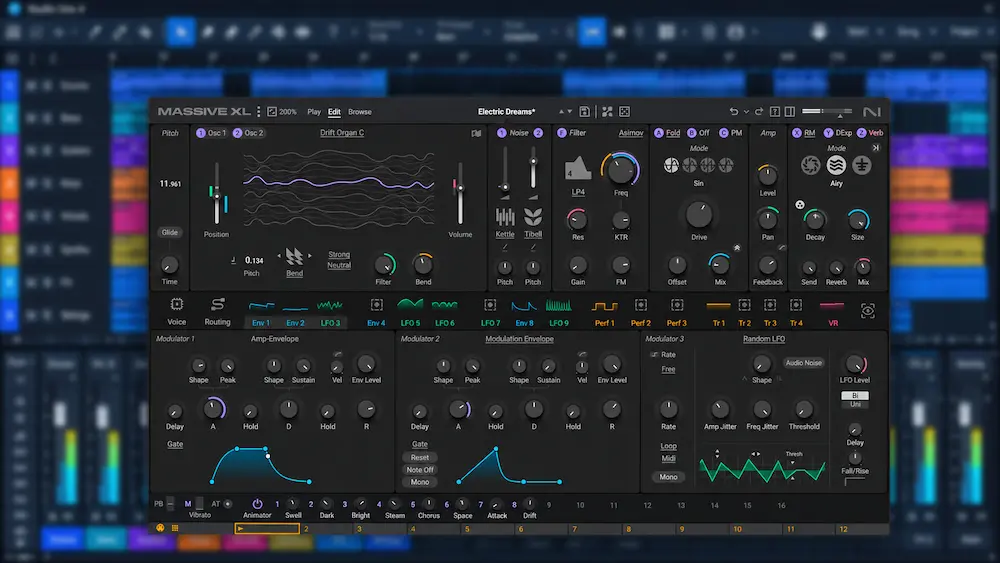
Native Instruments Massive XL introduces a reference-driven approach to synthesizer sound design: instead of starting from an initialized preset, users can import audio and generate editable patches from it. Combined with expanded wavetable content, guided patch mutation, and a redesigned modulation interface, the instrument aims to accelerate sound exploration while preserving control over the underlying synthesis.
Released on October 27, 2026, Massive XL succeeds Massive X with a broader set of sound-generation and workflow tools. Its defining feature is the Preset Generator, which analyzes imported audio and produces four synthesizer-patch variations. The important question is how useful those variations are in practice. A generated patch may capture some of a source’s timbral character without reproducing its harmonic complexity, evolving modulation, or other defining details. The amount of editing required to turn a variation into a production-ready sound is therefore a more meaningful measure than the number of patches generated.
For producers considering an upgrade or comparing Massive XL with Serum 2 and Arturia Pigments, the key distinction is workflow rather than library size alone. Massive XL’s reference-based patch generation offers a different starting point for sound design, but the available information does not establish that it produces better sound quality, uses less CPU, or consistently outperforms competing synthesizers.
What Is New in Native Instruments Massive XL?
 Massive XL builds on Massive X with changes to patch generation, sound variation, modulation, and preset management. The most consequential addition is the Preset Generator, which introduces an audio-reference-based starting point for sound design. The expanded wavetable and noise libraries provide more source material, while the revised modulation and workflow tools focus on editing and performance.
- Preset Generator: Generates four editable synthesizer patches from an imported audio reference, with stem separation integrated into the workflow.
- Mutator and Randomizer: Provide alternative routes to sound variation, using guided changes or randomized module settings.
- Expanded wavetable and noise content: Adds more than 100 wavetables and more than 100 noise tables, including material associated with the original Massive and classic PPG wavetables.
- Custom wavetable creation: Lets users create wavetable material from imported samples.
- Updated modulation tools: Introduces animated modulation feedback, clearer source identification, drag-and-drop assignments, and 16 assignable macros.
- Additional effects: Adds Raum, Replika Shimmer, and Tape Wobble.
- Performance and workflow improvements: Includes polyphonic aftertouch support, reusable component sub-presets, undo and redo history, and updated preset-management tools.
These changes address different stages of the sound-design process. The Preset Generator changes how a patch can be initiated; the expanded libraries increase the range of available source material; and the modulation and workflow updates affect how sounds are refined, controlled, and performed.
The value of the upgrade therefore depends on how a producer works. Those who rely on factory presets may benefit most from the expanded content, while sound designers who build and modify patches may find the generation, mutation, and modulation tools more relevant. The number of new features alone does not establish how much faster or more effective the instrument will be in a particular workflow.
Massive XL Preset Generator: A Different Starting Point for Sound Design
The Preset Generator is Massive XL’s most distinctive feature. Instead of starting with an oscillator configuration, filter topology, and modulation routing, users can import an audio reference and generate four editable patch variations from a selected audio segment of up to four seconds. Controls for matching the source and varying the generated results let users adjust the balance between closer approximation and more exploratory sound design. This shifts the initial stage of sound design from manual parameter selection to evaluating and refining generated results.
The workflow addresses a common challenge in synthesis: translating a sound heard in a reference track into a workable combination of oscillators, filters, envelopes, modulation, and effects. Identifying the desired character by ear is one task; determining which synthesis techniques will produce it is another. Audio-guided patch generation aims to reduce that gap.
The generated patches should be treated as starting points rather than exact recreations. Their usefulness depends on whether they capture the characteristics that matter to the producer and how much editing is needed to make them fit the intended arrangement.
Where Audio-to-Preset Generation Can Help
For a monophonic bass or a relatively simple synthesizer lead, generated variations may offer useful alternatives to manual initialization and programming. Producers can compare the four results, identify promising tonal characteristics, and refine the strongest candidate instead of configuring every component from scratch. This is a different workflow from generative MIDI sequencing for bass motifs and lead patterns, which provides note sequences for an instrument rather than generating the synthesizer patch itself.
The same approach can support exploratory sound design. A reference does not have to be reproduced precisely to be useful: a patch that captures part of its tonal character may become the basis for a new bass, lead, or evolving texture. In this context, the generator’s value lies in the options it presents, not in faithful reconstruction.
Launch-day coverage from SYNTH ANATOMY reports more convincing results with simpler material than with complex, heavily modulated, or mixed sources. This limitation matters because a finished reference may contain several overlapping elements and processing stages, making it harder to derive a useful synthesizer patch from the audio alone.
Why Complex References Are More Difficult
A finished sound may combine multiple oscillators, nonlinear processing, modulation, effects, layering, and changes over time. When several sources overlap, the rendered audio does not uniquely reveal the synthesis architecture or processing chain that produced it.
Two patches can sound similar over a short passage while relying on substantially different methods. One might use oscillator modulation and filtering; another might achieve a comparable result with a different waveform, envelope shaping, and effects. A generator may approximate aspects of the audible result without recovering the original synthesis method.
Stem separation may help isolate elements from a reference, but it does not guarantee a clean source free of separation artifacts. Residual material and processing artifacts can affect the input, so the quality of the reference remains an important variable in the workflow.
The Preset Generator is therefore better understood as an audio-guided sound-design tool than as a universal audio-to-synthesizer converter. Its practical value depends on the relevance of the generated patches and the amount of additional editing required to make them usable.
The available information does not establish consistent reconstruction accuracy across source categories, a measurable success rate, or a processing-time advantage over alternative workflows. These questions require controlled comparisons; feature descriptions and isolated examples are not enough to establish general performance.
Make Your Synths Sit Better in the Mix
Sound design is only part of the production process. Once your basses, leads, and layered textures are arranged, mastering helps assess how the finished mix translates as a whole, including tonal balance, low-end definition, dynamics, and stereo presentation. Submit up to 40 seconds of your mix for a free mastering demo to hear how a dedicated mastering approach may work with your material.
Get Your Free Mastering Demo →
Mutator and Randomizer: Exploring Variations Without Starting Over
Massive XL includes two tools for generating sound variations: Mutator and Randomizer. Both help explore alternatives to an existing sound, but they use different approaches.
Mutator changes sound-building components using material drawn from the preset library, while Randomizer alters settings within an existing module structure. Selective changes and locking controls let users retain elements they want to preserve while experimenting with other parts of a patch.
This distinction is useful because randomization can easily disrupt the relationships that make a patch work. An oscillator configuration, modulation assignment, or filter response may define the sound’s character; changing everything at once can make it difficult to identify which adjustments improve the result. Preserving selected elements makes variation more controlled and easier to evaluate.
For example, a producer who has established a suitable bass patch could explore alternative filter settings, effects, or modulation behavior without discarding the core oscillator configuration. Rather than rebuilding the sound after each experiment, the producer can retain its defining elements and focus on the parameters that still need refinement.
Neither tool guarantees musically useful results. Their practical value depends on the relevance of the variations, the precision of the available controls, and how easily a promising result can be refined. The supplied information does not establish a quantified success rate or a measurable efficiency advantage over manual sound design.
Wavetable Synthesis and Expanded Sound Content
 Massive XL adds more than 100 wavetables and more than 100 noise tables, including material associated with the original Massive and classic PPG wavetables. It also allows users to create custom wavetables from imported samples.
For sound designers, the expanded library provides more source material for shaping oscillator timbres, while custom wavetable creation opens another route from recorded audio to synthesized sound. Rather than using an imported sample only for playback, users can turn suitable source material into the basis of a wavetable-based patch.
Sample-to-wavetable conversion should not be confused with a dedicated wavetable editor. Importing source material expands the available sound-design options, but producers who need detailed manual control over individual wavetable frames should verify whether Massive XL provides the editing tools their workflow requires.
The results depend on the source and how its characteristics translate into wavetable data. Sustained tonal material, noisy textures, transient-rich recordings, and complex polyphonic audio present different challenges. Not every sample will produce a useful wavetable, and the character of the original recording may change substantially during conversion.
Library size alone, however, says little about the quality of the synthesis engine. A larger collection offers more starting points, but does not demonstrate better wavetable interpolation, lower aliasing, greater oscillator efficiency, or superior sound quality.
Those characteristics require separate evaluation through controlled measurements or comparable audio tests. Without that evidence, claims that Massive XL’s wavetable engine sounds better than competing implementations would be premature.
Modulation, Effects, and the Redesigned Interface
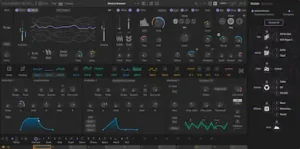
Massive XL’s revised interface is designed to make modulation routing easier to inspect. Animated feedback visualizes parameter movement, while clearer modulator information helps users identify which sources influence a given control.
Modulation can be assigned by dragging and dropping, and the instrument supports sidechain routing, envelopes, LFOs, Performers, Trackers, and 16 assignable macros with host automation. Together, these tools provide multiple ways to shape how a patch responds and evolves over time.
Visual feedback is particularly useful in complex patches, where several modulation sources may affect the same parameter or interact across different stages of a sound. Seeing parameter movement and identifying its controlling sources can make troubleshooting and refinement more straightforward. It does not, however, remove the need to understand the underlying modulation relationships.
The included effects—Raum, Replika Shimmer, and Tape Wobble—provide additional options for shaping space, texture, and movement within the instrument. Polyphonic aftertouch support adds another layer of performance control when used with compatible hardware and appropriately configured patches.
Other workflow changes include draggable envelope handles, undo and redo history, reusable component sub-presets, contextual help, and customizable user banks. These features can reduce friction during editing, but they should be distinguished from changes to the synthesis engine itself.
The benefits will depend on how a producer uses the instrument. Those who build intricate, modulation-heavy patches are more likely to value the additional visual feedback and routing controls. Producers who mainly browse presets and make occasional adjustments may notice a smaller improvement in their workflow.
Massive XL vs. Serum 2 vs. Arturia Pigments
Massive XL competes with established synthesizers that already offer extensive wavetable synthesis, modulation, effects, and sample-based sound design. The most useful comparison is therefore not a feature count, but how each instrument approaches sound creation and which workflow best fits a producer’s needs.
| Synthesizer | Main strength | Important consideration |
|---|---|---|
| Native Instruments Massive XL | Audio-reference-based patch generation, guided mutation, expanded wavetable content, and modulation tools. | The consistency of generated patches and their practical advantage over manual sound design have not been established through controlled comparisons. |
| Xfer Records Serum 2 | Hybrid synthesis combining wavetable, sample, multisample, granular, and spectral oscillator engines. | Its range of sound-generation methods makes it a versatile alternative, but direct comparisons should focus on equivalent production tasks rather than feature counts. |
| Arturia Pigments | Multiple synthesis engines, extensive modulation, flexible filtering, and integrated effects. | Its multi-engine architecture may appeal to producers who want different synthesis methods within a single instrument. |
| Native Instruments Massive X | An established synthesis environment with an existing library of presets, Expansions, and project workflows. | Existing users need to weigh the new sound-generation and workflow tools against the cost of upgrading. |
When Serum 2 May Be the Better Choice
Serum 2 combines wavetable synthesis with sample, multisample, granular, and spectral oscillator engines. This makes it relevant to producers who want to combine different sound-generation techniques within one instrument.
Massive XL’s distinguishing feature is its integrated audio-to-preset workflow, which generates editable patches from imported references. Serum 2 instead offers a broad set of synthesis methods for constructing and shaping sounds. These are different approaches to sound design, not evidence that either instrument is inherently more capable.
The deciding factor is whether a producer would benefit more from generating patch ideas from audio references or from directly combining and controlling multiple synthesis methods.
When Arturia Pigments May Be the Better Choice
Pigments combines multiple synthesis engines with extensive modulation, filtering, and effects. It is a strong candidate for producers who want to move between synthesis approaches within a unified environment.
Massive XL may be more appealing to users who specifically value its preset-generation and mutation tools. Pigments may better suit workflows centered on switching between synthesis engines and shaping their output through modulation and effects.
A useful comparison would test how efficiently each synthesizer can produce a suitable bass, lead, or evolving texture, how much editing the initial result requires, and how easily it can be refined for a track. The available evidence does not establish a definitive winner across these tasks.
Should Massive X Owners Upgrade?
Massive XL supports Massive X presets and Expansions, which is relevant to users who have built an established sound library around the earlier instrument.
The upgrade is most compelling when its new generation tools, expanded content, modulation feedback, and workflow changes address needs that recur in the user’s production process. Producers who regularly develop sounds from audio references may benefit more than those who rely on established templates or primarily use existing presets.
At the introductory upgrade price of $49, the initial cost is relatively modest. However, price alone does not establish value. If the new features do not meaningfully change the way a producer creates or refines sounds, continuing with Massive X remains a reasonable decision.
System Requirements and Compatibility
Massive XL supports 64-bit Windows and macOS systems. The published requirements list Windows 10 or 11, macOS 14, 15, or 26, an Intel Core i5 or equivalent processor with AVX or Apple Silicon, and at least 4 GB of RAM, with 6 GB recommended.
Plugin format support varies by operating system. Windows versions are available in VST3 and AAX formats; macOS versions support VST, VST3, AU, and AAX. An internet connection is required for installation and activation, but the instrument can run offline afterward.
Massive XL has no standalone mode, so users must run it inside a compatible DAW or plugin host. This is worth considering if you want to audition sounds or perform without opening a host application.
These specifications describe the manufacturer’s stated requirements, not independently verified compatibility or performance. Before installing Massive XL on an older system, check the current requirements and confirm that your operating system and host application are supported.
Massive XL Price: Is It Worth the Money?
 At launch, Native Instruments lists Massive XL for $99 at an introductory price, compared with its regular price of $199. The promotional offer is scheduled to end on December 31, 2026.
Owners of Massive X can upgrade for $49 during the promotion, while owners of the original Massive can crossgrade for $79. Eligibility and the final price should be confirmed at checkout, as offers may depend on the user’s license or account status.
The introductory price is easier to justify for producers who expect to use Massive XL’s audio-to-preset generation and updated sound-design tools regularly. For those who already own a capable synthesizer and have no specific need for these workflows, the upgrade offers less obvious value.
Native Instruments’ product page currently lists Massive XL for inclusion in its 360 subscription in 2027, although the support FAQ says that future catalog additions and timelines are not confirmed. Existing subscribers should check the latest subscription information before deciding whether to purchase a separate license.
The decision should ultimately depend on how the instrument fits into a producer’s workflow, not on the size of the discount. Even an inexpensive upgrade offers limited value if its new capabilities do not solve a recurring production problem.
What Massive XL Does Not Yet Prove
Massive XL introduces several new sound-design and workflow features, but their practical advantages over competing synthesizers remain difficult to quantify from the available evidence.
- CPU performance: No controlled, equivalent-condition comparison establishes how Massive XL’s CPU usage compares with Serum 2 or Pigments.
- Sound quality: The available evidence does not establish that Massive XL sounds better than competing synthesizers. That judgment requires careful listening comparisons under controlled conditions.
- Reconstruction accuracy: The Preset Generator’s performance across different source types has not been established through a systematic benchmark.
- Workflow efficiency: The new generation tools and interface are intended to streamline sound design, but reliable measurements of time saved or editing effort are not available.
- Long-term reliability: The instrument’s recent release means there is not yet enough evidence to draw firm conclusions about stability in large projects across a range of DAWs and system configurations.
These unanswered questions are not evidence that Massive XL performs poorly. They mark the limits of what can currently be concluded about its performance and practical advantages. Until comparable tests become available, its new features are best evaluated on their individual merits rather than treated as proof of superiority over established alternatives.
Overall Rating
These ratings assess Massive XL’s documented feature set, control options, and potential usefulness for sound design. They are editorial judgments based on available product information, not results from controlled listening tests, CPU benchmarks, or independent measurements of preset-generation accuracy.
| Category | Rating |
|---|---|
| Audio-Reference Patch Generation | 8.2/10 |
| Wavetable & Noise Resources | 8.6/10 |
| Patch Variation & Refinement | 8.4/10 |
| Modulation & Performance Control | 8.5/10 |
| Effects & Texture Shaping | 7.8/10 |
| Preset Management & Editing Workflow | 8.3/10 |
| Overall | 8.3/10 |
The audio-reference generator earns a strong score for offering four editable patch variations, although reconstruction accuracy across different source types remains unverified.
The expanded collection of more than 100 wavetables and more than 100 noise tables, alongside sample-based wavetable creation, provides a broad range of documented starting material for synthesis.
Mutator, Randomizer, selective locking, and reusable component sub-presets support experimentation while helping producers preserve parts of a patch that already work.
Animated modulation feedback, drag-and-drop assignments, sidechain routing, and 16 assignable macros provide substantial documented control over how patches evolve and respond to performance.
Raum, Replika Shimmer, and Tape Wobble expand the available spatial and textural options, but the article does not establish their comparative sound quality or the depth of the effects section against specialist processors.
Undo and redo history, customizable banks, contextual help, and component sub-presets support iterative editing; however, the practical time saved by these features has not been measured.
Massive XL’s strongest proposition is the combination of audio-guided patch creation, extensive wavetable resources, and detailed modulation control in one synthesizer. The main limitation is evidential: the available information does not establish how reliably generated patches translate into production-ready results or whether the new workflow is faster than conventional programming. It is most relevant to sound designers who want new starting points without giving up the ability to refine the underlying patch.
Final Verdict: Who Should Buy Massive XL?
Native Instruments Massive XL is worth considering for producers who want to explore sound ideas quickly while retaining control over the resulting patches. Its Preset Generator, mutation tools, expanded wavetable content, and revised modulation interface give it a distinct workflow that goes beyond simply adding another collection of factory presets.
The strongest case is for sound designers who regularly use audio references to develop synthesizer patches, along with Massive X owners who can put the new tools to practical use. Producers who mainly load presets or already achieve their desired results with another synthesizer have less reason to upgrade.
The main uncertainty is whether these features deliver a consistent advantage in everyday production. The available evidence does not establish superior sound quality, lower CPU usage, or reliable reconstruction accuracy across different source types. Those factors should not be assumed from the feature list alone.
The bottom line: Massive XL is a potentially useful sound-design and workflow upgrade, not an automatic replacement for Serum 2, Pigments, or an existing Massive X setup. Its value depends on whether the new generation tools produce useful, editable patches for the sounds a producer actually needs.
Your Synth Patch Is Only One Part of the Final Sound
As this review highlights, generating or refining a synth patch is only one step toward a finished production. Even a carefully shaped bass, lead, or layered texture still has to work alongside the rest of the arrangement, with the right tonal balance, low-end definition, dynamics, and stereo placement. Another plugin cannot automatically resolve every mix-level issue, and mastering is not a substitute for mix revisions. Upload up to 40 seconds of your mix for a free mastering demo prepared by a real mastering engineer, then compare the original with the mastered version to evaluate what changes—and what still needs attention. Submit Your Mix for a Free Mastering Demo →
Frequently Asked Questions
Is Massive XL a replacement for Massive X?
Massive XL is the successor to Massive X, adding audio-reference-based patch generation and other sound-design and workflow features. Existing Massive X users should assess whether these additions address a practical need before upgrading; the new version does not automatically make established patches or workflows obsolete.
Can Massive XL turn any audio file into an exact synthesizer patch?
No. The Preset Generator creates editable patch variations based on audio references, but it should not be treated as an exact sound-reconstruction tool. Launch-day reporting indicates that results can be less convincing with complex, heavily modulated, or mixed material. Generated patches may require substantial editing to approach the reference.
Does Massive XL support Massive X presets?
Native Instruments lists compatibility with Massive X presets and Expansions. This gives existing users a way to retain access to their established sound libraries while exploring Massive XL’s new features. Check the manufacturer’s current compatibility documentation for any format-specific limitations.
Is Massive XL better than Serum 2?
There is not enough controlled comparative evidence to declare an overall winner. Massive XL emphasizes audio-reference-based patch generation and guided sound variation, while Serum 2 offers a broad hybrid synthesis environment. The more suitable instrument depends on the sounds you need to create, the degree of manual control you prefer, and how each workflow fits into your production process.
Does Massive XL work as a standalone instrument?
No. Massive XL does not offer a standalone mode, so it must run inside a compatible host application, such as a digital audio workstation (DAW). Confirm that your host and operating system support the required plug-in format before purchasing.
Is the Massive XL upgrade worth $49 for Massive X owners?
The upgrade may be worthwhile if you expect to use the Preset Generator, expanded sound content, and revised modulation workflow regularly. If you mainly rely on existing presets and established Massive X patches, the practical benefit may be limited. Compare the current upgrade offer with your eligibility and intended use before deciding.
Will Massive XL be included in Native Instruments 360?
Native Instruments has announced plans to include Massive XL in its 360 subscription in 2027. The exact inclusion date and applicable subscription terms should be verified against the latest information from the manufacturer.
Does Massive XL use less CPU than Massive X or Serum 2?
The available evidence does not establish a reliable CPU-efficiency advantage over either instrument. Processor load can vary with patch complexity, voice count, modulation, effects, oversampling, and system configuration. A meaningful comparison requires controlled testing with comparable settings and workloads.

Yurii Ariefiev covers synthesizers from an audio-engineering perspective, focusing on how oscillator architecture, wavetable content, and modulation behavior shape a sound. When evaluating tools for sound design, he considers not just the range of available timbres, but how predictably a patch can be refined, how clearly its modulation can be controlled, and whether generated results translate into usable sounds without excessive editing.
Enjoyed this review?
If you found it useful, you can support independent audio research with a coffee.
☕ Buy me a coffee