A stereo mix can sound wide and balanced in headphones or on studio monitors yet change significantly when summed to mono. Instruments may lose level, vocals may become less prominent, and certain effects or tonal elements may partially disappear. In some cases, the mix can sound noticeably thinner or lose its sense of depth.
These changes are often caused by phase interactions between the left and right channels. When stereo signals are combined, differences in timing, polarity, and phase response can produce partial cancellation, altering the level and frequency balance of individual elements. Stereo widening, chorus, short delays, reverb, and stereo samples are common sources of these problems.
Checking mono compatibility is therefore an important part of mixing. It helps identify stereo processing that compromises the balance, tonal consistency, or presence of essential elements when the two channels are combined.
What Is Mono Compatibility?
Mono compatibility describes how well a stereo mix retains its tonal balance, level, and essential musical elements when the left and right channels are summed into a single channel.
A stereo signal consists of two channels:
- Left channel (L)
- Right channel (R)
When these channels are combined, their signals interact according to their relative amplitude, timing, and polarity. Depending on their relationship, certain frequencies may reinforce each other or partially cancel, resulting in changes to the mix’s frequency balance and perceived level.
This is why a stereo mix may sound different in mono. Some frequencies may become attenuated, instruments may lose presence, and stereo effects may change in character or become less prominent.
Mono compatibility does not require a mix to sound identical in stereo and mono. The stereo image will naturally become narrower when the channels are summed. The objective is to preserve the level, clarity, and balance of essential musical elements without introducing significant tonal changes or unwanted cancellation.
Why Stereo Mixes Can Sound Different in Mono
One of the main causes of mono compatibility problems is phase cancellation. When the left and right channels contain similar signals, their phase relationship affects how they interact when summed to mono. Depending on their relative timing, polarity, and amplitude, these signals may reinforce each other or partially cancel.
Constructive Interference
When two signals are aligned in phase, their waveforms reinforce each other. If their amplitudes are similar, the combined signal increases in level. This reinforcement is known as constructive interference.
Destructive Interference
When two signals have opposing phase relationships, portions of their waveforms can cancel, reducing the amplitude of the combined signal. Identical signals with opposite polarity cancel completely when summed at equal levels.
These interactions are particularly relevant in stereo mixing, where the left and right channels may contain similar audio with differences in timing, polarity, or phase response.
As a result, a stereo signal that sounds wide and full may become thinner, lose certain frequencies, or change its tonal balance when summed to mono. The extent of these changes depends on the relationship between the channel signals and the stereo processing applied.
Common Causes of Phase Cancellation in Audio
Several mixing techniques can create phase-related problems when a stereo signal is summed to mono. The risk depends on how the processing affects the relationship between the left and right channels and how the resulting signal interacts with other elements in the mix.
Stereo Widening Plugins
Stereo widening processors may increase channel differences through stereo width processing, Mid/Side processing, interchannel delays, phase manipulation, or frequency-dependent processing. Understanding how these techniques affect the stereo image is also important when working with stereo imaging and width.
Although these techniques can create a wider stereo image, excessive widening may cause certain frequencies or elements to become weaker when the signal is summed to mono. The effect is particularly noticeable when widening relies heavily on phase differences or short delays between channels.
Haas Effect and Short Delays
Short delays between the left and right channels can create the perception of stereo width without producing distinct echoes. This technique is commonly associated with the Haas effect.
When the delayed channels are summed to mono, the time difference between them can produce comb filtering. This creates a series of frequency-dependent peaks and dips that may alter the original signal’s tonal balance.
Chorus and Modulation Effects
Chorus, flanging, and other modulation effects introduce continuously changing time and phase relationships between the original signal and its processed components.
These effects can produce a rich, spacious sound in stereo but may cause frequency cancellations, tonal changes, or fluctuations in perceived level when summed to mono. The extent of the effect depends on the modulation settings, delay times, signal structure, and stereo configuration.
Stereo Samples and Layered Instruments
Stereo recordings, sampled instruments, layered synthesizers, and duplicated tracks may contain differences in timing, phase response, and channel content.
When multiple sources occupy similar frequency ranges, they can mask one another and alter the perceived tonal balance of the mix. Phase cancellation, however, depends on the relationship between the signals, including their relative timing, polarity, and phase response.
Polarity Inversion
Polarity inversion is different from a time-dependent phase shift, but reversing the polarity of one channel can cause substantial cancellation when it is combined with a similar signal.
This can be particularly noticeable with correlated material, including duplicated recordings, centered signals, or sources with similar content in both channels. Depending on the signal, polarity inversion may reduce the level of certain elements or significantly alter the frequency response when summed to mono.
Make Your Mix Translate Consistently Across Playback Systems
A well-balanced mix should retain its clarity, tonal balance, punch, and essential elements across different playback environments. If you want a professional assessment of your mix before release, submit up to 40 seconds of audio for a free mastering demo. Get a second perspective on your mix’s tonal balance, dynamics, and overall translation before finalizing your master. Request Your Free Mastering Demo →
How to Check Mono Compatibility
Mono compatibility should be checked throughout the mixing process rather than left until the final stages. A practical approach is to evaluate the full mix, identify mixing problems that appear unexpectedly, and isolate the sources responsible for those changes.
1. Listen to the Entire Mix in Mono
Start by switching your master monitoring to mono. Make sure the monitoring control actually sums the left and right channels rather than playing only one side, and keep the signal routed through the same master processing when comparing stereo and mono. This ensures that the comparison reflects the combined signal rather than a change in the monitoring path.
Pay attention to:
- Vocal level and intelligibility
- Kick drum and bass balance
- Snare and percussion presence
- Stereo synths and pads
- Guitar layers
- Reverb tails and ambience
- Background effects
The goal is not to preserve the stereo image but to determine whether the mix’s balance and essential elements remain intact.
If the vocal becomes noticeably quieter, the bass loses weight, a synth becomes less audible, or the mix sounds hollow, identify which sources or processing stages are responsible for the change.
2. Check Individual Instruments
If the mix changes significantly in mono, narrow down the problem by bypassing processing, muting tracks, or checking individual groups.
Pay particular attention to sources using:
- Stereo widening
- Chorus and flanging
- Stereo delay
- Reverb
- Double tracking
- Stereo samples
- Layered recordings
Check problematic elements both in isolation and within the full mix. A source may sound acceptable on its own but create cancellation or masking when combined with other instruments occupying similar frequency ranges.
3. Compare Stereo and Mono at Similar Loudness
Summing a stereo signal to mono can change its perceived level, which may influence your judgment during A/B comparisons.
Compare the stereo and mono versions at approximately the same perceived loudness. Focus on changes in tonal balance, punch, clarity, and the relative level of important elements rather than assuming that the louder version sounds better.
4. Check the Master Bus
Phase-related changes can result from interactions between multiple tracks, even when no individual source appears to have a significant problem.
Check the full mix using a mono monitoring option on the master bus. Pay particular attention to sessions containing numerous stereo instruments, parallel processing chains, and effects returns, where interactions between multiple signals may affect the combined result.
If the mix changes noticeably in mono, return to the individual tracks and groups to identify the sources responsible before making corrective adjustments.
Understanding a Phase Correlation Meter
A phase correlation meter measures the degree of similarity between the left and right channels of a stereo signal. It helps identify changes in their relationship and assess potential mono compatibility issues.
The meter typically displays values ranging from -1 to +1:
- +1: Perfect positive correlation. The left and right channels contain identical signals.
- 0: No linear correlation between the channels.
- -1: Perfect negative correlation. The channels have an opposite polarity relationship.
Positive correlation generally indicates that the channels share similar information, while negative correlation suggests that some components may cancel when summed to mono. A signal that frequently moves into the negative range may warrant closer inspection, particularly if important elements lose level or tonal balance during mono playback.
However, correlation is not a direct measure of stereo quality or mono compatibility. A wide stereo mix can naturally exhibit lower correlation values due to differences in channel content, stereo ambience, modulation, and spatial effects. A reading near zero does not automatically indicate a problem, just as a positive reading does not guarantee that the mix will translate perfectly to mono.
Use the meter to identify potentially problematic sections and monitor changes over time, then verify any suspected issues by listening to the mix in mono. A phase correlation meter is a diagnostic aid, not a replacement for critical listening.
How to Use a Vectorscope to Identify Stereo Problems
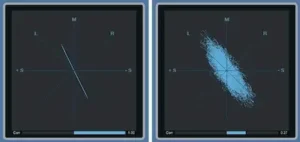 A vectorscope provides a visual representation of the stereo signal, helping you evaluate its width, distribution, and relationship between the left and right channels.
Unlike a phase correlation meter, which displays channel correlation as a numerical value, a vectorscope visualizes stereo information as a pattern. The shape and spread of this pattern can reveal how concentrated, wide, or asymmetrical the stereo image is.
A concentrated pattern generally indicates a more correlated signal, while a wider pattern suggests greater differences between the left and right channels. Depending on the vectorscope’s display orientation and design, patterns extending toward the horizontal axis may indicate reduced correlation or potentially problematic phase relationships.
A vectorscope can help identify:
- Excessive stereo width
- Uneven distribution of stereo information
- Unusual channel relationships
- Stereo effects that dominate the image
- Potential mono compatibility issues
Using a vectorscope alongside a phase correlation meter provides a more complete picture of stereo behavior. The vectorscope helps visualize the structure of the stereo image, while the correlation meter provides a clearer indication of the relationship between the channels. Both can help identify areas that require closer inspection, but mono listening remains essential for confirming actual compatibility problems.
How to Fix Mono Compatibility Problems
Once you identify the source of a mono compatibility problem, adjust the processing or signal relationship responsible for it. The goal is to preserve the intended stereo image while maintaining the level, tonal balance, and clarity of important elements when the mix is summed to mono.
Reduce Stereo Width
If an instrument loses significant level, tonal balance, or clarity in mono, try reducing its stereo width.
Excessive channel differences can make certain elements less consistent when the stereo signal is summed. Gradually narrow the source and compare the results in both stereo and mono.
If reducing the width improves mono translation without noticeably compromising the stereo image, it may be an effective solution.
Reduce Stereo Processing
Stereo enhancement, short delays, modulation effects, and phase-based widening can alter the relationship between the left and right channels.
Temporarily bypass the processing to determine whether it contributes to the problem. If the unprocessed signal translates more consistently to mono, reduce the effect’s intensity, adjust its timing or modulation settings, or consider a different processing approach.
Avoid compensating for a problematic stereo effect with unrelated processing elsewhere in the mix.
Control Stereo Width with Mid/Side Processing
Mid/Side processing allows you to control the center information (Mid) and the differences between the left and right channels (Side) independently.
Reducing the Side level can make a stereo signal sound more focused and less wide. This may improve the perceived stability of certain elements in stereo, particularly pads, guitars, background textures, and atmospheric effects.
However, in conventional Mid/Side encoding, the mono sum is derived from the Mid component. Reducing the Side level alone does not necessarily change the resulting mono signal. Therefore, use Mid/Side adjustments to control stereo width and balance, but verify mono compatibility separately.
Check Polarity and Timing
When similar signals produce unexpected cancellation, examine their polarity and timing.
This is particularly important with duplicated recordings, layered drums, parallel processing, and multi-microphone sources, where differences in timing, polarity, or frequency-dependent phase response can affect the combined signal. This can also occur when high-pass filtering multiple vocal microphones, as the filters may introduce phase shifts that affect how the signals combine.
Test polarity changes and timing adjustments while monitoring the combined sources in context. Do not automatically invert polarity because a correlation meter displays negative values. A polarity change may improve one frequency range or source combination while making another worse.
Use Stereo Width Selectively
Not every element needs to occupy a wide stereo field. A mix often benefits from a deliberate balance between focused central elements and wider supporting sounds.
- Keep kick and bass sufficiently focused for a stable low-frequency foundation.
- Maintain vocal presence and intelligibility.
- Preserve the impact of the main snare and other important transient elements.
- Use supporting instruments to create stereo separation.
- Use background textures, reverbs, and ambience to add depth and space.
A deliberate stereo hierarchy creates a sense of width and depth without requiring every element to be heavily widened. The objective is to achieve a spacious stereo mix that retains its essential balance when summed to mono.
Checking Mono Compatibility with ADUAL
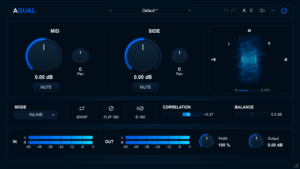 ADUAL is a free stereo utility plugin that provides Mid/Side monitoring, stereo analysis, and signal control tools for examining the behavior of stereo audio during mixing.
Its analysis and monitoring features can help identify unusual stereo relationships, investigate potential mono compatibility problems, and understand how different processing stages affect the stereo image.
Correlometer
The Correlometer displays the correlation between the left and right channels, helping you monitor changes in their relationship during playback.
Use it to identify sections where correlation decreases or becomes negative, particularly when working with stereo processing that may affect mono translation.
Pay particular attention to:
- Stereo chorus and modulation effects
- Wide synth layers
- Stereo percussion and samples
- Parallel processing and effects
- Stereo enhancement plugins
The meter can help identify sections that deserve closer inspection, but correlation readings alone do not determine whether a mix has a mono compatibility problem. Confirm suspected issues by listening to the signal summed to mono and checking whether important elements lose level, clarity, or tonal balance.
Vectorscope
The Vectorscope provides a visual representation of the stereo signal, helping you examine its width, distribution, and channel relationships.
Use it to monitor changes in the stereo image, identify unusually wide patterns, and compare the signal before and after stereo processing.
The display can help reveal how a widening plugin, modulation effect, or other stereo processor changes the image. However, vectorscope patterns should be interpreted in the context of the instrument, arrangement, and monitoring signal rather than treated as definitive indicators of mono compatibility.
MID MUTE and SIDE MUTE
The MID MUTE and SIDE MUTE controls allow you to isolate the Mid or Side component of a stereo signal for focused monitoring and troubleshooting.
MID MUTE: Removes the Mid component, allowing you to monitor the Side information independently. This is useful for examining stereo ambience, spatial effects, modulation, and other elements that contribute to the differences between the left and right channels.
SIDE MUTE: Removes the Side component, allowing you to monitor the Mid signal independently. This helps evaluate the central information of the mix, including vocals, bass, drums, and other elements that remain in the Mid component.
Isolating these components can help you understand how the stereo signal is constructed and identify elements that rely heavily on Side information. Use the controls for diagnosis rather than assuming that either component should always be minimized.
FLIP 180
FLIP 180 reverses the polarity of the stereo signal and can be used to compare how the signal behaves under inverted polarity.
This can be useful when investigating polarity-related interactions, comparing signal relationships, or checking how polarity inversion affects the sound when combined with other sources.
Keep in mind that reversing the polarity of both stereo channels simultaneously does not change their relative polarity or, by itself, resolve cancellation caused by summing the left and right channels to mono. Use polarity inversion as a diagnostic comparison and evaluate the result in the context of the complete mix.
A Practical Mono Compatibility Checklist
Before finishing a mix, use this checklist to verify that essential elements remain balanced, clear, and consistent when the stereo signal is summed to mono.
- Sum the entire mix to mono and listen for changes in tonal balance, level, or clarity.
- Check vocal intelligibility, presence, and level.
- Verify that the kick drum and bass retain their weight and definition.
- Listen to stereo synths, guitars, pads, and layered instruments individually in mono.
- Bypass stereo widening plugins and compare the results.
- Check chorus, delay, reverb, and other stereo effects for unwanted tonal changes or loss of presence.
- Monitor the phase correlation meter for sections that may require closer inspection.
- Use a vectorscope to examine stereo distribution and channel relationships.
- Isolate Mid and Side components when troubleshooting stereo signals.
- Check polarity and timing when working with duplicated tracks, layered recordings, or multi-microphone sources.
- Compare stereo and mono versions at similar perceived loudness.
- Recheck the master bus in mono after making corrective adjustments.
Mono Compatibility Is About Translation, Not Narrowness
A wide stereo mix is not automatically a good stereo mix. Stereo width alone does not guarantee clarity, balance, or reliable playback across different systems.
The objective is to create a stereo image that feels spacious, balanced, and intentional while preserving the level, tonal balance, and clarity of essential musical elements when the mix is played in mono.
Mono compatibility matters across a variety of playback environments, including streaming, mobile devices, small speakers, public address systems, television, and other systems where stereo information may be reduced or combined.
A mix that translates well to mono is more reliable because its essential musical elements remain audible and balanced without depending entirely on differences between the left and right channels.
You do not need to eliminate stereo effects or avoid creative widening. Instead, understand how those techniques affect the relationship between the channels and how the resulting signal behaves when summed to mono.
Check your mix in mono, identify the elements responsible for unwanted changes, and use phase correlation meters, vectorscopes, and Mid/Side monitoring to make informed mixing decisions.
Download ADUAL for free and use its Correlometer, Vectorscope, Mid/Side monitoring, and polarity controls to analyze stereo signals and investigate potential mono compatibility issues directly in your mixing session.

Evaluating stereo processing requires more than judging width or spatial impression. Phase relationships, channel correlation, frequency-dependent interactions, and signal summing can affect how a mix translates across different playback configurations. Understanding these factors is particularly important when assessing stereo effects, layered material, and processing that changes the relationship between the left and right channels.
Enjoyed this guide?
If you found it useful, you can support independent audio research with a coffee. ☕
Buy me a coffee