Vocal production involves more than controlling dynamics and correcting tonal imbalances. Detailed phrase automation, word-specific effects, layered arrangements, and transitions between vocal sections all contribute to the final result. While individual plugins can handle these tasks, managing a complex vocal chain across multiple processors can add unnecessary setup and editing time.
iZotope Nectar 5 combines corrective processing, dynamics, pitch tools, creative effects, and assisted mixing in a modular vocal-production suite. Released in November 2026, the new version introduces several notable additions: Moments, a text-based workflow for applying effects to individual words and phrases; a Serial Compressor; Vocal Stabilizer; and an updated Vocal Assistant workflow.
The significance of these changes lies less in the number of new modules than in how they affect the production process. Moments offers an alternative to manually creating and managing detailed vocal-effect automation, while the updated dynamics and stabilization tools aim to simplify established processing tasks. Whether these changes justify an upgrade depends largely on how much control an engineer needs over individual vocal phrases and how the existing Nectar workflow fits into their DAW.
This iZotope Nectar 5 review examines the suite’s documented features, practical applications, DAW compatibility, differences from Nectar 4, and position among alternative vocal-processing tools. It evaluates the practical implications of the documented features without presenting unverified listening results or independent performance benchmarks as established facts.
What Is iZotope Nectar 5?
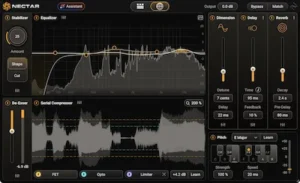 iZotope Nectar 5 is a vocal-processing suite developed by iZotope, part of Boris FX. It brings together tools for several stages of vocal production, including corrective processing, dynamics, pitch control, and creative effects.
Rather than operating solely as a conventional channel strip, Nectar 5 uses a modular architecture. Engineers can work with individual processors or manage multiple stages of a vocal chain through the suite’s central interface. This makes it suitable for both integrated vocal processing and more selective use within an existing DAW workflow.
The suite covers several areas of vocal production:
- Corrective processing: Equalization, de-essing, breath control, and gating.
- Dynamics: Compression, serial compression, limiting, and automatic level adjustment.
- Pitch processing: Pitch correction and related vocal-pitch tools.
- Creative effects: Reverb, delay, distortion, doubling, harmony, and stereo processing.
- Vocal production: Tools for shaping lead vocals, backing vocals, and layered arrangements.
- Assisted mixing: Vocal Assistant and Custom Flow for generating and refining processing chains.
- Word-level effects: Moments for applying creative processing to selected words and sections of a vocal performance.
The full suite includes 14 component plugins, so individual processors can also be inserted directly into a DAW’s signal chain. This is useful for engineers who prefer to keep EQ, compression, and effects in separate plugin instances rather than routing every vocal through a single, integrated interface.
Nectar 5 therefore serves two distinct roles: a centralized environment for building vocal-processing chains and a collection of individual processors that can be incorporated into an established mixing template.
What’s New in iZotope Nectar 5?
Nectar 5 is an evolution of an established vocal-processing suite rather than a complete departure from the previous generation. Nectar 4 already offered a broad range of vocal tools, including Vocal Assistant, Auto-Level, creative effects, and processors for vocal layering and unmasking.
The fifth generation focuses on expanding the editing workflow, refining access to existing processing tools, and introducing new ways to manage dynamics and phrase-level effects.
| Feature | What Changes in Nectar 5 | Practical Relevance |
|---|---|---|
| Moments | Text-based, word-level effects processing | Applies creative effects to selected words and phrases without relying exclusively on manual clip editing or conventional automation |
| Serial Compressor | Combines up to three compressors, limiters, or clippers in one processing stage | Allows multi-stage dynamics processing within a single module |
| Vocal Stabilizer | Adaptive tonal processing | Helps manage tonal variation across a vocal performance |
| Vocal Assistant | Updated analysis workflow and Custom Flow | Provides more control over suggested processing chains |
| Overview | Redesigned interface with centralized access to processing controls | Makes it easier to review and adjust the vocal-processing chain |
| Creative effects | Additional modes and filtering options | Expands control over effect tone and configuration |
These additions should not be confused with entirely new processing principles. Serial compression, adaptive tonal control, and automated vocal analysis are established techniques. Nectar 5’s main contribution is bringing these capabilities into a more integrated workflow, with Moments representing the most distinct change in how engineers can edit and apply effects to vocal performances.
Give Your Mix the Final Level of Clarity and Balance
Vocal processing can shape individual tracks, control dynamics, and create space for every phrase. Mastering brings the entire mix into focus, helping assess tonal balance, overall dynamics, stereo image, and how the finished track translates across different playback systems. If your mix is ready for its final stage, submit up to 40 seconds of audio and get a free mastering demo to hear how your material translates through our mastering process.
Get Your Free Mastering Demo →
Moments: Word-Level Vocal Effects Without Manual Automation
Moments is the most distinctive workflow addition to iZotope Nectar 5. Instead of locating individual words on a waveform and building effect automation around them, engineers can work from a synchronized transcription of the vocal performance. The concept is straightforward: select a word or phrase in the text and assign creative processing to that passage.
Moments uses vocal transcription to connect the displayed lyrics with their corresponding audio regions. This changes how effects are assigned, but not the underlying need to make decisions about timing, intensity, and context. The main advantage is potentially faster navigation and effect placement, particularly in arrangements with numerous vocal accents.
Seven creative effect types are available:
- Doubler: Adds a doubled-vocal texture to selected words, useful for emphasizing phrase endings without thickening the entire lead.
- Delay: Creates rhythmic echoes and isolated vocal throws, allowing individual words to carry into gaps between phrases.
- Reverb: Adds spatial emphasis to specific passages while leaving surrounding vocals comparatively dry.
- Preverb: Produces reverse-reverb-style effects for transitions and anticipatory vocal accents.
- Distortion: Introduces harmonic coloration or more aggressive textures on selected passages.
- Harmony: Adds harmonized vocal layers to emphasize particular words or phrases.
- Pitch: Applies creative pitch and formant manipulation to selected vocal passages.
Consider a pop production where several lines end with different delay treatments. One phrase might call for a short, tempo-synchronized repeat, while another needs a longer throw that extends into the following instrumental gap. A third might benefit from distortion or pitch manipulation rather than delay.
In a conventional DAW workflow, these decisions often involve send automation, dedicated effects returns, clip-based processing, or separate audio tracks. Each method provides precise control, but repeated edits can become cumbersome when dozens of words require different treatments.
Moments approaches the same task through the transcription. Selecting the relevant word provides a more direct starting point for assigning its effect, reducing the need to locate each passage manually in the arrangement. This is particularly useful when the production calls for frequent changes in vocal texture rather than a consistent effect across an entire track.
The distinction matters: selecting an effect is not the same as completing the automation. Engineers still need to evaluate how processed words transition into surrounding audio, whether effect tails interfere with subsequent phrases, and how the resulting levels and stereo placement interact with the arrangement. A delay throw that works in isolation can still mask the next vocal entrance or compete with an instrumental fill.
Transcription accuracy is another practical consideration. Word-based editing depends on how reliably the software identifies and aligns the performance. Slurred consonants, overlapping vocals, ad-libs, and heavily processed recordings may present challenges for transcription-based workflows. These are potential limitations of the approach, not independently verified shortcomings of Moments.
ARA compatibility is a significant restriction. Moments relies on Audio Random Access (ARA) integration and requires a supported DAW. According to iZotope’s current compatibility information, Moments supports Logic Pro (running under Rosetta), Pro Tools, Cubase, Nuendo, Fender Studio Pro, and REAPER through VST3 ARA. Ableton Live and FL Studio support the standard Nectar 5 processing features, but are not listed as compatible hosts for Moments.
This distinction is important because general Nectar 5 compatibility does not guarantee access to its transcription-based editing workflow. Before purchasing the suite specifically for Moments, engineers should verify their DAW version, operating system, and supported plugin format against the manufacturer’s current requirements.
For engineers considering Nectar 5 primarily for Moments, DAW compatibility should be established before evaluating the creative features. The value of word-level effects editing depends not only on the available processors but also on whether the workflow can be integrated into the sessions where it would actually save time.
Serial Compressor: Multi-Stage Dynamics in One Module
Serial compression is a well-established technique in vocal mixing. Rather than relying on a single compressor to control every aspect of a performance, engineers distribute gain reduction across multiple stages, each serving a different dynamic function.
A fast compressor can manage short-duration peaks, while a slower stage handles broader level variations and maintains a more consistent vocal envelope. Limiting or clipping can provide an additional stage of peak control when the signal requires it. The objective is to avoid forcing one processor to perform several competing tasks.
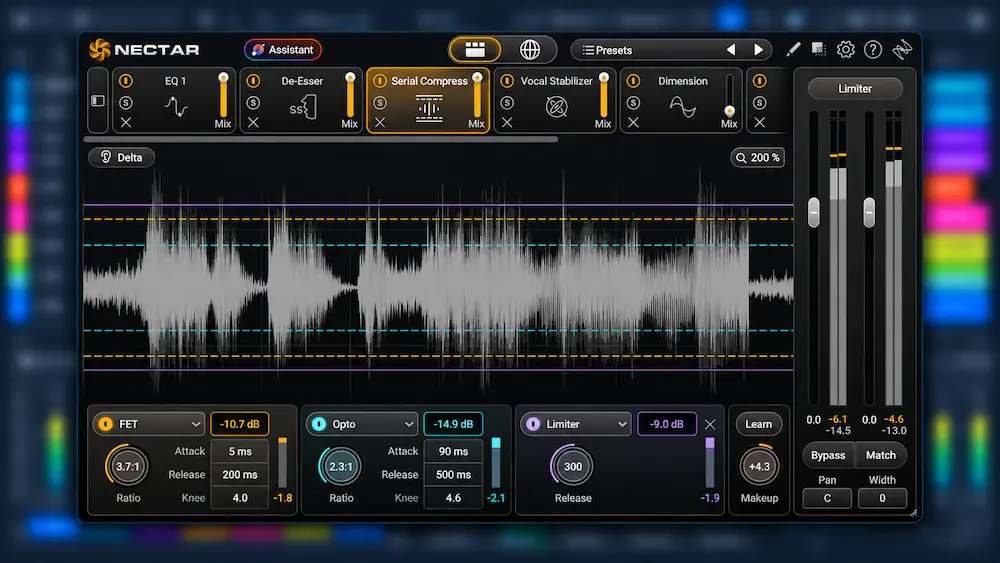
Nectar 5’s Serial Compressor brings this approach into a dedicated module that supports up to three compressors, limiters, or clippers. This allows engineers to build a multi-stage dynamics chain without inserting and configuring several independent processors.
The available configurations can accommodate different compression characteristics, including combinations of FET-style and Opto-style processing. The module also includes a Learn control for automatic makeup-gain adjustment, helping establish output levels after compression stages are configured. Consistent gain staging in mixing remains important for keeping signal levels predictable throughout the chain and making meaningful comparisons between processing stages.
In vocal production, this architecture is relevant when a performance combines inconsistent phrase levels, occasional transient peaks, and sustained passages that require more gradual level control. Separating these tasks across multiple stages can make gain reduction easier to manage than applying aggressive compression through a single processor.
The practical advantages are primarily related to workflow and configuration:
- Consolidated processing: Multiple dynamics stages can be configured within one module.
- More deliberate gain control: Peak management and broader vocal leveling can be assigned to different stages.
- Simpler session management: Engineers can adjust the chain without navigating multiple plugin windows.
- Flexible compressor combinations: Different compression characteristics can be combined within the same processing environment.
However, serial compression is not a new technique introduced by Nectar 5. It has long been available through conventional compressor chains, whether built with separate plugins or dedicated hardware units.
The distinction is workflow integration, not a demonstrated advance in compression performance. There are no independent comparative measurements establishing that Nectar 5’s Serial Compressor provides better transient preservation, lower distortion, or more transparent gain reduction than a carefully configured chain of third-party processors.
For experienced engineers, the relevant criteria are the module’s control flexibility, behavior at different gain-reduction levels, and how efficiently it fits into the broader vocal-processing chain. The presence of three dynamics stages in one interface is a workflow advantage; it is not, by itself, evidence of superior sound quality.
Vocal Stabilizer: Adaptive Tonal Processing
Vocal recordings rarely maintain a consistent tonal balance throughout an entire performance. Register changes, shifts in vocal intensity, variations in microphone distance, and differences in breathiness can all affect the frequency content of a take. These variations are particularly noticeable when a singer moves between restrained verses and more forceful choruses.
A static equalizer applies the same frequency response regardless of how the performance changes. Engineers can address tonal inconsistencies through automation or dynamic EQ, but both approaches require decisions about which frequency ranges need adjustment and when that processing should occur.
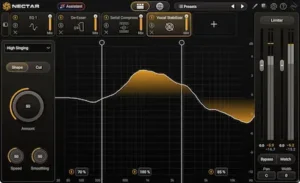
Vocal Stabilizer is Nectar 5’s adaptive EQ module, designed to shape tonal balance and dynamically reduce resonances as a vocal performance changes. Its controls include vocal style and register settings, Shape and Cut processing approaches, and adjustable amounts for individual frequency bands.
The intended application is to make tonal correction respond to changes in the recorded voice rather than relying exclusively on a fixed equalization curve. This may be useful when different sections of a performance exhibit noticeably different tonal characteristics, reducing the need to compensate for every variation with separate automation moves.
However, adaptive tonal processing should not be treated as a universal replacement for dynamic EQ, resonance suppression, or manual equalization. These approaches address related but distinct problems. A broad tonal adjustment may help maintain consistency across a performance, while overall frequency balance in the mix depends on how the vocal interacts with every other source across the spectrum.
The available documentation does not establish the module’s exact DSP architecture, filter topology, frequency-dependent gain limits, or detailed response characteristics. Without independent measurements and controlled listening comparisons, it would be premature to make claims about its precision, transparency, or sonic superiority over conventional dynamic EQ.
Its practical value ultimately depends on how effectively it controls unwanted tonal variation while preserving the natural differences in a singer’s performance. Consistency is useful, but excessive correction can also reduce the tonal movement and character that make a vocal expressive.
Vocal Assistant and Custom Flow
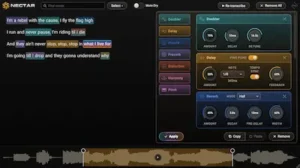 Vocal Assistant is designed to analyze a vocal recording and generate a suggested processing chain that engineers can use as a starting point for further mixing. Rather than replacing manual decisions, it provides an initial configuration that can be refined to suit the recording and the intended production style.
In Nectar 5, Custom Flow expands this workflow by giving users more control over the direction of the suggested processing.
Users can specify characteristics of the intended vocal treatment, including style, register, key, intensity, and atmosphere. They can also choose processing modules and use an acapella reference where appropriate. This makes the assistant less dependent on a generic one-click recommendation and gives engineers more influence over the type of processing it generates.
The distinction is useful for producers who want to accelerate initial setup without handing over control of the final mix. A relatively dry lead vocal, for example, may call for restrained dynamics and a more intimate presentation, while another performance may benefit from greater spatial depth, firmer level control, or more pronounced creative effects. Custom Flow provides a way to steer the suggested chain toward these different objectives.
However, an automatically generated chain is still a starting point, not a finished vocal mix. The suggested settings need to be evaluated in context, with particular attention to gain staging, vocal balance, sibilance, masking, and the relationship between the lead vocal and the instrumental arrangement.
A vocal that sounds polished in solo may still sit poorly in the full mix. Its apparent clarity, presence, and level can change considerably once competing instruments are introduced. Vocal Assistant can help establish an initial processing direction, but the final decisions still depend on critical listening within the complete arrangement.
The Overview Interface and Modular Plugin Architecture
One challenge with comprehensive vocal-processing suites is managing multiple processors without interrupting the mixing workflow. Adjusting dynamics, tonal balance, and effects often requires moving between different modules, which can slow down decisions when several aspects of a vocal chain need attention at once.
Nectar 5 addresses this through its redesigned Overview page, which brings key controls from the processing chain into a centralized interface. Instead of opening every processor individually, engineers can access important parameters from a single view and move into the dedicated modules when more detailed adjustments are necessary.
This creates two levels of control:
- Overview controls: Centralized access to key processing parameters for broader adjustments and workflow management.
- Individual modules: More detailed access to the controls and settings of each processing stage.
The modular architecture extends this flexibility beyond the main Nectar interface. Individual component plugins can be inserted directly into a DAW session without using the complete suite. This is particularly useful in established mixing environments where vocal tracks already follow a specific routing and processing structure.
For example, an engineer might use a dedicated equalizer before compression, insert a Nectar dynamics processor later in the signal chain, and route the vocal to separate reverb and delay buses. This allows selected Nectar processors to complement existing tools rather than requiring the entire vocal chain to be rebuilt inside one plugin.
The distinction is important: Nectar 5 can function as an integrated vocal-processing environment or as a source of individual processors within a custom signal chain. That makes its architecture more flexible than a workflow limited to a single, self-contained vocal channel strip.
Additional Effects and Processing Improvements
Beyond its three major additions, Nectar 5 introduces several refinements to its existing effects processors. These updates focus on expanding control over stereo effects, effect balance, and the interaction between the vocal signal and its processing.
The Dimension module adds Micro Pitch Shift functionality, including a new Dimension mode. A Wet Level control provides more direct control over the processed signal, while FX Ducking allows reverb and delay effects to respond dynamically to the incoming vocal signal. Nectar 5 also adds three-band filtering to its reverb, delay, and Dimension processing.
These refinements address common problems in vocal mixing. A long reverb tail can obscure the beginning of the next phrase, while an uncontrolled delay return may introduce excessive low-frequency buildup or compete with other elements in the arrangement. Filtering helps shape the frequency content of the effects, while ducking can reduce their prominence while the dry vocal is present.
The distinction is between controlling an effect at its source and correcting problems later in the routing chain. Having filtering, wet-level adjustment, and ducking available within the effects environment can reduce the need for additional routing and automation, although external processing may still be preferable when more detailed control is required.
These are workflow and control refinements rather than fundamentally new effects-processing techniques. Their value lies in making common effect-management tasks more accessible within Nectar 5, particularly when several vocal effects need to coexist without compromising intelligibility or phrase definition.
iZotope Nectar 5 vs. Nectar 4: Is the Upgrade Worth It?
For existing users, the most relevant comparison is between Nectar 5 and Nectar 4 Advanced. The previous generation already provides a comprehensive vocal-processing environment, including Vocal Assistant, Auto-Level, Voices, Backer, Vocal Unmask, and a broad selection of established processing modules.
That distinction matters when evaluating the upgrade. Nectar 5 does not introduce professional vocal processing to an otherwise limited product. It builds on an established feature set with additional processing options and changes to the way engineers interact with vocal recordings.
The main differences are concentrated in the following areas:
| Area | Nectar 4 | Nectar 5 |
|---|---|---|
| Vocal processing | Comprehensive modular processing | Expanded processing and workflow options |
| Word-level effects | No equivalent Moments workflow | Introduces Moments for transcription-based effects editing |
| Serial Compressor | Conventional dynamics processing workflow | Dedicated module supporting up to three compressors, limiters, or clippers |
| Vocal Stabilizer | No equivalent dedicated module | Introduces adaptive tonal processing |
| Vocal Assistant | Existing assisted-processing workflow | Updated workflow with Custom Flow |
| Interface | Previous interface design | Redesigned Overview page |
For engineers who primarily use Nectar for conventional equalization, compression, de-essing, and creative effects, Nectar 4 may already cover most of their requirements. The core argument for upgrading is not access to an entirely new category of vocal processing, but the convenience and functionality of the additional tools.
Moments is potentially the most compelling reason to move to Nectar 5, particularly for producers who regularly create word-specific delay throws, harmonies, and other localized effects. The Serial Compressor and Vocal Stabilizer may also be useful, depending on the existing dynamics and tonal-control workflow.
However, the value of these additions depends on actual usage. Engineers who rarely perform detailed word-level effects editing or already have an established collection of dynamics and tonal-processing tools may see less practical benefit.
There is little reason to upgrade automatically because a new version is available. Existing Nectar 4 owners should assess whether the specific workflow improvements in Nectar 5 solve recurring production problems that their current setup does not address efficiently.
Nectar 5 vs. Other Vocal Processing Plugins
Nectar 5 occupies a broad category of vocal-processing tools, but not all competing products approach the same production tasks. Some prioritize fast, integrated channel-strip processing, while others specialize in pitch correction, detailed audio editing, equalization, compression, or automated level control.
The most useful comparison is therefore not simply a feature count. It is how each product fits into an existing vocal-production workflow and whether its particular strengths justify adding another plugin to the processing chain.
Waves CLA Vocals
Waves CLA Vocals takes a more streamlined approach to vocal processing. Its workflow is built around a relatively straightforward interface for shaping a vocal without configuring an extensive chain of individual processors.
Nectar 5 offers a broader modular environment, with more processing stages and greater flexibility in configuring the vocal chain. CLA Vocals may be a better fit for engineers who prioritize speed and simplicity over detailed control of individual processing stages. The distinction is primarily workflow-oriented: a focused channel-strip approach versus a more comprehensive vocal-processing suite.
Antares Auto-Tune Pro
Antares Auto-Tune Pro is primarily designed for vocal pitch correction and tuning. Although Nectar 5 includes pitch-processing capabilities, the two products address different levels of the vocal-production process.
Engineers who require detailed control over pitch correction, tuning behavior, and note-level editing should evaluate a dedicated tuning environment. A comprehensive vocal suite may cover several production tasks, but that does not make it a substitute for specialized pitch-correction tools.
Celemony Melodyne
Celemony Melodyne specializes in detailed audio editing, particularly pitch and timing manipulation. Its note-oriented editing workflow allows engineers to work directly with individual notes and their musical characteristics rather than relying exclusively on real-time vocal processing.
Nectar 5 provides a broader collection of processing tools for shaping a vocal within a mix, whereas Melodyne is more focused on detailed performance editing. The products can therefore serve complementary roles in the same production workflow rather than functioning as direct replacements for one another.
FabFilter Pro-Q and Pro-C
FabFilter Pro-Q and Pro-C represent a more component-based approach to vocal processing. Rather than relying on an integrated vocal suite, engineers can build a custom signal chain using dedicated equalization and compression processors.
This approach offers detailed control over individual processing decisions and makes it easier to integrate the processors into an established mixing template. Engineers can choose exactly where equalization and compression occur, how much processing each stage performs, and how the individual plugins interact.
The trade-off is session management. Building and maintaining a complete vocal chain from separate processors requires additional plugin instances, configuration, and routing. Nectar 5 consolidates more of these functions into one environment, while a FabFilter-based chain provides a more independently configurable processing structure.
Waves Vocal Rider
Waves Vocal Rider addresses a narrower problem: managing vocal level variations through automated level adjustment. It is a specialized gain-control tool rather than a complete vocal-processing environment.
For engineers whose main concern is maintaining a more consistent vocal level before or alongside compression, a dedicated level-riding processor may be sufficient. There is little reason to introduce a full vocal suite when the actual requirement is limited to controlling level variations.
Nectar 5’s strongest competitive advantage is the integration of multiple vocal-production stages within one environment. Specialized alternatives can offer a more focused workflow for individual tasks, while Nectar 5 is intended for engineers who want a broader set of processing tools without assembling every part of the vocal chain from separate plugins.
Practical Applications in Vocal Mixing
Nectar 5 is designed primarily for vocal production, with different modules addressing specific stages of the mixing process. Its usefulness depends on the type of vocal material, the amount of processing required, and how much control the engineer wants to retain over individual elements of the signal chain.
Lead Vocal Processing
For lead vocals, Nectar 5 brings together equalization, de-essing, compression, tonal stabilization, and creative effects within one processing environment. This allows engineers to address several aspects of vocal balance without assembling the entire chain from separate plugins.
The Serial Compressor is relevant when a performance requires multiple stages of dynamic control, while Vocal Stabilizer offers an adaptive approach to managing tonal variation across different sections of a take.
Vocal Assistant can provide an initial processing configuration, but its recommendations still need to be evaluated against the instrumental arrangement. Effective vocal mixing depends on placement, intelligibility, and consistency within the complete mix, not simply on how polished the isolated track sounds.
Pop and R&B Vocal Production
Pop and R&B productions often depend on carefully arranged vocal layers, doubles, harmonies, and effects that change between individual phrases. In these styles, the lead vocal is frequently treated as an arrangement element rather than a single performance with consistent processing throughout.
Moments is particularly relevant to this workflow because it allows creative effects to be assigned to selected words and phrases through a synchronized transcription interface. This provides an alternative to building every localized effect variation through conventional automation and separate effects routing.
Word-specific processing can help create more deliberate transitions between sections, emphasize phrase endings, and introduce variation without applying the same effect treatment to the entire lead vocal. The effectiveness of this approach still depends on how the processed material interacts with backing vocals and the instrumental arrangement.
Hip-Hop and Electronic Music
Hip-hop and electronic productions frequently use vocal throws, distorted accents, pitch manipulation, and layered backing vocals as part of the arrangement. These treatments often need to change from one phrase to another rather than remain consistent across the entire performance.
Moments offers an alternative workflow for assigning localized effects, while Nectar’s other creative processors provide additional options for shaping vocal textures. This can be useful for building isolated accents and transitions without duplicating the entire vocal track for every effect variation.
DAW compatibility is an important consideration. According to the documented compatibility information, producers working in Ableton Live or FL Studio cannot use the ARA-based Moments workflow. The other Nectar 5 processing tools remain available, but this limitation affects one of the suite’s most distinctive features.
Backing Vocals and Vocal Layers
Backing vocals require careful control of tonal balance, dynamics, stereo placement, and spatial effects. When several vocal layers occupy similar frequency ranges, their combined energy can reduce clarity and compete with the lead vocal.
Nectar’s modular architecture allows engineers to apply a consistent processing approach across multiple vocal tracks while retaining the option to use individual component plugins in separate signal chains. This is useful when backing vocals require different treatment from the lead, rather than a duplicated version of the same processing chain.
However, additional processing cannot compensate for every arrangement problem. Excessive doubling, overlapping harmonies, poor timing alignment, and uncontrolled low-midrange buildup may require editing, selective muting, or arrangement changes. Adding more effects to an already crowded vocal arrangement can make intelligibility worse rather than improve it.
Compatibility and Technical Limitations
Plugin compatibility is an important consideration when evaluating a vocal-processing suite, particularly when some of its features depend on integration standards that are not supported by every DAW.
In Nectar 5, the standard processing modules and Moments have different compatibility requirements. Most of the suite’s processing functionality can be used independently of the Moments workflow, but the latter relies on Audio Random Access (ARA) integration.
This makes DAW compatibility particularly important. Ableton Live and FL Studio are identified in the launch documentation as unsupported for Moments. Users working in these applications can still access the other Nectar 5 processing tools, but cannot use its transcription-based, word-level effects workflow.
Before purchasing Nectar 5, engineers should check the manufacturer’s current system requirements and supported-DAW list, paying particular attention to their DAW version and operating-system configuration. General plugin compatibility does not necessarily guarantee access to every feature in the suite.
Processing performance is another area where independent data remains limited. There are no sufficiently documented independent benchmarks establishing CPU consumption, memory requirements, processing latency, or the performance impact of running multiple Nectar 5 instances in large sessions.
The same caution applies to audio performance. Without controlled comparative measurements, it is not possible to establish the precise distortion characteristics, transient behavior, phase response, or aliasing performance of the new processing modules relative to alternative processors.
These evidence gaps should not be interpreted as proof of poor performance. They simply mean that numerical performance claims and assertions of technical superiority would be premature without reproducible testing. For professional users, compatibility and system performance should be verified in the actual DAW environment rather than assumed from the suite’s feature list.
iZotope Nectar 5 Price and Value for Money
 At the time of the November 2026 launch research, iZotope Nectar 5 was listed at a regular US price of $249, with a promotional price of $179 available through December 7, 2026. The manufacturer also offered a 10-day trial.
Nectar 5 Elements provides Overview-level controls for seven modules, including EQ, Compressor, De-esser, Reverb, Delay, Dimension, and Pitch, alongside Vocal Assistant and Custom Flow. However, it does not provide access to the full module interfaces or include Moments, Serial Compressor, Vocal Stabilizer, the Mothership plugin, individual component plugins, Breath Control, or Melodyne essential. The full Nectar 5 edition unlocks these additional processing and editing capabilities.
This distinction matters when choosing between the two versions. Producers who primarily need basic vocal processing and assisted setup may find Elements sufficient, but those interested in word-level effects editing, multi-stage compression, adaptive tonal processing, or individual component plugins should evaluate the full Nectar 5 edition.
The value of the full version depends largely on how much of its processing environment an engineer will actually use. For producers who regularly need corrective processing, compression, creative effects, vocal layering, and word-specific treatments, having these tools in one suite can reduce the need to assemble and manage a chain of separate plugins.
The financial case is less compelling for engineers who already own dedicated processors covering most of these tasks. In an established studio setup, another comprehensive suite may duplicate existing functionality without delivering a meaningful improvement in workflow or processing capability.
Existing Nectar 4 owners should also check their registered iZotope accounts for eligible upgrade offers. Upgrade pricing may differ from the standard retail price and can depend on the license already associated with the account. The relevant comparison is therefore not simply the full retail price of Nectar 5, but the actual upgrade cost against the specific features the engineer expects to use.
Who Should Buy iZotope Nectar 5?
Vocal-focused producers: Nectar 5 is worth considering for producers who spend a significant amount of time working with vocals and regularly need several types of processing. Its integrated environment can simplify sessions that would otherwise require multiple independent plugins.
Recording and mixing engineers: The modular architecture and individual component plugins allow Nectar processing to be incorporated into established DAW signal chains. This is particularly useful when selected processors are needed without moving the entire vocal chain into the Nectar interface.
Home-studio owners: The suite can provide a broad collection of vocal-processing tools without requiring separate purchases for every processing stage. Its value is greatest when the included modules cover genuine gaps in an existing plugin collection rather than duplicate tools that are already available.
Electronic music and hip-hop producers: Moments and the creative effects modules are relevant for word-specific processing, vocal transitions, and sound design. However, the value of Moments depends on DAW compatibility, so producers using Ableton Live or FL Studio should not base their purchase decision on this feature.
Existing Nectar 4 owners: The upgrade makes the most sense when Moments, Serial Compressor, or Vocal Stabilizer address recurring limitations in the current workflow. If the existing version already covers the required processing tasks, Nectar 4 may remain a perfectly adequate solution.
Engineers with established specialist chains: Those who already have dedicated tools for dynamics, equalization, pitch correction, and effects may gain convenience from Nectar 5 without gaining substantially new processing capabilities. In this situation, the decision should be based on workflow efficiency rather than the size of the feature list.
Final Verdict: Is iZotope Nectar 5 Worth It?
iZotope Nectar 5 is a comprehensive vocal-processing suite whose most distinctive development is Moments. Its transcription-based, word-level effects workflow offers an alternative to conventional vocal automation, particularly in productions where individual words and phrases require different creative treatments. For engineers who regularly build detailed vocal effects, this is the update’s clearest practical advantage.
Serial Compressor and Vocal Stabilizer extend the suite with additional approaches to dynamics and tonal control. The updated Vocal Assistant and redesigned Overview interface also refine how engineers configure and manage processing within the suite. However, these additions are primarily workflow and integration improvements rather than evidence of fundamentally new processing techniques.
That distinction matters when assessing the upgrade. Serial compression is an established engineering technique, adaptive tonal processing is not exclusive to Nectar, and automated processing recommendations still require critical evaluation. A larger feature set does not automatically translate into better vocal mixes.
Moments also comes with an important compatibility restriction: its reliance on ARA limits availability to supported DAWs. Producers working in Ableton Live or FL Studio cannot use this feature according to the documented compatibility information. For these users, one of Nectar 5’s most significant additions is unavailable, which changes the value proposition considerably.
The buying decision comes down to workflow requirements. Nectar 5 is worth considering for producers and engineers who want an integrated vocal-processing environment and can make practical use of its new features. Existing Nectar 4 owners should be more selective: upgrading makes sense when Moments, Serial Compressor, or Vocal Stabilizer addresses a recurring production problem that the current setup does not handle efficiently.
Ultimately, Nectar 5 is a meaningful expansion of an established vocal-processing suite, particularly in the area of word-level effects editing. It offers additional workflow options, but it does not make conventional vocal automation, specialist processors, or engineering judgment obsolete.
Your Vocal Mix Is Built. Now Hear It in the Context of Mastering.
Nectar 5 gives you more ways to shape vocal dynamics, manage tonal variation, and create detailed word-level effects. But even a carefully processed vocal can sit differently once the entire mix is evaluated as a finished track. More plugins won’t necessarily resolve masking, uneven tonal balance, excessive dynamics, or translation issues across playback systems. The next step is to hear what mastering can bring to your actual mix. Upload up to 40 seconds and receive a free mastering demo prepared by a real mastering engineer. Compare the original and mastered versions directly, then judge the changes in context rather than relying on promises.
Submit Your Mix for a Free Mastering Demo →
Frequently Asked Questions About iZotope Nectar 5
What is the main new feature in iZotope Nectar 5?
Moments is the most distinctive addition. It uses a synchronized, text-based interface that allows users to select individual vocal words or phrases and apply effects such as delay, reverb, distortion, doubling, harmony, and pitch processing. This provides a more direct approach to detailed vocal effects editing than manually creating automation for every event.
Does iZotope Nectar 5 work in Ableton Live?
The standard Nectar 5 processing modules can be used in Ableton Live. However, Moments requires ARA compatibility and is not supported in Ableton Live according to the documented launch compatibility information. This means Ableton users can access the suite’s conventional processing tools but cannot use its word-level Moments workflow.
Does Nectar 5 work in FL Studio?
Nectar 5’s standard processing tools remain available in FL Studio, but the ARA-dependent Moments feature is not supported according to the documented compatibility information. The distinction is important: the limitation applies to Moments, not to the entire Nectar 5 suite.
Is Nectar 5 better than Nectar 4?
Nectar 5 adds Moments, Serial Compressor, Vocal Stabilizer, an updated Vocal Assistant workflow, and a redesigned Overview interface. These changes expand the suite’s processing and workflow options, but they do not establish universal sonic superiority over Nectar 4. For existing users, the upgrade decision should depend on whether the new features address specific needs in their vocal-production workflow.
Can Nectar 5 replace separate vocal EQ and compressor plugins?
Nectar 5 can handle many common vocal-processing tasks, including equalization and multi-stage compression. Its integrated architecture may reduce the need to assemble a chain from multiple third-party plugins. However, engineers who rely on specialized processors may still prefer dedicated tools for particular applications. Nectar 5 does not make separate EQs and compressors universally unnecessary.
Does Nectar 5 include pitch correction?
Nectar 5 includes a real-time Pitch module for vocal correction, while the full version also includes Melodyne essential for detailed, note-by-note pitch and timing editing. These tools serve different purposes: Nectar’s Pitch module provides real-time correction within the vocal-processing chain, whereas Melodyne essential offers a separate environment for more detailed offline editing. Engineers who need advanced pitch and timing control should evaluate whether the included Melodyne edition meets their requirements.
How many component plugins are included in Nectar 5?
The full Nectar 5 suite includes 14 component plugins that can be loaded individually in a DAW. iZotope also describes the complete package as containing 18 plugins in total, counting the Mothership plugin, Moments, Breath Control, and Melodyne essential alongside the 14 component plugins. These figures describe different parts of the package rather than two conflicting component-plugin counts.
How much does iZotope Nectar 5 cost?
At launch in November 2026, the full version was listed at $249, with a temporary promotional price of $179 through December 7, 2026. Prices and promotions can change, so check the manufacturer’s current product listing before purchasing.
Is Nectar 5 suitable for professional vocal mixing?
Its modular processing architecture, dynamics tools, creative effects, and individual processing components make Nectar 5 suitable for professional vocal-production workflows. However, the quality of the final mix still depends on the source recording, arrangement, processing decisions, and how the vocal is balanced and integrated into the complete production.

When evaluating vocal-processing tools, I look beyond the number of available processors. The important questions concern how predictably a chain handles gain reduction, tonal consistency, and effect levels without compromising intelligibility or the natural character of a performance. These considerations matter whether processing is applied to an individual track or integrated into a larger vocal arrangement.
Enjoyed this review?
If you found it useful, you can support independent audio research with a coffee. ☕