
Apple Digital Masters Mastering — Why Your Track Changes After Encoding
Apple Digital Masters mastering means your track sounds the same after AAC encoding as it did before it.
Your master sounds finished. Then it hits Apple Music — and changes.
Transients shift. Highs get harsher. Low-end loses stability. Same track. Different result.
It happens at the final stage — the one most producers never actually hear before release.
The only way to control that is to hear the encoded version — before release.
If you’re not controlling that stage, you’re approving a version your audience will never actually hear. Want to hear how your track actually translates after encoding? Run it through our mastering process and compare the result before and after conversion.
What you approve is what listeners actually hear — not a degraded version after upload.
What Apple Digital Masters Actually Controls (Not What Most People Think)
 What matters isn’t the file itself — it’s how it holds up after encoding.
Most people assume Apple Digital Masters is about hitting the “right” numbers before export. It’s not. What it actually controls is what happens after your master leaves the DAW — specifically, how it survives AAC encoding.
AAC doesn’t just compress your audio — it rebuilds it. And that rebuilding process is where most problems begin.
This is where most masters start to fall apart. A track can look perfectly safe in your session — and still break after encoding.
And that’s the core difference. Sample peak tells you what’s happening at discrete points in the waveform. True peak estimates what happens between those points — how the signal behaves when reconstructed in the analog domain or during encoding.
If you only control sample peaks, you’re missing the actual risk zone. AAC doesn’t care about your limiter settings — it cares about how the waveform translates after conversion. That’s why a master that looks perfectly safe at -0.1 dBFS can still distort once encoded.
That behavior starts at the end of the chain — especially in how limiting shapes the waveform, which we break down in the mastering chain.
Apple Digital Masters is built around that exact problem. It’s not about exporting a cleaner file — it’s about predicting how encoding will reshape your audio and adjusting the master so the final playback stays intact.
In other words, the WAV file isn’t the finish line — the encoded version is. If you’re not checking that stage, you’re not validating the final result.
Why Standard Masters Collapse After Apple Encoding
You hear this all the time in real releases. A track comes in sounding tight — controlled peaks, solid punch, nothing obviously broken. The limiter is doing its job, ceiling set around -0.1 dB, everything feels loud and competitive. Then it goes through AAC. And suddenly… it’s not the same record anymore.
This is where the released version stops matching what you approved.
Scenario one: clipping appears out of nowhere. Before encoding, the waveform looks clean. No red flags. But AAC reconstruction can push the signal beyond its original boundaries. Those “invisible” intersample peaks become real overs after conversion. The result isn’t subtle — you get brittle edges on kicks, vocals that crack on consonants, and a top end that feels strained instead of open.
That’s why “safe at -0.1 dB” doesn’t hold up in real playback. It’s only safe in the domain you’re looking at. Once encoding reshapes the waveform, that margin disappears.
Scenario two: transients lose definition. A limiter can lock peaks in place, but AAC doesn’t preserve them perfectly. It approximates. Fast attacks — especially in drums — can soften or smear slightly, depending on how aggressively the signal was pushed before encoding. What felt punchy in WAV starts to feel less precise, like the front edge of the sound isn’t landing the same way.
You’ll hear this most clearly on kicks and snares. The energy is still there, but the impact shifts. It’s subtle — until you compare directly.
Scenario three: highs turn harsh. This one surprises people. The mix wasn’t bright to begin with. But after AAC, certain high-frequency elements become edgy. Not louder — just harder. That’s because the encoding process simplifies complex harmonic content, and sometimes the result exaggerates what’s left instead of smoothing it out.
A vocal that felt clean starts to bite. Hi-hats get brittle. Air turns into glare.
Here’s where it actually breaks:
none of this is “random compression damage.” It’s a direct result of how the master was pushed before encoding.
When a limiter is driven hard, it creates a very specific waveform shape — dense, flattened, tightly packed. AAC then tries to reconstruct that shape with less data. The more extreme the original shaping, the more unpredictable the result becomes.
The pattern is always the same:
push the signal harder → increase waveform density → reduce reconstruction headroom → artifacts appear
This behavior starts before encoding — in how loudness shaping affects waveform density, which you can hear more clearly when you compare loudness shaping and clipping behavior in loudness vs clipping.
The mistake isn’t using a limiter. The mistake is assuming the limiter defines the final result.
It doesn’t. AAC does.
The Technical Requirements — And Why They Are Not Enough
 Apple gives you a clear checklist.
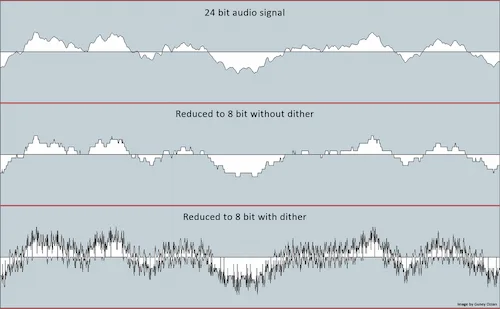
24-bit source. High-resolution file. True peak below a defined ceiling. No clipping.
On paper, it looks straightforward — follow the rules, deliver the file, done.
Apple gives you a clear checklist.
24-bit source. High-resolution file. True peak below a defined ceiling. No clipping.
On paper, it looks straightforward — follow the rules, deliver the file, done.
But here’s the problem: those requirements are not designed to guarantee a perfect result. They’re designed to reduce the risk of failure.
There’s a big difference between the two.
Take true peak as an example. Staying below the recommended ceiling helps prevent obvious distortion during encoding — but it doesn’t control how your waveform is reshaped by AAC. Two masters can sit at the same true peak level and behave completely differently once converted.
In real-world mastering, stable results often come with more conservative headroom — commonly around -1 dBTP or lower — to absorb reconstruction peaks that don’t appear in the original file.
One translates cleanly. The other starts to crack in the high end or loses low-end definition. Same numbers. Different outcome.
Bit depth works the same way. Delivering a 24-bit file preserves resolution before encoding, but it doesn’t protect the structure of your signal after compression. If the master is overly dense or aggressively limited, that extra resolution doesn’t stop AAC from simplifying it in a way that changes the sound.
Even format requirements — like avoiding unnecessary sample rate conversions — are about keeping the signal stable before processing. They don’t account for how that signal behaves during encoding.
Relying on specs alone leads to inconsistent results.
Requirements define boundaries. They don’t define translation.
In real sessions, we’ve seen tracks that fully comply with Apple’s guidelines still come back with audible issues after encoding — slight distortion on vocal peaks, hi-hats that feel sharper than intended, bass that shifts in weight. Nothing “wrong” by the numbers. But clearly different in playback.
Apple Digital Masters isn’t about passing a checklist. It’s about understanding how far you can push a master within those limits without triggering unwanted changes later.
So yes — you need to meet the requirements. But if that’s all you’re doing, you’re still guessing how the track will actually sound once it’s live.
What actually matters is simple: if your master survives AAC encoding cleanly, everything else is secondary. If it survives conversion cleanly, the numbers are already doing their job.
Apple Digital Masters vs Regular Mastering (Real Difference in Output)
On the surface, both approaches can look identical. Same loudness range. Same peak control. Same export quality. But once the track goes live on Apple Music, the difference becomes obvious.
Regular mastering focuses on how the track sounds in its final WAV form. If it feels balanced, loud enough, and clean — it’s considered finished. Apple Digital Masters takes a different position: the WAV is not the final version. It’s a source that will be reshaped by AAC encoding.
That shift completely changes how you approach the result. Because now the goal isn’t just to make the master sound right — it’s to make sure it stays right after conversion.
Here’s how that difference plays out in practice:
| Aspect | Regular Mastering | Apple Digital Masters Approach |
|---|---|---|
| Final reference point | WAV playback | AAC-encoded playback |
| Peak control | Sample / basic true peak | True peak with encoding margin awareness |
| Limiter behavior | Optimized for loudness in WAV | Adjusted to survive AAC reconstruction |
| High-frequency response | Balanced before export | Balanced with encoding artifacts in mind |
| Transient detail | Defined in original master | Tested after AAC conversion |
| Quality control | Monitoring inside DAW | Monitoring after encoding stage |
| Result after upload | Can shift, distort, or lose clarity | Remains stable and predictable |
In practice, the difference isn’t louder or cleaner — it’s more stable after encoding.
No unexpected harshness. No collapsing transients. No hidden distortion after upload.
That’s what determines the final playback result. Because listeners don’t hear your WAV file — they hear the encoded version.
And if the master wasn’t built with that stage in mind, what you approved in the studio isn’t what actually gets delivered to the audience.
What Actually Changes in Mastering for Apple Digital Masters
The tools stay the same — what changes is what you trust as the final result.
In a standard workflow, the master is judged inside the DAW. If it sounds right there, it’s approved. With Apple Digital Masters, that approach breaks — because the DAW version is not what the listener hears.
So the process changes in three critical ways:
You build in real headroom, not just for safety — but for reconstruction. Peaks that look controlled in WAV can rebuild above ceiling after encoding.
You treat limiting as a variable, not a final step. The harder the waveform is shaped, the less predictable it becomes after AAC.
And most importantly — you validate every decision against the encoded version, not the source file.
That distinction changes how the result is evaluated — not the tools, but the reference point you trust.
In practice, Apple Digital Masters mastering comes down to three decisions: leaving enough true peak headroom, controlling limiter density, and verifying the encoded result instead of the WAV.
How to Check Your Master Before Apple Conversion
 Most tracks aren’t failing because of bad decisions — they’re failing because no one actually listens to them after encoding.
Everything is approved in WAV. Clean meters, controlled peaks, solid tone. Then it’s uploaded… and that’s the first time the encoded version is heard.
Most tracks aren’t failing because of bad decisions — they’re failing because no one actually listens to them after encoding.
Everything is approved in WAV. Clean meters, controlled peaks, solid tone. Then it’s uploaded… and that’s the first time the encoded version is heard.
That breaks the entire evaluation process.
If you’re working toward Apple Digital Masters, the only version that matters is the one created by AAC. So the question becomes simple: how do you hear that version before release?
Step one: preview AAC, not just WAV. You need to run your master through an AAC encoder and listen critically to the result. Not casually — level-matched, back-to-back with the original. That’s where differences show up fast. A vocal that felt smooth suddenly has a sharper edge. Cymbals feel thinner. Low-end shifts slightly in weight.
Those aren’t random artifacts. They’re reactions to how the master was shaped before encoding.
Step two: analyze the signal after conversion. Meters inside your DAW are no longer enough. Once the file is encoded, the waveform is different. Peaks can rebuild. Density changes. If you don’t re-check the encoded file, you’re relying on measurements that no longer reflect reality.
This is where intersample behavior becomes obvious. A master that looked stable can show overs after conversion — not because anything clipped in your session, but because the encoding process reconstructed the waveform differently.
Step three: verify true peak on the encoded file. Not the original. The encoded version. That’s the only way to confirm whether your headroom actually holds up. In real-world cases, we’ve seen tracks sitting comfortably below ceiling in WAV jump past safe limits once converted — especially when the limiter was pushed hard.
If the signal is already pushed to its limits, encoding will expose that immediately — even if it wasn’t obvious before. This often comes from how much headroom and control was left before encoding — not always obvious until conversion.
The key shift is this:
you’re not validating your master — you’re validating the encoded playback.
And until you do that, you don’t actually know how your track will sound once it’s live.
If You Don’t Control the Encoding Stage — You’re Guessing
At this point, the pattern should be clear. You can shape a master perfectly inside your session — and still lose control the moment it hits AAC encoding. That gap between “approved” and “released” is where most issues appear. Not because the work was careless, but because the final stage wasn’t actually checked.
We approach mastering differently. Every track is evaluated not just in WAV, but after encoding — so what you hear before release matches what listeners get on Apple Music. No assumptions. No guesswork.
Free demo (up to 30 seconds). Real engineer. Real playback after conversion.
Common Mistakes That Break Apple Digital Masters
Most failures don’t come from lack of skill. They come from blind spots. The track sounds finished, meters look clean, nothing feels off — until it’s encoded. Then the problems show up in ways that weren’t obvious inside the session.
Here are the mistakes that consistently break translation.
Overdriving the limiter. This is the big one. Pushing loudness too far creates a dense, flattened waveform that looks controlled but leaves no space for reconstruction. AAC doesn’t preserve that shape exactly — it rebuilds it. And when the signal is already pushed to the edge, that reconstruction introduces distortion.
You’ll hear it immediately on playback. Kicks lose their edge and start to smear. Vocals get a slight crack on peaks. Highs feel tight and aggressive instead of open. Nothing extreme — just enough to make the track feel less solid and less controlled.
We’ve had cases where a master sitting at -0.3 dBTP passed all checks in WAV, but after AAC conversion produced consistent clipping on vocal peaks. Pulling it back by less than 1 dB completely removed the issue.
Skipping AAC preview entirely. A surprising number of masters are approved without ever hearing the encoded version. Everything is judged inside the DAW. That means decisions are based on a version of the track the listener will never actually hear.
When the encoded file finally plays back on Apple Music, that’s the first real check — and by then it’s too late to adjust anything.
Working only in WAV as if it’s final. This assumption breaks a lot of otherwise solid work. WAV is treated as the endpoint, when in reality it’s just the source for encoding. If you’re not analyzing what happens after conversion, you’re only validating half the chain.
We’ve seen cases where a master looked completely stable — no clipping, no obvious imbalance — but once encoded, subtle issues appeared across the spectrum. A slight lift in harshness on vocals. Low-end losing weight. Peaks behaving differently under pressure. None of it visible in the original file.
It always follows the same chain:
the mistake happens in mastering → the consequence appears after encoding
That cause-and-effect gap is where most engineers get caught. The decisions feel correct in isolation, but the outcome changes once the signal is processed again.
If you’ve ever had a track sound worse after release without a clear reason, it’s worth looking at how these problems develop in real sessions — especially in cases where the master already felt finished but still broke after release — something we break down in real cases in mastering problems.
Apple Digital Masters isn’t about avoiding mistakes in theory. It’s about catching how those mistakes translate when the file stops being what you originally exported.
Is Apple Digital Masters Certification Actually Required?
Certification is one of the most misunderstood parts of Apple Digital Masters. Some artists assume you need an officially approved engineer for your track to qualify as an Apple Digital Master. Others think it’s just a marketing label.
In practice, it’s much simpler than people think.
Apple Digital Masters certification is tied to engineers who have been trained and verified by Apple to follow their recommended workflow — including proper handling of high-resolution audio and encoding checks. It’s essentially a signal of trust: this person knows how to prepare a master that behaves correctly inside Apple’s system.
But here’s the part that matters:
certification doesn’t change how your audio sounds — the process does.
If a track is mastered with full control over encoding behavior, it can translate perfectly on Apple Music regardless of who did it. On the flip side, a certified workflow doesn’t automatically guarantee a flawless result if the actual decisions inside the master aren’t handled correctly.
We’ve worked on projects where tracks met every formal requirement — high-resolution source, correct peak control, everything aligned — yet still showed issues after encoding because no one actually evaluated the final AAC output.
That’s where the misconception comes in. Certification validates the engineer. It doesn’t validate the outcome.
So when does certification actually matter?
If you’re working with major labels or distributors that require formal compliance, it can be part of the delivery process. In those cases, it’s less about sound and more about meeting industry expectations.
For independent releases, especially in the US market, the listener doesn’t care who mastered the track — only how it sounds. And Apple’s system doesn’t reject a track just because it wasn’t handled by a certified engineer.
What matters is whether the master holds up after encoding.
If it translates cleanly, keeps its dynamics, and avoids artifacts once it’s live, it’s doing its job. If it doesn’t, certification won’t fix that.
So the real question isn’t “is the engineer certified?” It’s “does the master survive the platform it’s released on?”
Apple Music, Streaming, and Why ADM Still Matters in the US Market
In the US, Apple Music isn’t a niche platform — it’s one of the primary environments where finished tracks are actually heard. And unlike some other services, its playback behavior makes small mastering decisions more exposed.
Here’s the difference most people underestimate.
Spotify tends to normalize aggressively and smooth things out. That can hide certain issues — not fix them, but make them less obvious. Apple Music behaves differently. It preserves more of the original structure, which means anything unstable in the master becomes easier to hear after encoding.
That’s where Apple Digital Masters comes in. Not as a label — as a practical advantage.
If your master is built to survive AAC conversion, it holds together more consistently across Apple’s playback system. Transients stay defined. Highs don’t spike unpredictably. The low end doesn’t shift in weight from one playback scenario to another.
Without that control, the same track can feel slightly different depending on how it’s processed during streaming. Not dramatically wrong — but inconsistent enough to affect how it translates across headphones, phones, and consumer speakers.
And in a competitive market, that consistency matters.
When two tracks sit next to each other in a playlist, the one that translates cleanly across playback conditions feels more finished. Not louder. Not brighter. Just more stable. That perception alone changes how the track holds attention.
Apple Digital Masters isn’t about chasing specs — it’s about removing variables. Making sure the version people hear in real conditions matches what was intended in the studio.
Different playback systems reshape the same master differently — and Apple’s encoding tends to expose those differences more clearly. That’s where broader translation becomes critical in mastering for streaming platforms, and why platform-specific behavior — especially on Spotify mastering — leads to different decisions at the mastering stage.
But when it comes to Apple Music specifically, the margin for error is smaller. Which means the advantage of getting it right is bigger.
Final Outcome: What a Correct Apple Digital Master Should Sound Like
At the end of the process, none of the numbers matter if the track doesn’t hold up in real playback. Apple Digital Masters isn’t judged by meters — it’s judged by what actually comes out of the speakers after encoding.
So what does a correct result sound like?
First — peaks stay clean. Not just in the original file, but after conversion. No crackle on vocal edges. No brittle snap on drums. Loud sections remain controlled without that subtle “pressure” you hear when peaks start breaking under reconstruction.
Second — transients remain stable. The attack of a kick doesn’t soften. The snap of a snare doesn’t blur. Even after AAC encoding, the front edge of the sound lands where it should. You don’t get that slightly delayed or smeared feeling that often shows up when the master was pushed too far before conversion.
Third — the high end stays smooth. No unexpected sharpness. No artificial edge creeping into vocals or cymbals. What felt open and controlled in the studio still feels that way in playback — not brighter, not harsher, just consistent.
There’s also something less obvious but just as important: the track feels stable across different systems. Headphones, phones, small speakers — it translates without shifting character. Not perfect everywhere, but predictable.
That’s what actually tells you the master is working.
If the track feels the same after encoding as it did before, the job is done.
Not identical in waveform. Not identical in numbers. But identical in perception.
Because at that point, you’re no longer reacting to what the encoding did — you’ve already accounted for it.
Get a Master That Survives Apple Encoding
By now you’ve seen where things break. Not in the DAW — after encoding. That last stage is where clean masters turn unpredictable, where small decisions become audible problems. If that stage isn’t controlled, you’re approving a version no one will actually hear.
We don’t stop at the export. Every track is checked after AAC conversion to make sure the result holds — same punch, same balance, no surprises on release. You hear exactly how your track translates before it goes live.
Free 30-second demo. Hear the encoded version before you release.
FAQ
What is Apple Digital Masters mastering?
Apple Digital Masters is a mastering approach designed to control how your track sounds after AAC encoding on Apple Music. It’s not just about delivering a high-quality WAV file — it’s about making sure that file translates correctly once it’s processed by Apple’s system. The final listener doesn’t hear your original master. They hear the encoded version.
Do I need certification to release an Apple Digital Master?
No. Certification is tied to engineers, not the audio itself. A track can translate perfectly on Apple Music without being handled by a certified engineer. Certification can matter in label workflows, but for most independent releases, the actual result is what counts.
What true peak level should I use for Apple Digital Masters?
There’s no fixed number that guarantees safety. In practice, many engineers leave additional headroom — often around -1 dBTP or lower — to account for reconstruction peaks that only appear after AAC encoding.
Why does my track distort after upload?
Because the encoded version is different from the original. AAC reconstruction can introduce intersample peaks or alter waveform shape, especially if the master was pushed too hard. What sounded clean in WAV can become unstable after encoding — that’s where the distortion comes from.
Is Apple Digital Masters required for Apple Music?
No. Apple Music accepts standard masters. Apple Digital Masters is an optional process that improves how the track translates after encoding. It’s not required — but it directly affects how consistent your track sounds once it’s live.
Can I master for Apple Digital Masters at home?
Yes, but only if you’re checking the encoded result properly. That means previewing AAC, analyzing the file after conversion, and adjusting based on what actually changes. Without that step, you’re only hearing part of the process.
What’s the difference between WAV and AAC playback?
WAV is the original, uncompressed master. AAC is a compressed version rebuilt for streaming. During that process, peaks can shift, transients can change, and high-frequency detail can behave differently. The gap between those two versions is exactly what Apple Digital Masters is designed to control.