
Spotify Mastering — Why Tracks Fall Apart After Normalization and How to Prevent It
Spotify doesn’t improve your master. It recalculates it. Spotify mastering isn’t about pushing level — it’s about making sure the track survives normalization.
The track suddenly feels flatter — like the impact is gone.
Nothing was “damaged.” Your track just couldn’t hold up after adjustment. That’s the difference between a loud master and one that actually translates.
A master can sound loud in your DAW — and still fall apart the moment Spotify adjusts it. This is where loudness stops being the problem — and stability becomes the whole game.
If your track sounds worse on Spotify, it’s not a platform issue — it means the master wasn’t built for real playback conditions.
That means fixing it isn’t about pushing level — it’s about making sure the track holds up once it gets changed.
Why “-14 LUFS” Is a Misleading Target (And Why It Doesn’t Guarantee Translation)
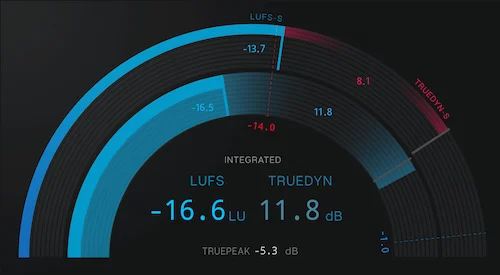 “-14 LUFS for Spotify.” Sounds simple. It isn’t.
That number gets repeated everywhere. Set your track there, and you’re “safe.”
That’s not how it behaves once it hits real playback.
One feels open, punchy, clear. The other? Flat. Smaller. Less defined.
Two tracks can show similar levels — and still fall apart in completely different ways once they hit streaming.
Level metrics only describe how loud a track is — not what holds up after Spotify changes it.
If you want to hear how that difference shows up in real tracks: loudness vs clipping in mastering.
A track that holds its shape and balance can feel louder — even after being turned down. Another track, pushed too hard, loses its shape. When Spotify reduces its level, all that’s left is a dense, lifeless signal.
Here’s where most masters fail: Loud masters aren’t punished — they’re simply leveled. And if the signal isn’t stable underneath, that recalculation exposes everything.
We’ve seen it in real sessions. Two masters delivered at nearly identical LUFS. One translates across playlists without losing impact. The other disappears next to reference tracks.
The difference isn’t the number — it’s how the track reacts after level changes.
If you want to see how that plays out in practice: LUFS mastering guide.
Chasing a target number won’t fix translation. What matters is how the track holds up after adjustment.
What Spotify Normalization Breaks First (And Why It Exposes Weak Masters Instantly)
Normalization doesn’t destroy your track. It reveals where it was already unstable.
The first thing that usually goes? Punch.
A kick that felt solid in your session suddenly feels softer. Not because it got quieter — but because its transient shape was already compromised. When Spotify levels the track, there’s no extra headroom left to carry that impact. The energy collapses into the body of the sound.
Next — the top end.
High frequencies are the most sensitive part of the signal. After encoding, anything overly pushed or poorly balanced starts to smear. Hi-hats lose definition. Air turns into noise. What felt “bright” becomes harsh or brittle.
That’s not a stylistic change — it’s the codec exposing what wasn’t controlled.
Low-end behaves differently, but the result is just as noticeable.
Bass that was tight in the mix can feel slower and less controlled. Instead of movement, you get a kind of static weight — like the groove lost its elasticity.
Then you hear it next to finished releases.
You play your track next to others on Spotify — same normalized level — and yours feels quieter. Not in meters. In impact.
That’s the real problem: not loudness, but presence.
All of this comes from the same place. When loudness is pushed without control, and the signal is already dense or unstable, normalization and encoding amplify those weaknesses.
In practice, Spotify acts like a stress test. If the master holds up, it translates everywhere. If it doesn’t — the platform makes that obvious immediately.
If a track fails this kind of stress test, it usually points to deeper structural issues in the master itself — the kind we break down in how to fix a bad master.
If you’ve run into these kinds of issues before, we break down the underlying causes in more detail here: mastering problems guide.
Why Two Tracks at the Same Loudness Sound Different (And Why Spotify Doesn’t Make Them Equal)
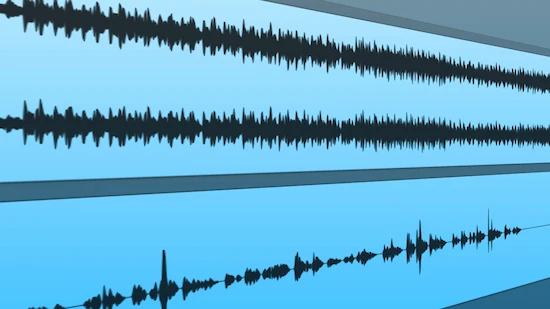 Match the LUFS — and you’ll still get two completely different results.
You hear this constantly when comparing real releases side by side. Two tracks, normalized to the same level inside Spotify. One feels open, punchy, alive. The other feels smaller, almost stuck in place.
Meters say they’re equal. Your ears say otherwise.
That gap comes from how the audio behaves — not how loud it is.
Start with whether the track keeps its movement after level changes. When that space is preserved, the track keeps its impact. Kicks hit. Snares snap.
Now take a master where everything has been pushed into the same range. The peaks are flattened. The body of the sound takes over. After normalization, there’s no contrast left — just density.
Transient clarity plays into this directly.
If the attack of a sound is well-defined, it cuts through even at lower playback levels. If that edge is softened or blurred, turning the track up won’t bring it back.
Then how the overall tone shifts after level changes.
A track that’s evenly distributed across lows, mids, and highs will feel stable after normalization. But if one area dominates — too much low-end weight, or an aggressive top — the whole balance shifts when the level changes.
Spotify doesn’t “equalize” tracks — it only aligns their level.
We’ve seen cases where a slightly quieter master actually feels louder in a playlist — simply because its internal balance holds together better.
What matters is not individual processing, but how the overall signal behaves after normalization. Not in terms of gear — but in how each stage shapes dynamics, tone, and transient response as a whole.
If you want to understand how those decisions stack up inside a real process, take a look here: mastering chain explained.
Spotify matches levels. Your listener hears what’s left.
If your track falls apart on Spotify — it’s not the platform
If your track loses punch after Spotify, the issue isn’t loudness — it’s the mastering decisions behind it. We’ll show you exactly how your track translates after normalization — using a real Spotify mastering service approach, not presets
No templates. No automation. Just real mastering decisions — based on your track.
What Actually Works for Spotify Translation (And Why It’s Not About Hitting a Target)
 Good Spotify mastering isn’t about hitting a fixed number — but it still needs a controlled range. In real-world projects, masters that translate well usually sit in a stable dynamic zone — not over-limited, not overly loose — with enough transient detail to survive normalization.
So what does a Spotify-ready master actually look like in practice?
It holds its punch after level adjustment, keeps clarity after encoding, and doesn’t collapse when played next to reference tracks in real playlists. Not louder on meters — but harder to ignore next to other tracks.
That doesn’t happen by accident.
Start with whether the track stays stable when its level shifts.
When the the internal motion of the track is shaped properly, Spotify can shift the level without collapsing the groove. The track still breathes. It still feels intentional.
Then how the attack of each sound holds up.
If the attack of your sounds is preserved, they cut through even after normalization. But if transients are already softened or over-limited, turning the track down exposes that immediately. What felt aggressive becomes dull.
High-end is where most masters fall apart.
Streaming codecs don’t treat highs gently. If the top end is pushed without control, it won’t translate — it will fragment. You’ll hear it as harshness, or worse, as a kind of digital haze.
At this stage, codec-aware decisions start to define the final result.
Keeping the high-end controlled so it survives conversion without turning harsh or unstable.
All of this comes back to one idea:
Spotify mastering isn’t about chasing a target number. It’s about whether your track holds together after it’s been adjusted.
We’ve had projects where a slightly more dynamic master translated better across playlists than a louder version of the same track. Same mix. Different decisions. Completely different outcome.
None of this works if the mix isn’t stable before mastering even begins.
If you want your master to translate, the foundation has to support it.
You can go deeper into that part here: prepare mix for mastering.
The goal isn’t to control Spotify. It’s to make your track stable enough that Spotify can’t break it.
Manual vs AI Spotify Mastering (Why One Adapts and the Other Guesses)
AI mastering can get you a result. It can’t guarantee how that result behaves on Spotify.
Tools like automated services analyze your file, apply a preset logic, and push it toward a target. Fast. Consistent. Predictable — in a generic sense.
But Spotify isn’t a controlled environment.
Your track gets normalized, encoded, and played next to completely different material. That’s where “good enough” starts to fall apart.
The limitation isn’t processing power. It’s context.
AI doesn’t know what your track is competing with. It doesn’t hear how your low-end interacts with real playback systems. It doesn’t adjust based on how transients will survive normalization.
It follows patterns. And patterns don’t account for edge cases — which is exactly where most translation problems live.
A human engineer approaches it differently.
Not by chasing a fixed outcome, but by reading the material. Where the energy sits. How the dynamics behave. What will hold up once the level shifts.
Sometimes that means pulling back instead of pushing harder. Sometimes it means leaving space where an automated system would try to fill it.
Because Spotify doesn’t reward uniform results. It exposes them.
In real comparisons, automated masters often look correct on paper — balanced, loud, clean — but lose definition the moment they hit streaming. Not broken. Just… generic.
And next to a well-controlled master, that difference becomes obvious.
Universal processing creates universal problems. Especially on a platform that standardizes playback.
How Different Mastering Approaches Behave on Spotify (Side-by-Side)
Different mastering approaches can look identical on meters — but once normalization and encoding kick in, the differences become obvious.
Here’s how they actually behave in real Spotify playback conditions:
| Approach | Loudness Stability | Transient Preservation | Spotify Translation Result |
|---|---|---|---|
| Over-limited mastering | Unstable after normalization | Severely reduced | Flat, loses punch and clarity |
| LUFS-targeted mastering | Moderately stable | Partially preserved | Inconsistent across playlists |
| AI mastering | Predictable but generic | Context-dependent, often softened | Clean but lacks depth and impact |
| Manual engineering mastering | Stable across normalization | Intentionally preserved | Consistent, punchy, and translates well |
Numbers alone don’t define the result. The way the signal is shaped before normalization determines how it survives after.
Spotify won’t fix it — but you can hear what actually works
If your track loses impact after upload, the only way forward is to test how it really translates. Send your track and get a free demo master (up to 30 seconds), shaped to hold up after normalization — not just inside your DAW.
Hear the difference after normalization — before you release.
Spotify Mastering FAQ (What Actually Matters in Real Playback)
What LUFS should I use for Spotify mastering?
There’s no single “correct” number. Spotify will normalize your track anyway. What matters is how your master holds up after that level shift. A balanced, controlled master will translate better than one chasing a target.
Does Spotify make tracks quieter?
Not exactly. It aligns playback levels across tracks. Some masters get turned down, others get turned up. The key difference is how they feel after that adjustment — not the number itself.
Why does my track sound worse after upload?
Because normalization and encoding expose weaknesses. Over-limited dynamics, unstable transients, or harsh high-end become more obvious once the track is processed for streaming.
Can AI mastering work for Spotify?
It can deliver a result, but it doesn’t adapt to how your track behaves after normalization. Without context, it often produces masters that look correct but don’t translate consistently.
Do I need separate masters for streaming?
In most cases, no. A well-built master should translate across platforms without needing multiple versions. The goal is stability — not platform-specific tweaks.