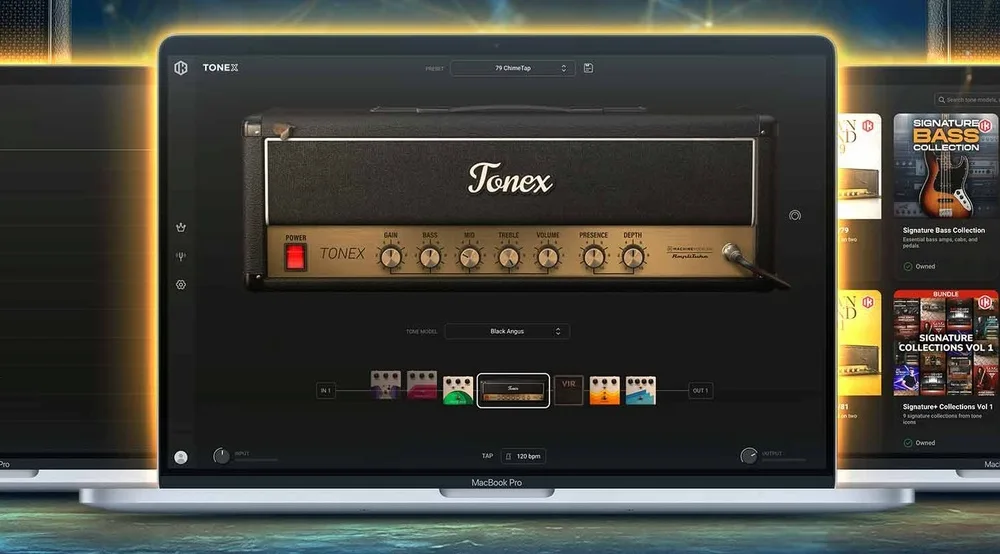
IK Multimedia’s TONEX 2.0 is not a new amp-modeling platform. The core capture-based technology remains the foundation of TONEX, while this release substantially redesigns the Player around search, library management, ToneNET integration and signal-chain workflow. For users with a large collection of Tone Models, that distinction matters more than the new version number.
TONEX has grown from a guitar amp-capture plugin into a large ecosystem of amps, pedals, presets and user-created models. The problem is no longer simply finding a convincing tone; it is finding the right one quickly, recalling it later and managing it efficiently inside a production session. TONEX 2.0 addresses that bottleneck with Smart Search, dedicated browsers, Favorites, custom folders, Recently Used content and a redesigned interface.
The result is a more practical production tool, but not a fundamental change in how TONEX models amplifiers. The new Player improves access to the technology that was already there. Whether that makes TONEX 2.0 a worthwhile upgrade depends largely on how heavily you rely on captured guitar and bass rigs in recording, reamping and mixing.
In This Review
- How We Evaluated TONEX 2.0
- How TONEX 2.0 Changes the Guitar Production Workflow
- Where TONEX 2.0 Earns Its Place in a Professional Session
- Where TONEX 2.0 Still Falls Short
- TONEX 2.0 vs. the Previous TONEX Player
- TONEX 2.0 vs. Neural DSP, Helix Native, Kemper and Quad Cortex
- How TONEX Guitar Tones Translate in a Real Mix
- TONEX 2.0 Pricing and Upgrade Value
- TONEX 2.0 Verdict
- Overall Rating
- TONEX 2.0 FAQ
How We Evaluated TONEX 2.0 for Real Production Workflows
This review evaluates TONEX 2.0 as a production tool rather than treating the release as a simple interface redesign. The focus is on the workflows where the update is most consequential: finding and recalling Tone Models, auditioning captures against a working arrangement, tracking DI guitar while monitoring through TONEX, reamping recorded performances, and revisiting guitar tones during mixing.
The Player was also considered in relation to the previous TONEX environment, with particular attention to library navigation, search, preset management and the practical distinction between captured rigs and modular amp-and-effects processing. The emphasis throughout is on production usefulness rather than isolated demonstrations, because a convincing solo guitar tone is not necessarily the most useful tone once drums, bass and vocals are in the mix.
CPU and latency are discussed conservatively. There is not yet enough independent TONEX 2.0 benchmark data to justify publishing a single CPU percentage or latency figure as representative across DAWs and systems. Where the evidence is incomplete, this review identifies the limitation rather than filling the gap with manufacturer claims.
TONEX 2.0 Tackles the Problem of a Growing Tone Model Library
 TONEX is no longer a small collection of amp captures. The platform now spans captured amplifiers, cabinets, pedals, complete rigs and a large volume of user-created content through ToneNET. That scale is useful when you need a very specific sound, but it also changes the production workflow: auditioning and organizing models can become a significant part of the job.
That is the problem TONEX 2.0 addresses most effectively. Smart Search, resizable browsers, Favorites, Recently Used content, custom folders, floating windows and deeper ToneNET integration are not new modeling techniques. They are library-management tools, and their value is measured in how quickly an engineer can get from a search result to a usable guitar or bass tone.
For a large session, that matters. If you are comparing several amp captures against a drum mix, switching between rhythm and lead tones, or revisiting a model used on an earlier version of a track, fast recall is more useful than another page of factory presets. TONEX 2.0 is designed around that kind of workflow rather than simply expanding the number of sounds available.
The update also leaves an important distinction intact: TONEX is still centered on captured rigs rather than unrestricted modular amp-and-effects construction. That makes its huge library of specific hardware captures the main attraction, while platforms built around independent amp, cabinet and effects blocks remain more flexible for complex signal-chain design. TONEX 2.0 makes its existing capture ecosystem easier to manage; it does not fundamentally change that architecture.
Hear What Professional Mastering Does to a Finished Mix
A strong guitar production still needs to translate as a finished record. If you want to hear how professional mastering can improve the balance, punch, depth, and overall translation of your mix, upload up to 35 seconds and get a free mastering demo. It gives you a direct before-and-after comparison without committing to a full mastering project.
Request your free mastering demo →
How TONEX 2.0 Changes the Guitar Production Workflow
The redesigned Home page is useful mainly because it brings the library, gear and signal chain into one working environment. The benefit becomes obvious once you stop treating TONEX as a simple amp selector and use it across an actual production.
A typical guitar workflow involves auditioning several captures, checking gain and low-end behavior against the drums and bass, saving viable candidates, and sometimes returning to those choices days or weeks later. With a large Tone Model library, the time spent finding and recalling sounds can become significant. TONEX 2.0 is designed to reduce that overhead.
Favorites and Recently Used are small additions, but they have practical value in repeat work. An engineer who regularly uses a few preferred clean, crunch and high-gain captures can return to them immediately instead of rebuilding the same search or browsing path. Custom folders extend that idea to project-specific organization.
Smart Search is more important at scale. ToneNET gives TONEX access to a huge range of user-created content, but a large library is only useful if you can narrow it down quickly. Searching for a specific amplifier type, gain character or application is considerably more efficient than auditioning models one by one.
The redesigned signal-chain view is less straightforward. The graphical layout makes the rig easier to read, but visual clarity does not automatically reduce the number of operations required to reach a parameter or change a setting. That matters in a production environment where an engineer may already know exactly what needs to change.
In other words, TONEX 2.0 improves the management of the TONEX workflow more convincingly than it changes the underlying workflow itself. It makes a large collection of captures easier to search, organize and recall, but it does not turn TONEX into a fundamentally more flexible modular guitar platform.
Where TONEX 2.0 Earns Its Place in a Professional Session
TONEX is most useful when the guitar tone needs to remain adjustable after the performance has been recorded. That makes DI tracking, reamping and tone replacement its strongest professional applications.
A guitarist can record a clean DI while monitoring through TONEX, keeping the performance independent from the amp choice. The monitored Tone Model provides the player with a finished-feeling sound, while the DI remains available for later changes. If the guitar needs more midrange, less compression, a different gain structure or an entirely different amp character during mixing, the performance does not have to be recorded again.
The same approach works for remote production. Instead of exchanging multiple printed amp tracks every time the guitar tone changes, the engineer can keep the DI as the source and make the tonal decision later. That separates the performance decision from the amp decision — a small change in workflow that can save substantial revision time on guitar-heavy projects.
That flexibility becomes particularly valuable when a project changes hands. A mix engineer receiving DI tracks does not need access to the original amplifier, cabinet or microphone setup to revisit the guitar sound. A suitable Tone Model can provide an alternative source tone directly inside the session, which is often more useful than trying to repair a fundamentally unsuitable recorded amp track with EQ alone. The same source-first approach can also extend upstream of TONEX: our Origin Effects EQDELUXE review examines how broad analog EQ before amp modeling can shape the signal before it enters the modeled chain.
That is where TONEX has the clearest professional value: not as a replacement for a well-recorded physical amp, but as a way to keep the amplifier decision reversible when the production requires it.
Where TONEX 2.0 Still Falls Short
 TONEX 2.0 improves the way you find and manage Tone Models, but it does not remove one of the platform’s fundamental limitations: TONEX is still built around captured rigs rather than a fully modular signal-chain architecture.
That distinction becomes obvious when a production requires several independent stages. A guitarist may want a specific captured boost before a specific amp, a separate cabinet treatment after the amp, or two different amp paths blended for a rhythm sound. In a fully modular system, those decisions are individual blocks in a routable chain. In TONEX, the captured model represents a more self-contained sonic state, which limits how freely those elements can be recombined.
That is not necessarily a problem if the goal is to reproduce a particular captured rig. It becomes a limitation when the engineer wants to build a tone that never existed in the original capture. TONEX is strongest at reproducing a specific piece of hardware or rig; modular platforms are stronger when the job is to construct a new signal path from independent components.
Helix Native is a useful contrast. Its architecture is designed around independent amps, cabinets, effects and routing, so building complex chains is part of the core workflow rather than something the user has to work around. TONEX takes the opposite approach: it prioritizes the character of a captured amp, pedal or rig over unrestricted signal-chain construction.
That trade-off is unlikely to matter during straightforward tracking, where a strong amp capture may be all that is required. It matters much more during detailed mixing, sound design and revision work, when an engineer may want to change one stage of the chain without changing the others.
There is a second limitation that no interface redesign can solve: the quality of the Tone Model still depends on the capture itself. A better browser cannot correct a poor source capture, excessive high-frequency fizz or an unconvincing cabinet response. TONEX gives you access to a huge number of models, but quantity does not guarantee that every model will translate into a finished mix.
That makes model selection part of the engineering process. The best-sounding capture in isolation is not necessarily the most useful one once guitars, vocals, bass and drums are competing for the same spectral space.
TONEX 2.0 Player Is Not the Same as the V2 Modeling Update
One distinction is easy to miss in the TONEX 2.0 rollout: the redesigned Player and the newer V2 Tone Models are related parts of the ecosystem, but they are not the same technical update.
The V2 models reflect developments in IK Multimedia’s capture and modeling process. They can therefore bring a sonic change that you can hear in the model itself, particularly when comparing newer captures with older ones. High-gain material is one area where differences in capture quality are more readily exposed, although most publicly available comparisons remain subjective rather than controlled measurements.
TONEX 2.0 Player is a different kind of release. Its main changes are the interface, search, library management, ToneNET integration and signal-chain workflow. Loading an existing Tone Model in the redesigned Player should not be treated as equivalent to running it through a new modeling engine.
That distinction matters when evaluating the update. The V2 generation concerns how newer Tone Models are created and how they can sound; TONEX 2.0 concerns how those models are found, organized, edited and used. The two developments improve different parts of the TONEX system.
For existing users, the practical implication is straightforward: if you are evaluating TONEX 2.0 for sound quality alone, listen to the newer V2 models rather than expecting the Player update itself to transform your existing library. If your frustration has been finding, managing and recalling sounds, the Player redesign is the more relevant part of the upgrade.
TONEX 2.0 vs. the Previous TONEX Player
| Area | Previous TONEX Player | TONEX 2.0 |
|---|---|---|
| Tone Models | Existing TONEX capture ecosystem | Same core ecosystem, with newer V2 models developed separately |
| Library Management | Functional, but increasingly cumbersome as the library grows | More structured browsing, search and organization |
| Search | Less efficient when working through large collections | Smart Search provides faster model and preset discovery |
| Favorites and Recall | Less central to the overall browsing workflow | Favorites and Recently Used content make frequently used models easier to recall |
| Project Organization | More dependent on the existing browser and preset structure | Custom folders provide a clearer way to organize personal and project-specific content |
| ToneNET Integration | Available, but more separated from the main browsing workflow | More tightly integrated into model discovery and management |
| Signal-Chain Flexibility | Limited by the captured-rig architecture | Still limited; 2.0 does not turn TONEX into a fully modular guitar platform |
| Core Modeling Approach | Capture-based TONEX workflow | Same fundamental approach; newer V2 capture/modeling developments are separate from the Player redesign |
The upgrade therefore makes the most sense for users whose problem is managing TONEX rather than users who are simply looking for a radically different amp-modeling engine. The larger the Tone Model library, the more meaningful the improvements to search, organization and recall become.
TONEX 2.0 vs. Neural DSP, Helix Native, Kemper and Quad Cortex
TONEX makes the most sense when the priority is access to specific captured amplifiers, pedals and rigs rather than maximum control over a modular signal chain. The alternatives below solve the same broad problem — getting convincing guitar tones into a production — but they approach it from different directions.
| Platform | Best suited to | Main advantage over TONEX | Main TONEX advantage |
|---|---|---|---|
| TONEX 2.0 | Captured amps, pedals, reamping and large Tone Model libraries | Less flexible for complex multi-stage routing | Large ecosystem of specific captured rigs and user Tone Models |
| Neural DSP | Focused amp-plugin workflows and fast track-ready tones | More controlled, purpose-built signal chains within individual plugins | Broader access to captured hardware and user-created Tone Models |
| Helix Native | Complex production, effects processing and modular routing | Much deeper routing, multiple amps and independent effects blocks | More emphasis on specific captured hardware rather than a general-purpose modeling environment |
| Kemper PROFILER | Studio profiling, live performance and hardware-based rigs | Dedicated hardware workflow, extensive routing and mature stage integration | Software-based workflow with a lower hardware commitment and direct DAW integration |
| Quad Cortex | High-end standalone modeling, live rigs and complex hardware setups | Standalone operation, physical control and extensive hardware routing | Lower entry barrier for a computer-based production workflow and a large ToneNET ecosystem |
The important distinction is not simply which platform sounds better. In a finished production, all of these systems can produce usable guitar tracks. The more consequential question is how much control you need after choosing the basic amp character.
TONEX is the strongest fit when the captured rig itself is the starting point. If you want to find a specific amplifier, cabinet or pedal capture, audition alternatives against a DI track and keep the source tone interchangeable during mixing, its model library is a major advantage.
Helix Native is the stronger choice when the signal chain is part of the sound-design process. Its architecture allows independent amp, cab and effects blocks, split paths, parallel processing and multiple amp configurations. That makes it considerably easier to build complex chains rather than starting from a captured state.
Neural DSP takes a more focused approach. Its individual plugins are designed around specific amplifier and effects combinations, with dedicated cab simulation, microphone controls and additional processing depending on the product. That makes them particularly efficient when you already know the type of amp sound you want and do not need a large capture marketplace.
Kemper remains a different proposition because the hardware itself is part of the workflow. Its profiling system captures the amplifier, cabinet and microphone chain, while the PROFILER architecture provides effects, routing and further control over the resulting Rig. For studios and touring players that need the same rig to move between recording and live use, that hardware integration is difficult to reproduce with a plugin alone.
Quad Cortex sits further toward the hardware end of the spectrum. It combines amp modeling and capture technology with standalone operation, physical control and a more extensive hardware signal-chain environment. It is therefore less of a direct TONEX Player replacement and more of an alternative approach to building a complete guitar rig.
For a professional studio, TONEX does not need to replace these platforms to be useful. Its strongest role is as a complementary source of captured amps and rigs. If a studio already has Helix Native, Neural DSP or Kemper, TONEX becomes compelling when its particular captures or ToneNET library solve a tone problem those systems do not solve as efficiently.
How TONEX Guitar Tones Translate in a Real Mix
 TONEX has no direct role in mastering. Its impact on the finished record happens earlier, when the amp and cabinet response become part of the recorded guitar tone. That makes the quality of the Tone Model less important than how well that tone survives the full arrangement.
A guitar capture can sound impressive in isolation and still be the wrong choice for a mix. A bright high-gain model may add the upper-mid density that makes doubled guitars abrasive once vocals and cymbals are present. A heavily saturated low-tuned model can sound massive on headphones but lose definition when it competes with bass and kick. The most convincing solo tone is often not the one that leaves the most space for the rest of the production.
That is why Tone Models should be auditioned against the actual arrangement rather than judged from isolated demos. The useful test is whether the guitar retains the required attack, sustain and harmonic density at the monitoring level used for the session, and whether it still occupies its intended position after the main bus processing is in place. These are source and mix decisions, and they should be settled before the track reaches the mastering stage.
Monitoring matters for the same reason. A capture with a smooth top end on one monitoring system may reveal excessive upper-mid energy or low-end buildup on another. This is not unique to TONEX; it is a normal consequence of making source-tone decisions before the mix is fully established. The model should be evaluated in context, not by how impressive it sounds through a single pair of headphones. Once those source and mix decisions are settled, the job changes: final tonal refinement becomes a mastering-stage decision, which is where tools such as the TK Audio TK-Lizer 3 are designed to operate.
Streaming and lossy encoding do not change how TONEX itself operates, but they can expose problems that were already present in the source. Dense high-frequency distortion and sustained harmonic content can leave less room for an encoder to work cleanly, particularly when the mix is already heavily limited. The way those decisions survive normalization, encoding and playback is part of the broader streaming mastering process, not a TONEX-specific problem. The correct approach is to control the source tone and mix before mastering rather than trying to compensate for it at the final stage.
CPU is a more practical consideration when several instances are running in a large session. TONEX is designed for real-time guitar processing, but there is not yet enough independent TONEX 2.0 benchmark data to establish a meaningful CPU or latency advantage over the previous Player. For critical tracking, the sensible approach is to keep the DI, use a buffer size that your interface and system can sustain reliably, and commit the modeled tone once the production decision is settled.
That workflow preserves the main advantage of software amp modeling: the performance is fixed, but the amp decision does not have to be.
Is TONEX 2.0 Worth Upgrading To?
For existing TONEX users, the upgrade makes the most sense if the library has become difficult to manage. The core modeling capability is not the reason to move to the new Player; the practical gain comes from finding, organizing and recalling Tone Models with less friction.
That distinction makes the upgrade highly dependent on workflow. An engineer with a small collection of regularly used captures may notice relatively little difference. Someone managing hundreds of models, presets and ToneNET downloads is more likely to benefit from Smart Search, Favorites, Recently Used content, custom folders and the redesigned browser system.
The public beta also changes how aggressively the update should be deployed. A production system that is already stable should not be replaced simply to gain a redesigned interface. Testing TONEX 2.0 alongside an existing installation is the safer approach until compatibility, preset handling and session reliability have been established across the DAWs and systems used for paid work.
New users have a different decision to make. The appeal of TONEX is not the 2.0 interface by itself, but the combination of captured hardware, user-created Tone Models, ToneNET and the ability to keep amp decisions reversible during recording and mixing. If that workflow fits the way you work, TONEX remains a strong alternative to conventional amp plugins and a useful complement to a larger guitar-production setup.
For active TONEX users, 2.0 is a worthwhile workflow upgrade rather than a mandatory sonic upgrade. For new users, the decision should be based on the TONEX capture ecosystem itself, not on the redesigned interface alone.
TONEX 2.0 Pricing and Upgrade Value
TONEX 2.0 Player is being offered as a free optional update for existing TONEX users, so the 2.0 release itself is not a separate paid upgrade. The cost question is mainly about which TONEX edition and Tone Model library you want access to.
| Option | What You Get | Who It Makes Sense For |
|---|---|---|
| Existing TONEX user | TONEX 2.0 Player update without buying the Player again | Current users who want the redesigned workflow |
| TONEX MAX | 1,250+ Premium Tone Models and unlimited user Tone Model downloads | Producers and engineers who want the broadest TONEX library |
| TONEX / TONEX SE | Lower-tier TONEX editions with smaller Premium Tone Model libraries | Users who want the TONEX workflow without paying for the full MAX collection |
TONEX MAX has a regular list price of $299.99, but IK Multimedia frequently discounts the software. At the time of this review, a July 2026 promotion had reduced MAX to $79.99. That makes the actual buying decision highly promotion-dependent rather than tied to a single permanent street price.
That pricing model changes the value calculation. Buying TONEX MAX at a deep discount can make sense if you expect to use the wider capture library for recording, reamping and mixing. Paying full list price is harder to justify for an engineer who already has a mature guitar-plugin setup and only needs a handful of amp sounds.
For existing TONEX users, the upgrade question is simpler: there is little financial reason not to install the Player update, but there may be a practical reason to wait if the current system is stable and the beta introduces workflow or compatibility problems. For new users, the more important decision is whether the TONEX capture ecosystem is worth buying into at all; the 2.0 interface alone is not.
Who Benefits Most From TONEX 2.0?
Recording engineers and guitar producers are the clearest fit. TONEX is particularly useful when DI tracking, reamping or late-stage amp changes are part of the workflow. The ability to keep the performance while changing the source tone can save a session from being locked to an unsuitable amp choice.
Mixing engineers will get the most from TONEX when guitar-heavy productions are a regular part of the workload. Rock, metal, alternative and pop sessions can benefit from having additional amp and cabinet options available without requiring the original hardware. For a generalist mixer who rarely needs to reconstruct guitar tones, it is a specialized tool rather than a core plugin.
Live players and hybrid studio/live setups are another strong use case, particularly when TONEX hardware is already part of the rig. The ability to carry captured sounds from the studio into a hardware-based performance setup gives the broader TONEX ecosystem an advantage over plugins designed purely for DAW use.
Mastering engineers have little reason to prioritize it. TONEX operates at the source-production stage, so it has no meaningful role in a conventional mastering-only workflow.
Producers already invested in Helix Native, Neural DSP or Kemper do not need to replace those systems simply because TONEX 2.0 has a redesigned interface. The stronger reason to add TONEX is access to specific captured rigs, ToneNET content or a reamping workflow that the existing setup does not handle as efficiently.
Electronic producers and beatmakers fall into the secondary audience. TONEX becomes useful when guitars, bass or amp-driven sound design are part of the production, but it is not a general-purpose production tool.
What Early TONEX 2.0 Users Are Saying
The early community response is useful because it exposes a weakness that a feature list cannot show: the redesign is not universally perceived as a faster workflow.
Positive reactions tend to focus on the cleaner organization, improved browsing and the fact that TONEX finally feels more manageable as its Tone Model library has grown. Other users are less convinced, particularly when previously obvious functions now sit behind additional windows, hover states or less obvious controls.
Preset and model management has also become an immediate discussion point. Early users have reported confusion around importing models and finding certain management functions, while others argue that the new interface is substantially easier to work with once its structure becomes familiar.
The more persistent criticism is architectural rather than cosmetic. Users continue to ask for the ability to combine multiple captured elements inside a single preset — for example, placing a captured boost before a captured amplifier or using more than one amp path. That request is important because it identifies a limitation the new browser cannot solve: TONEX is still fundamentally organized around captured states rather than a fully modular signal-chain architecture.
For that reason, the community response does not support a simple “2.0 is better” conclusion. It supports a narrower one: TONEX 2.0 is a substantial attempt to fix the software’s library-management problem, but whether the redesign feels faster depends on how heavily a user relies on browsing, importing and organizing large numbers of Tone Models.
TONEX 2.0 Verdict
TONEX 2.0 is most valuable when the size of your Tone Model library has become a production problem. Its advantage is not a new sonic category but faster discovery, recall and organization of captured rigs during recording, reamping and mixing.
For recording and mixing engineers working with guitars, that has real production value. Faster search, better organization and easier recall reduce the time spent auditioning and managing tones, while the underlying capture workflow keeps amp decisions reversible after tracking. That is particularly useful for reamping, remote production and guitar-heavy mixes where the original amplifier setup may no longer be available.
The limitations remain architectural. TONEX is still less flexible than a fully modular platform when a production requires complex routing, multiple independent amp stages or extensive effects chains. The new interface does not change that trade-off, and it should not be treated as a replacement for every guitar-production environment.
For a studio that regularly records or mixes guitar, TONEX 2.0 is a strong addition to the toolkit. For mastering-only engineers, it is largely irrelevant; for generalist mixers, its value depends on how often guitar tone reconstruction or reamping enters the session. Existing TONEX users with large libraries have the clearest reason to upgrade, while users already satisfied with Helix Native, Neural DSP or Kemper should add TONEX only when its captured-gear ecosystem provides something their current setup does not.
The bottom line: TONEX already had the compelling part — the captured sounds. TONEX 2.0 makes those sounds faster to find, organize and use.
Overall Rating
| Category | Rating |
|---|---|
| Sound Quality | 9/10 |
| Workflow | 9.5/10 |
| Mix Translation | 8.5/10 |
| CPU / Workflow Efficiency | 8/10 |
| Sound Design Flexibility | 7/10 |
| Value for Money | 9/10 |
| Overall | 8.5/10 |
Sound Quality — 9/10. TONEX remains a strong amp-capture platform, and high-quality Tone Models can produce convincing production-ready guitar and bass tones. The score is not higher because the result still depends heavily on the individual capture; a large library does not mean every model will translate equally well into a finished mix.
Workflow — 9.5/10. This is where TONEX 2.0 earns its highest score. Smart Search, Favorites, Recently Used content, custom folders, resizable browsers and tighter ToneNET integration address a real problem created by the size of the TONEX ecosystem. For engineers managing a large library, faster recall is a meaningful production improvement rather than cosmetic interface work.
Mix Translation — 8.5/10. TONEX can materially improve a guitar track when the original amp choice, gain structure or cabinet character is holding the mix back. The advantage comes from making the source tone replaceable, not from TONEX performing any automatic mix correction. The final result still depends on the selected model, arrangement, monitoring and downstream processing.
CPU / Workflow Efficiency — 8/10. TONEX is designed for real-time use and fits conventional DAW workflows, but there is not yet enough independent TONEX 2.0 benchmark data to justify a stronger score. This rating reflects practical usability rather than a measured CPU advantage over the previous Player. Actual system load will vary with the DAW, buffer size, sample rate, computer and number of active instances.
Sound Design Flexibility — 7/10. This is the clearest weakness. TONEX is excellent when the captured amp, pedal or rig is the starting point, but its architecture is less flexible than a genuinely modular guitar platform. Engineers who routinely build complex chains from independent amps, cabinets, effects and parallel paths will find systems such as Helix Native more accommodating.
Value for Money — 9/10. TONEX offers substantial value for producers and engineers who actually use captured hardware, reamping and the ToneNET ecosystem. The calculation is less compelling for users who already have a mature guitar-production setup and have little need for additional captured rigs. Its value therefore comes from the workflow it enables, not from the number of models on the product page.
TONEX 2.0 is not the most flexible guitar platform available, and it does not need to be. Its strongest combination is convincing captured hardware, a large ecosystem and a substantially improved way of finding and managing that material. For guitar-focused production, that makes it a serious professional tool; for users who primarily need unrestricted signal-chain design, the limitations are easier to justify elsewhere.
The Right Mastering Decision Starts With the Mix
A convincing amp tone is only one part of a finished record. Once the guitars, bass, drums, vocals, and dynamics come together, small problems in balance, depth, punch, and translation become much harder to judge from inside the production itself. Professional mastering brings an independent set of ears to those final decisions without changing what already works in the mix.
Don’t guess what your mix still needs. Upload up to 35 seconds and hear the same section mastered by a real mastering engineer. The free mastering demo gives you a direct reference for what can be improved before you commit to the full project.
Get your free mastering demo →
TONEX 2.0 FAQ
Can TONEX 2.0 be used for DI guitar recording and reamping?
Yes. This is one of its strongest production workflows. You can record a dry DI while monitoring through a Tone Model, then change the amp and cabinet sound later without re-recording the performance.
Will my existing TONEX Tone Models work in TONEX 2.0?
Existing TONEX content remains part of the TONEX ecosystem, but beta software can change how models, presets and user content are organized or recalled. If a commercial session depends on specific existing presets, verify them before moving the project to the beta.
Does TONEX 2.0 improve the sound of older Tone Models?
Not simply because they are loaded in the new Player. The Player redesign changes the software environment; sonic differences associated with newer V2 models come from the newer capture/modeling generation rather than from the redesigned browser or Home page.
Is TONEX 2.0 good enough for professional guitar recording?
Yes. High-quality Tone Models can be used as production guitar tones, particularly when the DI is retained for later reamping. The important variable is the individual capture and how it behaves in the arrangement, not whether the tone came from a physical amplifier.
Can TONEX 2.0 replace Helix Native in a studio?
It can replace it for some workflows, but not as a one-for-one substitute. TONEX is better suited to specific captured amps, pedals and rigs, while Helix Native offers deeper modular routing and a broader effects-based signal-chain architecture.
Is TONEX 2.0 useful if I already own Neural DSP plugins?
Yes, if you need access to captured hardware or ToneNET content that your existing plugins do not provide. There is little reason to replace a Neural DSP workflow that already covers your needs; TONEX is more compelling as a complementary source of alternative amp and cabinet tones.
Does TONEX 2.0 work well for bass as well as guitar?
Yes. Bass captures are part of the TONEX ecosystem, and the same DI/reamping workflow applies. The main consideration is whether the selected model retains enough low-frequency definition to remain distinct from the kick and bass elements already occupying the arrangement.
Is TONEX 2.0 CPU-heavy in large DAW sessions?
There is not yet enough independent benchmark data to give a reliable TONEX 2.0 CPU figure. Actual load varies with the DAW, buffer size, sample rate, computer and number of active instances, so large sessions should be tested on the system used for production rather than judged from a single published percentage.
Is TONEX 2.0 free for existing TONEX users?
Yes. The TONEX 2.0 Player update is offered as a free optional update for existing TONEX users. The main cost question is whether you want to expand to a higher TONEX edition, particularly TONEX MAX and its larger Premium Tone Model library.
Should I use the TONEX 2.0 beta for paid sessions?
Only after testing it against your existing workflow. If the current TONEX installation is stable, there is little production benefit in replacing it immediately with beta software. Test project recall, presets, Tone Model access and plugin behavior before moving commercial sessions to the new version.

Yurii Ariefiev evaluates audio software from the perspective of real recording, reamping, mixing, and mastering workflows, with particular attention to how source decisions translate into finished records.
This TONEX 2.0 review focuses on capture quality, Tone Model selection, DI and reamping workflows, mix translation, and the practical differences between captured rigs and modular amp-processing systems.