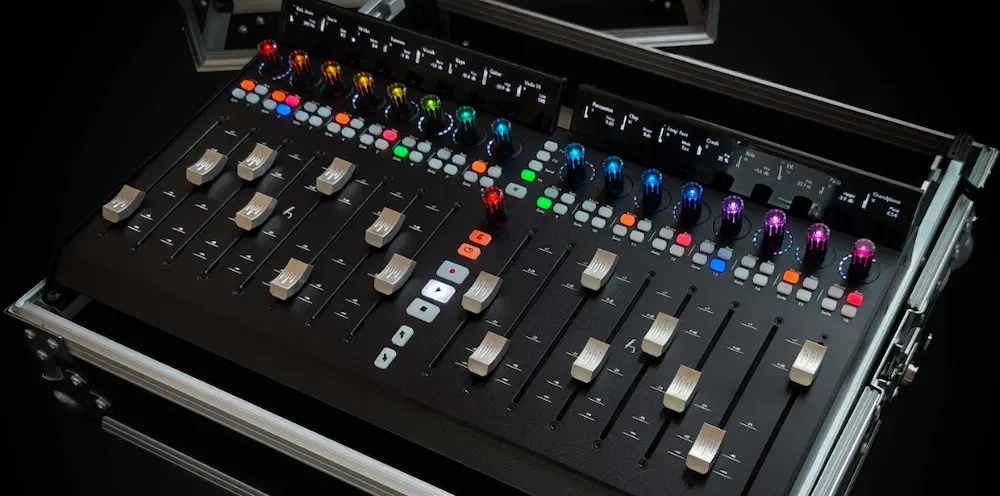
The Asparion D700 Rack is a 19-inch rackmount control surface built around 16 touch-sensitive 100 mm motorized faders, 17 RGB rotary encoders, 76 programmable buttons, and support for MIDI, Mackie Control, HUI, OSC, and MQTT. Unlike a conventional desktop DAW controller, it is designed to become part of a larger production system—whether that means a studio, touring rack, broadcast facility, or custom control installation.
The real question is not whether the D700 Rack has enough controls. It clearly does. The question is whether its rackmount format, multi-protocol architecture, modular expansion, and custom mapping justify the premium over simpler 16-fader controllers and more deeply integrated surfaces such as the Avid S1 and SSL UF8.
This review looks at the D700 Rack from that perspective: not as an audio processor, but as a piece of DAW control infrastructure. The emphasis is on tactile mixing, automation, protocol limitations, multi-DAW use, rack deployment, mastering workflows, and where the $2,349 RRP actually makes sense.
In This Review
Asparion D700 Rack Specifications
| Specification | D700 Rack |
|---|---|
| Motorized faders | 16 × 100 mm touch-sensitive |
| Fader resolution | Up to 12-bit / 4,000 steps |
| Rotary encoders | 17 RGB endless encoders |
| LED feedback | 16 LED rings with 15 LEDs each |
| Programmable buttons | 76 LED buttons |
| Display option | Optional D700S OLED modules |
| Control protocols | MIDI, Mackie Control, HUI, OSC, MQTT |
| Expansion | Up to 64 motorized faders |
| Computer connection | USB-C |
| Rack format | 19-inch |
| Primary applications | DAW control, live production, broadcast, media and custom control |
The important distinction is that these specifications describe the hardware’s control capacity, not the depth of integration available in every DAW. Asparion’s own documentation notes that compatibility can be limited by the application and protocol, so a supported DAW should not automatically be interpreted as providing identical functionality to a native control surface.
Bottom line: the Asparion D700 Rack is not primarily a premium way to get 16 motorized faders. Its premium is tied to the combination of 19-inch rack deployment, multi-DAW control, custom mapping, modular expansion, and MIDI, HUI, Mackie Control, OSC, and MQTT support. If you only need tactile DAW mixing, a cheaper controller is likely the better buy. If the controller has to operate as part of a larger production system, the D700 Rack becomes much more compelling.
D700 Rack vs. D700FT + D700F: What Actually Changed?
The D700 Rack is not a fundamentally new control architecture. It is the established D700 system packaged as a 19-inch rackmount unit with the same basic control philosophy and expansion path. Asparion’s support documentation confirms that when a dedicated Rack manual is unavailable, the Rack should be configured as a D700FT with one extension.
| Configuration | Best Use | Main Advantage |
|---|---|---|
| D700 Rack | Touring, broadcast, installed systems | 16 faders in a standardized 19-inch rack format |
| D700FT + D700F | Desktop studio systems | 16 faders with a more flexible desktop footprint |
| D700FT | Compact studio setups | 8 faders with transport and master controls |
| D700FT + additional D700F modules | Large mixing environments | Scalable physical surface up to 64 faders |
The practical difference is therefore deployment rather than a new generation of fader technology. If the controller is going into a touring rack, broadcast position, or permanent installation, the Rack format solves a real physical problem. If it is sitting on a studio desk, the original modular D700 layout can be the more logical choice.
Where a Rackmount DAW Controller Actually Makes Sense
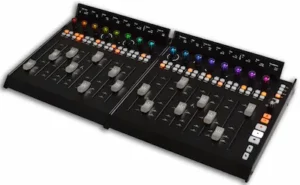 Most DAW controllers are designed to live on a desk. That works in a conventional studio, but it becomes less practical when the control surface has to live inside a touring rack, broadcast position, machine room, or permanent installation. In those environments, the physical format matters almost as much as the controls themselves.
That is the strongest argument for the Asparion D700 Rack. The underlying D700 platform is not tied to a single DAW or control protocol. It supports MIDI, Mackie Control, HUI, OSC, and MQTT, with Asparion’s Configurator and Connector software handling custom assignments and communication between the hardware and external applications. Asparion also provides configurations for a wide range of DAWs, including Pro Tools, Logic Pro, Cubase, Nuendo, Reaper, Ableton Live, Studio One, Bitwig, and others.
The distinction is important: the D700 Rack is less about having 16 faders than about being able to decide what those faders and controls actually do. In a studio that moves between DAWs, integrates external systems, or needs custom control beyond a conventional mixer, that flexibility can be genuinely useful. In a straightforward single-DAW mixing setup, it is much harder to justify the premium over a simpler 16-fader surface.
Hear What Your Mix Is Still Leaving on the Table
Better control during mixing is only part of the equation. The final master still determines how your finished track holds together in terms of balance, punch, depth, and translation. Upload up to 35 seconds of your mix and hear what professional mastering can change before committing to a full master.
Request your free mastering demo →
Where the D700 Rack Actually Improves a Mix
The D700 Rack does not touch the audio signal. There is no conversion, DSP, analog stage, or processing engine to evaluate, so its value has to be judged by what happens between the engineer and the DAW.
That matters most during automation. Sixteen 100 mm motorized faders let an engineer ride multiple channels at once, make simultaneous level moves, and work across a group of tracks without repeatedly switching between the mouse and individual on-screen controls. Vocal rides, drum balances, stem automation, parallel-processing levels, and bus moves are all more immediate when the controls are physically in front of you.
The D700’s faders offer up to 12-bit resolution, while each channel adds an endless RGB encoder, LED feedback, and programmable buttons. The modular architecture can also be expanded to as many as 64 motorized faders. Those specifications matter less individually than they do as a system: a large session can be divided into physical banks while the engineer keeps a consistent tactile workflow across the mix.
That is the practical advantage. The D700 Rack does not make mixing decisions for you; it reduces the amount of interface friction between hearing a problem and performing the move. The catch is that this is not unique to Asparion. A cheaper 16-fader controller can deliver much of the same benefit. The D700 has to earn its premium through its configuration options, protocol support, modularity, and rack-based deployment.
What 12-Bit Fader Resolution Actually Means
Asparion specifies up to 12-bit resolution, or roughly 4,000 steps, for the D700’s 100 mm motorized faders. On paper, that is a high-resolution control surface, but the number needs to be interpreted at the protocol level.
The fader hardware can report fine physical movements; that does not mean the DAW receives or acts on 4,000 equally useful positions in every configuration. HUI and Mackie Control have their own resolution and feedback limitations, while the amount of parameter information returned to the surface varies between DAWs. Asparion’s documentation also notes that certain display and parameter-feedback functions depend on the software and protocol in use.
So the 12-bit figure is best understood as a hardware-resolution specification, not a guarantee of 12-bit control over every DAW parameter. The distinction matters during automation: the physical fader can be very precise, but the effective resolution of the workflow is ultimately determined by the entire chain from the surface to the control protocol and the DAW.
That still makes the specification relevant. A 100 mm fader with fine positional sensing gives the engineer more physical control than a coarse or short-throw surface. It just should not be confused with deeper DAW integration or automatically superior automation resolution.
The D700’s Real Differentiator Is Its Control Architecture
The most interesting part of the D700 is not the number of faders. It is the control layer behind them.
Asparion’s Configurator allows individual controls to be reassigned, while the platform supports MIDI CC, Mackie Control, HUI, OSC, and MQTT. The Connector software extends that flexibility beyond conventional DAW control. OSC can link the surface to networked audio and media applications, while MQTT opens the door to automation and control systems that have little to do with mixing.
For a mixer working entirely inside one DAW, most of that capability will never be used. For a broadcast facility, live-production system, theater, or hybrid studio, it can be much more significant. The same physical controls can be assigned to different functions depending on the application instead of being permanently tied to a single mixer workflow.
This is where the D700 takes a different approach from something like the Avid S1. EUCON is designed around deep, high-level communication with compatible Avid software, giving the S1 a much tighter relationship with the DAW. Asparion gives up some of that integration depth in exchange for broader protocol support and user-defined control.
That tradeoff is central to the buying decision. If Pro Tools is the center of your studio and you want the surface to expose as much of the DAW as possible with minimal configuration, deeper native integration is usually the better solution. If the controller has to move between DAWs, media systems, live applications, or custom control environments, the D700’s broader architecture becomes considerably more valuable.
Why the 19-Inch Format Actually Matters
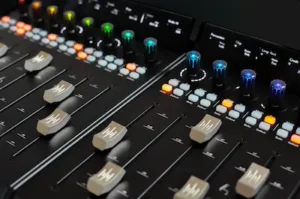 The D700 Rack’s most meaningful change is physical rather than electronic. A 19-inch chassis allows the controller to become part of the installation instead of taking up space as a desktop peripheral.
That matters in touring racks, broadcast control rooms, live-production systems, and permanent facilities where hardware is already organized around standardized rack infrastructure. The surface can be mounted alongside network hardware, digital audio equipment, computers, and other control devices, with the controls remaining accessible without adding another piece of furniture or a temporary desktop setup.
The distinction is particularly relevant for touring work. A controller that stays mounted in the rack is less dependent on the venue’s available workspace and easier to integrate into a repeatable system. For a fixed installation, the same principle applies: the D700 Rack becomes part of the room’s control architecture rather than something that has to be positioned and connected for each session.
The original D700 was already relatively compact, so the Rack version is not a major portability upgrade. Its value is deployment flexibility. If you do not need a permanent or rack-based installation, the 19-inch format offers little practical advantage. If you do, it is one of the few reasons the Rack version makes more sense than a conventional desktop control surface.
Asparion D700 Rack Price, Alternatives and Value
The value proposition gets much harder to defend once the specialized requirements disappear.
If all you want is 16 motorized faders for DAW mixing, $2,349 is a difficult price to justify. Controllers such as the PreSonus FaderPort 16 deliver the core tactile workflow for considerably less. The D700 Rack’s additional protocols and customization do not make basic fader rides, balancing, or automation inherently better; they make the controller useful in a wider range of systems.
The same tradeoff appears with the Avid S1 and SSL UF8. These surfaces take a more focused approach to DAW control. Avid’s EUCON ecosystem, for example, provides deeper integration with compatible software, while SSL’s workflow is built around a more tightly defined studio environment. The D700 takes the opposite route: less dependence on one ecosystem, more control over how the hardware is configured.
There is a second cost that does not appear on the specification sheet: configuration and maintenance. A highly programmable surface can save time once it is properly mapped, but creating those mappings, troubleshooting protocol behavior, and maintaining different configurations across DAWs can become part of the job. A turnkey controller may offer fewer possibilities while requiring far less engineering to keep working.
That is the fundamental tradeoff behind the D700 Rack. You are not paying $2,349 for 16 faders. You are paying for a configurable control platform. If you will not use that flexibility, the cheaper and simpler option is the more rational purchase.
What Existing D700 Testing Tells Us About the Rack
The D700 Rack is a new physical implementation of an established control platform, so independent testing of the original D700 is useful—but it should not be confused with a hands-on test of the Rack itself. The Rack-specific conclusions in this review are based on its published hardware architecture, software and protocol documentation, current support information, and the behavior documented in independent tests of the underlying D700 platform.
That distinction matters. The original D700 has already been tested by independent audio publications, including AMAZONA and Beat Magazine, with generally positive conclusions about its build, fader feel, modular design, and control flexibility. Those tests also identified practical issues such as fader calibration, software stability, configuration overhead, and the lack of some conveniences that become relevant in professional installations.
Those findings are useful context, not proof that the Rack has the same behavior. A proper Rack-specific test should still examine motorized fader synchronization, rapid banking, simultaneous automation, parameter feedback, reconnect behavior, and long-session stability under the exact DAW and protocol being used.
Is the D700 Rack Useful for Mixing or Mastering?
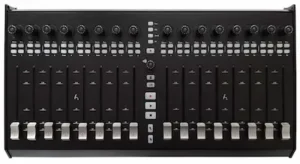 For mixing, the D700 Rack has a clear use case. Sixteen motorized faders are useful for vocal rides, drum balances, stem automation, bus levels, and dense sessions where several channels need attention at once. Physical faders also make it easier to perform simultaneous moves that feel awkward with a mouse, particularly during automation passes.
Mastering is a different calculation. A typical mastering session is parameter-driven rather than channel-driven, with far fewer independent channels competing for attention. That distinction between the two workflows is important when choosing a control surface; mixing and mastering serve fundamentally different roles, and the hardware requirements reflect that. You are more likely to need fast access to a handful of EQ, dynamics, gain, monitoring, and reference controls than 16 independent channel faders.
The D700 Rack becomes more interesting in a hybrid mastering setup where the engineer needs custom physical control over several applications, hardware processors, monitoring functions, or reference workflows. That kind of environment becomes more relevant when dedicated analog processors are part of the chain; for example, our TK Audio TK-Lizer 3 review examines a mastering EQ designed around broad tonal shaping, Mid-Side processing, and repeatable analog workflow. The D700 can provide a physical control layer around this type of hybrid setup, where MIDI, OSC, and user-defined mappings may be more valuable than the fader count itself.
For a dedicated mastering room, however, buying the D700 primarily for its 16 faders would be difficult to justify. The more interesting application is using selected controls for the processing stages that actually matter in a mastering chain—EQ, dynamics, gain, monitoring, and recall—rather than treating the surface as a 16-channel mixer. That is also why understanding how a mastering chain is structured matters when deciding whether a large programmable surface will improve the workflow or simply add hardware.
Asparion D700 Rack vs. Avid S1, SSL UF8 and FaderPort 16
| Controller | Best For | Main Advantage | Why Choose It Over the D700 Rack? |
|---|---|---|---|
| Asparion D700 Rack | Custom studio, live and installed systems | 16 faders, rackmount design, modular expansion and broad protocol support | Best choice when the surface needs to control multiple systems or applications |
| Avid S1 | Pro Tools and EUCON-based workflows | Deep DAW integration and detailed software feedback | Better choice when tight DAW integration matters more than protocol flexibility |
| SSL UF8 | Studio mixing and production | Focused DAW control and established SSL workflow | Better fit for engineers who want a dedicated studio control surface without the D700’s configuration overhead |
| PreSonus FaderPort 16 | Affordable 16-fader mixing | Large motorized surface at a substantially lower cost | Better value when the main requirement is tactile DAW mixing rather than system integration |
| Behringer X-Touch | Budget-conscious studios | Low-cost access to motorized fader control | Better choice when price matters more than premium construction and advanced customization |
The D700 Rack is not the obvious winner across this category. Each alternative makes a different tradeoff. The Avid S1 is more compelling when deep EUCON integration is the priority. The SSL UF8 takes a more focused studio approach, while the FaderPort 16 delivers the basic 16-fader workflow without requiring the D700’s price premium. The X-Touch goes in the opposite direction, prioritizing affordability.
The D700 Rack earns its place when the controller needs to function as production infrastructure rather than simply a DAW mixer. Its combination of rack mounting, modular expansion, custom mapping, and MIDI, HUI, Mackie Control, OSC, and MQTT support makes it the more flexible option for multi-system studios, live rigs, broadcast environments, and custom installations.
Why the D700 Rack Makes More Sense on the Road Than on a Desk
The strongest case for the D700 Rack is not a conventional studio mix position. It is a production system that has to be packed, transported, installed, and operated repeatedly.
A touring engineer can mount the controller alongside a rack mixer, playback computer, network hardware, and other control equipment instead of depending on whatever desk space is available at the venue. That matters more than it sounds. A repeatable rack layout reduces setup variables and keeps the physical control environment consistent from one venue to the next.
The same logic applies to broadcast and permanent installations. In those environments, a controller is infrastructure. Its physical location, mounting method, cable management, and relationship to the rest of the system can matter as much as the number of faders.
The D700 Rack is particularly interesting when it sits alongside equipment that already uses a rack-based architecture. A compact live system built around a rack mixer such as the Behringer WING, for example, can use the D700 as a dedicated physical control layer without turning the entire setup into a conventional console footprint.
That is a much stronger argument for the Rack than simply saying that it “saves desk space.” For a fixed studio desk, the advantage is minor. For a touring or installed system, it can change how the entire control position is designed.
Who Actually Benefits From the D700 Rack?
The D700 Rack makes sense when its physical control and configuration capabilities solve a specific workflow problem. It is much harder to justify as a general-purpose upgrade.
Mixing engineers are the most obvious studio users. If you perform a lot of automation, work on large sessions, and prefer physical faders to mouse-driven level moves, 16 motorized channels can materially change how you work. The value increases if you also move between DAWs or need custom control assignments.
Mastering engineers have less reason to buy it. Most mastering workflows are built around a relatively small number of parameters, so 16 faders are usually unnecessary. The D700 becomes more interesting only when it is being used as a custom control layer for monitoring, reference management, hardware routing, or multiple applications.
Professional studios, live engineers, broadcast facilities, and system integrators are where the D700 Rack has its strongest justification. Rack mounting, modular expansion, OSC/MQTT support, and custom mapping become meaningful when the surface has to operate as part of a larger production system rather than simply control a DAW mixer.
Home-studio producers and beginners are unlikely to get a sensible return from it. If the primary goal is simply tactile control over a DAW, considerably cheaper surfaces can provide the important part of that experience. Buying the D700 makes sense only when you can identify a specific workflow that its additional flexibility solves.
Asparion D700 Rack: Pros and Cons
Pros
- 16 full-length motorized faders in a 19-inch rackmount chassis
- Fine physical fader resolution with up to 4,000 steps
- Broad support for MIDI, HUI, Mackie Control, OSC, and MQTT
- Extensive control mapping and configuration options
- Modular expansion up to 64 motorized faders
- Well suited to touring, broadcast, live, and permanent installations
- Solid aluminum construction designed for professional use
Cons
- $2,349 is a substantial premium over simpler 16-fader controllers
- DAW integration is not equally deep across all supported protocols and applications
- Advanced customization can add configuration and maintenance work
- The 16-fader layout is excessive for many mastering workflows
- Much of the D700 Rack’s value depends on using its specialized control and installation features
Asparion D700 Rack Verdict: Who Should Buy It?
The Asparion D700 Rack is a strong professional control surface, but it is not a sensible upgrade for every studio. Its 16 motorized faders are useful; they are not what makes this $2,349 controller distinctive.
If you simply need tactile control over a DAW mixer, cheaper 16-fader surfaces can deliver most of the workflow benefit. If you work almost exclusively in one DAW and want the deepest possible software integration, a platform built around that DAW’s native control system may be the better choice. For most mastering engineers, 16 faders are also unnecessary.
The D700 Rack earns its price when the control architecture itself matters. Rack mounting, modular expansion, custom assignments, and support for MIDI, Mackie Control, HUI, OSC, and MQTT make it useful in multi-DAW studios, touring systems, broadcast facilities, and permanent installations where a conventional desktop controller is too limited or poorly suited to the physical setup.
That makes the D700 Rack a specialist tool rather than a universal studio upgrade. It does not improve the audio signal, and it does not automatically make mixing faster. Its value comes from giving an engineer or system designer a configurable physical control layer that can remain useful across different applications and production environments.
For a typical home or project studio, I would not buy it. For a professional facility that can actually use its rackmount format, modularity, and multi-protocol control, the D700 Rack is much easier to justify—and considerably more interesting than its raw fader count suggests.
Asparion D700 Rack: Independent Rating
| Category | Rating |
|---|---|
| Workflow | 9/10 |
| Control Flexibility | 9.5/10 |
| DAW Integration | 7.5/10 |
| Performance & Reliability | 8/10 |
| Build & Deployment | 9/10 |
| Value for Money | 6.5/10 |
| Professional Use | 9/10 |
| Overall | 8.3/10 |
Workflow — 9/10. Sixteen 100 mm motorized faders make the D700 genuinely useful for automation, stem balancing, bus rides, and large sessions where mouse-driven control becomes tedious. The gain is tactile access and reduced interface friction, not automatic improvement in mixing decisions.
Control Flexibility — 9.5/10. This is the D700’s strongest category. MIDI, Mackie Control, HUI, OSC, MQTT, custom assignments, and modular expansion give it a much wider role than a conventional DAW surface. The limitation is that flexibility only has value when the studio actually needs it.
DAW Integration — 7.5/10. Broad compatibility is not the same thing as deep integration. HUI and Mackie Control can cover the essential functions, but they do not expose every DAW feature with the depth of a native protocol such as Avid EUCON. The D700 gains breadth by giving up some integration depth.
Performance & Reliability — 8/10. This rating reflects the established D700 platform and available independent testing rather than a long-term hands-on test of the Rack itself. Earlier D700 testing identified calibration, responsiveness, and software stability issues, while the Rack-specific behavior remains less independently documented.
Build & Deployment — 9/10. The 19-inch rackmount format is a meaningful professional advantage rather than a cosmetic redesign. It allows the controller to become part of a repeatable touring, broadcast, live-production, or fixed-installation system. For a conventional desktop studio, however, much of that advantage disappears.
Value for Money — 6.5/10. At $2,349, the D700 Rack is expensive if judged simply as a 16-fader DAW controller. Less expensive surfaces can deliver the fundamental tactile mixing workflow. The price becomes easier to defend only when rack deployment, custom control, multi-DAW operation, or non-DAW integration are part of the actual requirement.
Professional Use — 9/10. The D700 is particularly convincing in environments where a control surface has to function as production infrastructure rather than just a DAW mixer. Touring systems, broadcast facilities, hybrid studios, and custom installations can exploit capabilities that would be largely unnecessary in a conventional project studio.
Overall — 8.3/10. The D700 Rack is a strong specialist controller whose value comes from architecture rather than raw fader count. It falls short of a higher overall score because its price is difficult to justify for straightforward DAW mixing and because broad protocol support does not guarantee deep integration with every application. For the professional environments it is actually designed to serve, however, the combination of rack deployment, tactile control, modularity, and protocol flexibility is unusually capable.
Your Control Surface Can’t Fix the Last 5%
A better mixing workflow can help you make faster, more precise decisions, but the finished record still has to survive outside the studio. Mastering is where balance, dynamics, low-end control, stereo image, and overall translation are evaluated as a finished piece—not just as another session on the screen.
If you’re unsure how much is still limiting your mix, don’t guess from another set of meters. Upload up to 35 seconds and hear the difference a real mastering engineer can make before paying for the full session.
Get your free mastering demo →
Asparion D700 Rack FAQ
Is the Asparion D700 Rack compatible with Pro Tools?
Yes. The D700 Rack can control Pro Tools through HUI, but HUI does not provide the same depth of integration as Avid’s EUCON protocol. If Pro Tools is your primary DAW, the difference in parameter feedback and software integration is worth considering before buying.
Can the D700 Rack be used with multiple DAWs in the same studio?
Yes. The D700 platform is designed for multi-DAW use, with configurations available for applications including Pro Tools, Logic Pro, Cubase, Nuendo, Reaper, Ableton Live, Studio One, and others. The important limitation is that available controls and feedback depend on the DAW and protocol rather than being identical across every application.
Does the D700 Rack require a specific DAW?
No. Its MIDI, Mackie Control, HUI, OSC, and MQTT support allows it to operate as a configurable control surface rather than a controller tied to one DAW. That flexibility is one of its main advantages over more tightly integrated surfaces.
Can the D700 Rack control software other than a DAW?
Yes. OSC and MQTT support extend the D700 beyond conventional mixer control into media, automation, live-production, and other custom control systems. This is particularly relevant in broadcast, installation, and touring environments.
Is the D700 Rack suitable for a professional live rig?
It is a strong candidate for a professional live rig, particularly when the controller needs to remain mounted in a 19-inch rack. The architecture is well suited to repeatable touring and live-production systems, but the exact setup should be tested with the intended DAW, protocol, and computer configuration before deployment.
Is the D700 Rack a good choice for mastering?
Usually not if the goal is simply to control mastering plugins. Most mastering workflows need a smaller set of high-value parameters rather than 16 channel faders. The D700 becomes more useful when it is assigned to monitoring, reference management, hardware routing, or other custom studio functions.
Is the Asparion D700 Rack better than an Avid S1?
Neither is universally better. The S1 is the stronger choice when deep EUCON integration is the priority. The D700 Rack is the more flexible option when you need rack installation, multiple protocols, custom mappings, or control across different applications and systems.
Is the Asparion D700 Rack worth $2,349?
Only if you need more than basic 16-fader DAW control. For straightforward mixing, less expensive surfaces offer better value. The D700 Rack earns its premium through its rackmount design, modular expansion, multi-protocol support, and ability to serve as a configurable control layer across professional production systems.

Yurii Ariefiev evaluates studio hardware from the perspective of real production workflow, with particular attention to mixing, mastering, automation, DAW integration, and the practical tradeoffs between tactile control and software-based operation.
This review examines the D700 Rack as a professional control surface rather than an audio processor, focusing on its usefulness for mixing, mastering, multi-DAW workflows, and rack-based production environments.