
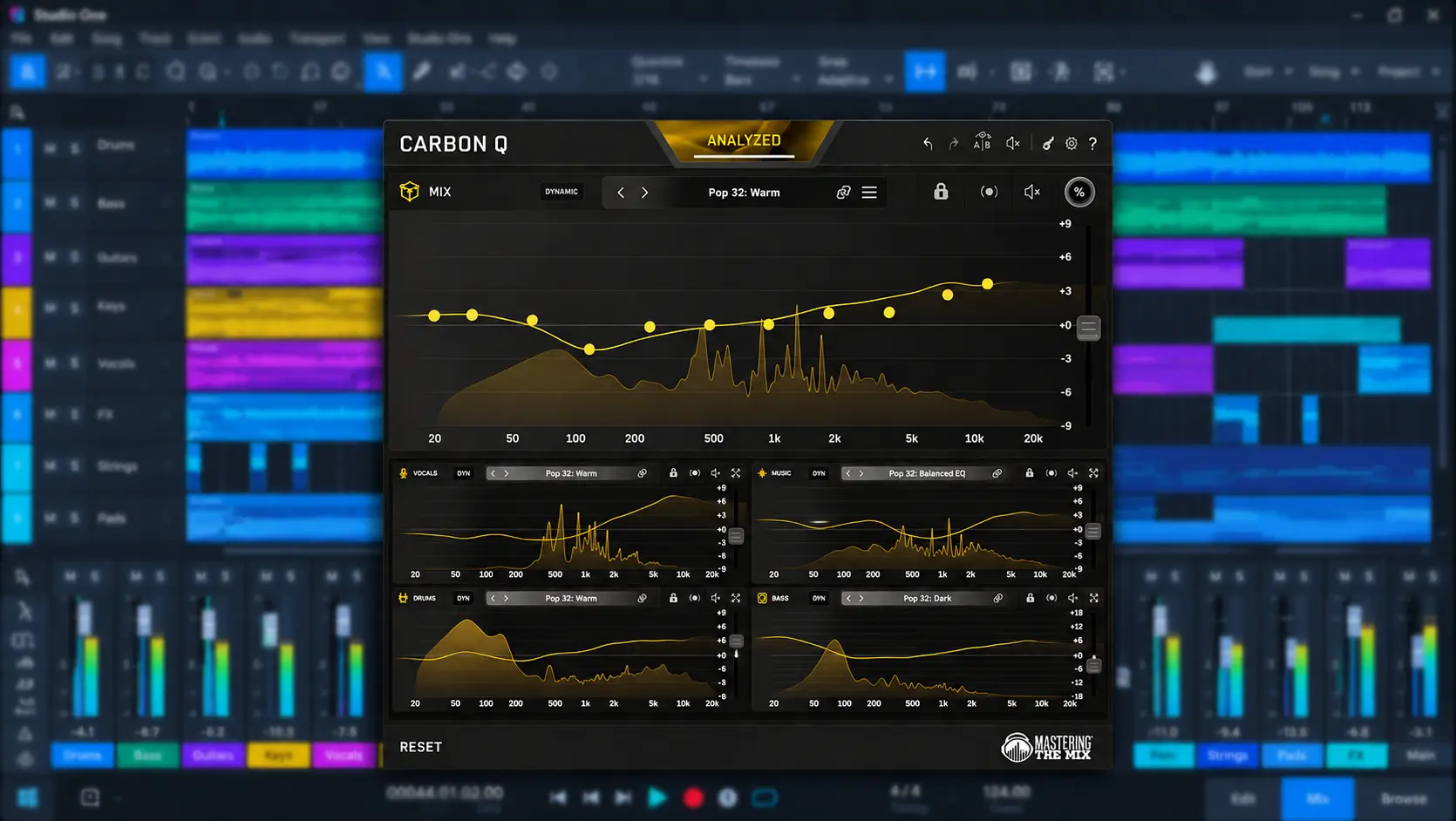
Mastering The Mix CARBON Q takes a different approach to EQ. Instead of treating vocals, music, drums, bass, and the mix bus as separate processing problems, it connects them within a session-wide workflow designed to manage tonal and level relationships between the major elements of a production.
Best for: Mixing engineers and producers working with organized vocal, music, drum, and bass buses who want to evaluate and shape the balance of the entire production rather than make every EQ decision independently.
CARBON Q is not a replacement for a conventional parametric EQ. Its 11 fixed frequency points favor broad tonal shaping over surgical correction, while reference-track analysis, Smart Presets, level matching, Dynamic Mode, and Mid/Side processing extend the system beyond a conventional fixed-band EQ.
The real question is therefore not how many EQ features CARBON Q provides, but whether its connected architecture solves a meaningful problem in a professional mix. This review examines its documented workflow, processing design, reference-based analysis, practical applications, and limitations, with particular attention to where the session-wide approach is genuinely useful and where a conventional EQ remains the better tool.
Review methodology: This is a launch-stage editorial review based on CARBON Q’s official documentation, manual, product information, and published technical measurements. It does not claim independent listening, CPU, latency, or stem-separation testing. Where performance has not been independently verified, the review identifies it as manufacturer-reported information rather than presenting it as a measured result.
Why CARBON Q Takes EQ Beyond Individual Channels
 Traditional EQ is primarily a local process. A vocal gets its own EQ, the drum bus gets another, bass gets another, and the mix bus may receive another. Each processor can be perfectly reasonable in isolation while the combined production still feels unbalanced.
That becomes a different engineering problem when the issue is the relationship between sources. A vocal may need more presence only because guitars are occupying the same midrange. A bass track can be technically controlled while still competing with the kick. A drum bus can sound powerful in solo but add excessive low-mid energy once the full arrangement is playing.
CARBON Q addresses that problem by connecting multiple instances assigned to VOCALS, MUSIC, DRUMS, and BASS with a MIX instance on the output. The important feature is therefore not the individual EQ curve. It is the shared session architecture that allows those decisions to be evaluated as parts of the same tonal and level relationship.
This distinction gives CARBON Q a specific role in a professional workflow. It is most useful when the mix is already organized into meaningful buses and the remaining problem is no longer simply “which frequency should I cut?” but “how should these major elements relate to each other?”
The Workflow Advantage Is Fewer Context Switches
With a conventional EQ workflow, an engineer may adjust the vocal, switch to the drum bus to hear the interaction, return to the bass, and then check the mix bus. The relevant relationships are maintained through repeated listening, comparison, and memory.
CARBON Q moves more of that comparison into a connected environment. The individual instances remain responsible for their own processing, but their relationship is visible within the same system. That can reduce unnecessary context switching when the engineering problem concerns several parts of the arrangement at once.
It does not make the decision automatically correct. Its value is that it makes a session-wide decision easier to organize, compare, and control.
What CARBON Q Actually Does in a Professional Session
CARBON Q is an 11-band EQ with fixed frequency points from 20 Hz to 12 kHz: 20, 30, 60, 120, 240, 480, 960 Hz, 1.92, 3.84, 7.68, and 12 kHz. Each band provides up to ±9 dB of gain.
That design defines the plugin’s role. CARBON Q is not a substitute for a surgical parametric EQ. Its fixed frequency points are not intended for tracking down a narrow vocal resonance, removing a specific drum-ring frequency, or making highly localized corrective moves. The emphasis is broad tonal shaping and level relationships between the major elements of a production.
In a typical workflow, CARBON Q can be placed toward the end of the processing chain on the relevant buses, with each instance assigned to a specific role and the MIX instance used to evaluate the overall balance. Positioning the plugin after the main bus processing also means its response reflects the signal at that point in the chain, rather than the unprocessed source.
This makes CARBON Q particularly relevant once the arrangement and major processing decisions are established. At that stage, many remaining problems are no longer about fixing an isolated frequency; they are about how the vocal, drums, bass, music, and mix bus interact as a complete production.
How CARBON Q Turns Reference Tracks Into a Mixing Starting Point
Reference-track workflows are hardly new. Engineers have level-matched commercial releases and compared tonal balance for decades. CARBON Q takes the process a step further by using reference analysis to generate a starting configuration for the connected mix rather than limiting the comparison to what can be seen on an analyzer.
The plugin can analyze a reference track, separate it into vocals, music, drums, and bass, evaluate their tonal and relative level relationships, and use that information to generate a starting preset for the session. Existing stems can also be supplied directly.
The important question is not whether CARBON Q can make a mix resemble a reference, but whether the resulting changes remain useful once the reference is treated as a directional target rather than an objective correction curve. A reference can identify a meaningful difference between productions, but it cannot determine whether that difference is appropriate for the arrangement, performance, genre, or artistic intent of the mix.
That distinction matters because a spectrum comparison shows what is different, but not necessarily where the difference originates. If a reference carries more upper-mid energy, the useful question is whether that energy comes primarily from the vocal, guitars, drums, or the interaction between them. CARBON Q is designed to bring that distinction into the same workflow as the EQ decisions.
There is, however, an important limit to any reference-based system: a reference is a point of comparison, not a specification for the mix.
The spectral profile of a finished record is inseparable from its arrangement, performances, dynamics, harmonic content, production choices, and monitoring environment. A darker mix is not inherently wrong because a reference is brighter, and a bass-heavy production does not need to be reduced simply because another record contains less sub energy.
A professional workflow is therefore better understood as:
Reference → analyze → identify the meaningful difference → make a controlled adjustment → listen again.
Not:
Reference → match everything → finished.
The value of CARBON Q depends on keeping that distinction intact. Its reference analysis can accelerate the process of identifying useful starting points, but the final decision still comes from listening to the production in context.
Hear What Your Mix Can Do Beyond the EQ Curve
A well-balanced mix is not only about tonal shaping. Clarity, low-end control, depth, stereo balance, dynamics, and translation all have to work together without one decision creating another problem elsewhere. If you want an experienced mastering engineer to evaluate where your mix stands, you can send up to 40 seconds for a free mastering demo. Upload up to 40 seconds for a free mastering demo →
Smart Presets: Useful Starting Points, Not Engineering Decisions
CARBON Q can analyze the current mix and generate ten Smart Presets based on the session and available reference material. Rather than loading a generic EQ curve, the presets are intended to suggest different approaches to the tonal balance and level relationships within the production.
The practical benefit is speed. When a mix feels slightly off but the source of the problem is not immediately obvious, several plausible starting points can be more useful than opening another EQ and building a solution from scratch.
For example, a dense pop arrangement may reveal a more effective vocal-to-music relationship through one preset, while an electronic production may expose a better balance between kick and bass. In a rock mix, another preset might make it easier to hear how much midrange the guitars are occupying relative to the vocal.
None of those suggestions should be treated as a target that the mix is required to reach. A preset can expose a useful direction without being the correct final setting, particularly when the production intentionally departs from conventional tonal balance.
That makes Smart Presets most useful as a decision-support tool. They reduce the time spent generating possible starting points, while the engineer remains responsible for deciding which, if any, of those directions serves the record.
Why Level Matching Matters When Evaluating EQ Changes
EQ comparisons are highly susceptible to loudness bias. Even a small increase in level can make a processed signal appear more detailed, open, or powerful, regardless of whether the underlying tonal change is actually better.
CARBON Q can level-match EQ moves and preset changes, making it easier to compare processing without allowing a change in output level to dominate the judgment.
This becomes particularly important with broad tonal adjustments. A 1 dB high-frequency boost, for example, may initially sound more exciting simply because the perceived level has changed. With the levels matched, the engineer can focus on whether the tonal shift actually improves clarity, balance, or translation.
For a professional workflow, that is a more meaningful feature than simply adding another set of preset curves. The value is not in making every EQ change sound impressive; it is in making the comparison more trustworthy.
Dynamic Mode and Mid/Side Processing
CARBON Q also includes Dynamic Mode, with a global amount control and three dynamic bands with adjustable crossover points, attack, and release.
The benefit becomes apparent when the tonal balance of a production changes significantly between sections. A vocal may become more aggressive in a chorus, a bass arrangement may generate substantially more low-frequency energy in a drop, or a dense drum section may push the upper midrange harder than a sparse verse. A static EQ curve has to make the same correction regardless of how strongly those frequencies are being presented.
Dynamic processing allows the selected ranges to respond to those changes instead of applying the full static correction continuously. Used conservatively, this can keep a tonal relationship more consistent without forcing the engineer to choose a compromise setting for every section of the arrangement.
The underlying technique is established. Dynamic EQ has been part of professional mixing for years. What is more relevant here is its integration into CARBON Q’s session-wide workflow, where dynamic control becomes another way of maintaining the tonal relationships established across the connected instances.
Mid/Side processing follows a similar principle. Rather than opening another processor for more targeted stereo correction, CARBON Q provides broad center-versus-side control within the same EQ environment.
This can be useful late in a mix when the engineer is evaluating the distribution of energy across the stereo field. For example, excessive low-mid information in the sides can reduce focus in the center, while excessive upper-frequency energy in the center can make the mix feel congested around vocals, snare, and other central elements. Mid/Side EQ provides a way to address those relationships without treating the stereo image as a separate problem from tonal balance.
CARBON Q Linear-Phase Filtering: Useful Technology With Important Caveats
 CARBON Q offers a maximum-quality linear-phase mode with approximately 41 ms of reported latency. That makes the setting relevant to mixing and mastering, but considerably less practical for low-latency monitoring during recording.
Mastering The Mix has published a comparison with another linear-phase EQ, reporting frequency-response deviation of approximately 0.13 dB under its specified test conditions, along with lower latency than the comparison configuration.
That is a useful engineering data point, but it should be treated as manufacturer testing rather than independent evidence of overall sonic superiority. Frequency-response accuracy in a defined test does not establish that one EQ will sound better than another across different sources, settings, or production contexts.
Linear-phase filtering is also not inherently superior to minimum-phase processing. It addresses phase rotation differently, while introducing its own time-domain behavior and, in this case, significant latency. The practical choice depends on the source, the processing goal, and whether preserving phase relationships is actually important for the particular EQ move.
The approximately 41 ms latency therefore matters more as a workflow constraint than as a specification to admire on paper. It is perfectly workable once the session is in the mixing or mastering stage, but it makes CARBON Q a poor choice for monitoring a vocalist or instrumentalist in real time while recording.
In practical terms, CARBON Q’s maximum-quality linear-phase mode belongs in the post-tracking part of the workflow, where latency no longer interferes with performer monitoring.
Where CARBON Q Falls Short
CARBON Q’s biggest limitation is also fundamental to its design: the EQ is deliberately constrained. Eleven fixed frequency points work well for broad tonal shaping, but they cannot replace a full-featured parametric EQ when the task requires precise corrective work.
If a vocal has a resonance at 3.71 kHz, a snare has a narrow ring around 684 Hz, or a guitar needs a targeted cut at 2.47 kHz, CARBON Q is not the first tool an engineer is likely to reach for. A conventional professional EQ remains necessary for surgical moves, narrow notches, and detailed frequency-specific correction.
There is a second, less obvious limitation: CARBON Q’s level controls do not replace the DAW’s actual channel faders. The plugin can establish relative output levels within its own processing, but it does not become a substitute for channel-level mixing or automation. The distinction matters when the goal is to change the actual balance of a session rather than simply adjust the level leaving the plugin.
Another structural limitation is the four-agent model. MUSIC is a single shared role for guitars, keys, synths, strings, and other instruments, so CARBON Q cannot independently optimize those sub-groups within the connected architecture. For arrangements where the instrumental bus contains very different tonal priorities, that constraint can reduce the usefulness of the session-wide approach.
The connected architecture also works best in an organized session. If a production already revolves around VOCALS, MUSIC, DRUMS, and BASS buses, the system has a clear structure to work with. In a session built from dozens of largely independent tracks with little bus organization, much of that advantage becomes less relevant.
Finally, reference-based workflows introduce their own failure mode: overcorrection. Moving a mix closer to the spectral profile of a commercial reference does not automatically make it a better production. Arrangement, instrumentation, performance, dynamics, and aesthetic intent can all justify substantial differences in frequency balance.
CARBON Q can make those differences easier to identify. It cannot determine which differences are intentional and which ones actually need correction.
CARBON Q vs. Pro-Q 4, smart:EQ 4 and Gullfoss
CARBON Q is easier to evaluate by the engineering problem each processor is designed to solve than by counting EQ features. These tools overlap in tonal shaping, but their workflows are fundamentally different.
| Tool | Best suited to | Key advantage | Main limitation |
|---|---|---|---|
| CARBON Q | Session-wide tonal and level balance | Connected VOCALS, MUSIC, DRUMS, BASS, and MIX workflow with reference analysis | Fixed frequency points and less flexibility for surgical correction |
| FabFilter Pro-Q 4 | General-purpose and surgical EQ | Precise frequency placement and highly flexible EQ control | Does not center its workflow on connected session-wide mix roles |
| sonible smart:EQ 4 | Intelligent spectral balancing | Automated and guided spectral shaping across individual processing tasks | Less specifically organized around CARBON Q’s fixed session roles |
| Gullfoss | Perceptual spectral shaping | Fast tonal enhancement through perceptual processing | Less explicit control over relationships between separate mix elements |
Choose CARBON Q when the main problem is the relationship between vocals, music, drums, bass, and the mix bus. Choose Pro-Q 4 when surgical frequency control and maximum EQ flexibility are the priority. Choose smart:EQ 4 when intelligent spectral balancing is more important than CARBON Q’s session architecture. Choose Gullfoss when perceptual spectral shaping is the primary objective.
In a professional session, these approaches can also coexist. A mixer can use a surgical EQ for resonances and corrective work, or an integrated processor such as FINN for broader track or bus shaping, then use CARBON Q to evaluate tonal and level relationships across the production.
CARBON Q Alternatives
The closest alternatives depend on the job rather than on price alone. FabFilter Pro-Q 4 is the stronger choice for surgical EQ and detailed corrective work. sonible smart:EQ 4 is better suited to intelligent spectral balancing. Gullfoss takes a more perceptual approach to tonal shaping. CARBON Q is the more specialized option when the primary problem is coordinating tonal and level relationships across a structured mix.
A Practical CARBON Q Mixing Workflow
A useful CARBON Q workflow starts with session organization, not presets.
Where the production allows it, organize the main elements into four connected roles: VOCALS, MUSIC, DRUMS, and BASS. Place the corresponding CARBON Q instances at an appropriate point in each processing chain, then use the MIX instance on the output to evaluate the combined result.
The corrective work should come first. Narrow resonances, harshness, obvious masking, uncontrolled low-end buildup, compression problems, and arrangement conflicts are better solved with dedicated processing or by changing the source itself. A broad tonal-balance system should not be used to compensate for problems that originate elsewhere in the mix. The same principle applies when preparing a finished mix for mastering: what is fixed before mastering is often more important than what is processed afterward.
Once those issues are under control, move to the section that places the greatest demand on the production—often the final chorus, main hook, or primary drop. This is where the relationships between the major mix elements are easiest to evaluate under maximum arrangement density.
CARBON Q can then be used to analyze the balance, audition Smart Presets, or compare the production against a carefully selected reference. Level-match the comparison, identify the differences that actually matter, and then make deliberate adjustments rather than simply accepting the proposed result.
The final decision should remain manual. The most efficient workflow is not necessarily the one in which the software makes the most decisions. It is the one in which the software removes low-value comparison work while leaving the high-value musical and engineering decisions with the person mixing the record.
CARBON Q in Mixing, Mastering, and Stem Workflows
CARBON Q is most naturally suited to mixing, where its connected architecture can operate across the major elements of a production.
That architecture also makes it relevant to stem mastering. When a mastering engineer receives vocals, drums, bass, and music as separate stems, the session contains the same structural divisions that CARBON Q is designed to organize. The engineer can evaluate the tonal and level relationships between those stems without first collapsing them into a single stereo signal.
A conventional stereo master removes much of that control. Once the mix is summed, a broad change intended for the vocal can also affect guitars, synths, or other material occupying the same frequency range. Stem mastering provides more separation, although it still requires careful judgment because processing one stem inevitably changes its relationship with the others.
For that reason, CARBON Q’s connected workflow has a stronger practical fit in stem mastering than in a conventional two-channel mastering chain. On a stereo master, where all of the material is already combined, the value of the connected architecture is naturally reduced and a highly flexible mastering EQ may be the more appropriate primary tool.
The same workflow distinction applies to recording. With approximately 41 ms of latency in its maximum-quality linear-phase mode, CARBON Q is not well suited to live input monitoring during most tracking situations. Its useful operating territory begins after the low-latency requirements of recording have passed.
Translation, Loudness, and Streaming Considerations
CARBON Q does not solve translation problems by itself. A mix that looks well balanced against a reference can still expose problems on headphones, consumer speakers, a car system, or a small mono playback device. Monitoring, room acoustics, arrangement, dynamics, and spectral masking remain critical to how a production translates outside the studio.
What CARBON Q can provide is a more controlled way to evaluate tonal and level relationships before making those decisions. Its level-matched comparisons are particularly useful because perceived loudness can bias an A/B judgment and make a louder version appear more detailed or powerful.
That distinction also matters when preparing a master for streaming. Playback normalization changes how level is perceived by the listener, so simply making a master louder during production does not guarantee a better result after distribution.
CARBON Q should therefore be treated as a mixing and tonal-balance tool, not as a streaming-compliance or loudness-analysis solution. It does not replace dedicated loudness metering, true-peak measurement, codec and lossy-encoding checks, mono compatibility testing, or the final checks covered in a professional mastering checklist.
CARBON Q Performance and System Requirements
 CARBON Q runs on macOS 13.3 or later with support for Intel and Apple Silicon, as well as Windows 10 or later. Supported plugin formats include VST3, AU, and AAX.
The reference-analysis and stem-separation functions are performed locally rather than requiring audio to be sent to a remote processing service. That is relevant for session workflow and data handling, but it should not be confused with a benchmark of CPU performance.
Independent CPU and RAM measurements are still limited for a new 1.0 release, so there is not enough evidence to characterize CARBON Q as either unusually efficient or unusually demanding in large sessions. Real-world load will also depend on the number of instances, processing mode, session size, and DAW configuration.
The more useful performance specification is latency. CARBON Q reports approximately 41 ms in its maximum-quality linear-phase mode.
For mixing, that latency is generally manageable. In mastering, where real-time performer monitoring is not a concern, it is largely irrelevant. During tracking, however, the plugin should be bypassed or kept out of the monitoring path when low-latency performance is required.
Who Should Buy CARBON Q?
Mixing engineers are the clearest fit. If your sessions are already organized around vocal, drum, bass, and music buses, CARBON Q’s connected architecture can reduce the amount of switching and repeated comparison required to manage those relationships.
Electronic producers are another strong match. Productions built around defined kick, bass, synth, drum, and vocal relationships can benefit from having those elements evaluated within the same tonal-balance framework.
Independent producers working in less-than-ideal monitoring environments may also benefit from the reference-driven workflow. It can provide useful comparison points when reliable monitoring is harder to achieve, although reference matching should remain a guide rather than a substitute for critical listening.
Professional studios should evaluate CARBON Q primarily on workflow efficiency. A studio with an established manual process for managing mix relationships may see a smaller benefit than an engineer whose current workflow involves frequent switching between buses and reference tools. More features do not automatically translate into a faster session.
Mastering engineers have a more specific use case. CARBON Q is more compelling when working with stems than when processing a conventional stereo master, where its connected architecture has less information to work with.
Recording engineers are unlikely to make it a priority. The latency associated with maximum-quality linear-phase processing makes it unsuitable for most low-latency tracking and monitoring situations.
Podcast and voice-focused producers are also unlikely to benefit from the full system. CARBON Q is designed around relationships between multiple musical elements, so its session-wide architecture is difficult to justify for straightforward single-source voice processing.
CARBON Q Price and Value: You Are Buying a Workflow
CARBON Q is currently $55 in the United States, reduced from its regular $78 price as part of the introductory launch offer. Mastering The Mix also provides a 15-day free trial, which materially lowers the risk of evaluating a workflow-focused plugin like this on a real project. The introductory discount is currently scheduled to run through November 6, 2026, so the sale price should be treated as temporary rather than the product’s permanent price.
The wrong way to evaluate CARBON Q is by comparing its 11 fixed bands with the feature set of a conventional parametric EQ. That comparison misses the reason the plugin exists.
The more useful question is how much time you spend evaluating and managing the relationships between the major elements of a mix. If that process regularly involves switching between buses, checking references, comparing levels, and revisiting the mix bus, CARBON Q has a tangible workflow proposition.
If most of your EQ work consists of surgical correction, narrow resonances, detailed dynamic processing, or highly specific frequency placement, the value proposition is much weaker. In that situation, a flexible parametric EQ remains the more appropriate investment.
The trial is particularly relevant here because CARBON Q’s value is difficult to judge from its feature list alone. The meaningful test is whether the connected VOCALS, MUSIC, DRUMS, BASS, and MIX workflow actually reduces the time and effort required to make balance decisions in your own sessions.
Overall Rating
These scores reflect the documented workflow, feature design, technical constraints, and practical fit described in this review. They are not based on independent CPU, latency, sonic, or stem-separation measurements.
| Category | Rating |
|---|---|
| Session-Wide Tonal Control | 9.1/10 |
| Reference-Based Analysis | 8.8/10 |
| EQ Precision & Flexibility | 7.0/10 |
| Dynamic & Mid/Side Control | 8.3/10 |
| Workflow Efficiency | 8.9/10 |
| Latency & Practical Deployment | 7.6/10 |
| Overall | 8.3/10 |
CARBON Q’s strongest advantage is its connected session architecture: it turns tonal balance into a coordinated mix-level decision rather than a collection of isolated EQ moves. The main compromises are equally clear: fixed frequency points limit surgical correction, the four-agent structure requires an organized bus workflow, and the reported 41 ms maximum-quality linear-phase latency makes the plugin unsuitable for low-latency tracking.
The Bottom Line: A Different EQ, Not a Better Everything-EQ
CARBON Q is interesting for a specific reason: its main differentiator is not another collection of filters, but the way multiple EQ instances are connected across a session.
The core idea is simple. Instead of treating the vocal, drums, bass, music, and mix bus as a series of isolated EQ problems, CARBON Q presents them as parts of a shared tonal and level-balancing system. The reference-track workflow strengthens that approach by giving the engineer a structured starting point for evaluating those relationships.
That is a legitimate engineering concept, but it comes with clear boundaries. CARBON Q is not a replacement for a full-featured parametric EQ. Its 11 fixed bands favor broad tonal shaping over surgical correction, its maximum-quality linear-phase mode introduces substantial latency, its output controls do not replace DAW faders, and reference-based processing still requires the engineer to decide which differences actually matter.
The product is also too new for broad claims about long-term reliability, CPU performance in demanding sessions, or established studio adoption. Manufacturer measurements can provide useful technical information, but they are not a substitute for independent comparative testing.
None of that undermines the central idea. It simply defines where CARBON Q belongs in a professional toolkit.
CARBON Q is best understood as a session-wide mix-balance system with an EQ at its center, not as a general-purpose EQ competing with Pro-Q 4 on the same terms.
If your recurring problem is surgical correction, narrow resonances, or highly specific frequency placement, a conventional professional EQ remains the better primary tool. If the harder problem is maintaining coherent tonal and level relationships between vocals, drums, bass, music, and the mix bus, CARBON Q addresses that problem directly. Its strongest value is therefore not replacing an existing EQ, but adding a session-wide layer of decision-making that conventional channel EQs do not provide.
Before You Add Another Plugin, Hear the Mix in Context
Not every balance problem is solved by another EQ move. Once tonal relationships, dynamics, stereo image, and low-end balance have been shaped in the mix, the useful next step is to hear what those decisions actually translate to under professional mastering. Send up to 40 seconds of your mix and receive a free mastering demo prepared by a real mastering engineer, so you can make a direct before-and-after comparison rather than judging the result from meters or plugin settings alone.
Upload up to 40 seconds and get your free mastering demo →
CARBON Q FAQ for Mixing and Mastering Engineers
Is CARBON Q a replacement for FabFilter Pro-Q 4?
No. Pro-Q 4 is the more flexible choice for surgical EQ, precise frequency placement, and detailed dynamic processing. CARBON Q is built around broad tonal shaping and level relationships between connected mix elements.
Does CARBON Q have fixed EQ frequencies?
Yes. CARBON Q uses 11 fixed frequency points from 20 Hz to 12 kHz, with up to ±9 dB of gain per band. That makes it well suited to broad tonal shaping but less appropriate for narrow resonances and surgical corrective EQ.
Can CARBON Q move my DAW channel faders?
No. Its output gain controls affect the signal inside the plugin. DAW channel faders and automation remain separate, so CARBON Q does not replace conventional mix-level control.
Is CARBON Q suitable for mastering?
Yes, particularly for stem mastering where vocals, drums, bass, and music remain separately accessible. Its connected architecture is less useful on a conventional stereo master, where a flexible mastering EQ may be the more appropriate primary tool.
Can CARBON Q be used while recording vocals?
It is generally better kept out of the tracking-monitoring path when low latency is required. Its maximum-quality linear-phase mode reports approximately 41 ms of latency, which is unsuitable for comfortable real-time performer monitoring in most recording situations.
Does CARBON Q use cloud processing?
The manufacturer states that reference analysis and stem separation are performed locally on the user’s computer rather than requiring the audio to be uploaded to a remote processing service.
Is CARBON Q CPU-heavy?
There is not yet enough independent benchmarking to make a reliable comparison with competing EQs. CPU load can also vary with the number of instances, processing mode, session size, and use of analysis or stem-separation functions.
Does CARBON Q automatically make a mix sound better?
No. Smart Presets and reference analysis can provide useful starting points, but a spectral difference from a reference is not automatically a problem. The engineer still has to determine which differences are musically and technically meaningful.
Is CARBON Q useful without a reference track?
Yes. The connected EQ workflow, level matching, dynamic processing, and Smart Presets can all be used without manually loading a reference. A reference becomes more useful when you want to evaluate the mix against a specific production aesthetic.
What is the biggest advantage of CARBON Q?
Its main advantage is the ability to manage tonal and level relationships between major mix elements from a connected session-wide workflow. That is the core distinction separating it from a conventional channel EQ.
Is CARBON Q worth buying if I already own Pro-Q 4?
It can be, but the two plugins solve different problems. Pro-Q 4 is the more flexible primary EQ for surgical and corrective work, while CARBON Q is designed around connected session-wide tonal and level relationships. The purchase makes more sense when that workflow addresses a recurring problem in your mixes rather than simply adding another EQ to the plugin folder.
Who should skip CARBON Q?
Engineers who primarily need surgical EQ, tracking engineers who require very low monitoring latency, and mixers working without a meaningful bus structure for vocals, music, drums, and bass are the least likely to benefit from its workflow.

As a mastering engineer and audio production editor, I evaluate audio tools by their practical role in mixing, mastering, frequency balance, dynamics, and translation. For a session-wide EQ such as CARBON Q, the important question is not how many conventional EQ controls it provides, but whether its connected workflow helps an engineer make better decisions about the relationship between individual sources.
Enjoyed this review?
If you found it useful, you can support independent audio research with a coffee.
☕ Buy me a coffee