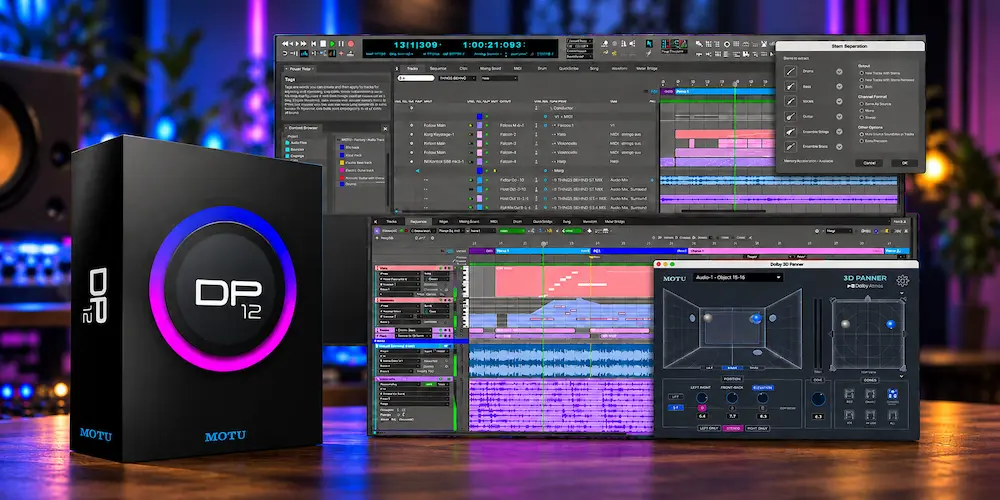
MOTU Digital Performer 12 is a significant workflow update to a mature DAW, but its value depends heavily on how the workstation is used. Native Dolby Atmos support and integrated AI stem separation are the most visible additions, yet neither introduces a new category of audio technology. Their importance is practical: both functions can now be handled inside the DAW instead of requiring a separate stage in the production chain.
The broader upgrade is more consequential for complex sessions. Arrangement Strip, the revised Track Freeze workflow, Track Presets, MIDI input management, expanded search and tagging, MusicXML interchange, improved AAF/OMF handling, and support for higher video frame rates address the less glamorous problems that consume time in real production. For composers, scoring engineers, post-production users, and mixers working with large sessions, these changes can have more day-to-day impact than the headline features.
This review evaluates Digital Performer 12 from an engineering perspective: how the new tools affect session construction, editing, mixing, and delivery; where they provide a genuine workflow advantage; where their limitations become relevant; and which users have a practical reason to upgrade or switch.
Digital Performer 12 at a Glance
| Full License | $499 |
| Upgrade from Previous Version | $195 |
| Competitive Upgrade | $395 |
| Platforms | macOS 12.7+ and Windows 11 24H2+ |
| Dolby Atmos | Native mixing, rendering and delivery up to 9.1.6 |
| Stem Separation | Vocals, drums, bass, guitar, ensemble strings and brass |
| MusicXML | Import and export for round-trip notation workflows |
| Major Workflow Additions | Arrangement Strip, enhanced Track Freeze, Track Presets, search and tagging |
Where Digital Performer 12 Changes the DAW Workflow
 The professional DAW market has moved toward integrated workflows. Dolby Atmos production, source separation, video interchange, notation, and increasingly complex session management are no longer isolated specialist tasks. They are becoming part of the same production environment.
That changes how a DAW update should be evaluated. The value of a feature is not necessarily tied to what it does to the audio signal. Removing repetitive session work, eliminating an export/import step, or keeping a scoring project inside one application can save more time than adding another processor or effect.
Digital Performer 12 takes that route. The core Digital Performer workflow remains intact, but MOTU has expanded it into areas where competing workstations have established stronger capabilities. At the same time, several routine operations have been redesigned to require fewer steps, particularly in large sessions.
The difference is most apparent outside conventional stereo production. For a composer, post-production engineer, immersive mixer, or producer working with complex arrangements, DP12’s additions can materially change the way a session is organized and delivered. For a stereo-only workflow, the upgrade is more incremental.
Digital Performer 12 vs DP11: What Actually Changed?
For existing Digital Performer users, the most useful way to evaluate version 12 is to separate genuinely new production capabilities from workflow refinements. DP12 adds several functions that expand what can be handled inside the workstation, while other changes are quality-of-life improvements that become more valuable as sessions grow in complexity.
| Workflow Area | Digital Performer 11 | Digital Performer 12 |
|---|---|---|
| Dolby Atmos | No native integrated Atmos workflow | Native Atmos mixing, rendering and delivery up to 9.1.6 |
| Stem Separation | No integrated AI stem-separation workflow | Integrated separation for vocals, drums, bass, guitar, strings and brass |
| Arrangement Editing | Conventional arrangement editing | Arrangement Strip for section-level restructuring |
| Track Freeze | Existing freeze workflow | Enhanced Track Freeze workflow |
| MusicXML | MusicXML export | MusicXML import and export |
| Video / Frame Rates | Established video workflow | Expanded support for high-frame-rate video formats |
| Session Management | Existing project-management workflow | Expanded search and tagging, Track Presets, Keysets and workflow refinements |
The largest change from DP11 is not a new mixing engine but a wider production scope. Atmos and integrated stem separation add capabilities that were previously outside the core DP workflow, while Arrangement Strip, Track Freeze, Track Presets and expanded project management reduce repetitive work inside existing sessions.
Digital Performer 12: Mixing Workflow and Core Production Changes
Dolby Atmos Integration Is the Biggest Functional Change
Native Dolby Atmos support is the most consequential addition to Digital Performer 12 for engineers working in immersive audio. The workstation supports Atmos configurations up to 9.1.6 and includes binaural monitoring for headphone-based evaluation. DP12 also includes an internal Dolby Atmos renderer and supports the delivery workflow needed to render and export immersive mixes, reducing the need to move the project into a separate Atmos environment.
The significance is not technological novelty. Cubase, Nuendo, Logic Pro and dedicated post-production platforms already provide established Atmos workflows. The advantage here is consolidation: an engineer can build, automate and deliver an immersive project without moving the session into a separate workstation.
That becomes particularly useful when stereo and immersive versions develop from the same production. Keeping routing, automation, editing and arrangement work in one session reduces the number of handoffs where channel assignments, automation states or delivery versions can diverge.
There is an important monitoring limitation. Binaural playback is useful for checking how an Atmos mix translates over headphones, but it is not equivalent to calibrated speaker monitoring. For professional immersive delivery, headphone monitoring should be treated as a reference rather than a substitute for an appropriately configured 7.1.4 or larger monitoring system. The same distinction becomes important at the delivery stage, where Dolby Atmos mastering requires final verification of the immersive master rather than simply exporting the mix.
For a stereo-only producer, Atmos support is unlikely to change the economics of an upgrade. For composers, post-production engineers and mixers delivering immersive music, it removes a meaningful workflow barrier.
AI Stem Separation Is Primarily a Workflow Tool
Digital Performer 12 can separate mixed audio into vocals, drums, bass and guitar, with additional support for ensemble strings and brass. The practical benefit is less about the “AI” label than where the processing happens: inside the DAW and directly within the production workflow.
With an external separation tool, the process typically involves exporting audio, processing it elsewhere, saving the resulting stems, importing them back into the session, aligning them and checking the results before any mixing work can continue. None of those steps changes the underlying recording; they simply add handling time.
DP12’s integrated separation removes much of that overhead and keeps the processing inside the workstation rather than sending the source through a separate online service. It is useful when working from reference mixes, demos, archived material, sampled performances or other sources where the original multitracks are unavailable. The separated material can move directly into editing, arrangement and mixing without leaving the project environment.
That does not make reconstructed stems equivalent to original multitracks. Source separation is still an inverse problem, and difficult material can produce transient smearing, high-frequency residue, phasey ambience, bleed between sources or unstable low-frequency content. Dense mixes, distorted guitars, reverberant vocals and complex orchestral arrangements can expose those limitations quickly.
For restoration, detailed spectral repair or demanding forensic work, a dedicated separation or spectral-editing application may still provide greater control. When the goal is instead to correct a stereo balance problem without reconstructing individual sources, a specialized processor such as CenterOne 3 represents a different approach: targeted processing of center-positioned material rather than source separation. Digital Performer 12’s strength is the reduction of workflow friction, not a guarantee of superior separation quality.
Arrangement Strip Makes Structural Editing More Practical
Arrangement Strip addresses a less glamorous but highly practical problem: restructuring a large session without manually relocating the underlying material on every track.
Changing a song’s structure can be deceptively labor-intensive. Moving a chorus, shortening an intro or converting a second verse into an instrumental section may require coordinated changes to regions, automation, markers, transitions and multiple instrument tracks. The musical decision is simple; implementing it across a large session is not.
Arrangement Strip elevates that process to the song-structure level, allowing sections to be reordered across the project instead of repeating the same editing operation track by track.
Its value depends on session organization. The more consistently the project is structured around identifiable sections, the more useful the feature becomes. Heavily edited material with complex automation and numerous manual exceptions still requires conventional editing and verification.
For producers who regularly revise arrangements, however, this is the kind of feature that can save meaningful time every week. It is not a new production paradigm, but it solves a real session-management problem.
Hear How Your Mix Translates Beyond the DAW
A well-managed session is only part of the equation. Before final delivery, the mix still needs to hold together in terms of clarity, balance, dynamics, depth, stereo image, and translation across real-world playback systems. If you want to evaluate what your finished mix is actually delivering, you can send us up to 40 seconds for a free mastering demo. Upload up to 40 seconds for your free mastering demo →
Digital Performer 12: The Workflow Improvements That Add Up
 The biggest productivity gains in a DAW rarely come from a single headline feature. They come from removing small points of friction that recur throughout a session.
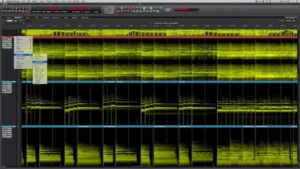
Digital Performer 12 addresses several of those friction points. Track Freeze now works directly on the track without requiring a separate frozen-track workflow, while Track Presets make repeatable routing, processing and instrument setups easier to recall. Main MIDI Controller management is useful in sessions with multiple MIDI devices, and expanded search and tagging reduce the time spent locating tracks and project elements.
Command Keysets allow different keyboard configurations for different production tasks. MusicXML improves interchange with notation workflows, while enhanced AAF/OMF support is more relevant when a project moves between music production and post-production environments. VST3 auto-migration also reduces some of the maintenance involved when compatible plug-in versions change.
The practical value of these changes depends on session complexity. Track Freeze addresses processing load, Track Presets improve repeatability, search and tagging reduce navigation overhead, while MusicXML, AAF/OMF and VST3 migration matter primarily when a project crosses production, scoring or post-production workflows.
Digital Performer 12 for Mixing, Mastering, and Scoring
Mixing in Digital Performer 12
For mixing, the practical gains come from the combination of session organization, Track Freeze, Track Presets and native Atmos support. None of these changes the underlying sound of the DAW; they reduce the amount of session management surrounding the mix.
Track Presets are particularly useful in repeatable workflows. A vocal chain, drum routing scheme or instrument setup can be recalled as a defined configuration rather than rebuilt from memory. For engineers working from consistent templates across multiple projects, that improves recall accuracy as well as speed.
Atmos is a more substantial expansion. Engineers delivering immersive music can now keep spatial routing and mixing inside Digital Performer rather than treating the DAW as a stereo workstation and moving the project into another environment for the immersive stage.
Mastering in Digital Performer 12
The upgrade is less consequential for conventional stereo mastering. A mastering workstation still needs precise editing, reliable metering, deterministic processing, accurate monitoring and dependable delivery workflows. DP12’s headline additions do not fundamentally alter those requirements.
Its relevance increases in two areas. Native Atmos support makes the workstation more suitable for immersive mastering and delivery, while stem separation can provide a useful diagnostic path when an engineer receives only a stereo mix and needs to investigate individual elements.
That diagnostic use has to be treated cautiously. Separated material is reconstructed audio, not recovered multitracks. Artifacts can affect tonal balance, transients, ambience and phase relationships, making the result unsuitable as an automatic substitute for original stems. It can still be valuable for identifying a masking problem, isolating a troublesome element for analysis, or testing a corrective approach before returning to the original mix. When a problem is already audible in the finished mix, the broader mastering problems guide is useful for distinguishing a mastering issue from a problem that needs to be corrected at the mix stage.
Film Scoring and Post-Production
Film scoring and post-production bring more of DP12’s additions into the same workflow. MusicXML interchange, video support, high-frame-rate formats, MIDI control, arrangement editing, surround configurations and Atmos are all relevant when a project has to move between composition, picture and final delivery. That production context also leads into a different mastering requirement: film score mastering has to preserve depth, dynamics and translation without treating cinematic material like a conventional stereo release.
This is where the feature set becomes more than a collection of independent additions. A stereo producer may use only a small subset of them. A composer working to picture can encounter several of these requirements within a single project.
As a result, the practical value of Digital Performer 12 is highly workflow-dependent. Its upgrade case is considerably stronger for scoring, post-production and immersive work than for a production setup limited to conventional stereo recording and mixing.
Digital Performer 12 Stem Separation: Where the AI Workflow Breaks Down
Stem separation is one of DP12’s most useful additions, but it is also the feature that requires the most careful evaluation. An AI separation engine can produce convincing results without producing stems that are clean enough for unrestricted mixing.
Separation quality depends heavily on the source material. Arrangement density, stereo processing, reverb, distortion, phase relationships and frequency overlap all affect how successfully an algorithm can distinguish one source from another. A relatively dry vocal over a sparse instrumental is a fundamentally easier problem than a dense mix with distorted guitars, cymbals, stereo bus compression and long reverberation tails.
Orchestral material presents another difficult case. Strings and brass occupy broad, overlapping frequency ranges, and their harmonics can interact with percussion, vocals, guitars and other sustained sources. A separated ensemble stem may therefore contain material that was never part of the intended source.
For engineering work, the safest approach is to treat the result as reconstructed audio and verify it against the original mix. Listen for transient smearing, high-frequency residue, phase instability, bleed and changes in ambience. A stem that sounds clean in solo can still introduce audible artifacts when placed back into the full mix.
The practical workflow is straightforward: use separation when the original stems are unavailable, inspect the result critically, compare it against the source mix, and use the extracted material only where its artifacts remain acceptable in context.
That makes DP12’s stem separation a useful production and diagnostic tool, but not a replacement for properly recorded multitracks. The distinction becomes especially important when the separated material is intended for professional mixing, mastering or commercial delivery.
Digital Performer 12 Stem Separation: Practical Evaluation
Feature descriptions alone do not establish how usable a separation engine is in production. The relevant evaluation is whether the extracted material remains usable after it is returned to the full mix, where residual bleed, phase changes and spectral artifacts become easier to detect.
| Source Type | Expected Separation Challenge | What to Check | Professional Relevance |
|---|---|---|---|
| Sparse mix with a dry vocal | Relatively clear source boundaries | Vocal bleed, consonants, cymbal residue and transient definition | Useful for editing and corrective work when artifacts remain controlled |
| Dense full mix | Overlapping frequencies and simultaneous transients | Phase instability, bleed, high-frequency residue and transient smearing | Useful primarily when the extracted material is needed for a specific repair or diagnostic task |
| Reverberant or distorted material | Ambience and nonlinear processing make source reconstruction harder | Reverb tails, distortion residue, unstable low end and changes in stereo ambience | Requires substantially more verification before professional use |
The important distinction is between a stem that sounds convincing in isolation and one that remains transparent when combined with the original mix. For professional work, the latter is the more useful test because residual bleed, phase changes and spectral damage can become much more obvious once the extracted material is processed or placed back into context.
Digital Performer 12 vs. Cubase, Nuendo, Logic Pro, and Pro Tools
Digital Performer 12 competes in a market where most of its headline capabilities already exist in other professional workstations. The useful comparison is therefore not a feature-count contest, but how each DAW handles the production, editing, mixing, scoring and delivery work around those capabilities.
| Workflow Area | Digital Performer 12 | Main Alternatives |
|---|---|---|
| Immersive Production | Native Dolby Atmos workflow with internal rendering | Cubase, Nuendo, Logic Pro and Pro Tools have established immersive workflows |
| Source Separation | Built directly into the DAW workflow | Availability and implementation vary by DAW and third-party tools |
| Scoring / MIDI | Strong emphasis on composition, MIDI and scoring workflows | Cubase/Nuendo and Logic also provide mature scoring and MIDI environments |
| Post / Picture | Strong integration of MIDI, video, interchange and immersive delivery | Nuendo and Pro Tools have deeply established post-production workflows |
| Switching Cost | Lower for existing DP users with established templates | Existing templates, routing, plug-ins and facility workflows can outweigh individual feature differences |
That distinction is especially important for existing users. A Digital Performer composer with established templates and workflows can gain significant value from DP12 without changing production habits. A Cubase, Nuendo or Pro Tools engineer who already has years of templates, routing conventions, plug-in configurations and facility-specific workflows has a much higher switching cost. New features alone do not eliminate that investment.
For that reason, DP12 should be evaluated as a workflow alternative rather than simply as another DAW with a larger feature list.
Digital Performer 12: CPU Performance, Stability, and Large Sessions
There is not enough standardized independent benchmarking to conclude that Digital Performer 12 is universally faster or more CPU-efficient than competing DAWs. Actual performance depends on plug-ins, buffer size, audio interface drivers, sample rate, virtual instruments, oversampling, video playback and the architecture of the session itself.
For demanding projects, DP12’s enhanced Track Freeze workflow is more practically relevant than a simple track-count benchmark. Tracks can be frozen directly without creating a separate frozen-track copy, reducing real-time processing load while keeping the session structure manageable.
Stability should also be evaluated in the context of the actual production system. Early community reports include both successful large-session use and isolated reports of authorization, interface or plug-in issues, so the available feedback is not sufficient to characterize DP12 as broadly unstable. A professional migration should therefore begin with representative sessions, critical plug-ins, interface drivers and video workflows before active projects are moved to the new version.
For a production studio, the safest approach is to install DP12 alongside the existing version and validate the exact sessions used for delivery. The relevant test is not an abstract benchmark, but whether the workstation remains predictable under the same routing, instruments, processing and delivery conditions used in daily work.
What Digital Performer 12 Does Not Change About Sound Quality
A more capable DAW is not automatically a better-sounding DAW. Digital Performer 12’s major additions primarily change how a session is built, managed and delivered; they do not inherently improve the audio signal itself.
Adding Dolby Atmos support does not make a stereo master sound better. Stem separation does not restore the quality of the original multitracks, and Track Presets do not improve the processing chain they recall. The sonic result still depends on the source material, processing decisions, monitoring and engineering.
The measurable benefit is workflow efficiency. DP12 can reduce application changes, repetitive session operations and manual project management, allowing an engineer to spend more time making production decisions rather than maintaining the session.
That is a meaningful professional advantage, but it should be evaluated as workflow improvement rather than as a change in DSP quality or inherent sound character.
Who Should Upgrade to Digital Performer 12?
 The upgrade case depends less on the number of new features than on how often those features intersect with an engineer’s actual workflow.
Existing Digital Performer users working in Dolby Atmos: Native immersive support is a substantial reason to move to DP12, particularly when Atmos projects previously required another workstation or a separate stage in the production process.
Composers and scoring engineers: This is one of the clearest use cases for DP12. MusicXML, MIDI management, video workflows, arrangement editing, high-frame-rate support, surround formats and Atmos address requirements that commonly appear together in scoring work.
Mix engineers managing large sessions: Track Freeze, Track Presets, search, tagging and structural editing can reduce repetitive session management, especially when projects are large enough for organization and CPU load to become production constraints.
Producers working from stereo references or incomplete sessions: Integrated stem separation can reduce the export, processing and re-import steps involved in reconstructing usable working material. Its value depends heavily on the quality of the source and the artifacts introduced by separation.
Stereo-only Digital Performer 11 users: The upgrade is more incremental. If an existing DP11 workflow is stable and efficient, the new capabilities may improve productivity without being essential to the way the system is currently used.
Users of other DAWs: DP12 is worth evaluating on its workflow and project architecture, but its new features alone do not erase the switching cost of an established Cubase, Nuendo, Logic Pro or Pro Tools environment with existing templates, routing, plug-ins and production habits.
Is the $195 Digital Performer 12 Upgrade Worth It?
For existing Digital Performer users, the $195 upgrade price is more relevant than the $499 full license. The question is not whether DP12 contains more features, but whether those additions remove enough recurring work to justify the upgrade.
For an engineer moving into Dolby Atmos, the calculation can change significantly because native immersive production eliminates the need to move certain projects into another workstation. The same applies to composers handling large arrangements, picture, notation interchange and complex session management: several smaller workflow improvements can accumulate into a meaningful time saving.
The economics are different for a stereo-focused DP11 user with an established template and no immediate need for Atmos or integrated stem separation. If the current system already handles recording, editing and mixing efficiently, DP12 may offer useful improvements without creating an urgent reason to upgrade.
The $195 price therefore makes DP12 easier to justify for workflows that directly use its new capabilities, but it does not make the upgrade equally valuable for every Digital Performer user. The return depends on how often the new tools eliminate work that would otherwise be done manually or in another application.
Overall Rating
These ratings reflect the documented feature set and its practical workflow implications, not laboratory benchmarks or independent listening measurements.
| Category | Rating |
|---|---|
| Immersive Audio Capability | 8.8/10 |
| Source Separation Workflow Value | 8.0/10 |
| Large-Session Management | 8.7/10 |
| Scoring & Post-Production Support | 8.9/10 |
| Interchange & Project Integration | 8.5/10 |
| Stereo-Only Upgrade Value | 7.1/10 |
| Overall | 8.3/10 |
Native Atmos support up to 9.1.6 and binaural monitoring make the immersive side of DP12 substantially more capable, although headphone monitoring remains a reference rather than a substitute for calibrated speaker monitoring.
The integrated separation tools are useful for reconstructing material when original multitracks are unavailable, but artifacts such as transient smearing, bleed and phase instability limit their use for demanding work.
Track Freeze, Track Presets, Arrangement Strip, search and tagging address the practical problems that become increasingly important as sessions grow in size and complexity.
MusicXML, video support, high-frame-rate formats, surround configurations and Atmos align particularly well with scoring-to-picture and post-production projects where several technical requirements have to coexist.
AAF/OMF support, VST3 migration and other interchange improvements reduce the number of external steps required when projects move between production and post-production environments.
For stereo-only DP11 users with an already efficient setup, the upgrade is less compelling because many of its strongest capabilities target immersive, scoring, source-separation and complex-session requirements rather than fundamental changes to stereo audio quality.
Digital Performer 12 is strongest when a project crosses composition, scoring, immersive audio, video and complex session management. Its main compromise is that several headline additions are workflow expansions rather than inherently better-sounding DSP, so their value depends heavily on the type of production being handled.
Digital Performer 12: Final Verdict
For existing Digital Performer users, the upgrade is easiest to justify when Atmos, source separation, large-session management or scoring workflows are part of the workload. For stereo-only DP11 sessions that are already efficient, the new version adds convenience more than a fundamental change in production capability.
The important distinction is between adding features and removing production steps. DP12 does both, but the second is where its less visible additions—Arrangement Strip, Track Freeze, Track Presets, search, tagging and interchange improvements—become relevant to daily work.
Digital Performer 12 is a broader production environment than DP11, with its strongest gains appearing when composition, scoring, immersive audio, video and complex session management overlap.
Before You Add More Processing, Hear the Mix in Context
Digital Performer 12 can make complex production workflows more efficient, but the final mix still has to stand on its own. Stem separation, arrangement changes, immersive routing, and processing decisions can introduce changes in balance, dynamics, depth, stereo image, or detail that are not always obvious while working inside the session. A real before-and-after mastering comparison is a more useful way to judge what the finished mix can support than adding another processing stage by assumption. Upload up to 40 seconds of your mix and we will prepare a free mastering demo by a real mastering engineer so you can evaluate the result against your original. Upload your mix and get your free 40-second mastering demo →
Digital Performer 12 FAQ
Is Digital Performer 12 worth upgrading from DP11?
The upgrade is most relevant to users who need native Dolby Atmos, integrated stem separation, Arrangement Strip, improved session management or expanded interchange features. For a stereo-focused DP11 workflow that is already stable and efficient, the upgrade is more incremental.
Does Digital Performer 12 support Dolby Atmos?
Yes. Digital Performer 12 adds native Dolby Atmos support for configurations up to 9.1.6, along with binaural monitoring for headphone-based evaluation. Binaural monitoring is a reference tool and does not replace a calibrated immersive speaker system for professional delivery.
Does Digital Performer 12 have AI stem separation?
Yes. DP12 can separate mixed material into vocals, drums, bass and guitar, with additional support for ensemble strings and brass. The resulting audio is reconstructed rather than recovered from original multitracks, so bleed, transient smearing and other artifacts should be checked before using the stems in a production mix.
Can Digital Performer 12 be used for professional mixing?
Yes. Digital Performer provides recording, editing, routing, automation, plug-in processing and large-session management suitable for professional mixing. DP12 also extends the workflow into immersive production and integrated source separation.
Is Digital Performer 12 good for mastering?
It can be used for mastering, particularly for engineers already working in Digital Performer or handling immersive delivery. For conventional stereo mastering, however, the DP12 update does not fundamentally change the requirements for precision editing, metering, processing, monitoring and delivery.
Does Digital Performer 12 use a lot of CPU?
There is not enough standardized independent benchmarking to make a reliable universal comparison with competing DAWs. Actual performance depends on the plug-ins, virtual instruments, buffer settings, sample rate, interface drivers and session architecture. The revised Track Freeze workflow can help reduce real-time processing load in demanding projects.
Is Digital Performer 12 better than Cubase or Nuendo?
The choice depends on workflow rather than a universal feature ranking. Cubase and Nuendo have established scoring, immersive and post-production workflows, while Digital Performer offers its own approach to MIDI, composition and session architecture. Existing templates, routing, plug-ins and production habits can be more important than individual feature differences.
Can Digital Performer 12 replace a dedicated stem-separation application?
For straightforward vocal, drum, bass or guitar extraction, integrated separation can eliminate the need for a separate application. More difficult restoration or spectral-editing work can still require dedicated tools when greater control over the reconstruction process is needed.
Is Digital Performer 12 suitable for film scoring?
Yes. MIDI and arrangement tools, MusicXML interchange, video workflows, high-frame-rate support, surround formats and native Atmos production make film scoring and scoring-to-picture important use cases for DP12.
What is new in Digital Performer 12?
Digital Performer 12 adds native Dolby Atmos production and delivery, AI-powered stem separation, Arrangement Strip, enhanced Track Freeze, MusicXML import and export, expanded search and tagging, high-frame-rate video support and other workflow improvements. The practical importance of these additions depends on whether a project involves immersive audio, scoring, source separation, video or large-session management.
How much does Digital Performer 12 cost?
Digital Performer 12 is priced at $499 for a full license, $395 for a competitive upgrade and $195 for an upgrade from a previous Digital Performer version. The $195 upgrade is the relevant figure for existing DP users evaluating the move from an earlier version.
What operating systems does Digital Performer 12 support?
Digital Performer 12 supports macOS 12.7 or later and Windows 11 version 24H2 or later. Compatibility with the operating system alone does not guarantee a problem-free production environment, so critical plug-ins, audio interfaces, virtual instruments and existing sessions should be tested before migration.
Is Digital Performer 12 worth buying for a new DAW user?
Digital Performer 12 is a full professional DAW and should be evaluated alongside Cubase, Logic Pro, Nuendo and Pro Tools. Its strongest reason to choose it is not any single feature, but whether its MIDI, composition, arrangement, mixing and scoring workflow matches the way the user intends to work.

Yurii Ariefiev approaches DAW evaluation from the perspective of practical audio production: session structure, routing, editing precision, processing reliability, and how efficiently complex projects can be managed. For Digital Performer 12, particular attention goes to immersive audio, source separation, large-session handling, and the technical demands of professional scoring and delivery.
Enjoyed this review? If you found it useful, you can support independent audio research with a coffee.
☕ Buy me a coffee