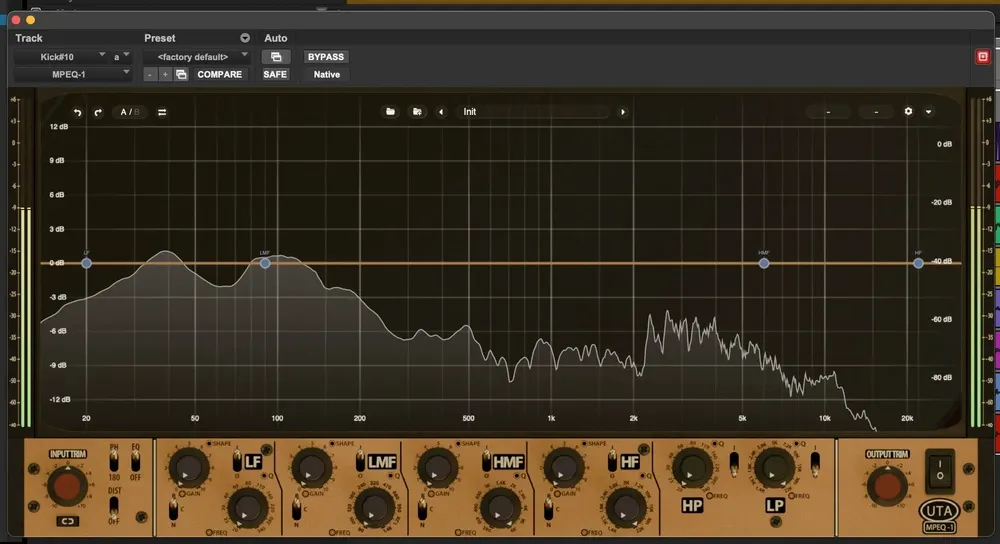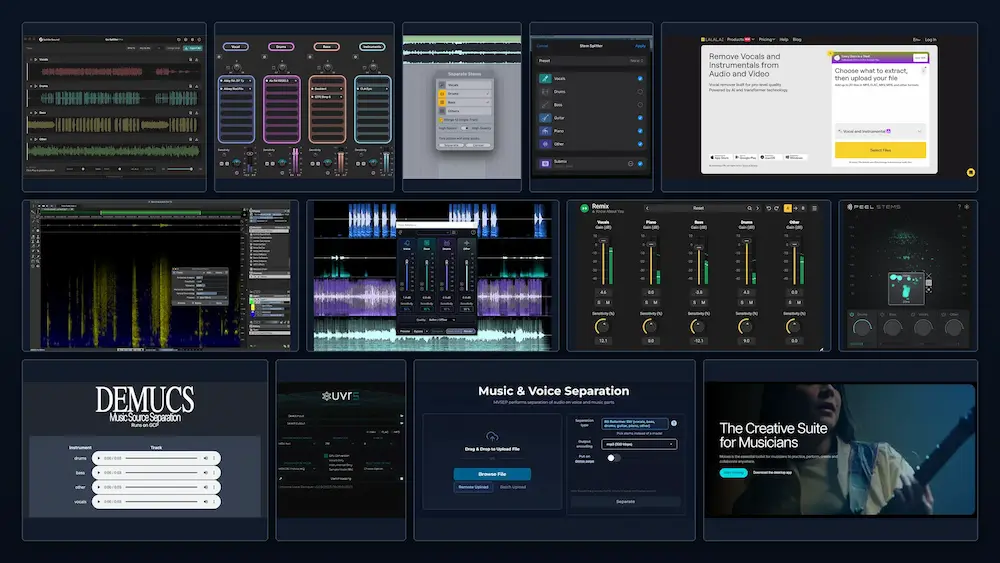
AI stem separation software can extract vocals, drums, bass, guitars, keyboards, and other musical elements from a finished stereo mix. For producers, remixers, mixing engineers, and mastering professionals, this creates options for editing, rearranging, restoring, or repurposing material that is no longer available as multitrack recordings.
However, stem separation does not recover the original multitrack session. It estimates individual sources from a combined signal, and the quality of those estimates depends on the separation model, the arrangement, the source recording, and the interaction between instruments. Dense mixes, overlapping harmonics, reverberation, distortion, and heavily processed sounds can all make reliable separation more difficult.
The number of available stems is therefore only one measure of a tool’s usefulness. Separation accuracy, transient preservation, spectral artifacts, stereo integrity, and the ability to refine or integrate the extracted material into an existing production workflow are equally important. A tool that produces four clean, usable stems may be more valuable than one that offers a larger number of outputs with significant bleed or unwanted processing artifacts.
This guide examines 13 stem separation solutions available in 2026, including cloud-based AI services, desktop applications, open-source models, DAW-integrated tools, and professional audio restoration software. The comparison considers what each solution is designed to do, how it fits into practical production workflows, and which limitations engineers should account for before using its output in a mix or master.
Important: This is an independent technical comparison based on publicly available product documentation, stated features, and the engineering principles behind source separation. It is not a controlled listening test or laboratory benchmark of all 13 tools. Separation quality varies with the source material, so results should be evaluated using audio representative of the intended application.
Stem Separation Software Compared: 13 Tools at a Glance
This table summarizes the processing environment, main separation capabilities, and intended applications of each tool. Available stem categories and processing options can vary by software version, separation model, operating system, and subscription or license. The descriptions indicate each product’s general role rather than guaranteeing identical results across all source material.
| Software | Processing Environment | Primary Capabilities | Best Suited For |
|---|---|---|---|
| LALAL.AI | Cloud service and local processing options | Vocal, drum, bass, guitar, piano, and instrumental separation | Flexible AI separation across different production tasks |
| Moises | Cloud service and dedicated applications | Vocal and instrument separation, with additional musician-focused tools | Practice, transcription, learning, and arrangement work |
| MVSEP | Cloud-based processing | A range of specialized neural network models for source separation | Comparing separation models and handling more specialized material |
| Ultimate Vocal Remover | Local desktop application | Multiple neural network models and configurable separation workflows | Free, locally processed, and customizable stem separation |
| Demucs | Local, open-source processing | Four-stem separation: vocals, drums, bass, and other | Command-line workflows, batch processing, and technical experimentation |
| zplane PEEL STEMS 2 | DAW plugin | Four-stem separation: vocals, drums, bass, and other | Stem-level mix manipulation within a production session |
| Acon Digital Remix | Real-time audio plugin | Five-stem separation: vocals, piano, bass, drums, and other | Stem-level processing, balancing, and automation |
| iZotope RX 12 | Standalone audio editor and supported plugin workflows | Music Rebalance and other source-separation tools, depending on edition | Audio restoration, targeted mix adjustments, and corrective work |
| Steinberg SpectraLayers 13 | Standalone spectral editing application | AI-assisted unmixing and separation of vocals and instrument categories | Detailed spectral editing and source-level restoration |
| Logic Pro Stem Splitter | Integrated DAW processing | Separation of vocals, drums, bass, guitar, piano, and other parts | Remixing, sampling, and editing within Logic Pro on supported Apple Silicon systems |
| Ableton Live 12 Suite | Integrated DAW processing | Stem separation for vocals, drums, bass, and other parts | Sampling, remixing, and clip-based production workflows |
| Waves StudioVerse Mix Unlock | DAW-integrated processing | Two-stem and four-stem separation options | Rebalancing and processing elements of a finished mix |
| SoliderSound Go-Splitter Pro | Local desktop processing | AI-based stem separation and additional production-oriented processing features | Offline processing and batch-oriented workflows |
Other notable alternatives: BandLab Splitter is worth considering for free browser-based and mobile stem separation, while Fadr combines online stem extraction with remix-oriented tools. LANDR Stems is another option for users who prefer a dedicated DAW plugin, with separation technology powered by AudioShake. These alternatives are not covered in the same detail below, but they may be relevant depending on the required workflow.
Give Your Finished Mix a More Refined Mastering Perspective
AI stem separation can offer additional control over individual elements, but a finished track still needs to work as a complete recording. Tonal balance, transient definition, low-end control, stereo integrity, and dynamics all influence how naturally a mix translates across playback systems. At AREFYEV STUDIO, we approach mastering with these relationships in mind, focusing on the overall sound rather than isolated processing results. You can submit up to 40 seconds of your mix for a free mastering demo and hear how a dedicated mastering approach may translate your material.
Request Your Free Mastering Demo →
Quick Picks: Which AI Stem Separation Tool Should You Choose?
The right AI stem separator depends on how much control you need, where you want processing to take place, and what you plan to do with the extracted audio.
- For flexible cloud and local workflows: LALAL.AI offers separate processing options for users who need online separation or a local DAW-based workflow.
- For comparing separation models: MVSEP provides access to multiple neural networks and specialized separation configurations.
- For free local processing: Ultimate Vocal Remover and Demucs are useful options for users who want to run separation on their own hardware.
- For stem control inside a DAW: zplane PEEL STEMS 2, Acon Digital Remix, and Waves StudioVerse Mix Unlock provide different approaches to manipulating separated groups during production.
- For restoration and spectral editing: iZotope RX 12 and Steinberg SpectraLayers 13 combine source separation with tools for corrective audio work.
- For built-in DAW separation: Logic Pro and Ableton Live 12 Suite allow users to extract stems without moving audio into a separate application.
This is a workflow-based shortlist, not a measured ranking of separation quality. The most suitable tool still depends on the source material and the intended application.
What Is AI Stem Separation?
AI stem separation, also called music source separation, uses machine learning to extract individual sound sources or instrument groups from a combined recording. Instead of working with the original multitrack session, the software analyzes a finished mix and estimates the audio contribution of selected sources, reconstructing them as separate output signals.
This is a challenging task because elements in a finished mix rarely occupy completely separate frequency or stereo regions. Vocals overlap harmonically with guitars and synthesizers, kick drums share low-frequency energy with bass, and reverberation and other spatial effects can extend across multiple sources. Since these elements are already combined in the waveform, separation cannot be achieved reliably through conventional frequency filtering alone.
Modern systems use machine learning models trained on mixtures and their corresponding source recordings. Depending on the model architecture, the software analyzes waveform characteristics, spectral patterns, transient information, and relationships between musical elements to estimate the contribution of each target source. It then reconstructs separate signals from those estimates.
Stem Separation vs. Source Separation
The terms are often used interchangeably, although they describe different levels of the same general process.
- Stem separation usually refers to dividing a finished mix into broader musical groups, such as vocals, drums, bass, and other instruments. In traditional production, a stem is a submix containing one or more related tracks; AI separation tools commonly use the term for their estimated output groups.
- Source separation is the broader technical term for extracting individual sources from a combined audio signal. Depending on the application, these sources may be musical instruments, voices, or other sound components.
- Vocal isolation focuses on extracting vocal content from a recording. The result may include lead vocals and backing vocals together rather than separating each singer or vocal layer independently.
- Instrumental extraction generally refers to isolating the non-vocal content of a mix, often by separating or suppressing the vocal component.
A conventional four-stem separation model typically produces Vocals, Drums, Bass, and Other. The Other stem is a residual category containing material the model does not assign to the first three groups. Depending on the arrangement, it may include guitars, keyboards, strings, synthesizers, percussion, and other instruments.
Some systems offer more specialized separation categories, allowing users to extract sources such as guitar, piano, or strings independently. However, a larger number of output categories does not necessarily mean better separation. When sources overlap heavily in frequency or share similar timbral characteristics, dividing them into narrower groups can introduce additional bleed and artifacts.
How Neural Networks Separate Music
Neural separation models learn to estimate individual sources from the combined audio representation. Their internal processing depends on the architecture: some operate directly on time-domain waveforms, others analyze time-frequency representations such as spectrograms, and hybrid systems combine both approaches.
Convolutional neural networks can learn local patterns in audio data, while recurrent and transformer-based architectures use different mechanisms to model relationships across time or within audio representations. These approaches are not interchangeable, and their effectiveness depends on the training data, model design, and separation task.
Hybrid architectures are particularly relevant to music separation because waveform and spectrogram representations expose different characteristics of the signal. Waveform processing preserves direct time-domain information, while spectral analysis makes frequency-dependent structures easier to model. Combining the two can help a model address different aspects of a complex musical mixture.
Demucs is an example of a hybrid waveform-and-spectrogram approach. RoFormer-based models use transformer attention mechanisms to model relationships within time-frequency representations. Both model families are used in music source separation, although their performance depends on the specific implementation and training configuration.
The important distinction is that a neural network does not recover the original microphone recordings or identify a physically isolated source that remains hidden inside the finished mix. It estimates a plausible reconstruction of each target based on patterns learned during training. Any information that cannot be reliably distinguished from the surrounding material may remain in the wrong stem or appear as separation artifacts.
The 13 Best AI Stem Separation Tools in 2026
1. LALAL.AI – Flexible AI Stem Separation with Local Processing
 Processing: Cloud-based and local
Platforms: Web, desktop application, DAW plugin
Official website: lalal.ai
LALAL.AI combines cloud-based source separation with a local processing option, giving users two ways to extract instrument groups from a finished recording. This distinction matters when choosing a workflow: cloud processing relies on remote infrastructure, while local processing keeps the audio on the user’s computer and makes separation available within a compatible production environment.
The platform uses two different neural network models for these workflows. Its cloud service uses Andromeda, while its local desktop and plugin workflow uses Lyra. Their capabilities and results should be evaluated separately rather than treated as identical implementations of the same separation process.
Andromeda: Cloud-Based Separation
Andromeda is LALAL.AI’s cloud-based separation model, introduced in May 2026. Its expanded separation workflow supports four main outputs:
- Vocals
- Instrumental
- Drums
- Bass
The Instrumental output provides the non-vocal portion of a recording, while the other options target specific instrument groups. This makes the service useful for tasks ranging from vocal extraction to more selective editing of an existing arrangement.
LALAL.AI also offers specialized processing options for tasks such as separating lead and backing vocals and reducing echo or reverberation. These functions address different separation problems and should not be confused with the standard instrument-group outputs.
Lyra: Local Separation Inside a DAW
Lyra is designed for local processing, allowing separation to run on the user’s computer rather than requiring the audio to be uploaded to LALAL.AI’s servers. This can be relevant when handling unreleased recordings, client material, or sessions subject to confidentiality requirements.
The local workflow supports seven output categories:
- Vocals
- Instrumental
- Drums
- Bass
- Piano
- Acoustic Guitar
- Electric Guitar
The VST plugin brings separation into a compatible DAW. Instead of repeatedly exporting a mix to an external service, an engineer can work with the extracted material within the production session. This is useful for auditioning stems, making arrangement changes, or preparing isolated elements for further processing.
Advantages
- Offers both cloud-based and local processing workflows.
- Uses separate models for its cloud and local workflows.
- Provides several instrument-specific output categories.
- Integrates local separation into compatible DAWs through a VST plugin.
- Local processing avoids uploading audio to the service.
Limitations
Andromeda and Lyra are different models, so their output quality, processing requirements, and available separation options are not necessarily interchangeable. Local processing also depends on the computer’s available hardware resources.
Neither workflow eliminates the limitations inherent in neural source separation. Dense arrangements, long reverb tails, distorted guitars, and overlapping transients can still produce bleed, smearing, or other artifacts. Extracted stems should be checked in context before being used for critical mixing or mastering decisions.
Best for: Producers and engineers who need both cloud-based separation and a local workflow that can be integrated into a DAW.
2. Moises – Multi-Instrument Separation for Musicians and Producers
 Processing: Cloud-based
Platforms: Web, desktop, iOS, Android
Official website: moises.ai
Moises is an AI-powered music platform that combines stem separation with tools for practice, transcription, and musical analysis. Although it is widely used for vocal removal and practice tracks, its broader instrument separation capabilities also make it relevant to producers and arrangers working with existing recordings.
The platform offers multiple separation models, including standard and higher-fidelity processing options. Access to particular models and separation categories depends on the available plan and account features.
Available Separation Categories
Moises currently lists 27 stem types on its Stem Separation feature page, including individual drum components, different guitar types, keyboards, strings, and separate vocal categories. Availability of specific models and processing options may depend on the subscription plan and product workflow.
- Lead and backing vocals
- Male and female vocals
- Acoustic and electric guitars
- Rhythm and solo guitars
- Kick and snare
- Hi-hat, toms, and cymbals
- Bass
- Piano and other keyboard instruments
- Strings
- Brass and woodwinds
- Other instrument groups
This range of categories can be useful when a broad four-stem split is not sufficiently selective. For example, separating drum components or distinguishing different guitar roles can provide more flexibility when preparing a backing track, studying an arrangement, or isolating material for further editing.
However, the number of selectable categories should not be mistaken for a guarantee of clean isolation. Instruments with overlapping timbres and frequency content can remain audible in neighboring stems, particularly in dense or heavily processed arrangements.
Additional Production Features
Moises combines source separation with music-oriented tools such as tempo adjustment, pitch shifting, chord detection, and lyric-related functionality. These features make the platform useful beyond the initial extraction stage.
Musicians can use it to study individual parts, identify chord progressions, practice against selected backing tracks, or prepare reference material for an arrangement. Producers can also use the extracted audio as a starting point for sampling and remixing, although the resulting stems may require additional editing before they are suitable for a professional production.
Advantages
- Offers a broad selection of vocal and instrument separation categories.
- Provides web, desktop, and mobile applications.
- Includes multiple separation options, depending on the account tier.
- Combines stem separation with tempo, pitch, and chord-related tools.
- Supports practical workflows for musicians, arrangers, and educators.
Limitations
Moises is primarily designed as an accessible music-processing platform rather than a dedicated audio restoration environment. Engineers who need detailed spectral editing, extensive source reconstruction, or low-level control over separation parameters may find a specialized restoration application or configurable separation model more appropriate.
Access to higher-fidelity processing and the full range of separation categories also depends on the subscription tier. For professional use, the relevant plan should be checked before building a workflow around a particular model or output configuration.
Best for: Musicians, arrangers, producers, and educators who need instrument separation alongside practical tools for music analysis and practice.
3. MVSEP – Multiple Neural Networks for Advanced Source Separation
 Processing: Cloud-based
Platforms: Web and API
Official website: mvsep.com
MVSEP differs from services built around a single general-purpose separation model. It provides access to a broad collection of neural networks, allowing users to select different algorithms according to the source material and the separation task.
This model-based approach is relevant to professional workflows because separation performance is highly task-dependent. A network optimized for vocal extraction may not be equally effective at isolating drums or bass. Models trained for particular source categories can produce different results, even when processing the same recording.
Model Selection and Separation Architectures
MVSEP provides access to multiple model families and implementations, including:
- Demucs and Hybrid Demucs variants
- BS RoFormer
- MelBand RoFormer
- SCNet
- MDX-based models
- Specialized ensemble models
The platform also includes models targeting more specific instrument categories, such as guitars, piano, strings, percussion, brass, woodwinds, and other sources. The available outputs depend on the selected model; these categories are not necessarily supported by every separation architecture.
For engineers, the main advantage is the ability to compare different approaches rather than relying on one fixed separation engine. A model that performs well on a sparse acoustic recording may behave differently on a dense electronic mix with layered synthesizers, distortion, and extensive effects. Selecting the appropriate model can therefore matter as much as the general capabilities of the platform.
Specialized Drum Separation
Some MVSEP workflows go beyond extracting a single Drums stem and attempt to separate individual components of a drum performance. Depending on the selected model, outputs may include:
- Kick
- Snare
- Hi-hat
- Toms
- Cymbals
- Ride
- Crash
This level of separation can be useful when a producer needs more control over a drum performance than a conventional Drums stem provides. For example, isolating the kick or snare may allow targeted editing or processing without having to work with the entire drum group.
There is an important workflow distinction, however: some specialized models are designed to process an already isolated drum signal rather than a complete stereo mix. In those cases, the material may first need to pass through a general drum-separation stage. The quality of the initial extraction will affect what the subsequent model can recover.
Ensemble Processing
MVSEP also offers ensemble workflows that combine predictions from multiple separation models. The principle is straightforward: different networks may preserve different details or make different separation errors, so combining their outputs can sometimes produce a more useful result than relying on one model alone.
Ensemble processing is not automatically superior. Its effectiveness depends on the models being combined and the source material. It can also increase processing time, while differences between model predictions may leave residual artifacts or compromise particular details. The final output still needs to be evaluated for transient definition, source bleed, and unwanted spectral residue.
Understanding SDR Measurements
MVSEP publishes evaluation results for selected models using Signal-to-Distortion Ratio (SDR), a metric commonly used in audio source separation research.
SDR evaluates the difference between an estimated source and its reference signal, expressing reconstruction error relative to the reference. Higher values generally indicate less distortion under the specific evaluation conditions. The exact interpretation depends on the SDR variant and measurement methodology used.
These measurements are useful for comparing models evaluated under the same conditions, but they should not be treated as a universal predictor of perceived audio quality. Results depend on the test dataset, reference material, source category, evaluation protocol, and characteristics of the input signal.
A model that achieves a strong benchmark score may still produce objectionable artifacts on a particular commercial recording. For practical work, SDR data should be considered alongside direct listening and checks for transient smearing, spectral residue, and unwanted source bleed.
Advantages
- Access to a large selection of neural network models.
- Specialized separation options for different instrument categories.
- Ensemble processing workflows.
- Published evaluation metrics for selected models.
- API access for automated processing workflows.
Limitations
The large model selection can make MVSEP less straightforward for beginners. Choosing an appropriate algorithm requires some understanding of source separation models, their intended applications, and the material being processed. Finding the most suitable option may involve comparing several models rather than relying on a single default setting.
Cloud processing also requires audio uploads and depends on the platform’s processing availability. Upload times, queues, and processing limits may affect workflows involving large files or multiple versions of the same recording.
Best for: Audio engineers, researchers, and advanced producers who want to compare separation architectures and select models for specific musical sources.
4. Ultimate Vocal Remover (UVR) – Free Local AI Separation
 Processing: Local
Platforms: Primarily Windows, with additional platform-specific installation options
Official project: Ultimate Vocal Remover on GitHub
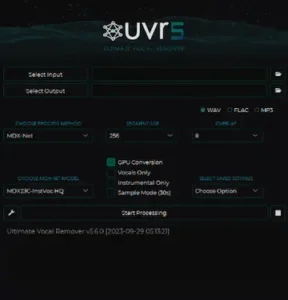
Ultimate Vocal Remover (UVR) is an open-source graphical application that provides access to neural-network-based source separation without requiring a commercial cloud subscription. Processing takes place locally, making it possible to work with audio files without uploading them to an external separation service.
Its main strength is model flexibility. Rather than relying on one proprietary separation engine, UVR provides an interface for working with different neural networks and model configurations. This gives users more control over the separation approach, although selecting an appropriate model may require experimentation and some familiarity with the available options.
Supported Model Families
UVR provides access to several neural network architectures and model families used for music source separation, including:
- Demucs
- MDX-Net
- VR Architecture
- RoFormer-based separation models
Depending on the installed models, UVR can be used for vocal isolation, instrumental extraction, and more specialized source separation tasks. The available outputs and separation characteristics vary between models.
Why Model Selection Matters
One of UVR’s main advantages is the ability to process the same recording with different models and compare the resulting stems. This is useful because separation quality is not uniform across architectures or source material.
For example, one model may preserve vocal detail more effectively, while another may retain more high-frequency percussion or produce less bleed in a dense instrumental arrangement. These differences are source-dependent, so there is no single model that can be assumed to deliver the best result for every recording.
This flexibility makes UVR particularly useful for engineers who want to evaluate alternative separation results before committing to a particular set of stems. The trade-off is that selecting the most suitable model can require additional processing time and critical listening.
Local Processing
UVR processes audio on the user’s computer, so source files do not need to be uploaded to an external separation service. This can be useful when working with confidential recordings or when an internet connection is unavailable.
Processing performance depends on the selected model, CPU or GPU resources, available memory, and application configuration. More demanding models and processing settings can require substantial computational resources, increasing render times on less powerful systems.
Advantages
- Free and open-source application.
- Local audio processing without mandatory cloud uploads.
- Access to multiple neural network architectures.
- Flexibility to compare different models on the same recording.
- Useful for evaluating alternative separation approaches.
Limitations
UVR is less streamlined than many commercial separation applications. Installing models, configuring processing options, managing dependencies, and organizing output files can require additional technical knowledge.
Windows is the most straightforward installation route for many users. Other operating systems may require additional setup, and compatibility should be checked against the current project documentation rather than assumed.
Best for: Producers and audio engineers who want a free, locally operated separation environment with access to multiple neural network models.
5. Demucs – Open-Source Music Source Separation
 Processing: Local
Platforms: Windows, macOS, Linux through supported Python environments
Official repository: Demucs on GitHub
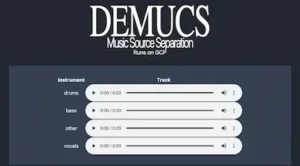
Demucs is an influential open-source project in neural music source separation. Developed by Alexandre Défossez and originally released through Meta’s research organization, it helped establish hybrid architectures that combine waveform-domain processing with spectrogram analysis.
Unlike a conventional desktop application, Demucs is primarily a separation engine that can be run locally and incorporated into custom audio-processing workflows. Its architecture and open-source implementation have made it relevant to researchers, developers, and technically experienced audio professionals.
Hybrid Transformer Demucs
Demucs v4 introduced Hybrid Transformer Demucs (HT Demucs), combining waveform-based processing with spectrogram-domain analysis. Transformer components model relationships within the audio representations, allowing the network to learn complex source characteristics that cannot be addressed through conventional frequency filtering alone.
The standard four-source configuration separates:
- Vocals
- Drums
- Bass
- Other
An experimental six-source configuration also attempts to extract guitar and piano. However, the original project documentation warns that the piano output can contain substantial source bleed and separation artifacts. These additional categories should therefore be treated as experimental rather than assumed to provide clean, independently usable stems.
Command-Line Workflow
Demucs is primarily operated through the command line rather than a conventional graphical interface. Installation requires a supported Python environment and the necessary dependencies.
A basic installation command is:
python3 -m pip install -U demucsTo separate an audio file into the standard four stems:
demucs "input-track.wav"To extract vocals and the remaining instrumental accompaniment:
demucs --two-stems=vocals "input-track.wav"The generated audio files are written to an output directory organized by model. This command-line approach is convenient for batch processing and automation, but less accessible to users who prefer visual controls and immediate DAW integration.
Technical Considerations
Demucs provides different model configurations with distinct separation characteristics and computational requirements. Processing time depends on the selected model, audio duration, hardware, and configuration. GPU acceleration can reduce processing time, although it requires compatible hardware and software dependencies.
Output handling also deserves attention. Separation can produce reconstructed signals with peaks that exceed the available digital headroom. The project’s documented clipping and rescaling options can affect the resulting stem levels, so engineers should check peak levels and relative balance before recombining the outputs.
This matters when the separated tracks are intended to reconstruct the original stereo mix. Independently adjusting stem levels can change their summed balance, while clipping or inappropriate rescaling can compromise level relationships between sources.
Advantages
- Open-source implementation with local processing.
- No mandatory cloud uploads.
- Documented waveform-and-spectrogram hybrid architecture.
- Useful for research, batch processing, and automated workflows.
- Can be incorporated into custom audio-processing pipelines.
Limitations
The original facebookresearch/Demucs repository was archived on January 1, 2025. Its README points users to a separate fork maintained by the original developer, but also states that the fork is not actively maintained and will receive only important bug fixes. Users should therefore treat Demucs as a mature, largely maintenance-mode project rather than an actively developed separation platform.
Demucs also requires more technical setup than commercial graphical applications. Installation, dependency management, command-line operation, and output organization may be inconvenient for users who want a straightforward separation workflow inside a DAW.
Best for: Developers, researchers, and technically experienced producers who want a customizable, open-source separation engine for local processing and automated workflows.
6. zplane PEEL STEMS 2 – Real-Time Stem Separation Inside a DAW
 Processing: Real-time
Formats: VST3, AU, AAX
Official website: zplane PEEL STEMS 2
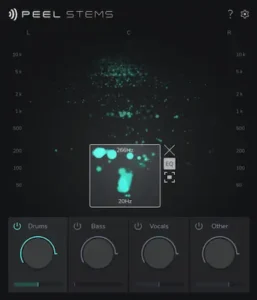
zplane PEEL STEMS 2 is designed for engineers who need to manipulate a finished stereo mix directly inside a DAW. Rather than exporting audio to an external separation service, the plugin processes the signal within the production session, allowing users to adjust individual instrument groups during playback.
This approach is particularly useful for mix revisions, arrangement adjustments, and targeted processing when the original multitrack session is unavailable. The main advantage is workflow integration: engineers can audition changes and process the resulting stems without repeatedly moving audio between applications.
Four Main Stems
- Drums
- Bass
- Vocals
- Other
The four output groups can be adjusted independently, providing control over the balance of a finished recording without requiring access to its original multitrack elements. The Other stem contains the remaining musical material that the separation model does not assign to vocals, drums, or bass.
Isolation Control
The Isolation parameter provides control over the separation behavior, allowing users to adjust how distinctly the target material is isolated from surrounding sources.
There is a practical trade-off between source isolation and the natural character of the extracted signal. More aggressive settings may suppress unwanted content from neighboring sources, but can also increase processing artifacts or compromise details within the target stem.
Consequently, maximum isolation is not necessarily the most useful setting. The appropriate adjustment depends on the recording, the amount of source overlap, and whether the priority is cleaner separation or preservation of the original sound.
PEEL Focus EQ
PEEL Focus EQ extends the plugin’s functionality beyond conventional four-stem separation. It allows users to focus on selected frequency regions and stereo content, providing more targeted control over material within the processed mix.
This can be useful when a broad instrument group is not sufficiently selective for a particular task. Instead of relying exclusively on the four main outputs, an engineer can focus on a narrower part of the soundfield and route the resulting material for additional processing.
The plugin also provides a secondary output for supported DAW configurations, including Ableton Live, FL Studio, Pro Tools, Reason, and Reaper. This offers additional routing flexibility when working with the separated material inside a session.
Latency and Technical Specifications
zplane specifies approximately 245 ms of DAW-compensated latency at a 44.1 kHz sample rate for PEEL STEMS 2.
This is an important consideration when integrating the plugin into a production session. DAW plugin delay compensation can align the processed signal with other tracks in supported configurations, but it does not eliminate the practical consequences of processing latency. Monitoring responsiveness and real-time performance should therefore be considered when deciding where to use the plugin in the signal chain.
Advantages
- Stem manipulation directly inside a DAW.
- Four independently adjustable musical groups.
- Isolation Control for adjusting separation behavior.
- Focus EQ for more targeted frequency and stereo-based processing.
- Secondary output routing in supported DAW configurations.
- VST3, AU, and AAX plugin formats.
Limitations
The four-stem structure is less granular than systems capable of separating individual instruments or breaking a drum performance into separate components. Material assigned to Other may still contain several overlapping sources that cannot be adjusted independently through the main stem controls.
The specified processing latency and computational requirements should also be considered when integrating PEEL STEMS 2 into an existing session. Although the plugin is designed for real-time operation, its responsiveness and suitability for live monitoring are not the same as those of a conventional low-latency mixing processor.
Best for: Mixing and mastering engineers who need DAW-integrated control over broad instrument groups in a finished stereo mix.
7. Acon Digital Remix – Five-Stem Real-Time Mixing
 Processing: Real-time
Formats: VST, VST3, AU, AAX
Official website: Acon Digital Remix
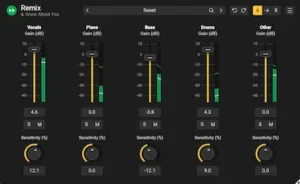
Acon Digital Remix is a real-time source separation plugin that provides independent control over five musical groups within a DAW. It is designed for engineers who want to adjust the balance of a finished mix without access to the original multitrack session.
The workflow is straightforward: insert Remix on the stereo mix, adjust the levels of the separated groups, and use the available outputs to integrate the extracted material into the existing processing chain. This makes it suitable for mix adjustments, arrangement changes, and targeted processing within a DAW session.
Five Independent Stems
- Vocals
- Piano
- Bass
- Drums
- Other
The dedicated Piano output distinguishes Remix from conventional four-stem separators. It provides additional control in keyboard-heavy arrangements, where piano parts may otherwise remain embedded in a broader instrumental stem.
However, the five categories are still broad source groups rather than individual multitrack elements. The Other stem can contain several instruments, and separation quality depends on how clearly the model can distinguish overlapping sources in the original mix.
Stem Sensitivity
Each stem has an individual Sensitivity control that adjusts the separation behavior for the selected source category.
Changing sensitivity affects the balance between retaining target material and rejecting unwanted content from neighboring sources. More aggressive detection may preserve additional details from the intended source, but can also increase spill from other instruments. More restrictive settings may reduce contamination while removing useful elements from the target stem.
This distinction matters in practical mixing. An isolated stem that sounds cleaner in solo is not necessarily the most useful one in the full arrangement. Engineers should evaluate both source isolation and how naturally the extracted material integrates with the remaining stems.
Automation and Multi-Output Routing
Remix supports DAW automation, allowing engineers to adjust stem levels and supported parameters over time. In compatible hosts, individual outputs can also be routed to separate channels for additional processing.
This creates opportunities for targeted adjustments without directly changing the other extracted groups. For example, an engineer can reduce the drum level during a particular section, apply a separate processing chain to the bass, or adjust the piano balance while leaving the remaining stems untouched.
Once routed to separate channels, the stems can be processed with conventional tools such as EQ, compression, and saturation. However, any processing decisions should account for separation artifacts already present in the extracted material.
Advantages
- Five independently adjustable stem categories.
- Real-time operation within a DAW.
- Individual Sensitivity controls.
- DAW automation for supported parameters.
- Multi-output routing in compatible hosts.
- One-time purchase licensing.
Limitations
Remix is built around five broad musical categories rather than detailed spectral editing or extensive instrument-level decomposition. The Piano stem adds useful separation flexibility, but it does not provide independent outputs for every instrument in a complex arrangement.
As with other neural separation tools, the results depend on the source material and the degree of overlap between instruments. Real-time operation improves workflow efficiency, but does not guarantee artifacts-free output or make every extracted stem suitable for critical restoration and mastering work.
Best for: Mixing and mastering engineers who want to rebalance and process five musical groups from a finished stereo mix without leaving their DAW.
8. iZotope RX 12 – Stem Separation for Audio Restoration
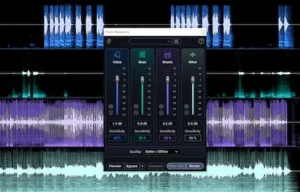 Processing: Offline and plugin-based workflows
Formats: Standalone application and supported DAW integrations
Official website: iZotope RX 12
iZotope RX is primarily an audio repair and restoration environment rather than a dedicated stem separation platform. Its Music Rebalance module makes it relevant to source separation by allowing engineers to adjust broad musical components within a completed recording.
This distinction is important. While dedicated stem separation tools are often designed around remixing and independent stem manipulation, RX approaches the task as part of a wider corrective workflow. The extracted material can become a starting point for targeted restoration and repair.
Music Rebalance
Music Rebalance separates a mixed recording into four broad categories:
- Vocals
- Bass
- Percussion
- Other instruments
These components can be adjusted independently, giving engineers some control over the balance of a finished recording without requiring the original multitrack session. This can be useful for reducing vocal prominence, modifying bass levels, or adjusting percussion in material that would otherwise need to be processed as a complete stereo mix.
However, Music Rebalance does not recover the original multitrack recordings. Its outputs are estimated source components, and unwanted bleed or separation artifacts may remain, particularly in dense arrangements.
Stems View in RX 12
RX 12 introduces a track-based workflow through Stems View, allowing users to work with separated components inside the RX environment rather than treating source separation solely as an export operation.
This approach is relevant when an extracted component requires further corrective processing. For example, an engineer may need to apply spectral repair to a vocal stem, reduce unwanted noise in an instrumental component, or address a localized defect in percussion without applying the same processing to the entire stereo mix.
The practical advantage is the integration of separation and restoration within one environment. Instead of moving repeatedly between a separation application and a dedicated repair tool, engineers can incorporate source-level correction into the same workflow.
Why RX Is Different
RX’s main distinction is its broader restoration toolkit. Source separation is one part of a workflow that can also involve spectral editing, noise reduction, de-clicking, de-hum, and other corrective processes.
This makes the software particularly relevant when the objective is not simply to create an instrumental or vocal-only version, but to address a specific problem within an existing recording. The ability to work on an extracted component can make otherwise difficult corrections more selective, although the quality of the separation places limits on how precisely the repair can be performed.
Advantages
- Music Rebalance for independent control over broad musical components.
- Source separation integrated into a professional restoration environment.
- Track-based Stems View workflow in RX 12.
- Access to spectral editing and other corrective tools.
- Useful for targeted repair of material within finished mixes.
Limitations
RX is a comprehensive restoration environment, not a specialized multi-stem production platform. Engineers who need a wider range of individual instrument categories, configurable neural network models, or extensive separation options may find MVSEP and other dedicated solutions more suitable.
Its advanced restoration capabilities also require an understanding of spectral editing and audio repair. Separation artifacts can limit the effectiveness of subsequent processing, so extracted components should be evaluated before applying corrective treatments.
Best for: Mastering engineers, restoration specialists, and post-production professionals who need to isolate and correct individual components of a finished recording.
9. Steinberg SpectraLayers 13 – Advanced Spectral Unmixing
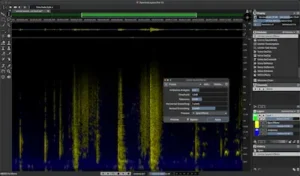 Processing: Offline spectral processing
Platforms: Windows and macOS
Official website: Steinberg SpectraLayers
SpectraLayers takes a different approach to source separation by combining AI-assisted unmixing with detailed spectral editing. Rather than limiting users to a set of conventional audio tracks, it represents sound as a visual spectral layer that can be selected, separated, edited, and reconstructed.
This makes the software particularly useful when a standard four-stem separator does not provide enough control over individual musical elements or when the separation result requires further corrective editing.
Unmix Song
The Unmix Song function can separate a mixed recording into several musical categories:
- Vocals
- Drums
- Bass
- Guitar
- Piano
- Sax and Brass
- Other
The dedicated Sax and Brass category offers additional control over arrangements with prominent wind instruments. However, the actual isolation quality depends on the source material, the overlap between instruments, and the separation model used.
Quality Modes
SpectraLayers provides processing quality options such as Fast, Balanced, and High for supported unmixing operations.
These modes offer different trade-offs between processing time and separation quality. More computationally intensive settings may produce cleaner results in some situations, but they do not guarantee artifact-free isolation. The difference is best evaluated by listening to both the extracted layer and the reconstructed mix.
Spectral Editing Beyond Separation
One of SpectraLayers’ main strengths is the integration of source separation with detailed spectral editing.
After unmixing, users can work directly with the spectral content of individual layers, addressing unwanted tonal components, transient interference, and localized artifacts. This can be valuable when a separation is broadly successful but still contains remnants of other instruments or processing artifacts.
For mastering and restoration work, this distinction matters. AI-assisted separation provides an initial division of the mix, while spectral editing offers additional control over specific imperfections that remain in the extracted material.
Advantages
- AI-assisted source separation with multiple musical categories.
- Dedicated Sax and Brass category in Unmix Song.
- Different processing quality modes.
- Detailed spectral editing after separation.
- Useful for restoration, sound design, and corrective audio work.
Limitations
SpectraLayers has a more specialized workflow than a straightforward online stem splitter. Users need to understand spectral representations and editing techniques to take full advantage of its capabilities.
It is also primarily an offline editing environment rather than a tool for immediate real-time stem balancing during DAW playback.
Best for: Audio editors, restoration specialists, and mastering engineers who need detailed source separation combined with spectral manipulation and corrective editing.
10. Logic Pro Stem Splitter – Integrated Separation for Apple Silicon
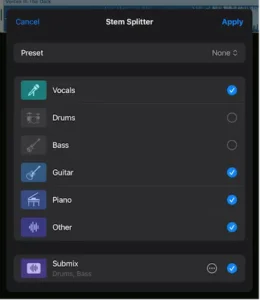 Processing: Local processing
Platform: macOS and compatible iPad hardware
Official website: Apple Logic Pro
Logic Pro includes a built-in Stem Splitter that extracts musical components directly inside the DAW. For producers already working in Logic, this removes the need to export a mix to a separate application, perform the separation, and import the resulting files back into the project.
The feature is integrated into the editing and arrangement workflow, allowing extracted components to be used for further processing, sampling, and structural changes within the session.
Available Stems
Logic Pro’s Stem Splitter can separate supported audio material into the following categories:
- Vocals
- Drums
- Bass
- Guitar
- Piano
- Other
The additional Guitar and Piano categories provide more detailed control than a conventional four-stem workflow. The Other output contains musical material that the model does not assign to the dedicated categories.
As with other AI separation systems, the outputs are estimates rather than recovered multitrack recordings. Instrument overlap, effects, distortion, and dense arrangements can affect separation quality.
Once the stems have been generated, they can be edited and processed as part of the Logic Pro project. This makes Stem Splitter useful for arrangement changes, remix preparation, selective processing, and creating alternative versions of an existing recording.
Hardware Compatibility
Stem Splitter requires compatible Apple Silicon hardware. On iPad, the feature is available on models equipped with an M1 chip or later. On Mac, it is unavailable on Intel-based systems or when Logic Pro runs under Rosetta.
This is an important purchasing consideration: owning Logic Pro does not automatically guarantee access to Stem Splitter on every device. Check Apple’s current hardware and software compatibility requirements before relying on the feature in a production workflow.
Advantages
- Integrated directly into Logic Pro.
- Local processing.
- Six musical categories.
- No need to transfer audio between external applications.
- Convenient for sampling, editing, and arrangement work.
Limitations
Logic Pro’s Stem Splitter is tied to the Apple ecosystem and compatible hardware. Producers working on Windows or in other DAWs need a separate solution.
It also offers less direct control over model selection and advanced separation parameters than platforms such as MVSEP or Ultimate Vocal Remover.
Best for: Logic Pro producers who want integrated stem separation without adding another application to their workflow.
11. Ableton Live 12 Suite – Built-In Local Stem Separation
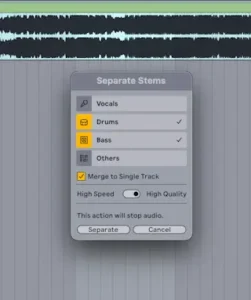 Processing: Local
Platform: Windows and macOS
Official website: Ableton Live
Ableton Live 12 Suite includes native stem separation, allowing producers to extract individual musical groups directly from audio clips.
Introduced in Live 12.3, the feature is built around an integrated workflow: separated components are rendered as new audio tracks inside the project rather than requiring a separate application for processing.
Four Available Stems
- Vocals
- Drums
- Bass
- Other
The Other category contains the musical material that the separation model does not assign to vocals, drums, or bass. This can include guitars, keyboards, synthesizers, and other instruments.
High Speed and High Quality Processing
Ableton provides two separation modes with different processing priorities.
High Speed processes the material in a single pass and is designed to produce results more quickly.
High Quality uses a more involved multi-step separation process. It can provide improved isolation in some situations, but requires additional processing time.
The appropriate mode depends on the source material, available system resources, and intended application. A more computationally intensive process does not guarantee a cleaner result for every mix.
Arrangement and Editing Workflow
Separated stems are rendered as individual audio tracks inside a new group. They can then be warped, sliced, resampled, rearranged, and processed using Ableton’s native devices or third-party plugins.
Live 12.4 also adds flexibility for separating selected portions of clips in Arrangement View and combining selected stems into a single track. This is useful when an entire recording does not need to be processed or when only specific components are required for further editing.
Important Export Limitation
Ableton’s documentation currently contains different specifications for stem export. The Stem Separation FAQ lists the output as 44.1 kHz, 16-bit WAV, while the Live 12 Reference Manual states that separated stems retain the bit depth of the source material.
For this reason, check the properties of the rendered files in your installed version of Live rather than assuming a fixed bit depth. The documented 44.1 kHz output sample rate is also worth considering when choosing Live’s built-in separator over an external tool with different export specifications. Converting the resulting files to a higher sample rate will not restore information absent from the original separation output.
Advantages
- Native DAW integration.
- Local processing.
- High Speed and High Quality modes.
- Direct access to extracted audio tracks.
- Useful for remixing, resampling, and sample manipulation.
Limitations
Stem separation is available in Live Suite rather than every Live edition. The four-stem structure also provides less detailed instrument extraction than specialized services offering additional source categories or model selection.
Processing time varies with the computer, source material, and selected quality mode. The fixed output format may also be a consideration when preparing stems for workflows that require different delivery specifications.
Best for: Ableton producers who want to extract, edit, and manipulate stems directly inside their production sessions.
12. Waves StudioVerse Mix Unlock – Real-Time Rebalancing of Finished Mixes
 Processing: Real-time
Platform: StudioVerse Audio Effects
Official website: Waves StudioVerse Mix Unlock
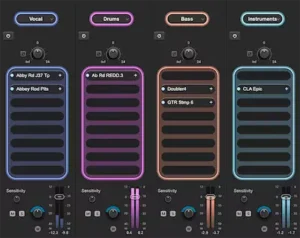
Waves StudioVerse Mix Unlock is designed to give users control over the main musical components of a completed stereo recording while it plays inside a DAW.
Unlike a conventional standalone stem separation plugin, Mix Unlock is integrated into StudioVerse Audio Effects as a dedicated feature. It is not installed or used as an independent separation plugin.
Two Separation Modes
Mix Unlock offers two separation configurations:
- Two-stem mode: Vocals and Playback.
- Four-stem mode: Vocals, Drums, Bass, and Instruments.
The two-stem configuration is intended for broad vocal-versus-instrumental adjustments, while the four-stem option provides more control over the balance of a finished mix. Neither mode recreates the original multitrack session; the outputs are estimated components derived from the stereo source.
Integration with StudioVerse
A key part of Mix Unlock’s workflow is its integration with the StudioVerse processing environment.
After separation, users can apply different effects to the extracted components. This allows vocal processing, drum enhancement, bass shaping, and instrumental effects to be explored within the same DAW session, without first exporting stems to a separate application.
Potential applications include:
- Adjusting vocal prominence in a completed mix.
- Reducing or emphasizing drum content.
- Changing the balance between bass and other instruments.
- Creating an instrumental version by reducing the vocal component.
- Applying different processing chains to individual separated groups.
These adjustments should be evaluated in the context of the full mix. Separation artifacts, source bleed, and changes to the interaction between musical elements can become more noticeable when individual components are processed aggressively.
Advantages
- Real-time processing inside a DAW.
- Two-stem and four-stem separation modes.
- Integration with StudioVerse effect chains.
- Convenient for creative mix adjustments and alternative versions.
- No separate export-and-reimport workflow required.
Limitations
Mix Unlock depends on StudioVerse Audio Effects and the applicable license or subscription requirements. It is not a standalone stem separation plugin.
The four-stem mode also uses broad musical categories rather than detailed instrument-level extraction. Engineers who need individual guitar, piano, or orchestral sections may require a more specialized separation tool.
Real-time operation is convenient, but it does not guarantee artifact-free separation. The usefulness of the extracted components depends on the source mix and the amount of processing applied afterward.
Best for: Waves users who want to rebalance and creatively process the main components of finished recordings directly inside their DAW.
13. SoliderSound Go-Splitter Pro – Local Offline Separation and Batch Processing
 Processing: Local and offline
Platforms: Windows 10/11 (x64), macOS 12.3 or later (Apple Silicon only)
Official website: SoliderSound Go-Splitter Pro
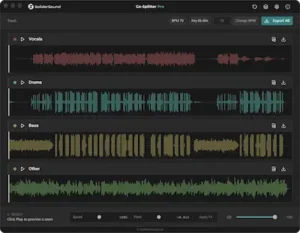
Go-Splitter Pro is a standalone desktop application designed for local stem separation and additional production-oriented audio processing.
Its main distinction is the combination of offline AI separation with batch processing, tempo and pitch tools, and MIDI export. This makes it more than a basic stem extraction utility: it also provides functions for preparing separated material for further production work.
Four Main Stems
- Vocals
- Drums
- Bass
- Other
Processing takes place on the user’s computer rather than requiring recordings to be uploaded to a cloud service. This can be useful when working with confidential material or when an internet connection is unavailable. Actual processing performance depends on the computer’s hardware and the selected separation settings.
Batch Processing
Go-Splitter Pro includes a processing queue for handling multiple recordings without having to initiate each separation task individually.
This can save time when preparing large collections of audio files or repeating the same separation workflow across multiple tracks. However, batch processing does not eliminate the need to review individual results, particularly when the source recordings vary considerably in arrangement and mix density.
Additional Production Tools
Beyond stem separation, the application includes:
- Automatic BPM detection.
- Musical key detection.
- Per-stem MIDI export.
- Pitch-preserving tempo changes.
- Speed and pitch effects.
- Stem mixer preview.
- Batch WAV export.
The MIDI export feature requires particular clarification. Converting an extracted audio stem into MIDI is an audio-to-MIDI transcription process, not recovery of the original MIDI performance. The resulting data may require editing, and note detection, articulation, timing, and polyphonic accuracy can vary depending on the source material.
Similarly, pitch-preserving tempo changes and speed or pitch effects serve different purposes: the former aims to change playback duration while maintaining pitch, whereas speed changes can also alter pitch unless compensated by separate processing.
Advantages
- Local processing without mandatory cloud uploads.
- Standalone desktop workflow.
- Batch processing for multiple recordings.
- WAV stem export.
- Additional tempo, pitch, and MIDI functions.
- One-time purchase licensing, according to the stated product model.
Limitations
Go-Splitter Pro provides four broad musical stems rather than detailed instrument-specific separation. Engineers who need to isolate individual guitars, keyboards, orchestral sections, or other sources may require a tool with more specialized models and output categories.
Local processing also makes performance dependent on available system resources. Processing speed and practical workload capacity will vary with the computer’s CPU, GPU, memory, and the size of the recordings.
Best for: Producers and audio engineers who need offline stem separation, batch processing, and additional tools for preparing audio material for production.
Which Stem Separation Software Is Best for Different Tasks?
There is no universally superior AI stem separator for every recording and production task. The most suitable option depends on the material being processed, the sources that need to be isolated, and how the extracted audio will be used afterward.
A tool optimized for quick vocal removal may not be the best choice for detailed instrument extraction or restoration. Likewise, a platform with extensive model selection may offer greater flexibility but require more technical knowledge and processing time. The following comparisons focus on practical workflow requirements rather than assuming that one separation engine is consistently superior across all types of material.
Best Stem Separation Software for Vocals
Vocal extraction is one of the most common applications of AI source separation, but the quality of the result depends heavily on the vocal arrangement, recording characteristics, and separation model.
LALAL.AI, Moises, MVSEP, and Ultimate Vocal Remover offer different approaches to vocal isolation. Cloud-based services prioritize accessibility, while local applications provide more control over model selection and processing workflows.
For professional audio work, the main evaluation criteria are not simply how much vocal content remains in the extracted stem. Equally important are vocal timbre preservation, transient and consonant definition, stereo integrity, and the amount of instrumental bleed.
Backing vocals, vocal doubling, long reverb tails, stereo delays, and distortion can make isolation particularly difficult. Aggressive separation may reduce instrumental contamination but also remove parts of the vocal’s natural character. The most useful result is therefore not necessarily the driest or most isolated stem, but the one that remains convincing in the context of the intended mix, where vocal placement and intelligibility are just as important as isolation. These considerations are closely related to the broader principles of vocal mixing.
Best Software for Drum Separation
For conventional drum extraction, MVSEP, Moises, LALAL.AI, and local Demucs-based workflows are worth considering. Their capabilities differ in terms of model selection, available output categories, and the level of control offered during processing.
When individual drum components are required, MVSEP provides access to specialized separation models that can target elements such as kick, snare, toms, and cymbal-related content. The exact outputs depend on the selected model and its supported input and output configuration.
Separating individual drum elements from a complete commercial mix is considerably more difficult than processing an isolated drum recording. In a finished mix, kick and bass may overlap in the low-frequency range, while snare transients can share spectral and temporal characteristics with guitars, vocals, and other percussive sources. Cymbals and reverberation can also leave residual content across multiple extracted stems.
For this reason, engineers should evaluate drum separation not only by the amount of isolated percussion, but also by transient preservation, low-frequency consistency, phase behavior, and unwanted bleed when the extracted components are recombined.
Best Software for Bass Extraction
Bass separation can be challenging because low-frequency content frequently overlaps with kick drums, low synthesizers, and other sustained instruments. The problem becomes more complex when the mix contains saturation, compression, subharmonics, or overlapping bass and kick transients. These interactions also illustrate why frequency balance in mixing must be evaluated across the complete arrangement rather than by judging individual stems in isolation.
MVSEP provides access to specialized bass separation models, while LALAL.AI, Moises, Demucs, and DAW-integrated solutions offer more general-purpose bass extraction workflows. The available models and degree of control differ between these tools.
When evaluating bass stems, pay particular attention to low-frequency continuity, preservation of harmonic content, transient definition, and unwanted kick drum leakage. Also check whether the extracted bass retains a natural relationship between its fundamental frequencies and upper harmonics. A stem that sounds clean in isolation may still produce an unnatural result when recombined with the other components.
Best Free Stem Separation Software
For users who want to avoid recurring subscription costs, Ultimate Vocal Remover (UVR) and Demucs are notable options.
UVR provides a graphical interface for working with different neural network models, while Demucs offers an open-source command-line workflow. Both support local processing, although setup requirements, model availability, and hardware performance differ.
MVSEP also offers free processing options. However, usage limits, model availability, processing queues, and credit requirements depend on the platform’s current terms. Free access should not be assumed to include every model or processing configuration.
For professional work, the absence of a subscription is only one consideration. Model quality, processing flexibility, output consistency, and the time required to obtain usable stems can have a greater impact on the overall workflow.
Best Stem Separation for Professional Mixing
Mixing engineers may need to modify one component of a finished recording without directly changing the level of the entire stereo mix. This is where real-time stem separation and independent stem processing can become useful.
Acon Digital Remix, zplane PEEL STEMS 2, Waves StudioVerse Mix Unlock, and iZotope RX 12 are relevant to this type of workflow, although they approach the task differently. Remix, PEEL STEMS 2, and Mix Unlock focus on working with separated musical groups, while RX combines source separation with a broader set of restoration tools.
The main distinction is whether the engineer needs immediate adjustments during DAW playback or can work with offline separation and subsequent editing. Real-time processing is convenient for balance changes and creative effects, whereas offline workflows may provide more flexibility for detailed correction and restoration.
In either case, extracted stems should be checked in the context of the complete mix. Changes to one component can expose separation artifacts or alter the perceived balance between sources.
Best Stem Separation for Mastering and Audio Repair
Mastering engineers typically receive a completed stereo mix rather than the original multitrack session. Stem separation can therefore provide additional control when a specific element needs corrective attention without access to the original production files.
For example, a vocal may be slightly too prominent, the bass may lack definition, or percussion may need a small adjustment. Separating the relevant component can make a targeted correction possible, although the result depends on how accurately the source can be isolated.
iZotope RX 12, Steinberg SpectraLayers 13, MVSEP, and zplane PEEL STEMS 2 offer different approaches to these tasks.
RX and SpectraLayers are particularly relevant when separation is part of a broader restoration and spectral editing workflow. PEEL STEMS 2 offers a real-time approach to adjusting separated groups, while MVSEP provides access to a range of specialized models that can be compared for a particular source recording.
None of these tools should be treated as a replacement for a properly balanced original mix. Separation can introduce bleed, transient damage, tonal changes, and other artifacts. Its value in mastering lies in providing additional corrective options when the original multitracks are unavailable and a conventional stereo adjustment would affect too much of the recording.
How to Evaluate AI Stem Separation Quality
Choosing a stem separation tool based on promotional demonstrations alone is not a reliable way to determine whether it will perform well in professional audio production. Demonstration material is often selected to showcase favorable results and may not represent the complexity of real-world recordings.
A model may perform well on a sparse acoustic recording but struggle with a dense electronic mix containing distorted guitars, layered synthesizers, stereo reverberation, and heavily compressed drums. Separation quality is therefore source-dependent and should be evaluated using material similar to the recordings intended for actual production work.
A meaningful evaluation should consider several technical and perceptual characteristics rather than relying on a single quality metric.
1. Source Isolation Accuracy
Source isolation accuracy describes how effectively a model extracts the intended musical component while minimizing unwanted content from other sources.
For example, a vocal stem should retain the intended vocal performance while minimizing contamination from drums, guitars, synthesizers, and other instruments.
However, maximum isolation is not necessarily the same as maximum audio quality. An aggressive separation process may remove useful harmonic content, reverberation, ambience, or parts of the source itself. The result can sound cleaner in isolation but less natural in the context of the original mix.
For this reason, evaluate both the amount of unwanted source bleed and the preservation of the target instrument’s natural tonal and dynamic characteristics.
2. Transient Preservation
Transient preservation is particularly important for drums, percussion, plucked instruments, and other sources with fast attacks.
Some separation models can soften, smear, or partially remove transient information. This may make extracted drums sound less punchy or defined than the original recording.
When evaluating a drum stem, listen carefully to kick attacks, snare transients, hi-hat definition, and cymbal decay. Also check whether transient changes remain noticeable when the separated components are recombined.
3. Spectral Artifacts
AI separation can introduce unwanted spectral components or alter the original tonal structure of an extracted source.
Commonly audible artifacts include metallic resonances, watery modulation, unstable high-frequency textures, and unnatural changes to harmonic content.
These problems may become more noticeable when an extracted stem is amplified or processed with additional compression, equalization, saturation, or transient shaping. A stem that initially appears acceptable at its original level may reveal significant defects when subjected to further processing.
4. Stereo Image and Phase Integrity
Many commercial mixes rely heavily on stereo processing, including chorus, delays, reverberation, stereo widening, and mid-side techniques.
Understanding how these elements contribute to perceived space is an important part of stereo width in mixing, particularly when separation processing can alter the relationships between the left and right channels.
Source separation can alter these spatial relationships, potentially changing stereo width, localization, or the phase relationship between channels. Some models may also introduce differences between the left and right channels that become apparent during further processing.
When stems are intended for recombination, check their stereo image, left-right balance, and mono compatibility. Pay particular attention to sources with wide reverberation or stereo modulation, since these effects can be difficult to assign cleanly to a single separated component.
5. Reconstruction Accuracy
One useful evaluation method is to compare the original stereo mix with the reconstructed sum of its separated components.
For example, a four-stem separation system may produce Vocals, Drums, Bass, and Other. Summing these outputs creates a reconstructed version that can be compared with the original recording.
However, the reconstructed signal may not null against the original, even when the individual stems sound convincing. A difference signal alone does not establish that the separation is poor.
The model may alter phase relationships, timing, spectral content, or amplitude relationships during reconstruction. It may also introduce processing artifacts that prevent exact cancellation.
For a meaningful comparison, align the files, match their levels, and check for timing differences before interpreting a null test. Listen to the reconstructed mix as well as the individual stems: a technically measurable difference does not necessarily correspond to an audible improvement or problem.
6. Processing Flexibility
Professional workflows also depend on practical technical considerations, including:
- Supported input and output formats.
- Available sample rates and bit depths.
- Local versus cloud processing.
- Batch processing capabilities.
- DAW integration and plugin compatibility.
- Multichannel output and routing support.
- Processing latency and offline rendering time.
- CPU, GPU, and memory requirements.
A technically capable separation model may still be inconvenient if its workflow requires repeated manual exports, restricts output formats, or offers limited control over the resulting files.
The most suitable tool is therefore not necessarily the one with the largest number of separation categories or the most advanced model. It is the one that produces sufficiently clean results for the intended task while fitting the engineer’s actual production workflow.
Common AI Stem Separation Artifacts and Their Causes
Even advanced neural networks cannot perfectly isolate and reconstruct every source in a complex stereo mix. Understanding common separation artifacts helps engineers determine whether an extracted stem is suitable for further editing, mixing, or mastering.
If residual bleed, transient damage, or other defects remain in an extracted stem, the next step may involve corrective processing rather than another separation pass. For a dedicated repair workflow, see our guide to fixing AI stem separation artifacts.
Vocal Bleed
Vocal bleed occurs when vocal content remains audible in instrumental stems or when instruments and other unwanted sounds leak into the isolated vocal track.
This is particularly common with backing vocals, vocal doubling, reverb and delay effects, distorted vocal layers, and arrangements where vocals occupy similar frequency ranges to guitars or synthesizers.
Bleed can also become more noticeable when an extracted stem is amplified or processed independently. Reducing it too aggressively, however, may remove parts of the vocal performance or alter its natural tonal character.
Metallic and Watery Artifacts
Metallic or watery textures can appear when a separation model fails to reconstruct complex harmonic and temporal information consistently.
These artifacts may become particularly noticeable during sustained notes, reverberant passages, cymbal decay, and heavily distorted sounds. They can manifest as unstable high-frequency textures, unnatural modulation, or a granular quality that was not present in the original recording.
Such artifacts are not always obvious when a stem is auditioned at a low level. Additional compression, saturation, or equalization may make them more prominent.
Transient Smearing
Transient smearing occurs when the separation process reduces the sharpness or temporal definition of short-duration events, including kick drum attacks, snare hits, and plucked instruments.
The extracted drum stem may consequently sound softer, less punchy, or less defined than the corresponding elements in the original mix.
Pay particular attention to the initial attack and decay of transient-rich sources. A separation result that retains the general rhythmic pattern may still lose some of the microdynamics that contribute to the source’s impact.
Reverb and Delay Contamination
Reverberation and delay are difficult to assign to individual stems because their energy extends beyond the original source and can overlap with other musical components in both time and frequency.
A vocal reverb tail may appear partly in the instrumental stem, while a guitar delay may remain audible across several extracted components. This is especially common in dense stereo arrangements where effects are shared or heavily processed.
Removing this residual content completely can also make the isolated source sound unnaturally dry or incomplete. The goal is therefore to assess whether the remaining effects are acceptable for the intended application rather than assuming that every stem should be completely free of bleed.
Phase and Stereo Inconsistencies
Some separation systems alter the phase and spatial relationships of the extracted sources. This can affect stereo width, localization, and the way individual components interact when recombined.
When separated stems are summed, these changes may produce frequency-dependent cancellations or reinforcement compared with the original mix. Differences between the left and right channels can also affect mono compatibility and the stability of the stereo image.
This is one reason reconstructed stems should be auditioned in context rather than judged exclusively in solo mode. Check the complete sum in stereo and mono, paying attention to changes in low-frequency energy, transient definition, and spatial balance.
Can AI Stem Separation Be Used for Professional Mastering?
Yes, but its usefulness depends on the specific correction required, the quality of the separation, and the extent to which the extracted material can be processed without introducing audible artifacts.
AI stem separation can provide additional control over a finished stereo mix when the original multitracks are unavailable. It can help engineers address certain balance problems, investigate masking between musical elements, and perform targeted corrections that may be difficult to achieve through conventional stereo processing alone.
However, extracted stems should be treated as reconstructed audio components rather than original multitrack recordings. They may contain source bleed, spectral artifacts, transient changes, and altered phase relationships. These limitations matter particularly in mastering, where relatively small changes can affect the tonal balance and spatial integrity of the entire recording.
When Stem Separation Can Help
- Reducing an excessively prominent vocal in a finished mix.
- Making restrained corrections to bass or drum balance.
- Investigating frequency masking between musical elements.
- Preparing instrumental or vocal-only versions.
- Isolating problematic components for targeted restoration.
- Creating alternative versions for remixing and creative production.
These applications are most useful when the extracted component is sufficiently clean for the intended correction and the adjustment cannot be achieved more transparently through conventional processing.
When It May Be Better to Avoid Separation
- When the original multitracks are available and can be processed directly.
- When extensive stereo effects or spatial relationships must remain intact.
- When the extracted stems contain noticeable artifacts or excessive source bleed.
- When separation introduces unacceptable phase or transient changes.
- When the required correction can be achieved more transparently in the original stereo mix.
In these situations, additional separation processing can introduce more problems than it solves. Conventional equalization, dynamic processing, mid-side techniques, or other stereo-domain adjustments may provide a more predictable result.
A Practical Mastering Workflow
For professional mastering, a conservative approach is preferable to aggressive stem manipulation. Separation should address a clearly identified problem rather than become an unnecessary processing stage.
- Analyze the original mix. Identify the specific balance, tonal, or masking problem before introducing source separation. Establish whether conventional stereo processing can address it more transparently.
- Choose an appropriate separation model. Different tools and models can produce different results depending on the arrangement, source characteristics, and processing requirements.
- Extract only the necessary components. Avoid unnecessary separation passes. If the correction concerns one source, additional stem extraction may introduce complexity without providing a practical benefit.
- Audition the isolated stem. Check for unwanted bleed, transient damage, spectral artifacts, tonal changes, and unnatural spatial characteristics.
- Process conservatively. Start with restrained level adjustments and targeted processing. Avoid attempting to reconstruct an entirely new mix from imperfectly separated components.
- Compare the reconstructed result with the original. Match playback levels and evaluate tonal balance, stereo integrity, phase behavior, and mono compatibility. Check that the processed version does not introduce new problems.
- Perform a final listening evaluation. Confirm that the correction improves the complete recording across relevant playback systems rather than merely making an isolated stem sound better.
The most important principle is that the final master must work better as a complete recording. A cleaner isolated stem does not automatically produce a better musical result. If separation artifacts become audible or the reconstructed mix loses its original character, returning to the untouched stereo mix may be the better engineering decision.
Cloud-Based vs. Local Stem Separation: Which Is Better?
One of the most important decisions when choosing AI stem separation software is whether to use cloud-based processing or run the separation model locally.
Both approaches have practical advantages and limitations. The right choice depends on available hardware, model requirements, processing volume, workflow preferences, and how sensitive the source recordings are.
Cloud-Based Separation
Cloud services perform separation on remote infrastructure. The user uploads a recording, selects an available model or separation category, and downloads the resulting files after processing.
Advantages:
- Access to computationally demanding models without maintaining equivalent local hardware.
- No need to install and configure complex neural network environments.
- Less dependence on the performance of the user’s local GPU.
- Convenient access from different devices and locations.
- Some platforms offer specialized models and separation configurations that may not be readily available in desktop applications.
Disadvantages:
- Audio files must be uploaded to an external service.
- Processing time can depend on server availability and queue conditions.
- Some services impose credit limits, subscription restrictions, or per-minute processing charges.
- Confidential recordings may require additional review of the provider’s data-handling and retention policies.
- An internet connection is required for uploading, processing, and retrieving results.
Cloud processing can be particularly convenient when using specialized models or processing occasional projects without investing in local hardware. However, engineers should check how uploaded files are stored, who can access them, how long they are retained, and whether they may be used for additional purposes under the provider’s terms.
Local AI Separation
Local processing runs the separation model directly on the user’s computer. Depending on the application, processing may use the CPU, GPU, or a combination of available hardware resources.
Advantages:
- Audio files can remain on the local machine without mandatory cloud uploads.
- No dependence on a remote processing queue.
- Useful for handling confidential client recordings under an appropriate local security policy.
- Can avoid recurring cloud processing-minute charges.
- Suitable for automated batch processing and offline workflows.
- Provides greater control over installed models and the local processing environment in applications that support them.
Disadvantages:
- Processing speed depends on the available CPU, GPU, memory, and storage performance.
- Some models require substantial GPU memory and system resources.
- Installation, dependency management, and model configuration can be technically demanding.
- Some desktop applications offer fewer specialized models than cloud platforms.
- Large neural network models can consume significant storage space.
- Hardware limitations may restrict the use of certain models or make batch processing impractical.
Local processing is often attractive for studios that regularly handle client material or need repeatable offline workflows. However, keeping audio files on the same computer does not automatically guarantee data security. Access controls, disk encryption, backups, operating system security, and third-party software permissions remain relevant.
For professional studios, the decision should also account for client confidentiality and contractual data-handling requirements. Cloud processing may be entirely appropriate when the provider’s policies meet those requirements, while local processing can simplify control over where recordings are stored and processed.
Ultimately, the choice is not simply between convenience and privacy. Cloud services can offer access to specialized processing infrastructure, while local applications provide greater control over the computing environment. The most practical solution depends on the studio’s workload, hardware, security requirements, and the separation quality needed for each project.
How to Choose the Right Stem Separation Software
The right stem separation tool depends on the intended application, the quality of the required output, and the amount of control needed over the processing workflow. A long feature list does not necessarily translate into better separation results.
For Music Producers
Producers who frequently sample, rearrange, remix, and repurpose existing recordings may benefit from Moises, LALAL.AI, Ableton Live, or Logic Pro.
These tools provide accessible separation workflows and make it relatively straightforward to prepare extracted material for creative production. Moises and LALAL.AI offer dedicated separation services, while Ableton Live and Logic Pro integrate the process directly into their respective DAW environments.
When choosing between them, consider the required stem categories, export options, processing convenience, and whether the software fits the DAW already used in the production workflow.
For Mixing Engineers
Mixing engineers who need to adjust individual components of a finished recording should consider Acon Digital Remix, zplane PEEL STEMS 2, Waves StudioVerse Mix Unlock, and iZotope RX 12.
The choice depends on whether real-time control during playback or a more detailed offline workflow is more important. Dedicated stem processing tools can simplify level adjustments and creative processing, while RX provides a broader restoration environment for corrective work.
Pay particular attention to DAW compatibility, output routing, automation, processing latency, and how naturally the extracted components behave when additional processing is applied.
For Mastering Engineers
Mastering professionals should prioritize source preservation, transient definition, stereo integrity, and the ability to make small corrections without introducing noticeable separation artifacts.
iZotope RX 12, Steinberg SpectraLayers 13, MVSEP, and zplane PEEL STEMS 2 are relevant options because they offer different approaches to source separation, spectral editing, and corrective processing.
The most important consideration is whether the extracted material is clean enough to support the intended correction. A specialized model or a more detailed editing environment cannot compensate for a separation result that has already lost important musical information.
For Developers and Advanced Users
MVSEP, Demucs, and Ultimate Vocal Remover (UVR) offer greater flexibility for users interested in model selection, automation, and customized processing workflows.
MVSEP provides access to multiple separation models through a web-based platform, while Demucs and UVR support local processing with different levels of technical configuration. These solutions are particularly useful when a standard commercial interface does not provide sufficient control over model selection or processing parameters.
Advanced users should also consider API availability, batch processing, dependency management, hardware requirements, and the ability to reproduce the same processing workflow across multiple recordings.
Frequently Asked Questions About AI Stem Separation
What is the best AI stem separation software in 2026?
There is no single best solution for every application. LALAL.AI and Moises provide accessible separation workflows, MVSEP offers a wide selection of specialized models, and UVR and Demucs are useful for local processing. iZotope RX 12 and Steinberg SpectraLayers 13 are particularly relevant to professional audio restoration.
What is the best free stem separation software?
Ultimate Vocal Remover and Demucs are notable free options for local source separation. MVSEP also provides free processing options, although usage limits and model availability vary. The best choice depends on available hardware, model requirements, and the desired level of control.
Can AI separate vocals from a finished song?
Yes. Modern AI separation systems can extract vocals from a finished stereo mix. Depending on the model, they may also provide separate lead and backing vocal outputs. However, the results can contain instrumental bleed, reverberation, and other separation artifacts.
Can I separate drums, bass, and vocals independently?
Yes. Many modern systems provide separate drum, bass, vocal, and instrumental outputs. Some specialized models also support additional categories such as piano, guitar, strings, and individual drum components. Available outputs depend on the software and selected model.
Does stem separation reduce audio quality?
It can. Source separation reconstructs individual components from a combined recording, potentially introducing spectral artifacts, transient changes, phase differences, and unwanted source leakage. The extent of these changes depends on the separation model and the characteristics of the original mix.
Can I use separated stems for professional mixing?
Yes, provided the extracted material is suitable for the intended processing. Engineers should check individual stems and the reconstructed mix for artifacts, tonal changes, transient damage, and phase inconsistencies before using them in a professional production.
Is cloud-based stem separation better than local processing?
Not necessarily. Cloud services can provide access to computationally demanding models, while local processing offers greater control over where audio files are handled and avoids external processing queues. Separation quality depends primarily on the specific model and source material, not simply on whether processing takes place locally or in the cloud.
Can AI stem separation recover the original multitrack recordings?
No. AI systems estimate individual sources from a combined audio waveform. They cannot recover the original microphone recordings, exact plugin settings, MIDI performances, or the original production session. The extracted stems are reconstructed approximations of the sources.
What is the difference between a vocal remover and a stem splitter?
A vocal remover typically focuses on separating vocals from instrumental content. A stem splitter provides a broader range of outputs, potentially including drums, bass, guitars, keyboards, and other instrument groups.
Can I use AI-separated stems commercially?
The ability to create stems does not automatically grant permission to distribute or commercially exploit the underlying recording. Copyright ownership, licensing terms, and the rights to the original composition and sound recording must be considered separately.
Final Verdict: Choosing the Right AI Stem Separation Tool
AI stem separation has become a practical part of modern music production, but no tool should be judged by its feature count alone. The right choice depends on the source material, the required level of separation, and how the extracted audio will be used.
For accessible multi-instrument separation, LALAL.AI and Moises offer convenient workflows. MVSEP is better suited to users who want to compare specialized neural network models, while Ultimate Vocal Remover and Demucs remain useful options for local processing. Go-Splitter Pro adds production-oriented features to an offline separation workflow.
For direct DAW integration, PEEL STEMS 2, Acon Digital Remix, Waves StudioVerse Mix Unlock, Ableton Live, and Logic Pro offer different approaches to processing extracted components within a production environment. Their practical value depends on workflow compatibility, routing requirements, latency, and the degree of control needed over individual stems.
iZotope RX 12 and Steinberg SpectraLayers 13 are particularly relevant when source separation is part of a broader restoration, spectral editing, or corrective processing workflow.
For mixing and mastering engineers, the decisive factor is not the number of stems a system can generate. It is how well those stems preserve the musical information needed for the intended correction. Transient definition, tonal balance, stereo integrity, and unwanted source leakage all matter more than the apparent level of isolation when a stem is auditioned on its own.
AI separation is therefore best treated as an additional engineering tool, not a replacement for original multitrack recordings or a properly executed mix. It can provide useful control over an otherwise inaccessible recording, but every extracted component should be evaluated in the context of the complete mix.
Used selectively and with realistic expectations, AI stem separation can expand the available options for editing, mixing, restoration, and mastering without guaranteeing a better result.
Before Adding More Processing, Hear What Your Mix Can Do in Mastering
AI stem separation can provide useful control over a finished mix, but reconstructed stems may introduce transient smearing, tonal changes, source bleed, or phase inconsistencies. More processing does not automatically solve these issues, and adjustments that sound better on isolated stems may not improve the complete recording. The next step is to evaluate your original mix as a whole. Submit up to 40 seconds and receive a free mastering demo prepared by a real mastering engineer. You will be able to compare the original passage with the mastered version and assess the actual differences in tonal balance, punch, dynamics, stereo image, and overall translation — rather than relying on another plugin’s processing claims.
Upload 40 Seconds and Get Your Free Mastering Demo →

Yurii Ariefiev approaches AI stem separation from an audio engineering perspective, where the usefulness of an extracted source depends on more than isolation alone. Source bleed, transient preservation, spectral artifacts, and stereo integrity all affect whether separated material can withstand further processing. These factors are especially important when reconstructed stems are used for corrective editing, remixing, or work on a finished master.
Enjoyed this review?
If you found it useful, you can support independent audio research with a coffee. ☕
Buy me a coffee