Preparing a vocal recording for mixing can involve more editing than processing. Before applying EQ, compression, or saturation, an engineer may need to reduce background noise and room reflections, even out phrase levels, manage breaths, control sibilance, and remove distracting mouth clicks. These tasks help establish a consistent vocal track, but they can also consume a significant amount of production time.
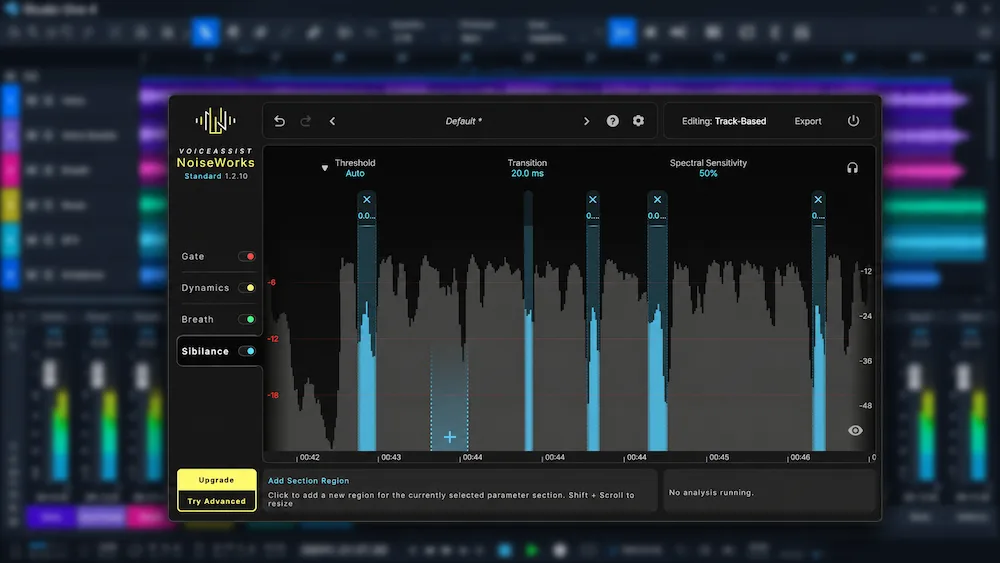
NoiseWorks VoiceAssist brings several vocal-editing and restoration processes into a single AI-assisted application. Unlike a conventional channel-strip plugin, it analyzes the recording, identifies individual vocal events, and generates editable processing. Engineers can review and adjust the results before moving the audio into the main mixing chain.
This approach is relevant to recording engineers, vocal producers, mixing engineers, and dialogue editors who regularly work with inconsistent source material. The central question, however, is not simply how much editing VoiceAssist can automate. It is whether the processing preserves natural vocal characteristics, how reliably its restoration tools handle difficult recordings, and whether its integrated workflow offers practical advantages over established tools such as iZotope RX.
This review examines VoiceAssist’s documented features, processing architecture, DAW integration, available editions, pricing, competing products, and practical limitations. Manufacturer specifications are distinguished from independent listening observations. In the absence of controlled comparative testing, there is not enough evidence to conclude that VoiceAssist consistently outperforms specialized restoration software.
What Is NoiseWorks VoiceAssist?
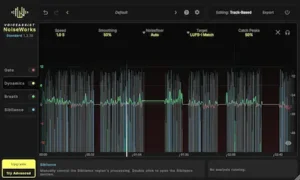 NoiseWorks VoiceAssist is an AI-assisted vocal and dialogue editing application developed by NoiseWorks GmbH, a German audio software company. It builds on the company’s earlier DynAssist concept, which focused primarily on vocal leveling and related processing tasks.
VoiceAssist was initially released in January 2026 with six processing sections. Subsequent updates expanded its feature set, adding Mouth Noise as a dedicated processing section. The version 1.4.13 manual, dated October 2026, documents seven processing areas: Clean, Lowend, Gate, Dynamics, Breath, Sibilance, and Mouth Noise.
Access to these processing tools depends on the license edition. The available versions offer different combinations of the seven sections within the same application environment.
VoiceAssist is designed to automate repetitive vocal-preparation tasks without removing the engineer’s ability to review and refine the results. It analyzes the recording, identifies relevant vocal events, and generates editable processing regions or automation curves. This approach differs from conventional insert processing, where an engineer applies a compressor or noise gate to the entire track and adjusts its parameters to achieve the desired result.
For engineers handling multiple vocal takes, spoken-word recordings, voiceovers, or dialogue, this event-based workflow may reduce the amount of repetitive corrective editing. Its practical value depends on how accurately the software identifies problem areas and how much manual refinement the resulting processing requires.
How Does VoiceAssist Work?
VoiceAssist relies on whole-recording analysis rather than exclusively on real-time processing. After a recording is loaded or captured, the application analyzes its content and identifies events relevant to the selected processing sections.
The engineer can review the detected events and proposed corrections, adjust processing intensity, modify individual regions, and remove edits that are unnecessary or too aggressive.
The distinction between automatic detection and automatic decision-making is important. VoiceAssist can identify a potential breath, sibilant, or unwanted noise event, but detection alone does not establish that the event should be removed or reduced. The engineer must still judge whether the proposed correction serves the performance.
Vocal editing is not simply a matter of eliminating every sound that deviates from an idealized signal profile. Breaths help define phrasing, consonants carry intelligibility, and subtle level variations can contribute to expression. Over-processing these elements can make a vocal sound unnatural or compromise its articulation.
VoiceAssist is therefore better understood as an assisted vocal-editing environment than as an autonomous vocal mixing system. Its output still requires critical listening and editorial judgment before the track enters the broader process of mixing a song, where its relationship with the other elements of the arrangement must be evaluated.
Give Your Mix the Clarity and Balance It Needs Before Release
Cleaning and balancing individual vocal tracks is only one part of achieving a cohesive production. Once the arrangement is complete, the final mix still needs to translate across playback systems while retaining its dynamics, depth, stereo image, and fine detail. At AREFYEV STUDIO, we approach mastering with attention to the relationship between these elements rather than relying on loudness alone. You can submit up to 40 seconds of your mix for a free mastering demo and hear how your track translates through a dedicated mastering process.
Upload Your Mix for a Free Mastering Demo →
The Seven VoiceAssist Processing Modules Explained
Clean: AI Noise Reduction and Dereverberation
Clean is one of the more technically significant sections of VoiceAssist. It is designed to reduce background noise and room reverberation in vocal and dialogue recordings, addressing two problems that often occur simultaneously in untreated recording environments.
Room reflections can compromise vocal clarity and make a recording sound distant or acoustically inconsistent. Background sources such as computer fans, environmental noise, and electrical interference create a separate problem, particularly when subsequent gain adjustments and compression make quieter unwanted sounds more noticeable.
Clean uses AI-based processing to address noise and reverberation, alongside controls for spectral editing and high-frequency recovery. Its spectral display provides a visual reference for examining frequency content affected by the processing, giving the engineer additional control over the restoration result.
Delta monitoring is particularly useful in this context. It allows the engineer to audition the material being removed or otherwise affected by the processing. This helps identify cases where noise reduction is also removing desirable vocal information, including consonant detail and subtle elements of the performance.
High-frequency recovery is another documented feature. It is intended to compensate for high-frequency content lost during noise reduction, with an adjustable frequency limit extending up to 20 kHz. The practical result will depend on the source material and the extent of the processing; this control should not be confused with recovering detail that is absent from the original recording.
As with other restoration systems, Clean is not guaranteed to produce transparent results under every condition. Aggressive noise reduction or dereverberation can introduce metallic artifacts, unnatural consonant textures, spectral smearing, or changes to the perceived vocal ambience. These risks make careful monitoring and restrained settings essential.
In a mixing workflow, Clean is most relevant when background noise or room reflections interfere with the clarity of the recording or become more distracting after compression and other processing. When the original vocal track is unavailable, an extracted vocal stem may provide a starting point for further cleanup, although the bleed and artifacts associated with AI stem separation can limit how transparently it can be processed. The objective is to improve the source without stripping away the acoustic character and detail that make the performance sound natural.
Lowend: Plosive and Low-Frequency Correction
Lowend targets low-frequency problems in vocal recordings, including plosive bursts, excessive proximity effect, unwanted low-frequency resonance, and rumble.
Plosives occur when bursts of air produced by consonants such as P and B reach the microphone capsule. Depending on microphone placement, polar pattern, and recording technique, they can generate substantial low-frequency energy over a very short period. These bursts can become especially disruptive when compression increases their prominence relative to the rest of the performance.
A conventional high-pass filter can reduce some of this energy, but it also affects the low-frequency body of the entire vocal track. When the problem is confined to particular syllables, selective correction is generally preferable to applying broad filtering across the performance.
VoiceAssist Lowend combines several types of low-frequency correction rather than relying on a single filtering process. Recover Lowend can restore some low-frequency body in thin recordings, while Resonance Reduction targets narrow, boomy peaks in the low and low-mid range. Its low-cut filter offers pitch-based, custom, and disabled modes. In pitch-based mode, the cutoff is determined by the lowest pitches detected in the recording, allowing the filter to adapt to the vocalist rather than applying one fixed frequency to every performance.
Plosive Amount and Plosive Sub provide additional control over detected P and B bursts. The module reduces low-frequency energy within individual plosive regions instead of applying the same correction across the entire vocal track. This makes it a more selective alternative to broad filtering, although the independent limitations documented by Tape Op mean that difficult plosives may still require manual spectral repair.
There are limitations, however. In his independent evaluation for Tape Op, Larry Crane identified situations in which Lowend did not successfully remove low-frequency plosives. This indicates that the module should be considered an additional corrective tool, not a guaranteed replacement for manual spectral editing or dedicated restoration software.
Low-frequency correction also requires restraint. Excessive processing can thin out the voice or alter its natural weight. The goal is to control disruptive plosive energy and unwanted buildup while preserving the fundamental body of the performance.
Gate: Intelligent Vocal Gating
Conventional noise gates operate primarily according to signal level. When the incoming signal falls below a threshold, the gate attenuates its output. This can help control noise between vocal phrases, but it also creates a risk of cutting into quiet consonants, word endings, and breathy passages when their levels approach the threshold.
VoiceAssist Gate offers two operating modes: Vocal Detection and Threshold Based. Vocal Detection takes a content-aware approach by identifying speech and silence regions within the recording, distinguishing vocal activity from pauses and quieter sections. Threshold Based works like a conventional noise gate, treating audio below a user-defined threshold as a pause. This gives engineers a choice between AI-based voice detection and traditional level-dependent gating, depending on the recording and editing requirements.
The distinction is particularly relevant to spoken-word production and close-miked vocals, where abrupt gating can make edits more noticeable than the background noise they are intended to control.
However, identifying a quiet region does not automatically mean that it should be silenced. Low-level vocal details, natural breaths, room tone, and intentional pauses may all contribute to the recording. Automatic detection should therefore be reviewed in the context of the performance rather than accepted without adjustment.
Dynamics: Automatic Vocal Leveling
Dynamics is particularly relevant when working with vocal recordings that contain substantial level differences between words, phrases, and sections.
Rather than relying exclusively on conventional compression, VoiceAssist analyzes the recording and generates an editable volume automation curve. This allows level adjustments to be made at specific points in the performance before the signal reaches the main dynamics-processing chain.
Vocal leveling and compression address related but distinct problems within vocal mixing. Leveling corrects differences in performance loudness, while compression controls dynamic behavior according to parameters such as threshold, ratio, attack, and release.
For example, a vocalist may deliver one phrase significantly louder than the preceding section. Using compression alone to control that difference can affect the behavior of the processor across the entire performance, potentially changing transient response and expressive dynamics.
Gain automation before compression offers a more selective alternative. The engineer can bring unusually loud passages under control or raise quieter phrases before compression, allowing the compressor to respond more consistently without having to compensate for every large performance-level variation.
VoiceAssist Dynamics automates part of this process while keeping the generated curve editable. The engineer can inspect unusually aggressive adjustments, refine individual sections, and preserve intentional changes in performance intensity.
Dynamics also includes loudness-target modes based on integrated and short-term measurements. Users can choose between LUFS-I Match, LUFS-I Custom, LUFS-S Match, and LUFS-S Custom, depending on whether the objective is to preserve the original overall loudness, match a selected integrated target, or control short-term vocal levels. The Catch Peaks function provides an additional way to manage short, unusually loud passages without applying compression to the entire performance.
This does not eliminate the need for conventional compression, detailed manual automation, or critical listening. Its value is in accelerating the initial level-management stage while leaving the final decisions under the engineer’s control.
Breath: Automatic Breath Reduction
Breathing is a natural part of vocal performance. Removing every inhalation can make an edited recording sound artificial, particularly when the vocal is exposed or the arrangement leaves little room to mask editing decisions.
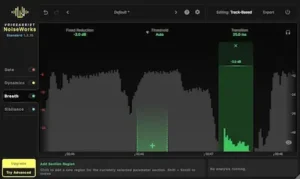
VoiceAssist Breath identifies breath regions and allows their levels to be reduced rather than requiring them to be deleted entirely. This provides a way to control distracting inhalations while retaining their timing and some of their natural presence.
Breath management can be useful in close-miked pop vocals, voiceovers, podcasts, and spoken-word recordings, where prominent inhalations may interrupt an otherwise consistent performance.
The main consideration is how the processed vocal sounds in context. A breath that seems excessive when soloed may sit naturally within the arrangement. Reducing it too aggressively can disrupt phrasing and make transitions between lines feel unnaturally clean.
Sibilance: Intelligent Sibilant Control
Sibilance is a common challenge in vocal recording and mixing. Strong S, SH, and related consonants can become uncomfortable when combined with bright microphones, aggressive compression, or excessive high-frequency emphasis.
Traditional de-essers typically reduce energy within a selected frequency range when it exceeds a specified threshold. This approach can be effective, but it may also affect other high-frequency content when the detection and processing settings are not sufficiently selective.
VoiceAssist Sibilance uses event detection and targeted processing to identify individual sibilant regions. The aim is to control problematic consonants without applying the same reduction indiscriminately across the entire recording.
This can be useful when only certain syllables require correction. Sibilant intensity and frequency content vary with the vocalist, articulation, microphone, and recording conditions, so a uniform approach is not always appropriate.
In his independent Tape Op evaluation, Larry Crane reported favorable results from the Sibilance processing, describing the outcome as natural in his listening assessment. This is a positive independent observation, but it does not establish that the module will outperform a dedicated de-esser across different voices and recording conditions.
Mouth Noise: Removing Clicks and Lip Smacks
Mouth clicks and lip smacks are particularly noticeable in close-miked recordings. They can become distracting during quiet passages, exposed vocal sections, and spoken-word productions, where small incidental sounds are less likely to be masked by the arrangement.
VoiceAssist includes a dedicated Mouth Noise section designed to detect these events and apply targeted correction.
The module provides an editable sensitivity curve, allowing detection sensitivity to be adjusted over the course of a recording rather than kept identical from beginning to end. It also includes a Detection HP control, which focuses click detection on higher frequencies while ignoring low-frequency vocal content. This provides an additional way to reduce false detections when processing recordings with substantial low-frequency energy.
A setting that works for a prominent click may be unnecessarily aggressive when applied to quieter articulation details. The ability to adjust sensitivity over time gives the engineer more control over how selectively the software identifies these events.
For dialogue editors and engineers working with audiobooks, podcasts, and detailed vocal recordings, dedicated mouth-noise detection addresses a repetitive editing task that can otherwise require close waveform inspection and manual spectral correction.
VoiceAssist ARA, Transfer Mode, and DAW Compatibility
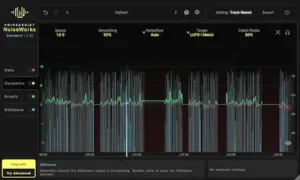 DAW integration is an important part of VoiceAssist’s workflow. The application supports several methods of accessing and processing audio, with availability depending on the host software and license edition.
ARA integration allows compatible DAWs to provide VoiceAssist with direct access to audio clips, avoiding the need to capture the signal through conventional real-time plugin playback. This can simplify the editing process when working with individual vocal takes, particularly when the engineer needs to analyze and process specific sections of a recording.
Transfer Mode provides an alternative for DAWs that do not support ARA. Audio is transferred into VoiceAssist during playback, after which it can be analyzed and processed within the application. This makes the workflow available in a wider range of production environments, although it involves an additional transfer step.
Transfer Mode was introduced in VoiceAssist 1.1, extending compatibility beyond DAWs with native ARA support.
AudioSuite is available in the Advanced edition for Pro Tools users. It allows selected audio regions to be processed directly within the AudioSuite workflow rather than relying exclusively on real-time insert processing.
Standalone operation is also included in Advanced. This provides a separate working environment for dialogue editors and users handling audio from video-editing applications or other sources outside a conventional music-production DAW.
VoiceAssist is available in VST3 and AAX formats on Windows, with AU support available on macOS alongside VST3 and AAX. Its documented ARA integrations include Pro Tools 2024.10 or later, Cubase, Nuendo, REAPER, Studio One, LUNA, Logic Pro, Samplitude Suite 2026.0.2 or later, and Sequoia 2026.0.2 or later. Logic Pro requires Rosetta for the ARA workflow.
DAWs without a supported ARA integration can use Transfer Mode. NoiseWorks specifically identifies applications such as Ableton Live, FL Studio, and Bitwig as examples of this workflow. Instead of accessing the audio directly through ARA, VoiceAssist records the selected material during playback and analyzes it before processing.
Logic Pro users should pay particular attention to the ARA requirement. According to the current documentation, the ARA workflow requires Logic Pro to run under Rosetta. Transfer Mode offers an alternative for users who prefer to run Logic Pro natively on Apple Silicon.
There is also a hardware distinction between the license editions. On Windows, Basic does not require GPU-based AI analysis, while Standard and Advanced rely on compatible dedicated NVIDIA or AMD graphics hardware for their AI models. This requirement should be considered before choosing an edition, particularly when evaluating compatibility with an existing studio workstation.
System Requirements and Performance Considerations
VoiceAssist has different hardware requirements depending on the operating system and edition. The documented specifications are summarized below.
| Requirement | Documented specification |
|---|---|
| macOS | macOS 13.0 or later |
| Apple hardware | Apple Silicon M1 or newer |
| Windows | Windows 10 version 1909 or later |
| CPU | Intel Core i5 or comparable AMD processor |
| RAM | 16 GB or more |
| Windows GPU | Dedicated NVIDIA or AMD graphics hardware for the AI models in the Standard and Advanced editions |
| Recommended GPU memory | 6 GB VRAM |
The GPU requirement is particularly relevant to Windows users considering the Standard or Advanced edition. Before purchasing, check whether your graphics hardware is supported and has sufficient dedicated memory. The documented GPU requirement does not apply to Basic, which does not use GPU-based AI analysis.
VoiceAssist analyzes recordings in blocks of up to 30 seconds. According to the manufacturer’s documentation, completed sections can be played and edited while analysis continues on subsequent material. This allows users to begin reviewing processed sections without waiting for the entire recording to finish.
Clean is identified as the slowest processing section. If noise reduction and dereverberation are not needed, disabling Clean can shorten the analysis process. This is a practical way to avoid spending processing time on restoration that the recording does not require.
There is not enough independently verified performance data to establish VoiceAssist’s typical CPU consumption, GPU utilization, processing latency, or stability in large sessions. Without controlled tests across comparable systems and projects, claims that it is significantly faster, lighter, or more demanding than competing vocal-processing tools would be premature.
NoiseWorks VoiceAssist vs. iZotope RX 12
The most relevant comparison for VoiceAssist is iZotope RX 12. Both products address audio cleanup and restoration, but they approach the work from different directions.
RX 12 is a comprehensive audio restoration environment with specialized tools for a broad range of recording problems. Depending on the edition, its capabilities include spectral repair, dialogue isolation, de-reverberation, breath control, de-plosive processing, mouth de-click, and other restoration operations.
VoiceAssist takes a more focused approach, combining several common vocal-preparation tasks within a DAW-oriented editing workflow. Its modules cover operations such as noise reduction, leveling, breath reduction, sibilance control, and mouth-noise cleanup.
| Capability | VoiceAssist | iZotope RX 12 |
|---|---|---|
| Automatic vocal leveling | Dynamics module | Leveler (RX Advanced only) |
| Breath control | Dedicated Breath module | Breath Control |
| Sibilance control | Dedicated Sibilance module | De-ess |
| Mouth-noise correction | Dedicated Mouth Noise module | Mouth De-click |
| Plosive correction | Lowend module | De-plosive |
| Noise reduction | Clean module | Dedicated noise-reduction tools |
| Dereverberation | Clean module | Dialogue De-reverb and related tools |
| Spectral editing | Not a dedicated spectral-editing environment | Extensive spectral editing and repair tools |
| Standalone workflow | Available in the Advanced edition | Yes |
VoiceAssist’s main appeal is workflow integration. When preparing spoken-word or vocal recordings, an engineer may need to address several recurring issues in sequence: background noise, inconsistent levels, breaths, sibilance, and mouth clicks. Having these operations organized within one editing environment can make that process more convenient, particularly when working with multiple takes or long dialogue recordings.
RX 12 offers a broader restoration toolkit. Its dedicated spectral editing and repair capabilities make it better suited to unusual or complex problems that extend beyond routine vocal cleanup, including isolated clicks, tonal interference, damaged recordings, and detailed manual intervention. The exact tools available depend on the RX edition.
The distinction is not simply a matter of how many processing modules each product includes. VoiceAssist is oriented toward an integrated vocal-editing workflow, while RX 12 provides a more general-purpose restoration environment. Some functions overlap, but the products are not interchangeable in every situation.
VoiceAssist should therefore not be treated as a universal replacement for RX 12. Engineers who already own RX may find that several VoiceAssist functions duplicate capabilities in their existing toolkit. Its potential value lies in the way it organizes and integrates routine vocal-preparation tasks, not in any independently established superiority in restoration quality.
VoiceAssist vs. Antinode Clear, Waves Clarity Vx Pro, and Accentize dxRevive Pro
Several other products address problems that overlap with VoiceAssist’s capabilities, although their feature sets and intended workflows differ.
Antinode Clear, formerly known as Supertone Clear, focuses on voice isolation, background-noise reduction, and dereverberation. Its real-time processing workflow makes it relevant when the primary objective is to separate a voice from unwanted background sound rather than perform a broader range of vocal-editing tasks.
Waves Clarity Vx Pro is a dedicated voice noise-reduction tool. Its main purpose is to suppress unwanted background noise while preserving the intelligibility and character of the voice. It is therefore a more focused solution than a multi-module vocal-editing environment.
Accentize dxRevive Pro is designed for dialogue restoration and enhancement. It is particularly relevant to post-production workflows involving speech recordings affected by noise, poor recording conditions, or other quality problems.
These products are not direct substitutes for VoiceAssist. Although their capabilities overlap in areas such as noise reduction and dialogue cleanup, they do not necessarily provide the same combination of vocal leveling, breath reduction, sibilance control, and mouth-noise processing.
The most suitable choice depends on the recording problem and the required workflow. Antinode Clear is worth considering for voice isolation and real-time cleanup; Waves Clarity Vx Pro is focused on background-noise reduction; and dxRevive Pro targets dialogue restoration. VoiceAssist takes a broader vocal-preparation approach by bringing several editing and cleanup operations into one environment.
VoiceAssist Pricing: Basic vs. Standard vs. Advanced
NoiseWorks offers three VoiceAssist editions: Basic, Standard, and Advanced. Each tier unlocks a different combination of processing modules and workflow options.
| Edition | Price | Included functionality |
|---|---|---|
| Basic | $49 | Dynamics |
| Standard | $149 | Dynamics, Gate, Breath, Sibilance |
| Advanced | $299 | All seven processing modules, standalone application, and additional integration options |
The prices above are regular list prices. During the Black Friday sale, running from November 1 to November 30, 2026, NoiseWorks is offering VoiceAssist Basic for $29, Standard for $99, and Advanced for $199. Promotional pricing may vary by retailer, so check the final price before purchasing.
VoiceAssist Basic
Basic is designed for users who primarily need automatic vocal leveling and editable gain automation through the Dynamics module.
At $49, it offers the lowest-cost entry point into the VoiceAssist workflow. It may be sufficient for producers who regularly work with vocal recordings but already have separate tools for noise reduction, breath control, and other restoration tasks.
VoiceAssist Standard
Standard adds Gate, Breath, and Sibilance to the Dynamics module. At $149, it provides a broader set of tools for routine vocal and dialogue editing, particularly when controlling pauses, breaths, and excessive sibilance is part of the regular workflow.
However, Standard does not include Clean, Lowend, or Mouth Noise. Users who need the dedicated noise-reduction and dereverberation functions, plosive correction, or mouth-noise processing will need to consider Advanced.
VoiceAssist Advanced
Advanced includes all seven processing modules, together with the standalone application and additional integration options, including AudioSuite support. It is the most complete edition and the relevant option for engineers who want VoiceAssist’s full vocal-preparation and restoration workflow rather than automatic leveling alone.
At $299, it costs twice as much as Standard. Whether that difference is justified depends on how frequently you need Clean, Lowend, Mouth Noise, and the additional workflow options. If those functions would otherwise require separate tools, Advanced may offer a more consolidated setup. If your existing restoration toolkit already covers those tasks, some of its features may overlap with software you own.
NoiseWorks offers a 14-day trial with the complete Advanced feature set. This gives users an opportunity to evaluate the processing modules on their own recordings before choosing an edition. Testing difficult material is particularly important: background noise, room reflections, plosives, breaths, and mouth clicks can produce very different results depending on the source recording.
Advanced is also available through a Rent-to-Own arrangement at $25 per month for 12 months, according to the purchasing information reviewed for this article.
Existing paid DynAssist license holders are eligible for VoiceAssist Standard at no additional cost, according to the manufacturer’s upgrade information.
What Independent Reviews Reveal About VoiceAssist
 Manufacturer demonstrations can help explain how a plugin is designed to work, but independent reviews offer a different perspective by examining its behavior in practical recording situations.
One of the more detailed assessments comes from Larry Crane at Tape Op, who evaluated VoiceAssist using vocal and spoken-word material.
His review highlighted several strengths. The default processing produced a cleaner, more dynamically balanced result, while the Breath module proved particularly useful for spoken-word recordings. Sibilance processing also received positive feedback for producing natural-sounding results.
The evaluation also identified limitations. Low-frequency plosives were not consistently removed, and some of the Clean module’s controls initially proved less intuitive. The review discussed spectral editing as a way to gain additional control, although the associated interface was not considered especially convenient.
Crane also noted that some sharp consonant transients still required additional restoration tools. This is a useful reminder that automated vocal processing does not eliminate the need for manual editing, particularly when dealing with difficult transient material.
Tape Op’s April/May 2026 review covers the original six-module version of VoiceAssist and predates the later addition of the dedicated Mouth Noise section. Its findings should therefore be read in the context of the feature set available at the time.
These observations provide a more balanced picture of VoiceAssist’s practical strengths and limitations. The results suggest that some modules can be effective on suitable recordings, but they do not establish that the automated processing will handle every vocal problem reliably.
Integraudio provides another independent product evaluation. Production Expert has also published material discussing VoiceAssist’s expanded Transfer Mode workflow and spectral editing capabilities. However, this material is identified as Partner Content and should not be treated as an independent editorial review.
Discussion on Gearspace offers some additional context about the restructuring of VoiceAssist’s editions. However, forum comments are anecdotal and cannot establish representative long-term reliability, technical performance, or overall user satisfaction.
What Remains Unverified?
Despite its extensive feature set, several important technical questions remain unresolved by the available independent evidence. These limitations make it difficult to assess VoiceAssist’s performance across different recording environments and production workflows.
- Restoration transparency: There is not enough controlled testing to establish how consistently Clean preserves consonant detail, vocal transients, and natural room ambience across different recording conditions.
- Artifact behavior: The prevalence and severity of metallic artifacts, spectral smearing, and other processing side effects have not been established through systematic comparative testing.
- Plosive correction: Independent feedback points to limitations with low-frequency plosives, but broader testing is needed to determine how consistently the Lowend module performs across different microphones, recording distances, and vocal performances.
- CPU and GPU consumption: The manufacturer’s hardware requirements are documented, but independent benchmarks measuring actual processor and graphics utilization are unavailable.
- Analysis speed: Clean is identified as the slowest processing section, but there is no sufficiently detailed benchmark comparing analysis times across recording lengths and hardware configurations.
- Large-session stability: Independent evidence is insufficient to assess long-term reliability in demanding DAW sessions with multiple tracks and extensive processing.
- Comparative restoration quality: No controlled, level-matched test establishes whether VoiceAssist produces better restoration results than RX 12, Antinode Clear, or other specialized alternatives.
These evidence gaps do not demonstrate that VoiceAssist performs poorly. They define the limits of what can currently be claimed about its technical performance. A more conclusive assessment would require repeatable tests using identical source recordings, comparable processing settings, and documented hardware configurations.
Who Should Use NoiseWorks VoiceAssist?
Recording and mixing engineers are among the most relevant users. Engineers who regularly handle multiple vocal takes may benefit from automated leveling, breath reduction, sibilance control, and targeted cleanup. These tools can help organize repetitive editing tasks before the main mixing process begins.
Vocal producers may find VoiceAssist useful during the preparation stage, particularly when cleaning and balancing performances before applying compression, equalization, pitch correction, and creative processing. Its value will depend on how much of this work is already covered by their existing editing tools.
Podcast and voiceover editors are another natural audience. Close-miked speech can contain prominent breaths, mouth clicks, room reflections, and background noise. VoiceAssist brings several relevant processing functions into one workflow, although the amount of manual correction required will depend on the recording quality.
Home-studio owners may find the Clean module useful when recordings contain unwanted noise or room coloration. However, restoration software cannot fully compensate for poor microphone placement, excessive room reflections, or an unsuitable recording environment. Improving the source at the recording stage remains the more reliable approach.
Mastering engineers are less likely to use VoiceAssist as a central mastering tool. Its primary purpose is vocal preparation and dialogue editing, tasks that generally belong earlier in the production chain. It may still be useful when a project includes problematic vocal stems or dialogue material that requires corrective work before mastering.
NoiseWorks VoiceAssist: Pros and Cons
Advantages
- Combines seven vocal-editing and restoration modules within one environment.
- Analyzes recordings in sections, allowing processed material to be reviewed and edited while subsequent sections are still being analyzed.
- Generates editable vocal-level automation through the Dynamics module.
- Provides dedicated processing for breaths, sibilance, and mouth noise.
- Includes AI-based noise reduction and dereverberation in the Advanced edition.
- Supports ARA and Transfer Mode workflows.
- Includes a standalone application in the Advanced edition.
- Offers a 14-day trial with the full Advanced feature set.
Limitations
- Advanced AI processing on Windows requires compatible dedicated graphics hardware.
- The Clean module can increase analysis time, particularly when processing longer recordings.
- Independent feedback has identified limitations in low-frequency plosive removal.
- Access to all seven processing modules requires the $299 Advanced edition.
- Some functions overlap with capabilities already available in established restoration suites.
- Independent performance benchmarks and controlled comparisons of restoration quality against competing products are not available.
Overall Rating
Rating methodology: These scores are editorial assessments based on documented functionality, workflow capabilities, published independent reviews, and the limitations identified in the available evidence. They do not represent a hands-on AREFYEV STUDIO benchmark or controlled listening comparison. The overall score is the arithmetic average of the six category ratings.
| Category | Rating |
|---|---|
| Vocal Leveling & Automation | 8.8/10 |
| Event Detection & Editability | 8.3/10 |
| Vocal Cleanup Coverage | 8.6/10 |
| Restoration Control & Documented Limitations | 7.4/10 |
| DAW Integration & Workflow | 8.6/10 |
| Processing Architecture & Flexibility | 8.2/10 |
| Overall | 8.3/10 |
Editable gain automation gives VoiceAssist a strong role in preparing inconsistent vocal performances before compression, reducing the need for repetitive manual level adjustments.
Event detection combined with adjustable processing regions gives engineers meaningful control over automated corrections, although the final decisions still require manual review to preserve performance details.
The seven dedicated modules address a broad range of recurring vocal and dialogue problems, from noise and reverberation to breaths, sibilance, plosives, and mouth clicks.
Clean and Lowend provide useful corrective options, but documented limitations with plosive removal and the lack of controlled comparative restoration tests prevent a stronger assessment of their reliability.
ARA, Transfer Mode, AudioSuite, and standalone operation give the application several integration routes, although specific options depend on the DAW and license edition.
The combination of whole-recording analysis, event-based processing, editable automation, and multiple processing modules provides a flexible approach to vocal preparation, but the GPU requirements on Windows and differences between license editions impose practical constraints.
VoiceAssist is a well-rounded vocal-preparation environment whose strongest advantage is combining repetitive editing tasks within an editable workflow. Its automation and DAW integration make it particularly relevant to recording and mixing engineers, vocal producers, and dialogue editors handling substantial amounts of source material. However, inconsistent plosive correction and unresolved questions about restoration transparency mean it should complement, rather than replace, specialized repair tools and critical manual editing.
Final Verdict: Is NoiseWorks VoiceAssist Worth Buying?
NoiseWorks VoiceAssist targets a genuine production bottleneck: the repetitive editing involved in preparing vocal recordings for mixing.
Its main strength is the integration of several corrective operations within one workflow. Automatic leveling, breath reduction, sibilance control, intelligent gating, noise reduction, dereverberation, and mouth-noise processing cover many of the tasks involved in routine vocal preparation.
The Dynamics module is particularly relevant to mixing engineers. Its editable gain automation provides a way to control performance-level variations before compression, rather than relying on a compressor to handle every difference in vocal level. Clean is another useful part of the package, although its restoration performance still needs more controlled independent evaluation.
VoiceAssist should not, however, be mistaken for a complete audio restoration suite. iZotope RX 12 offers a broader range of tools for complex repair work, while specialized processors may be more appropriate for particular recording problems. VoiceAssist’s appeal lies in its integrated vocal-editing workflow, not in proven superiority over these alternatives.
Basic at $49 is the entry-level option for engineers who primarily need automated vocal leveling. Standard at $149 adds breath, sibilance, and gating tools for a broader editing workflow. Advanced at $299 is the edition to consider if you regularly need Clean, Lowend, Mouth Noise, and the complete set of processing modules.
For professional mixing engineers, VoiceAssist is best understood as a vocal-preparation tool that can complement established compressors, de-essers, and restoration software. It does not eliminate the need for those tools or for manual editing when the source material presents difficult problems.
The 14-day Advanced trial is the most sensible way to evaluate the software before buying. Test it on recordings that present real challenges: room reflections, background noise, inconsistent vocal levels, plosives, breaths, and mouth clicks. Clean studio vocals alone will not reveal enough about the plugin’s practical limitations. The key question is whether VoiceAssist handles enough of your recurring editing work reliably to justify its price and a place in your existing setup.
Your Vocal Editing Is Only One Part of the Final Mix. Hear What Professional Mastering Can Bring to the Entire Production.
VoiceAssist can help control vocal levels, reduce unwanted noise, manage sibilance, and prepare individual tracks for mixing. But as this review demonstrates, automated processing still has limitations: some plosives require manual repair, restoration can affect natural vocal detail, and every correction needs to be judged in the context of the full arrangement. Once your mix is complete, adding another processor is not necessarily the answer. What matters is hearing how the finished production translates as a whole — including vocal presence, low-frequency balance, transient definition, stereo depth, and overall dynamics. At AREFYEV STUDIO, you can take that next step with a free mastering demo prepared by a real mastering engineer. Upload up to 40 seconds of your finished mix and compare the original with the mastered version to hear what changes are actually possible before deciding how to proceed.
Submit Your Mix and Hear a Professional Mastering Comparison — Get Your Free Demo →
Frequently Asked Questions
Is NoiseWorks VoiceAssist a real-time vocal processing plugin?
Not in the conventional sense. VoiceAssist primarily relies on whole-recording analysis and editable processing rather than functioning exclusively as a real-time insert effect. ARA, Transfer Mode, AudioSuite, and standalone operation provide different ways to integrate it into a vocal-editing workflow.
Does VoiceAssist replace iZotope RX 12?
No. VoiceAssist combines several vocal-preparation functions in one environment, while RX 12 offers a broader toolkit for audio restoration and detailed repair. VoiceAssist is better viewed as a complementary vocal-editing solution than a direct replacement.
Which VoiceAssist edition includes noise reduction?
The Clean section, which provides AI-based noise reduction and dereverberation, is available in the Advanced edition. Basic and Standard do not include Clean.
Can VoiceAssist automatically reduce breaths and mouth clicks?
Yes. Breath and Mouth Noise are dedicated processing sections that detect relevant events and allow targeted corrections. The results should still be reviewed manually, particularly when natural breathing, consonant detail, and vocal articulation need to be preserved.
Does VoiceAssist work with Logic Pro?
Yes. VoiceAssist supports Logic Pro through its documented integration options. The current manual specifies that the ARA workflow requires Rosetta. Transfer Mode provides an alternative workflow for users who do not want to rely on that ARA configuration.
Does VoiceAssist require an NVIDIA graphics card?
No. The documented Windows requirements for Standard and Advanced specify compatible dedicated NVIDIA or AMD graphics hardware for AI processing. Basic does not require GPU-based analysis. Apple Silicon Macs use their integrated hardware rather than requiring a separate NVIDIA card.
Is VoiceAssist suitable for podcast and dialogue editing?
Yes. Breath reduction, mouth-noise processing, intelligent gating, vocal leveling, and Clean can all be relevant to spoken-word production. The usefulness of each function depends on the recording conditions and the amount of cleanup required.
Is VoiceAssist Advanced worth $299?
It may be worthwhile for engineers who regularly need all seven processing sections, particularly Clean, Lowend, and Mouth Noise. Those who already own a comprehensive restoration suite may find some functions redundant. The 14-day Advanced trial is a practical way to assess whether the additional tools justify the purchase.
Can VoiceAssist replace manual vocal editing?
No. It can automate parts of vocal preparation, but it does not eliminate the need for engineering judgment. Event detection, gain adjustments, and corrective processing still require review, especially when natural phrasing, consonant detail, and vocal expression must be preserved.
Is VoiceAssist useful for mastering engineers?
Its primary purpose is vocal preparation and dialogue editing, not final stereo mastering. It can be useful when preparing vocal stems or correcting problems in individual recordings before the mastering stage, but it is not a conventional mastering processor.

From a mastering engineer’s perspective, vocal preparation is ultimately about improving intelligibility and consistency without flattening the performance. Automated editing needs to distinguish unwanted noise from meaningful breaths, consonant detail, and room character; otherwise, corrective processing can create more work than it removes. The quality of event detection and the transparency of each correction matter more than the number of automated functions.
Enjoyed this review?
If you found it useful, you can support independent audio research with a coffee. ☕
Buy me a coffee