Free Sylenth1 Skins (Best Free GUI Skins Download)
Last updated: April 28, 2026
Sylenth1 still shows up in sessions every day. Not because it’s trendy — because it works. But the interface? Dated. Flat. Fatiguing after a few hours.
That’s where free Sylenth1 skins come in.
A good skin doesn’t change the sound. It changes how you work. Contrast, layout, color balance — small things that add up fast when you’re deep in a project. We’ve seen producers move faster just by switching to a darker UI with clearer modulation sections. Less squinting. Fewer mistakes.
Search demand for Sylenth1 skins download keeps growing for a reason. This isn’t about decoration — it’s about workflow friction.
Some want cleaner visuals for long sessions.
Some want a UI that matches their setup.
Some just can’t stand the default anymore.
Fair enough.
Below is a curated selection of skins that are actually usable — not just flashy mockups. Clean layouts, readable parameters, and zero nonsense.
Best Free Sylenth1 Skins
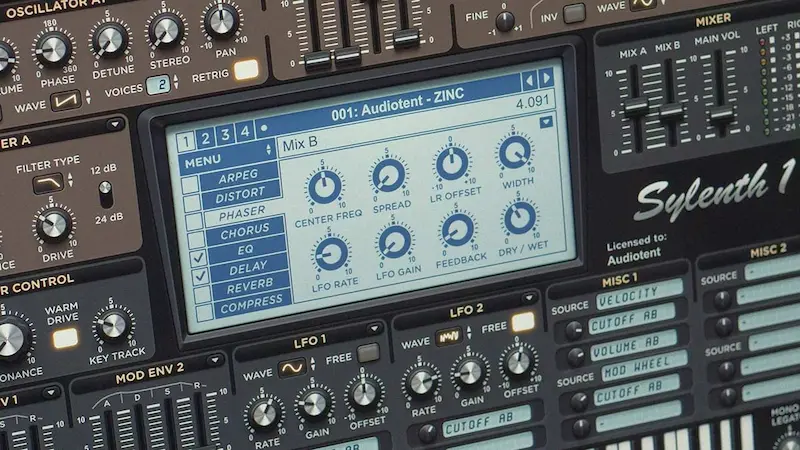
Inside the archive, you’ll find a mix of styles — from clean dark layouts to high-contrast and minimal designs.
Everything is focused on usability: clear sections, readable controls, and no visual clutter.
- Dark Minimal Skin: A stripped-back dark interface with better contrast and reduced glare. Works well for long sessions and low-light environments.
- High Contrast Skin: Designed for clarity. Knobs, labels, and sections are easier to read at a glance — useful when moving fast between parameters.
- Blue Neon Skin: Modern look with glowing accents. Not for everyone, but it makes modulation sections stand out clearly.
- Flat UI Skin: Minimal design without gradients or visual noise. Clean and distraction-free.
- Analog Style Skin: Inspired by hardware gear. Warmer tones, classic layout feel, slightly softer visuals.
- Compact Skin: Tighter spacing and smaller elements. Useful if you run multiple plugin windows on one screen.
- Light Clean Skin: For those who prefer brighter interfaces. Balanced contrast without harsh whites.
- Color-Coded Modulation Skin: Different sections use color coding for faster orientation. Helps avoid mistakes when routing modulation.
Why Use Sylenth1 Skins
The default Sylenth1 interface does the job. But after a few hours? It slows you down more than you think.
Custom skins aren’t about aesthetics. They’re about control.
Workflow changes first.
When sections are visually separated better — oscillators, filters, modulation — you stop hunting for parameters. Your eyes land where they need to. Small gain, but over a session it adds up.
Less eye fatigue.
Bright, low-contrast UI elements force your eyes to work harder. Especially at night. A darker skin with balanced contrast reduces strain. We’ve had producers switch skins mid-project and immediately feel the difference.
Faster navigation.
When knobs, labels, and sections are clearer, decisions happen quicker. No second-guessing. No zooming in mentally to read tiny text. You move.
Sounds minor. It’s not.
In long sessions, interface friction turns into real mistakes — wrong parameter tweaks, missed automation, slower decisions. A well-designed skin removes that layer completely.
How to Install Sylenth1 Skins
 This is where most people mess up. Not because it’s hard — because they overthink it.
Sylenth1 doesn’t use installers. No setup wizard. Just files and the right folder.
Step 1 — Download the skin
You’ll usually get a .zip or .rar archive. Extract it first. Inside, you’ll see a folder with image files and a config file (often .txt or .dat).
Step 2 — Move it to the correct directory
Drop that folder into your Sylenth1 skin directory.
Typical paths:
- Windows: Documents → LennarDigital → Sylenth1 → Skins
- macOS: ~/Library/Application Support/LennarDigital/Sylenth1/Skins
If the “Skins” folder isn’t there — create it. No magic.
Step 3 — Select the skin inside Sylenth1
Open the plugin → Menu → choose the new skin from the list.
Done.
If it doesn’t show up, 99% of the time the folder structure is wrong. Common mistake: extra nested folder after extraction. Sylenth1 won’t dig for it — it expects the files one level deep.
Fix the structure, reload the plugin, and it appears.
Are Sylenth1 Skins Safe?
Short answer: most are. But not all.
Sylenth1 skins are just graphic assets — images, layout files, sometimes a config. They don’t process audio. They don’t touch your system at a deep level. That’s the good news.
The problem is where you download them from.
What’s safe
Skins shared on known audio communities, developer pages, or established plugin sites are usually clean. No installers. No executables. Just files you drop into a folder.
What to avoid
If a “skin” comes with a .exe or asks you to run anything — stop. That’s not a skin. That’s how people end up with compromised systems.
Same with sketchy file hosts. Endless redirects, fake download buttons, password-protected archives for no reason — all red flags.
Real-world case
We’ve seen producers install “custom GUI packs” that bundled unrelated software in the background. Not malicious enough to crash the system — just enough to slow it down and mess with performance. Hard to trace, easy to avoid.
Simple rule
If it’s just images and config files — you’re fine.
If it behaves like software — walk away.
Stick to clean sources, keep your setup minimal, and you won’t have issues.
Free vs Paid Sylenth1 Skins
There’s no magic tier here. Paid doesn’t automatically mean better. Free doesn’t automatically mean usable.
Free skins
Most of them come from the community. Some are rough. Some are surprisingly solid. You’ll find clean dark themes, minimal layouts, even a few that outperform the default UI in terms of readability.
The downside? No consistency. Different styles, different quality, sometimes questionable contrast choices. You have to dig.
Paid skins
More controlled design. Better alignment, sharper graphics, more attention to detail. Some are built with specific workflows in mind — sound design, live tweaking, long sessions.
But here’s the catch — they don’t change how Sylenth1 works. If the layout doesn’t click for you, it’s useless no matter how polished it looks.
What actually matters
Clarity. Contrast. Speed.
If a free skin gives you that — you don’t need anything else.

FAQ
Are Sylenth1 skins free?
Most of them are. The majority of skins come from the community and are shared without cost. You’ll occasionally see paid options with more polished visuals, but in practice, a well-made free skin can do the job just as well.
How to change skin in Sylenth1?
Open the plugin, go to the menu inside Sylenth1, and select the skin from the available list. If it’s not there, the files are in the wrong folder or the structure is off. Fix that first — the plugin won’t recognize it otherwise.
Where to download Sylenth1 skins?
From trusted audio communities, plugin-focused websites, or curated collections like the one on this page. Avoid random file-sharing links with no context — that’s where most problems start.
Do skins affect sound?
No. Skins don’t touch the audio engine. Same presets, same processing, same output. The only thing that changes is how you interact with the plugin.