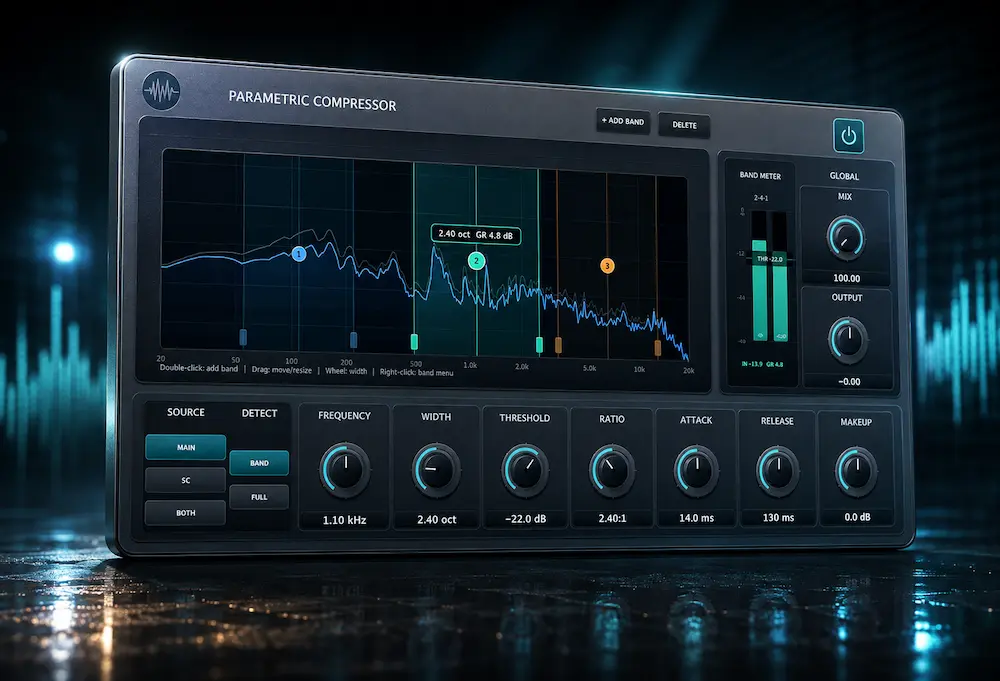
Traditional multiband compression divides the spectrum into adjacent crossover bands. That works well for broad tonal dynamics, but it becomes restrictive when the problem is narrower: a resonance that only needs control around one frequency, a bass fundamental that needs to duck under a kick, or a mix-bus region that should compress without affecting everything around it. Parish Audio Parametric Compressor takes a different approach, allowing up to 10 compressor bands to be placed independently across the spectrum, with overlapping ranges and separate detector settings.
The distinction is more than a different interface. Each band defines not only where compression occurs, but also what drives it. The detector can use the main signal, an external sidechain, or both, and can respond to the selected frequency range or the full signal. That makes the plugin particularly interesting for frequency-selective sidechain work and dynamic control that would otherwise require a combination of processors or more complicated routing.
Our verdict: Parametric Compressor is a strong specialist dynamics tool, particularly when a conventional multiband compressor is too restrictive and a dynamic EQ does not provide the compressor-style behavior you want. Its independent bands and detector routing are genuinely useful for kick/bass separation, vocal control and selective mastering. The trade-off is complexity: this is not a plugin I would add to a chain simply because it offers ten bands.
Inside this review
Why Frequency-Selective Compression Matters in Mixing
 Some of the hardest dynamics problems in a mix are neither broadband nor static. A vocal may only turn aggressive on certain notes or consonants. A bass track may need to give up space for the kick below 100 Hz without losing the harmonics that define its pitch. A drum bus can build up in the low mids only when the arrangement gets dense. In mastering, the same issue can appear as a narrow band of energy that becomes excessive only at specific moments.
These situations are where static EQ and broadband compression start to compromise each other. A permanent EQ cut changes the tone even when the problem is absent; broadband compression reduces material outside the problematic range. Engineers can work around that with dynamic EQ, multiband compression, sidechain routing, or automation, but each approach imposes its own limitations.
Parametric Compressor takes a different position. Instead of defining the processing architecture with fixed crossover points, it treats each compressor band as an independent frequency-selective processor. Bands can be placed wherever the problem occurs and can overlap when different parts of the spectrum need different dynamics. That makes it less a replacement for dynamic EQ or multiband compression than an alternative way of building the same kind of targeted control.
What Parish Audio Parametric Compressor Actually Does
Parish Audio Parametric Compressor is a frequency-selective dynamics processor built around independently positioned compressor bands rather than a fixed crossover structure. It runs on Windows and macOS as VST3, with Audio Unit support on macOS. There is no AAX version at launch, so Pro Tools users cannot integrate it directly into a native AAX session.
The plugin provides up to 10 independent compressor bands. Each band has its own frequency, width, threshold, ratio, attack, release, and makeup gain controls. This means the engineer can define both the frequency region being compressed and the dynamics behavior applied to that region without forcing the rest of the spectrum into the same processing architecture.
The important distinction is that the bands do not have to form adjacent crossover regions. A narrow band can target a resonance, a wider band can control low-mid buildup, and two bands can overlap when different dynamics behavior is required in the same general frequency area.
In practice: you can build the compression around the problem instead of first dividing the signal and then deciding which part of each crossover band needs treatment. That is the reason to reach for Parametric Compressor. If the problem is broadband, a conventional compressor is usually faster.
Hear What Professional Mastering Can Do With a Difficult Mix
A sophisticated compressor can solve specific dynamics problems, but it cannot compensate for a mix that still lacks balance, depth, or translation. If you want to hear how an experienced mastering engineer would approach your track, upload up to 35 seconds of your mix and receive a free mastering demo. You can compare the processed result against your mix before deciding whether a full mastering project is justified.
Request your free mastering demo →
The Detector Architecture Is the Real Differentiator
Ten compressor bands are useful, but they are not what makes Parametric Compressor unusual. The more important feature is the independence of each band’s detector.
Each band can derive its detector signal from the main input, an external sidechain, or both. The detector can then respond either to the band’s selected frequency range or to the full incoming signal. In practical terms, the engineer can separate the signal being compressed from the frequency information that triggers the gain reduction.
That gives you two independent decisions:
- Where does the gain reduction happen?
- What signal or frequency content triggers it?
The practical difference is that the compressed signal and the trigger do not have to occupy the same spectral role. That is what makes the external-detector mode particularly useful for problems such as kick/bass interaction, where only a selected part of the bass needs to move.
How to Use Parish Audio Parametric Compressor
The most effective way to use Parametric Compressor is to start with a specific dynamics problem rather than with the number of available bands. The plugin can create complex processing chains inside a single instance, but that does not mean every mix needs multiple active bands.
- Identify the unstable frequency region. Listen for the frequency content that becomes excessive only at certain moments rather than assuming the entire spectrum needs compression.
- Create the narrowest useful band. Start with a focused frequency range and widen it only when the problem extends beyond the initial target.
- Choose the detector source. Decide whether the compressor should react to the main signal, an external sidechain, or a combination of both.
- Set the detector range. The trigger can be based on the selected frequency region or on the full incoming signal, allowing the source being compressed and the signal driving gain reduction to be treated separately.
- Set attack and release from the source. Fast settings can control short peaks, while slower timing can produce more natural movement on buses and program material.
- Level-match before judging the result. Frequency-selective compression can make a mix feel cleaner simply because unwanted energy has been reduced. Compare the processed and unprocessed signals at a similar perceived level.
- Add another band only when the problem is genuinely different. Multiple bands are useful when separate frequency regions require different dynamics behavior, but unnecessary bands increase complexity and the risk of over-processing.
For mastering, the threshold for adding another band should be even higher. If a small EQ move, automation pass, or simpler dynamic processor solves the problem with fewer side effects, there is little reason to introduce additional compression simply because Parametric Compressor makes it possible.
Parish Audio Parametric Compressor Settings: Practical Starting Points
Parametric Compressor becomes easier to approach when its controls are connected to specific mixing problems. The following values are starting points rather than fixed presets; the correct frequency, width, threshold and timing depend on the source, arrangement and amount of gain reduction required.
| Problem | Starting Frequency | Width | Ratio | Attack | Release |
|---|---|---|---|---|---|
| Vocal harshness | 2.5–4 kHz | Narrow | 2:1–4:1 | Fast–medium | Medium |
| Sibilance | 6–9 kHz | Narrow | 2:1–5:1 | Fast | Fast–medium |
| Kick/bass overlap | 50–100 Hz | Narrow–medium | 2:1–4:1 | Fast | Timed to the kick |
| Low-mid buildup | 150–400 Hz | Medium–wide | 1.5:1–3:1 | Medium | Medium–slow |
| Upper-frequency aggression | 3–8 kHz | Narrow–medium | 1.5:1–3:1 | Medium–fast | Medium |
These settings should be treated as practical starting points, not universal recipes. A vocal resonance may move with the singer’s register, while kick and bass relationships depend heavily on the fundamental frequencies and envelope of the individual tracks. In mastering, use substantially less gain reduction and wider listening comparisons before deciding whether the processing improves translation.
Kick and Bass: Targeted Sidechain Compression Without Ducking the Whole Bass
Kick and bass often compete in the same low-frequency range, but broadband sidechain compression does not distinguish between the part of the bass that needs to move and the part that gives the instrument its character. When the kick triggers a conventional compressor, the entire bass signal can drop, including upper harmonics that carry pitch definition and help the bass remain audible on smaller playback systems.
Parametric Compressor allows a different approach. The kick can feed the external detector while gain reduction is applied only to a selected low-frequency region of the bass. The fundamental can therefore make room for the kick without automatically pulling down the bass harmonics above it.
That does not create a new form of sidechain compression. The technique itself is well established. The advantage is the routing architecture: the plugin lets the engineer define the source that triggers compression and the frequency region that is actually compressed independently, without building a more elaborate processor chain.
This is particularly relevant in EDM, house, techno, hip-hop, and modern pop, where the kick/bass relationship is often engineered as part of the mix rather than left to arrangement alone. When low-end problems remain after the mix reaches mastering, however, the issue may require a different approach; see how bass problems are identified and controlled in mastering for the distinction between a mix-stage dynamics problem and a mastering-stage correction.
As a starting point, the engineer can investigate roughly 50–100 Hz when the kick and bass fundamentals overlap, then adjust the width according to the actual spectral relationship.
The exact band position will depend on the kick and bass fundamentals, but the workflow is consistent: use the kick to trigger the detector and keep the compressor band narrow enough that the bass harmonics above the problem area continue to carry the instrument.
Vocals: Controlling Harshness Without Flattening the Performance
Vocals are another strong use case, particularly when the problem is intermittent rather than tonal. A vocal might become aggressive around 3 kHz only on certain notes, consonants, or louder phrases. A static EQ cut can remove the problem, but it also changes the vocal’s tone when that frequency is not excessive. Broadband compression does little to address the underlying issue because the unwanted energy is confined to a specific part of the spectrum.
A narrow Parametric Compressor band can target that region and apply gain reduction only when the energy becomes excessive. The same approach can be useful for low-mid buildup, resonant notes, proximity-effect inconsistencies, or isolated upper-mid peaks that become distracting as the singer moves through the register.
This puts the plugin in territory that overlaps with dynamic EQ, but the workflow is different. Instead of shaping an EQ node dynamically, the engineer is designing a compressor around a specific frequency region, with its own threshold, ratio, attack, release, and detector behavior.
Practical Vocal Applications
For a vocal that becomes aggressive only on louder phrases, a narrow band around roughly 2.5–4 kHz can be a useful starting point. For sibilance, a higher band around 6–9 kHz can be targeted with faster attack and release behavior. Low-mid proximity buildup may call for a broader region around 150–300 Hz instead.
These ranges are starting points rather than fixed recipes. The useful workflow is to locate the frequency that actually becomes unstable, use the narrowest practical band, and set the threshold so that gain reduction occurs only when the problem appears.
For vocal mixing, that distinction matters when the goal is not simply to make a frequency quieter, but to control how aggressively that frequency changes with the performance.
Parametric Compressor for Mastering: Precision Without Unnecessary Processing
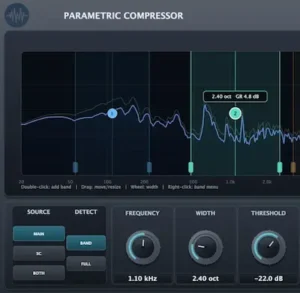 Parametric Compressor can make sense in mastering when a dynamic problem is narrow enough to need frequency-specific control but too intermittent for a static EQ move. A mastering engineer could use a broad band to contain low-mid buildup as the arrangement becomes dense, or a narrower band to control occasional upper-frequency aggression without permanently changing the tonal balance of the master. Where it sits in the overall processing chain matters just as much as the individual settings, particularly when the final dynamics stage is responsible for peak management and loudness.
The useful distinction is that the compressor does not have to follow a conventional multiband crossover layout. The engineer can define the frequency region that needs gain reduction and leave the rest of the spectrum largely untouched. That can be valuable when a master is already tonally balanced and only develops a problem at specific moments, such as intermittent upper-frequency aggression that would otherwise require a broader tonal correction. For a deeper look at that specific mastering problem, see how harsh highs are identified and controlled in mastering.
But mastering is also where the plugin’s flexibility needs the most discipline. If a transparent dynamic EQ already solves the problem with fewer controls and a familiar workflow, there is no technical reason to introduce a more complicated processor simply because its architecture is different. In mastering, Parametric Compressor earns its place when its routing and band structure solve a problem more cleanly—not because having more bands automatically produces a better master.
For mastering, the most useful application is therefore corrective rather than creative. A narrow band can address intermittent upper-mid aggression, a broader region can control occasional low-mid buildup, and an external detector can be used when a specific element is causing a repeatable dynamic conflict. In all cases, the amount of gain reduction should remain subordinate to the overall tonal and dynamic balance of the master.
Parametric Compressor vs. Pro-MB, Dynamic EQ and Trackspacer
Parametric Compressor overlaps with several established dynamics tools, but it is not simply a replacement for all of them. FabFilter Pro-MB is a mature choice for conventional multiband compression, dynamic EQ is often faster for frequency-specific tonal correction, while Trackspacer approaches frequency-dependent ducking from a different spectral-processing architecture.
Parametric Compressor becomes more interesting when the engineer needs independently positioned compressor bands, overlapping frequency regions, and separate detector behavior. The better choice depends on the problem being solved rather than on the number of features available.
| Processor | Best For | Key Advantage | Key Limitation |
|---|---|---|---|
| Parametric Compressor | Frequency-selective compression and targeted sidechain processing | Independent overlapping bands with flexible detector routing | Newer ecosystem and no AAX support at launch |
| FabFilter Pro-MB | Conventional multiband dynamics | Mature workflow and predictable crossover-based processing | Less freedom when independent bands need to overlap |
| Dynamic EQ | Dynamic tonal correction | Fast and precise frequency-specific control | Less focused on compressor-style envelope behavior |
| Trackspacer | Frequency-dependent sidechain ducking | Fast spectral interaction between two signals | Less detailed compressor-style control per frequency region |
This becomes most useful when the problem is narrow enough that broad crossover bands affect material you want to leave alone. A dynamic EQ is often the fastest choice for correcting an unstable frequency, while a conventional multiband compressor remains preferable when broad spectral regions need coordinated dynamics. Parametric Compressor becomes more compelling when those approaches become restrictive—particularly when overlapping compression bands or an external detector need to control only a selected part of the spectrum.
In other words, these processors are better viewed as complementary tools than interchangeable versions of the same processor. The right choice depends on the problem being solved and how much control the mix actually needs.
Parish Audio Parametric Compressor: Pros and Cons
| Pros | Cons |
|---|---|
| Independent compressor bands without fixed crossover points | No native AAX support at launch |
| Overlapping frequency regions | More complex than a conventional compressor |
| Independent detector source and detection range | Easy to over-process when multiple bands are stacked |
| Strong targeted sidechain applications | Long-term reliability is not yet established |
| Useful for vocals, bass, buses and mastering | Does not replace dynamic EQ or conventional multiband processing |
| Low introductory price | Independent CPU and DSP measurements are still limited |
The strongest argument for Parametric Compressor is its architecture rather than its feature count. The plugin gives an experienced engineer more freedom to define where compression happens and what triggers it. The main downside is the same flexibility: the processor requires more deliberate decisions than a conventional compressor, and adding bands without a specific reason can make a mix harder to control rather than easier.
Is Parametric Compressor a DSP Innovation?
Calling Parametric Compressor a revolutionary new compression algorithm would be overstating the case. Frequency-selective dynamics, dynamic EQ and sidechain processing are established techniques.
The useful innovation is narrower and more practical: Parish Audio lets the engineer position compressor bands independently, overlap them, and choose separately what signal drives each band. That changes the workflow more than it changes the underlying theory of compression.
Its innovation is therefore best understood as workflow design rather than a new compression theory. The useful question is not whether the algorithm is revolutionary, but whether the independent band and detector structure solves a problem more directly than the tools you already own.
The Main Limitation: More Control Can Mean More Processing
Ten overlapping compressor bands give Parametric Compressor a lot of range, but that flexibility can also encourage over-processing. The risk is not that the plugin will fail technically. The risk is that the engineer keeps adding another band every time a new problem appears.
A narrow resonance may need one dynamic band. If another frequency becomes unstable, it is tempting to add another. Repeat that process across a vocal, bus, or master and the result can become a dense network of interacting compressors that is harder to predict than the original problem.
That matters even more in mastering, where small changes can accumulate across the entire program. A static EQ move, clip gain adjustment, automation pass, or simpler dynamic processor may solve the same problem with less intervention.
Parametric Compressor is most effective when its flexibility is used selectively. The goal should be to identify the specific dynamic problem, target the smallest useful frequency range, and apply only enough gain reduction to control it. More bands are an option, not a reason to use them.
Compatibility: The AAX Gap Matters for Pro Tools Studios
Parametric Compressor is available as VST3 on Windows and as VST3 and Audio Unit on macOS. That covers the major plugin formats used by most modern DAWs, including Cubase, Ableton Live, Logic Pro, Studio One, and Reaper.
The more significant limitation is the lack of AAX support. For a Pro Tools-based commercial studio, plugin compatibility is not a minor convenience issue: an AAX-only workflow cannot load the processor natively, regardless of how useful its processing architecture may be.
For engineers working primarily in VST3- or AU-compatible hosts, the format support is straightforward. For Pro Tools users, however, the absence of AAX is a genuine reason to wait rather than rebuild a workflow around another DAW simply to use one specialist compressor.
Independent Assessment: What Can Be Judged and What Still Needs Testing
Our assessment focuses on how Parametric Compressor fits into mixing and mastering workflows: its frequency-selective compression architecture, detector flexibility, sidechain applications, and the situations where its independent bands offer a practical advantage over conventional multiband compression and dynamic EQ.
Other characteristics require controlled measurement and should not be inferred from the interface or feature list. At the time of this review, there is not enough independent data to make a reliable claim about CPU efficiency, latency, aliasing, phase response, oversampling behavior, or long-term stability in large sessions.
| Area | Independent Assessment |
|---|---|
| Frequency-selective compression | Strong architectural advantage |
| Overlapping bands | Useful when fixed crossover regions become restrictive |
| Detector flexibility | One of the plugin’s strongest features |
| Sidechain applications | Particularly useful for targeted kick/bass ducking |
| Mixing workflow | Highly flexible, but requires disciplined use |
| Mastering workflow | Useful as a specialist processor rather than a default dynamics stage |
| CPU efficiency | Insufficient independent benchmark data |
| Aliasing and phase behavior | Requires controlled measurement |
| Long-term stability | Too early to establish reliably |
This distinction matters. A flexible architecture does not automatically make a compressor sonically superior. Parametric Compressor already has a legitimate advantage at the workflow level; stronger claims about DSP performance should wait until independent measurements are available.
Is Parish Audio Parametric Compressor Worth the Price?
Parametric Compressor is listed at $69.95, with a launch price of $34.97 during the introductory 50% discount period. At the launch price, the plugin is an inexpensive way to add a specialized dynamics processor to a mixing setup, particularly if frequency-selective compression and targeted sidechain work are already part of your workflow.
The value proposition is less compelling at the regular price if you already own a capable dynamic EQ and multiband compressor. Parametric Compressor does not make those tools obsolete; its advantage is the way it combines independently positioned compressor bands with flexible detector routing. That can make certain jobs faster or cleaner, but it does not justify replacing an established dynamics toolkit on its own.
For a working mix engineer, the decision therefore comes down to frequency of use rather than feature count. If you regularly run into problems that require narrow, overlapping, or sidechain-driven compression, $34.97 is a strong entry price for a genuinely useful specialist tool. At $69.95, it needs to earn its place by solving problems your existing processors handle less efficiently.
Overall Rating
| Category | Rating |
|---|---|
| Processing Architecture | 9.0/10 |
| Workflow Flexibility | 9/10 |
| Detector & Sidechain Control | 9.0/10 |
| Mixing Applications | 9/10 |
| Mastering Applications | 8/10 |
| Ease of Use | 7.5/10 |
| Value for Money | 8.5/10 |
| Overall | 8.8/10 |
Processing Architecture — 9.0/10: The independently positioned and overlapping compressor bands are the plugin’s defining strength. They allow the processing structure to follow the actual frequency problem instead of a fixed crossover layout.
Workflow Flexibility — 9/10: Parametric Compressor can cover narrow corrective compression, broader spectral control and targeted sidechain applications inside one processor. The trade-off is a higher decision load than with a conventional compressor.
Detector & Sidechain Control — 9.0/10: Separating the frequency region being compressed from the signal or frequency content driving gain reduction gives the plugin a genuinely useful advantage for frequency-specific sidechain work.
Mixing Applications — 9/10: Kick/bass separation, vocal dynamics, resonances, low-mid buildup and dense buses all provide credible applications where conventional broadband compression can be too broad.
Mastering Applications — 8/10: The architecture is useful for localized and intermittent problems, but mastering generally rewards simpler processing. The plugin earns its place when its frequency and detector flexibility solve a problem more cleanly than an established dynamic EQ or multiband compressor.
Ease of Use — 7.5/10: The interface offers substantially more control than a conventional compressor, but that flexibility increases the learning curve and makes unnecessary multi-band processing easier to create.
Value for Money — 8.5/10: The introductory $34.97 price is strong for a specialist processor with this architecture. At the regular $69.95 price, the purchase makes more sense for engineers who regularly encounter frequency-selective dynamics problems.
Overall — 8.8/10: Parametric Compressor earns its score through a useful processing architecture rather than feature count. It is a strong specialist addition for experienced mixing engineers and a potentially valuable mastering tool when localized dynamics problems require more control than a conventional multiband compressor provides. The score is tempered by its specialist nature, lack of AAX support at launch, and the additional learning curve created by its flexible architecture.
Who Should Buy Parish Audio Parametric Compressor?
Mixing engineers: The strongest fit. The plugin is most useful when a mix contains frequency-specific dynamics problems, targeted sidechain interactions, or situations where conventional multiband crossover bands are too broad.
Mastering engineers: Worth auditioning as a specialist processor. Its frequency-selective architecture can be useful for intermittent tonal problems, but established mastering processors remain the more predictable choice.
Electronic producers: A strong match for kick/bass separation and frequency-specific sidechain compression.
Pro Tools-based studios: Wait for AAX support unless the studio already works in a compatible VST3/AU environment.
Beginners: Low priority. The plugin’s flexibility is more useful once basic compression, EQ and automation decisions are already familiar.
Verdict: A Useful Specialist Compressor, Not a New Mixing Standard
Parametric Compressor makes the strongest case for itself when a conventional multiband compressor starts imposing more structure than the problem requires. Its defining advantage is not the number of bands, but the ability to determine independently where gain reduction occurs and what triggers it.
That architecture has practical value in kick-and-bass separation, vocal dynamics, resonant frequency control, dense buses, and selective mastering work. In each case, the benefit comes from targeting a specific part of the spectrum without automatically applying the same dynamics behavior to everything around it.
It is less compelling as a replacement for established compressors or dynamic EQs. Engineers who already solve these problems quickly with familiar tools have little reason to rebuild their workflow around Parametric Compressor simply because its routing architecture is different.
The plugin is also too new for firm conclusions about CPU efficiency, aliasing, phase behavior, long-term stability, or sonic superiority. Those are questions for controlled testing and extended use, not features that can be inferred from the interface or specifications.
The introductory $34.97 price makes it an inexpensive specialist addition. At the regular $69.95, the buying decision becomes more dependent on whether its particular architecture solves problems your existing processors handle less efficiently.
For mixing engineers, Parametric Compressor is a worthwhile specialist tool rather than a must-have. Mastering engineers should audition it for narrow or sidechain-driven dynamics problems, while beginners and Pro Tools-based studios have less compelling reasons to prioritize it.
More Processing Is Not the Same as Better Mastering
A plugin can control a resonance, reshape dynamics, or make room for a kick, but it cannot tell you whether the mix actually needs more processing. Professional mastering starts with critical listening: identifying what is limiting translation, what should remain untouched, and where a small change will make the biggest difference across real playback systems.
If you want to hear that difference on your own track, upload up to 35 seconds of your mix and receive a free mastering demo prepared by a real mastering engineer. Compare it with your original before committing to a full session.
Get your free mastering demo →
Parish Audio Parametric Compressor FAQ
Is Parish Audio Parametric Compressor a dynamic EQ?
Not exactly. It uses frequency-selective compressor bands rather than EQ nodes. The two processors can solve similar problems, but Parametric Compressor is built around compressor behavior, with independent threshold, ratio, attack, release, and detector controls for each band.
Can Parametric Compressor replace a conventional multiband compressor?
For some workflows, yes. Its independently positioned and overlapping bands can handle jobs that are awkward with fixed crossover points. A conventional multiband compressor remains preferable when broad adjacent frequency regions need predictable, coordinated dynamics control.
Can Parametric Compressor use an external sidechain?
Yes. Each band can use an external sidechain as its detector source, allowing another track to trigger gain reduction in a selected frequency region. This is particularly useful for targeted kick-and-bass ducking and frequency-specific masking control.
Is Parametric Compressor suitable for mastering?
Yes, as a specialist processor. It can address intermittent low-mid buildup, upper-frequency aggression, and other localized dynamic problems without applying the same gain reduction across the entire spectrum. Its flexibility should be used conservatively in a mastering chain.
Does Parametric Compressor work with Pro Tools?
Not natively at launch. The plugin is available in VST3 on Windows and VST3/AU on macOS, but there is no AAX version. Pro Tools users should therefore wait for AAX support unless they have a separate compatible workflow.
How CPU-intensive is Parametric Compressor?
There is not enough independent benchmark data to provide a reliable CPU figure yet. Actual load should depend partly on the number of active bands and their detector configurations, but measured performance is needed before making a meaningful comparison with other compressors.
Is Parametric Compressor better than a dynamic EQ?
Not in general. A dynamic EQ is often the faster tool for frequency-specific tonal correction. Parametric Compressor becomes more useful when the engineer wants compressor-style dynamics, overlapping frequency regions, or external sidechain detection.
Is Parish Audio Parametric Compressor worth buying at the introductory price?
For engineers who regularly use frequency-selective compression or targeted sidechain processing, the introductory price makes it a strong-value specialist tool. If your existing dynamic EQ and multiband compressor already handle those jobs efficiently, the upgrade in workflow may not justify another plugin.
What are good Parametric Compressor settings for vocals?
A useful starting point is a narrow band around 2.5–4 kHz for aggressive upper-mid energy, or roughly 6–9 kHz for sibilance. Use moderate ratios and enough attack/release control to reduce only the phrases where the problem appears. These are starting ranges rather than universal settings.
What are good Parametric Compressor settings for kick and bass?
When kick and bass fundamentals overlap, investigate roughly 50–100 Hz as a starting range and use the kick as the external detector. Keep the compressed band focused on the low-frequency region that actually masks the kick rather than ducking the entire bass signal.
Can Parametric Compressor replace FabFilter Pro-MB?
It can replace Pro-MB for some workflows, but the two processors are not identical. Pro-MB remains the more established choice for conventional multiband compression, while Parametric Compressor is more interesting when independently positioned, overlapping bands and flexible detector routing are the priority.

Yurii Ariefiev evaluates audio plugins from a practical mixing and mastering perspective, focusing on compression behavior, frequency-selective dynamics, sidechain routing, and the decisions that affect real-world mix translation.
His reviews distinguish useful processing architecture from feature-count marketing, examining when tools such as dynamic EQs, multiband compressors, and specialized dynamics processors actually solve a mix or mastering problem—and when simpler processing is the better choice.
☕ Buy me a coffee