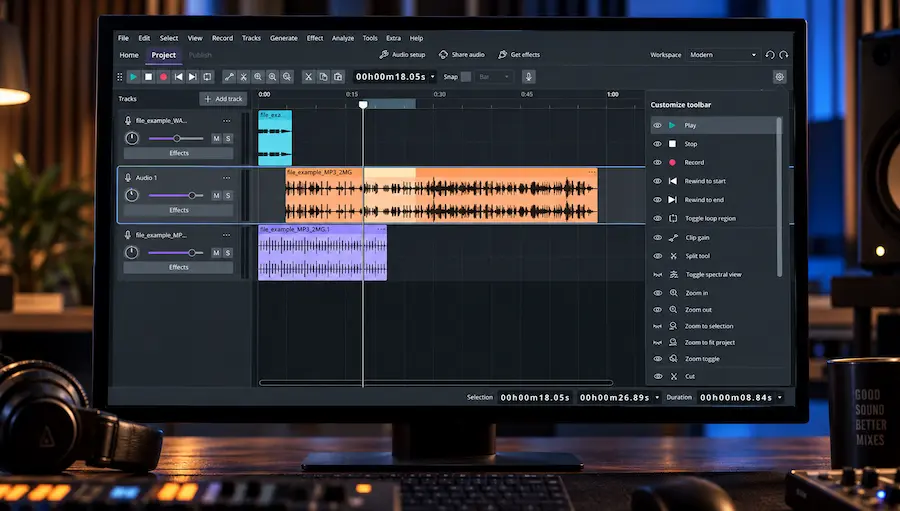
Audacity 4 is the first version that makes the old Audacity editing model feel genuinely different. The interface has been rebuilt, clips can be manipulated directly, recording is now more flexible and clip-based, and effects such as Compressor, Limiter and Reverb can run in realtime. Windows users also get official ASIO support in the new application architecture.
Audacity 4 does not suddenly make EQ, compression or limiting sound different. The meaningful change is what happens before and around those processors: clips are easier to move and recover, edits are less destructive, recording takes can stay on the track, and realtime effects can be changed without rendering them into the audio. For editing-heavy work, those changes matter more than the new interface itself.
Audacity 4 Review — Quick Navigation
What’s New
Editing Workflow
Workspaces & Interface
Mixing & Production
Project Compatibility
Limitations
Mastering
Recording & Podcasting
Realtime Effects & Plugins
Audacity 4 vs 3
Alternatives
Verdict
Price & Availability
FAQ
What’s New in Audacity 4?
Audacity 4 is a substantial application rebuild rather than a conventional feature update. The most important changes affect editing, recording, interface organization and realtime processing.
| New in Audacity 4 | What It Changes | Practical Impact |
|---|---|---|
| Clip-based editing | Clips can be selected, moved, trimmed, stretched and grouped independently. | Faster structural editing and easier revisions. |
| Non-destructive trimming | Trimmed audio remains available beyond the clip edge. | Safer editing when decisions need to be revised later. |
| Ripple editing | Removing material can move subsequent audio automatically. | Less manual repositioning after structural edits. |
| Workspaces | Different interface layouts can be saved for different tasks. | Useful when switching between recording, editing and production workflows. |
| Realtime effects | Supported effects can run during playback without permanently rendering the audio. | Faster auditioning and easier processing revisions. |
| Per-track metering | Track headers provide level metering for recording and playback. | More immediate level monitoring inside the session. |
| Official ASIO on Windows | Audacity 4 carries official ASIO support into the new application architecture. | More practical low-latency recording with compatible interfaces. |
| New project format | Audacity 4 uses .aup4 for its projects while opening Audacity 3 .aup3 projects. | Existing projects can move into the new application architecture without simply abandoning the previous project format. |
| Direct sample editing | Individual samples can be edited directly at high zoom; the old Draw and Multi-tool modes are replaced by the new context-sensitive editing workflow. | Faster for precise repair and sample-level cleanup. |
| Markers and regions | Points and time ranges can be marked directly on the timeline. | Useful for navigation, editing notes and preparing selected regions for export. |
| Loop region | The loop range has its own timeline row and dedicated toggle. | Faster auditioning of short edits, transitions and problem areas. |
| Redesigned spectrogram | Spectral editing has been rebuilt as part of the new interface. | Makes Audacity 4 more relevant to restoration and detailed audio inspection. |
The important point is that these changes reinforce one another. Audacity 4 is not simply Audacity 3 with a redesigned interface; the application now treats clips, recording and realtime processing as more flexible parts of the same editing workflow.
Audacity 4 Editing Workflow: Clips, Ripple Editing and Non-Destructive Editing
 Audacity has always been capable of serious recording and audio editing, but its editing model lagged behind the way modern DAWs handle clips. Tasks that are routine elsewhere—moving sections without losing timing, working with overlapping material, editing multiple clips as a unit, or recovering audio after a trim—could require more manual intervention than they should.
Audacity 4 tackles that limitation by changing the underlying editing model rather than simply rearranging the interface. Clips can overlap, multiple clips can be selected and edited together, related clips can be grouped, and trimming is non-destructive. The new application uses the .aup4 project format, while Audacity 3 .aup3 projects can still be opened in Audacity 4. The format change therefore reflects the new application architecture rather than a simple break with existing projects.
The difference becomes noticeable during repetitive edits rather than during the first five minutes of clicking around the interface. Splitting a recording, moving the resulting clips, trimming them and then restoring part of a trim no longer requires treating the track as one continuously selected waveform. The clip itself becomes the object being edited. A typical edit involves cutting material, moving sections, tightening timing, adjusting clip level and revisiting earlier decisions. When those operations remain reversible and clips behave as independent objects, the session becomes easier to revise without repeatedly rebuilding selections or committing destructive edits.
That is where Audacity 4 makes its strongest case. The release does not introduce a fundamentally new approach to audio processing; it makes the editor itself less of a bottleneck.
Audacity 4 Workspaces and Interface Redesign
The Workspaces are more useful than a collection of cosmetic presets. The Modern workspace deliberately removes several editing commands from the visible toolbar and leaves them in menus and shortcuts, while Music adds tempo and time-signature controls. That makes the workspace choice affect the actual editing surface rather than just changing the colour scheme.
For someone moving between voice editing and music projects, this is a practical improvement. The downside is that users coming from Audacity 3 may initially spend time looking for commands that have not disappeared but have simply moved.
Audacity 4 does not currently restore the dedicated Mixer from Audacity 3; track-level controls and metering are integrated into the new track interface instead.
For an engineer, this is useful when Audacity is used for more than one type of job. The ability to switch between recording, editing and production-oriented layouts reduces interface reconfiguration, although it does not compensate for the deeper routing and automation features still missing from a full DAW.
The new interface therefore succeeds where the old one was weakest: organization. It makes Audacity feel less like a collection of legacy dialogs and more like a configurable audio workstation, without changing the application’s fundamental role as an editor and recorder.
Ready for the Critical Mastering Stage?
Audacity 4 is useful for editing and preparing a mix, but the final mastering stage still depends on controlled dynamics, tonal balance, stereo image and reliable translation across playback systems. If you want to hear how your finished mix responds to professional mastering, you can upload up to 35 seconds for a free mastering demo. Upload your mix for a free mastering demo →
How Audacity 4 Fits Into a Mixing and Audio Production Workflow
Audacity 4 is more capable in a production context, but it still sits between a dedicated audio editor and a full DAW. It can record, edit, process and export multitrack audio, yet the workflow remains less comprehensive than what engineers get from a mature DAW with extensive routing, automation, MIDI and session-management tools.
The clip gain tool is one of the more useful additions for actual production work. You can draw gain changes directly on a clip, creating level rides, dips and fades without rendering those changes into the audio. Because the adjustment moves with the clip and remains editable, it is well suited to dialogue edits and small level corrections where the level needs to follow the structure of the audio. This reduces the need to create temporary rendered files simply to make basic level changes.
Realtime effects also move Audacity closer to a conventional mixing workflow. Compressor, Limiter and Reverb can be processed in realtime, so an engineer can adjust parameters, audition the result and bypass processing without repeatedly applying and undoing an effect. That is a meaningful improvement for fast corrective work, although the available realtime processing remains far less extensive than the plugin ecosystem and processing architecture of a full DAW.
VST3 support makes the distinction even more important. Audacity 4 can work with third-party processing, but plugin support should not be confused with a complete mixing environment. Engineers accustomed to complex send/return structures, detailed automation, sidechain routing and large plugin-heavy sessions will still find a substantial gap between Audacity and a dedicated DAW such as Reaper, Pro Tools, Cubase, Logic Pro or Ableton Live.
Official ASIO support remains important for Windows users, but it is not an Audacity 4-only feature: Audacity 3.7.9 also added ASIO support to the official Windows builds. The significance in Audacity 4 is that ASIO is carried into the new application architecture, making the new version practical to evaluate as a recorder with a compatible audio interface. ASIO itself does not provide the routing and monitoring architecture of a full tracking DAW.
The result is a useful secondary production environment: strong for recording, editing, corrective processing and straightforward multitrack work, but not a compelling replacement for a full DAW in a complex mixing session.
That distinction becomes clearer when looking at modern DAWs built around production rather than primarily editing. For example, our Bitwig Studio 6.1 review examines how integrated sample manipulation, slicing, pitch analysis and sound-design tools reduce the number of separate editing steps inside a full production environment.
Audacity 4 Project Compatibility: What Happens to Audacity 3 Projects?
Audacity 4 introduces the .aup4 project format, but upgrading does not mean abandoning existing Audacity 3 projects. Audacity 4 can open .aup3 projects and carry them into the new application environment.
The conversion is one-way: Audacity 4 opens the `.aup3` project and saves it as `.aup4`, while the original `.aup3` remains untouched. A converted project should therefore be treated as an Audacity 4 project rather than as a format that can simply be switched back to Audacity 3 later.
The important qualification is feature compatibility. A project may open successfully while still depending on functions that are not currently available in Audacity 4. Time Tracks, Note/MIDI tracks, the Mixer, Macro Manager and scripting pipe, VAMP plugin hosting, Play-at-speed and some legacy plugin workflows are among the Audacity 3 capabilities not available in the initial 4.0 release.
For that reason, project compatibility and workflow compatibility are not the same thing. An .aup3 project opening correctly does not guarantee that every part of an established Audacity 3 production process can be reproduced in version 4.
For professional work, the safest migration strategy is therefore to keep the original Audacity 3 projects intact, test representative sessions in Audacity 4 and only move production-critical workflows after confirming that the required tools and export procedures are available.
Audacity 4 Limitations for Professional Workflows
The biggest limitation of Audacity 4 is not the new editing architecture but the gap between that architecture and the feature set established in Audacity 3.
At the 4.0 release, Time Tracks, Note/MIDI tracks, the Mixer, Macro Manager and scripting pipe, VAMP plugin hosting and Play-at-speed are not available. Some Audacity 3 legacy plugin workflows also remain unsupported. The release also has gaps in parts of the previous exporting, rendering, analyzer and effects toolset.
For an established user, this creates a genuine migration problem. A redesigned workflow is only an improvement if it can still perform the operations required by the existing production system.
That makes Audacity 4 a strong secondary production environment and a much more capable audio editor, but not a universal replacement for a professional DAW or mastering workstation.
Audacity 4 for Mastering: What It Can—and Cannot—Replace
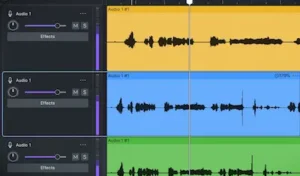 Audacity 4 is useful before the mastering stage, but I would not use it as the primary mastering workstation. It can handle stereo file preparation, editing, EQ, dynamics processing, limiting and export, while the redesigned clip workflow is helpful when a mastering job involves more than simply running a finished mix through a processing chain. The main limitation is everything around those processors: metering, analysis, comparison, sequencing and delivery control.
The limitation is not the presence or absence of individual processors. Professional mastering depends on the workflow surrounding those processors: accurate metering, detailed spectral and waveform analysis, reliable A/B comparison, repeatable processing, sequencing, revision control and delivery management. Dedicated mastering applications and mature DAWs provide considerably more control in these areas.
Audacity 4 is a useful utility for trimming masters, checking files, making basic corrective adjustments and preparing alternate exports. It is particularly suitable when the task is primarily editorial rather than processing-heavy. Before a finished mix leaves the editor, however, the important question is whether the exported file is actually ready for critical processing; a mastering checklist is useful here because technical errors at the export stage can survive all the way into delivery. For critical mastering work, Audacity 4 remains a secondary tool rather than a replacement for an established mastering environment.
The same distinction applies when comparing Audacity 4 with Audacity 3. The new release changes how engineers interact with the material, but the core value of the update is workflow rather than a fundamentally new audio-processing engine. There is no reason to expect a mix or master to sound inherently better simply because the project has been moved into version 4.
For a mastering engineer, that is the practical verdict: Audacity 4 can improve the handling of audio before and around the mastering stage, but it does not replace the tools and monitoring discipline required for critical mastering decisions.
Audacity 4 Recording, Podcasting and Voice Editing
Audacity 4 is particularly strong when recording and editing are part of the same workflow. Recording is now more flexible and clip-based: new takes can be created as clips at the chosen timeline position instead of being handled solely through the older track-oriented workflow. This makes auditioning and revising takes easier in sessions where several performances need to remain available.
The recording workflow also supports lead-in recording for punch-ins, allowing the engineer to hear the material immediately before the punch point before the new take begins. This is a small operational change, but it matters in voice, podcast and performance editing because the transition into a replacement take can be judged in context rather than in isolation.
Official ASIO support in the current Windows builds is important for recording engineers, but it is not unique to Audacity 4. Audacity 3.7.9 also added ASIO support to the official Windows builds. Audacity 4 carries that support into the new application architecture, removing one of the historical barriers to using the standard Windows distribution with compatible low-latency audio interfaces. ASIO does not turn Audacity into a professional tracking DAW, but it makes the application considerably more practical as a recorder.
For podcast and voice production, the combination is more significant than any individual feature. Recording, clip-based editing, non-destructive trimming, ripple editing and realtime processing can now exist inside one continuous workflow. That is where Audacity 4 becomes much more than a basic waveform editor.
The limitations appear when the session becomes production-heavy. Complex monitoring, routing, automation, MIDI and large plugin-based arrangements still favor a full DAW. Audacity 4 is strongest when the job is recording plus intensive editorial work rather than elaborate music production.
Audacity 4 Realtime Effects and Plugin Workflow
Realtime effects change the way Audacity can be used for iterative processing. Instead of permanently rendering an effect onto the waveform, supported effects can run during playback, remain adjustable and be bypassed or removed without rewriting the underlying audio.
Effects can be stacked on a track and processed in sequence, while master effects can be used on the finished mix. The useful part of realtime effects is the chain itself. Compressor, Limiter and Reverb can be reordered, bypassed individually or bypassed as a complete chain while the project is playing. The chain stays with the project and is included when the audio is exported, so there is no separate “apply everything first” step before delivery.
Audacity 4 supports third-party plugin formats including VST3 and Nyquist, with LV2 available on Linux and Audio Units on macOS. Plugin compatibility should still be tested for the specific operating system, plugin build and CPU architecture. Some legacy Audacity 3 plugin workflows, including VAMP, are not yet available. Plugin availability, however, should not be confused with the routing and automation architecture of a full DAW.
From a mixing perspective, realtime processing makes Audacity 4 more flexible than previous versions, but it does not eliminate its role as a lightweight production environment. The difference is that processing can now participate in a reversible workflow instead of being treated primarily as a final destructive operation.
Audacity 4 vs Audacity 3: What Actually Changed?
| Feature | Audacity 3.7.9 | Audacity 4 | Practical Difference |
|---|---|---|---|
| Clip editing | Older track-oriented workflow | Clips can be selected, moved, grouped and edited independently | Major workflow improvement |
| Non-destructive trimming | More limited editing model | Trimmed audio remains available beyond the clip edge | Safer revisions |
| Ripple editing | Sync-Lock based workflow | Explicit ripple/delete-and-close-gap editing commands | Faster structural edits |
| Recording | Mature recording workflow | More flexible clip-based recording and non-destructive takes | Better for iterative recording |
| ASIO on Windows | Official Windows builds include ASIO in 3.7.9 | Official Windows builds include ASIO | Continued official ASIO support |
| Realtime effects | More limited processing workflow | Realtime effects can be adjusted, bypassed and stacked | More flexible processing |
| Workspaces | No equivalent system | Saveable interface layouts for different workflows | Better session organization |
| Project format | .aup3 | .aup4, with .aup3 projects supported | New project architecture |
| MIDI / Note Tracks | Available | Not available in 4.0 | Regression for MIDI-based workflows |
| Mixer | Available | Dedicated Mixer not available in 4.0 | Important regression for some mixing workflows |
| Macro Manager | Available | Not available in 4.0 | Important for batch-oriented workflows |
| VAMP / legacy plugin workflows | Available | VAMP plugin hosting and some legacy plugin workflows are not available in 4.0 | Specialized workflow regression |
Audacity 4 is therefore not a clean feature-for-feature replacement for Audacity 3. The editing model is substantially better, but the migration decision is asymmetric: users gain clips, realtime effects, Workspaces and a safer recording workflow while temporarily losing several established features. If those missing features are part of your daily workflow, Audacity 3 may still be the more useful version even though Audacity 4 is the newer release.
Audacity 4 Alternatives: Reaper, Adobe Audition, WaveLab and Ocenaudio
| Software | Best Suited To | Where It Has the Advantage | Why Choose Audacity 4 Instead |
|---|---|---|---|
| Audacity 4 | Audio editing, recording and straightforward multitrack work | Free, open source, cross-platform and increasingly flexible for clip-based editing | No purchase or subscription cost; simple setup for recording and editing |
| Reaper | Music production, mixing and complex DAW workflows | Routing, automation, MIDI, scripting, plugin management and deep session customization | Simpler for basic recording and editing; no license cost |
| Adobe Audition | Professional audio editing, dialogue and post-production | Advanced editorial tools, restoration, processing and integration with Adobe workflows | Free and open source, with a lower barrier to entry |
| WaveLab | Mastering, audio analysis and professional delivery | Dedicated mastering workflow, detailed metering, analysis, sequencing and delivery tools | Free and considerably simpler for basic file preparation and editing |
| Ocenaudio | Fast single-file audio editing | Efficient workflow for straightforward waveform editing and processing | Multitrack editing and the newer clip workflow provide greater scope for structured projects |
The closest alternative depends on what you are trying to replace. Reaper is the obvious step up for music production, routing and automation. WaveLab is the more relevant comparison for mastering and delivery. Adobe Audition makes more sense for demanding editorial and post-production work. Ocenaudio is the simpler alternative when the job is mainly fast single-file editing.
Audacity 4’s advantage is narrower: it now covers substantially more editing and recording work while remaining free and open source. It is a stronger editor than it was, not a new competitor to every professional DAW.
Is Audacity 4 Worth Upgrading To? Our Verdict
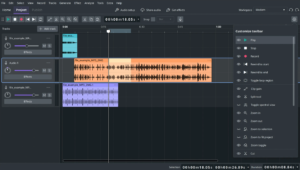 For new users, Audacity 4 is the version to start with. The redesigned clip model, non-destructive editing, Workspaces, realtime effects and improved recording workflow make it substantially more capable than the older interface suggests.
For existing Audacity 3 users, the answer depends on the workflow. If the priority is recording, podcast editing, voice production, cleanup and frequent clip-based revisions, Audacity 4 is a meaningful upgrade. If the workflow depends on MIDI/Note tracks, the Mixer, Macro Manager, VAMP, Play-at-speed or other missing Audacity 3 functionality, the migration should be treated as a test rather than an automatic upgrade.
For music production, Audacity 4 is useful for recording, editing, corrective processing and preparing material for another DAW or mastering stage. It is still not the strongest choice for building a complex production from MIDI instruments, extensive routing and automation.
For mastering, Audacity 4 is best treated as an editorial and file-preparation utility. It can edit, process and export audio, but critical mastering still benefits from dedicated metering, analysis, sequencing, comparison and delivery workflows.
Our verdict: Audacity 4 is a major workflow upgrade, not a major audio-engine upgrade. Its strongest improvement is the move toward flexible, non-destructive clip-based editing. The biggest reason not to migrate immediately is not sound quality but missing Audacity 3 functionality.
Audacity 4 Price and Availability
Audacity 4 remains free and open-source software. The application is available for Windows, macOS and Linux under the GPL v3 license, so there is no subscription or commercial license required to use the core application.
That pricing changes the value calculation considerably. Audacity 4 does not need to match the feature depth of a paid DAW to be useful; its strongest proposition is providing a substantially more modern editing and recording workflow without adding software cost.
The trade-off is therefore not price versus features, but simplicity versus workflow depth. Users who need advanced MIDI production, complex routing, extensive automation or dedicated mastering infrastructure will still need a more specialized application.
Audacity 4 Review Scorecard
| Category | Score |
|---|---|
| Editing Workflow | 9/10 |
| Recording | 8/10 |
| Mixing | 6.5/10 |
| Mastering | 6/10 |
| Feature Completeness | 7/10 |
| Value | 10/10 |
| Overall | 8/10 |
The score is driven primarily by editing and recording rather than mixing or mastering depth. Audacity 4 is unusually strong for a free editor, but the missing Audacity 3 features and limited DAW infrastructure keep it from scoring as a general-purpose production platform.
Is Your Mix Ready for the Final Master?
Audacity 4 can make editing, recording and corrective processing more flexible, but a better editing workflow does not automatically mean a mix is ready for release. Before adding more processing, it is worth hearing what the finished mix can actually become at the mastering stage—and whether issues in balance, dynamics, depth or translation are still present.
Upload up to 35 seconds of your mix and get a free mastering demo prepared by a real mastering engineer. Compare your original directly with the mastered version and make the decision based on what you can actually hear. Upload your mix for a free mastering demo →
Audacity 4 FAQ for Producers and Audio Engineers
Is Audacity 4 good enough for professional music production?
It can handle professional-quality recording and editing, but it is not a substitute for a full DAW in complex music production. Routing, MIDI, automation and broader mixing features remain limiting factors for larger sessions.
Does Audacity 4 sound better than Audacity 3?
Not as a direct result of the version change. Audacity 4’s major improvements are in clip editing, project organization and application architecture rather than a fundamentally new audio-processing engine.
Can Audacity 4 use VST3 plugins?
Yes. Audacity 4 supports VST3 along with other supported plugin formats. Compatibility can still depend on the operating system, plugin build and CPU architecture, so important production chains should be tested before migration.
Does Audacity 4 support ASIO?
Official Windows builds support ASIO, which makes Audacity more practical for low-latency recording with compatible audio interfaces. ASIO support is particularly relevant when Audacity is being used as a recorder rather than only as an editor.
Is Audacity 4 better than Reaper for mixing?
No. Reaper remains the stronger choice for complex mixing because of its routing, automation, MIDI, plugin management and session customization. Audacity 4 is better positioned as a lightweight editor and recorder.
Can Audacity 4 be used for professional mastering?
It can perform basic mastering and file-preparation tasks, but it lacks the dedicated metering, analysis, sequencing, routing and delivery workflow found in professional mastering applications. Loudness decisions also need to be evaluated independently of the editor itself; if the goal is to understand LUFS in the context of mastering and streaming normalization, see this LUFS mastering guide. Audacity is more useful here as a mastering utility than as a primary mastering workstation.
What features are missing from Audacity 4?
Audacity 4.0 does not currently include Time Tracks, Note/MIDI tracks, the Mixer, Macro Manager and its scripting pipe, VAMP plugin hosting, or Play-at-speed. Some Audacity 3 legacy plugin workflows are also not yet supported. Some exporting, rendering, analyzer and effect functionality is still missing compared with Audacity 3. The Audacity team says these features are being worked on for future releases.
Should I keep Audacity 3 installed after upgrading to Audacity 4?
If an existing workflow depends on MIDI/Note tracks, the Mixer, Macro Manager, Play-at-speed or specific legacy effects and analysis tools, keeping Audacity 3 installed is a sensible precaution. Test critical projects in version 4 before making the older version redundant.
Does Audacity 4 use less CPU than Audacity 3?
There is not enough independent benchmark data to establish a reliable general CPU advantage. Actual performance will depend on project size, realtime effects, plugins, hardware and operating-system configuration.
Is Audacity 4 a good alternative to Adobe Audition?
For free recording, editing and straightforward audio production, Audacity 4 is a viable alternative. Adobe Audition remains better suited to demanding editorial, restoration and post-production workflows where its deeper toolset justifies the cost.
Is Audacity 4 worth upgrading to immediately?
For new users, version 4 is the sensible choice. Existing users should first check whether their workflow depends on features that have not yet returned from Audacity 3. The editing improvements are substantial, but they do not justify breaking an established workflow unnecessarily.

Yurii Ariefiev is a mastering engineer and audio production editor. His software reviews focus on practical editing, recording, processing, metering and workflow limitations rather than feature lists alone.
For this Audacity 4 review, the focus is on how the new clip model, realtime processing and recording workflow affect real audio-production tasks, and where Audacity 4 still falls short of a full DAW or mastering workstation.
☕ Buy me a coffee