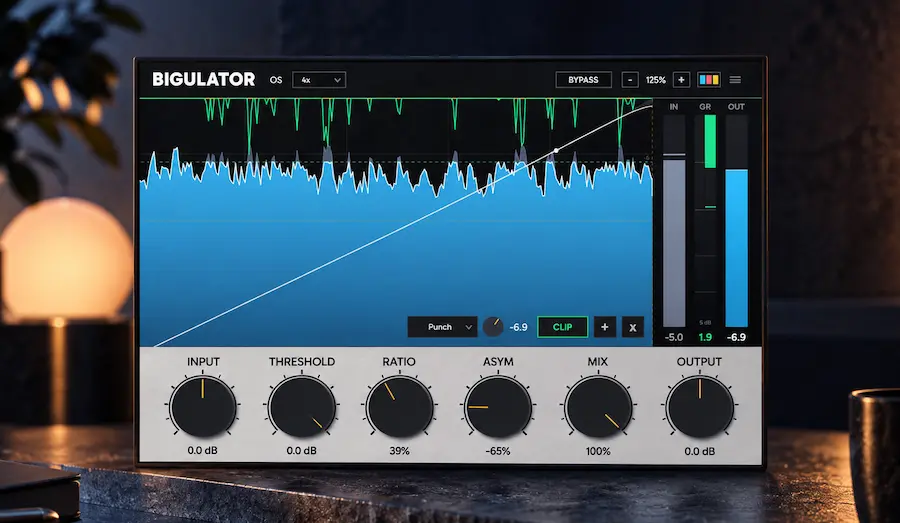
Bigulator is built around an unusual clipping topology. Instead of using a conventional envelope-based control signal, Big Man Labs modeled a circuit in which an audio-rate VCA is driven by a peak-skimming rectifier. The plugin was developed from the original hardware schematic and measurements of the unit.
That makes Bigulator interesting for a more specific reason than simply adding another clipper to a mastering folder. The relevant question is how that waveform-dependent behavior changes transient shape, density, and harmonic character compared with established digital clippers. At $42, the plugin is cheap enough to test; the harder question is whether the difference remains useful once the results are level-matched against tools you already know.
Why Bigulator Has to Offer More Than Another Clipper
 Clipping has become a standard part of modern mixing and mastering, particularly when short transient peaks are limiting loudness before the final limiter. A clipper can remove that peak energy without the envelope-based gain reduction of a limiter, changing how the limiter responds and often allowing it to work less aggressively. On drums, bass, mix buses, and masters, that difference can be audible even when the final loudness is matched.
The problem for Bigulator is that none of this is new. The current clipper market already includes processors capable of transparent peak control, aggressive loudness shaping, multiband clipping, mid/side processing, and high-quality oversampling. An engineer buying another clipper is therefore not looking for basic peak reduction. There has to be a meaningful difference in the way the processor responds to the signal.
That sets a higher bar for Bigulator. Its case rests on the behavior of its modeled circuit: an audio-rate VCA and peak-skimming rectifier that respond directly to the waveform rather than following the familiar detector-based dynamics model. If that topology produces a more useful combination of transient control, density, and harmonic character, Bigulator has a legitimate place in a mastering or mix-bus chain. If the audible result is effectively interchangeable with conventional clipping, its additional controls and analog pedigree become much less important.
How Bigulator’s Audio-Rate VCA Changes the Clipping Model
Bigulator’s defining feature is not its control set but the signal path behind it. The original hardware uses a VCA driven at audio rate by a peak-skimming rectifier, with no conventional envelope detector or separate attack and release stages. Big Man Labs says the plugin was developed from the hardware schematic and then fitted against measurements of the original unit.
That puts Bigulator in a different technical category from a conventional waveshaper. A basic clipper applies a nonlinear transfer function to the incoming waveform: once the signal crosses a defined region, its peaks are reshaped according to the selected curve. A compressor or limiter takes a different approach, deriving a control signal from the recent amplitude history and using that envelope to determine gain reduction. Bigulator’s modeled circuit does neither in the conventional sense. Its control signal operates at audio rate, so the instantaneous waveform is part of the gain-control mechanism itself.
That distinction should be most apparent on material with strong transient structure. A kick drum, snare, percussion hit, or vocal peak can produce rapid changes in the VCA’s control behavior rather than simply encountering a fixed clipping curve. In theory, that can alter the relationship between peak reduction, transient shape, and harmonic generation in ways that a conventional clipper does not reproduce.
But the circuit description does not, by itself, prove that the result is better. A technically unusual topology can still produce a result that is less useful than a simpler processor on a particular master. A level-matched comparison is more revealing: does the waveform-dependent response retain useful punch while adding the desired density, or does it simply introduce another form of distortion? That is where its value has to be established in practice, rather than inferred from the hardware modeling story.
Hear What a Controlled Mastering Chain Can Do
Bigulator’s clipping approach highlights how much the final master depends on the relationship between peak control, transient shape, density, and the limiter that follows. If you want to hear how your own mix can translate through a carefully controlled mastering chain without relying on aggressive loudness processing, you can submit up to 35 seconds of your mix for a free mastering demo. Get your free mastering demo →
What I noticed when pushing Bigulator past clean peak control
In practical use, the interesting part of Bigulator is not the first fraction of a dB of clipping. At very light settings, it is easy for the processor to disappear into the rest of the mastering chain, which makes it a poor candidate for judging its character. The difference becomes more useful when the clipper is asked to remove several dB from short transient peaks and the output is then level-matched against a conventional clipper.
On drum-heavy material, the response is better judged by the shape of the kick and snare than by the clipper’s loudness reading. I would listen specifically for whether the initial transient remains identifiable while the body of the hit becomes denser. The same test on a full mix is less forgiving: harmonic buildup that sounds useful on a drum bus can become an obvious change in tonal balance once the entire mix is being processed.
I also would not leave ASYM engaged simply because the circuit is modeled from analog hardware. With a full mix, even a small increase in asymmetry can move the processor from peak control toward audible coloration. That makes the control much more useful when deliberately auditioned against bypass at matched level than when treated as an “analog” enhancement.
The practical takeaway is that Bigulator rewards source-dependent settings. I would not choose one amount of clipping and one ASYM value as a default preset for every master. The processor becomes more convincing when its nonlinear character is used selectively rather than pushed simply to obtain a larger loudness number.
When Multiband Clipping Actually Helps in Mastering
Bigulator goes beyond the modeled hardware by adding one-, two-, and three-band operation with minimum-phase or linear-phase crossovers. Each band has independent Ratio, Threshold, and ASYM controls, and the thresholds can either track together or operate independently.
That matters in mastering because broadband clipping makes the entire mix part of the same nonlinear process. A kick or sub-bass transient can consume a disproportionate amount of the available peak headroom, even when the rest of the spectrum does not need the same amount of clipping. Splitting the signal into bands allows the engineer to control that energy locally instead of forcing the entire master through the same threshold.
Consider a mix where the kick and sub-bass produce occasional peaks several decibels above an otherwise controlled spectrum. With broadband clipping, those peaks can determine how the processor behaves across the full frequency range. A low-frequency band can instead absorb part of that peak reduction while the midrange and high-frequency bands remain comparatively untouched. This can be useful when the goal is to increase density without making vocals, cymbals, or upper-mid transients unnecessarily aggressive.
That does not make multiband clipping the default choice. The crossover is now part of the processing path, and nonlinear processing can expose differences between bands that were less obvious in the original mix. Minimum-phase and linear-phase crossovers also make different time-domain compromises, while aggressive band-specific clipping can make a master feel less cohesive than a well-tuned broadband stage.
The useful way to approach Bigulator’s multiband section is therefore corrective rather than aspirational: use it when a specific frequency range is driving the peak problem, and stay broadband when the entire mix already responds well as a single signal.
What Bigulator’s ASYM Control Actually Changes
ASYM is one of Bigulator’s more unusual controls. It exposes the channel imbalance present in the modeled hardware and extends the available range beyond what the original unit could produce. In practical terms, it changes the symmetry of the nonlinear response, giving the engineer another way to shape the harmonic and dynamic character of the clipping stage.
That makes ASYM more useful as a coloration control than as a transparency control. Increasing asymmetry changes how the processor treats positive and negative portions of the waveform, so the result should be judged by what happens to the source rather than by the assumption that “analog” automatically means more musical. On a master, that means checking the tonal balance, stereo image, mono compatibility, and overall harmonic buildup at matched loudness.
The control is easier to exploit creatively on individual tracks and buses. A modest amount of asymmetry can add density or alter the character of a drum bus, bass, synth, or other sustained source without adding a separate saturation stage. On a full mix, the same setting can become intrusive much faster because the nonlinear character is being applied to an already complex signal.
For mastering, ASYM is best treated as an optional tone-shaping stage rather than a default setting. Its value is highest when the change in harmonic character solves a specific problem or complements the existing chain; if the master already has the right density and tonal balance, additional asymmetry is more likely to add distortion than useful character.
Bigulator’s 16x Oversampling: What It Means in Practice
Bigulator supports up to 16x oversampling, which is relevant because clipping is a nonlinear process. Once a waveform is clipped, new harmonics are generated above the original signal content. If those harmonics are not properly filtered before the signal returns to the session’s sample rate, they can fold back into the audible range as aliasing.
That makes oversampling an important part of a clipper’s design, but the multiplier itself is not a meaningful quality rating. A 16x mode does not automatically outperform an 8x or 4x implementation, just as a higher oversampling setting does not guarantee a cleaner result. Filter design, attenuation, transition-band behavior, and the point in the signal path where oversampling is applied all affect the final result.
Bigulator’s 16x ceiling is therefore best viewed as sufficient headroom for demanding nonlinear processing rather than a competitive advantage. Other established clippers offer equal or higher oversampling rates, so the number alone does not distinguish Bigulator from the field.
For actual mastering work, the more useful test is whether increasing the oversampling setting produces a measurable or audible improvement on material that is being clipped hard. At moderate settings and sensible amounts of clipping, the difference may be small; with aggressive peak reduction, dense high-frequency content, or exposed transients, aliasing becomes much easier to hear. Oversampling also increases processing cost, so running every instance at the maximum setting is not automatically the best workflow.
At present, there are not enough independent measurements of Bigulator’s aliasing performance to establish how its 16x implementation compares with the best competing clippers. That leaves the oversampling specification as a useful feature, but not evidence that Bigulator is technically cleaner than its established alternatives.
The Digital Sum Clipper Adds a Second Stage of Peak Control
 Bigulator also includes a digital sum clipper with four voicings: Tight, Punch, Smooth, and Smoother. It operates as a separate stage from the modeled analog-style processing, giving the engineer another way to shape the remaining peaks after the circuit-model stage.
That separation is useful in a mastering chain. The first stage can be used for the character and density associated with the modeled circuit, while the digital stage handles the final few dB of peak reduction before the limiter. In some cases, that can replace a second clipper plugin and makes it easier to audition the two stages as a single processing chain.
The important distinction is that the digital sum clipper is primarily a workflow advantage, not Bigulator’s main technical differentiator. Digital clipping is already a mature technique, and dedicated clippers offer extensive control over clipping behavior, oversampling, and signal routing. The four voicings therefore add useful flexibility, but they do not by themselves give Bigulator a compelling reason to replace an established clipper. Its actual value depends on where the clipping stage sits within the wider mastering chain and what the processors before and after it are already doing.
The more interesting workflow is to use the two stages for different jobs rather than simply stacking clipping for additional loudness: let the modeled stage establish the character, then use the sum clipper conservatively to catch residual peaks. Whether that produces a better result than two dedicated processors remains source-dependent, but the architecture makes the comparison straightforward.
Where Bigulator Fits in a Real Mixing and Mastering Chain
Mastering is the most obvious application. Used conservatively before a final limiter, Bigulator can remove short-lived peaks and change the material presented to the limiter. The goal is not simply to make the master louder; it is to reduce the amount of limiting required and decide where the nonlinear processing happens. The multiband section becomes useful when a specific low-frequency region is driving the peak problem and broadband clipping starts affecting the rest of the spectrum unnecessarily.
Mix buses and drum buses are the next logical targets. On drums, clipping can reshape kick, snare, and percussion transients while increasing apparent density without relying entirely on compression. This becomes especially relevant when the kick has been built from multiple layers, because the final clipping stage reacts to the combined transient, low-frequency energy, and phase relationship of those layers. Our Kick Alchemist review looks at that earlier production stage in detail, including how layered kick components are tuned and phase-aligned before they reach the mix. On a mix bus, Bigulator can then become part of the next decision: how much of that finished transient structure should be reshaped for density and peak control.
Bass and synth processing is where ASYM becomes more relevant. These sources can tolerate substantially more nonlinear coloration than a finished master, and the ability to alter the symmetry of the clipping response gives the engineer another way to shape harmonic density without adding a separate saturation processor. The useful range will depend heavily on the source; what adds weight to a sustained synth can simply sound distorted on a clean bass recording.
Vocals are a secondary use case. A clipper can catch isolated consonant or transient peaks before compression, but clipping should not be confused with conventional vocal dynamics control. If the problem is inconsistent performance level, proximity effect, or sustained dynamic variation, compression, automation, or gain riding remains the more appropriate solution.
Bigulator is considerably less compelling for podcast, broadcast, and voice-over work. Those workflows generally prioritize predictable level control, speech intelligibility, and repeatability over nonlinear coloration. A dedicated limiter or speech-oriented dynamics chain is usually the more efficient choice.
Bigulator vs. KClip 3, StandardCLIP, Saturate, and KClip Zero
Bigulator enters a mature clipper market, so the relevant comparison is not how many controls each plugin has. The more useful question is what kind of clipping each processor is designed to deliver and how much control an engineer gets over that behavior.
| Plugin | Core Approach | Key Strength | Where Bigulator Has an Argument |
|---|---|---|---|
| Bigulator | Circuit-modeled nonlinear processing | Audio-rate VCA behavior, multiband processing, ASYM control | When its particular transient response and harmonic character outperform a conventional clipper for the source |
| KClip 3 | Flexible digital clipping | 8 clipping modes, multiband and M/S processing, up to 32x oversampling, extensive metering | Bigulator is aimed at a different sonic behavior rather than broader feature coverage |
| StandardCLIP | Precision digital clipping | Transparent peak control and extensive oversampling | Bigulator is more relevant when nonlinear coloration is part of the objective |
| Newfangled Audio Saturate | Detail-preserving spectral clipping | Maintaining fine spectral detail during aggressive peak reduction | Bigulator takes a circuit-modeling approach rather than treating the spectrum as the primary control domain |
| KClip Zero | Accessible digital clipping | Free entry point for straightforward peak shaping | Bigulator has to justify its cost through sonic behavior, not basic clipping functionality |
KClip 3 is the strongest counterargument to buying Bigulator purely for flexibility. It already covers a wide range of clipping workflows, including eight clipping modes, multiband and mid/side processing, LUFS metering, and up to 32x oversampling. If the requirement is simply “give me a versatile clipper with extensive control,” there is little reason to switch.
StandardCLIP occupies a different position. Its appeal is precision and control: an engineer looking for flexible digital clipping, detailed oversampling options, and relatively transparent peak reduction can get there without introducing a strong circuit-modeling identity. StandardCLIP also offers oversampling up to 256x, which makes Bigulator’s 16x ceiling a feature rather than a technical advantage. Newfangled Audio Saturate takes another route, using detail-preserving spectral clipping to maintain fine spectral information during aggressive processing.
That leaves Bigulator with a narrower but more defensible position. Its strongest reason to exist is not a larger feature set or a higher oversampling number. It is the possibility that its circuit-derived, waveform-dependent response produces a transient and harmonic character that an engineer cannot reproduce as easily with a conventional clipper.
In other words, Bigulator is a poor choice if you are shopping for the most comprehensive clipper. It becomes much more interesting if you already own the standard tools and are looking for a different response rather than another collection of familiar controls.
Is Bigulator Worth $42?
At $42, Bigulator is inexpensive enough that the purchase decision is unlikely to come down to budget. It is a perpetual license, includes a 14-day trial, and is available in the major plugin formats across Windows, macOS, and Linux. For an engineer who regularly uses clipping, the trial is more important than the price: the relevant question is whether the processor produces a result that existing tools do not.
That distinction matters because the market already contains capable and inexpensive alternatives. KClip 3 sits in a similar price range, while KClip Zero provides a free option for straightforward clipping. StandardCLIP is another established processor that does not require a large investment for professional peak control. Bigulator therefore cannot justify its price simply by offering clipping, oversampling, or multiband processing.
The value proposition is entirely tied to its sonic behavior. If the modeled VCA response gives a mix or master a useful combination of transient control, density, and nonlinear character that is difficult to reproduce with the clippers already in an engineer’s folder, $42 is a low-cost addition to a professional toolkit. If the audible difference disappears in level-matched comparisons, there is little reason to pay for another clipper regardless of how inexpensive it is.
For that reason, Bigulator is best evaluated as a specialized processor rather than a replacement for an existing clipper. Engineers who already have a reliable mastering clipper should use the trial to test it on familiar material, level-match the results, and decide whether its particular response solves a problem their current chain does not.
Bigulator Performance: Compatibility Is Clear, Benchmark Data Is Not
Bigulator has broad platform coverage: Windows 10 and later, macOS 10.13 and later with Intel and Apple Silicon support, and Linux with Ubuntu 22.04 or later. The plugin is available in AAX, VST3, AU, and CLAP formats and supports sample rates up to 192 kHz. The published minimum system requirement is an Intel Core i5 or AMD Ryzen 5-class processor with 4 GB of RAM.
That cross-platform support is more significant than the modest system requirements suggest. Native Linux support remains relatively uncommon among commercial audio plugins, making Bigulator viable in production environments that would otherwise have a much smaller selection of mastering processors. Reports from early KVR users indicate that the Linux build is being used successfully in real sessions, including on master buses, although anecdotal reports are not a substitute for systematic compatibility testing.
The more important unknown is CPU and latency behavior. There are not yet enough independent measurements to establish how much processing overhead Bigulator introduces at different oversampling settings, how its minimum-phase and linear-phase crossover modes affect latency, or how efficiently multiple instances scale in large projects. Those figures matter more to a working engineer than the nominal minimum hardware specification.
The plugin’s GPU-accelerated display should also be interpreted correctly. The available technical information associates GPU acceleration with the real-time gain-reduction display, not with the audio-processing engine itself. There is therefore no reason to assume that the nonlinear processing becomes GPU-dependent or that a faster graphics card will materially improve audio performance.
For conventional mixing and mastering sessions, the available compatibility information is reassuring. What remains unproven is how efficiently Bigulator scales under heavy oversampling, multiple instances, and complex multiband configurations. Until independent benchmarks are available, CPU efficiency and latency should be treated as open questions rather than advantages or disadvantages.
Minimum-Phase vs. Linear-Phase: Choosing the Right Crossover for Clipping
Bigulator’s crossover options expand its usefulness beyond broadband clipping, but they also introduce a decision that does not exist in a conventional full-band clipper. Once the signal is divided into frequency bands, the crossover itself becomes part of the sound, and the consequences are more significant because the subsequent processing is nonlinear.
Minimum-phase crossovers are generally the sensible starting point for real-time mixing and mastering. They avoid the pre-ringing associated with linear-phase filtering and typically keep the time-domain response more compact. That can be preferable when the material contains sharp transients, particularly drums and percussion, where changes in the timing and shape of a transient can be more noticeable than small differences in frequency-domain separation.
Linear-phase crossovers take a different approach by avoiding the frequency-dependent phase shift introduced by conventional minimum-phase filtering. The tradeoff is latency and the possibility of pre-ringing around fast transients. Those effects are not automatically problematic, but they can become relevant when aggressive clipping follows the crossover because the nonlinear stage can make subtle changes in transient structure more audible.
For mastering, there is therefore no universally superior crossover mode. What matters in practice is whether this circuit produces a transient response, density, or harmonic character that is genuinely useful alongside conventional clippers. If a low-frequency peak is consistently driving the entire master into unwanted clipping, multiband processing may be justified. If the broadband response is already balanced, adding crossovers simply introduces another variable into a chain that may not need one.
In practice, I would start with broadband clipping, move to minimum-phase multiband processing only when the spectrum demands it, and treat linear-phase operation as a deliberate alternative rather than an automatic upgrade. The goal is not maximum separation between bands; it is the most coherent result after the nonlinear stage.
What the Current Evidence Does—and Does Not—Show
The main limitation in evaluating Bigulator is not a missing feature. It is the lack of independent evidence. The plugin is new enough that there is not yet a meaningful body of third-party testing from which to establish how its processing compares with mature clipping tools.
Early user feedback is encouraging but necessarily limited. KVR’s initial coverage includes a small number of user reports, including positive comments from Linux users testing the plugin during its trial period. Those reports are useful for identifying obvious compatibility problems or early workflow impressions, but they cannot establish long-term stability, CPU efficiency, or sonic superiority.
I could not find enough published blind comparisons, null tests, aliasing measurements, CPU benchmarks, or systematic analysis of Bigulator’s nonlinear response to establish an objective advantage over the established clippers discussed here. That matters because clipping differences are easy to exaggerate when processors are compared at different output levels or with different amounts of peak reduction.
The absence of measurements is not evidence that Bigulator performs poorly. It simply limits what can be stated with confidence. The circuit architecture can be evaluated from its design, but claims about superior transparency, musicality, transient preservation, or overall sound quality still need to be established through controlled listening and measurement.
For an engineer considering the plugin, that makes the 14-day trial particularly useful. Bigulator should be judged against familiar material at matched loudness, preferably with the same peak-reduction target used by the existing clipper. Until independent testing accumulates, its strongest claims remain things to verify rather than established performance advantages.
Bigulator Should Be Judged by Peak Control, Not LUFS Gain
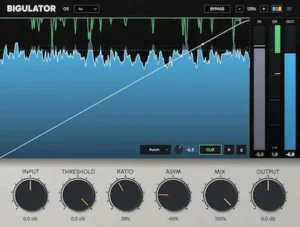 The easiest way to misjudge Bigulator is to ask how much louder it can make a master. That is a poor way to evaluate a clipper. Once two processors are producing the same integrated loudness, the more revealing comparison is what each one has done to the transient structure and how much work remains for the limiter.
A useful test is to level-match the results and compare transient impact, perceived density, harmonic buildup, and downstream limiter gain reduction. If Bigulator can remove the same amount of peak energy while retaining more useful punch, or produce the desired density with less subsequent compression or limiting, its unusual circuit behavior has practical value. If the results collapse into the same sonic territory after level matching, the circuit-modeling approach becomes much less consequential. For a broader explanation of how clipping and loudness interact in mastering, see our guide to loudness vs. clipping in mastering.
That distinction is increasingly relevant to streaming mastering. Loudness normalization reduces the practical advantage of pushing a master several decibels louder than competing releases, although loudness and level management still matter. The more durable objective is a master that reaches an appropriate competitive level without sacrificing transient contrast, tonal stability, or playback translation simply to maximize the loudness meter.
Codec translation is another important part of that evaluation. Aggressive nonlinear processing can create additional high-frequency energy and intermodulation products that become more obvious after lossy encoding. A clipper that sounds impressive at the unencoded DAW output can therefore produce a less convincing result once the master passes through a streaming codec. Bigulator should be evaluated at both stages: first at matched level in the DAW, then after encoding to the formats and bitrates relevant to the release.
That is a more meaningful test of its mastering value than the maximum LUFS increase displayed by the meter. The question is not whether Bigulator can make a signal loud. Every competent modern clipper can do that. The question is what it gives up—or preserves—while getting there.
How I Would Test Bigulator Against an Established Clipper
For a meaningful comparison, I would not start by matching the amount of clipping shown by the meters. The processors should first be set to solve the same peak-control problem, then matched by output level before making a sonic judgment.
My starting point would be a full mix with pronounced kick and snare transients. I would run Bigulator and the reference clipper into the same downstream limiter, keep the limiter settings unchanged, and compare the amount of gain reduction required after each clipping stage. The important observation is not which plugin produces the higher LUFS value, but whether one reaches the same final level while leaving the limiter with a less damaging signal.
I would then repeat the comparison on a drum bus. This is where the circuit-derived character is easier to isolate because the nonlinear processing is not being spread across vocals, cymbals, bass, and the rest of the arrangement. If Bigulator produces useful density without making the initial attack of the kick or snare collapse, that is a more meaningful reason to keep it than a higher loudness reading.
For mastering, I would also repeat the test after encoding a reference master to a lossy delivery format. Clipping artifacts that are subtle in the DAW can become more obvious after codec processing, particularly around dense high-frequency material. A processor that wins the level-matched DAW comparison but creates harsher encoded transients is not automatically the better mastering choice.
This is also why I would test Bigulator at several clipping depths rather than judging it from a single preset. Its value is likely to be most apparent when the processor is pushed far enough for its nonlinear behavior to matter, but not so far that obvious distortion becomes the dominant characteristic.
Bigulator: Strengths and Limitations
Pros
- Distinctive circuit-derived clipping architecture based on an audio-rate VCA.
- Waveform-dependent gain behavior gives it a different processing approach from conventional clipper curves.
- Multiband operation with minimum-phase and linear-phase crossover options adds useful control for mastering problems that broadband clipping cannot solve cleanly.
- Per-band Ratio, Threshold, and ASYM controls provide meaningful control over nonlinear behavior rather than cosmetic parameter variations.
- Up to 16x oversampling provides a useful range for demanding nonlinear processing.
- Integrated digital clipping stage can reduce the need for a second clipper in some mastering chains.
- Native Windows, macOS, and Linux support with AAX, VST3, AU, and CLAP formats.
- $42 pricing and a 14-day trial make comparative evaluation inexpensive.
Cons
- The claimed sonic advantage of the circuit model has not yet been established through substantial independent testing.
- 16x oversampling is useful but does not distinguish Bigulator from established high-quality clippers.
- Competing processors offer more mature feature sets, particularly for advanced routing, metering, and clipping control.
- Multiband clipping adds crossover and time-domain variables that can make a master less coherent when there is no specific reason to split the spectrum.
- ASYM is primarily a nonlinear coloration control and should not be treated as a transparent mastering enhancement.
- The integrated digital clipper is useful for workflow consolidation but is not a compelling reason to replace a dedicated clipping processor.
- Independent data on CPU scaling, latency, aliasing, and long-term reliability is still limited.
Overall Rating
| Category | Rating |
|---|---|
| Sonic Character | 8.5/10 |
| Peak Control | 8.5/10 |
| Transient Handling | 9/10 |
| Mastering Utility | 9/10 |
| Processing Flexibility | 8.5/10 |
| Value for Money | 9.5/10 |
| Overall | 8.8/10 |
Sonic Character — 8.5/10. Bigulator has a clearly differentiated nonlinear architecture, and that gives it a more defensible sonic identity than a clipper that simply adds another set of transfer curves. The audio-rate VCA and peak-skimming rectifier are the reason to investigate it, but the score stops short of claiming that its character is universally superior to established clipping approaches.
Peak Control — 8.5/10. Bigulator is highly capable at controlling short peak excursions and changing the signal presented to a downstream limiter. Its multiband architecture and integrated digital clipping stage make it adaptable to different peak-control problems, but the basic task itself is already handled extremely well by established clippers.
Transient Handling — 9/10. This is one of Bigulator’s strongest areas conceptually and practically. Its waveform-dependent gain behavior makes transient response more interesting than a conventional fixed clipping curve, particularly on drums and other material with pronounced peak structure. The high rating reflects its useful response, not a claim of objectively superior transient preservation in every comparison.
Mastering Utility — 9/10. Bigulator makes sense in a professional mastering chain when used for controlled peak reduction, density shaping, and interaction with a final limiter. The multiband section can solve specific low-frequency peak problems, while the broadband mode remains the more straightforward starting point. Its main limitation is that engineers still need to verify the result against established clippers using level-matched comparisons.
Processing Flexibility — 8.5/10. Multiband processing, minimum-phase and linear-phase crossovers, per-band controls, ASYM, oversampling, and the additional digital clipping stage provide substantial flexibility. The score is deliberately below the top tier because competing processors offer more mature routing, metering, and clipping control, so Bigulator’s flexibility is useful without being class-leading.
Value for Money — 9.5/10. At $42 with a 14-day trial, the barrier to evaluating Bigulator is unusually low for a professional-oriented processor. Its value does not come from replacing every other clipper; it comes from adding a genuinely different nonlinear response to an existing toolkit at a modest cost. The trial also makes it possible to verify that difference on familiar material before committing.
Overall — 8.8/10. Bigulator is a strong specialized clipper with a credible sonic identity, useful mastering applications, and an unusually attractive price. The score stops short of the 9+ range because its claimed advantages over established clippers have not yet been demonstrated through enough independent measurements, blind comparisons, or systematic benchmarking. For an engineer who already owns a good clipper, Bigulator is worth testing precisely because it offers a different response—not because it makes the existing tools obsolete.
Bigulator Verdict: A Specialized Clipper With a Distinctive Response
Bigulator’s strongest argument is its processing behavior, not its feature count. The audio-rate VCA and peak-skimming rectifier give the plugin a legitimate architectural basis for behaving differently from a conventional digital clipper, while the multiband section and ASYM control extend that behavior beyond a single broadband workflow.
That does not make it a new mastering standard. The established field is already strong. KClip 3 covers a broader range of conventional clipping workflows, StandardCLIP remains a compelling choice when transparent peak control is the priority, and Newfangled Audio Saturate offers a fundamentally different approach to managing spectral detail during aggressive nonlinear processing.
Bigulator’s case is narrower than a claim of superiority. It is useful when the familiar clipper in your chain is not giving you the transient shape, density, or harmonic character you want. That is a legitimate reason to keep another clipper available, particularly when the additional cost is only $42.
For mastering engineers, Bigulator deserves a serious demo and should be compared directly against the clipper already trusted in the mastering chain. Mixing engineers have equally practical uses for it on drum buses, mix buses, basses, and synths where controlled nonlinear density is desirable. Beginners will get more value from learning clipping and dynamics with simpler tools, while engineers already satisfied with their current clipper have no compelling reason to switch without an audible improvement.
Bottom line: Bigulator is a specialized clipper rather than a replacement for established mastering tools. Its $42 price makes the trial easy to justify, but the real reason to keep it is its different nonlinear response. If that response gives you a better result on your own mixes and masters than the clipper you already trust, Bigulator has earned its place in the chain. If it does not, the feature list alone is not a sufficient reason to buy it.
Before Adding Another Processor, Hear What Your Mix Actually Needs
Bigulator shows why peak control is not simply a question of finding another clipper or pushing the master harder. Transient shape, density, harmonic buildup, limiter interaction, and codec translation all have to work together. If your mix still feels constrained, harsh, flat, or less coherent after processing, the next useful step may be a professional mastering perspective rather than another plugin.
Upload up to 35 seconds of your mix and get a free mastering demo prepared by a real mastering engineer. Compare the original with the mastered version and judge the difference on your own material before deciding what the mix actually needs. Upload your mix for a free mastering demo →
Bigulator FAQ
Is Bigulator suitable for professional mastering?
Yes, it can be used as a clipping stage before a final limiter, particularly when controlled peak reduction or nonlinear density is the goal. Its suitability for a specific mastering chain still needs to be established through level-matched listening against the clipper already used in that chain.
Does Bigulator use conventional attack and release controls?
No. Its modeled hardware path uses an audio-rate VCA driven by a peak-skimming rectifier rather than a conventional envelope detector with separate attack and release settings. That waveform-dependent behavior is one of the main reasons its response can differ from standard clippers.
What is the advantage of Bigulator’s multiband clipping?
Multiband operation lets the engineer process different frequency regions with separate Ratio, Threshold, and ASYM settings. This can be useful when low-frequency peaks are driving broadband clipping harder than the rest of the mix requires. It also introduces crossover and time-domain considerations, so it is not inherently superior to broadband processing.
Does Bigulator support linear-phase crossovers?
Yes. Bigulator provides both minimum-phase and linear-phase crossover options. Minimum-phase processing is generally the more straightforward choice for transient-heavy material, while linear-phase operation can be useful when avoiding conventional crossover phase shift is more important than minimizing latency and pre-ringing.
Is Bigulator’s 16x oversampling better than the higher oversampling rates offered by some competitors?
Not necessarily. Oversampling quality depends on the implementation rather than the multiplier alone. Bigulator’s 16x maximum is appropriate for nonlinear processing, but there is currently insufficient independent measurement to establish that it produces less aliasing than competing processors offering higher oversampling rates.
Can Bigulator run on Linux?
Yes. Bigulator supports Linux in addition to Windows and macOS, which makes it relevant to Linux-based production systems where the choice of commercial mastering plugins is more limited. The plugin is also available for Windows and macOS, including Apple Silicon systems, with AAX, VST3, AU, and CLAP formats.
Does Bigulator replace a dedicated limiter?
No. Its most logical role in a mastering chain is as a clipping stage before the final limiter. It can reduce short peak excursions and change the signal presented to the limiter, but it does not replace the need for controlled final dynamics and peak management.
How does Bigulator compare with KClip 3 and StandardCLIP?
KClip 3 offers a broader set of conventional clipping controls and routing options, while StandardCLIP is aimed strongly at precise and transparent peak shaping. Bigulator’s differentiator is its circuit-derived audio-rate VCA behavior. The practical choice should be based on level-matched results rather than feature count.
Is Bigulator useful for mixing, or is it mainly a mastering plugin?
It is useful in both contexts. Drum buses, mix buses, basses, and synths are particularly suitable for experimentation because clipping can be used for density and tone as well as peak control. Mastering requires substantially more conservative settings because nonlinear artifacts accumulate across the full mix.
Is Bigulator worth buying if I already own another professional clipper?
Only if it produces a result you cannot get as effectively from the tools you already own. At $42, the trial makes that comparison inexpensive, but the justification for adding another clipper should be a measurable or clearly audible workflow benefit—not simply another set of controls.

Yurii Ariefiev evaluates audio plugins from a mastering and mix-engineering perspective, with particular attention to clipping, transient control, nonlinear processing, loudness, and signal translation. His reviews focus on how a processor behaves in an actual production chain rather than relying on feature lists or marketing specifications.
At AREFYEV STUDIO, plugin performance is considered in the context of real mixing and mastering workflows: peak reduction, harmonic coloration, oversampling, limiter interaction, and the effect of processing on the final master. Technical claims are separated from what can be established through practical listening and level-matched evaluation.
☕ Buy me a coffee