Harrison Tape Saturator Review — Tape Emulation, Real Behavior and Practical Mixing Use
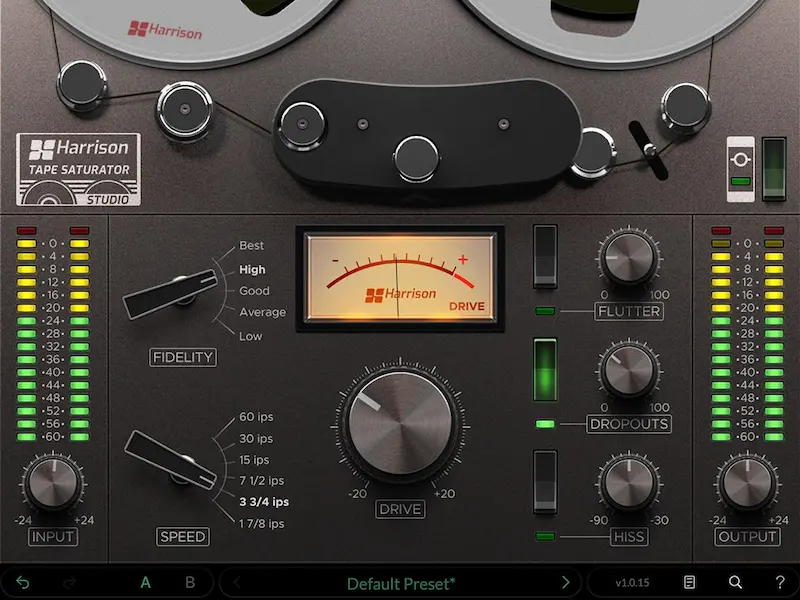
Harrison Audio has released Tape Saturator — a plugin that goes beyond standard saturation. Instead of simply adding harmonics, it attempts to recreate the full behavior of classic two-track tape machines used in professional studios throughout the 1970s and 1980s.
This distinction matters. Most saturation plugins enhance tone. Tape Saturator models a system — including compression, frequency response shifts and mechanical imperfections.
What actually happens to your audio
The plugin introduces multiple layers of processing:
- even and odd harmonics → increased density and perceived loudness;
- soft tape compression → transient smoothing and cohesion;
- frequency shaping → low-end thickening and high-frequency roll-off;
- mechanical artifacts → instability, noise and degradation.
At subtle levels, it works as a mix enhancer. At higher settings, it becomes a sound design tool capable of destroying signal integrity in a controlled, musical way.
Key feature — controlled degradation
The Fidelity control is not just a quality setting — it defines how “healthy” the tape behaves:
- high settings → clean signal with high headroom;
- mid settings → classic studio tape response;
- low settings → audible distortion and lo-fi artifacts.
This gives a range most plugins do not offer: from transparent enhancement to aggressive coloration.
Additional controls:
- Speed — directly affects tone and transient response;
- Drive — determines how hard the signal hits the tape;
- Flutter — pitch instability;
- Dropouts — signal interruptions;
- Hiss — analog noise floor.
Comparison with other tape plugins
Understanding where this plugin sits is critical:
- Waves (J37 / Kramer Tape) — faster workflow, less depth;
- Softube Tape — more “musical”, but limited control;
- UAD Studer / Ampex — highest realism, but heavy and expensive;
- Harrison Tape Saturator — flexible, affordable, less “polished”.
Conclusion: not the most realistic, but one of the most controllable options in its price range.
Real-world use cases
Where it works:
- master bus — adds glue and perceived loudness;
- drums — softens transients and adds weight;
- bass — stabilizes dynamics and increases presence;
- synths — introduces analog texture.
Where it fails:
- poorly balanced mixes — exaggerates problems;
- over-bright vocals — reduces clarity;
- already compressed material — destroys dynamics.
This is not a “fix tool”. It is a multiplier.
How to use it properly
- set Drive just below audible distortion;
- adjust Speed based on tonal goal;
- use Fidelity as main character control;
- apply artifacts only when needed.
On mastering chains, excessive use will reduce transient impact and competitive loudness performance on streaming platforms.
Why saturation alone is not enough
A common misconception: tape saturation makes a mix sound professional.
In reality, it enhances what is already there. If your mix lacks balance, saturation will highlight those issues instead of fixing them.
That’s why professional workflows rely on proper mixing before applying analog-style processing. If you need a competitive result, you can order professional mixing and mastering, where tools like this are used within a structured signal chain.
Compatibility
Windows 10+, macOS 13+, VST, VST3, AU and AAX formats.
Pricing
Intro price: $29 (regular $49).
FAQ
Is it worth buying? Yes for flexibility. No if you want high-end realism.
Can it be used on mastering? Yes, but carefully.
Is it better than Waves or Softube? Different — more control, less polish.