Acustica Audio Aero 2 Review: Dynamic Amp Modeling vs Neural DSP, ToneX and NAM
The modern guitar amp simulator market no longer has a tone problem. Most modern guitar plugins can already approximate the frequency balance, saturation profile and cabinet character of real amplifiers closely enough for commercial production. The remaining weakness is behavioral realism — how an amp reacts under dynamic playing pressure, dense mix compression and modern mastering conditions.
That gap becomes obvious with palm-muted rhythm guitars, fast transient-heavy lead work and layered productions where guitars compete against hyper-processed drums, synth bass and aggressive loudness targets. Many amp simulators sound convincing in solo playback but flatten once the signal hits bus compression, limiting and streaming codecs. The issue is rarely EQ. It is usually the interaction between transient response, gain staging and nonlinear harmonic behavior.
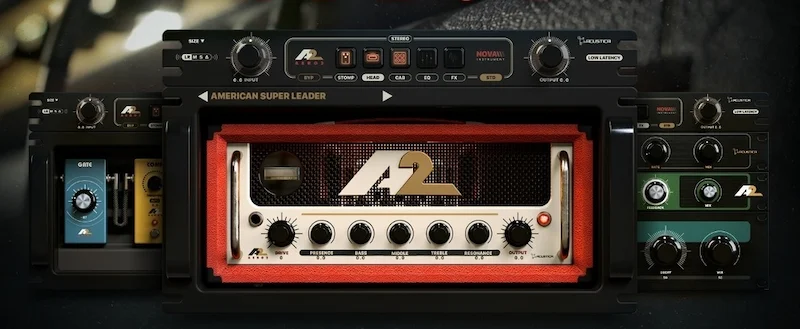
The Acustica Audio Aero 2 plugin is positioned directly into that territory. Instead of building another preset-driven collection of amp captures and impulse responses, the company has expanded Aero into a full amplification environment based around its Nova architecture. The plugin models the entire signal chain — stomp section, amplifier stage, cabinet interaction, EQ and post effects — inside a fixed workflow intended to behave more like a physical rig than a modular DSP sandbox.
That distinction matters because Acustica has never competed on speed or convenience. The company’s ecosystem has historically prioritized dynamic complexity, harmonic density and analog-style signal interaction over lightweight CPU performance and streamlined workflow design. The Acustica Audio Aero 2 amp simulation plugin enters a market already dominated by highly optimized platforms like Neural DSP, capture-based ecosystems like ToneX and rapidly evolving open-source solutions such as NAM.
What makes Aero 2 relevant is not the number of included models. The real question is whether Acustica’s nonlinear approach to amp modeling changes how guitars survive real-world audio production — particularly after mixing, mastering, loudness normalization and streaming conversion.
| Plugin Type | Dynamic guitar amp simulator and full signal-chain environment |
| Included Models | 53 stomps, 76 amp heads and 122 cabinets |
| Processing Architecture | Nova-based nonlinear modeling |
| Latency Modes | Low-latency and high-quality processing modes |
| Formats | VST3, AU and AAX |
| Compatibility | Windows 10+ and macOS 11–14 |
| Introductory Price | €85 introductory pricing before full retail increase |
- Why Aero 2 Arrives at a Critical Moment for Amp Modeling
- Inside Aero 2’s Nova Engine and Why It Behaves Differently From Most Amp Sims
- Why the Cabinet Section Matters More Than the Amp Models
- How Aero 2 Fits Into Real Mixing and Production Workflows
- Where Aero 2 Starts to Break Down
- How Aero 2 Compares to Neural DSP, ToneX and NAM
- How Aero 2 Holds Up After Mixing, Mastering and Streaming Conversion
- Verdict
- FAQ
Why Aero 2 Arrives at a Critical Moment for Amp Modeling
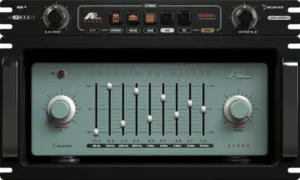 The amp-sim market has largely moved past static tone recreation. Earlier generations of guitar plugins focused on frequency matching: recreating the EQ curve of a cabinet, the distortion texture of an amp head or the harmonic profile of a pedal circuit. Modern production workflows demand something more difficult — dynamic realism under mix pressure.
That shift explains why profiling, neural capture systems and behavior-based modeling have become the dominant direction across guitar production. Engineers are no longer judging amp plugins by isolated demo tones. They are evaluating how guitars translate after bus compression, clipping, loudness normalization and streaming conversion. A tone that sounds oversized in solo playback often collapses once layered against modern drums, synth bass, parallel saturation and limiter gain reduction.
This is where Aero 2 enters the conversation differently from most mainstream amp simulators. Acustica is not primarily chasing preset immediacy or ultra-polished workflow design. The plugin is built around signal-chain interaction — the relationship between front-end gain staging, transient behavior, cabinet response and downstream harmonic buildup.
Instead of treating the amplifier, cabinet and post-processing stages as separate modules stitched together by routing flexibility, Aero 2 approaches the chain more like an integrated hardware ecosystem. The stomp section, amp stage, cabinet modeling, EQ and spatial processing operate inside a fixed architecture intended to preserve inter-stage behavior rather than maximize customization.
That design choice matters more than the raw model count. One of the biggest weaknesses in modern amp simulation is disconnect. Many plugins reproduce convincing isolated components yet fail to maintain cohesion once the signal moves through compression, mastering and codec encoding. The result is a guitar tone that initially feels detailed but gradually becomes flat, harsh or dimensionally unstable during real production workflows.
Aero 2 appears designed around the opposite objective: maintaining harmonic density and transient integrity after the signal leaves the plugin itself. That is a more relevant engineering target in 2026 than simply adding another library of amp captures or cabinet IRs.
The uncomfortable reality is that most listeners will never notice these differences in isolation. The advantage appears when guitars survive multiple production stages without gradually turning smaller, harsher or flatter during release preparation.
Whether Acustica’s Nova-based approach fully delivers on that goal is still open for debate. But the direction reflects a broader industry shift away from static realism and toward behavioral realism — how a modeled rig reacts under actual production conditions rather than controlled demo playback.
Inside Aero 2’s Nova Engine and Why It Behaves Differently From Most Amp Sims
The most important part of Aero 2 is not the number of included amps, pedals or cabinets. The real story is the Nova engine underneath the interface and how Acustica approaches nonlinear behavior inside a guitar signal chain.
Most modern amp simulators rely primarily on algorithmic modeling. That approach is efficient, flexible and highly optimized for real-time playback, but it often treats amplifier stages as isolated processes. The result can sound convincing during static playback while still feeling disconnected under aggressive playing dynamics.
Acustica’s ecosystem has historically taken a different direction. Instead of focusing purely on mathematical approximation, the company leans heavily into sampled dynamic behavior and inter-stage interaction. Aero 2 extends that philosophy into guitar processing by modeling how multiple stages influence one another under changing signal conditions rather than behaving like separate distortion modules chained together.
The difference becomes most obvious during transient-heavy performances.
Many amp plugins maintain a believable tonal balance until the input signal becomes physically demanding. Fast palm-muted rhythms, inconsistent picking force and dense low-mid saturation tend to expose weaknesses quickly. Low-end transients smear into compression artifacts, upper harmonics separate from the body of the note and sustained distortion starts behaving like static fizz rather than moving air pressure.
Aero 2 handles those transitions differently. The plugin reacts more like a continuously stressed analog chain than a fixed distortion algorithm. Pick attack changes the density and structure of saturation depending on how the stomp stage, amp section and cabinet interaction are feeding one another in real time.
That distinction matters in modern production because guitars are no longer isolated centerpieces. They exist alongside clipped drum buses, heavily limited masters, layered synthesizers and sub-heavy low-end management. Under those conditions, static amp modeling often creates tones that appear huge in solo playback but lose dimensionality once the full production starts competing for harmonic space.
Aero 2’s Nova-based architecture appears designed specifically to preserve transient movement and harmonic cohesion after downstream compression and mastering. The plugin does not necessarily sound more “analog” in the vague marketing sense often used in plugin advertising. What it actually does is maintain better interaction between attack, saturation density and cabinet response as the signal becomes more stressed.
The fixed signal-flow architecture also plays an important role here. Aero 2 follows a conventional hardware-style chain:
- Input and stomp processing
- Amp head stage
- Cabinet and microphone interaction
- Post-amplifier EQ shaping
- Modulation and spatial effects
Compared to fully modular environments, that structure may initially seem restrictive. In practice, it prevents one of the biggest problems in modern amp simulation: unrealistic routing behavior that produces impressive demo tones but unstable mix translation.
Unlimited routing flexibility often encourages excessive gain stacking, disconnected cabinet processing and unnatural post-distortion EQ decisions. Aero 2 pushes users toward a more production-oriented workflow where the signal chain behaves closer to an actual recorded rig rather than a collection of unrelated DSP blocks.
Why the Cabinet Section Matters More Than the Amp Models
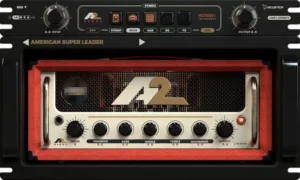 Most amp-sim marketing still revolves around amplifier heads, but in modern production the cabinet stage usually determines whether guitars translate beyond solo playback. The amp generates harmonic structure. The cabinet decides how that structure survives compression, limiting and codec conversion.
Aero 2 includes 122 cabinet emulations with adjustable microphone positioning and distance control, but the important detail is not the quantity. What separates stronger cabinet systems from generic IR workflows is how the speaker interaction behaves under nonlinear saturation and transient stress.
Traditional IR loaders often create a disconnected signal path. The amplifier stage responds dynamically while the cabinet behaves like a static snapshot layered afterward. Under dense mix processing, that disconnect becomes audible quickly. Upper mids harden unnaturally, low-mid buildup loses focus and transient articulation starts separating from the body of the guitar tone.
Aero 2 feels engineered around a more integrated response. The cabinet stage interacts with the amplification chain instead of functioning like an isolated convolution block attached at the end of the signal path. That difference becomes more obvious under aggressive modern production conditions than during isolated demo playback.
The British-style 4×12 models preserve upper-mid bite without turning brittle once limiter pressure increases. The American high-gain cabinets hold low-end shape more effectively than many modern IR libraries that rely on oversized sub information and exaggerated high-frequency presence to simulate “size.”
That behavior matters because streaming platforms punish unstable guitar harmonics. AAC and Ogg encoding tend to exaggerate harshness between roughly 2.5kHz and 5kHz while softening transient definition. Amp sims built around hyped upper harmonics often sound exciting initially but become abrasive after encoding, particularly once loudness normalization and mastering saturation enter the chain.
That becomes even more obvious in modern loudness workflows where limiter behavior and codec translation start reshaping guitar transients after export. Engineers working with aggressive streaming targets should already understand how loudness processing alters harmonic structure during mastering.
Loudness vs Clipping in Mastering breaks down why heavily saturated material often changes character once limiter pressure increases.
Aero 2 takes a denser approach instead of a brighter one. The guitars sit more forward in harmonic weight rather than artificial top-end extension. As a result, the tones tend to remain stable after mastering rather than collapsing into brittle upper-mid noise during streaming playback.
How Aero 2 Fits Into Real Mixing and Production Workflows
Aero 2 is not built around the same production philosophy as Neural DSP or other speed-focused amp platforms. It behaves more like a high-end analog emulation environment than a fast preset machine.
That changes how the amp simulation plugin fits into modern guitar production workflows.
For real-time tracking, the low-latency mode is practically mandatory. Acustica’s plugins have historically prioritized signal complexity over responsiveness, and Aero 2 still reflects some of those tradeoffs. Even with improved optimization, the plugin remains considerably heavier than most mainstream amp simulators.
The CPU load is not simply inefficient coding. Modeling complex nonlinear interaction across multiple gain stages requires significantly more processing overhead than static saturation algorithms or lightweight DSP approximations. Aero 2 behaves closer to Acustica’s high-end mixing and mastering ecosystem than to conventional guitar software.
Where the plugin becomes more compelling is during re-amping, mix-stage tone shaping and hybrid production workflows.
The Acustica Audio Aero 2 plugin handles stereo material unusually well for a guitar-focused environment. Re-amped synth layers, drum parallel chains and electronic textures benefit from the cabinet interaction and harmonic density in ways that typical amp sims often cannot reproduce cleanly. The plugin starts functioning less like a dedicated guitar processor and more like a nonlinear production tool.
Its EQ section also reflects a more engineering-focused workflow. The combination of high-pass filtering, low-pass filtering and graphic EQ allows tonal shaping to happen inside the amplification stage itself instead of relying entirely on corrective processing later in the mix.
That workflow has downstream consequences. Cleaning low-end buildup and upper-mid harshness before bus compression changes how the guitars interact with saturation, limiting and stereo imaging later in the chain. Tones shaped correctly inside the amp environment usually survive mastering more naturally than guitars repaired afterward with aggressive surgical EQ.
That distinction becomes increasingly important in modern production where guitars often compete against clipped drums, layered synth bass and extremely dense mastering targets. Aero 2 appears designed around maintaining stability under those conditions rather than maximizing instant solo-tone impact.
Where Aero 2 Starts to Break Down
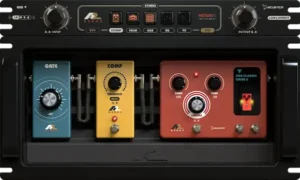 Aero 2 is technically ambitious, but it also inherits many of the same limitations that have historically kept Acustica Audio products outside mainstream production workflows.
The most obvious issue is efficiency. Aero 2 is substantially heavier than most modern amp simulators, particularly in sessions already carrying oversampled processing, orchestral libraries, linear-phase mastering chains or CPU-intensive synth environments. Multiple instances add up quickly, especially at lower buffer settings where real-time responsiveness matters.
That tradeoff is partially unavoidable. Aero 2 is attempting to model complex nonlinear interaction across multiple stages rather than behaving like a lightweight distortion platform. Still, there is a practical threshold where increased realism starts colliding with production speed.
For some engineers, that threshold will arrive quickly.
The interface design creates another divide. Aero 2 offers significantly more depth than many mainstream amp plugins, but the workflow can feel overly technical during fast production sessions. The Standard and Extended views help organize the environment, yet the plugin still behaves more like an engineering tool than a streamlined creative platform.
That distinction matters because the broader amp-sim market has shifted heavily toward immediacy. Neural DSP, ToneX and several modern hybrid ecosystems prioritize rapid decision-making, polished preset browsing and low-friction tracking workflows. Aero 2 demands slower evaluation and more deliberate gain staging.
Some users will interpret that as depth. Others will experience it as friction.
Genre dependence also becomes important here. Aero 2 performs best in productions where transient detail, harmonic movement and dynamic articulation remain audible inside the final mix. Progressive metal, fusion, cinematic scoring, instrumental rock and detail-oriented hybrid production all benefit from that level of interaction.
Modern pop and heavily processed commercial rock workflows may benefit less. Many contemporary productions intentionally flatten guitar dynamics through clipping, layered saturation and aggressive bus compression to maximize consistency and loudness density. Under those conditions, the advantages of Aero 2’s more nuanced behavior become smaller relative to the CPU cost and slower workflow.
There is also a broader industry reality that cannot be ignored: amp modeling has reached a point of diminishing returns.
The difference between average and high-end guitar simulation is still substantial. The difference between very good and extremely good is becoming narrower — especially once guitars pass through mastering, streaming normalization, consumer earbuds and lossy codec conversion.
Aero 2 improves transient realism, cabinet cohesion and harmonic behavior under pressure. What it does not do is compensate for weak arrangement choices, poor monitoring environments or badly recorded DI tracks. Engineers expecting the plugin itself to create “finished” guitars without disciplined production decisions will likely overestimate what any modern amp simulator can realistically deliver.
That becomes especially important before final delivery. Even strong amp modeling can break down if the mix itself is not prepared correctly for downstream mastering and streaming conversion.
Prepare Mix for Mastering explains the technical issues that usually appear before mastering ever begins.
How Aero 2 Compares to Neural DSP, ToneX and NAM
Aero 2 does not compete with Neural DSP, ToneX and NAM in the same way most amp simulators compete with one another. The differences are less about raw tone quality and more about production philosophy.
| Platform | Primary Strength | Weakness | Best Use Case |
|---|---|---|---|
| Aero 2 | Dynamic interaction, harmonic cohesion and mix translation stability | Heavy CPU usage and slower workflow | Re-amping, hybrid production and mastering-aware guitar processing |
| Neural DSP | Fast workflow and polished commercial guitar tones | Less emphasis on nonlinear inter-stage behavior | Tracking, modern production and rapid session work |
| ToneX | High-quality amp capture realism | Capture quality varies heavily between profiles | Authentic rig recreation and hardware-style playback |
| NAM | Exceptional realism with open-source flexibility | Inconsistent workflow and fragmented ecosystem | Technical users building custom amp workflows |
Neural DSP remains the benchmark for modern commercial workflow efficiency. Its plugins are optimized for fast tracking, low-friction preset navigation and instant mix-ready guitar tones. The ecosystem is designed around immediacy. Engineers can open a session, load a preset and commit decisions quickly without fighting the software itself.
That matters more in professional production than many guitar discussions admit. Under deadlines, workflow speed often outweighs small improvements in behavioral realism.
Aero 2 takes almost the opposite approach. It prioritizes inter-stage interaction, transient behavior and harmonic complexity over instant usability. The plugin rewards slower engineering decisions rather than rapid preset cycling. In practice, it behaves less like a modern content-creator amp suite and more like a nonlinear studio processing environment built around guitar amplification.
ToneX occupies a different category entirely. IK Multimedia’s ecosystem focuses on capture realism — reproducing the behavior of specific hardware chains through profiling technology. At its best, ToneX can sound extremely convincing, particularly when paired with high-quality captures. The limitation is that capture-based systems tend to behave more like snapshots than continuously interactive signal environments.
Aero 2 feels less dependent on isolated rig reproduction and more focused on how the entire amplification chain reacts under changing performance conditions. The distinction becomes more noticeable during aggressive picking dynamics, layered productions and downstream mastering compression.
NAM continues to disrupt the market from another angle. Its open-source ecosystem has pushed raw amp realism surprisingly far, especially considering the platform’s accessibility. Some NAM captures rival commercial products sonically. The challenge is consistency. Workflow quality depends heavily on third-party captures, external loaders, routing decisions and surrounding infrastructure.
Aero 2 sits somewhere between these ecosystems:
- More dynamically interconnected than many algorithmic amp simulators
- More cohesive than fragmented IR and loader workflows
- More production-oriented than raw capture ecosystems
- Less immediate and streamlined than Neural DSP
- Heavier and more technically demanding than most mainstream alternatives
That positioning makes Aero 2 particularly relevant for:
- Mix engineers handling re-amping workflows
- Producers focused on transient realism and mix translation
- Hybrid composers blending guitars with electronic production
- Sound designers looking for nonlinear saturation behavior beyond traditional guitar use
- Engineers already comfortable with Acustica’s workflow philosophy
It is considerably less ideal for:
- Fast demo writing sessions
- Preset-driven production workflows
- Entry-level systems with limited CPU headroom
- Ultra-low-latency live tracking environments
- Users expecting instant polished tones without detailed gain staging
The key distinction is that Aero 2 is not trying to become the fastest or easiest amp simulator available. It is trying to behave more convincingly under real production pressure. Whether that tradeoff justifies the heavier workflow depends entirely on how much value a producer places on dynamic realism once the guitars move beyond isolated playback and into a mastered mix.
How Aero 2 Holds Up After Mixing, Mastering and Streaming Conversion
One of Aero 2’s more convincing strengths is not how the guitars sound in isolation, but how they behave after the production chain starts applying pressure.
A large percentage of modern amp simulators are voiced for immediate impact. They emphasize upper-mid detail, transient sharpness and exaggerated presence because those characteristics create the illusion of clarity during quick playback comparisons. The problem appears later — once the guitars pass through bus compression, clipping, mastering saturation and streaming normalization.
Under those conditions, many heavily hyped amp tones begin collapsing into brittle upper-mid density. Pick attack hardens unnaturally, saturation grain separates from the body of the note and the guitars start occupying harsh spectral space that competes aggressively with vocals, cymbals and synth layers.
Aero 2 behaves differently. The harmonic structure is denser, less artificially bright and more controlled in the upper spectrum. Instead of relying on exaggerated transient edge to create perceived aggression, the plugin maintains note weight and saturation cohesion as downstream processing becomes more aggressive.
That distinction becomes increasingly important in streaming-oriented production environments where guitars rarely remain untouched after export.
AAC and Ogg Vorbis encoding expose weaknesses in distortion processing very quickly. Aliasing artifacts, unstable upper harmonics and overly synthetic saturation textures often become harsher once converted for Spotify, Apple Music or YouTube playback. Amp sims that initially sound “detailed” inside a DAW can become fatiguing after codec compression removes transient depth and exaggerates upper-mid instability.
Aero 2 tends to survive those workflows more gracefully. The plugin does not necessarily sound larger or brighter than competing products. In many cases, it actually sounds slightly more restrained during solo playback. The advantage appears later, once mastering compression and streaming conversion begin flattening transient information and narrowing harmonic separation.
The guitars retain body instead of turning into abrasive high-mid texture.
This is particularly relevant for engineers struggling with brittle upper-mid buildup after export. Excessive presence energy that initially feels “detailed” inside a session often becomes harsh once streaming codecs and mastering saturation start reducing transient depth.
Fix Harsh Highs in Mastering covers why aggressive upper harmonics become unstable after loudness processing.
That does not mean Aero 2 automatically fixes translation problems. Monitoring accuracy still matters heavily here.
Because the plugin generates dense harmonic information rather than exaggerated top-end hype, poor monitoring environments can easily mislead engineering decisions. Users working on hyped headphones, untreated rooms or consumer playback systems may overcompensate by darkening the guitars excessively and removing critical articulation frequencies.
In practice, Aero 2 rewards disciplined monitoring and production judgment more than preset-driven workflow habits. Engineers who already understand how guitars behave under mastering pressure will likely appreciate the plugin’s stability. Users expecting instant “finished” brightness from solo playback may initially underestimate how well the tones survive downstream processing.
Verdict
Aero 2 is not competing on convenience, preset speed or low-friction workflow design. Acustica is targeting something narrower and far more difficult: believable nonlinear behavior under real production conditions.
That makes Aero 2 one of the more technically ambitious amp-sim releases in the current market.
The Nova-based architecture gives the plugin a noticeably different response profile than most mainstream guitar software. Instead of behaving like separate DSP modules stacked together, Aero 2 reacts more like a continuously interacting signal chain where gain staging, cabinet behavior and transient pressure influence one another in real time.
That difference becomes increasingly audible once guitars move beyond isolated playback and into actual production environments. Dense mixes, clipping, mastering compression and streaming conversion expose weaknesses in amp modeling quickly. Aero 2 generally maintains harmonic cohesion and transient stability more effectively than many plugins designed primarily around instant impact.
That distinction matters because mix translation problems are often created long before the final limiter stage. Guitars that feel oversized during solo playback can collapse once the production moves from mixing into mastering.
Mixing vs Mastering explains why tonal decisions that sound impressive during mixing often behave differently after full-range mastering compression and playback normalization.
At the same time, the tradeoffs are impossible to ignore.
Aero 2 is heavier, slower and less streamlined than most competing ecosystems. The workflow demands more deliberate engineering decisions, stronger monitoring discipline and more CPU headroom than typical preset-driven amp platforms. For producers prioritizing speed, fast tracking or lightweight sessions, those compromises may outweigh the sonic advantages entirely.
The plugin also exposes an uncomfortable reality about modern amp simulation: the market is no longer separated by basic tone quality. Most high-end amp sims already sound good enough for commercial release. What increasingly separates them is how they behave after compression, limiting, codec conversion and dense mix layering start reducing available detail.
That is where Aero 2 makes its strongest case.
For engineers focused on transient realism, mix translation and analog-style signal interaction, Aero 2 may be one of the more convincing production-oriented guitar environments currently available in plugin form. Not because it sounds dramatically bigger in solo playback, but because it remains structurally stable once the rest of the production chain starts pushing back against the signal.

Yurii Ariefiev is a mastering engineer and audio production editor specializing in mix translation, streaming optimization and real-world playback behavior across modern distribution platforms. His editorial work focuses on mastering infrastructure, nonlinear processing, loudness management and the technical interaction between mixing decisions, codec conversion and final playback systems.
This article was written from a production-engineering perspective rather than a press-release summary, with emphasis on transient behavior, cabinet interaction, monitoring accuracy and the way amp modeling survives downstream mastering and streaming normalization in professional audio workflows.
FAQ
Is Aero 2 actually usable for professional guitar mixing?
Yes, particularly during re-amping and mix-stage processing. Aero 2’s strength is not instant preset tone generation but maintaining transient definition and harmonic stability once guitars sit inside dense productions.
How demanding is Aero 2 on CPU resources?
Considerably heavier than most mainstream amp sims. Sessions running multiple Aero 2 instances alongside oversampled plugins, orchestral templates or mastering chains can hit CPU limits quickly at lower buffer sizes.
Does Aero 2 replace standalone cabinet IR workflows?
For many engineers, yes. Its cabinet stage feels more integrated with the amplifier behavior than typical third-party IR loader combinations, especially under heavy compression and limiting.
Is Aero 2 better for mixing than live guitar tracking?
In many cases, yes. The plugin’s strengths become more obvious during re-amping, tone shaping and post-production workflows than ultra-low-latency real-time tracking scenarios.
How does Aero 2 compare to Neural DSP plugins?
Neural DSP prioritizes speed, immediacy and polished workflow efficiency. Aero 2 focuses more heavily on nonlinear interaction, transient behavior and analog-style signal response under mix pressure.
Does Aero 2 work well for modern metal production?
It performs best in detailed and dynamically expressive metal production where transient articulation still matters. Extremely flattened modern metal mixes may benefit less from its deeper dynamic behavior.
Can Aero 2 improve how guitars survive mastering and streaming conversion?
Potentially, yes. Its denser harmonic structure and less exaggerated upper-mid voicing tend to remain more stable after limiting, AAC encoding and loudness normalization. Mastering Problems explains why some mixes become harsher or smaller after final processing.
Is Aero 2 useful for synths, drums and sound design?
More than most traditional amp simulators. Stereo synth layers, drum buses and hybrid electronic textures respond well to its cabinet interaction and nonlinear saturation behavior.
What separates Aero 2 from standard algorithmic amp simulators?
The Nova-based architecture appears designed around inter-stage behavior rather than isolated amp emulation blocks. The plugin reacts more like a connected signal chain under dynamic load.
Is Aero 2 worth the price compared to other amp sims?
For engineers focused on mix translation, transient realism and production-oriented guitar processing, possibly yes. For users prioritizing fast workflow and lightweight tracking, cheaper and more efficient alternatives may make more practical sense.
Is Aero 2 worth it for bedroom producers?
For detail-oriented producers working primarily inside the box, possibly yes. Users prioritizing fast workflow and lightweight sessions may find simpler amp sims more practical.
Does Aero 2 work on Apple Silicon systems?
Yes. Aero 2 supports modern macOS systems including Apple Silicon-compatible workflows through AU, VST3 and AAX formats.
Can Aero 2 realistically replace real guitar amps?
For many studio workflows, yes. Live performance and room interaction remain difficult to reproduce fully, but modern amp simulation has narrowed the gap significantly for mixing and production.
Is Aero 2 good for extended-range and low-tuned guitars?
Its cabinet behavior and transient handling make it particularly effective for low-tuned material where low-mid stability and pick articulation become difficult for many amp sims.