Most MIDI composition plugins promise the same outcome: faster songwriting with fewer repetitive editing tasks. As projects become more complex, however, those same tools often introduce a different problem. Chord progressions, bass lines, arpeggios, and supporting parts end up scattered across dozens of MIDI clips, turning even minor harmonic revisions into tedious project maintenance.
Chord Dock 2.0 takes aim at that bottleneck instead of trying to reinvent music theory. Rather than treating every MIDI region as an independent element, it builds the arrangement around a centralized chord timeline that drives accompanying parts from a single harmonic source. The approach resembles a dedicated DAW chord track more than a conventional chord-generation plugin.
That distinction matters in real production. Songwriters, electronic producers, and media composers rarely struggle to generate another chord progression. The greater challenge is keeping every supporting instrument synchronized as the arrangement evolves. By shifting harmonic control to a single timeline, Chord Dock focuses on reducing repetitive editing rather than generating more musical ideas.
This review looks beyond the feature list to examine how Chord Dock 2.0 performs in practical studio workflows, where it fits alongside established composition tools, and whether its Arranger system delivers measurable workflow improvements or simply repackages concepts already available elsewhere.
Contents
Why Harmonic Revisions Slow Down Modern Production
 Writing a chord progression is rarely the difficult part of a production. Keeping that progression consistent as the arrangement grows is another story. What begins as four bars on a piano often expands into bass, pads, synth stacks, arpeggiators, orchestral layers, and transitional elements. At that stage, even a single harmonic change can ripple through half the session.
Most DAWs still rely on duplicated MIDI clips rather than a centralized harmonic structure. As a result, producers routinely spend time updating individual parts instead of refining the arrangement itself. A revised chorus, an added passing chord, or a different turnaround may require edits across multiple instrument tracks simply to keep every performance aligned.
Several composition platforms attempt to solve this problem from the opposite direction. Scaler, Captain Chords, and RapidComposer focus on harmonic analysis, chord suggestions, and songwriting assistance, gradually evolving into comprehensive composition environments. Those tools are extremely capable, but their depth can become unnecessary when the objective is simply to keep an existing arrangement synchronized.
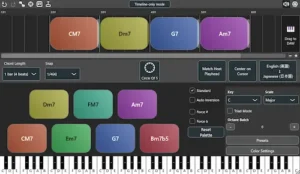
Chord Dock takes a more focused approach. Instead of generating increasingly sophisticated harmonic ideas, it treats the chord progression as the project’s central reference. Supporting parts follow that shared structure rather than relying on duplicated MIDI regions, allowing producers to revise harmony without rebuilding large sections of the arrangement.
This may sound like a subtle workflow change, but in larger productions it addresses a genuine source of friction. Less time spent maintaining MIDI relationships means more time evaluating musical decisions, refining performances, and moving a project toward the mixing stage.
Chord Dock 2.0 Shifts the Focus from Chord Writing to Arrangement Control
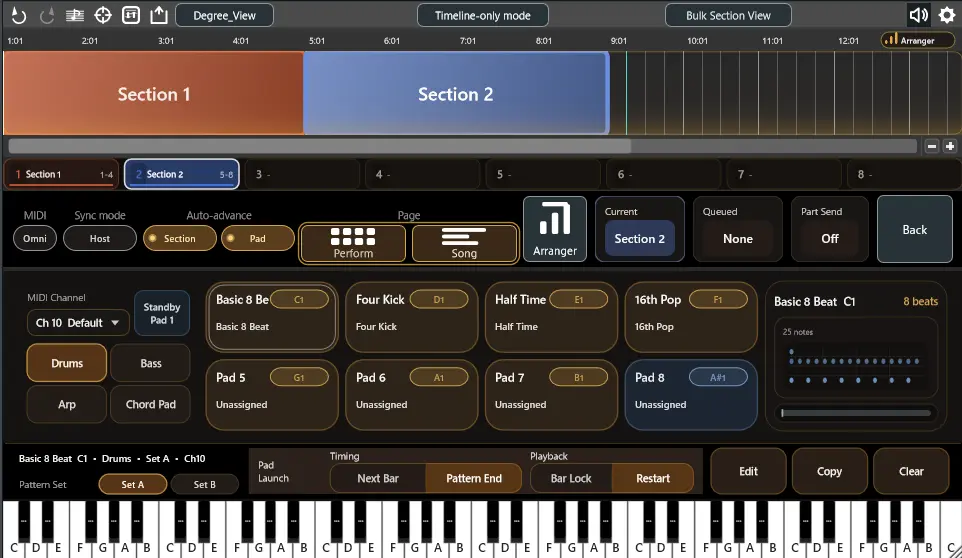
Arranger Mode is the headline feature in Chord Dock 2.0, but the more significant change isn’t the ability to generate bass, arpeggio, drum, or pad parts. It is the way those parts are managed once a song begins to evolve. Earlier versions centered on building chord progressions. Version 2.0 extends that concept by allowing an entire arrangement to reference the same harmonic framework.
In practice, every section of a song can maintain its own accompaniment patterns while remaining linked to a shared chord timeline. Verse and chorus may use completely different rhythmic ideas, yet both continue responding to the same harmonic changes. Revising a progression no longer requires rebuilding multiple MIDI performances simply to preserve consistency across the arrangement.
The bundled ChordPart receiver plugin pushes that workflow further. Instead of exporting fresh MIDI every time a progression changes, harmonic information can be routed directly to separate instrument tracks. Bass, pads, plucks, orchestral layers, or arpeggiators stay synchronized without repeatedly replacing MIDI clips—a small improvement on paper, but one that removes a surprising amount of repetitive editing during production.
Equally important is what Chord Dock does not attempt to do. This is not an AI songwriting platform, nor is it designed to generate complete arrangements with minimal user input. The accompaniment engine remains rule-based, applying user-defined patterns to changing chord progressions. That approach prioritizes predictability over automation, allowing producers to refine arrangements without sacrificing creative control.
For experienced producers, that distinction is likely to be one of the plugin’s strongest selling points. Automation is most valuable when it removes repetitive work, not when it starts making musical decisions. Chord Dock largely stays on the right side of that line, acting as a workflow accelerator rather than a substitute for composition.
What Changes Inside a Real Production Session?
The practical value of Chord Dock 2.0 becomes clearer in projects that continue evolving after the initial writing session. Most productions are not built from start to finish in a single pass. Arrangements are revised after vocal recordings, bridges are rewritten, choruses extended, and harmonic movement adjusted to support new melodies. Every structural change creates additional editing work if each instrument maintains its own independent MIDI performance.
Consider a fairly typical pop production. Piano establishes the progression, followed by layered synths, bass, string textures, rhythmic plucks, and several transitional elements. A late decision to replace a dominant chord with a suspended variation may affect nearly every harmonic instrument in the session. The musical change itself takes seconds. Updating every dependent MIDI clip can take considerably longer.
The same principle applies to performance-oriented MIDI tools. Once harmonic revisions begin affecting programmed guitar parts, maintaining realistic strumming patterns becomes just as important as keeping chord changes synchronized. We explored that production challenge in our StepStrum review, which examines a complementary approach to realistic MIDI guitar programming.
Chord Dock reduces that maintenance overhead by treating the chord progression as shared project data rather than duplicated information scattered across multiple tracks. Supporting patterns remain independent from one another, but they continue referencing the same harmonic structure. Producers spend less time rebuilding performances and more time evaluating whether the musical change actually improves the arrangement.
The benefit is less about automation than about preserving momentum. Creative sessions often lose energy when technical housekeeping interrupts decision-making. Repeatedly exporting MIDI, replacing clips, and checking for inconsistencies rarely contributes anything musically, yet those tasks accumulate throughout larger projects.
The new Song Page reinforces the same philosophy at the arrangement level. Entire sections can be reorganized without reconstructing the harmonic framework from scratch, making it easier to audition alternate song structures before committing to detailed MIDI editing. That flexibility is particularly valuable during collaborative writing sessions, where structural revisions often continue until production is nearly complete.
Where Chord Dock Stops Being Useful
One of Chord Dock 2.0’s strengths is that it doesn’t try to become another all-in-one production environment. It solves a specific problem—keeping harmonic information organized while a song is still evolving. Once that stage is over, its role naturally begins to diminish.
During composition and arrangement, maintaining a shared harmonic structure can eliminate a surprising amount of repetitive work. Producers remain free to experiment with alternate chord voicings, restructure sections, or rewrite transitions without manually rebuilding every dependent MIDI performance. The larger the session becomes, the more noticeable that efficiency gain is.
After MIDI has been committed to audio, however, Chord Dock largely disappears from the workflow. From that point forward, the project moves into mixing and eventually mastering, where decisions revolve around balance, dynamics, spectral masking, stereo placement, and translation rather than harmonic editing. If you’re interested in how those production stages differ in real-world sessions, see Mixing vs Mastering. By then, Chord Dock has already delivered most of its value.
The same applies to mastering. Harmonic organization may contribute to a cleaner arrangement, but it has no direct relationship with loudness optimization, tonal balance, codec translation, stereo imaging, or transient preservation. Those remain entirely separate engineering disciplines.
That limitation should not be viewed as a weakness. Modern production increasingly relies on specialized tools that solve individual workflow problems well instead of attempting to handle every stage of a project. Chord Dock belongs firmly in the composition phase, where structural flexibility is still more valuable than finished audio.
For composers working with virtual instruments until the final stages of production, that specialization makes sense. Film scoring, game audio, contemporary pop, and electronic music often remain MIDI-driven much longer than traditional recording projects. In those environments, keeping harmonic information centralized can save considerably more time than it would in productions built primarily around recorded performances.
Predictability Beats Automation More Often Than You Think
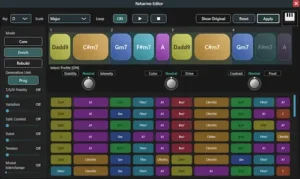 It’s easy to mistake Chord Dock 2.0 for another AI-assisted composition platform, particularly now that automatic accompaniment has become a common marketing theme across music software. In reality, the plugin follows a much more conservative design philosophy.
Its accompaniment engine does not generate complete musical ideas or make stylistic decisions on behalf of the producer. Instead, it applies user-defined patterns to an existing harmonic structure. That distinction may sound technical, but it has important workflow implications. Producers always know why the software behaves the way it does because every result originates from rules they established themselves.
That level of predictability becomes increasingly valuable in professional environments. Commercial production often prioritizes consistency over novelty. Editors, composers, and producers working against deadlines generally spend less time correcting deterministic systems than interpreting unpredictable AI-generated material that requires additional refinement before it fits the project.
The trade-off is equally clear. Chord Dock will not suggest unexpected reharmonizations, develop convincing counterpoint, or produce stylistically aware arrangements with minimal input. Producers looking for software that actively participates in the writing process may find more capable alternatives elsewhere.
The plugin is therefore best understood as a workflow tool rather than a creative partner. It removes repetitive production tasks while deliberately leaving musical decisions in the hands of the person using it. For experienced composers, that separation is often a feature rather than a limitation.
Its biggest challenge today is less about functionality than adoption. Competing platforms have spent years building tutorial libraries, educational content, presets, and active user communities. Chord Dock still needs time to develop that ecosystem before it can compete with more established composition software on equal footing.
Chord Dock 2.0 Doesn’t Compete on Features—It Competes on Workflow Philosophy
Comparing Chord Dock directly with every MIDI composition plugin on the market can be misleading because they don’t all solve the same problem. While their feature lists often overlap, their design priorities are fundamentally different.
Some platforms focus on harmonic discovery, helping producers find new chord progressions or understand music theory. Others lean toward algorithmic composition, generating complete phrases, bass lines, or orchestral ideas with varying degrees of automation. Chord Dock sits somewhere else. Its primary objective is not generating more musical content, but reducing the amount of project maintenance required after the music has already been written.
| Product | Core Philosophy | Best Fit | Main Trade-Off |
|---|---|---|---|
| Chord Dock 2.0 | Centralized harmonic management | Producers managing evolving arrangements | Smaller ecosystem and fewer composition tools |
| Scaler 3 | Harmony exploration and music theory | Songwriters and composers developing ideas | More complex interface and broader feature set |
| Captain Chords Epic | Guided commercial songwriting | Pop, EDM, and beat production | Less adaptable in larger production workflows |
| RapidComposer | Algorithmic composition environment | Film composers and advanced arrangers | Steep learning curve |
| Cthulhu | Performance-oriented MIDI triggering | Electronic music production | Limited arrangement management |
The comparison also highlights where Chord Dock intentionally avoids feature creep. It does not attempt to become a theory tutor, an AI composition assistant, or a complete songwriting environment. Instead, it focuses on keeping harmonic information organized as productions become increasingly layered and structurally complex.
That makes it a stronger fit for producers who already understand harmony and simply want a cleaner way to manage it inside their DAW. Users still learning composition, experimenting with reharmonization, or looking for software that actively generates musical ideas will likely find more value in platforms such as Scaler or RapidComposer.
Viewed through that lens, Chord Dock is not trying to replace the market leaders. It occupies a narrower category centered on arrangement management rather than composition itself, making direct one-to-one comparisons less meaningful than they initially appear.
Resource Usage Is Unlikely to Be the Deciding Factor
Unlike audio processors, Chord Dock spends its time managing MIDI events and harmonic relationships rather than processing continuous audio streams. That alone places it in a very different performance category from EQs, dynamics processors, convolution reverbs, or virtual instruments.
At the time of writing, independent CPU benchmarks and large-session stress tests have not yet been published. Even so, there is little evidence to suggest that Chord Dock itself is likely to become the performance bottleneck in a modern production. Projects built around orchestral templates, large sample libraries, or CPU-intensive synthesizers will almost certainly be limited by the instruments generating audio rather than by the plugin managing harmonic data.
The same logic applies to memory usage. Chord Dock stores arrangement information rather than sample content, so RAM consumption depends far more on the connected virtual instruments than on the plugin itself.
Project loading follows a similar pattern. In most professional sessions, waiting for a project to open is dominated by sample streaming, instrument initialization, and plugin scanning. Harmonic management represents only a small fraction of that process, making Chord Dock unlikely to have a measurable impact on startup times.
Live performance is the only area where long-term conclusions would be premature. Features such as section launching and Performance Mode clearly target real-time use, but reliable stage performance can only be evaluated after broader adoption across different DAWs, operating systems, and controller setups. At this stage, there is simply not enough independent field data to draw stronger conclusions.
Better Arrangements Usually Lead to Better Mixes
 Chord Dock has no influence on frequency response, dynamics, stereo imaging, or loudness. Its contribution happens much earlier, during the stage where musical decisions determine how difficult the mix will eventually become.
Experienced engineers know that many “mix problems” are actually arrangement problems. Layered keyboard parts occupying identical voicings, bass lines colliding with sustained pads, or competing harmonic extensions often force corrective EQ, automation, and dynamic processing that would have been unnecessary if the arrangement had been cleaner from the start.
By keeping harmonic relationships consistent throughout production, Chord Dock can indirectly reduce those conflicts before they reach the mixing stage. That doesn’t guarantee a better mix, but it does reduce the likelihood of fixing problems that originated in composition rather than engineering.
This becomes increasingly relevant for independent producers who handle writing, programming, recording, mixing, and mastering themselves. Improving the arrangement early in the production cycle generally produces a greater return than attempting to solve the same issues later with additional processing. Many of the problems engineers encounter during mastering actually originate in the production stage rather than the final processing chain, which is why preparing a balanced mix before mastering remains far more important than relying on corrective processing afterward. Prepare Mix for Mastering explores those production-stage decisions in greater detail.
Professional mix engineers may never load Chord Dock in their own sessions, but they can still benefit from projects built with a more disciplined harmonic structure. Cleaner arrangements usually translate into faster decision-making, fewer corrective moves, and mixes that feel more intentional before the first EQ is inserted.
Once the arrangement itself is no longer creating unnecessary masking or harmonic conflicts, dynamic processing can become considerably more transparent. That production sequence—first solving musical structure, then refining dynamics—is closely related to the workflow discussed in our Techivation M-Compressor 2 review, where spectral compression is evaluated as a corrective mixing tool rather than a substitute for strong arrangement decisions.
Overall Rating
| Category | Rating |
|---|---|
| Workflow Efficiency | 9.6/10 |
| Arrangement Management | 9.7/10 |
| Ease of Integration | 9.0/10 |
| Composition Flexibility | 8.4/10 |
| Performance & Stability | 8.8/10 |
| Value for Money | 9.5/10 |
| Overall | 9.2/10 |
Chord Dock 2.0 is one of the few MIDI production tools that focuses on solving an organizational problem instead of adding another layer of composition features. It won’t replace advanced songwriting platforms, but it dramatically reduces repetitive arrangement work in productions that remain MIDI-driven until the final stages.
Workflow Efficiency – 9.6/10. The plugin removes a surprising amount of repetitive editing by keeping harmonic information centralized. Producers spend less time rebuilding MIDI clips and more time evaluating musical decisions.
Arrangement Management – 9.7/10. This is where Chord Dock clearly stands out. Shared harmonic control, reusable accompaniment patterns, and section-based organization make complex productions significantly easier to maintain.
Ease of Integration – 9.0/10. Chord Dock fits naturally into existing DAW workflows because it works with standard MIDI rather than requiring producers to adopt a closed production ecosystem.
Creative Flexibility – 8.4/10. The software deliberately favors predictable workflow over algorithmic composition. Producers looking for intelligent reharmonization or AI-assisted writing will find more capable alternatives elsewhere.
Performance & Stability – 8.8/10. The MIDI-only architecture should remain lightweight in most sessions. While large-scale independent benchmark testing is still limited, nothing suggests the plugin itself will become a performance bottleneck.
Value for Money – 9.5/10. Considering the launch pricing and the amount of repetitive production work it eliminates, Chord Dock offers excellent value for producers who regularly build complex MIDI arrangements.
Verdict: A Practical Tool That Knows Its Limits
Chord Dock 2.0 succeeds because it avoids trying to solve every composition problem at once. Rather than competing in the increasingly crowded race toward AI-assisted songwriting, it focuses on a narrower challenge that many producers encounter every day: keeping complex arrangements organized as they evolve.
That focus also defines its limitations. Producers looking for deep harmonic analysis, intelligent reharmonization, or software that actively generates new musical ideas will find more capable options elsewhere. Chord Dock assumes that the creative decisions already belong to the producer. Its role is to make those decisions easier to manage, not easier to invent.
Whether that philosophy is compelling depends entirely on your workflow. If your projects frequently grow into dozens of MIDI tracks that require constant synchronization, Chord Dock addresses a genuine production bottleneck. If your writing process is largely linear or you commit performances to audio early, its advantages become far less significant.
The plugin’s long-term success will likely depend less on additional features than on ecosystem growth. Educational resources, third-party workflows, user feedback, and continued development will determine whether Chord Dock becomes a widely adopted production utility or remains a niche solution for highly organized composers.
At its current price, the barrier to entry is low enough that the decision is largely practical rather than financial. The question is not whether Chord Dock offers enough features—it does—but whether centralized harmonic management solves a problem that already exists in your own production workflow.
Viewed through that lens, Chord Dock 2.0 is neither a revolutionary composition platform nor another forgettable MIDI utility. It is a focused productivity tool that improves the earliest stages of music production, long before critical mastering decisions are made. Understanding where composition ends and professional mastering begins helps put tools like Chord Dock into the proper context, as explained in How Professional Mastering Works.
Frequently Asked Questions
Can Chord Dock 2.0 replace a DAW’s built-in chord track?
Not entirely. Native chord tracks primarily store harmonic information for a project, while Chord Dock adds arrangement management, reusable accompaniment patterns, and dedicated MIDI workflow features. Whether it offers an advantage depends largely on the capabilities of your DAW.
Does Chord Dock generate original chord progressions?
Its primary strength is managing and developing chord progressions rather than inventing them automatically. Producers remain responsible for the musical direction, while the plugin keeps supporting parts synchronized with harmonic changes.
Can Chord Dock be used with Kontakt, Omnisphere, Serum, or other virtual instruments?
Yes. Chord Dock outputs standard MIDI, making it compatible with virtually any instrument that accepts MIDI input. The quality of the final result depends on the instruments themselves rather than the plugin.
Is Chord Dock better suited to electronic music or traditional songwriting?
Both workflows can benefit, but producers working with MIDI-heavy arrangements tend to gain the most. Electronic music, pop production, cinematic scoring, and hybrid orchestral projects often remain editable until late in production, making centralized harmonic management especially useful.
How does Chord Dock compare with Scaler 3?
The two applications emphasize different parts of the workflow. Scaler is built around harmonic exploration and music theory, while Chord Dock focuses on organizing and maintaining existing arrangements. Many producers may find them complementary rather than directly interchangeable.
Does Chord Dock improve CPU performance in large projects?
No. It is designed to improve workflow rather than reduce overall system load. In most large sessions, virtual instruments and sample libraries consume significantly more resources than MIDI management tools.
Can Chord Dock speed up collaborative production?
Potentially. A shared harmonic structure makes it easier to revise arrangements without manually rebuilding MIDI parts for every collaborator, reducing repetitive editing during the writing stage.
Is Chord Dock intended for beginners?
Beginners can certainly use it, but its biggest advantages become apparent once projects grow beyond a handful of instrument tracks. Producers managing larger arrangements are more likely to appreciate its organizational workflow.
Does Chord Dock have any direct impact on mixing or mastering?
No. The plugin never processes audio. Any improvement to the final mix comes indirectly through stronger arrangement decisions rather than changes in tone, dynamics, loudness, or stereo imaging.
Who is most likely to benefit from Chord Dock 2.0?
Composers, songwriters, electronic producers, and media composers working with evolving MIDI arrangements are the primary audience. Producers who commit performances to audio early in the creative process may see fewer workflow advantages.

Yurii Ariefiev evaluates music production software from the perspective of complete production workflows, examining how harmonic decisions, MIDI organization, arrangement structure, mixing, and mastering interact long before a track reaches its final release. His reviews emphasize practical studio use rather than feature comparisons or marketing claims.
This editorial review analyzes Chord Dock 2.0 as a workflow tool for modern music production, focusing on arrangement efficiency, harmonic management, and how stronger source material ultimately leads to cleaner mixes and more reliable mastering results.