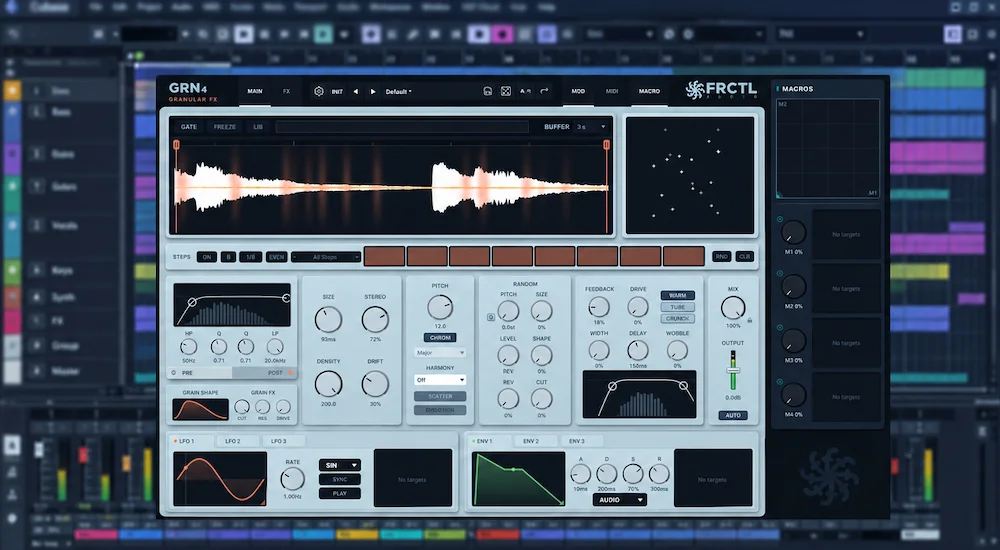
FRCTL GRN 4 is a substantial rewrite of FRCTL’s granular effect, with a new grain engine, a 64-grain active pool, up to 200 grains per second, per-grain filtering and drive, a new GRAIN SHAPE system, independent grain randomization, and expanded modulation. The result is not simply a larger feature set around the previous processor: more of the grain-generation process is now directly exposed to the user.
That matters because granular effects are easy to make impressive and harder to make controllable. GRN 4 is most interesting when a specific piece of source material needs to be turned into a repeatable rhythmic, harmonic, or textural layer rather than simply processed into an unpredictable cloud. This review focuses on how the new engine changes that workflow, where its additional control is useful, and where the plugin remains a specialist production tool rather than a replacement for conventional mixing or mastering processors.
GRN 4 vs GRN 3 at a glance
| Area | GRN 3 | GRN 4 |
|---|---|---|
| Grain engine | Previous engine | New grain engine |
| Active grains | 16 | 64 |
| Maximum grain density | Previous limit | Up to 200 grains/sec |
| Per-grain processing | More limited | Filter + drive |
| Grain envelope | Previous system | GRAIN SHAPE |
| Variation and modulation | Earlier system | Expanded randomization, LFOs, envelopes and STEPS |
Why GRN 4’s Grain Selection Matters in Real Production
 Granular processing is powerful precisely because it breaks the normal relationship between time, pitch, and playback position. The problem is control. Once density, timing, pitch variation, and feedback are pushed far enough, many granular effects stop behaving like predictable processors and start behaving like random sound generators. That can be desirable for sound design, but it becomes a liability when a texture has to sit in a specific arrangement, repeat reliably, or be recreated during a later mix revision.
The important change is that the waveform selection now behaves as a defined playback region rather than simply a starting area for grain generation. Grains are constrained to that region, and material is crossfaded when a grain requires more audio than the selection contains. Because both selection edges can be modulated, the source window itself becomes part of the granular movement. At very small selections, the behavior crosses into pitched micro-loop territory.
That changes how the effect can be used in a mix. Instead of feeding a long recording into the processor and relying on grain position to find useful material, an engineer can isolate the exact piece of audio that should drive the texture. A vowel can become a sustained vocal layer; a drum transient can become a rhythmic element; a guitar harmonic can generate an evolving ambience; a small fragment of a field recording can become the raw material for a cinematic texture. The result is still granular processing, but the source selection becomes part of the source-manipulation decision rather than an incidental starting point.
What the New Grain Engine Actually Changes in GRN 4
The defining change in GRN 4 is the replacement of the underlying grain engine. The headline specification is a fourfold increase in the active grain pool, from 16 to 64 grains, but the number alone tells you very little about the result. More simultaneous grains give the processor more room to build dense textures; they do not inherently make those textures smoother, cleaner, or more musical. The important change is the additional control over how those grains are generated and interact with the selected source material.
GRN 4 can generate up to 200 grains per second. At high densities, that allows individual grains to overlap so heavily that the output moves from clearly articulated fragments toward a continuous granular cloud. At lower densities, the same engine can produce discrete rhythmic events, particularly when its grain timing is combined with the STEPS sequencer and modulation system. The useful range is therefore broader than the specification suggests: the engine can move between recognizable grain events and sustained textures without requiring a different processing approach.
For production work, that matters more than the raw grain count. The useful question is not how many grains a plugin can generate, but how easily the engineer can control their density, timing, source material, and interaction without losing the musical intent of the original sound.
Bring the Final Mix Into Sharper Focus
Granular processing can add movement, texture and detail, but the finished mix still needs to translate as a balanced record with controlled dynamics, depth and a coherent stereo image. If you want to hear how your mix responds to professional mastering, you can upload up to 40 seconds for a free mastering demo and compare the result against your current version. Upload Your Mix for a Free Mastering Demo →
Per-Grain Filtering Gives GRN 4 a Different Kind of Spectral Control
Per-grain filtering is one of the more consequential additions in GRN 4. Each grain has its own low-pass filter and drive stage, with the filter coefficients fixed when that grain is created. The result is fundamentally different from applying a resonant filter to the plugin’s output: resonance can become part of each individual grain rather than a single contour imposed on the finished grain cloud. The new CUT jitter control adds another layer of variation by allowing the cutoff frequency to differ between grains by up to two octaves.
That distinction matters most when grain density is high and grain durations are short. A conventional post-filter processes the aggregate signal after the grains have already been combined. GRN 4 can shape the spectral content of those individual events before they form the composite texture. With moderate resonance and cutoff variation, this can add movement and separation without relying on conventional automation. Push the same controls harder and the result moves toward resonant, metallic, or intentionally unstable textures.
The drive stage follows the same per-grain approach. Saturation applied before the grains are summed produces a different result from distorting the completed granular signal: harmonics are generated within individual grain events and then accumulated as those events overlap. That makes the drive useful as part of the granular sound itself rather than simply as an output coloration stage.
For mixing, the distinction is practical. GRN 4 can generate a vocal texture, percussion layer, transition, or synth layer whose spectral movement is built into the individual grains. It is therefore more compelling as a creative sound-design and production processor than as a substitute for a conventional EQ, filter, or distortion plugin.
GRAIN SHAPE: Why the Grain Envelope Matters
The new GRAIN SHAPE editor controls the amplitude envelope of individual grains, allowing the same source fragment to behave very differently depending on how each event starts, sustains, and ends. The available shapes can produce anything from a short, plucked response to a slower swell or a flatter envelope with a more pronounced termination.
This matters because the envelope of a grain is part of its sonic identity. At microscopic time scales, the attack and release of each event determine whether a granular texture feels smooth, percussive, brittle, rhythmic, or deliberately glitchy. Changing the source does not have to be the only way to change the character of the result; changing how that source fragment is shaped at the grain level can be equally significant.
In a production context, the relationship is straightforward. A plucked shape can turn a vocal or instrumental fragment into a series of short rhythmic accents, while a swelling shape can make the same material function as an atmospheric layer. A flatter envelope can reduce the sense of individual grain articulation when many grains overlap, helping the result read more like a continuous texture.
GRAIN SHAPE therefore has a practical role in defining the musical behavior of the granular effect, rather than simply adding another modulation curve to the interface.
Independent Grain Randomization Makes Variation Controllable
 GRN 4 separates per-grain randomization into pitch, size, level, shape, reverse, and filter cutoff. Each parameter can also be used as a modulation target, allowing variation to be introduced into specific aspects of the grain stream rather than applied indiscriminately.
That separation is important in production. Random variation is useful when it creates movement without undermining the musical structure of the source. With independent controls, an engineer can decide which properties should remain stable and which should fluctuate, making the result easier to shape and reproduce.
For example, keeping pitch stable while varying grain size and cutoff can add movement without significantly disrupting the harmonic identity of the source. Varying level and shape while leaving the filter unchanged can make a texture feel less static without turning spectral movement into its dominant characteristic. Adding reverse variation can introduce irregularity into the timing and articulation of individual grains while leaving the basic pitch behavior intact.
The practical advantage is not randomness itself, but selective variation. GRN 4 treats randomization as a set of controllable production parameters rather than a single control whose result is largely left to chance.
Modulation and STEPS Expand GRN 4’s Production Workflow
GRN 4 adds a third LFO and a third envelope, along with MIDI triggering for the envelopes and a MIDIENV source that derives modulation from the amplitude envelope of incoming MIDI notes. Continuous parameters can be assigned as modulation targets, including modulators and macros, so modulation can be routed into the same controls that shape the granular engine.
The more consequential workflow change is that modulation is no longer limited to the grain stream itself. GRN 4 also separates its PRE and POST filters, giving each stage independent cutoff, resonance, bypass and slope controls. That makes it possible to treat filtering as part of the signal path around the granular engine rather than as a single finishing stage.
The STEPS sequencer adds another layer of control, with 4, 8 or 16 steps, divisions down to 1/128, drag-based pattern editing, ratchets and rhythm presets. Combined with the modulation system, it lets a sustained source become a deliberately timed granular pattern without moving the rhythm programming into a separate automation or gating setup.
For electronic production, the advantage is primarily workflow efficiency. The source material, grain generation, modulation, rhythm, filtering, and creative processing can remain inside one device. That reduces routing and makes it faster to move from a static source to a deliberately programmed granular pattern.
Where GRN 4 Fits in Production
GRN 4 is most useful before the final mix is assembled, where a source can be transformed into a new production element and then blended with the original material. Its strongest applications are therefore creative rather than corrective: generating layers, extending short sounds, creating transitions, and turning small source fragments into material that would otherwise require additional recording or sampling.
Vocals: A selected vowel, syllable, or short phrase can become a sustained harmonic or rhythmic layer beneath the dry performance. The bounded source selection makes this more controllable than feeding an entire vocal recording into a granular processor.
Drums: Individual transients can be expanded into fills, tails, synthetic percussion, or rhythmic textures. STEPS is particularly useful when the granular layer needs to follow a defined pattern rather than simply react to the incoming performance.
Synths and guitars: Sustained notes, harmonics, pick attacks, and short instrumental fragments can provide the raw material for evolving textures while retaining a connection to the original performance.
Film and game sound design: Short recordings can be developed into drones, transitions, mechanical textures, impacts, and evolving beds. For interactive projects, the resulting material still needs to be evaluated in the context of the target playback system rather than treated like a conventional linear mix.
Mastering: GRN 4 has a limited role here. It can be useful when a creative processing stage is required before mastering, but it is not a replacement for corrective EQ, dynamics processing, limiting, clipping, stereo control, or other conventional mastering tools.
What GRN 4 Does Not Replace
The new grain engine does not turn GRN 4 into a general-purpose mixing processor. Its core function remains granular sound generation and transformation, so it should be judged according to the problems it is designed to solve rather than against conventional mix-processing tools.
If the task is to control harshness, manage low-frequency dynamics, improve vocal intelligibility, reduce resonances, or prepare a mix for streaming normalization, a granular processor is the wrong tool. Those jobs require processors designed specifically for tonal balance, dynamics, corrective processing, or loudness management, and GRN 4 should remain separate from the conventional mastering chain used to shape the finished mix.
The same distinction applies to GRN 4’s integrated effects. They can cover delay, modulation, filtering, distortion, or reverb functions when those processes are part of a granular sound-design chain. Their main advantage is that they are available inside the same processing environment, reducing routing and keeping the texture-building workflow compact. That does not mean they should automatically replace dedicated processors when precise control over an individual effect is required.
There is also a practical risk of over-processing. Per-grain resonance, drive, randomization, feedback, and high grain density can accumulate into a signal with substantial spectral and temporal activity. A texture that sounds compelling in solo can become masking, overly dense, or distracting when the full arrangement is playing.
For mixing engineers, the most sensible approach is therefore to treat GRN 4 primarily as a source-generation, layering, or parallel-texture processor. Used selectively, it can add material to a production without forcing the entire mix through a granular processing stage.
GRN 4 vs Portal, Efx FRAGMENTS and SILO
| Plugin | Core Approach | Granular Workflow | Notable Position |
|---|---|---|---|
| FRCTL GRN 4 | Focused granular processing | Source selection, 64-grain engine, per-grain filter and drive, grain shaping, modulation and sequencing | $34.99 one-time license, Linux support, no iLok |
| Output Portal | Broad granular sound transformation | Established creative workflow aimed at general-purpose granular processing | Mature ecosystem and widely established workflow |
| Arturia Efx FRAGMENTS | Granular effects and performance processing | Modes, sequencing and performance-oriented granular manipulation | Integrated Arturia workflow and established effects ecosystem |
| Unfiltered Audio SILO | Granular and spatial sound design | Granular processing integrated with delay, spatial and reverb-oriented treatment | Strong emphasis on spatial transformation |
GRN 4 occupies a more focused position than the broader granular effects category might suggest. Its distinguishing feature is not simply the presence of granular synthesis, but the amount of control exposed at the grain level: source boundaries, density, envelope shape, per-grain spectral processing, randomization, and modulation can all become part of the sound-design process.
Portal, Efx FRAGMENTS, and SILO approach the same general category from different directions. Portal is a broad granular sound-transformation environment; Efx FRAGMENTS places more emphasis on accessible performance and sequencing workflows; SILO combines granular processing with spatial treatment. GRN 4 is therefore best compared by workflow rather than by a single feature count.
Why GRN 4’s Price Changes the Buying Decision
GRN 4 costs $34.99 as a one-time purchase, and the 4.0 update is free for existing GRN owners. FRCTL offers a 14-day trial and a free GRN Lite edition. Licenses can be verified offline, with no subscription and no iLok requirement. The plugin runs as VST3, AU and CLAP on Windows, macOS and Linux.
At that price, the more relevant buying question is not whether GRN 4 offers enough features, but whether granular processing has a regular place in the user’s workflow. If it does, the relatively low entry cost removes much of the usual hesitation around adding another specialized effect. If it does not, even an inexpensive plugin can simply become another unused entry in the effects folder.
If Portal, Efx FRAGMENTS, or SILO already covers the required granular work and is rarely a limitation, GRN 4 is not an essential purchase. For producers and sound designers who use granular processing frequently, however, the combination of low cost, Linux support, per-grain processing, and an integrated modulation system makes it an easy plugin to keep available.
The versioning strategy is also relevant for professional sessions. GRN 4 installs separately from GRN 3 rather than replacing the earlier version, allowing existing projects to continue loading the plugin version they were created with. Existing serial information and presets carry over to the new installation.
That separation is more than a convenience when working with archived client sessions. A major plugin rewrite can change the behavior of a processor even when the interface and preset library appear familiar. Keeping the previous version available avoids making an old session dependent on a new DSP implementation simply because the engineer installed the current release.
GRN 4 Performance: What Can Actually Be Verified
Performance claims require a different standard of evidence from feature descriptions. FRCTL positions GRN for real-time operation, but the current product information does not provide a complete independent performance profile for the GRN 4 engine. The new version increases the active grain pool from 16 to 64 and adds per-grain filtering and drive, so the previous version’s performance characteristics cannot simply be assumed to apply unchanged.
There is currently not enough independent testing to make a defensible claim about GRN 4’s CPU consumption, RAM usage, scaling across large sessions, offline render performance, aliasing, phase behavior, or oversampling. Early user reports and testing in the KVR discussion are useful as practical observations, but they do not constitute controlled benchmarks across consistent systems and workloads.
That distinction matters when evaluating a production plugin. A larger grain pool and additional per-grain processing do not automatically indicate high CPU usage, but neither do the specifications prove that the plugin will remain lightweight under demanding sessions. Performance can vary substantially with buffer size, sample rate, instance count, host, and the complexity of the processing being used.
The defensible conclusion at this stage is that GRN 4 is intended for real-time creative processing and advertises zero-latency operation, while its behavior in large, CPU-intensive sessions still deserves independent testing. The plugin is available in VST3, AU, and CLAP formats for Windows, macOS, and Linux.
How GRN 4 Holds Up in a Real Mix
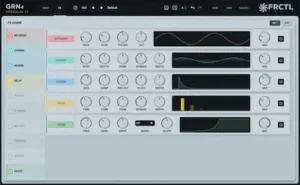 Granular processing is particularly sensitive to context. A dense texture can sound impressive when soloed, yet become masking, distracting, or unnecessarily bright once it is combined with the rest of the arrangement. GRN 4 is therefore easier to judge by the function of the layer than by the apparent impact of the effect on its own.
A practical approach is to build the texture in isolation, then lower its level until its contribution becomes subtle rather than dominant. A granular vocal layer that sounds dramatic at -10 dB may perform its actual job more effectively at -24 dB, where it adds movement without competing with the lead. The same principle applies to stereo width. Wide granular material can create useful contrast around a centered source, but excessive width should be checked in mono and after any downstream processing that may alter the stereo relationship. These checks are also part of the broader mix preparation process, where the goal is to make sure creative processing is still working as intended before the final mastering stage.
High-density granular material also deserves attention during final delivery checks. Short transients, concentrated high-frequency activity, and distortion can create complex material that may not translate identically through lossy codecs. This does not make GRN 4 unsuitable for streaming production; it means the finished mix should be evaluated after the granular layer has been integrated, rather than relying only on the sound of the isolated effect.
For mastering engineers, the main concern is how the completed mix responds to conventional dynamics processing. Compression and limiting can increase the apparent prominence of a granular layer that seemed appropriately restrained during mixing. A mix that depends heavily on high-frequency granular detail should therefore be checked at normal and low monitoring levels, in mono, and through the intended delivery codec before release.
These are not shortcomings specific to GRN 4. They are normal consequences of introducing a highly active time-frequency process into a finished production.
Who Should Use GRN 4?
Electronic producers and mixing engineers: GRN 4 makes the most sense when granular processing is used to build parallel vocal layers, drum textures, synth treatments, transitions, or other production elements that need to remain controllable inside a mix.
Composers and sound designers: This is one of the strongest use cases. Short source fragments can be developed into drones, transitions, rhythmic beds, impacts, mechanical textures, and evolving material for film, games, trailers, and interactive media.
Existing GRN owners: GRN 4 is particularly relevant because the new version installs separately from GRN 3, allowing older sessions to remain on the previous version while the new engine is evaluated independently.
Users who already own several granular plugins: The decision depends on whether GRN 4’s source-selection model, per-grain processing, modulation architecture, and pricing offer something missing from the current setup. Its low cost makes experimentation accessible, but ownership of another granular processor is not by itself a reason to add another.
Overall Assessment
| Area | Assessment |
|---|---|
| Grain-level control | Strong |
| Source manipulation | Strong |
| Modulation and rhythmic control | Extensive |
| Production role | Specialized |
| Value at $34.99 | High for the intended use case |
GRN 4’s strongest area is the amount of control it exposes at the grain level. Its source-selection model, per-grain processing, modulation architecture and rhythmic control make it substantially more configurable than the earlier GRN workflow. The trade-off is specialization: this is a granular production instrument, not a general-purpose mixing processor.
Verdict: GRN 4 Is a Substantial Redesign of a Focused Granular Tool
GRN 4’s strongest improvement is not the number of new controls but the amount of granular behavior that can now be shaped directly. The new engine, larger grain pool, bounded source selection, per-grain filtering and drive, GRAIN SHAPE, independent randomization, and expanded modulation give the processor considerably more control over how a source is fragmented and rebuilt.
That control becomes most valuable when GRN 4 is treated as a production instrument rather than a conventional effects processor. A short vocal, drum transient, synth note, guitar harmonic, or field recording can become a deliberately shaped layer, while the source boundaries and modulation system make the result more repeatable than a purely random granular effect.
The compromises are equally clear. GRN 4 remains specialized, its integrated effects do not replace dedicated studio processors, and there is still limited independent performance data for CPU scaling, aliasing, and large-session behavior. The plugin therefore earns its place through granular depth and workflow rather than through versatility across every stage of a mix.
At $34.99, the barrier to adding that capability is low. For producers and sound designers who regularly use granular processing, GRN 4 offers a substantial increase in control without abandoning a relatively direct workflow. For engineers who rarely use granular effects, it remains a specialist tool rather than an essential part of a conventional production or mastering setup.
Before Adding More Processing, Hear What the Mix Actually Needs
GRN 4 can add dense movement, spectral variation and wide granular detail, but the final question is how those layers behave once the complete mix is subjected to dynamics processing and real-world playback. Not every mix problem is solved by another plugin. A professional mastering pass gives you a direct before-and-after reference for tonal balance, dynamics, depth, stereo image and overall translation. Upload up to 40 seconds of your mix and receive a free mastering demo prepared by a real mastering engineer. Upload 40 Seconds and Compare Your Mix Before and After Mastering →
FAQ
Is GRN 4 better than GRN 3?
GRN 4 provides substantially more granular control than GRN 3. The major changes include a new grain engine, a 64-grain active pool, up to 200 grains per second, per-grain filtering and drive, GRAIN SHAPE, expanded randomization, and additional modulation capabilities. GRN 4 installs separately, so existing projects can remain on GRN 3.
Can GRN 4 be used for mixing vocals?
Yes. It is particularly useful for parallel creative layers, where a selected vocal phrase or vowel is transformed into a texture and blended underneath the original performance. It is not a substitute for corrective vocal processing.
Is GRN 4 useful for mastering?
Only for unusual creative-processing applications. GRN 4 is not a mastering utility and should not be evaluated as an alternative to dedicated EQ, compression, limiting, clipping, or stereo-processing tools.
Does GRN 4 replace Output Portal?
No. It is an alternative with a different balance of features and workflow. GRN 4 is particularly attractive for users who want a low-cost one-time license and extensive per-grain control, while Portal remains a mature, broadly established granular workflow.
Does GRN 4 work on Linux?
Yes. GRN 4 supports Windows, macOS, and Linux, with VST3, AU, and CLAP formats. AU is applicable to macOS, while VST3 and CLAP provide cross-platform plugin formats.
Is GRN 4 CPU heavy?
There is not enough independent benchmarking to assign a reliable CPU rating to GRN 4. The new version increases the active grain pool substantially and adds per-grain processing, so real-world CPU scaling should be evaluated under the intended host, sample rate, buffer size, and instance count rather than assumed from the specifications.
Can GRN 4 create pitched granular loops?
Yes. A very narrow source selection can produce a pitched micro-loop, while pitch processing and scale quantization can help keep the resulting material within the harmonic framework of a track.
Is GRN 4 good for film and game sound design?
Yes. Short field recordings, impacts, mechanical sounds, voices, and musical fragments can be transformed into evolving textures, drones, transitions, and rhythmic sound-design elements.
Is GRN 4 worth buying if I already own several granular plugins?
That depends on whether its specific workflow adds something missing from the existing setup. The low price makes experimentation relatively inexpensive, but established plugins such as Portal, Efx FRAGMENTS, and SILO already cover much of the broader granular-processing category.
Is GRN 4 a good value at $34.99?
Its $34.99 one-time license makes GRN 4 relatively inexpensive for a specialized granular processor, particularly when the feature set is relevant to the user’s workflow. The package also includes a 14-day trial, GRN Lite, cross-platform support, and no subscription or iLok requirement.

Yurii Ariefiev evaluates audio plugins from a production and mastering perspective, with particular attention to how processing behaves when it moves from isolated sound design into a finished mix. In this GRN 4 review, the focus is on grain density, source selection, envelope behavior, spectral variation, modulation, and the practical consequences of introducing granular processing into real production workflows.
Enjoyed this review? If you found it useful, you can support independent audio research with a coffee.
☕ Buy me a coffee