Acustica Audio Cream 3 Review: Is This British Console Plugin Worth Using for Professional Mixing?
Last updated: July 2026
Estimated reading time: 15–17 minutes
The market for analog channel strip plugins is saturated. Most professional engineers already own multiple console emulations, transparent EQs, compressors, and saturation tools capable of producing release-ready mixes. That shifts the question from sound quality alone to workflow: does a new plugin improve decision-making enough to justify another place in the signal chain?
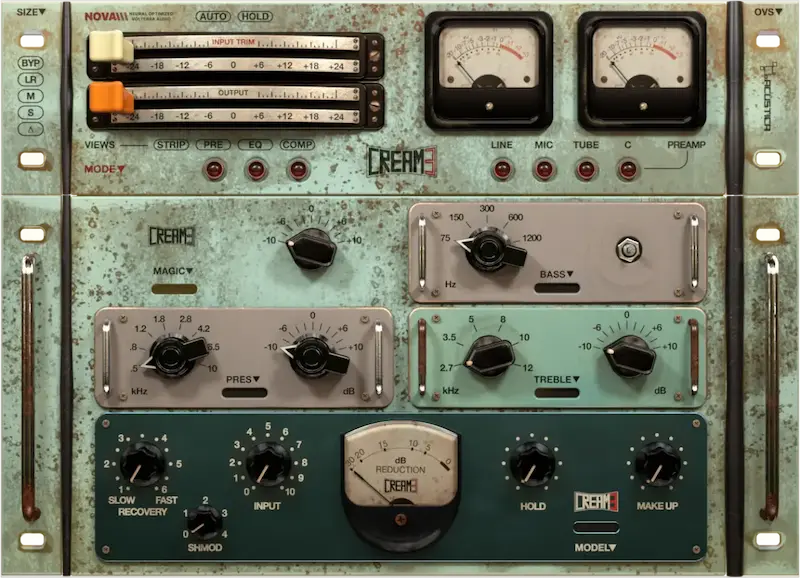
Acustica Audio positions Cream 3 as a British console-inspired channel strip built around the company’s latest dynamic convolution engine. Instead of prioritizing speed or surgical precision, it focuses on nonlinear behavior, harmonic complexity, and the cumulative character associated with analog console workflows.
Whether that approach delivers a measurable advantage depends on more than tone. Session size, CPU overhead, latency, recall, automation, and gain staging all influence how practical a plugin becomes during real productions. A processor that sounds excellent on a single vocal can become a bottleneck when used across a 100-track session.
This review evaluates Cream 3 from a production perspective rather than a marketing one. Instead of repeating specifications, we’ll examine where the plugin fits into modern mixing workflows, where its analog modeling provides a genuine advantage, where competing channel strips remain the better choice, and whether Cream 3 earns a permanent place in a professional mixing or mastering environment.
On this page
Why Analog Console Modeling Still Matters in Modern Mixing
 Analog console emulation has survived several generations of digital processing for one reason: accuracy is no longer the limiting factor. Modern EQs, compressors, and dynamics processors are already transparent enough for virtually any professional production. What many engineers still pursue is the nonlinear interaction that gives a mix greater depth, cohesion, and perceived dimension.
That explains why premium channel strip plugins continue attracting experienced users despite an already crowded market. The goal is not simply adding harmonic distortion. A well-designed console emulation changes how EQ, dynamics, saturation, and gain staging interact across an entire session. Those small cumulative changes often influence the perceived size and balance of a mix more than any individual processor.
The market has evolved as well. Early analog emulations were sold primarily on nostalgia and hardware authenticity. Today’s engineers are more interested in practical outcomes: Does the plugin reduce corrective processing? Does it help tracks sit together faster? Does it encourage broader mix decisions instead of endless parameter adjustments?
Acustica Audio has consistently taken a different approach from most software developers. While companies such as FabFilter prioritize precision and speed, and developers like Softube, Universal Audio, and Plugin Alliance focus on balancing analog character with efficient workflows, Acustica continues investing heavily in dynamic convolution to reproduce the nonlinear response of analog hardware as closely as possible.
That philosophy defines Cream 3. It is not intended to replace transparent utility processors or become the only channel strip in every project. Instead, it targets engineers who deliberately build analog-inspired signal chains and are willing to trade additional CPU resources for more complex harmonic behavior.
The timing is also significant. More commercial releases are mixed entirely inside the box, yet clients still expect records that feel expansive rather than clinically clean. Streaming platforms have standardized loudness delivery, but they have not changed what listeners perceive as a polished mix. Depth, punch, transient control, and tonal cohesion remain competitive advantages regardless of distribution format.
As a result, channel strips have regained importance. Instead of assembling long chains of independent EQs, compressors, saturators, and preamps, many engineers prefer making interconnected decisions inside a single signal path where every processing stage influences the next. That approach often produces more coherent mixes while reducing unnecessary plugin stacking.
For mastering, the role is more selective. Complete channel strips rarely replace dedicated mastering processors, but carefully chosen analog stages can introduce subtle harmonic density before transparent limiting. The deciding factor is consistency. Any processor used on the stereo bus must remain predictable under extremely small adjustments.
Cream 3 also represents a broader debate within plugin development. Most analog emulations today rely on mathematical modeling that delivers excellent results with relatively modest CPU requirements. Acustica continues to favor sampled hardware behavior through dynamic convolution, pursuing greater realism at the cost of higher processing demands. Whether that trade-off is worthwhile depends less on specifications than on the engineer’s workflow.
That is ultimately the right way to evaluate Cream 3. The question is not whether it sounds analog—it clearly does. The more important question is whether its approach improves the speed, consistency, and quality of real mixing decisions enough to justify becoming part of a professional production workflow.
Why Cream 3’s NOVA Engine Feels Different from Earlier Acustica Plugins
Much of the discussion surrounding Cream 3 focuses on its console model, EQ curves, and analog character. Those elements matter, but they are not what makes the plugin fundamentally different from many competing channel strips. The more significant change is the processing engine underneath. Cream 3 is built on Acustica Audio’s NOVA technology, representing a substantial evolution from the company’s earlier sampling architecture rather than simply another console emulation.
Understanding that distinction helps explain why Cream 3 behaves differently from both traditional algorithmic plugins and Acustica’s own earlier releases. The audible differences are often less dramatic than marketing language suggests, but the workflow implications are real.
Most analog-modeled plugins on the market rely primarily on mathematical models. Developers analyze the behavior of hardware, recreate its nonlinear characteristics with DSP algorithms, and optimize those calculations for modern CPUs. This approach offers predictable performance, low latency, and excellent scalability while producing increasingly convincing analog behavior. Companies such as SSL Native, Softube, Universal Audio, and Plugin Alliance have refined this methodology to a point where many engineers can complete entire commercial projects without feeling limited by purely algorithmic processing.
Acustica Audio has traditionally taken a different path. Instead of describing analog hardware through mathematical approximations alone, the company built its reputation on extensive sampling of real equipment across multiple operating conditions. The goal was not simply to reproduce frequency response or harmonic coloration, but to capture how hardware reacts as levels, dynamics, and signal complexity change over time.
Earlier Acustica products accomplished this through the Nebula engine. While Nebula demonstrated that sampled hardware could deliver remarkably convincing analog behavior, it also developed a reputation for significant CPU usage, long loading times, and workflows that felt noticeably slower than competing solutions. Engineers often accepted those compromises because the sonic results justified the additional processing overhead.
NOVA represents an attempt to modernize that philosophy rather than replace it. Instead of abandoning sampled hardware behavior in favor of fully algorithmic processing, Acustica redesigned the engine to improve efficiency, responsiveness, and scalability while preserving the company’s characteristic approach to analog modeling. The objective is evolutionary rather than revolutionary: maintain the qualities users associate with Acustica plugins while reducing many of the practical limitations that accompanied earlier generations.
That distinction is important because NOVA is not simply “Nebula with better performance.” The architecture has been redesigned to make large sessions more practical, improve instance handling, reduce unnecessary processing overhead, and shorten the gap between Acustica’s workflow and the responsiveness engineers expect from modern native plugins.
In day-to-day mixing, those changes matter more than specification sheets. Engineers rarely judge a processor by the number of kernels, internal calculations, or sampling techniques involved. They judge it by whether the session remains responsive, whether automation behaves predictably, and whether dozens of plugin instances can coexist without disrupting creative momentum.
Cream 3 demonstrates those improvements most clearly during longer projects rather than isolated demonstrations. Opening large sessions, navigating between channels, adjusting gain structure, and making repeated automation passes generally feels more fluid than with earlier Acustica generations. The plugin still demands more computing resources than many algorithmic competitors, but the difference is no longer as disruptive as long-time Acustica users may remember.
This also explains why comparisons between NOVA and traditional convolution processors are often misleading. Conventional convolution is primarily designed to reproduce static responses such as impulse captures of reverbs, speaker cabinets, or acoustic spaces. Those responses remain essentially fixed regardless of how the incoming signal changes. Console circuitry behaves differently. Compression, saturation, transformer behavior, and nonlinear harmonics all respond continuously to changing signal levels. NOVA is intended to reproduce that dynamic behavior rather than apply a static snapshot of hardware.
At the same time, NOVA should not be viewed as the opposite of algorithmic modeling. Modern plugin development increasingly combines multiple techniques instead of treating them as competing philosophies. Cream 3 benefits from sampled hardware data, but efficient DSP optimization remains essential for making the plugin practical on contemporary production systems. The result is better described as a hybrid processing architecture than a purely sampled recreation of vintage electronics.
For experienced engineers, the practical takeaway is straightforward. NOVA does not suddenly redefine what analog emulation can achieve, nor does it make algorithmic channel strips obsolete. Instead, it narrows the gap between hardware-focused sampling and modern native workflow. That makes Cream 3 easier to integrate into professional sessions while preserving much of the nonlinear interaction that has long distinguished Acustica Audio products.
Ultimately, the processing engine should not be viewed as the primary reason to choose Cream 3. Engineers buy channel strips to solve production problems, not to benchmark processing technologies. NOVA matters because it makes Acustica’s design philosophy more practical for everyday mixing, allowing the plugin to spend less time proving how accurately it models hardware and more time helping engineers complete real projects efficiently.
Beyond Console Emulation: How Cream 3 Fits Into a Professional Mixing Workflow
Most reviews evaluate a channel strip by its feature set. That tells you very little about how it behaves during an actual mix. What matters is whether the plugin helps engineers reach decisions faster, maintain consistency across large sessions, and reduce the need for corrective processing later.
Cream 3 is designed as a complete analog signal path rather than a collection of unrelated processors. Input gain, harmonic content, EQ, compression, and output level all influence one another, making gain staging part of the sound instead of a purely technical step. That behavior feels closer to working through a console than assembling a chain of independent plugins.
This becomes obvious as tracks accumulate. Increasing input level changes more than harmonic saturation—it also alters compressor behavior, transient response, and how instruments occupy space within the mix. Engineers accustomed to transparent digital processors may need time to adjust, since small gain changes produce audible tonal differences instead of predictable linear results.
One practical advantage is that Cream 3 encourages earlier commitment. Rather than stacking multiple processors while searching for incremental improvements, it promotes broader tonal decisions at the beginning of the mix. That often results in cleaner sessions with fewer corrective plugins and a more consistent sonic direction.
Vocals are a good example. Instead of combining separate saturation, EQ, and compression plugins, Cream 3 allows those processes to interact within a single signal path. Moderate harmonic enhancement influences how compression responds, while broad tonal shaping can improve vocal presence without relying on aggressive equalization.
On drums, the plugin is generally more effective across buses than on every individual channel. Consistent console coloration across kick, snare, toms, and overheads often produces greater cohesion than processing each source independently. If your workflow relies heavily on synthesized kick design rather than acoustic drum recordings, our D16 PunchBox 2 review explores how dedicated kick-generation tools complement console-style processing instead of replacing it.
Electric guitars benefit for similar reasons. Instead of relying on narrow corrective EQ moves, Cream 3 favors broad tonal shaping supported by harmonic enrichment. The result is usually a more natural sense of weight and presence, especially when several rhythm layers need to occupy the same frequency range.
Bass is another source where console-style processing can improve translation. Additional harmonic content often makes low-frequency material easier to perceive on earbuds, laptops, and smaller speakers without resorting to excessive low-end boost. The improvement comes from harmonic development rather than increased sub-bass energy.
The stereo bus demands considerably more restraint. Heavy console coloration across a finished mix can quickly reduce openness and transient definition. Cream 3 is generally more convincing when used for subtle harmonic reinforcement than for obvious tonal transformation. In mastering workflows, that usually means conservative settings and careful level matching during evaluation.
Where Cream 3 Delivers the Biggest Improvement
| Source | Recommendation | Why It Works |
|---|---|---|
| Lead Vocals | Excellent | Enhances density and cohesion without relying on aggressive EQ. |
| Drum Bus | Excellent | Creates consistent console character across the kit. |
| Bass | Excellent | Improves harmonic definition and playback translation. |
| Electric Guitars | Very Good | Adds weight while preserving natural dynamics. |
| Mix Bus | Moderate | Works best with subtle settings rather than obvious coloration. |
| Piano | Good | Useful for tonal cohesion but generally requires restraint. |
These recommendations reflect practical deployment rather than absolute rules. Cream 3 produces its strongest results when used on sources that benefit from cumulative console behavior instead of inserting identical processing across every channel.
Selective deployment also produces better results than placing the plugin on every channel. Traditional console workflows relied on cumulative coloration, but not every source contributed equally to the mix. Lead vocals, drums, guitars, keyboards, and major buses often benefit the most, while utility tracks and corrective processing rarely require the additional complexity.
None of this makes Cream 3 a replacement for precision tools. Surgical EQ, dynamic equalization, resonance control, spectral repair, and transparent compression remain better handled by dedicated digital processors. Cream 3 delivers the greatest value after technical problems have already been solved, when the focus shifts from correction to musical balance and tonal cohesion. That also explains why a well-prepared mix consistently produces better mastering results than relying on processing later. For a detailed breakdown, see Prepare Mix for Mastering.
That ultimately defines its role. Cream 3 is less about expanding the number of processing options than changing how decisions are made throughout a mix. Engineers who prefer building a record around console-style interaction will likely appreciate that workflow. Those who prioritize speed, transparency, and maximum CPU efficiency may reach the same destination with lighter tools.
Where Cream 3 Falls Short: Separating Engineering Reality from Marketing Claims
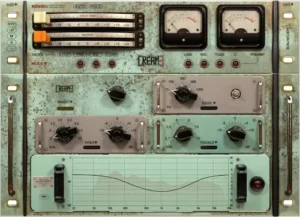 No analog-modeled plugin is universally better than a modern digital alternative, and Cream 3 is no exception. Its strengths depend heavily on context. Engineers working with analog-inspired workflows may find its harmonic behavior genuinely valuable, while others may see little advantage over faster, lighter channel strips.
The biggest compromise remains CPU efficiency. Acustica Audio has steadily improved performance across recent releases, but dynamic convolution still demands substantially more processing power than conventional algorithmic modeling. On a 20-track project the difference is rarely critical. On commercial sessions with well over 100 tracks, software instruments, oversampled processors, and complex routing, every additional plugin directly affects workflow.
Rendering offline minimizes export times, but it does nothing for playback latency, instance loading, or session responsiveness during mixing. Engineers constantly automate parameters, compare revisions, switch between projects, and make rapid editing decisions. A responsive session often contributes more to productivity than marginal improvements in analog realism.
Gain staging also requires more discipline than with most transparent digital processors. Cream 3 intentionally changes its behavior as input level changes, affecting harmonic content, compression, and overall tonal balance. Used deliberately, that interaction is one of the plugin’s defining strengths. Used inconsistently, it can make a mix feel less controlled instead of more analog.
There is also the issue of diminishing returns. The difference between a clean digital signal and Cream 3 is easy to hear. The difference between Cream 3 and other high-end console emulations is often far more subtle than marketing discussions suggest. At a professional level, arrangement quality, microphone selection, monitoring accuracy, editing, and engineering decisions have a much greater impact on the finished record than switching between premium analog channel strips.
That perspective becomes even more important during mastering. Cream 3 can add tasteful harmonic density to a stereo mix, but mastering rarely rewards obvious coloration. Small processing moves become increasingly significant after limiting, lossy codec encoding, and loudness normalization. Engineers expecting dramatic improvements at the mastering stage are likely asking the plugin to solve problems that originated much earlier in the production process.
Cream 3 is equally difficult to justify as a corrective processor. Surgical EQ, dynamic equalization, de-essing, resonance control, spectral repair, and transparent dynamics remain better handled by specialized digital tools. Using Cream 3 for technical problem-solving usually complicates the workflow without delivering meaningful advantages.
Marketing often suggests that more accurate hardware modeling automatically produces better mixes. In practice, engineering decisions matter far more than the specific analog emulation chosen. Two experienced mix engineers using different console plugins will usually produce more comparable results than one engineer continually replacing processors in search of marginal tonal improvements.
That is ultimately how Cream 3 should be judged. Its value does not come from recreating another vintage console with greater precision. It comes from whether its workflow helps an engineer make better decisions, reach a finished mix faster, and maintain consistency across an entire production.
Who Should Probably Skip Cream 3?
One of the biggest mistakes when evaluating premium audio plugins is assuming that a higher price or more sophisticated processing automatically produces better mixes. Cream 3 is an excellent example of why that assumption does not hold up in professional production. It is an exceptionally capable channel strip, but it is also designed for a specific type of engineer. Outside that audience, its strengths can quickly become unnecessary complexity.
The first group that should think twice is engineers working under tight production deadlines. Commercial sessions often involve multiple revisions, client recalls, alternate mixes, stem exports, and rapid project switching. In that environment, workflow efficiency usually has a greater impact on productivity than subtle differences in analog behavior. If your schedule depends on opening large sessions instantly and making revisions as quickly as possible, a lighter algorithmic channel strip may ultimately help you deliver better work.
CPU resources are another practical consideration. Although today’s workstations are considerably more powerful than they were only a few years ago, modern sessions are also far more demanding. Large orchestral templates, virtual instruments, oversampled processors, immersive routing, and AI-assisted production tools all compete for system resources. Cream 3 no longer carries the extreme performance penalties associated with older Acustica releases, but it still asks noticeably more from the host computer than many competing channel strips.
That does not make Cream 3 inefficient—it simply changes where it makes sense to use it. Engineers expecting to place the plugin across every channel of a 150-track production without considering CPU overhead are likely to become frustrated. Those willing to deploy it strategically on key sources generally experience a much better balance between sonic benefit and session performance.
Another audience that may find limited value is producers who already work primarily with analog hardware. If most tonal shaping already happens through high-end microphone preamps, compressors, summing mixers, or console channels, Cream 3 may contribute only incremental improvements during the digital stage of production. In those situations, transparent utility processors often make more practical companions than another layer of analog coloration.
Electronic music producers should also consider their workflow before investing. Genres such as modern EDM, hard techno, dubstep, and aggressive trap often rely on highly controlled transient shaping, precise automation, and extensive sound design. Cream 3 can certainly contribute character to these productions, but it is rarely the processor responsible for defining the final sound. Many electronic producers will achieve greater day-to-day efficiency by combining lightweight channel strips with dedicated saturation, clipping, and transient-processing tools.
It is equally important to recognize what Cream 3 does not solve. It will not repair poor recordings, compensate for weak arrangements, improve inaccurate monitoring, or replace critical mix decisions. Engineers sometimes expect premium analog emulations to transform average productions simply because the modeled hardware carries an impressive reputation. In reality, no channel strip can replace strong source material or disciplined engineering.
Beginners may also find the workflow less intuitive than expected. Transparent digital processors tend to respond predictably regardless of input level, making it easier to understand cause and effect while learning fundamental mixing techniques. Cream 3 behaves more like analog equipment, where gain staging influences multiple stages simultaneously. Without a solid understanding of level management, inexperienced users may mistake intentional nonlinear behavior for inconsistency.
The same principle applies to mastering. Engineers searching for a processor that dramatically increases loudness, fixes translation problems, or compensates for an unbalanced mix are looking in the wrong place. Cream 3 can add tasteful analog character to a stereo signal, but mastering remains a process built around precision, consistency, and restraint. Those fundamentals matter far more than the specific console emulation chosen.
Perhaps the clearest sign that Cream 3 is not the right purchase is if you frequently compare plugins instead of finishing mixes. The differences between today’s premium analog channel strips have become increasingly subtle. Constantly replacing processors in search of marginal tonal improvements rarely produces better records. Spending that same time refining balances, automation, and arrangement almost always has a greater impact on the final release.
None of these limitations diminish the quality of Cream 3 itself. They simply define the audience it was built for. Engineers who enjoy deliberate console-style mixing, understand disciplined gain staging, and are comfortable trading some CPU efficiency for richer analog interaction will likely appreciate what it offers. Everyone else should view it as a specialized production tool rather than a universal upgrade for every session.
How Cream 3 Compares with Today’s Leading Channel Strip Plugins
Choosing between premium channel strip plugins is no longer a question of sound quality alone. At this level, nearly every major developer delivers convincing analog coloration. The bigger differences come from workflow, CPU efficiency, recall speed, and how each plugin behaves when a session grows from a few tracks to well over a hundred.
Cream 3 occupies a distinct position within that market. Instead of prioritizing low CPU usage or surgical flexibility, it focuses on reproducing the complex nonlinear behavior of analog hardware through Acustica Audio’s dynamic convolution technology. That philosophy immediately separates it from most algorithmic console emulations.
SSL Native Channel Strip 2 remains one of the fastest options for large commercial sessions. It loads quickly, places minimal demand on system resources, and offers a familiar workflow that many engineers can operate almost instinctively. Cream 3 delivers a richer harmonic presentation, but that comes with a measurable increase in CPU consumption and slower session performance.
Universal Audio approaches the problem differently. Its channel strips emphasize familiar hardware workflows while maintaining a balance between analog character and practical usability. Cream 3 generally pushes further toward realism, whereas UAD tends to prioritize consistency and efficiency across larger productions.
Softube Console 1 is less a direct competitor than a complete mixing ecosystem. Engineers who prefer tactile control surfaces and console-style operation may find the integrated hardware workflow more valuable than incremental improvements in analog modeling alone.
Plugin Alliance’s AMEK and Lindell channel strips occupy the middle ground. They provide convincing analog character with considerably lower system overhead, making them attractive for engineers mixing large sessions under tight deadlines. Engineers interested in alternative console workflows may also find our Sonimus S-Console review useful, particularly when comparing lightweight algorithmic channel strips with heavier dynamic-convolution designs.
Cream 3 aims for greater hardware authenticity, but whether that difference justifies the additional processing load depends entirely on the production.
The comparison becomes more nuanced for engineers already working with analog hardware. If most tonal shaping already happens through outboard preamps, compressors, or summing, Cream 3 may provide only incremental benefits. For engineers mixing entirely inside the box, however, its integrated signal path can deliver a console-oriented workflow without external hardware.
| Plugin | Analog Character | Workflow Speed | CPU Efficiency | Best Fit | Main Trade-off |
|---|---|---|---|---|---|
| Acustica Audio Cream 3 | Excellent | Moderate | Low | ITB engineers seeking maximum analog realism | High CPU demand and slower sessions |
| SSL Native Channel Strip 2 | Very Good | Excellent | Excellent | Large commercial mixes | Less harmonic complexity |
| Universal Audio Channel Strips | Excellent | Very Good | Very Good | Classic console workflows | Smaller tonal differences between models |
| Softube Console 1 | Excellent | Excellent | Very Good | Hybrid hardware/software studios | Best experience requires Console 1 hardware |
| Plugin Alliance AMEK / Lindell | Very Good | Very Good | Very Good | High-track-count productions | Less dynamic hardware interaction |
Engineers expecting Cream 3 to outperform every competing channel strip will probably be disappointed. The audible gap between premium analog emulations has narrowed considerably over the past decade. In practice, workflow often becomes the deciding factor.
Cream 3 is at its best for engineers who deliberately build analog-inspired mixes and are willing to dedicate additional CPU resources to achieve that goal. Those who prioritize speed, large session performance, and rapid revisions may ultimately work more efficiently with lighter algorithmic alternatives.
What Happens Outside the Studio: Translation, Streaming, CPU, and Long-Term Workflow
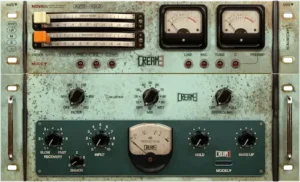 Analog modeling should never be judged solely inside an acoustically treated control room. A mix ultimately succeeds because it translates across earbuds, headphones, car stereos, laptops, smart speakers, and streaming platforms. Any processor that improves the studio experience but falls apart in everyday playback solves the wrong problem.
Cream 3 tends to deliver its greatest benefit through subtle harmonic development rather than dramatic tonal change. Used conservatively, it can make vocals, guitars, keyboards, and other midrange sources feel more connected without relying on aggressive EQ or excessive saturation. That type of enhancement generally survives real-world playback more convincingly than obvious coloration.
The low end deserves particular attention. Additional harmonic content often improves bass perception on smaller playback systems that cannot reproduce deep sub frequencies effectively. Instead of adding more energy below 50 Hz, Cream 3 can help bass instruments remain intelligible through harmonic information reproduced by consumer devices.
Its role changes considerably during mastering. While Cream 3 can introduce tasteful analog density, stereo mastering leaves very little room for obvious processing. If you’re interested in how subtle processing decisions fit into a complete professional workflow, see How Professional Mastering Works. Small harmonic adjustments often translate better than aggressive coloration, especially after limiting and lossy codec encoding. Engineers expecting dramatic improvements at this stage are likely compensating for issues that should have been addressed during mixing.
The plugin also has little influence on loudness by itself. Harmonic enhancement can increase perceived density, but it does not replace controlled dynamics, balanced frequency content, or careful limiter settings. Competitive streaming masters are still built on solid mix decisions rather than analog coloration alone—a topic explored in more detail in Loudness vs Clipping in Mastering.
Monitoring quality ultimately determines how much of Cream 3’s character an engineer can evaluate with confidence. On untreated monitoring systems, the difference between premium analog emulations often becomes difficult to separate from ordinary tonal variation. Accurate monitoring exposes the cumulative changes more clearly than any A/B comparison performed through consumer speakers.
Long-term workflow may prove more important than any sonic characteristic. A handful of Cream 3 instances is unlikely to challenge a modern workstation. Large commercial productions are another matter. Sessions containing orchestral templates, film scores, dense pop arrangements, or extensive virtual instrument libraries demand careful resource management, making selective deployment far more practical than inserting the plugin across every channel.
That selective approach also mirrors traditional console practice. Not every source benefits equally from analog coloration. Lead vocals, drum buses, guitars, keyboards, and mix buses usually provide the greatest return, while utility channels, corrective processing, and background elements rarely justify additional CPU overhead.
Viewed in that context, Cream 3 is less about recreating vintage hardware for its own sake and more about making deliberate production choices. Its value depends on disciplined use, thoughtful gain staging, and knowing where analog behavior genuinely improves translation rather than simply adding another layer of coloration.
Verdict: Who Should Actually Invest in Acustica Audio Cream 3?
Cream 3 is not the kind of plugin that wins attention during a 30-second A/B test. Its strengths become more apparent over the course of an entire mix, where subtle nonlinear behavior, gain interaction, and cumulative console coloration influence the way tracks sit together rather than drawing attention to any single processor.
That immediately narrows its audience. Engineers looking for a lightweight, transparent channel strip with minimal CPU overhead will find stronger alternatives elsewhere. Cream 3 is aimed at producers and mix engineers who deliberately build analog-style sessions and are willing to trade system resources for a more console-oriented workflow.
Its value is not based on sounding dramatically better than every competing channel strip. At the professional level, the audible differences between premium analog emulations are often smaller than marketing suggests. What separates Cream 3 is the way it encourages broader mix decisions instead of endless corrective processing and plugin stacking.
The trade-off remains obvious. CPU demand is still significantly higher than most algorithmic alternatives, making deployment strategy an important part of the workflow. Used selectively on lead vocals, drum buses, guitars, keyboards, or the mix bus, Cream 3 delivers considerably more value than treating every channel identically.
For mastering engineers, its role is intentionally limited. It should be viewed as an optional source of analog color rather than the foundation of a mastering chain. If you’d like to see how this stage fits into the complete processing order, our guide to the Mastering Chain Explained covers the workflow in detail.
The bottom line is straightforward. Cream 3 is designed for engineers who enjoy mixing through a console mindset rather than assembling long chains of disconnected processors. It will not rescue weak arrangements, poor recordings, or inconsistent engineering decisions. What it can do is reward disciplined mixing with greater cohesion, depth, and a more naturally integrated presentation—provided the workflow aligns with the way you already build records.
If workflow efficiency is your highest priority, lighter algorithmic channel strips remain the better investment. If your goal is authentic console-style interaction inside an entirely in-the-box production environment, Cream 3 stands among the strongest options currently available.
Studio Evaluation
| Category | Rating |
|---|---|
| Analog Character | 9.7/10 |
| Mix Cohesion | 9.5/10 |
| Workflow | 9.2/10 |
| CPU Efficiency | 6.8/10 |
| Mix Translation | 9.3/10 |
| Value for Money | 8.9/10 |
| Overall | 9.1/10 |
Cream 3 is one of the strongest console-style channel strips currently available for engineers who prioritize analog depth over maximum efficiency. Its dynamic convolution engine delivers convincing console behavior and excellent mix cohesion, but the additional CPU load makes selective deployment a smarter strategy than placing it across every channel. For experienced mixing engineers working primarily inside the box, it is a compelling production tool rather than a universal replacement for lightweight algorithmic channel strips.

Yurii Ariefiev is a mastering engineer and audio production editor who evaluates professional audio software through real mixing and mastering sessions rather than manufacturer specifications. His reviews focus on workflow efficiency, monitoring translation, CPU impact, and whether a plugin delivers measurable value in commercial production.
This editorial analysis examines Acustica Audio Cream 3 from the perspective of practical studio use, emphasizing long-session performance, analog workflow integration, and production decisions that influence the quality of a finished master—not marketing claims or feature lists.

Frequently Asked Questions
Is Cream 3 designed primarily for mixing or mastering?
Cream 3 is fundamentally a mixing tool. While it can add subtle analog character on a stereo bus, dedicated mastering EQs, compressors, and limiters remain the better choice for precision mastering work.
How CPU-intensive is Cream 3 compared to other premium channel strips?
It is noticeably more demanding than most algorithmic alternatives. Modern multi-core systems handle moderate sessions comfortably, but large productions with high track counts require more selective plugin placement.
Does Cream 3 introduce noticeable latency?
Latency depends on the selected processing mode and host DAW. During larger sessions, engineers should evaluate overall responsiveness rather than focusing on individual plugin instances.
Can Cream 3 replace an entire channel strip workflow?
For many sources, yes. It combines several processing stages within a single signal path, reducing the need for separate EQ, compression, and saturation plugins. Corrective processing, however, is still better handled with dedicated tools.
Which music genres benefit most from Cream 3?
It tends to complement rock, pop, jazz, blues, orchestral, acoustic, and singer-songwriter productions where console-style depth and cohesion are priorities. Electronic genres can benefit as well, although highly transient-focused mixes often require a more selective approach.
Is Cream 3 suitable for mixing entirely inside the box?
Yes. In fact, engineers working exclusively in the box are likely to gain the most from its integrated analog signal path, especially if they are not using external consoles or outboard processors.
Should Cream 3 be inserted on every channel?
Usually not. Most engineers achieve better results by using it on lead vocals, drums, guitars, keyboards, buses, and other key elements instead of processing every track identically.
Is Cream 3 worth upgrading if you already own earlier Acustica Audio channel strips?
The decision depends on your workflow more than the sonic differences alone. Users seeking a more refined interface, updated processing engine, and improved day-to-day usability are more likely to appreciate the upgrade.
Who is Cream 3 not designed for?
Engineers who prioritize extremely low CPU usage, transparent processing, or very large, fast-moving commercial sessions may find lighter algorithmic channel strips more practical.
Who Will Get the Best Results from Cream 3?
By the time you reach this point, one conclusion should be clear: Cream 3 is not trying to compete with every channel strip on the market. It is aimed at engineers who already know how they prefer to build a mix. Whether it deserves a place in your workflow depends far more on your production style than on any specification sheet or marketing comparison.
Mix engineers working primarily inside the box are likely to benefit the most. Without access to large-format consoles or extensive outboard equipment, Cream 3 offers a practical way to introduce console-style interaction throughout a session while keeping the entire production fully recallable. Used selectively, it can add cohesion that would otherwise require several separate processors working together.
Rock remains one of the genres where Cream 3 feels particularly comfortable. Multi-microphone drum recordings, layered electric guitars, live bass, and expressive vocals all benefit from the subtle interaction between gain staging, dynamics, and analog coloration. Rather than making individual tracks sound dramatically different, the plugin helps the entire mix feel more unified.
Pop productions can benefit for similar reasons, although with greater restraint. Modern pop often combines transparent digital editing with carefully controlled analog character. Cream 3 works best after corrective processing has already been completed, allowing it to add density and cohesion without competing against surgical EQ or dynamic processing.
Jazz, blues, acoustic, and singer-songwriter productions are also natural candidates. These genres often rely more on tonal continuity than aggressive sound design, making broad console-style processing more valuable than highly colored saturation or extreme transient shaping.
Electronic music presents a more nuanced case. Producers working in melodic house, progressive, synthwave, or organic electronic styles may appreciate Cream 3 across buses and key instruments. Those producing modern EDM, hard techno, dubstep, or heavily processed trap may find greater value in combining lightweight digital channel strips with dedicated clipping, transient shaping, and saturation processors. In those sessions, Cream 3 often performs best as a finishing tool rather than the foundation of every channel.
Mastering engineers should approach the plugin with realistic expectations. Cream 3 is capable of adding subtle analog texture before final limiting, but it is not designed to replace transparent mastering equalizers, precision dynamics processors, or dedicated clipping tools. Its greatest contribution comes when the mix is already balanced and only requires modest tonal refinement before delivery.
Bedroom producers represent another audience that may benefit more than expected. Not because Cream 3 automatically produces professional results, but because it encourages stronger gain staging habits and broader mix decisions instead of endless plugin stacking. Used with discipline, it can simplify sessions by replacing several processors with a more integrated signal path.
On the other hand, engineers who routinely mix television broadcasts, podcasts, dialogue-heavy productions, or corporate content may see fewer advantages. Those projects generally prioritize speed, transparency, consistency, and rapid revisions over complex analog behavior. Lightweight algorithmic processors often fit those workflows better.
The same applies to professionals handling extremely large commercial sessions. Film scores, orchestral templates, immersive productions, and modern pop arrangements containing hundreds of active channels demand careful CPU management. Cream 3 remains entirely usable in those environments, but selective deployment becomes essential rather than optional.
Ultimately, Cream 3 is not a plugin for engineers chasing the latest release or collecting another console emulation. It is best suited to professionals who intentionally build mixes around console-style workflows, understand disciplined gain staging, and value cumulative tonal interaction over maximum processing speed. If that describes the way you already work, Cream 3 is one of the more compelling channel strips currently available. If not, there are lighter alternatives that will likely integrate into your sessions more naturally.